reset KIA Soul 2012 1.G Owner's Manual
[x] Cancel search | Manufacturer: KIA, Model Year: 2012, Model line: Soul, Model: KIA Soul 2012 1.GPages: 393, PDF Size: 8.76 MB
Page 112 of 393
433
Features of your vehicle
Resetting the sunroof
Whenever the vehicle battery is dis-
connected or discharged, you must
reset your sunroof system as follows:
1.Turn the ignition switch to the ONposition.
2.According to the position of the sunroof, do the following.
1) In case the sunroof is closed completely or tilted:
Push the sunroof control lever
upward until the sunroof tilts
completely upward.
2) In case the sunroof is open: Push the sunroof control lever
forward until the sunroof closes
completely. Push the sunroof
control lever upward until the
sunroof tilts completely upward.
3.Release the sunroof control lever.
4.Push the sunroof control lever upward (for about 10 seconds)
until the sunroof has returned to
the original tilt position after it is
raised a little higher than the maxi-
mum tilt position. Then, release the
lever. 5.Push the sunroof control lever
upward (for about 6 seconds) until
the sunroof operates as follows;
TILT DOWN → SLIDE OPEN →
SLIDE CLOSED
Then release the lever.
When this is complete, the sunroof
system has been reset.
Page 123 of 393
Features of your vehicle
44
4
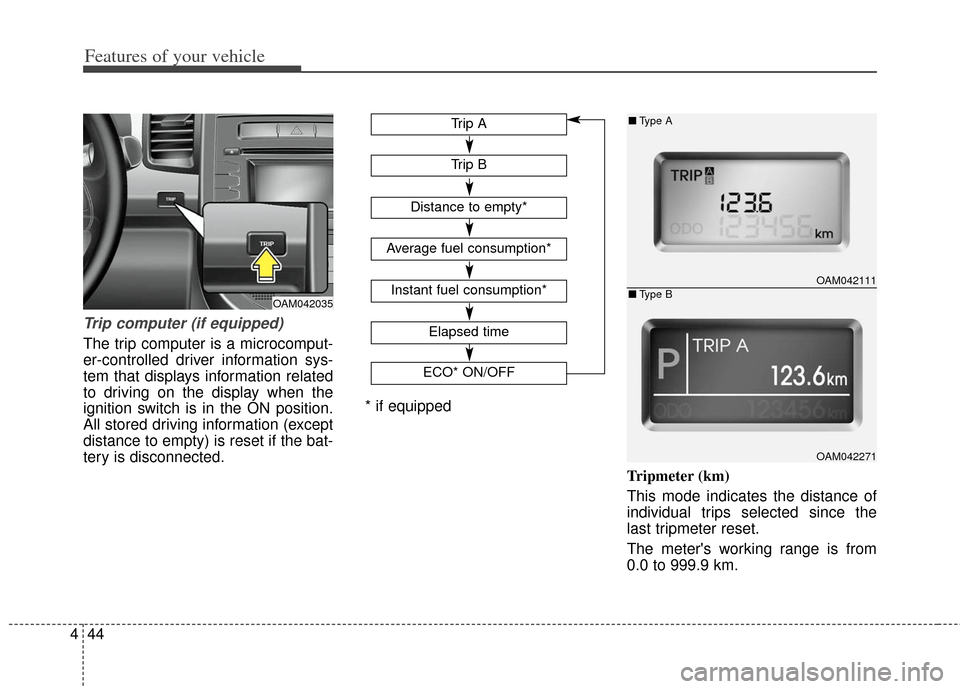
Trip computer (if equipped)
The trip computer is a microcomput-
er-controlled driver information sys-
tem that displays information related
to driving on the display when the
ignition switch is in the ON position.
All stored driving information (except
distance to empty) is reset if the bat-
tery is disconnected.
Tripmeter (km)
This mode indicates the distance of
individual trips selected since the
last tripmeter reset.
The meter's working range is from
0.0 to 999.9 km.
OAM042111
OAM042271
■Type A
■Type BOAM042035
Elapsed time
ECO* ON/OFF
Trip B
Trip A
Distance to empty*
Average fuel consumption*
Instant fuel consumption*
* if equipped
Page 125 of 393
Features of your vehicle
46
4
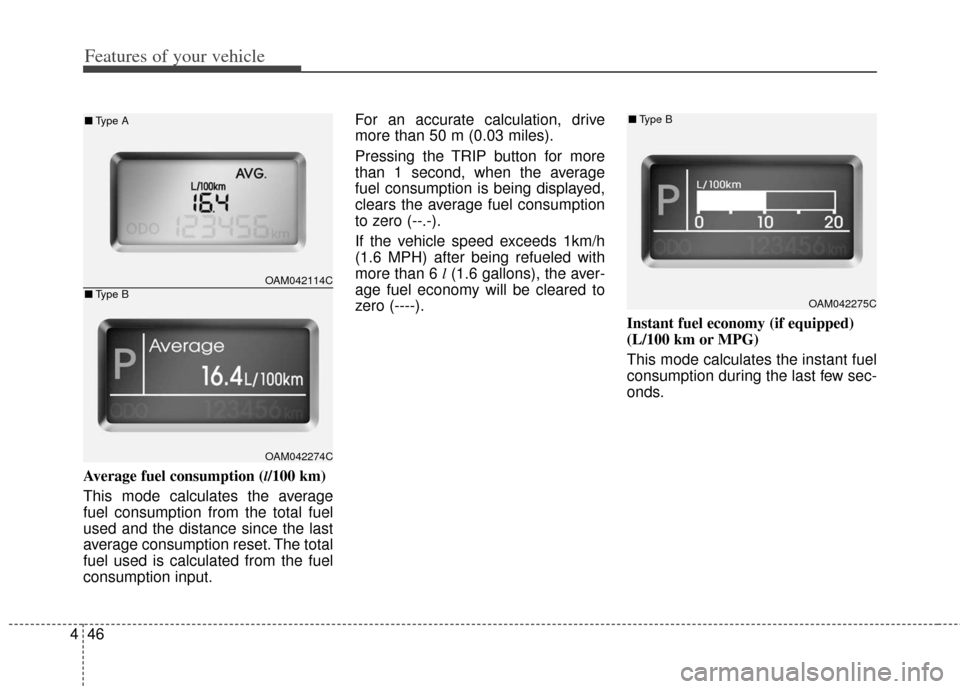
Average fuel consumption (l/100 km)
This mode calculates the average
fuel consumption from the total fuel
used and the distance since the last
average consumption reset. The total
fuel used is calculated from the fuel
consumption input. For an accurate calculation, drive
more than 50 m (0.03 miles).
Pressing the TRIP button for more
than 1 second, when the average
fuel consumption is being displayed,
clears the average fuel consumption
to zero (--.-).
If the vehicle speed exceeds 1km/h
(1.6 MPH) after being refueled with
more than 6 l
(1.6 gallons), the aver-
age fuel economy will be cleared to
zero (----).
Instant fuel economy (if equipped)
(L/100 km or MPG)
This mode calculates the instant fuel
consumption during the last few sec-
onds.
OAM042275C
■Type B
OAM042114C
OAM042274C
■Type A
■Type B
Page 126 of 393
447
Features of your vehicle
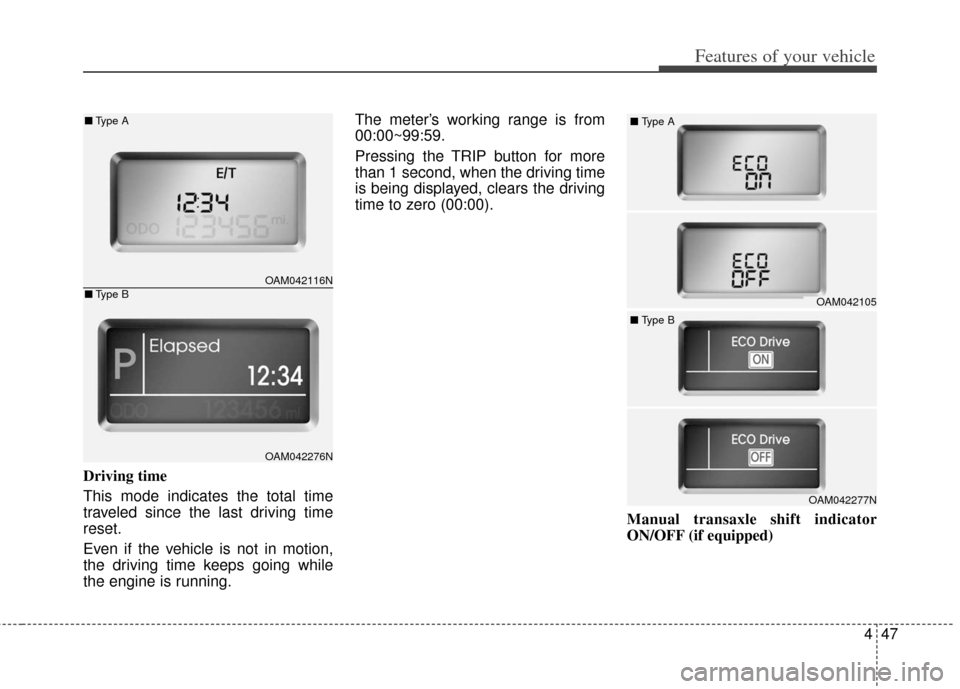
Driving time
This mode indicates the total time
traveled since the last driving time
reset.
Even if the vehicle is not in motion,
the driving time keeps going while
the engine is running.The meter’s working range is from
00:00~99:59.
Pressing the TRIP button for more
than 1 second, when the driving time
is being displayed, clears the driving
time to zero (00:00).
Manual transaxle shift indicator
ON/OFF (if equipped)
OAM042105
■
Type A
OAM042277N
■
Type B
OAM042116N
OAM042276N
■Type A
■Type B
Page 169 of 393
Features of your vehicle
90
4
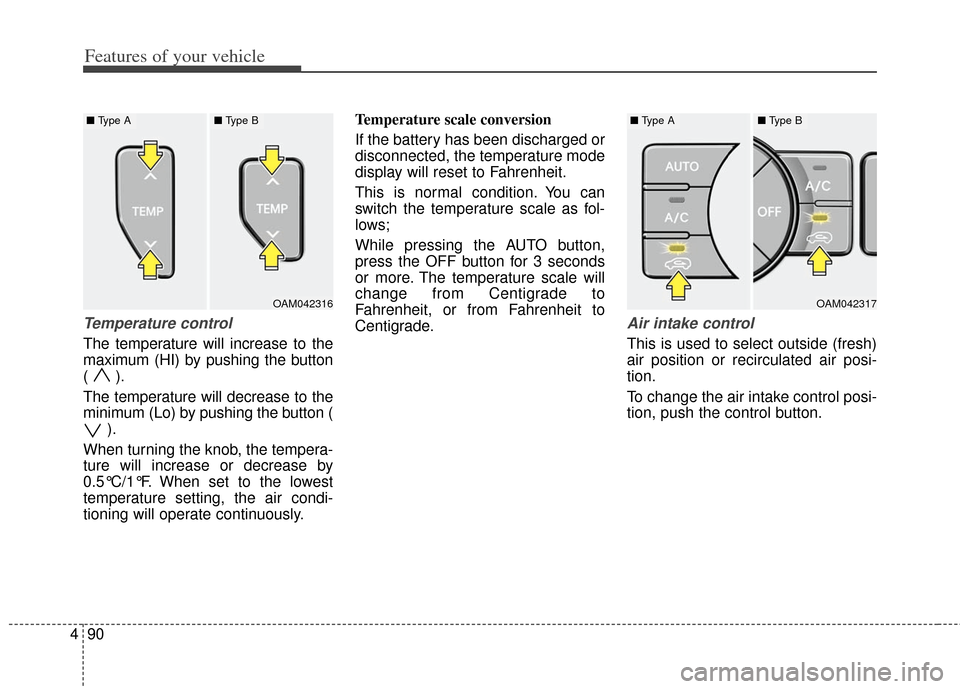
Temperature control
The temperature will increase to the
maximum (HI) by pushing the button
( ).
The temperature will decrease to the
minimum (Lo) by pushing the button (
).
When turning the knob, the tempera-
ture will increase or decrease by
0.5°C/1°F. When set to the lowest
temperature setting, the air condi-
tioning will operate continuously. Temperature scale conversion
If the battery has been discharged or
disconnected, the temperature mode
display will reset to Fahrenheit.
This is normal condition. You can
switch the temperature scale as fol-
lows;
While pressing the AUTO button,
press the OFF button for 3 seconds
or more. The temperature scale will
change from Centigrade to
Fahrenheit, or from Fahrenheit to
Centigrade.
Air intake control
This is used to select outside (fresh)
air position or recirculated air posi-
tion.
To change the air intake control posi-
tion, push the control button.
OAM042317
■
Type A■ Type B
OAM042316
■ Type A■ Type B
Page 175 of 393
Features of your vehicle
96
4
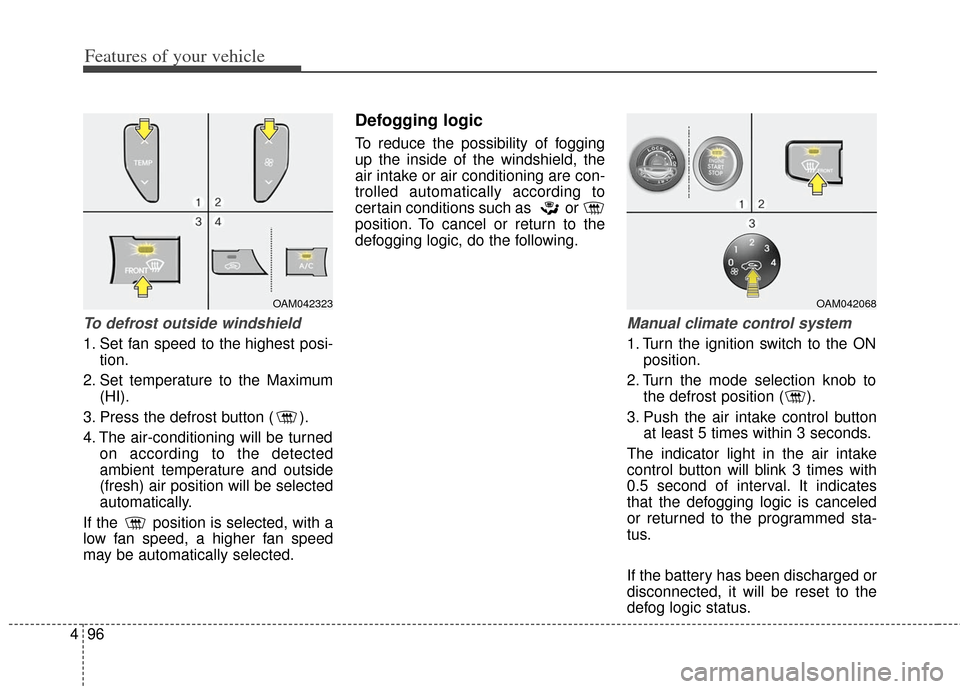
To defrost outside windshield
1. Set fan speed to the highest posi-
tion.
2. Set temperature to the Maximum (HI).
3. Press the defrost button ( ).
4. The air-conditioning will be turned on according to the detected
ambient temperature and outside
(fresh) air position will be selected
automatically.
If the position is selected, with a
low fan speed, a higher fan speed
may be automatically selected.
Defogging logic
To reduce the possibility of fogging
up the inside of the windshield, the
air intake or air conditioning are con-
trolled automatically according to
certain conditions such as or
position. To cancel or return to the
defogging logic, do the following.
Manual climate control system
1. Turn the ignition switch to the ON position.
2. Turn the mode selection knob to the defrost position ( ).
3. Push the air intake control button at least 5 times within 3 seconds.
The indicator light in the air intake
control button will blink 3 times with
0.5 second of interval. It indicates
that the defogging logic is canceled
or returned to the programmed sta-
tus.
If the battery has been discharged or
disconnected, it will be reset to the
defog logic status.
OAM042068OAM042323
Page 176 of 393
497
Features of your vehicle
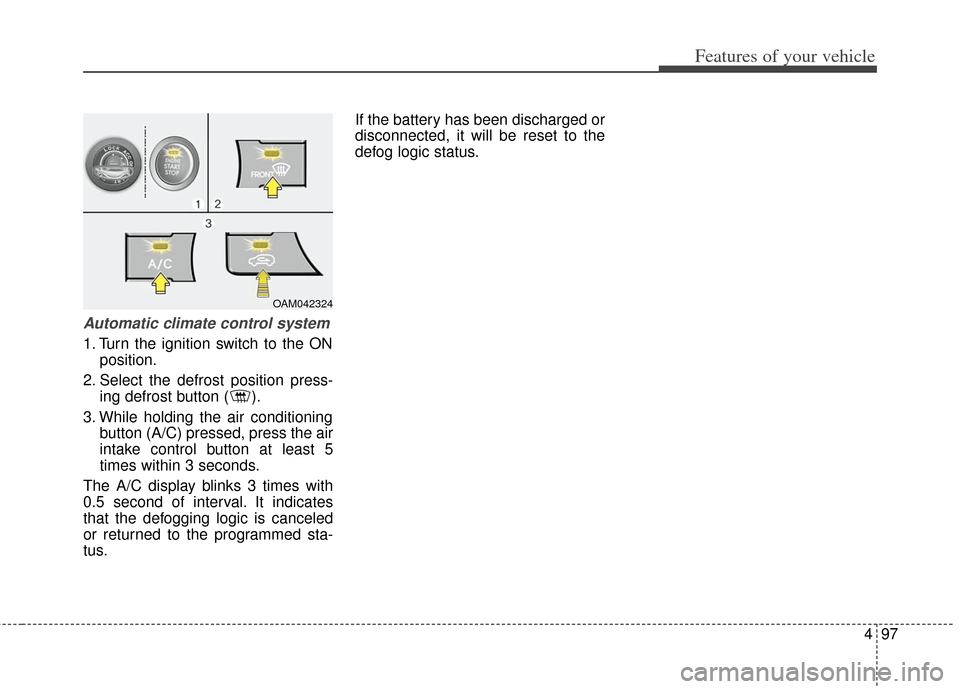
Automatic climate control system
1. Turn the ignition switch to the ONposition.
2. Select the defrost position press- ing defrost button ( ).
3. While holding the air conditioning button (A/C) pressed, press the air
intake control button at least 5
times within 3 seconds.
The A/C display blinks 3 times with
0.5 second of interval. It indicates
that the defogging logic is canceled
or returned to the programmed sta-
tus. If the battery has been discharged or
disconnected, it will be reset to the
defog logic status.
OAM042324
Page 189 of 393
Features of your vehicle
110
4
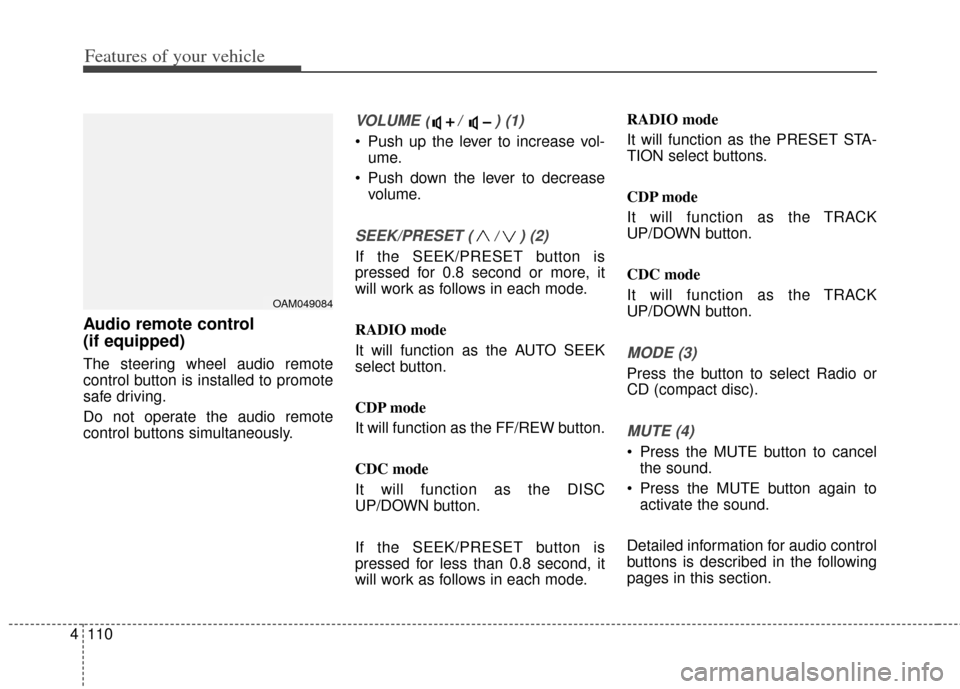
Audio remote control
(if equipped)
The steering wheel audio remote
control button is installed to promote
safe driving.
Do not operate the audio remote
control buttons simultaneously.
VOLUME ( / ) (1)
Push up the lever to increase vol-
ume.
Push down the lever to decrease volume.
SEEK/PRESET ( / ) (2)
If the SEEK/PRESET button is
pressed for 0.8 second or more, it
will work as follows in each mode.
RADIO mode
It will function as the AUTO SEEK
select button.
CDP mode
It will function as the FF/REW button.
CDC mode
It will function as the DISC
UP/DOWN button.
If the SEEK/PRESET button is
pressed for less than 0.8 second, it
will work as follows in each mode. RADIO mode
It will function as the PRESET STA-
TION select buttons.
CDP mode
It will function as the TRACK
UP/DOWN button.
CDC mode
It will function as the TRACK
UP/DOWN button.
MODE (3)
Press the button to select Radio or
CD (compact disc).
MUTE (4)
Press the MUTE button to cancel
the sound.
Press the MUTE button again to activate the sound.
Detailed information for audio control
buttons is described in the following
pages in this section.
OAM049084
Page 197 of 393
Features of your vehicle
118
4
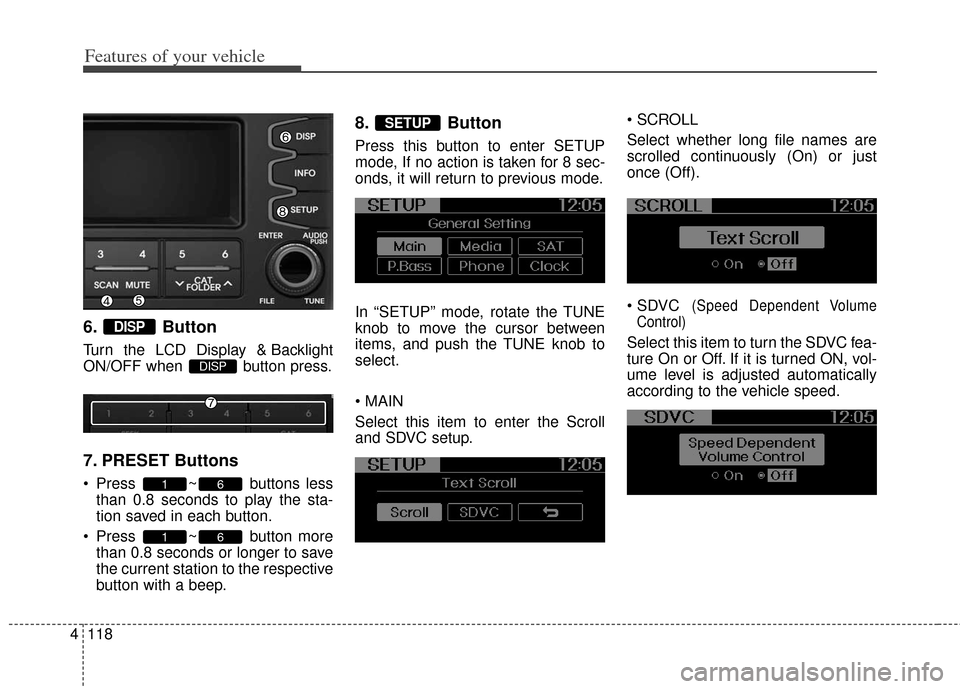
6. Button
Turn the LCD Display & Backlight
ON/OFF when button press.
7. PRESET Buttons
Press ~ buttons less
than 0.8 seconds to play the sta-
tion saved in each button.
Press ~ button more than 0.8 seconds or longer to save
the current station to the respective
button with a beep.
8. Button
Press this button to enter SETUP
mode, If no action is taken for 8 sec-
onds, it will return to previous mode.
In “SETUP” mode, rotate the TUNE
knob to move the cursor between
items, and push the TUNE knob to
select.
Select this item to enter the Scroll
and SDVC setup.
Select whether long file names are
scrolled continuously (On) or just
once (Off).
(Speed Dependent Volume
Control)
Select this item to turn the SDVC fea-
ture On or Off. If it is turned ON, vol-
ume level is adjusted automatically
according to the vehicle speed.
SETUP
61
61
DISP
DISP
Page 209 of 393
Features of your vehicle
130
4
Some iPod models might not sup-
port the communication protocol
and the files will not be played.
Supported iPod models:
- iPod Mini
®
- iPod 4th(Photo) ~ 6th(Classic) generation
- iPod Nano
®1st~4th generation
- iPod Touch
®1st~2nd generation
The order of search or playback of songs in the iPod can be different
from the order searched in the
audio system.
If the iPod disabled due to its own malfunction, reset the iPod. (Reset:
Refer to iPod manual)
An iPod may not operate normally on low battery.
Some iPod devices, such as the iPhone, can be connected through
the
Bluetooth®wireless technology
interface. The device must have
audio
Bluetooth®wireless technol-
ogy capability (such as for stereo
headphone
Bluetooth®wireless
technology). The device can play,
but it will not be controlled by the
audio system. The Kia iPod Power Cable is need-
ed in order to operate iPod with the
audio buttons on the audio system.
The USB cable provided by Apple
may cause malfunction and
should not be used for Kia vehi-
cles.
❋ The Kia iPod Power Cable may
be purchased through your Kia
Dealership.
When connecting iPod with the iPod Power Cable, insert the con-
nector to the multimedia socket
completely. If not inserted com-
pletely, communications between
iPod and audio may be interrupted.
When adjusting the sound effects of the iPod and the audio system,
the sound effects of both devices
will overlap and might reduce or
distort the quality of the sound.
Deactivate (turn off) the equalizer function of an iPod when adjusting
the audio system’s volume, and
turn off the equalizer of the audio
system when using the equalizer of
an iPod. When the iPod cable is connected,
the system can be switched to AUX
mode even without iPod device
and may cause noise. Disconnect
the iPod cable when you are not
using the iPod device.
When not using iPod with car audio, detach the iPod cable from
iPod. Otherwise, iPod may remain
in accessory mode, and may not
work properly.
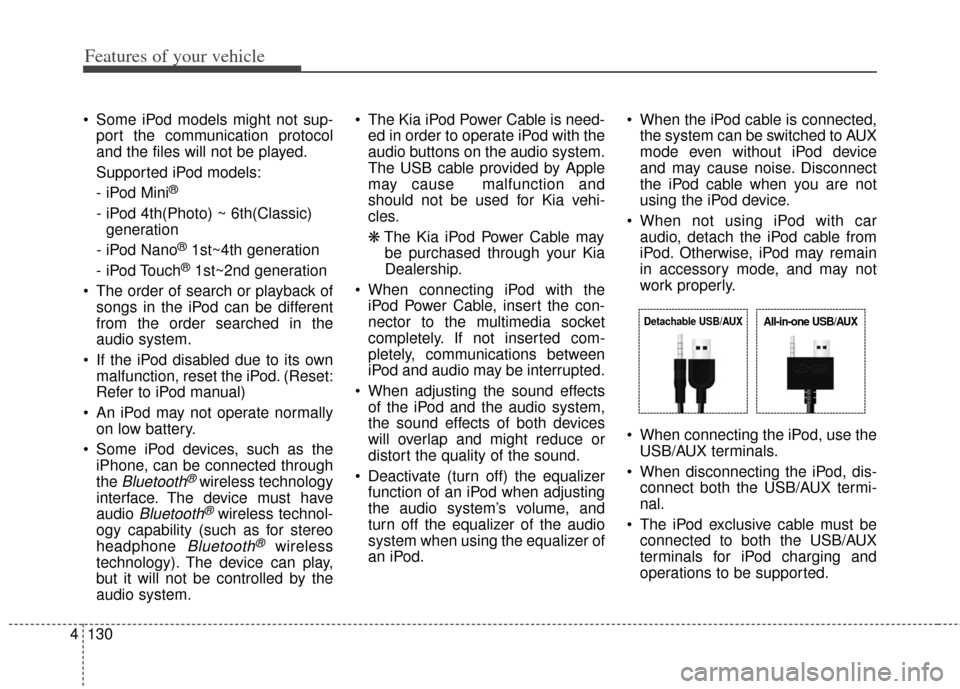
When connecting the iPod, use the USB/AUX terminals.
When disconnecting the iPod, dis- connect both the USB/AUX termi-
nal.
The iPod exclusive cable must be connected to both the USB/AUX
terminals for iPod charging and
operations to be supported.
Detachable USB/AUXAll-in-one USB/AUX