start stop button KIA Soul 2013 1.G User Guide
[x] Cancel search | Manufacturer: KIA, Model Year: 2013, Model line: Soul, Model: KIA Soul 2013 1.GPages: 393, PDF Size: 8.76 MB
Page 196 of 393
4117
Features of your vehicle
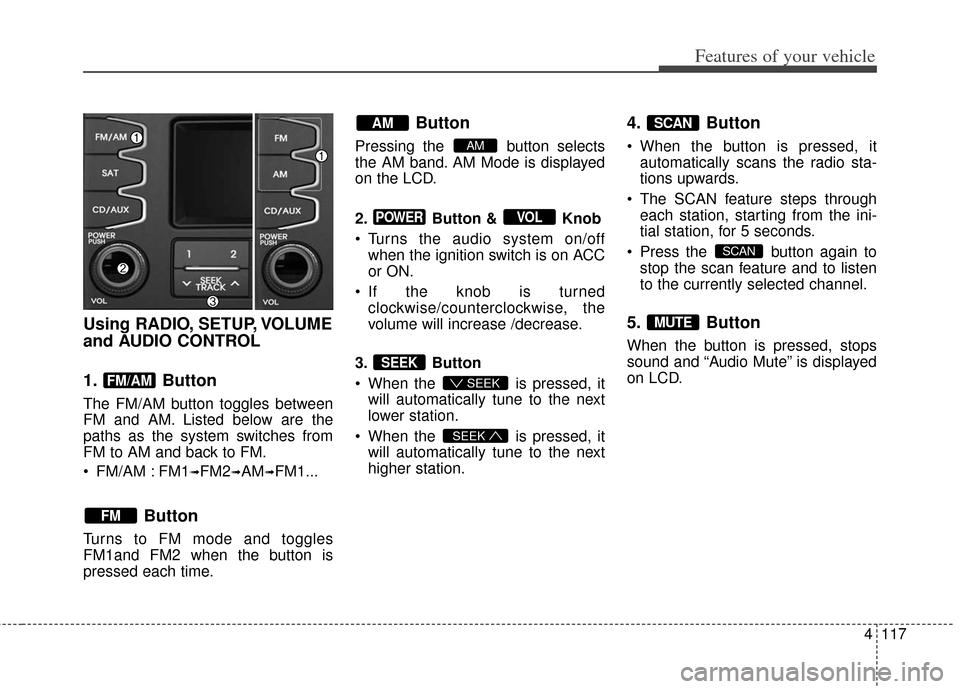
Using RADIO, SETUP, VOLUME
and AUDIO CONTROL
1. Button
The FM/AM button toggles between
FM and AM. Listed below are the
paths as the system switches from
FM to AM and back to FM.
FM/AM : FM1
➟FM2➟AM➟FM1...
Button
Turns to FM mode and toggles
FM1and FM2 when the button is
pressed each time.
Button
Pressing the button selects
the AM band. AM Mode is displayed
on the LCD.
2. Button & Knob
Turns the audio system on/offwhen the ignition switch is on ACC
or ON.
If the knob is turned clockwise/counterclockwise, the
volume will increase /decrease.
3. Button
When the is pressed, it will automatically tune to the next
lower station.
When the is pressed, it will automatically tune to the next
higher station.
4. Button
When the button is pressed, itautomatically scans the radio sta-
tions upwards.
The SCAN feature steps through each station, starting from the ini-
tial station, for 5 seconds.
Press the button again to stop the scan feature and to listen
to the currently selected channel.
5. Button
When the button is pressed, stops
sound and “Audio Mute” is displayed
on LCD.
MUTE
SCAN
SCAN
SEEK
SEEK
SEEK
VOLPOWER
AM
AM
FM
FM/AM
Page 211 of 393
Features of your vehicle
132
4
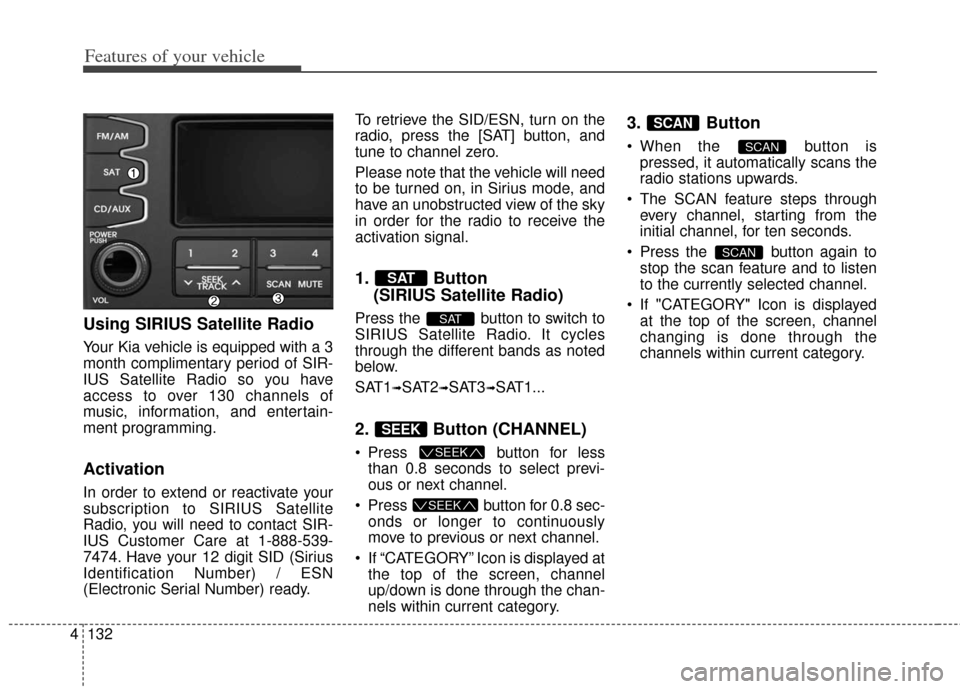
Using SIRIUS Satellite Radio
Your Kia vehicle is equipped with a 3
month complimentary period of SIR-
IUS Satellite Radio so you have
access to over 130 channels of
music, information, and entertain-
ment programming.
Activation
In order to extend or reactivate your
subscription to SIRIUS Satellite
Radio, you will need to contact SIR-
IUS Customer Care at 1-888-539-
7474. Have your 12 digit SID (Sirius
Identification Number) / ESN
(Electronic Serial Number) ready. To retrieve the SID/ESN, turn on the
radio, press the [SAT] button, and
tune to channel zero.
Please note that the vehicle will need
to be turned on, in Sirius mode, and
have an unobstructed view of the sky
in order for the radio to receive the
activation signal.
1. Button
(SIRIUS Satellite Radio)
Press the button to switch to
SIRIUS Satellite Radio. It cycles
through the different bands as noted
below.
SAT1
➟SAT2➟SAT3➟SAT1...
2. Button (CHANNEL)
Press button for less
than 0.8 seconds to select previ-
ous or next channel.
Press button for 0.8 sec- onds or longer to continuously
move to previous or next channel.
If “CATEGORY” Icon is displayed at the top of the screen, channel
up/down is done through the chan-
nels within current category.
3. Button
When the button ispressed, it automatically scans the
radio stations upwards.
The SCAN feature steps through every channel, starting from the
initial channel, for ten seconds.
Press the button again to stop the scan feature and to listen
to the currently selected channel.
If "CATEGORY" Icon is displayed at the top of the screen, channel
changing is done through the
channels within current category.
SCAN
SCAN
SCAN
SEEK
SEEK
SEEK
SAT
SAT
Page 223 of 393
5
Before driving / 5-3
Key positions / 5-5
Engine start/stop button / 5-8
ISG (Idle stop and go) system / 5-13
Manual Transaxle / 5-17
Automatic transaxle / 5-20
Brake system / 5-25
Cruise control system / 5-37
Active eco system / 5-41
Economical operation / 5-42
Special driving conditions / 5-44
Winter driving / 5-49
Trailer towing / 5-51
Vehicle load limit / 5-52
Vehicle weight / 5-57
Driving your vehicle
Page 230 of 393
Driving your vehicle
85
ENGINE START/STOP BUTTON (IF EQUIPPED)
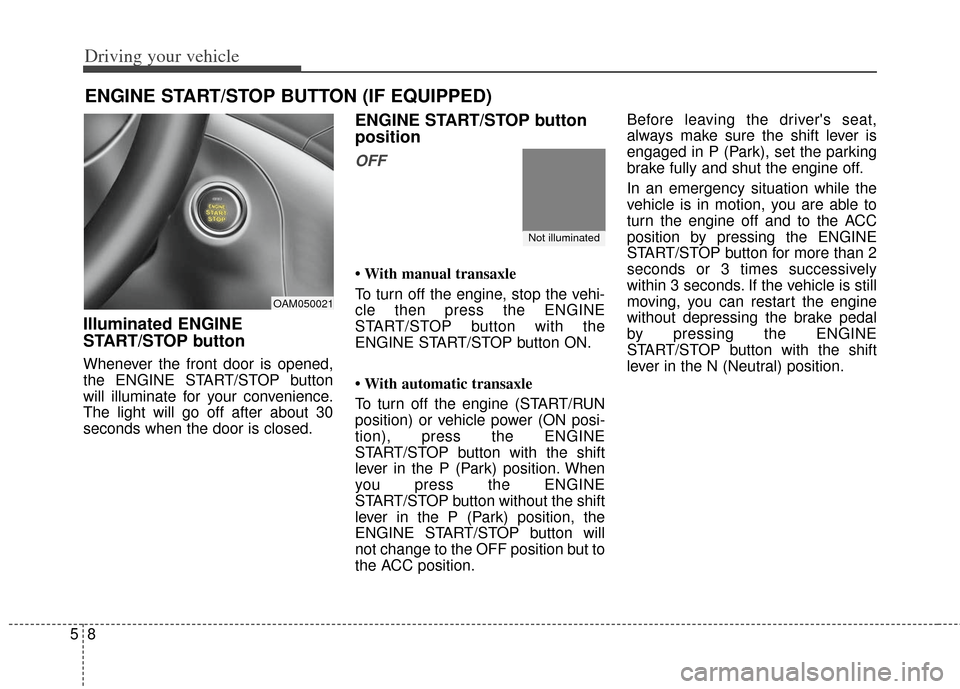
Illuminated ENGINE
START/STOP button
Whenever the front door is opened,
the ENGINE START/STOP button
will illuminate for your convenience.
The light will go off after about 30
seconds when the door is closed.
ENGINE START/STOP button
position
OFF
• With manual transaxle
To turn off the engine, stop the vehi-
cle then press the ENGINE
START/STOP button with the
ENGINE START/STOP button ON.
• With automatic transaxle
To turn off the engine (START/RUN
position) or vehicle power (ON posi-
tion), press the ENGINE
START/STOP button with the shift
lever in the P (Park) position. When
you press the ENGINE
START/STOP button without the shift
lever in the P (Park) position, the
ENGINE START/STOP button will
not change to the OFF position but to
the ACC position.Before leaving the driver's seat,
always make sure the shift lever is
engaged in P (Park), set the parking
brake fully and shut the engine off.
In an emergency situation while the
vehicle is in motion, you are able to
turn the engine off and to the ACC
position by pressing the ENGINE
START/STOP button for more than 2
seconds or 3 times successively
within 3 seconds. If the vehicle is still
moving, you can restart the engine
without depressing the brake pedal
by pressing the ENGINE
START/STOP button with the shift
lever in the N (Neutral) position.
OAM050021
Not illuminated
Page 231 of 393
59
Driving your vehicle
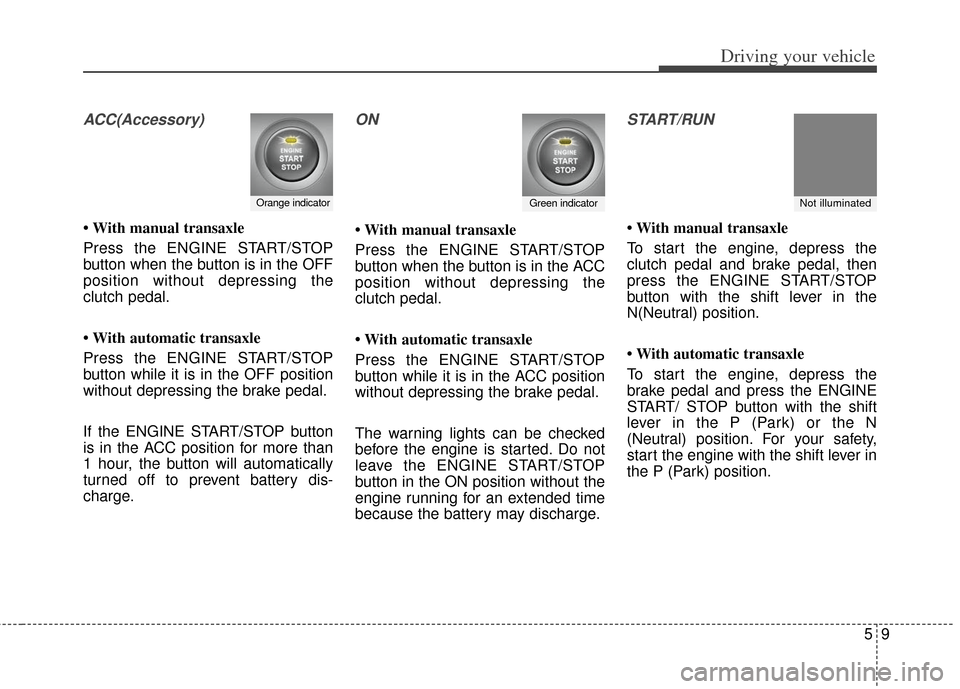
ACC(Accessory)
• With manual transaxle
Press the ENGINE START/STOP
button when the button is in the OFF
position without depressing the
clutch pedal.
• With automatic transaxle
Press the ENGINE START/STOP
button while it is in the OFF position
without depressing the brake pedal.
If the ENGINE START/STOP button
is in the ACC position for more than
1 hour, the button will automatically
turned off to prevent battery dis-
charge.
ON
• With manual transaxle
Press the ENGINE START/STOP
button when the button is in the ACC
position without depressing the
clutch pedal.
• With automatic transaxle
Press the ENGINE START/STOP
button while it is in the ACC position
without depressing the brake pedal.
The warning lights can be checked
before the engine is started. Do not
leave the ENGINE START/STOP
button in the ON position without the
engine running for an extended time
because the battery may discharge.
START/RUN
• With manual transaxle
To start the engine, depress the
clutch pedal and brake pedal, then
press the ENGINE START/STOP
button with the shift lever in the
N(Neutral) position.
• With automatic transaxle
To start the engine, depress the
brake pedal and press the ENGINE
START/ STOP button with the shift
lever in the P (Park) or the N
(Neutral) position. For your safety,
start the engine with the shift lever in
the P (Park) position.
Orange indicatorGreen indicatorNot illuminated
Page 232 of 393
Driving your vehicle
10
5
If you press the ENGINE
START/STOP button without
depressing the clutch pedal on man-
ual transaxle vehicles or without
depressing the brake pedal on auto-
matic transaxle vehicles, the engine
will not start and the engine
start/stop button changes as follows:
OFF ➔ACC ➔ON ➔OFF If you leave the ENGINE START/
STOP button in the ACC or ON posi-
tion for a long time, the battery will
discharge.Starting the engine
1.Carry the smart key or leave it
inside the vehicle.
2.Make sure the parking brake is firmly applied.
3.Place the transaxle shift lever in P (Park). Depress the brake pedal
fully.
You can also start the engine when
the shift lever is in the N (Neutral)
position.
4.Press the ENGINE START/STOP button.
5.In extremely cold weather (below -18°C / 0°F) or after the vehicle has
not been operated for several days,
let the engine warm up without
depressing the accelerator.
Whether the engine is cold or warm,
it should be started without depress-
ing the accelerator.
WARNING - Starting vehicle
Never press the ENGINE
START/STOP button while the
vehicle is in motion. This would
result in loss of directional con-
trol and braking function, which
could cause an accident.
Page 233 of 393
511
Driving your vehicle
Even if the smart key is in the vehi-cle, if it is far away from you, the
engine may not start.
When the ENGINE START/STOP button is in the ACC position or
above, if any door is opened, the
system checks for the smart key. If
the smart key is not in the vehicle,
the " " indicator will blink or the
warning "Key is not in vehicle" will
illuminate on the LCD display. And
if all doors are closed, the chime
will sound for 5 seconds. The indi-
cator or warning will turn off while
the vehicle is moving. Always have
the smart key with you.
The engine will start, only when the
smart key is in the vehicle. If the engine stalls while the vehicle
is in motion, do not attempt to move
the shift lever to the P (Park) posi-
tion. If the traffic and road conditions
permit, you may put the shift lever in
the N (Neutral) position while the
vehicle is still moving and press the
ENGINE START/STOP button in an
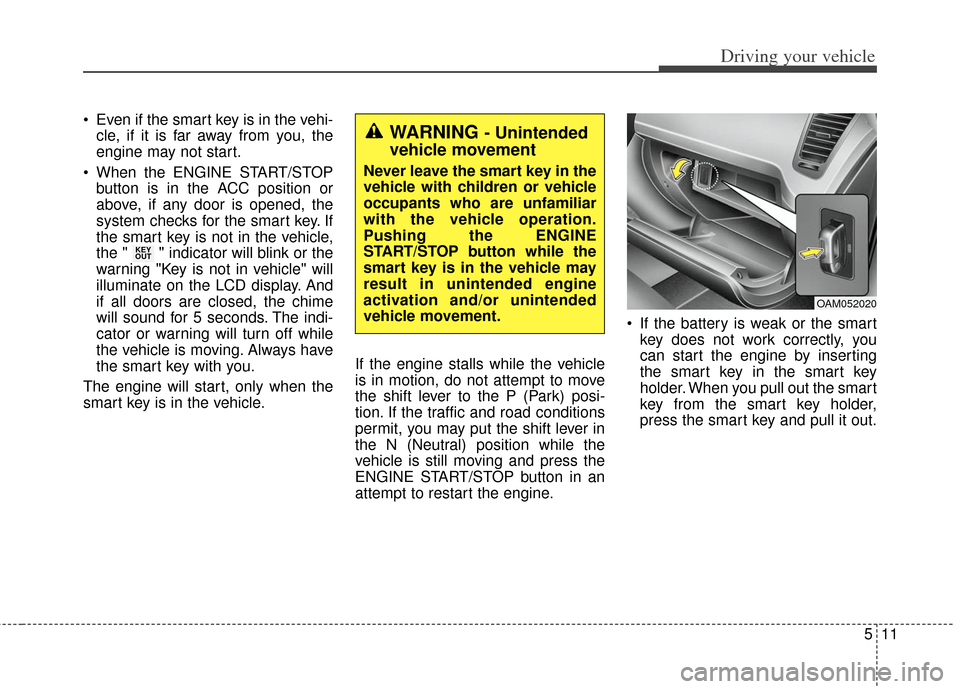
attempt to restart the engine. If the battery is weak or the smart
key does not work correctly, you
can start the engine by inserting
the smart key in the smart key
holder. When you pull out the smart
key from the smart key holder,
press the smart key and pull it out.
KEY
OUT
WARNING - Unintended
vehicle movement
Never leave the smart key in the
vehicle with children or vehicle
occupants who are unfamiliar
with the vehicle operation.
Pushing the ENGINE
START/STOP button while the
smart key is in the vehicle may
result in unintended engine
activation and/or unintended
vehicle movement.
OAM052020
Page 234 of 393
Driving your vehicle
12
5
When the stop lamp fuse is blown,
you can't start the engine normally.
Replace the fuse with a new one. If
it is not possible, you can start the
engine by pressing the ENGINE
START/STOP button for 10 sec-
onds while it is in the ACC posi-
tion. The engine can start without
depressing the brake pedal. But for
your safety always depress the
brake pedal before starting the
engine.
Do not press the ENGINE START/
STOP button for more than 10 sec-
onds except when the stop lamp fuse
is blown.
Page 255 of 393
533
Driving your vehicle
ESC OFF usage
When driving
It’s a good idea to keep the ESCturned on for daily driving whenev-
er possible.
To turn ESC off while driving, press the ESC OFF button while driving
on a flat road surface.
Hill-start assist control (HAC)
(if equipped)
Hill start Assist Control is a comfort
function. The main intend is to pre-
vent the vehicle from rolling back-
wards while driving off uphill on an
inclined surface. HAC holds the brak-
ing pressure builtup by driver during
stopping procedure for 2 seconds
after releasing brake pedal.
During the pressure-hold period, the
driver has enough time to press the
accelerator pedal to drive off.
The braking pressure is reduced as
soon as the system detects the dri-
ver’s intention to drive off. The HAC does not operate when
the transaxle shift lever is in the P
(Park) or N (Neutral) position.
The HAC activates even though the ESC is off but it does not acti-
vate when the ESC has malfunc-
tioned.
WARNING - OperatingESC
Never press the ESC OFF but-
ton while ESC is operating (ESC
indicator light blinks).
If ESC is turned off while ESC is
operating, the vehicle may slip
out of control.
WARNING - Rollingbackward
Drivers should pay close atten-
tion when activating the HAC.
The vehicle may roll backward
causing an accident due to
insufficient brake hold pres-
sure.
Page 303 of 393
What to do in an emergency
24
6
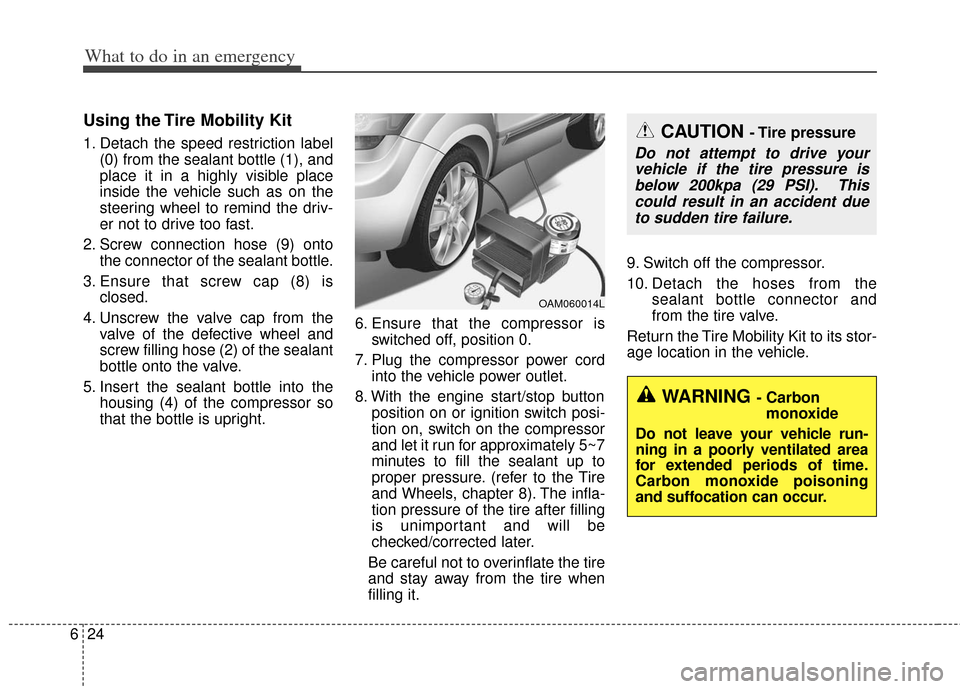
Using the Tire Mobility Kit
1. Detach the speed restriction label
(0) from the sealant bottle (1), and
place it in a highly visible place
inside the vehicle such as on the
steering wheel to remind the driv-
er not to drive too fast.
2. Screw connection hose (9) onto the connector of the sealant bottle.
3. Ensure that screw cap (8) is closed.
4. Unscrew the valve cap from the valve of the defective wheel and
screw filling hose (2) of the sealant
bottle onto the valve.
5. Insert the sealant bottle into the housing (4) of the compressor so
that the bottle is upright. 6. Ensure that the compressor is
switched off, position 0.
7. Plug the compressor power cord into the vehicle power outlet.
8. With the engine start/stop button position on or ignition switch posi-
tion on, switch on the compressor
and let it run for approximately 5~7
minutes to fill the sealant up to
proper pressure. (refer to the Tire
and Wheels, chapter 8). The infla-
tion pressure of the tire after filling
is unimportant and will be
checked/corrected later.
Be careful not to overinflate the tire
and stay away from the tire when
filling it. 9. Switch off the compressor.
10. Detach the hoses from the
sealant bottle connector and
from the tire valve.
Return the Tire Mobility Kit to its stor-
age location in the vehicle.
OAM060014L
CAUTION - Tire pressure
Do not attempt to drive your vehicle if the tire pressure isbelow 200kpa (29 PSI). Thiscould result in an accident dueto sudden tire failure.
WARNING - Carbon monoxide
Do not leave your vehicle run-
ning in a poorly ventilated area
for extended periods of time.
Carbon monoxide poisoning
and suffocation can occur.