engine KIA Soul 2013 1.G Workshop Manual
[x] Cancel search | Manufacturer: KIA, Model Year: 2013, Model line: Soul, Model: KIA Soul 2013 1.GPages: 393, PDF Size: 8.76 MB
Page 151 of 393
Features of your vehicle
72
4
Do not use the interior lights for
extended periods when the engine is
not running.
It may cause battery discharge.
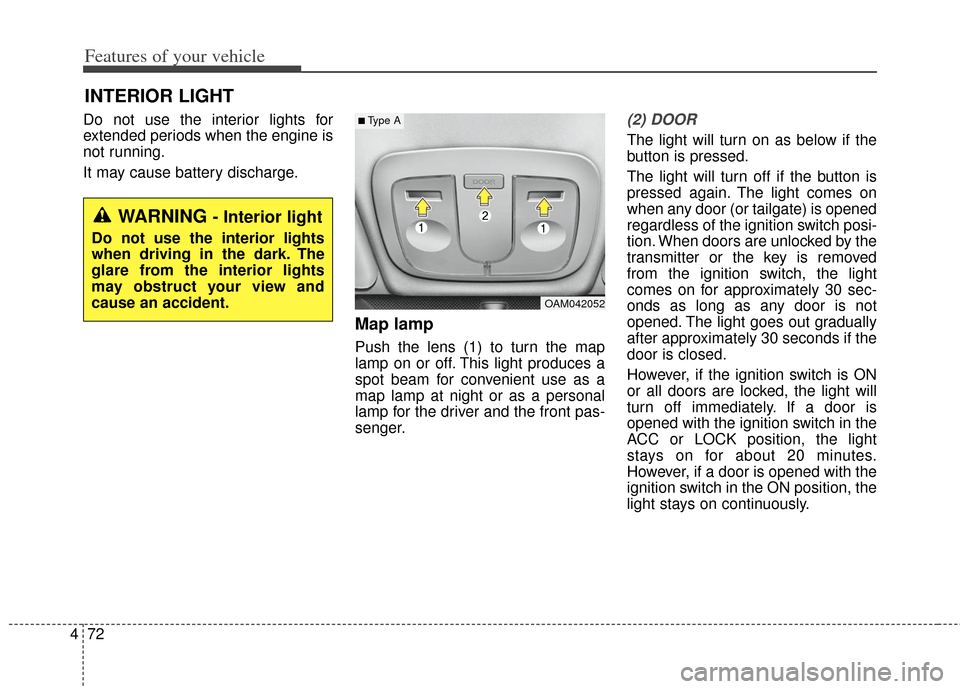
Map lamp
Push the lens (1) to turn the map
lamp on or off. This light produces a
spot beam for convenient use as a
map lamp at night or as a personal
lamp for the driver and the front pas-
senger.
(2) DOOR
The light will turn on as below if the
button is pressed.
The light will turn off if the button is
pressed again. The light comes on
when any door (or tailgate) is opened
regardless of the ignition switch posi-
tion. When doors are unlocked by the
transmitter or the key is removed
from the ignition switch, the light
comes on for approximately 30 sec-
onds as long as any door is not
opened. The light goes out gradually
after approximately 30 seconds if the
door is closed.
However, if the ignition switch is ON
or all doors are locked, the light will
turn off immediately. If a door is
opened with the ignition switch in the
ACC or LOCK position, the light
stays on for about 20 minutes.
However, if a door is opened with the
ignition switch in the ON position, the
light stays on continuously.
INTERIOR LIGHT
OAM042052
■Type A
WARNING - Interior light
Do not use the interior lights
when driving in the dark. The
glare from the interior lights
may obstruct your view and
cause an accident.
Page 154 of 393
475
Features of your vehicle
If you want to defrost and defog the
front windshield, refer to “Windshield
defrosting and defogging” in this sec-
tion.
Rear window defroster
The defroster heats the window to
remove frost, fog and thin ice from
the rear window, while the engine is
running.
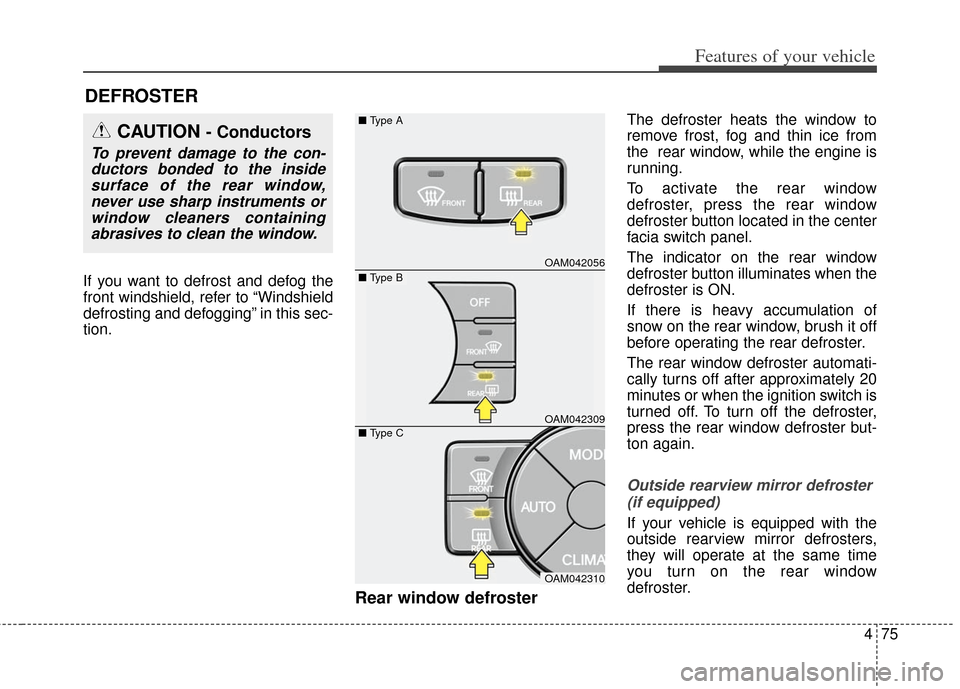
To activate the rear window
defroster, press the rear window
defroster button located in the center
facia switch panel.
The indicator on the rear window
defroster button illuminates when the
defroster is ON.
If there is heavy accumulation of
snow on the rear window, brush it off
before operating the rear defroster.
The rear window defroster automati-
cally turns off after approximately 20
minutes or when the ignition switch is
turned off. To turn off the defroster,
press the rear window defroster but-
ton again.
Outside rearview mirror defroster (if equipped)
If your vehicle is equipped with the
outside rearview mirror defrosters,
they will operate at the same time
you turn on the rear window
defroster.
DEFROSTER
OAM042056
OAM042309
OAM042310
■
Type A
■ Type C
CAUTION - Conductors
To prevent damage to the con-
ductors bonded to the insidesurface of the rear window,never use sharp instruments orwindow cleaners containingabrasives to clean the window.
■ Type B
Page 156 of 393
477
Features of your vehicle
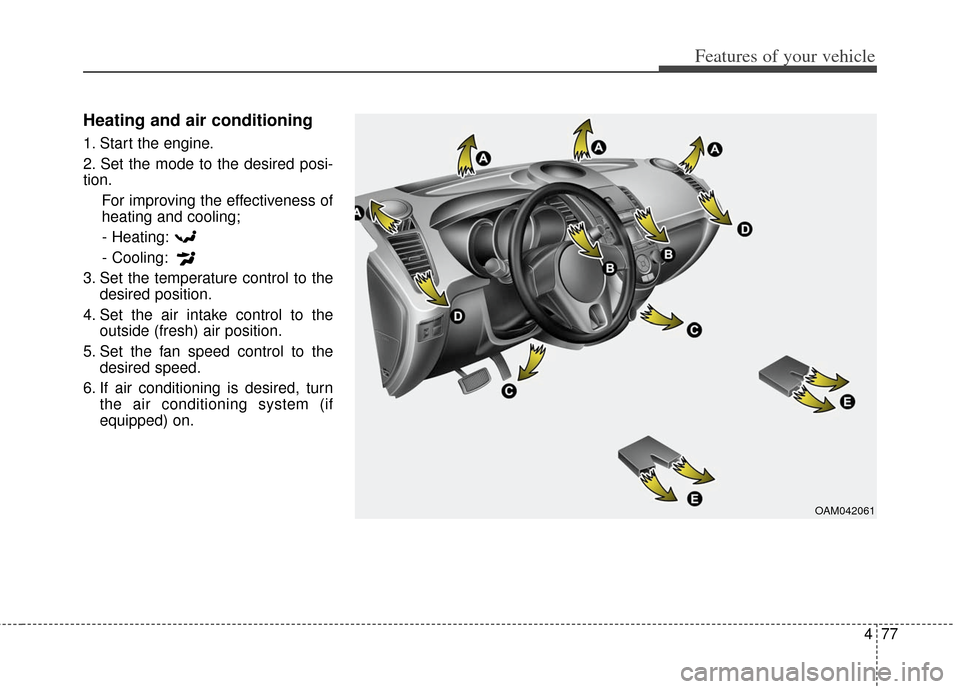
Heating and air conditioning
1. Start the engine.
2. Set the mode to the desired posi-
tion.For improving the effectiveness of
heating and cooling;- Heating:
- Cooling:
3. Set the temperature control to the desired position.
4. Set the air intake control to the outside (fresh) air position.
5. Set the fan speed control to the desired speed.
6. If air conditioning is desired, turn the air conditioning system (if
equipped) on.
OAM042061
Page 161 of 393
Features of your vehicle
82
4
System operation
Ventilation
1. Set the mode to the position.
2. Set the air intake control to the
outside (fresh) air position.
3. Set the temperature control to the desired position.
4. Set the fan speed control to the desired speed.
Heating
1. Set the mode to the position.
2. Set the air intake control to theoutside (fresh) air position.
3. Set the temperature control to the desired position.
4. Set the fan speed control to the desired speed.
5. If dehumidified heating is desired, turn the air conditioning system (if
equipped) on.
If the windshield fogs up, set the mode to the
orposition. Operation Tips
To keep dust or unpleasant fumes
from entering the vehicle through
the ventilation system, temporarily
set the air intake control to the
recirculated air position. Be sure to
return the control to the fresh air
position when the irritation has
passed to keep fresh air in the
vehicle. This will help keep the driv-
er alert and comfortable.
Air for the heating/cooling system is drawn in through the grilles just
ahead of the windshield. Care
should be taken that these are not
blocked by leaves, snow, ice or
other obstructions.
To prevent interior fog on the wind- shield, set the air intake control to
the fresh air position and fan speed
to the desired position, turn on the
air conditioning system, and adjust
the temperature control to desired
temperature.
Air conditioning (if equipped)
All Kia Air Conditioning Systems are
filled with environmentally friendly
R-134a refrigerant which does not
damage the ozone layer.
1. Start the engine. Press the air con- ditioning button.
2. Set the mode to the position.
3. Set the air intake control to the outside air or recirculated air posi-
tion.
4. Adjust the fan speed control and temperature control to maintain
maximum comfort.
When maximum cooling is desired, set the temperature control to the
extreme left position, set the mode
control to the MAX A/C position,
then set the fan speed control to
the highest speed.
Page 162 of 393
483
Features of your vehicle
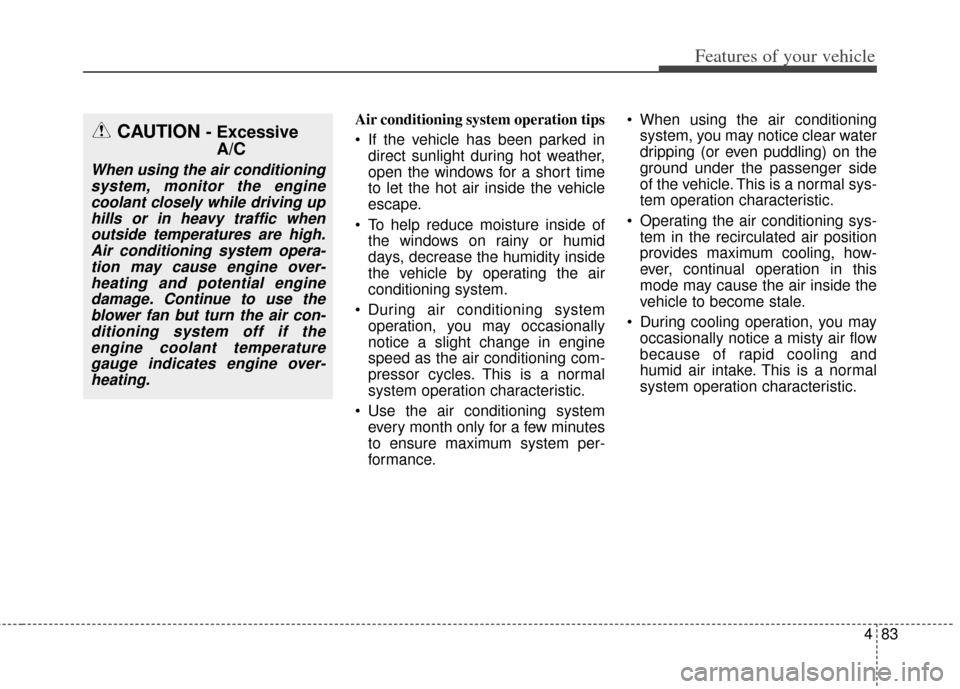
Air conditioning system operation tips
If the vehicle has been parked indirect sunlight during hot weather,
open the windows for a short time
to let the hot air inside the vehicle
escape.
To help reduce moisture inside of the windows on rainy or humid
days, decrease the humidity inside
the vehicle by operating the air
conditioning system.
During air conditioning system operation, you may occasionally
notice a slight change in engine
speed as the air conditioning com-
pressor cycles. This is a normal
system operation characteristic.
Use the air conditioning system every month only for a few minutes
to ensure maximum system per-
formance. When using the air conditioning
system, you may notice clear water
dripping (or even puddling) on the
ground under the passenger side
of the vehicle. This is a normal sys-
tem operation characteristic.
Operating the air conditioning sys- tem in the recirculated air position
provides maximum cooling, how-
ever, continual operation in this
mode may cause the air inside the
vehicle to become stale.
During cooling operation, you may occasionally notice a misty air flow
because of rapid cooling and
humid air intake. This is a normal
system operation characteristic.CAUTION - ExcessiveA/C
When using the air conditioning
system, monitor the enginecoolant closely while driving uphills or in heavy traffic whenoutside temperatures are high.Air conditioning system opera-tion may cause engine over-heating and potential enginedamage. Continue to use theblower fan but turn the air con-ditioning system off if theengine coolant temperaturegauge indicates engine over-heating.
Page 167 of 393
Features of your vehicle
88
4
Manual heating and air condi-
tioning
The heating and cooling system can
be controlled manually by pushing
buttons other than the AUTO button.
In this case, the system works
sequentially according to the order of
buttons selected.
When pressing any button (or turning
any knob) except AUTO button while
automatic operation, the functions
not selected will be controlled auto-
matically.
1. Start the engine.
2. Set the mode to the desired posi-
tion.
3. Set the temperature control to the desired position.
4. Set the air intake control to the outside (fresh) air position.
5. Set the fan speed control to the desired speed.
6. If air conditioning is desired, turn the air conditioning system on.
Press the AUTO button in order to
convert to full automatic control of
the system.
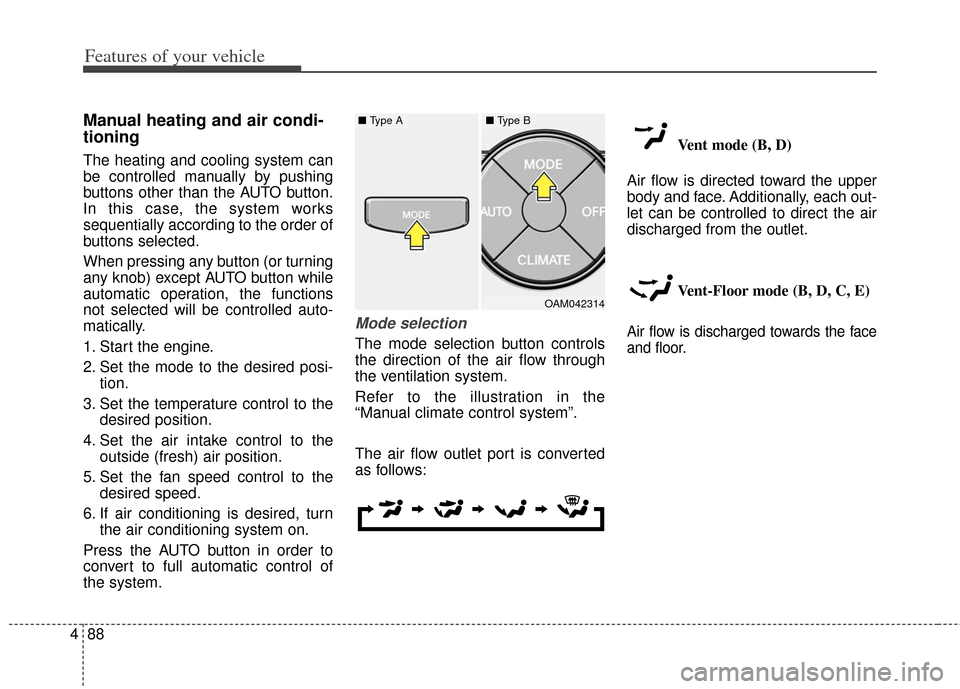
Mode selection
The mode selection button controls
the direction of the air flow through
the ventilation system.
Refer to the illustration in the
“Manual climate control system”.
The air flow outlet port is converted
as follows: Vent mode (B, D)
Air flow is directed toward the upper
body and face. Additionally, each out-
let can be controlled to direct the air
discharged from the outlet.
Vent-Floor mode (B, D, C, E)Air flow is discharged towards the face
and floor.
OAM042314
■ Type A■ Type B
Page 181 of 393
Features of your vehicle
102
4
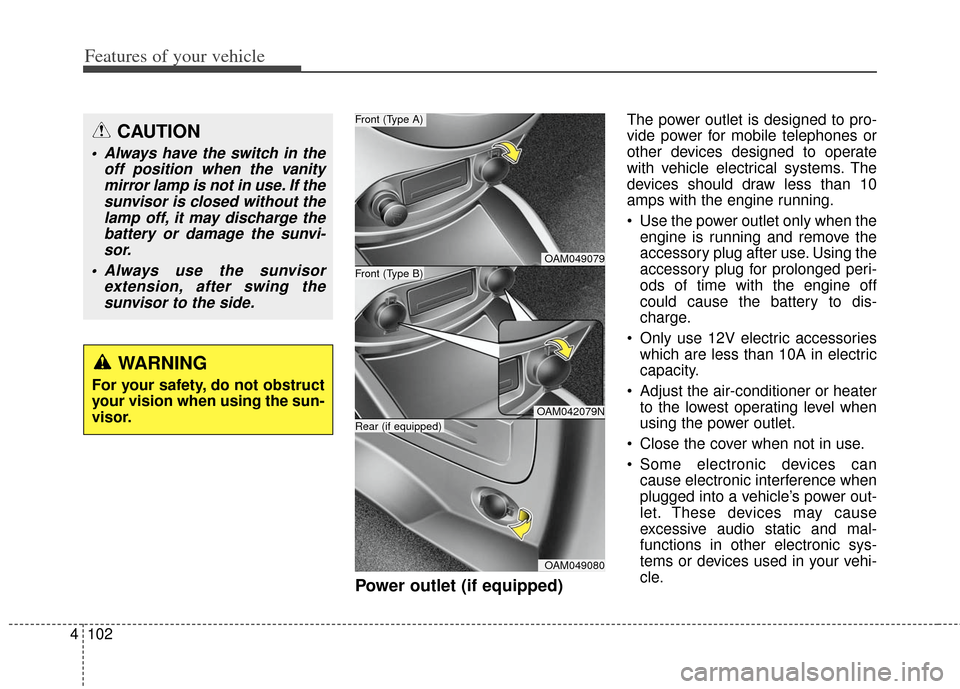
Power outlet (if equipped)
The power outlet is designed to pro-
vide power for mobile telephones or
other devices designed to operate
with vehicle electrical systems. The
devices should draw less than 10
amps with the engine running.
Use the power outlet only when the
engine is running and remove the
accessory plug after use. Using the
accessory plug for prolonged peri-
ods of time with the engine off
could cause the battery to dis-
charge.
Only use 12V electric accessories which are less than 10A in electric
capacity.
Adjust the air-conditioner or heater to the lowest operating level when
using the power outlet.
Close the cover when not in use.
Some electronic devices can cause electronic interference when
plugged into a vehicle’s power out-
let. These devices may cause
excessive audio static and mal-
functions in other electronic sys-
tems or devices used in your vehi-
cle.CAUTION
Always have the switch in the off position when the vanitymirror lamp is not in use. If thesunvisor is closed without thelamp off, it may discharge thebattery or damage the sunvi-sor.
Always use the sunvisor extension, after swing thesunvisor to the side.
WARNING
For your safety, do not obstruct
your vision when using the sun-
visor.
OAM049079
OAM042079N
OAM049080
Front (Type B)
Front (Type A)
Rear (if equipped)
Page 191 of 393
Features of your vehicle
112
4
The lighting around the front speaker
may not illuminate when the sound of
the audio is low.
Do not use the lights for extended
periods when engine is not running.
It may cause battery discharge.
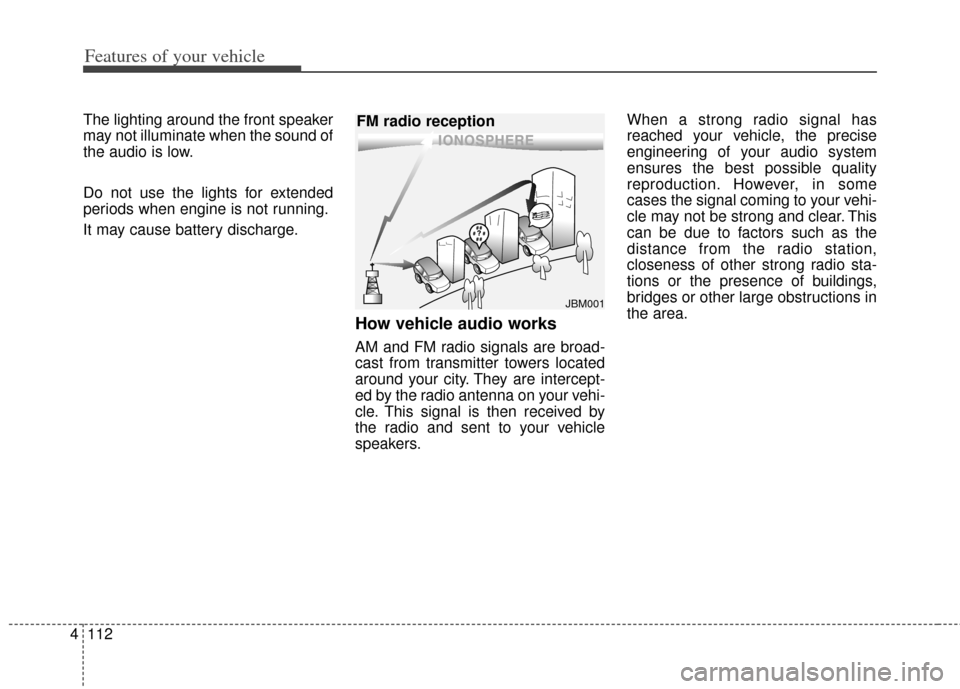
How vehicle audio works
AM and FM radio signals are broad-
cast from transmitter towers located
around your city. They are intercept-
ed by the radio antenna on your vehi-
cle. This signal is then received by
the radio and sent to your vehicle
speakers. When a strong radio signal has
reached your vehicle, the precise
engineering of your audio system
ensures the best possible quality
reproduction. However, in some
cases the signal coming to your vehi-
cle may not be strong and clear. This
can be due to factors such as the
distance from the radio station,
closeness of other strong radio sta-
tions or the presence of buildings,
bridges or other large obstructions in
the area.
JBM001
FM radio reception
Page 205 of 393
Features of your vehicle
126
4
When using an external USB
device, make sure the device is not
connected when starting up the
vehicle.
If you start the engine when the USB device is connected, it may
damage the USB device. (USB
flashdrives are very sensitive to
electric shock.) Connect the device
after starting up.
If the engine is started up or turned off while the external USB device is
connected, the external USB
device may not work.
It may not play inauthentic MP3 or WMA files.
1) It can only play MP3 files with the compression rate between
8Kbps~320Kbps.
2) It can only play WMA music files with the compression rate
between 8Kbps~320Kbps.
Take precautions for static electric- ity when connecting or disconnect-
ing the external USB device.
An encrypted MP3 PLAYER is not recognizable. Depending on the condition of the
external USB device, the connect-
ed external USB device can be
unrecognizable.
When the formatted byte/sector setting of External USB device is
not either 512BYTE or 2048BYTE,
then the device will not be recog-
nized.
Use only a USB device formatted to FAT 12/16/32.
USB devices without USB I/F authentication may not be recog-
nizable.
If you repeatedly connect or dis- connect the USB device in a short
period of time, it may break the
device.
You may hear a strange noise when connecting or disconnecting
a USB device.
If you disconnect the external USB device during playback in USB
mode, the external USB device
can be damaged or may malfunc-
tion. Therefore, disconnect the
external USB device when the
audio is turned off or in another
mode. (e.g, Radio or CD) Depending on the type and capac-
ity of the external USB device or
the type of the files stored in the
device, there is a difference in the
time taken for recognition of the
device.
Do not use the USB device for pur- poses other than playing music
files.
Playing videos through the USB is not supported.
If you use devices such as a USB hub purchased separately, the
vehicle’s audio system may not
recognize the USB device. In that
case, connect the USB device
directly to the multimedia terminal
of the vehicle.
If the USB device is divided by log- ical drives, only the music files on
the highest-priority drive are recog-
nized by car audio.
Devices such as MP3 Player/ Cellular phone/Digital camera can
be unrecognizable by standard
USB I/F can be unrecognizable.
Page 214 of 393
4135
Features of your vehicle
(if equipped)
1. button : Raises or lowersspeaker volume.
2. : Mute the microphone during a
call.
3. button : Activates voice recog- nition.
4. button : Places and transfers calls.
5. button : Ends calls or cancels functions.
■What is Bluetooth®wireless
technology?
Bluetooth®wireless technology that
allows multiple devices to be con-
nected in a short range, low-powered
devices like hands-free, stereo head-
set, steering remote control, etc. For
more information, visit the
Bluetooth®wireless technology web-
site at
www.Bluetooth.com
■General Features
This audio system supports
Bluetooth®wireless technology
enabled hands-free and stereo-
headset features.
- HANDS-FREE feature: Making or receiving calls wirelessly through
voice recognition.
- STEREO-HEADSET feature: Playing music from cellular
phones (that supports A2DP fea-
ture) wirelessly.
Voice recognition engine of the
Bluetooth®wireless technology
system supports 3 types of lan-
guages:
English
Canadian French
US Spanish
The phone must be paired to the system before using
Bluetooth®
wireless technology features.
Only one selected (linked) cellular phone can be used with the sys-
tem at a time.
Some phones are not fully compat- ible with this system.
MUTE
VOLUME
12
435