instrument panel KIA Soul 2014 2.G Owner's Guide
[x] Cancel search | Manufacturer: KIA, Model Year: 2014, Model line: Soul, Model: KIA Soul 2014 2.GPages: 500, PDF Size: 13.89 MB
Page 201 of 500
4115
Features of your vehicle
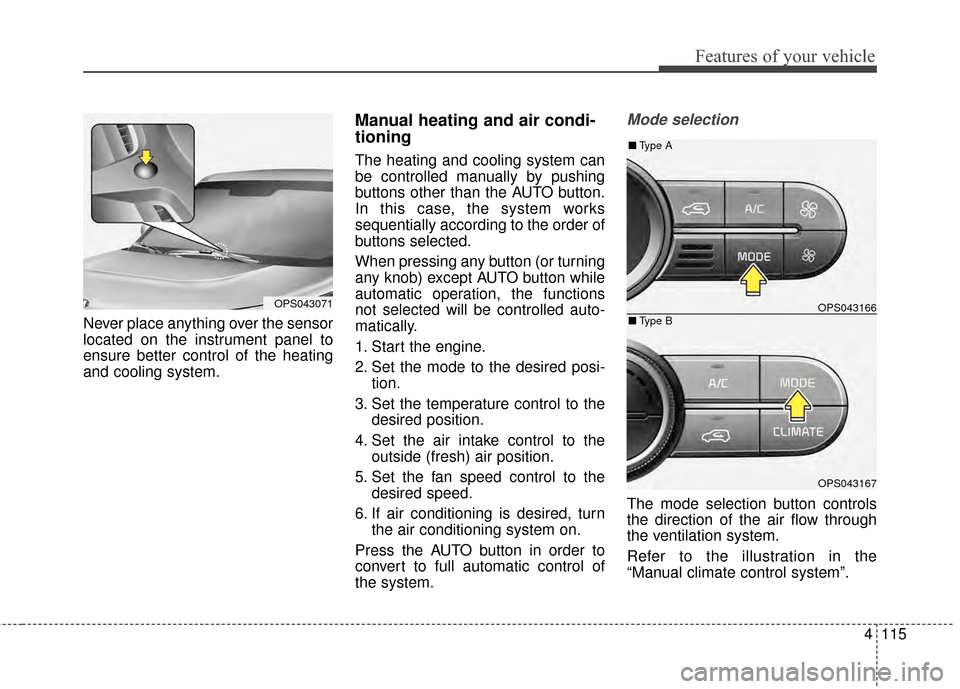
Never place anything over the sensor
located on the instrument panel to
ensure better control of the heating
and cooling system.
Manual heating and air condi-
tioning
The heating and cooling system can
be controlled manually by pushing
buttons other than the AUTO button.
In this case, the system works
sequentially according to the order of
buttons selected.
When pressing any button (or turning
any knob) except AUTO button while
automatic operation, the functions
not selected will be controlled auto-
matically.
1. Start the engine.
2. Set the mode to the desired posi-tion.
3. Set the temperature control to the desired position.
4. Set the air intake control to the outside (fresh) air position.
5. Set the fan speed control to the desired speed.
6. If air conditioning is desired, turn the air conditioning system on.
Press the AUTO button in order to
convert to full automatic control of
the system.
Mode selection
The mode selection button controls
the direction of the air flow through
the ventilation system.
Refer to the illustration in the
“Manual climate control system”.
OPS043071OPS043166
OPS043167
■ Type B
■Type A
Page 203 of 500
4117
Features of your vehicle
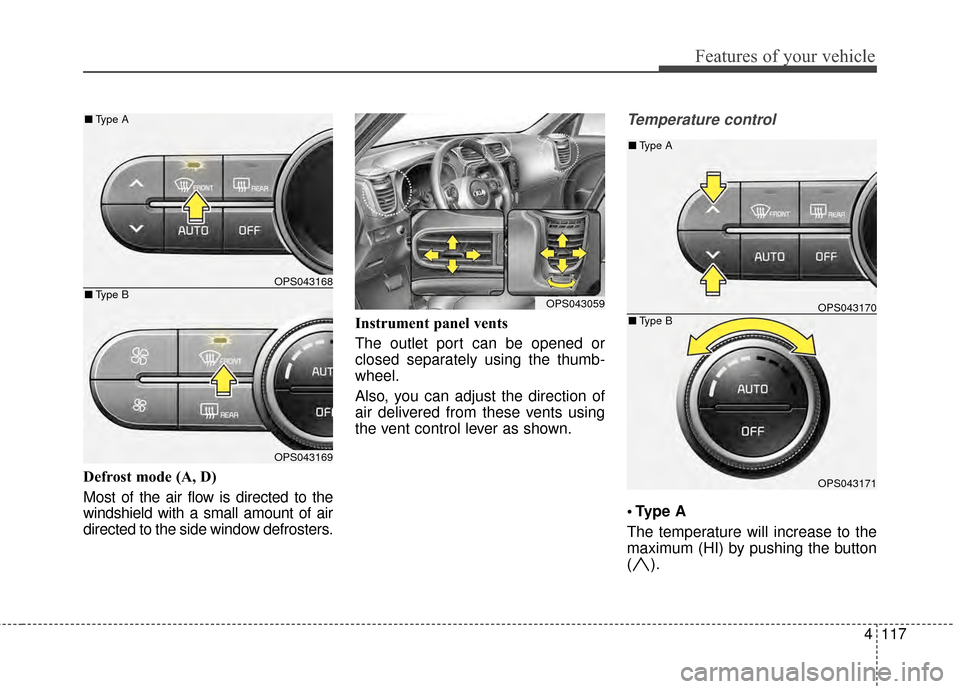
Defrost mode (A, D)
Most of the air flow is directed to the
windshield with a small amount of air
directed to the side window defrosters.Instrument panel vents
The outlet port can be opened or
closed separately using the thumb-
wheel.
Also, you can adjust the direction of
air delivered from these vents using
the vent control lever as shown.
Temperature control
A
The temperature will increase to the
maximum (HI) by pushing the button
().
OPS043168
OPS043169
■
Type B
■Type A
OPS043059OPS043170
OPS043171
■Type B
■Type A
Page 496 of 500
I5
Index
If the engine stalls while driving . . . . . . . . . . . . . . . . 6-3
If you have a flat tire while driving . . . . . . . . . . . . . . 6-3
Instrument cluster . . . . . . . . . . . . . . . . . . . . . . . . . . . . . 4-54 Gauges . . . . . . . . . . . . . . . . . . . . . . . . . . . . . . . . . . . 4-\
56
Instrument Cluster Control. . . . . . . . . . . . . . . . . . . . 4-55
LCD Display Control . . . . . . . . . . . . . . . . . . . . . . . . 4-55
Transaxle Shift Indicator . . . . . . . . . . . . . . . . . . . . . 4-60
Instrument panel overview . . . . . . . . . . . . . . . . . . . . . . . 2-5
Interior features. . . . . . . . . . . . . . . . . . . . . . . . . . . . . . 4-133 Cargo area cover. . . . . . . . . . . . . . . . . . . . . . . . . . . 4-140
Clothes hanger . . . . . . . . . . . . . . . . . . . . . . . . . . . . 4-138
Cup holder . . . . . . . . . . . . . . . . . . . . . . . . . . . . . . . 4-133
Floor mat anchor(s) . . . . . . . . . . . . . . . . . . . . . . . . 4-138
Luggage net holder. . . . . . . . . . . . . . . . . . . . . . . . . 4-139
Power outlet . . . . . . . . . . . . . . . . . . . . . . . . . . . . . . 4-137
Rear seat warmer . . . . . . . . . . . . . . . . . . . . . . . . . . 4-136
Seat air ventilation . . . . . . . . . . . . . . . . . . . . . . . . . 4-135
Seat warmer . . . . . . . . . . . . . . . . . . . . . . . . . . . . . . 4-134
Sunvisor . . . . . . . . . . . . . . . . . . . . . . . . . . . . . . . . . 4-133
Interior light . . . . . . . . . . . . . . . . . . . . . . . . . . . . . . . . . 4-97 Glove box lamp . . . . . . . . . . . . . . . . . . . . . . . . . . . 4-101
Interior lamp auto cut . . . . . . . . . . . . . . . . . . . . . . . . 4-97
Luggage room lamp . . . . . . . . . . . . . . . . . . . . . . . . . 4-99
Map lamp . . . . . . . . . . . . . . . . . . . . . . . . . . . . . . . . 4-97
Portable lamp usage . . . . . . . . . . . . . . . . . . . . . . . . . 4-99
Room lamp . . . . . . . . . . . . . . . . . . . . . . . . . . . . . . . . 4-98
Vanity mirror lamp . . . . . . . . . . . . . . . . . . . . . . . . . 4-101
Interior overview. . . . . . . . . . . . . . . . . . . . . . . . . . . . . . . 2-4 ISG (Idle Stop and Go) system . . . . . . . . . . . . . . . . . . 5-46
Auto start . . . . . . . . . . . . . . . . . . . . . . . . . . . . . . . . . 5-47
Auto stop . . . . . . . . . . . . . . . . . . . . . . . . . . . . . . . . . 5-46
Condition of ISG system operation . . . . . . . . . . . . . 5-48
ISG system deactivation . . . . . . . . . . . . . . . . . . . . . . 5-49
ISG system malfunction . . . . . . . . . . . . . . . . . . . . . . 5-50
Key . . . . . . . . . . . . . . . . . . . . . . . . . . . . . . . . . . . . \
. . . . . 4-4 Battery replacement . . . . . . . . . . . . . . . . . . . . . . . . . . 4-7
Immobilizer system . . . . . . . . . . . . . . . . . . . . . . . . . . 4-8
Key operations . . . . . . . . . . . . . . . . . . . . . . . . . . . . . . 4-4
Record your key number . . . . . . . . . . . . . . . . . . . . . . 4-4
Transmitter precautions . . . . . . . . . . . . . . . . . . . . . . . 4-6
Key positions . . . . . . . . . . . . . . . . . . . . . . . . . . . . . . . . . 5-7 Ignition switch position . . . . . . . . . . . . . . . . . . . . . . . 5-7
Illuminated ignition switch . . . . . . . . . . . . . . . . . . . . 5-7
Starting the engine . . . . . . . . . . . . . . . . . . . . . . . . . . . 5-9
LCD Display . . . . . . . . . . . . . . . . . . . . . . . . . . . . . . . . . 4-62 A/V Mode. . . . . . . . . . . . . . . . . . . . . . . . . . . . . . . . . 4-66
LCD Modes . . . . . . . . . . . . . . . . . . . . . . . . . . . . . . . 4-62
Service Mode . . . . . . . . . . . . . . . . . . . . . . . . . . . . . . 4-63
Turn By Turn Mode . . . . . . . . . . . . . . . . . . . . . . . . . 4-67
User Settings Mode . . . . . . . . . . . . . . . . . . . . . . . . . 4-64
K
L