light KIA Soul 2014 2.G Owner's Guide
[x] Cancel search | Manufacturer: KIA, Model Year: 2014, Model line: Soul, Model: KIA Soul 2014 2.GPages: 500, PDF Size: 13.89 MB
Page 70 of 500
Safety features of your vehicle
54
3
The indication of the system's pres-
ence are the letters "AIR BAG"
embossed on the air bag pad cover
on the steering wheel and the pas-
senger's side front panel pad above
the glove box.
The SRS consists of air bags
installed under the pad covers in the
center of the steering wheel and the
passenger's side front panel above
the glove box.
The purpose of the SRS is to provide
the vehicle's driver and/or the front
passenger with additional protection
than that offered by the seat belt sys-
tem alone in case of a frontal impact
of sufficient severity. The SRS uses
sensors to gather information about
the driver's and front passenger's
seat belt usage and impact severity.
The seat belt buckle sensors deter-
mine if the driver and front passen-
ger's seat belts are fastened.These sensors provide the ability to
control the SRS deployment based on
whether or not the seat belts are fas-
tened, and how severe the impact is.
The advanced SRS offers the ability
to control the air bag inflation with
two levels. A first stage level is pro-
vided for moderate-severity impacts.
A second stage level is provided for
more severe impacts.
The passenger’s front air bag is
designed to help reduce the injury of
children sitting close to the instru-
ment panel in low speed collisions.
However, children are safer if they
are restrained in the rear seat.
According to the impact severity and
seat belt usage, the SRSCM (SRS
Control Module) controls the air bag
inflation. Failure to properly wear
seat belts can increase the risk or
severity of injury in an accident.
WARNING
If the occupant detection sys-
tem is not working properly, the
SRS air bag warning light on
the instrument panel will illumi-
nate because the SRS air bag
warning light is connected with
the occupant detection system.
If the SRS air bag warning light
does not illuminate when the
ignition switch is turned to the
ON position, remains illuminat-
ed after approximately 6 sec-
onds when the ignition switch
is turned to the ON position, or
if it illuminates while the vehicle
is being driven, have an author-
ized Kia dealer inspect the
advanced SRS air bag system
as soon as possible.
Page 73 of 500
357
Safety features of your vehicle
(Continued)
No objects should be placedover or near the air bag mod-
ules on the steering wheel,
instrument panel or the front
passenger's panel above the
glove box, because any such
object could cause harm if the
vehicle is in a crash severe
enough to cause the air bags
to deploy.
Never place covers, blankets or aftermarket seat warmers
on the passenger seat as
these may interfere with the
occupant detection system.
Do not tamper with or discon- nect SRS wiring or other com-
ponents of the SRS system.
Doing so could result in injury,
due to accidental deployment
of the air bags or by rendering
the SRS inoperative.
(Continued)(Continued)
If the SRS air bag warninglight remains illuminated
while the vehicle is being driv-
en, have an authorized Kia
dealer inspect the air bag sys-
tem as soon as possible.
Air bags can only be used once – have an authorized Kia
dealer replace the air bag
immediately after deployment.
The SRS is designed to deploy the front air bags only
when an impact is sufficiently
severe and when the impact
angle is less than 30° from the
forward longitudinal axis of
the vehicle. Additionally, the
air bags will only deploy once.
Seat belts must be worn at all
times.
(Continued)(Continued)
Front air bags are not intend-ed to deploy in side-impact,
rear-impact or rollover crash-
es. In addition, front air bags
will not deploy in frontal
crashes below the deploy-
ment threshold.
(Continued)
Page 83 of 500
367
Safety features of your vehicle
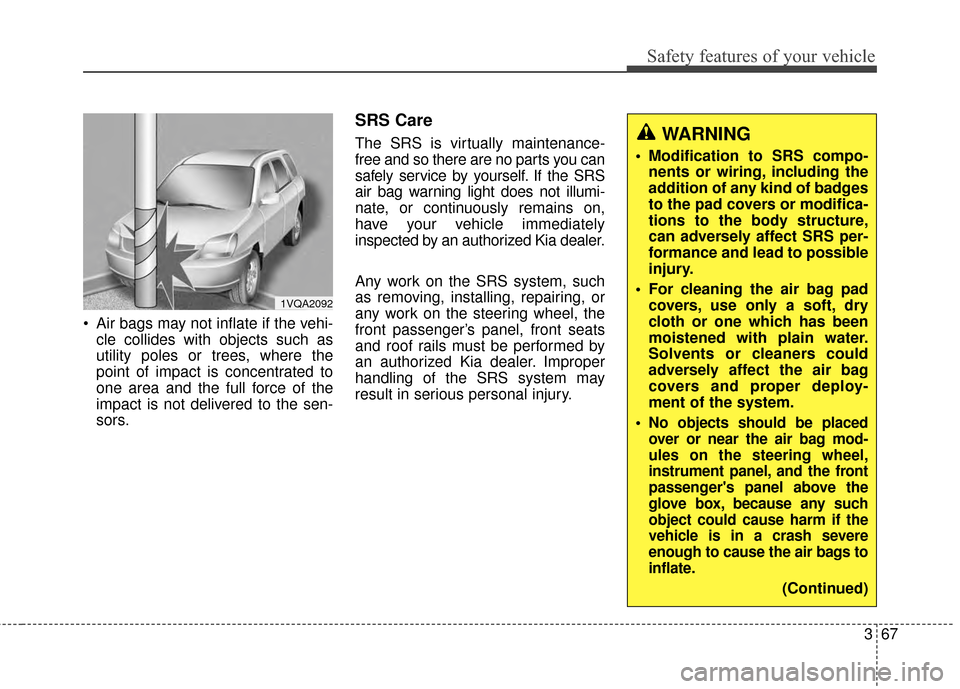
Air bags may not inflate if the vehi-cle collides with objects such as
utility poles or trees, where the
point of impact is concentrated to
one area and the full force of the
impact is not delivered to the sen-
sors.
SRS Care
The SRS is virtually maintenance-
free and so there are no parts you can
safely service by yourself. If the SRS
air bag warning light does not illumi-
nate, or continuously remains on,
have your vehicle immediately
inspected by an authorized Kia dealer.
Any work on the SRS system, such
as removing, installing, repairing, or
any work on the steering wheel, the
front passenger’s panel, front seats
and roof rails must be performed by
an authorized Kia dealer. Improper
handling of the SRS system may
result in serious personal injury.WARNING
Modification to SRS compo-nents or wiring, including the
addition of any kind of badges
to the pad covers or modifica-
tions to the body structure,
can adversely affect SRS per-
formance and lead to possible
injury.
For cleaning the air bag pad covers, use only a soft, dry
cloth or one which has been
moistened with plain water.
Solvents or cleaners could
adversely affect the air bag
covers and proper deploy-
ment of the system.
No objects should be placed
over or near the air bag mod-
ules on the steering wheel,
instrument panel, and the front
passenger's panel above the
glove box, because any such
object could cause harm if the
vehicle is in a crash severe
enough to cause the air bags to
inflate.
(Continued)
1VQA2092
Page 88 of 500
Instrument cluster . . . . . . . . . . . . . . . . . . . . . . . . . 4-54
. . . . . . . . . . . . . . . . . . . . 4-55
. . . . . . . . . . . . . . . . . . . . . . . . . 4-55
. . . . . . . . . . . . . . . . . . . . . . . . . . . . . . . . . . . . \
. 4-56
. . . . . . . . . . . . . . . . . . . . . . 4-60
LCD Display . . . . . . . . . . . . . . . . . . . . . . . . . . . . . . 4-62
. . . . . . . . . . . . . . . . . . . . . . . . . . . . . . . . . 4-62
. . . . . . . . . . . . . . . . . . . . . . . . . . . . . . . . 4-63
. . . . . . . . . . . . . . . . . . . . . . . . . . . 4-64
. . . . . . . . . . . . . . . . . . . . . . . . . . . . . . . . . . . 4-\
66
. . . . . . . . . . . . . . . . . . . . . . . . . . 4-67
. . . . . . . . . . . . . . . . . . . . . . . . . . . . 4-67
Trip computer . . . . . . . . . . . . . . . . . . . . . . . . . . . . . 4-72
. . . . . . . . . . . . . . . . . . . . . . . . . . . . . . . . . . . . \
4-73
. . . . . . . . . . . . . . . . . . . . . . . . . . . . . . . 4-74
Warning and indicator lights . . . . . . . . . . . . . . . . 4-76
. . . . . . . . . . . . . . . . . . . . . . . . . . . . . . . 4-76
. . . . . . . . . . . . . . . . . . . . . . . . . . . . . . 4-83
Rear camera display . . . . . . . . . . . . . . . . . . . . . . . 4-88
Lighting . . . . . . . . . . . . . . . . . . . . . . . . . . . . . . . . . . 4-89\
. . . . . . . . . . . . . . . . . . . . . . . . . . . . . 4-89
. . . . . . . . . . . . . . . . . . . . . . . . . 4-89 . . . . . . . . . . . . . . . . . . . . . . . . . . . . . . 4-90
. . . . . . . . . . . . . . . . . . . . . . . . . 4-91
. . . . . . . . . . . . 4-92
. . . . . . . . . . . . . . . . . . . . . . . . . . . . . . . 4-93
Wipers and Washers . . . . . . . . . . . . . . . . . . . . . . . 4-94
. . . . . . . . . . . . . . . . . . . . . . 4-94
. . . . . . . . . . . . . . . . . . . . 4-94
. . . . . . . . . . . . . . . . . . . . . . . . . . . 4-94
. . . . . . . . . . 4-96
Interior light . . . . . . . . . . . . . . . . . . . . . . . . . . . . . . 4-97
. . . . . . . . . . . . . . . . . . . . . . . . . . . . . . . . . . 4-97\
. . . . . . . . . . . . . . . . . . . . . . . . . . . . . . . . . . 4-98\
. . . . . . . . . . . . . . . . . . . . . . . . . . 4-99
. . . . . . . . . . . . . . . . . . . . . . . . . . 4-99
. . . . . . . . . . . . . . . . . . . . . . . . . . . . . 4-101
. . . . . . . . . . . . . . . . . . . . . . . . . . 4-101
Defroster . . . . . . . . . . . . . . . . . . . . . . . . . . . . . . . . 4-102
. . . . . . . . . . . . . . . . . . . . . . . 4-102
Manual climate control system . . . . . . . . . . . . . 4-104
. . . . . . . . . . . . . . . . . . 4-105
. . . . . . . . . . . . . . . . . . . . . . . . . . . . 4-110
. . . . . . . . . . . . . . . . . . . . . . 4-112
4
Page 91 of 500
45
Features of your vehicle
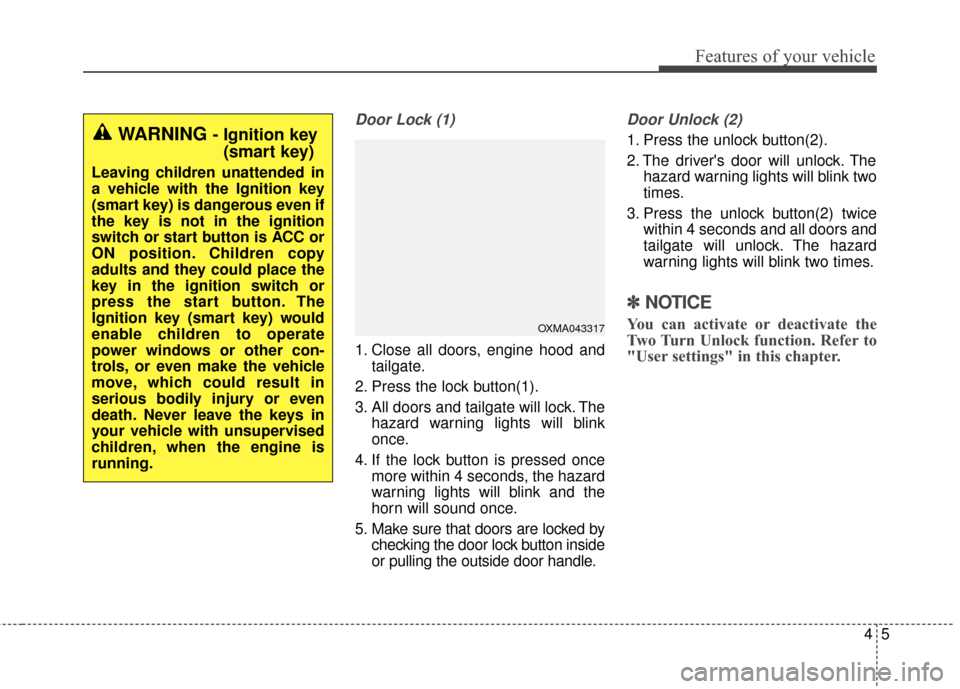
Door Lock (1)
1. Close all doors, engine hood andtailgate.
2. Press the lock button(1).
3. All doors and tailgate will lock. The hazard warning lights will blink
once.
4. If the lock button is pressed once more within 4 seconds, the hazard
warning lights will blink and the
horn will sound once.
5. Make sure that doors are locked by checking the door lock button inside
or pulling the outside door handle.
Door Unlock (2)
1. Press the unlock button(2).
2. The driver's door will unlock. Thehazard warning lights will blink two
times.
3. Press the unlock button(2) twice within 4 seconds and all doors and
tailgate will unlock. The hazard
warning lights will blink two times.
✽ ✽NOTICE
You can activate or deactivate the
Two Turn Unlock function. Refer to
"User settings" in this chapter.
WARNING - Ignition key
(smart key)
Leaving children unattended in
a vehicle with the Ignition key
(smart key) is dangerous even if
the key is not in the ignition
switch or start button is ACC or
ON position. Children copy
adults and they could place the
key in the ignition switch or
press the start button. The
Ignition key (smart key) would
enable children to operate
power windows or other con-
trols, or even make the vehicle
move, which could result in
serious bodily injury or even
death. Never leave the keys in
your vehicle with unsupervised
children, when the engine is
running.
OXMA043317
Page 92 of 500
Features of your vehicle
64
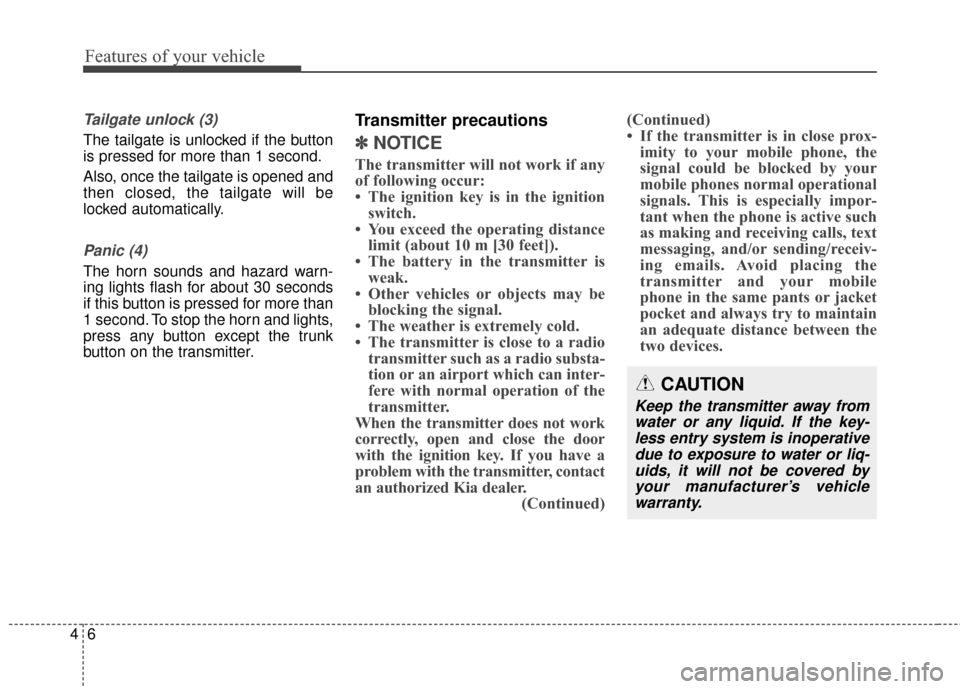
Tailgate unlock (3)
The tailgate is unlocked if the button
is pressed for more than 1 second.
Also, once the tailgate is opened and
then closed, the tailgate will be
locked automatically.
Panic (4)
The horn sounds and hazard warn-
ing lights flash for about 30 seconds
if this button is pressed for more than
1 second. To stop the horn and lights,
press any button except the trunk
button on the transmitter.
Transmitter precautions
✽ ✽NOTICE
The transmitter will not work if any
of following occur:
• The ignition key is in the ignition
switch.
• You exceed the operating distance limit (about 10 m [30 feet]).
• The battery in the transmitter is weak.
• Other vehicles or objects may be blocking the signal.
• The weather is extremely cold.
• The transmitter is close to a radio transmitter such as a radio substa-
tion or an airport which can inter-
fere with normal operation of the
transmitter.
When the transmitter does not work
correctly, open and close the door
with the ignition key. If you have a
problem with the transmitter, contact
an authorized Kia dealer. (Continued)(Continued)
• If the transmitter is in close prox-
imity to your mobile phone, the
signal could be blocked by your
mobile phones normal operational
signals. This is especially impor-
tant when the phone is active such
as making and receiving calls, text
messaging, and/or sending/receiv-
ing emails. Avoid placing the
transmitter and your mobile
phone in the same pants or jacket
pocket and always try to maintain
an adequate distance between the
two devices.
CAUTION
Keep the transmitter away from
water or any liquid. If the key-less entry system is inoperativedue to exposure to water or liq-uids, it will not be covered byyour manufacturer’s vehiclewarranty.
Page 93 of 500
47
Features of your vehicle
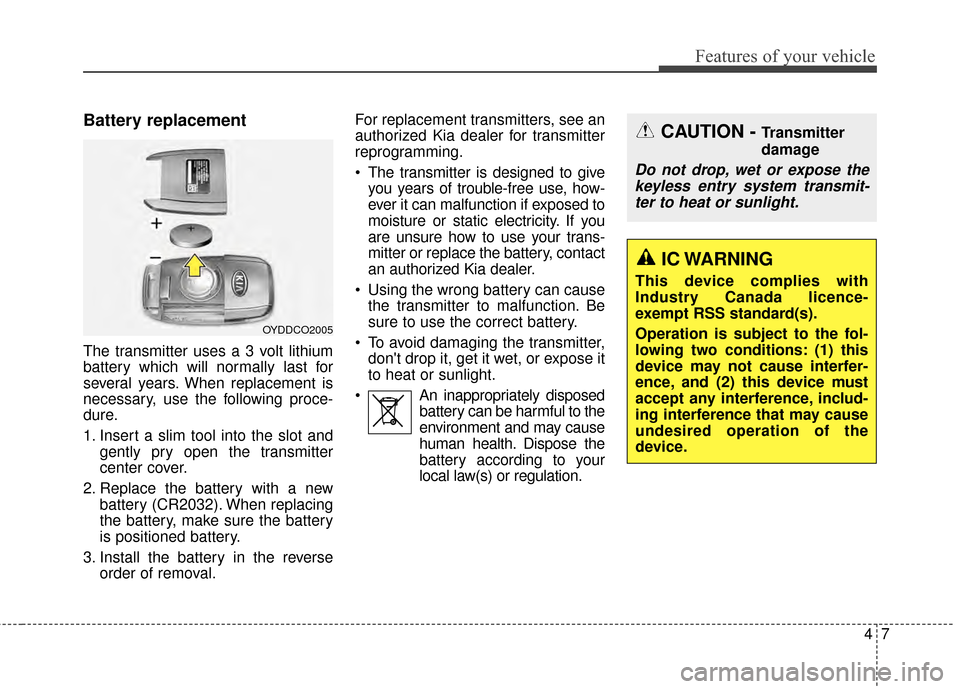
Battery replacement
The transmitter uses a 3 volt lithium
battery which will normally last for
several years. When replacement is
necessary, use the following proce-
dure.
1. Insert a slim tool into the slot andgently pry open the transmitter
center cover.
2. Replace the battery with a new battery (CR2032). When replacing
the battery, make sure the battery
is positioned battery.
3. Install the battery in the reverse order of removal. For replacement transmitters, see an
authorized Kia dealer for transmitter
reprogramming.
The transmitter is designed to give
you years of trouble-free use, how-
ever it can malfunction if exposed to
moisture or static electricity. If you
are unsure how to use your trans-
mitter or replace the battery, contact
an authorized Kia dealer.
Using the wrong battery can cause the transmitter to malfunction. Be
sure to use the correct battery.
To avoid damaging the transmitter, don't drop it, get it wet, or expose it
to heat or sunlight.
An inappropriately disposed battery can be harmful to the
environment and may cause
human health. Dispose the
battery according to your
local law(s) or regulation.
OYDDCO2005
CAUTION - Transmitter
damage
Do not drop, wet or expose thekeyless entry system transmit-ter to heat or sunlight.
IC WARNING
This device complies with
Industry Canada licence-
exempt RSS standard(s).
Operation is subject to the fol-
lowing two conditions: (1) this
device may not cause interfer-
ence, and (2) this device must
accept any interference, includ-
ing interference that may cause
undesired operation of the
device.
Page 98 of 500
Features of your vehicle
12
4
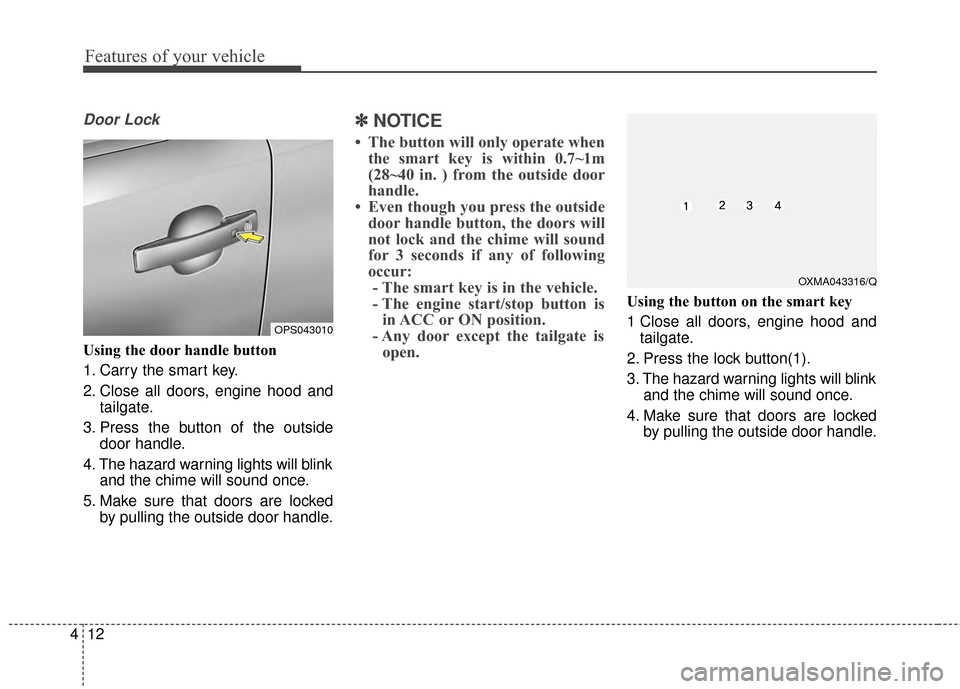
Door Lock
Using the door handle button
1. Carry the smart key.
2. Close all doors, engine hood and
tailgate.
3. Press the button of the outside door handle.
4. The hazard warning lights will blink and the chime will sound once.
5. Make sure that doors are locked by pulling the outside door handle.
✽ ✽NOTICE
• The button will only operate when
the smart key is within 0.7~1m
(28~40 in. ) from the outside door
handle.
• Even though you press the outside door handle button, the doors will
not lock and the chime will sound
for 3 seconds if any of following
occur:- The smart key is in the vehicle.
- The engine start/stop button is in ACC or ON position.
- Any door except the tailgate is open.
Using the button on the smart key
1 Close all doors, engine hood and
tailgate.
2. Press the lock button(1).
3. The hazard warning lights will blink and the chime will sound once.
4. Make sure that doors are locked by pulling the outside door handle.
OXMA043316/Q
OPS043010
Page 99 of 500
413
Features of your vehicle
Unlocking
Using the door handle button
1. Carry the smart key.
2. Press the button of the driver'soutside door handle.
3. The driver’s door will unlock. The hazard warning lights will blink and
the chime will sound two times.
4. Press the button twice within 4 seconds and all doors and the tail-
gate will unlock and the hazard
warning lights will blink and the
chime will sound two times.
❈ If you press the button of the front
passenger’s outside door handle
while carrying the smart key, all
doors will unlock.
✽ ✽
NOTICE
• The button will only operate when
the smart key is within 0.7~1m
(28~40 in. ) from the outside door
handle.
• When the smart key is recognized in the area of 0.7~1m (28~40 in.)
from the front outside door han-
dle, other people can also open the
doors.
• After unlocking the driver’s door or all doors, the door(s) will lock
automatically unless the door is
opened.
Using the button on the smart key
1. Press the unlock button(2) of the
smart key.
2. The driver’s door will unlock. The hazard warning lights will blink and
the chime will sound two times.
3. Press the unlock button(2) twice within 4 seconds and all doors and
the tailgate will unlock. The hazard
warning lights will blink and the
chime will sound two times.
✽ ✽NOTICE
After pressing the button, the doors
will lock automatically unless any
door is opened within 30 seconds.
✽ ✽NOTICE
You can activate or deactivate the
Two Turn Unlock function. Refer to
"User settings" in this chapter.
Page 100 of 500
Features of your vehicle
14
4
Tailgate unlocking
Using the tailgate handle button
1. Carry the smart key.
2. Press the tailgate handle button.
3. When all doors are locked, the
hazard warning lights will blink two
times.
Once the tailgate is opened and
then closed, the tailgate will lock
automatically.
✽ ✽NOTICE
The button will only operate when
the smart key is within 0.7~1m
(28~40in.) from the tailgate handle.
Using the button on the smart key
1. Press the tailgate unlock button(3)
for more than 1 second.
2. When all doors are locked, the hazard warning lights will blink two
times.
Panic
1. Press the panic button(4) for morethan 1 second.
2. The horn sounds and hazard warning light flash for about 30
seconds.
✽ ✽NOTICE
To stop the horn and lights, press
any button on the smart key.
Start-up
You can start the engine without
inserting the key. For detailed infor-
mation refer to the “Engine start/stop
button” in chapter 5.
Loss of the smart key
A maximum of 2 smart keys can be
registered to a single vehicle.
If you happen to lose your smart key,
you will not be able to start the
engine. You should immediately take
the vehicle and remaining key to your
authorized Kia dealer(tow the vehi-
cle, if necessary) to protect it from
potential theft.