ESP KIA Soul 2014 2.G Owner's Guide
[x] Cancel search | Manufacturer: KIA, Model Year: 2014, Model line: Soul, Model: KIA Soul 2014 2.GPages: 500, PDF Size: 13.89 MB
Page 282 of 500
Features of your vehicle
196
4
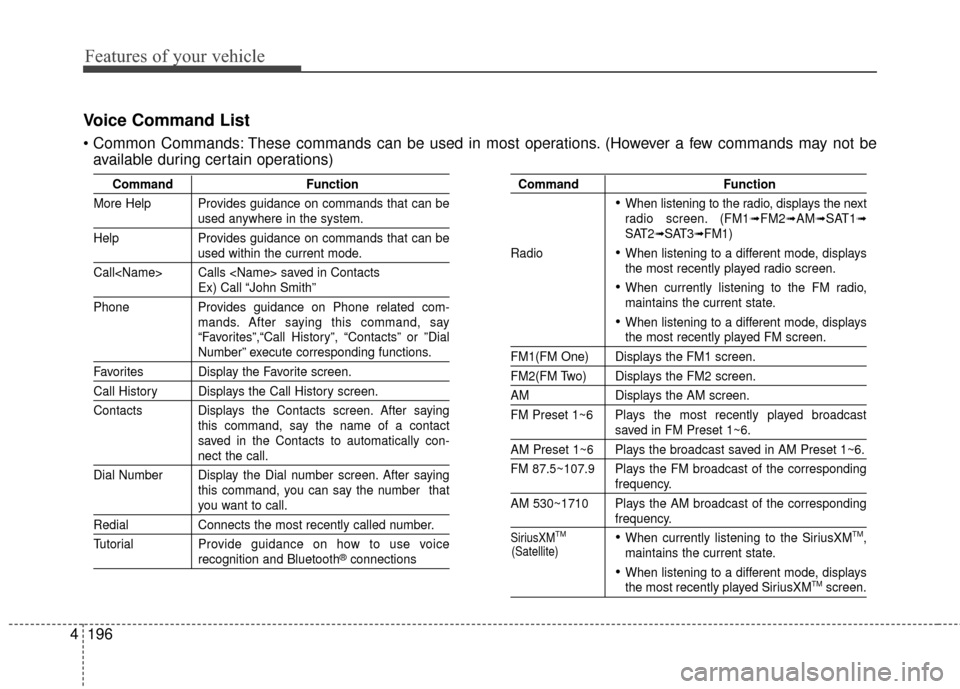
Voice Command List
These commands can be used in most operations. (However a few commands may not be
available during certain operations)
Command Function
More Help Provides guidance on commands that can be
used anywhere in the system.
Help Provides guidance on commands that can be
used within the current mode.
Call
Ex) Call “John Smith”
Phone Provides guidance on Phone related com- mands. After saying this command, say
“Favorites”,“Call History”, “Contacts” or ”Dial
Number” execute corresponding functions.
Favorites Display the Favorite screen.
Call History Displays the Call History screen.
Contacts Displays the Contacts screen. After sayingthis command, say the name of a contact
saved in the Contacts to automatically con-
nect the call.
Dial Number Display the Dial number screen. After saying this command, you can say the number that
you want to call.
RedialConnects the most recently called number.
Tutorial Pro vide guidance on how to use voice
recognition and Bluetooth®connections
Command Function
When listening to the radio, displays the next
radio screen. (FM1➟FM2➟AM➟SAT1➟SAT2➟SAT3➟FM1)
Radio
When listening to a different mode, displays
the most recently played radio screen.
When currently listening to the FM radio,
maintains the current state.
When listening to a different mode, displaysthe most recently played FM screen.
FM1(FM One) Displays the FM1 screen.
FM2(FM Two) Displays the FM2 screen.
AM Displays the AM screen.
FM Preset 1~6 Plays the most recently played broadcast
saved in FM Preset 1~6.
AM Preset 1~6 Plays the broadcast saved in AM Preset 1~6.
FM 87.5~107.9 Plays the FM broadcast of the corresponding
frequency.
AM 530~1710 Plays the AM broadcast of the corresponding
frequency.
SiriusXMTMWhen currently listening to the SiriusXMTM,
maintains the current state.
When listening to a different mode, displaysthe most recently played SiriusXMTMscreen.
(Satellite)
Page 291 of 500
Driving your vehicle
45
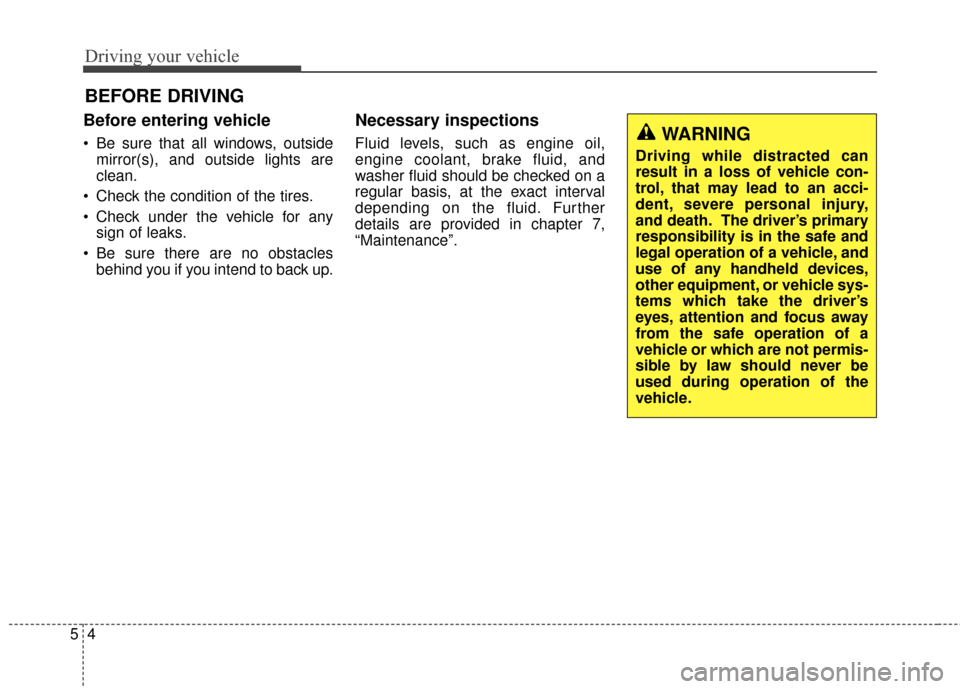
Before entering vehicle
• Be sure that all windows, outsidemirror(s), and outside lights are
clean.
Check the condition of the tires.
Check under the vehicle for any sign of leaks.
Be sure there are no obstacles behind you if you intend to back up.
Necessary inspections
Fluid levels, such as engine oil,
engine coolant, brake fluid, and
washer fluid should be checked on a
regular basis, at the exact interval
depending on the fluid. Further
details are provided in chapter 7,
“Maintenance”.WARNING
Driving while distracted can
result in a loss of vehicle con-
trol, that may lead to an acci-
dent, severe personal injury,
and death. The driver’s primary
responsibility is in the safe and
legal operation of a vehicle, and
use of any handheld devices,
other equipment, or vehicle sys-
tems which take the driver’s
eyes, attention and focus away
from the safe operation of a
vehicle or which are not permis-
sible by law should never be
used during operation of the
vehicle.
BEFORE DRIVING
Page 292 of 500
55
Driving your vehicle
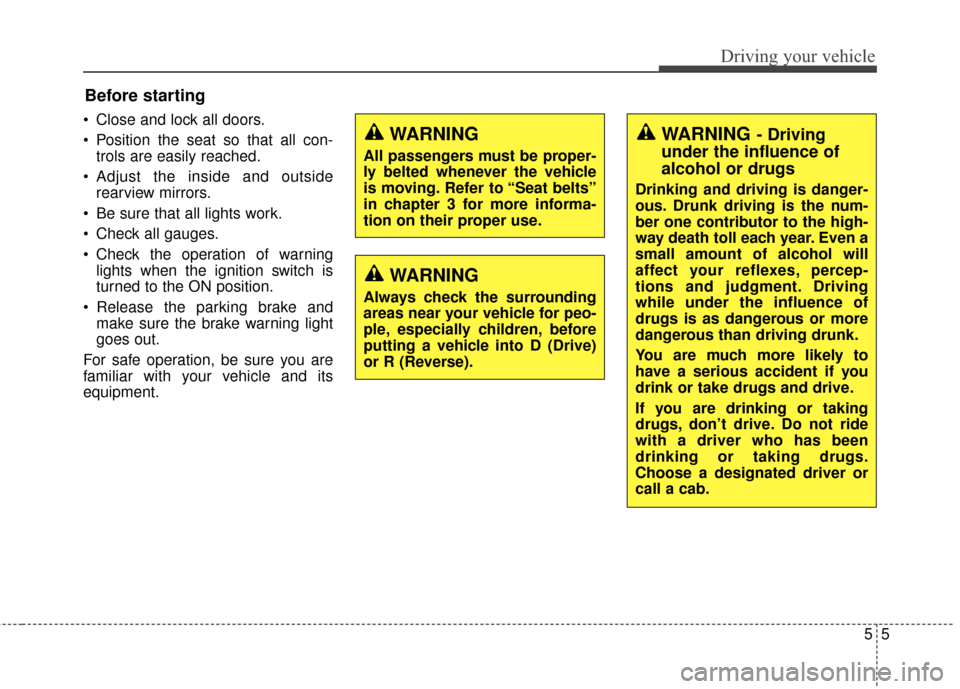
Close and lock all doors.
Position the seat so that all con-trols are easily reached.
Adjust the inside and outside rearview mirrors.
Be sure that all lights work.
Check all gauges.
Check the operation of warning lights when the ignition switch is
turned to the ON position.
Release the parking brake and make sure the brake warning light
goes out.
For safe operation, be sure you are
familiar with your vehicle and its
equipment.
Before starting
WARNING- Driving
under the influence of
alcohol or drugs
Drinking and driving is danger-
ous. Drunk driving is the num-
ber one contributor to the high-
way death toll each year. Even a
small amount of alcohol will
affect your reflexes, percep-
tions and judgment. Driving
while under the influence of
drugs is as dangerous or more
dangerous than driving drunk.
You are much more likely to
have a serious accident if you
drink or take drugs and drive.
If you are drinking or taking
drugs, don’t drive. Do not ride
with a driver who has been
drinking or taking drugs.
Choose a designated driver or
call a cab.
WARNING
All passengers must be proper-
ly belted whenever the vehicle
is moving. Refer to “Seat belts”
in chapter 3 for more informa-
tion on their proper use.
WARNING
Always check the surrounding
areas near your vehicle for peo-
ple, especially children, before
putting a vehicle into D (Drive)
or R (Reverse).
Page 293 of 500
Driving your vehicle
65
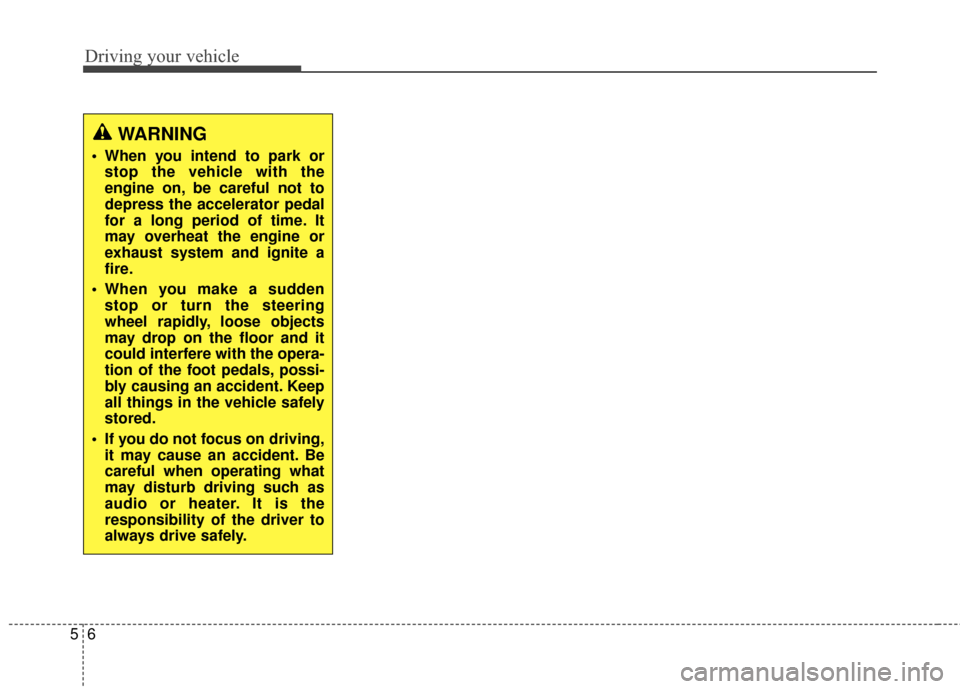
WARNING
When you intend to park orstop the vehicle with the
engine on, be careful not to
depress the accelerator pedal
for a long period of time. It
may overheat the engine or
exhaust system and ignite a
fire.
When you make a sudden stop or turn the steering
wheel rapidly, loose objects
may drop on the floor and it
could interfere with the opera-
tion of the foot pedals, possi-
bly causing an accident. Keep
all things in the vehicle safely
stored.
If you do not focus on driving, it may cause an accident. Be
careful when operating what
may disturb driving such as
audio or heater. It is the
responsibility of the driver to
always drive safely.
Page 304 of 500
517
Driving your vehicle
Downshifting
When you must slow down in heavy
traffic or while driving up steep hills,
downshift before the engine starts to
labor. Downshifting reduces the
chance of stalling and gives better
acceleration when you again need to
increase your speed. When the vehi-
cle is traveling down steep hills,
downshifting helps maintain safe
speed and prolongs brake life.
Good driving practices
Never take the vehicle out of gearand coast down a hill. This is
extremely hazardous. Always leave
the vehicle in gear.
Don't "ride" the brakes. This can cause them to overheat and mal-
function. Instead, when you are
driving down a long hill, slow down
and shift to a lower gear. When you
do this, engine braking will help
slow down the vehicle.
Slow down before shifting to a lower gear. This will help avoid
over-revving the engine, which can
cause damage.
Slow down when you encounter cross winds. This gives you much
better control of your vehicle.
Be sure the vehicle is completely stopped before you attempt to shift
into reverse. The transaxle can be
damaged if you do not. To shift into
reverse, depress the clutch, move
the shift lever to neutral, then shift
to the reverse position. Exercise extreme caution when
driving on a slippery surface. Be
especially careful when braking,
accelerating or shifting gears. On a
slippery surface, an abrupt change
in vehicle speed can cause the
drive wheels to lose traction and
the vehicle to go out of control.
Page 307 of 500
Driving your vehicle
20
5
For smooth operation, depress the
brake pedal and the lock release but-ton when shifting from N (Neutral) toa forward or reverse gear. Transaxle ranges
The indicator in the instrument clus-
ter displays the shift lever position
when the ignition switch is in the ON
position.
P (Park)
Always come to a complete stop
before shifting into P (Park). This
position locks the transaxle and pre-
vents the drive wheels from rotating.
WARNING- Automatic
transaxle
Always check the surrounding
areas near your vehicle for
people, especially children,
before shifting the shift lever
into D (Drive) or R (Reverse).
Before leaving the driver’s seat, always make sure the
shift lever is in the P (Park)
position; then set the parking
brake fully and shut the
engine off. Unexpected and
sudden vehicle movement
can occur if these precautions
are not followed in the order
identified.
CAUTION
To avoid damage to your transaxle, do not acceleratethe engine in R (Reverse) orany forward gear position withthe brakes on.
When stopped on an incline, do not hold the vehicle withthe engine power. Use theservice brake or the parkingbrake.
Do not shift from N (Neutral) or P (Park) into D (Drive), or R(Reverse) when the engine isabove idle speed.
WARNING
Shifting into P (Park) while the vehicle is in motion will cause
the drive wheels to lock which
will cause you to lose control
of the vehicle.
Do not use the P (Park) posi- tion in place of the parking
brake. Always make sure the
shift lever is latched in the P
(Park) position and set the
parking brake fully.
Never leave a child unattend- ed in a vehicle.
Page 311 of 500
Driving your vehicle
24
5
Good driving practices
Never move the gear shift lever
from P (Park) to any other position
with the accelerator pedal
depressed.
Never move the gear shift lever into P (Park) when the vehicle is in
motion.
Be sure the vehicle is completely stopped before you attempt to shift
into R (Reverse) or D (Drive).
Never take the vehicle out of gear and coast down a hill. This may be
extremely hazardous. Always leave
the vehicle in gear when moving.
Do not "ride" the brakes. This can cause them to overheat and mal-
function. Instead, when you are
driving down a long hill, slow down
and shift to a lower gear. When you
do this, engine braking will help
slow down the vehicle.
Slow down before shifting to a lower gear. Otherwise, the lower
gear may not be engaged. Always use the parking brake. Do
not depend on placing the
transaxle in P (Park) to keep the
vehicle from moving.
Exercise extreme caution when driving on a slippery surface. Be
especially careful when braking,
accelerating or shifting gears. On a
slippery surface, an abrupt change
in vehicle speed can cause the
drive wheels to lose traction and
the vehicle to go out of control.
Optimum vehicle performance and economy is obtained by smoothly
depressing and releasing the
accelerator pedal.WARNING
Always buckle-up! In a colli-sion, an unbelted occupant is
significantly more likely to be
seriously injured or killed than
a properly belted occupant.
Avoid high speeds when cor- nering or turning.
Do not make quick steering wheel movements, such as
sharp lane changes or fast,
sharp turns.
The risk of rollover is greatly increased if you lose control
of your vehicle at highway
speeds.
Loss of control often occurs if two or more wheels drop off
the roadway and the driver
oversteers to reenter the road-
way.
In the event your vehicle leaves the roadway, do not
steer sharply. Instead, slow
down before pulling back into
the travel lanes.
Never exceed posted speed limits.
Page 317 of 500
Driving your vehicle
30
5
Anti-lock brake system (ABS)The ABS continuously senses the
speed of the wheels. If the wheels
are going to lock, the ABS system
repeatedly modulates the hydraulic
brake pressure to the wheels.
When you apply your brakes under
conditions which may lock the
wheels, you may hear a “tik-tik’’
sound from the brakes, or feel a cor-
responding sensation in the brake
pedal. This is normal and it means
your ABS is active.
In order to obtain the maximum ben-
efit from your ABS in an emergency
situation, do not attempt to modulate
your brake pressure and do not try to
pump your brakes. Press your brake
pedal as hard as possible or as hard
as the situation allows the ABS to
control the force being delivered to
the brakes.
WARNING
ABS (or ESC) will not prevent
accidents due to improper or
dangerous driving maneuvers.
Even though vehicle control is
improved during emergency
braking, always maintain a safe
distance between you and
objects ahead. Vehicle speeds
should always be reduced dur-
ing extreme road conditions.
The braking distance for vehi-
cles equipped with an anti-lock
braking system (or Electronic
Stability Control System) may
be longer than for those without
it in the following road condi-
tions.
(Continued)
(Continued)
During these conditions the
vehicle should be driven at
reduced speeds:
Rough, gravel or snow-cov-ered roads.
On roads where the road sur- face is pitted or has different
surface height.
The safety features of an ABS
(or ESC) equipped vehicle
should not be tested by high
speed driving or cornering. This
could endanger the safety of
yourself or others.
Page 320 of 500
533
Driving your vehicle
The Electronic Stability Control
(ESC) system is an electronic sys-
tem designed to help the driver main-
tain vehicle control under adverse
conditions. It is not a substitute for
safe driving practices. Factors includ-
ing speed, road conditions and driv-
er steering input can all affect
whether ESC will be effective in pre-
venting a loss of control. It is still your
responsibility to drive and corner at
reasonable speeds and to leave a
sufficient margin of safety.
When you apply your brakes under
conditions which may lock the
wheels, you may hear a “tik-tik’’
sound from the brakes, or feel a cor-
responding sensation in the brake
pedal. This is normal and it means
your ESC is active.
✽ ✽NOTICE
A click sound may be heard in the
engine compartment when the vehi-
cle begins to move after the engine is
started. These conditions are normal
and indicate that the Electronic
Stability Control System is function-
ing properly.
ESC operation
ESC ON condition
When the ignition is turnedON, ESC and ESC OFF
indicator lights illuminate for
approximately 3 seconds,
then ESC is turned on.
ton for at least half a sec-
ond after turning the igni-
tion ON to turn ESC off.
(ESC OFF indicator will
illuminate). To turn the
ESC on, press the ESC
OFF button (ESC OFF
indicator light will go off).
you may hear a slight tick-
ing sound. This is the ESC
performing an automatic
system self-check and does
not indicate a problem. When operating
When the ESC is in opera-
tion, the ESC indicator light
blinks.
Stability Control is operat-
ing properly, you can feel a
slight pulsation in the vehi-
cle. This is only the effect
of brake control and indi-
cates nothing unusual.
mud or driving on a slip-
pery road, pressing the
accelerator pedal may not
cause the engine rpm
(revolutions per minute) to
increase.
-
Page 323 of 500
Driving your vehicle
36
5
✽
✽
NOTICE
• When operating the vehicle on a
dynamometer, ensure that the
ESC is turned off (ESC OFF light
illuminated). If the ESC is left on,
it may prevent the vehicle speed
from increasing, and result in false
diagnosis.
• Turning the ESC off does not affect ABS or brake system opera-
tion.
Vehicle stability management
(VSM)
This system provides further
enhancements to vehicle stability
and steering responses when a vehi-
cle is driving on a slippery road or a
vehicle detects changes in coeffi-
cient of friction between right wheels
and left wheels when braking.
VSM operation
When the VSM is in operation, ESC
indicator light ( ) blinks.
When the vehicle stability manage-
ment is operating properly, you can
feel a slight pulsation in the vehicle
and/or abnormal steering responses
(EPS). This is only the effect of brake
and EPS control and indicates noth-
ing unusual. The VSM does not operate when:
Driving on bank road such as gra-
dient or incline
Driving in reverse
ESC OFF indicator light ( ) remains on the instrument cluster
EPS indicator light remains on the instrument cluster
VSM operation off
If you press the ESC OFF button to
turn off the ESC, the VSM will also
cancel and the ESC OFF indicator
light ( ) illuminates.
To turn on the VSM, press the button
again. The ESC OFF indicator light
goes out.