key KIA SOUL 2014 Navigation System Quick Reference Guide
[x] Cancel search | Manufacturer: KIA, Model Year: 2014, Model line: SOUL, Model: KIA SOUL 2014Pages: 76, PDF Size: 4.59 MB
Page 60 of 76

57
00350052005800570048
Canceling Route
Cancel the route.
Press the
NAVI hard key . ▶
Press
the
Route tab. ▶
Select
Cancel Route .
Click Cancel Route the icon.
Press the Yes button to cancel the
route.
Name Description
Display the dis-
tance and direction
to the first turn
point.
Display the dis-
tance and direction
to the second turn
point.
Display the lane
information at the
current location.
Display the recom-
mended direction
in white, travelable
direction in white,
and the non-trav-
elable direction in
grey.
Displays the dis-
tance to the des-
tination and the
estimated time of
arrival. Press the
button to check the
detailed informa-
tion.
Cancel the route.
Possible to change
to preliminary guid-
ance, TBT guid-
ance, and zoom-on
guidance screens.
Destination InfoDisplays the desti-
nation information.
Page 61 of 76

58
Display Route Information
Press the NAVI hard key. ▶
Press
the
Route tab. ▶
Select
Route Info .
Press the Route Info icon.
Possible to check the information on
the route. Select the desired item to
chec
k the map information.
Click the
Avoid Street button to avoid
the street or road.
Check the desired item and press
the
Done button to finish.
Route Overview
Check the information on route
including the distance, expected
time, toll fees, etc.
Press the
NAVI hard key. ▶
Press
the
Route tab. ▶
Select
Route Overview .
Press the Route Overview icon.
Name Description
Route OptionsChange the search
option.
Route PreviewPreview turn-by-
tur
n list.
Edit RouteProvide informa-
tion on surround-
ing facilities.
003100440059004C004A00440057004C00520051
Page 62 of 76
59
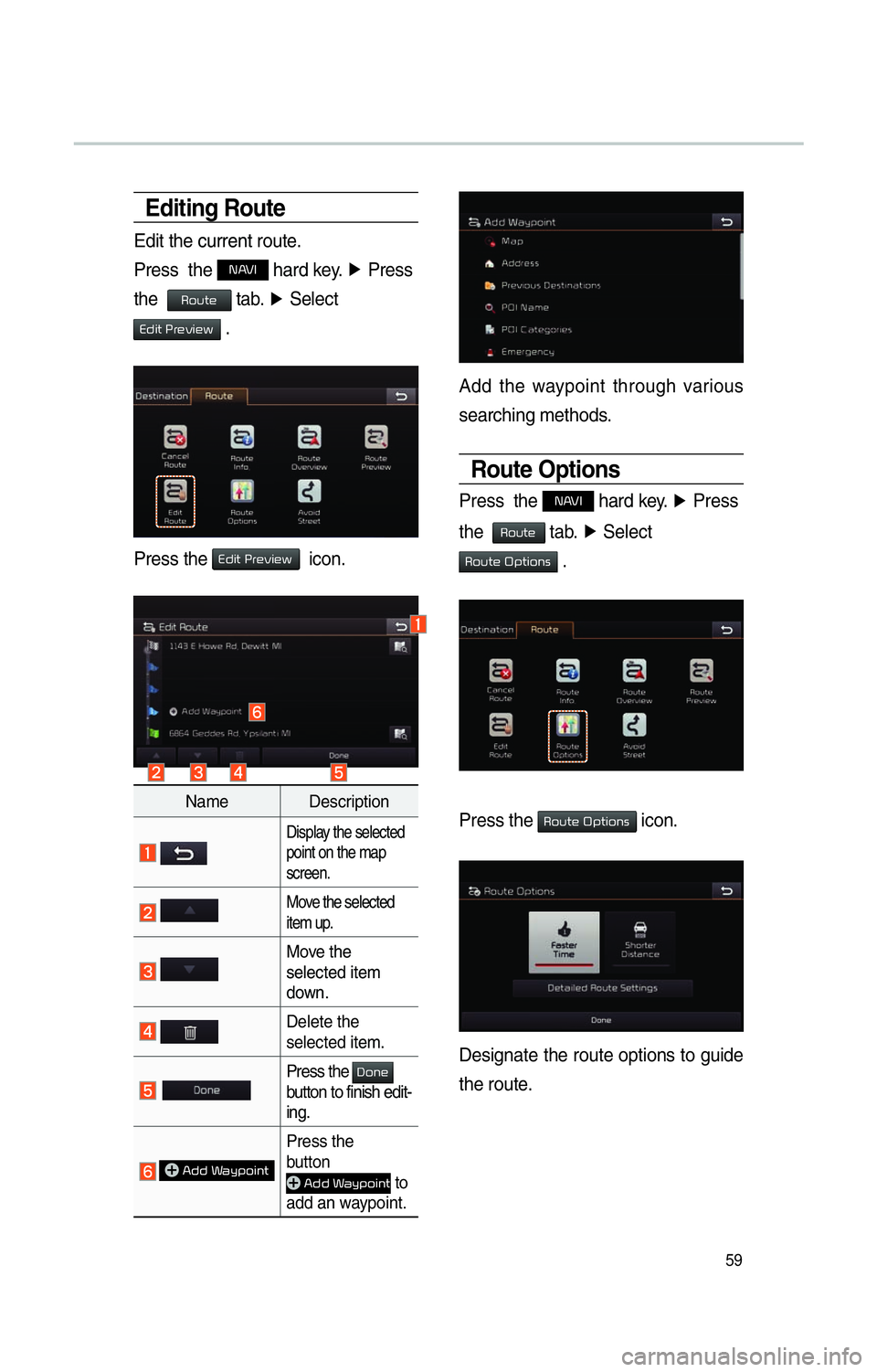
Editing Route
Edit the current route.
Press the
NAVI hard key. ▶
Press
the
Route tab. ▶
Select
Edit Preview .
Press the Edit Preview icon.
Name Description
Display the selected
point on the map
screen.
Move the selected
item up .
Move the
selected item
do
wn.
Delete the
selected item.
Press the Done
button to finish edit-
ing.
Add Waypoint
Press the
button
Add Waypoint to
add an waypoint.
Add the waypoint through various
searching methods.
Route Options
Press the NAVI hard key. ▶
Press
the
Route tab. ▶
Select
Route Options .
Press the Route Options icon.
Designate the route options to guide
the route.
Page 63 of 76
60
Avoid Stre et
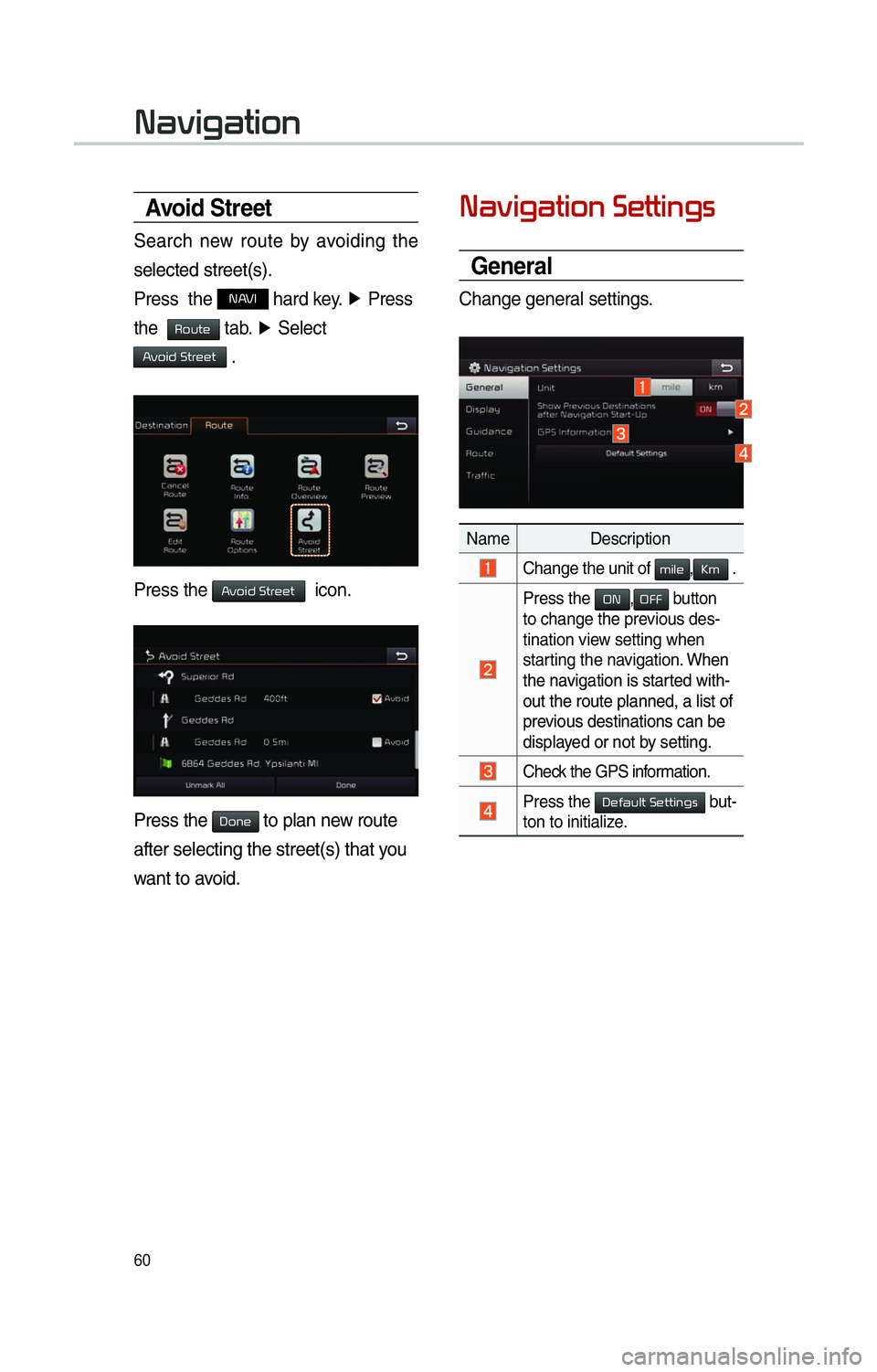
Search new route by avoiding the
selected street(s).
Press the
NAVI hard key. ▶
Press
the
Route tab. ▶
Select
Avoid Street .
Press the Avoid Street icon.
Press the Done to plan new route
after selecting the street(s) that you
want to avoid.
003100440059004C004A00440057004C0052005100030036004800570057004C0051004A0056
General
Change general settings.
Name Description
Change the unit of mile,Km .
Press the
ON,OFF button
to change the previous des-
tination view setting when
starting the navigation. When
the na
vigation is started with-
out the route planned, a list of
previous destinations can be
displayed or not by setting.
Check the GPS information.
Press the 00270048004900440058004F005700030036004800570057004C0051004A0056 but-
ton to initialize.
003100440059004C004A00440057004C00520051
Page 66 of 76
63
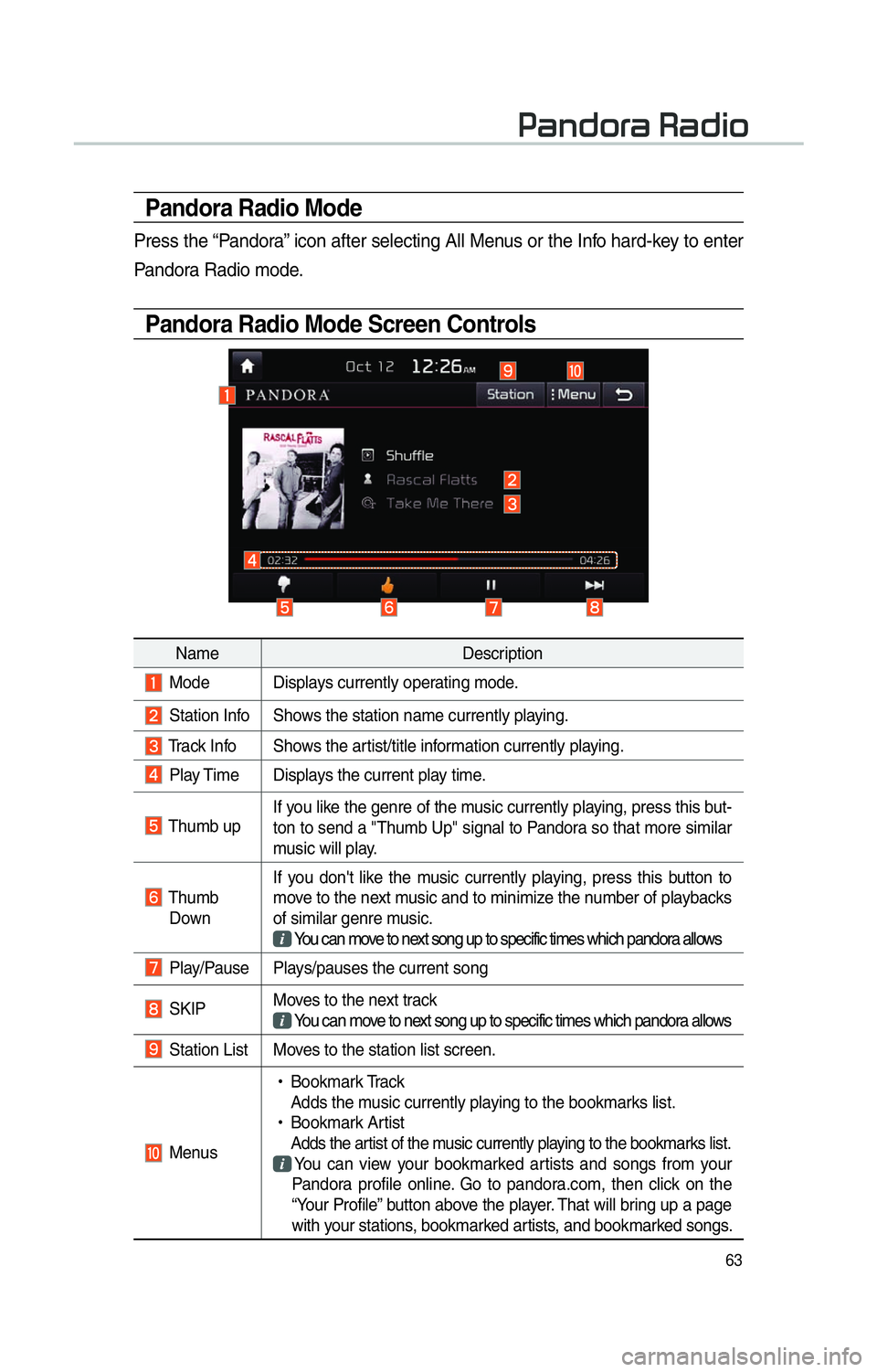
Pandora Radio Mode
Press the “Pandora” icon after selecting All Menus or the Info hard-key to enter
Pandora Radio mode.
Pandora Radio Mode Screen Controls
00330044005100470052005500440003003500440047004C0052
NameDescription
Mode Displays currently operating mode.
Station Info Shows the station name currently playing.
Track Info Shows the artist/title information currently playing.
Play Time Displays the current play time.
Thumb up If you like the genre of the music currently playing, press this but-
ton to send a "Thumb Up" signal to Pandora so that more similar
music will play.
Thumb
Down If you don't like the music currently playing, press this button to
move to the next music and to minimize the number of playbacks
of similar genre music.
You can move to next song up to specific times which pandora allows
Play/Pause Plays/pauses the current song
SKIP Moves to the next track
You can move to next song up to specific times which pandora allows
Station List Moves to the station list screen.
Menus
!Ÿ
Bookmark Track
Adds the music currently playing to the bookmarks list.
!Ÿ
Bookmark Artist
Adds the artist of the music currently playing to the bookmarks list. You can view your bookmarked artists and songs from your
Pandora profile online. Go to pandora.com, then click on the
“Your Profile” button above the player. That will bring up a page
with your stations, bookmarked artists, and bookmarked songs.
Page 67 of 76

64
0036004C0055004C00580056003B003000030027004400570044
About SiriusXM™ Data ServiceAbout SiriusXM™ Data Service
The SiriusXM™ Data Service is a
paid membership Satellite radio ser-
vice which provides users
with traffic, stock, sports, and
weather information.
However, weather information is not
supported for vehicles purchased in
Canada.
Accessing
SiriusXM™ Data
Press the “SiriusXM Data” icon after
selecting
0024004F004F000300300048005100580056 or the INFO
hard-key to enter the SiriusXM™
Data mode.
Weather Forexcast
This service provides current
weather information and weather
forecasts for the
next five days in your region. To
change the region, press the Other
City button and select the desired
region.
Warnings and Advisories
This service provides weather
warnings and advisories, such as
tornado, storm, Floodflood, etc. as
symbols on the Navigation map.
Page 68 of 76

65
SiriusXM™ Fuel
Price Information
At the “SiriusXM Data” screen, press
the “Fuel Prices” icon to enter the
Fuel Prices Information mode.
Search for Nearby Stations,
and Register Key Locations as
Favorite Stations.
Search for nearby stations with the
“Nearby Stations” menu.
It shows station locations, starting
from the nearest one, and select
“Nearest” menu on the top right side
to further sort them by price or brand
name.
Select the 052F button to the right of
the list to register key locations as
a Favorite Station so that you can
go there again with the “Favorite
Stations” menu. Select the list to
move to navigation destination select
screen to receive guidance.
My Fuel Type Settings
With the “Filters” menu, you can
select fuel types and favorite brands.
When searching for Nearby Stations,
the results will reflect selected fuel
types and brand information.
Page 70 of 76

67
Press the team name to check daily
results and recent schedules for that
team.
SiriusXM™ Movie
Information
Press the “Movies” icon to enter the
Mo
vie mode.
You can check recent movies and
nearby theaters, and also register
your favorite theater locations.
Search for Nearby Theaters, and
Register Any Key Locations as
Favorite Theaters.
In the “Nearby Theaters” menu, you
can search for any nearby theaters.
It shows theaters, starting from
the nearest one, and selecting the
“Nearest” menu at the top right side
will sort them by name.