driving KIA SOUL 2017 Owner's Manual
[x] Cancel search | Manufacturer: KIA, Model Year: 2017, Model line: SOUL, Model: KIA SOUL 2017Pages: 589, PDF Size: 13.3 MB
Page 129 of 589
443
Features of your vehicle
MIRRORS
Inside rearview mirror
Adjust the rearview mirror so that the
center view through the rear window
is seen. Make this adjustment before
you start driving.
Do not place objects in the rear seat
or cargo area which would interfere
with your vision through the rear win-
dow.
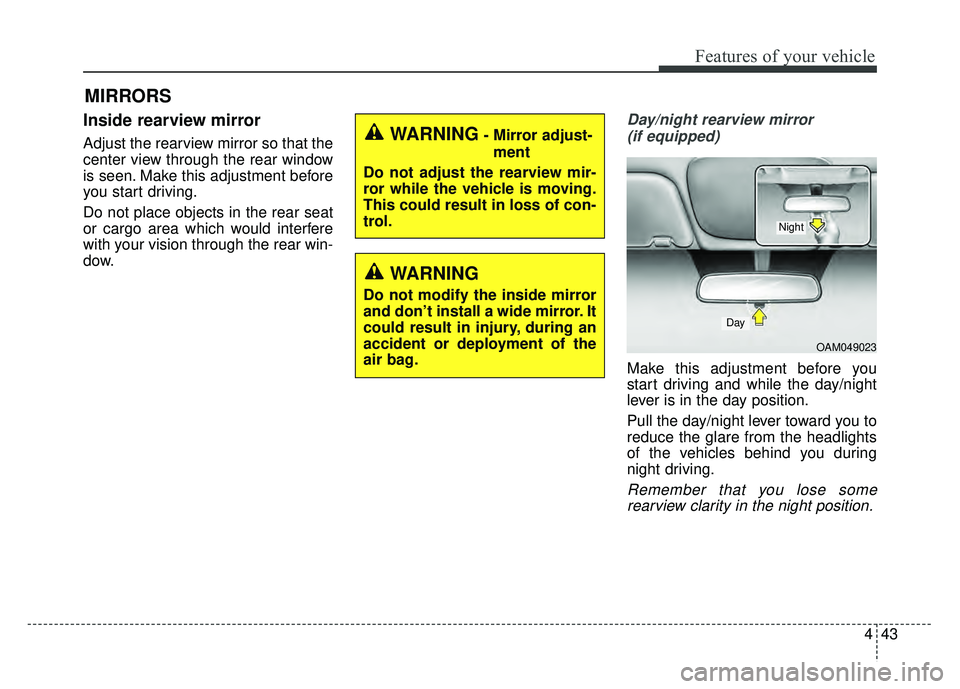
Day/night rearview mirror (if equipped)
Make this adjustment before you
start driving and while the day/night
lever is in the day position.
Pull the day/night lever toward you to
reduce the glare from the headlights
of the vehicles behind you during
night driving.
Remember that you lose somerearview clarity in the night position.
WARNING- Mirror adjust-
ment
Do not adjust the rearview mir-
ror while the vehicle is moving.
This could result in loss of con-
trol.
WARNING
Do not modify the inside mirror
and don’t install a wide mirror. It
could result in injury, during an
accident or deployment of the
air bag.
OAM049023
Day
Night
Page 130 of 589
Features of your vehicle
44
4
Electric chromic mirror (ECM)
(if equipped)
The electric rearview mirror automat-
ically controls the glare from the
headlights of the vehicles behind you
in nighttime or low light driving condi-
tions. The sensor mounted in the mir-
ror senses the light level around the
vehicle, and automatically controls
the headlight glare from the vehicles
behind you.
When the engine is running, the
glare is automatically controlled by
the sensor mounted in the rearview
mirror.
Whenever the shift lever is shifted
into reverse (R), the mirror will auto-
matically go to the brightest setting in
order to improve the drivers view
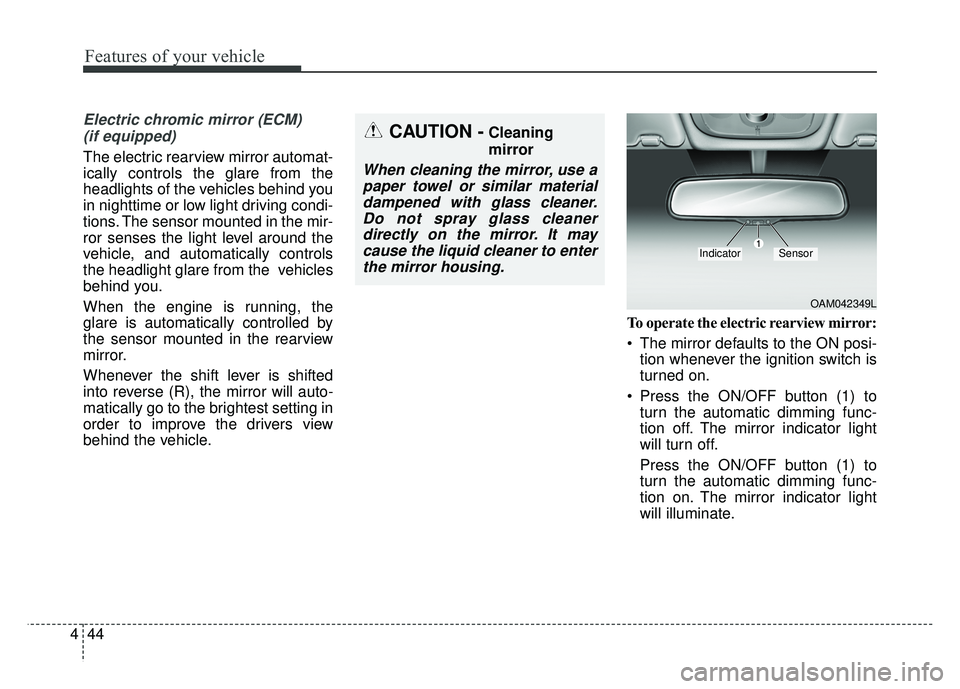
behind the vehicle. To operate the electric rearview mirror:
The mirror defaults to the ON posi-
tion whenever the ignition switch is
turned on.
Press the ON/OFF button (1) to turn the automatic dimming func-
tion off. The mirror indicator light
will turn off.
Press the ON/OFF button (1) to
turn the automatic dimming func-
tion on. The mirror indicator light
will illuminate.
CAUTION -Cleaning
mirror
When cleaning the mirror, use apaper towel or similar materialdampened with glass cleaner.Do not spray glass cleanerdirectly on the mirror. It maycause the liquid cleaner to enterthe mirror housing.
OAM042349L
IndicatorSensor
Page 131 of 589
445
Features of your vehicle
Outside rearview mirror
Be sure to adjust the mirror angles
before driving.
Your vehicle is equipped with both
left-hand and right-hand outside
rearview mirrors. The mirrors can be
adjusted remotely with the remote
switch. The mirror heads can be fold-
ed back to prevent damage during an
automatic vehicle wash or when
passing through a narrow street.
The right outside rearview mirror is
convex. Objects seen in the mirror
are closer than they appear.
Use your interior rearview mirror or
direct observation to determine the
actual distance of following vehicles
when changing lanes.If the mirror is jammed with ice, do
not adjust the mirror by force. Use an
approved spray de-icer (not radiator
antifreeze) to release the frozen
mechanism or move the vehicle to a
warm place and allow the ice to melt.CAUTION- Rearview
mirror
Do not scrape ice off the mirrorface; this may damage the sur-face of the glass. If ice shouldrestrict the movement of themirror, do not force the mirrorfor adjustment. To remove ice,use a deicer spray, or a spongeor soft cloth with very warmwater.
WARNING- Mirror adjust-
ment
Do not adjust or fold the outside
rearview mirrors while the vehi-
cle is moving. This could result
in loss of control.
Page 137 of 589
451
Features of your vehicle
Engine Coolant TemperatureGauge
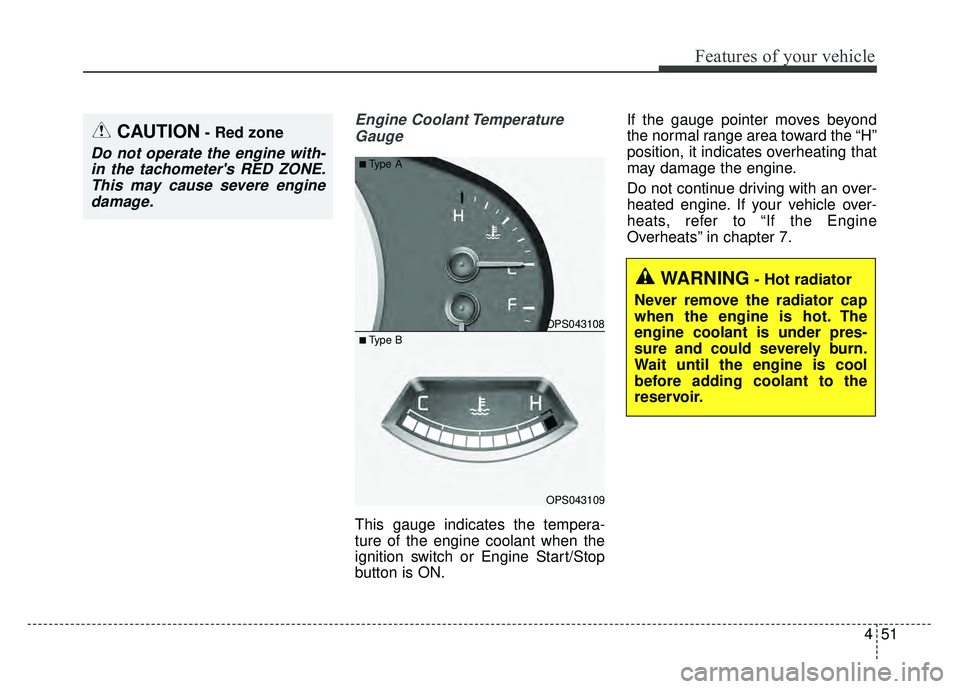
This gauge indicates the tempera-
ture of the engine coolant when the
ignition switch or Engine Start/Stop
button is ON. If the gauge pointer moves beyond
the normal range area toward the “H”
position, it indicates overheating that
may damage the engine.
Do not continue driving with an over-
heated engine. If your vehicle over-
heats, refer to “If the Engine
Overheats” in chapter 7.
CAUTION- Red zone
Do not operate the engine with-
in the tachometer's RED ZONE.This may cause severe enginedamage.
OPS043108
OPS043109
■Type A
■ Type B
WARNING- Hot radiator
Never remove the radiator cap
when the engine is hot. The
engine coolant is under pres-
sure and could severely burn.
Wait until the engine is cool
before adding coolant to the
reservoir.
Page 138 of 589
Features of your vehicle
52
4
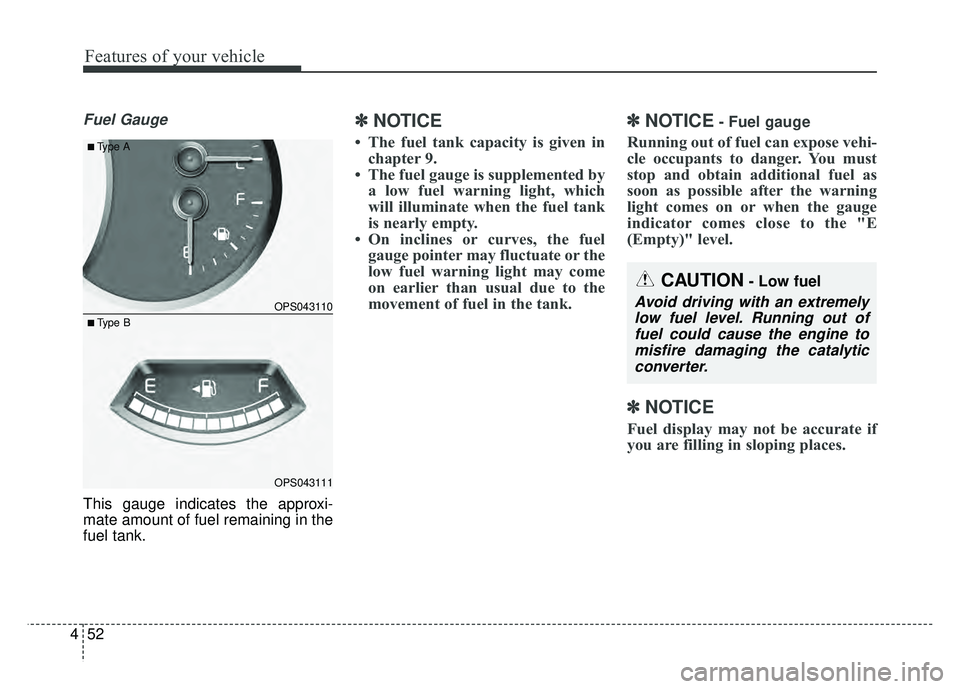
Fuel Gauge
This gauge indicates the approxi-
mate amount of fuel remaining in the
fuel tank.
✽ ✽
NOTICE
• The fuel tank capacity is given in
chapter 9.
• The fuel gauge is supplemented by a low fuel warning light, which
will illuminate when the fuel tank
is nearly empty.
• On inclines or curves, the fuel gauge pointer may fluctuate or the
low fuel warning light may come
on earlier than usual due to the
movement of fuel in the tank.
✽ ✽ NOTICE- Fuel gauge
Running out of fuel can expose vehi-
cle occupants to danger. You must
stop and obtain additional fuel as
soon as possible after the warning
light comes on or when the gauge
indicator comes close to the "E
(Empty)" level.
✽ ✽NOTICE
Fuel display may not be accurate if
you are filling in sloping places.
OPS043110
OPS043111
■Type A
■ Type B
CAUTION- Low fuel
Avoid driving with an extremely
low fuel level. Running out offuel could cause the engine tomisfire damaging the catalyticconverter.
Page 140 of 589
Features of your vehicle
54
4
Transaxle Shift Indicator
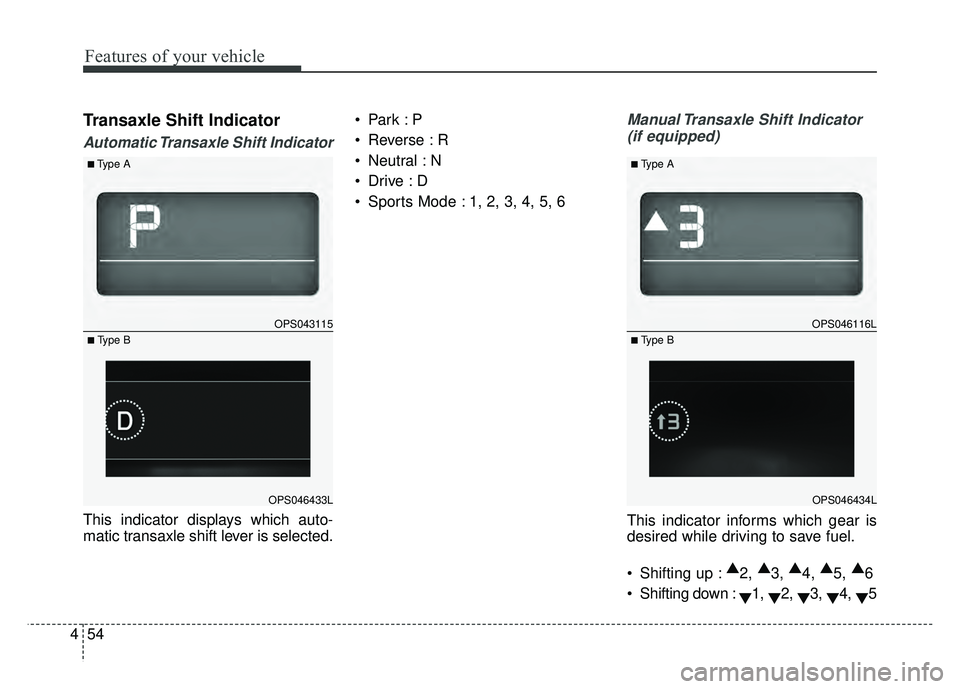
Automatic Transaxle Shift Indicator
This indicator displays which auto-
matic transaxle shift lever is selected.
Reverse : R
Neutral : N
Sports Mode : 1, 2, 3, 4, 5, 6
Manual Transaxle Shift Indicator
(if equipped)
This indicator informs which gear is
desired while driving to save fuel.
Shifting up : ▲
2, ▲
3, ▲
4, ▲
5, ▲
6
Shifting down : ▼1,
▼2,
▼3,
▼4,
▼5
OPS043115
OPS046433L
■Type A
■ Type B
OPS046116L
OPS046434L
■Type A
■ Type B
Page 142 of 589
Features of your vehicle
56
4
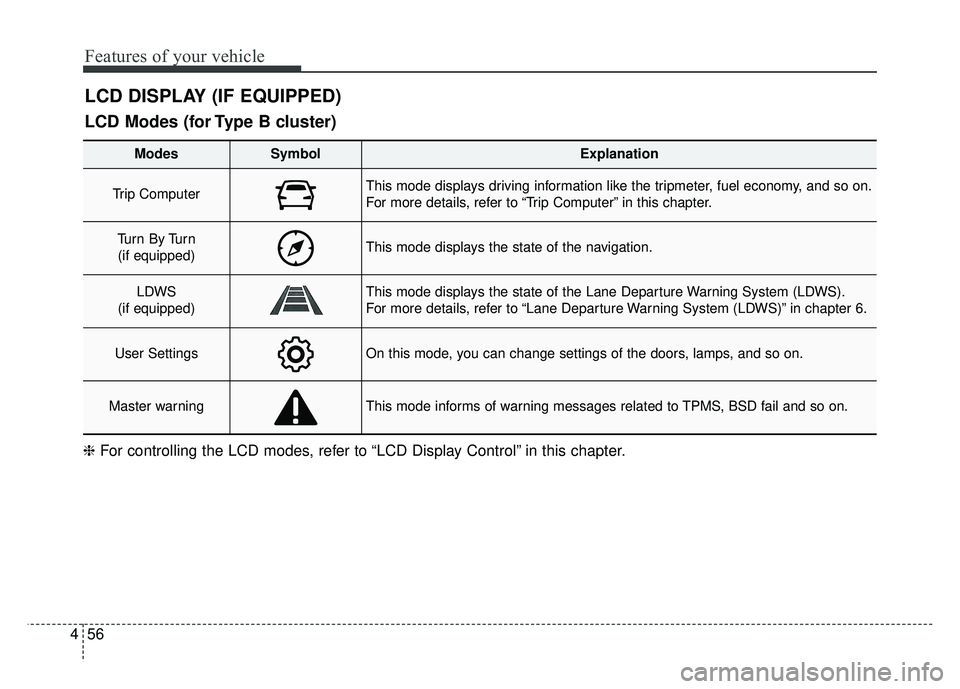
LCD DISPLAY (IF EQUIPPED)
❈ For controlling the LCD modes, refer to “LCD Display Control” in this chapter.
LCD Modes (for Type B cluster)
Modes SymbolExplanation
Trip Computer This mode displays driving information like the tripmeter, fuel economy, and so on.
For more details, refer to “Trip Computer” in this chapter.
Tu r n B y Tu r n
(if equipped)This mode displays the state of the navigation.
LDWS
(if equipped)This mode displays the state of the Lane Departure Warning System (LDWS).
For more details, refer to “Lane Departure Warning System (LDWS)” in chapter 6.
User SettingsOn this mode, you can change settings of the doors, lamps, and so on.
Master warningThis mode informs of warning messages related to TPMS, BSD fail and so on.
Page 145 of 589
459
Features of your vehicle
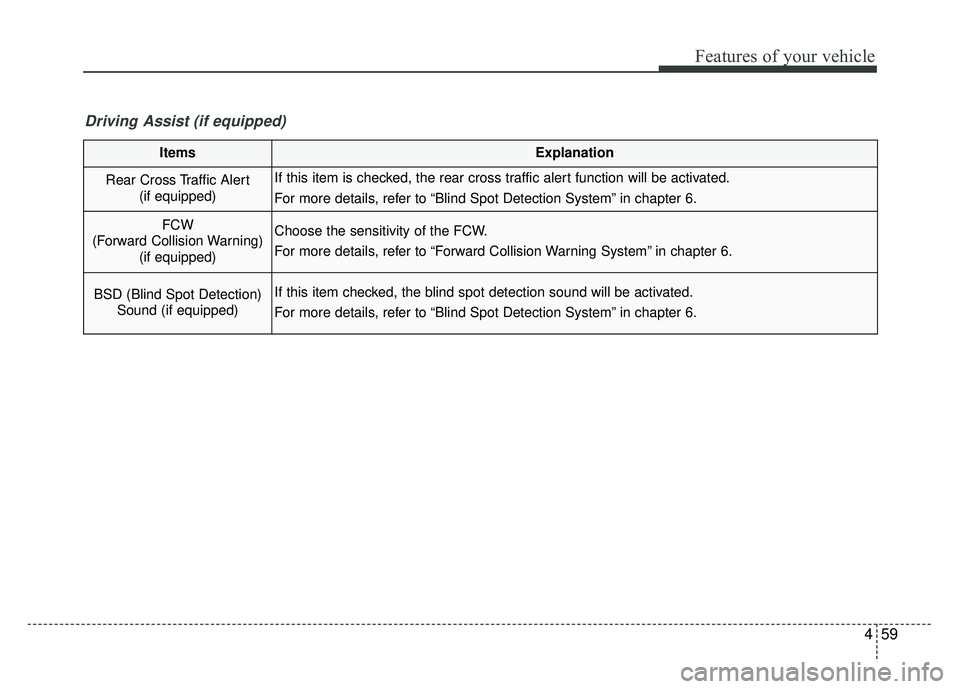
ItemsExplanation
Rear Cross Traffic Alert (if equipped)If this item is checked, the rear cross traffic alert function will be activated.
For more details, refer to “Blind Spot Detection System” in chapter 6.
FCW
(Forward Collision Warning) (if equipped)Choose the sensitivity of the FCW.
For more details, refer to “Forward Collision Warning System” in chapter 6.
BSD (Blind Spot Detection)Sound (if equipped)If this item checked, the blind spot detection sound will be activated.
For more details, refer to “Blind Spot Detection System” in chapter 6.
Driving Assist (if equipped)
Page 154 of 589
Features of your vehicle
68
4
Overview
Description
The trip computer is a microcomput-
er-controlled driver information sys-
tem that displays information related
to driving.
✽ ✽
NOTICE
Some driving information stored in
the trip computer (for example
Average Vehicle Speed) resets if the
battery is disconnected.
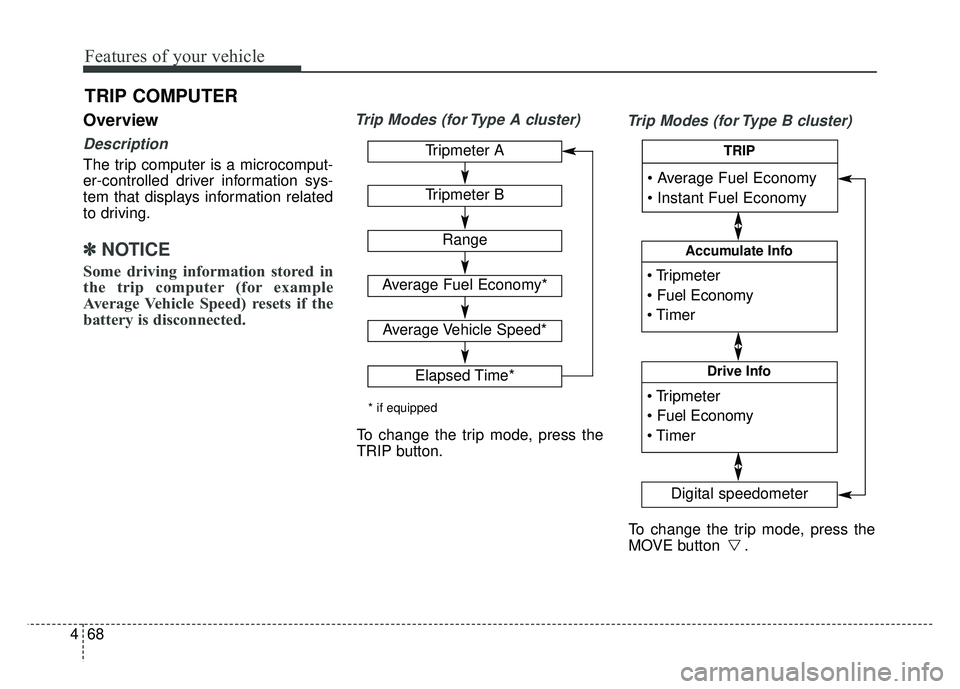
Trip Modes (for Type A cluster)
Trip Modes (for Type B cluster)
TRIP COMPUTER
Tripmeter A
Tripmeter B
Range
Average Fuel Economy*
Average Vehicle Speed*
Elapsed Time*
* if equipped
To change the trip mode, press the
TRIP button.
To change the trip mode, press the
MOVE button .
Accumulate Info
Digital speedometer
Drive Info
TRIP
Page 155 of 589
469
Features of your vehicle
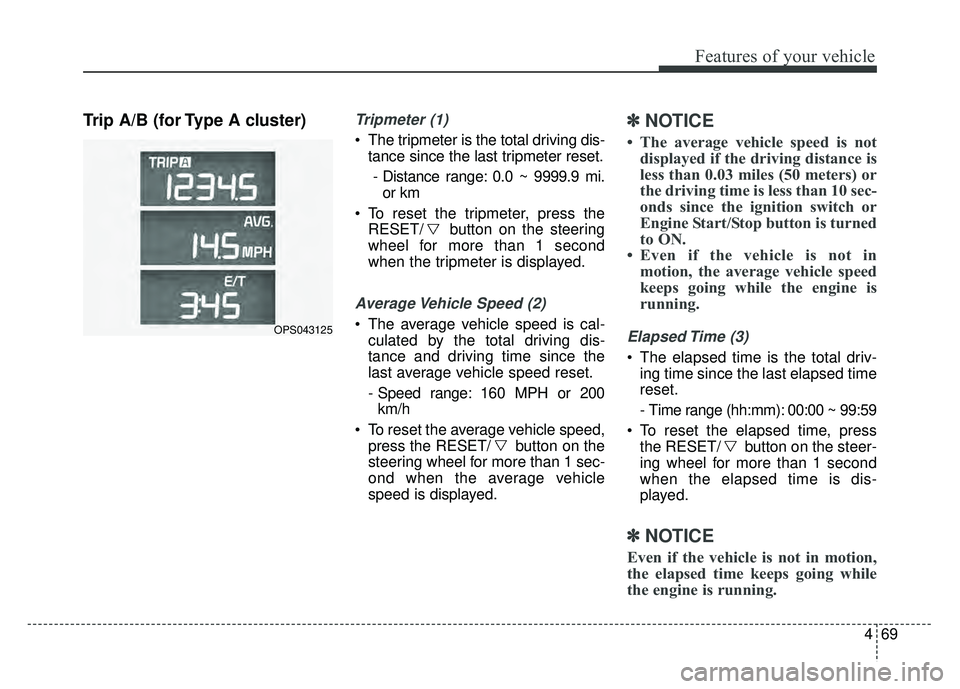
Trip A/B (for Type A cluster)Tripmeter (1)
The tripmeter is the total driving dis-tance since the last tripmeter reset.
- Distance range: 0.0 ~ 9999.9 mi. or km
To reset the tripmeter, press the RESET/ button on the steering
wheel for more than 1 second
when the tripmeter is displayed.
Average Vehicle Speed (2)
The average vehicle speed is cal-culated by the total driving dis-
tance and driving time since the
last average vehicle speed reset.
- Speed range: 160 MPH or 200km/h
To reset the average vehicle speed, press the RESET/ button on the
steering wheel for more than 1 sec-
ond when the average vehicle
speed is displayed.
✽ ✽ NOTICE
• The average vehicle speed is not
displayed if the driving distance is
less than 0.03 miles (50 meters) or
the driving time is less than 10 sec-
onds since the ignition switch or
Engine Start/Stop button is turned
to ON.
• Even if the vehicle is not in motion, the average vehicle speed
keeps going while the engine is
running.
Elapsed Time (3)
The elapsed time is the total driv-
ing time since the last elapsed time
reset.
- Time range (hh:mm): 00:00 ~ 99:59
To reset the elapsed time, press the RESET/ button on the steer-
ing wheel for more than 1 second
when the elapsed time is dis-
played.
✽ ✽ NOTICE
Even if the vehicle is not in motion,
the elapsed time keeps going while
the engine is running.
OPS043125