reset KIA SOUL 2017 Owner's Guide
[x] Cancel search | Manufacturer: KIA, Model Year: 2017, Model line: SOUL, Model: KIA SOUL 2017Pages: 589, PDF Size: 13.3 MB
Page 306 of 589
Audio system
571
Pandora
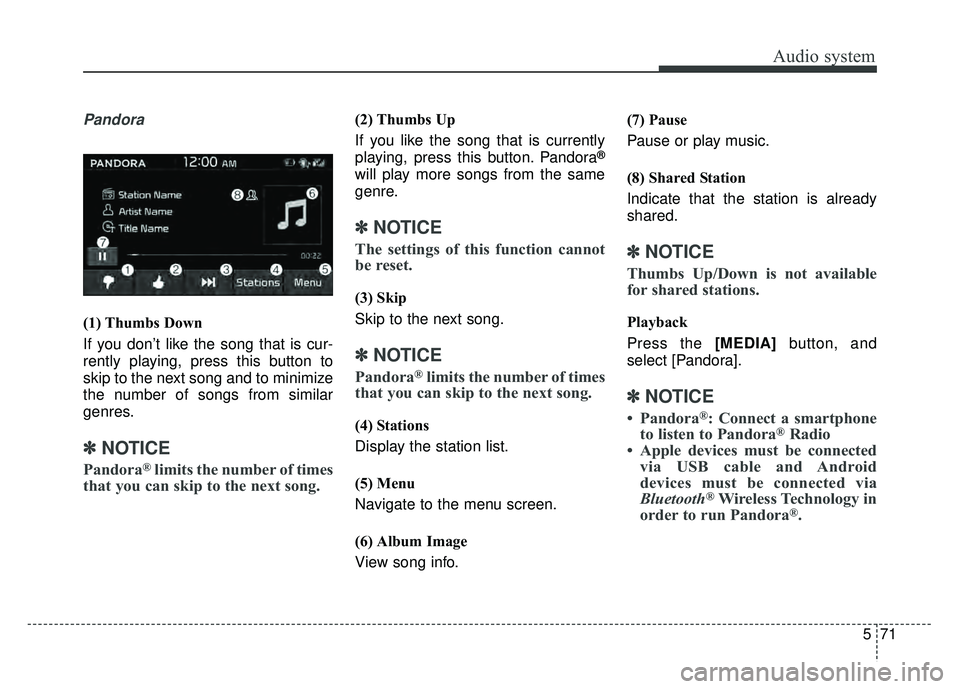
(1) Thumbs Down
If you don’t like the song that is cur-
rently playing, press this button to
skip to the next song and to minimize
the number of songs from similar
genres.
✽ ✽NOTICE
Pandora®limits the number of times
that you can skip to the next song.
(2) Thumbs Up
If you like the song that is currently
playing, press this button. Pandora
®
will play more songs from the same
genre.
✽ ✽ NOTICE
The settings of this function cannot
be reset.
(3) Skip
Skip to the next song.
✽ ✽NOTICE
Pandora®limits the number of times
that you can skip to the next song.
(4) Stations
Display the station list.
(5) Menu
Navigate to the menu screen.
(6) Album Image
View song info. (7) Pause
Pause or play music.
(8) Shared Station
Indicate that the station is already
shared.
✽ ✽
NOTICE
Thumbs Up/Down is not available
for shared stations.
Playback
Press the [MEDIA] button, and
select [Pandora].
✽ ✽ NOTICE
• Pandora®: Connect a smartphone
to listen to Pandora®Radio
• Apple devices must be connected via USB cable and Android
devices must be connected via
Bluetooth
®Wireless Technology in
order to run Pandora®.
Page 307 of 589
![KIA SOUL 2017 Owners Guide Audio system
72
5 Menu
Press the [Menu] and select the
desired function.
Bookmark: Add the song that is
currently playing to your book-
marks list.
✽ ✽ NOTICE
• You can view your bookmarked
son](/img/2/54636/w960_54636-306.png "KIA SOUL 2017 Owners Guide Audio system
72
5 Menu
Press the [Menu] and select the
desired function.
Bookmark: Add the song that is
currently playing to your book-
marks list.
✽ ✽ NOTICE
• You can view your bookmarked
son")
Audio system
72
5 Menu
Press the [Menu] and select the
desired function.
Bookmark: Add the song that is
currently playing to your book-
marks list.
✽ ✽ NOTICE
• You can view your bookmarked
songs on your online Pandora®
profile. Go to pandora.com, then
go to [Your profile] above the
player. That will bring up a page
with your stations and book-
marked songs.
• The settings of this function can- not be reset.
Quit: Exit Pandora®mode and
return to previous audio mode.
Information: Detailed info on the currently playing song is displayed.
Sound Settings: Audio sound set- tings can be changed.
Page 318 of 589
Audio system
583
(Continued)
• Contacts can be downloaded onlyfrom the currently connected
Bluetooth
®Wireless Technology
device.
If no Bluetooth
®Wireless Technology
device is connected, the download
contacts button is disabled.
• If the language setting is Korean, Bluetooth
®Wireless Technology
voice prompts are not supported.
System
Select the [SETUP] button on the
audio system ➟ Select [System].
Memory Information: View My Music memory usage.
Language: Change the user lan- guage.
Default: Reset the audio system.
System Information: At the System Information screen, Software version
information, updates are available.
- System Update: At the SystemInformation screen, insert the
USB memory with the latest file
downloaded, and then select the
[Update] to begin updating. The
system with then reboot auto-
matically.
✽ ✽ NOTICE
• The system resets to the default
values, and all saved data and set-
tings are lost.
• This product needs supplemented software updates and additional
functions, which collectively may
take some time to complete,
depending on the amount of data.
• If the Power is disconnected or the USB is removed during an update,
the data might be damaged. Please
wait until the update is complete
while engine is on.
Screen Saver
Set the information displayed when
the audio system is switched off or
the screen is turned off.
Select the [SETUP] button on the
audio system ➟ Select [Screen
Saver].
Analog: An analog clock is dis- played.
Digital: A digital clock is displayed.
None: No information is displayed.
Display Off
To prevent glare, the screen can be
turned off with the audio system in
operation.
Select the [SETUP] button on the
audio system ➟ Select [Display Off].
Page 367 of 589
Driving your vehicle
48
6
To cancel cruise control, do
one of the following:
Press the brake pedal.
Depress the clutch pedal if
equipped with a manual transaxle.
Shift into N (Neutral) with an auto- matic transaxle.
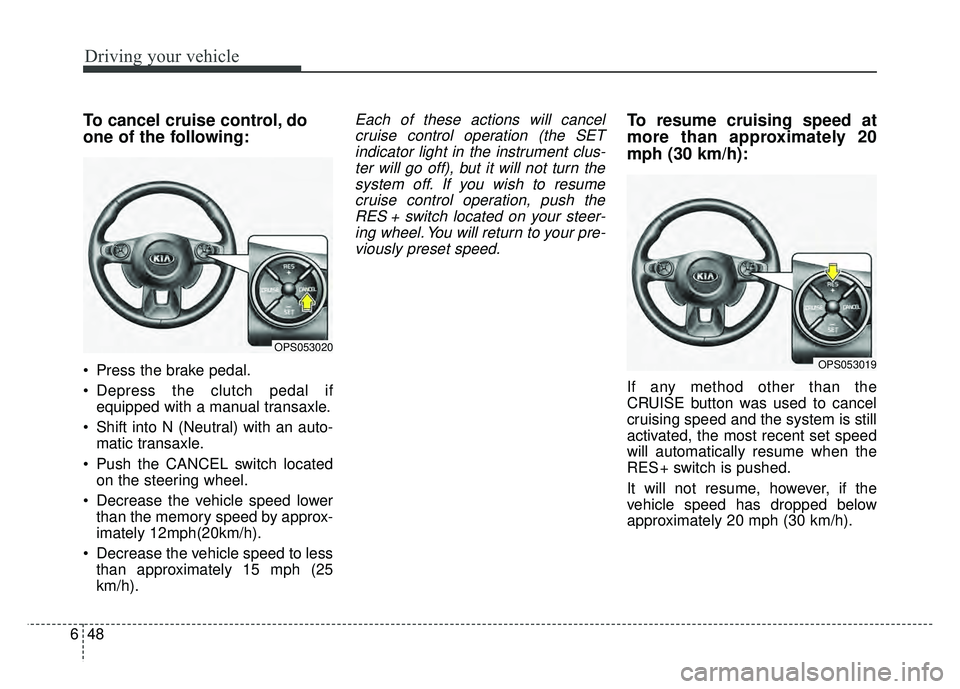
Push the CANCEL switch located on the steering wheel.
Decrease the vehicle speed lower than the memory speed by approx-
imately 12mph(20km/h).
Decrease the vehicle speed to less than approximately 15 mph (25
km/h).
Each of these actions will cancelcruise control operation (the SETindicator light in the instrument clus-ter will go off), but it will not turn thesystem off. If you wish to resumecruise control operation, push theRES + switch located on your steer-ing wheel. You will return to your pre-viously preset speed.To resume cruising speed at
more than approximately 20
mph (30 km/h):
If any method other than the
CRUISE button was used to cancel
cruising speed and the system is still
activated, the most recent set speed
will automatically resume when the
RES + switch is pushed.
It will not resume, however, if the
vehicle speed has dropped below
approximately 20 mph (30 km/h).
OPS053020
OPS053019
Page 369 of 589
Driving your vehicle
50
6
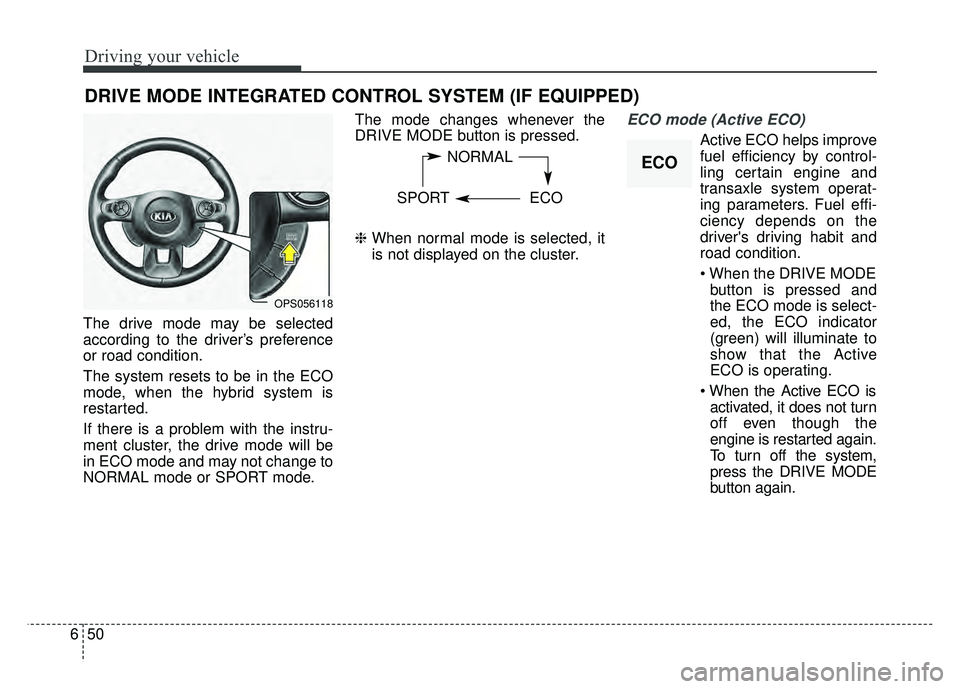
The drive mode may be selected
according to the driver’s preference
or road condition.
The system resets to be in the ECO
mode, when the hybrid system is
restarted.
If there is a problem with the instru-
ment cluster, the drive mode will be
in ECO mode and may not change to
NORMAL mode or SPORT mode. The mode changes whenever the
DRIVE MODE button is pressed.
❈
When normal mode is selected, it
is not displayed on the cluster.
ECO mode (Active ECO)
Active ECO helps improve
fuel efficiency by control-
ling certain engine and
transaxle system operat-
ing parameters. Fuel effi-
ciency depends on the
driver's driving habit and
road condition.
button is pressed and
the ECO mode is select-
ed, the ECO indicator
(green) will illuminate to
show that the Active
ECO is operating.
activated, it does not turn
off even though the
engine is restarted again.
To turn off the system,
press the DRIVE MODE
button again.
DRIVE MODE INTEGRATED CONTROL SYSTEM (IF EQUIPPED)
NORMAL
SPORT ECO
OPS056118
ECO
Page 408 of 589
73
What to do in an emergency
If the engine stalls at a cross-
road or crossing
If the engine stalls at a crossroad or
crossing, set the shift lever in the N
(Neutral) position and then push the
vehicle to a safe place.
If you have a flat tire while
driving
If a tire goes flat while you are driv-
ing:
1.Take your foot off the acceleratorpedal and let the vehicle slow
down while driving straight ahead.
Do not apply the brakes immedi-
ately or attempt to pull off the road
as this may cause a loss of control.
When the vehicle has slowed to
such a speed that it is safe to do
so, brake carefully and pull off the
road. Drive off the road as far as
possible and park on a firm level
ground. If you are on a divided
highway, do not park in the median
area between the two traffic lanes. 2.When the vehicle is stopped, turn
on your emergency hazard flash-
ers, set the parking brake and put
the transaxle in P (Park, automatic
transaxle) or reverse (manual
transaxle).
3.Have all passengers get out of the vehicle. Be sure they all get out on
the side of the vehicle that is away
from traffic.
4.When changing a flat tire, follow the instruction provided later in this
section.
If the engine stalls while driv-
ing
1.Reduce your speed gradually,keeping a straight line. Move cau-
tiously off the road to a safe place.
2.Turn on your emergency flashers.
3.Try to start the engine again. If your vehicle will not start, contact an
authorized Kia dealer or seek other
qualified assistance.
✽ ✽ NOTICE
If there was a check engine light and
loss of power or stall and if safe to do
so to wait at least 10 seconds to
restart the vehicle after it stalls. This
may reset the car so it will no longer
run at low power (limp home) condi-
tion.
IN CASE OF AN EMERGENCY WHILE DRIVING
Page 499 of 589
Maintenance
58
8
When recharging the battery,
observe the following precautions:
The battery must be removed from
the vehicle and placed in an area
with good ventilation.
Do not allow cigarettes, sparks, or flame near the battery.
Watch the battery during charging, and stop or reduce the charging
rate if the battery cells begin
gassing (boiling) violently or if the
temperature of the electrolyte of
any cell exceeds 120°F (49°C).
Wear eye protection when check- ing the battery during charging.
Disconnect the battery charger in the following order. 1.Turn off the battery charger main
switch.
2.Unhook the negative clamp from the negative battery terminal.
3.Unhook the positive clamp from the positive battery terminal.
Before performing maintenance or recharging the battery, turn off all
accessories and stop the engine.
The negative battery cable must be removed first and installed last
when the battery is disconnected.Reset items
Items should be reset after the bat-
tery has been discharged or the bat-
tery has been disconnected.
Auto up/down window (See chapter 4)
Sunroof (See chapter 4)
Trip computer (See chapter 4)
Climate control system (See chapter 4)
Clock (See chapter 4)
Audio (See chapter 5)
Page 503 of 589
Maintenance
62
8
Disc brake pads should be inspected
for wear whenever tires are rotated.
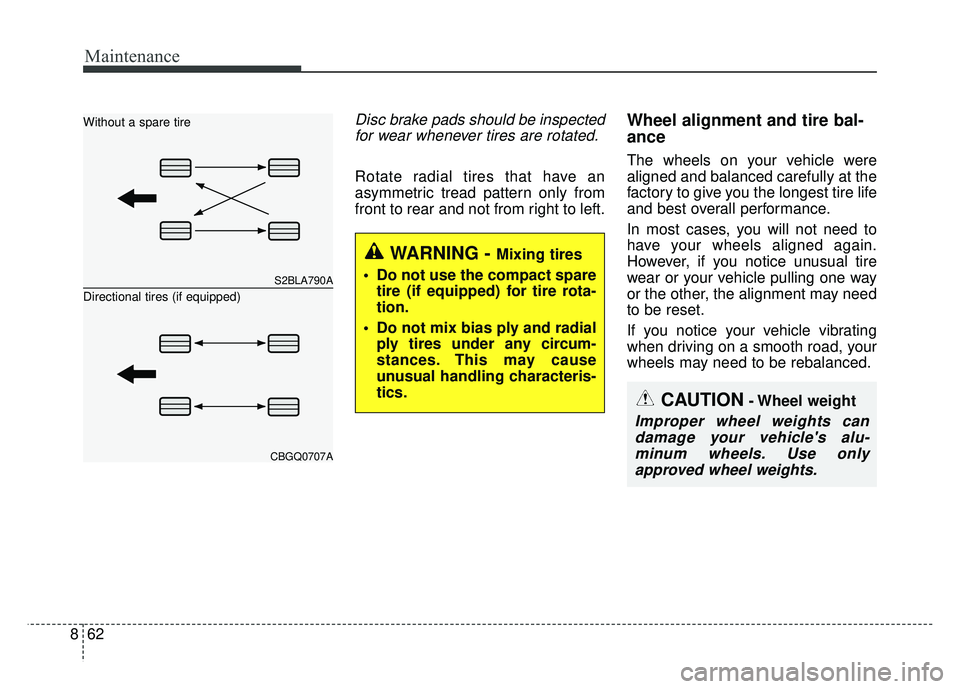
Rotate radial tires that have an
asymmetric tread pattern only from
front to rear and not from right to left.
Wheel alignment and tire bal-
ance
The wheels on your vehicle were
aligned and balanced carefully at the
factory to give you the longest tire life
and best overall performance.
In most cases, you will not need to
have your wheels aligned again.
However, if you notice unusual tire
wear or your vehicle pulling one way
or the other, the alignment may need
to be reset.
If you notice your vehicle vibrating
when driving on a smooth road, your
wheels may need to be rebalanced.
S2BLA790A
CBGQ0707A
Without a spare tire
Directional tires (if equipped)
CAUTION- Wheel weight
Improper wheel weights candamage your vehicle's alu-minum wheels. Use onlyapproved wheel weights.
WARNING - Mixing tires
Do not use the compact spare tire (if equipped) for tire rota-
tion.
Do not mix bias ply and radial ply tires under any circum-
stances. This may cause
unusual handling characteris-
tics.
Page 518 of 589
877
Maintenance
Fuse switch
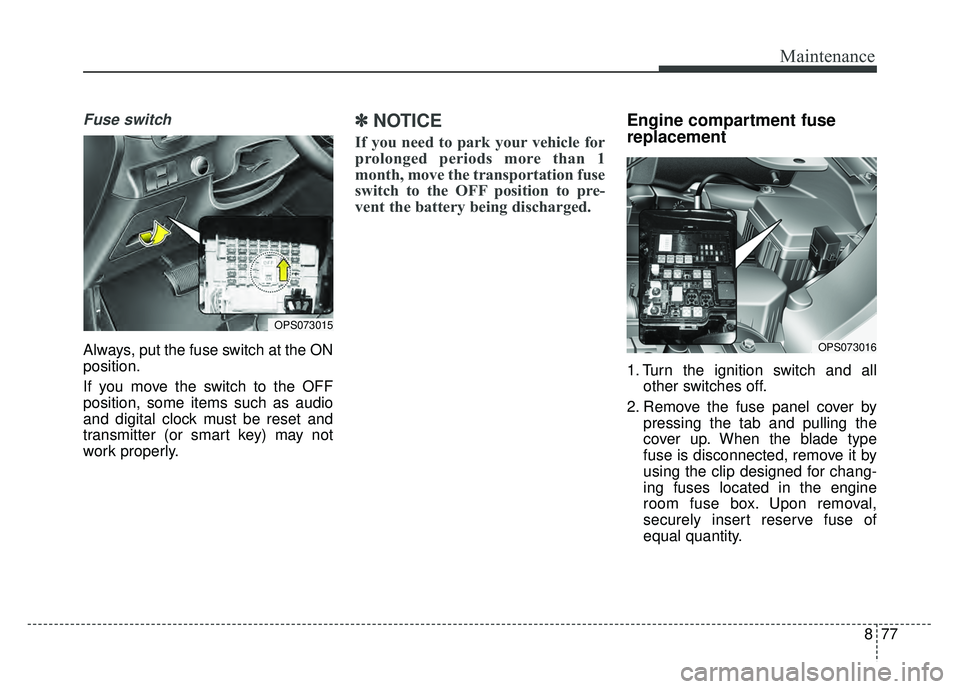
Always, put the fuse switch at the ON
position.
If you move the switch to the OFF
position, some items such as audio
and digital clock must be reset and
transmitter (or smart key) may not
work properly.
✽ ✽NOTICE
If you need to park your vehicle for
prolonged periods more than 1
month, move the transportation fuse
switch to the OFF position to pre-
vent the battery being discharged.
Engine compartment fuse
replacement
1. Turn the ignition switch and all
other switches off.
2. Remove the fuse panel cover by pressing the tab and pulling the
cover up. When the blade type
fuse is disconnected, remove it by
using the clip designed for chang-
ing fuses located in the engine
room fuse box. Upon removal,
securely insert reserve fuse of
equal quantity.
OPS073016
OPS073015
Page 577 of 589

I3
Index
Back-up lamp bulb replacement . . . . . . . . . . . . . . . . . 8-100
Battery. . . . . . . . . . . . . . . . . . . . . . . . . . . . . . . . . . . . \
. . 8-56For best battery service . . . . . . . . . . . . . . . . . . . . . . 8-56
Battery recharging . . . . . . . . . . . . . . . . . . . . . . . . . . 8-57
Reset items . . . . . . . . . . . . . . . . . . . . . . . . . . . . . . . . 8-58
Battery replacement . . . . . . . . . . . . . . . . . . . . . . . . . . . . 4-7
Battery saver function . . . . . . . . . . . . . . . . . . . . . . . . . . 4-88
Before driving . . . . . . . . . . . . . . . . . . . . . . . . . . . . . . . . . 6-4
Blind Spot Detection System(BSD) . . . . . . . . . . . . . . . 6-57 BSD (Blind Spot Detection) /LCA (Lane Change Assist) . . . . . . . . . . . . . . . . . . 6-58
RCTA (Rear cross traffic alert) . . . . . . . . . . . . . . . . 6-61
Driver's Attention . . . . . . . . . . . . . . . . . . . . . . . . . . . 6-63
Bonnet see the hood . . . . . . . . . . . . . . . . . . . . . . . . . . . 4-29
Brake system. . . . . . . . . . . . . . . . . . . . . . . . . . . . . . . . . 6-32 Power brakes . . . . . . . . . . . . . . . . . . . . . . . . . . . . . . 6-32
Parking brake . . . . . . . . . . . . . . . . . . . . . . . . . . . . . 6-34
Anti-lock brake system (ABS) . . . . . . . . . . . . . . . . . 6-36
Electronic stability control (ESC) . . . . . . . . . . . . . . 6-38
Vehicle stability management (VSM) . . . . . . . . . . . 6-42
Hill-start assist control (HAC) . . . . . . . . . . . . . . . . . 6-43
Brake/clutch fluid . . . . . . . . . . . . . . . . . . . . . . . . . . . . . 8-45 Checking the brake/clutch fluid level . . . . . . . . . . . 8-45
Bulb replacement . . . . . . . . . . . . . . . . . . . . . . . . . . . . . 8-88
Bulb replacement precaution . . . . . . . . . . . . . . . . . . . . 8-88
Bulb wattage . . . . . . . . . . . . . . . . . . . . . . . . . . . . . . . . . . 9-4 California Perchlorate notice . . . . . . . . . . . . . . . . . . . 8-117
Camera (Rear view) . . . . . . . . . . . . . . . . . . . . . . . . . . . 4-87
Capacities (Lubricants) . . . . . . . . . . . . . . . . . . . . . . . . . . 9-7
Capacity/weight . . . . . . . . . . . . . . . . . . . . . . . . . . . . . . . 9-6
Care
Care of seat belts . . . . . . . . . . . . . . . . . . . . . . . . . . . 3-30
SRS Care . . . . . . . . . . . . . . . . . . . . . . . . . . . . . . . . . 3-67
Tire care . . . . . . . . . . . . . . . . . . . . . . . . . . . . . . . . . . 8-59\
Exterior care . . . . . . . . . . . . . . . . . . . . . . . . . . . . . . 8-106
Interior care . . . . . . . . . . . . . . . . . . . . . . . . . . . . . . 8-112
Care of seat belts . . . . . . . . . . . . . . . . . . . . . . . . . . . . . 3-30
Center console storage . . . . . . . . . . . . . . . . . . . . . . . . 4-133
Central door lock switch. . . . . . . . . . . . . . . . . . . . . . . . 4-19
Chains - Tire . . . . . . . . . . . . . . . . . . . . . . . . . . . . . . . . . 6-77
Checking tire inflation pressure . . . . . . . . . . . . . . . . . . 8-60
Child restraint system . . . . . . . . . . . . . . . . . . . . . . . . . . 3-31 Securing a child restraint withthe LATCHanchors system . . . . . . . . . . . . . . . . . . . . . . . . . . . . 3-37
Securing a child restraint seatwith Tether Anchor"" system . . . . . . . . . . . . . . . . . . . . . 3-38
Securing a child restraint with alap belt or lap/ shoulder belt . . . . . . . . . . . . . . . . . . . . . . . . . . . . . . 3-39
Child-protector rear door lock . . . . . . . . . . . . . . . . . . . 4-21
Clean air . . . . . . . . . . . . . . . . . . . . . . . . . . . . . . . . . . . 4-\
132
Climate control air filter . . . . . . . . . . . . . . . . . . . . . . . . 8-50 Filter inspection . . . . . . . . . . . . . . . . . . . . . . . . . . . . 8-50
BC