dashboard KIA SOUL 2017 Owners Manual
[x] Cancel search | Manufacturer: KIA, Model Year: 2017, Model line: SOUL, Model: KIA SOUL 2017Pages: 589, PDF Size: 13.3 MB
Page 68 of 589
Safety features of your vehicle
50
3
Main components of the occu-
pant detection system
A detection device located within the front passenger seat cushion.
An electronic system which deter- mines whether the passenger air
bag systems should be activated
or deactivated.
A indicator light located on the instrument panel which illuminates
the words PASSENGER AIR BAG
“OFF” indicating the front passen-
ger air bag system is deactivated.
The instrument panel air bag warn- ing light is interconnected with the
occupant detection system. If the front passenger seat is occupied
by a person that the system deter-
mines to be of appropriate size, and
he/she sits properly (sitting upright
with the seatback in an upright posi-
tion, centered on the seat cushion with
their seat belt on, legs comfortably
extended and their feet on the floor),
the PASSENGER AIR BAG “OFF”
indicator will turn off and the front pas-
senger's air bag will be able to inflate,
if necessary, in frontal crashes.
You will find the PASSENGER AIR
BAG “OFF” indicator on the center
facia panel. This system detects the
conditions 1~4 in the following table
and activates or deactivates the front
passenger air bag based on these
conditions.
Always be sure that you and all vehicle
occupants are seated and restrained
properly (sitting upright with the seat in
an upright position, centered on the
seat cushion, with the person’s legs
comfortably extended, feet on the floor,
and wearing the safety belt properly)
for the most effective protection by the
air bag and the safety belt. The ODS (Occupant Detection
System) may not function properly if
the passenger takes actions which
can defeat the detection system.
These include:
(1) Failing to sit in an upright position.
(2) Leaning against the door or cen- ter console.
(3) Sitting towards the sides or the front of the seat.
(4) Putting legs on the dashboard or resting them on other locations
which reduce the passenger
weight on the front seat.
(5) Improperly wear ing the safety
belt.
(6) Reclining the seat back.
(7) Wearing a thick cloth like ski wear or hip protection wear.
(8) Put on the seat an additional thick cushion.
Page 249 of 589
Audio system
14
5 Adjust the volume to levels that
allow the driver to hear sounds
from outside of the vehicle. Driving
in a state where external sounds
cannot be heard may lead to acci-
dents.
Pay attention to the volume setting when turning the device on. A sud-
den output of extreme volume
upon turning the device on could
lead to hearing impairment. (Adjust
the volume to a suitable levels
before turning off the device.)
If you want to change the position of device installation, please
inquire with your place of purchase
or service maintenance center.
Technical expertise is required to
install or disassemble the device. Turn on the car ignition before
using this device. Do not operate
the audio system for long periods
of time with the ignition turned off
as such operations may lead to
battery discharge.
In case of product malfunction, please contact your place of pur-
chase or After Service center.
Placing the audio system within an electromagnetic environment may
result in noise interference.
WARNING - Driver
distraction
Operating the device while driv-
ing could lead to accidents due
to a lack of attention to external
surroundings. First park the
vehicle before operating the
device.CAUTION
When cleaning the device, make sure to turn off theaudio system and use a dryand smooth cloth.
Do not place beverages close to the audio system. Spillingbeverages may lead to systemmalfunction.
Never use tough materials, chemical cloths, or solvents(alcohol, benzene, thinners,etc.) as such materials maydamage the device panel orcause color/quality deteriora-tion.
Prevent caustic solutions such as perfume and cosmet-ic oil from contacting thedashboard because they maycause damage or discol-oration.
CAUTION- LCD Monitor
Do not subject the device to
severe shock or impact. Direct
pressure onto the front side of
the monitor may cause damage
to the LCD or touch screen.
Page 285 of 589
Audio system
50
5 Adjust the volume to levels that
allow the driver to hear sounds
from outside of the vehicle. Driving
in a state where external sounds
cannot be heard may lead to acci-
dents.
Pay attention to the volume setting when turning the device on. A sud-
den output of extreme volume
upon turning the device on could
lead to hearing impairment. (Adjust
the volume to a suitable levels
before turning off the device.)
If you want to change the position of device installation, please
inquire with your place of purchase
or service maintenance center.
Technical expertise is required to
install or disassemble the device. Turn on the car ignition before
using this device. Do not operate
the audio system for long periods
of time with the ignition turned off
as such operations may lead to
battery discharge.
In case of product malfunction, please contact your place of pur-
chase or After Service center.
Placing the audio system within an electromagnetic environment may
result in noise interference.
WARNING - Driver
distraction
Operating the device while driv-
ing could lead to accidents due
to a lack of attention to external
surroundings. First park the
vehicle before operating the
device.
CAUTION- LCD Monitor
Do not subject the device to
severe shock or impact. Direct
pressure onto the front side of
the monitor may cause damage
to the LCD or touch screen.
CAUTION
When cleaning the device, make sure to turn off theaudio system and use a dryand smooth cloth.
Do not place beverages close to the audio system. Spillingbeverages may lead to systemmalfunction.
Never use tough materials, chemical cloths, or solvents(alcohol, benzene, thinners,etc.) as such materials maydamage the device panel orcause color/quality deteriora-tion.
Prevent caustic solutions such as perfume and cosmet-ic oil from contacting thedashboard because they maycause damage or discol-oration.
Page 568 of 589
Specifications, Consumer information, Reporting safety defects
10
9
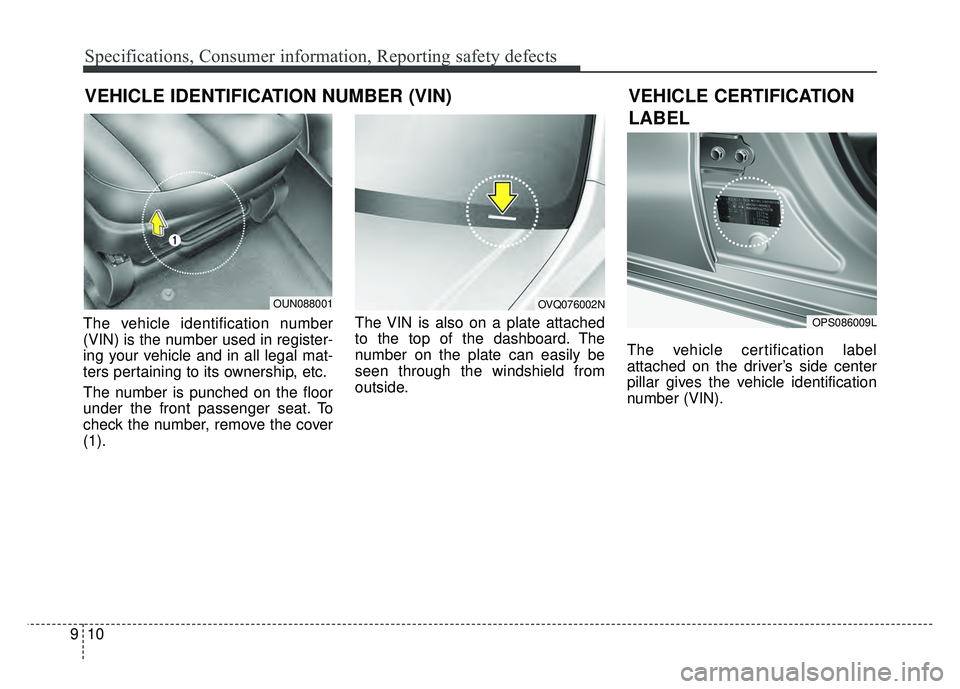
VEHICLE IDENTIFICATION NUMBER (VIN)
The vehicle identification number
(VIN) is the number used in register-
ing your vehicle and in all legal mat-
ters pertaining to its ownership, etc.
The number is punched on the floor
under the front passenger seat. To
check the number, remove the cover
(1). The VIN is also on a plate attached
to the top of the dashboard. The
number on the plate can easily be
seen through the windshield from
outside.
The vehicle certification label
attached on the driver’s side center
pillar gives the vehicle identification
number (VIN).
OUN088001OVQ076002N
OPS086009L
VEHICLE CERTIFICATION
LABEL
Page 578 of 589
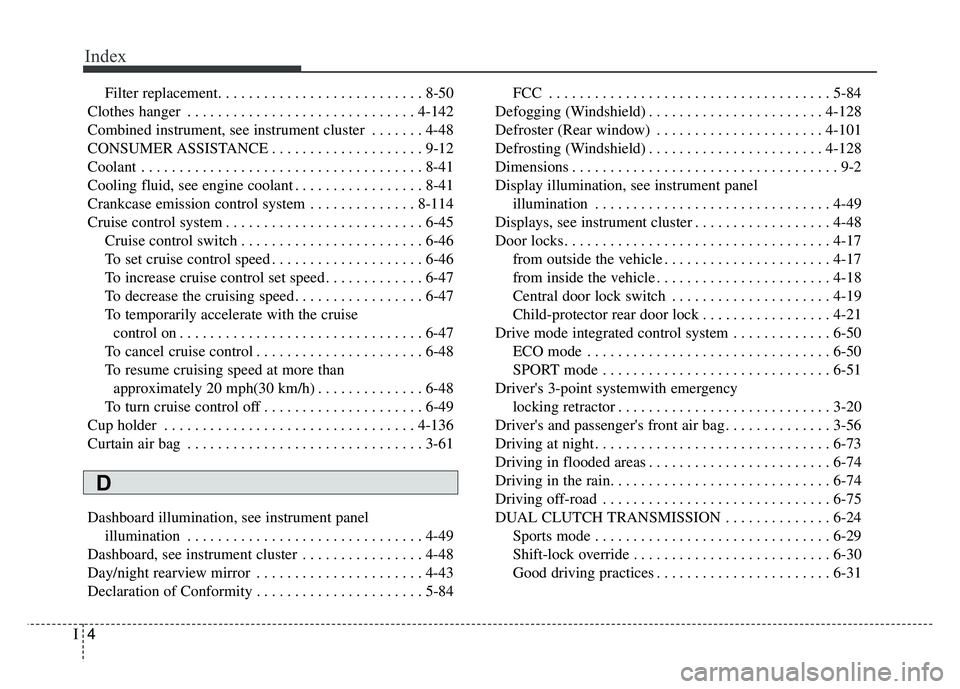
Index
4I
Filter replacement. . . . . . . . . . . . . . . . . . . . . . . . . . . 8-50
Clothes hanger . . . . . . . . . . . . . . . . . . . . . . . . . . . . . . 4-142
Combined instrument, see instrument cluster . . . . . . . 4-48
CONSUMER ASSISTANCE . . . . . . . . . . . . . . . . . . . . 9-12
Coolant . . . . . . . . . . . . . . . . . . . . . . . . . . . . . . . . . . . . \
. 8-41
Cooling fluid, see engine coolant . . . . . . . . . . . . . . . . . 8-41
Crankcase emission control system . . . . . . . . . . . . . . 8-114
Cruise control system . . . . . . . . . . . . . . . . . . . . . . . . . . 6-45 Cruise control switch . . . . . . . . . . . . . . . . . . . . . . . . 6-46
To set cruise control speed . . . . . . . . . . . . . . . . . . . . 6-46
To increase cruise control set speed . . . . . . . . . . . . . 6-47
To decrease the cruising speed . . . . . . . . . . . . . . . . . 6-47
To temporarily accelerate with the cruisecontrol on . . . . . . . . . . . . . . . . . . . . . . . . . . . . . . . . 6-47
To cancel cruise control . . . . . . . . . . . . . . . . . . . . . . 6-48
To resume cruising speed at more than approximately 20 mph(30 km/h) . . . . . . . . . . . . . . 6-48
To turn cruise control off . . . . . . . . . . . . . . . . . . . . . 6-49
Cup holder . . . . . . . . . . . . . . . . . . . . . . . . . . . . . . . . . 4-136
Curtain air bag . . . . . . . . . . . . . . . . . . . . . . . . . . . . . . . 3-61
Dashboard illumination, see instrument panel illumination . . . . . . . . . . . . . . . . . . . . . . . . . . . . . . . 4-49
Dashboard, see instrument cluster . . . . . . . . . . . . . . . . 4-48
Day/night rearview mirror . . . . . . . . . . . . . . . . . . . . . . 4-43
Declaration of Conformity . . . . . . . . . . . . . . . . . . . . . . 5-84 FCC . . . . . . . . . . . . . . . . . . . . . . . . . . . . . . . . . . . . \
. 5-84
Defogging (Windshield) . . . . . . . . . . . . . . . . . . . . . . . 4-128
Defroster (Rear window) . . . . . . . . . . . . . . . . . . . . . . 4-101
Defrosting (Windshield) . . . . . . . . . . . . . . . . . . . . . . . 4-128
Dimensions . . . . . . . . . . . . . . . . . . . . . . . . . . . . . . . . . . . 9-\
2
Display illumination, see instrument panel illumination . . . . . . . . . . . . . . . . . . . . . . . . . . . . . . . 4-49
Displays, see instrument cluster . . . . . . . . . . . . . . . . . . 4-48
Door locks. . . . . . . . . . . . . . . . . . . . . . . . . . . . . . . . . . . 4-\
17 from outside the vehicle . . . . . . . . . . . . . . . . . . . . . . 4-17
from inside the vehicle . . . . . . . . . . . . . . . . . . . . . . . 4-18
Central door lock switch . . . . . . . . . . . . . . . . . . . . . 4-19
Child-protector rear door lock . . . . . . . . . . . . . . . . . 4-21
Drive mode integrated control system . . . . . . . . . . . . . 6-50 ECO mode . . . . . . . . . . . . . . . . . . . . . . . . . . . . . . . . 6-50
SPORT mode . . . . . . . . . . . . . . . . . . . . . . . . . . . . . . 6-51
Driver's 3-point systemwith emergency locking retractor . . . . . . . . . . . . . . . . . . . . . . . . . . . . 3-20
Driver's and passenger's front air bag . . . . . . . . . . . . . . 3-56
Driving at night . . . . . . . . . . . . . . . . . . . . . . . . . . . . . . . 6-73
Driving in flooded areas . . . . . . . . . . . . . . . . . . . . . . . . 6-74
Driving in the rain. . . . . . . . . . . . . . . . . . . . . . . . . . . . . 6-74
Driving off-road . . . . . . . . . . . . . . . . . . . . . . . . . . . . . . 6-75
DUAL CLUTCH TRANSMISSION . . . . . . . . . . . . . . 6-24 Sports mode . . . . . . . . . . . . . . . . . . . . . . . . . . . . . . . 6-29
Shift-lock override . . . . . . . . . . . . . . . . . . . . . . . . . . 6-30
Good driving practices . . . . . . . . . . . . . . . . . . . . . . . 6-31
D