temperature KIA SOUL 2018 User Guide
[x] Cancel search | Manufacturer: KIA, Model Year: 2018, Model line: SOUL, Model: KIA SOUL 2018Pages: 620, PDF Size: 13.29 MB
Page 189 of 620
4103
Features of your vehicle
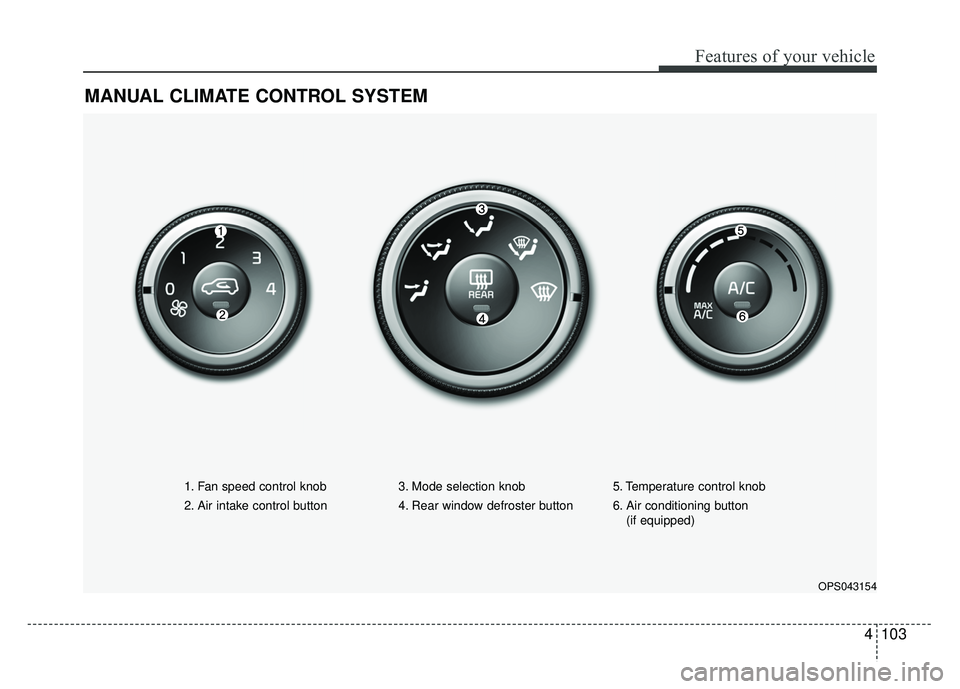
MANUAL CLIMATE CONTROL SYSTEM
OPS043154
1. Fan speed control knob
2. Air intake control button 3. Mode selection knob
4. Rear window defroster button5. Temperature control knob
6. Air conditioning button
(if equipped)
Page 190 of 620
Features of your vehicle
104
4
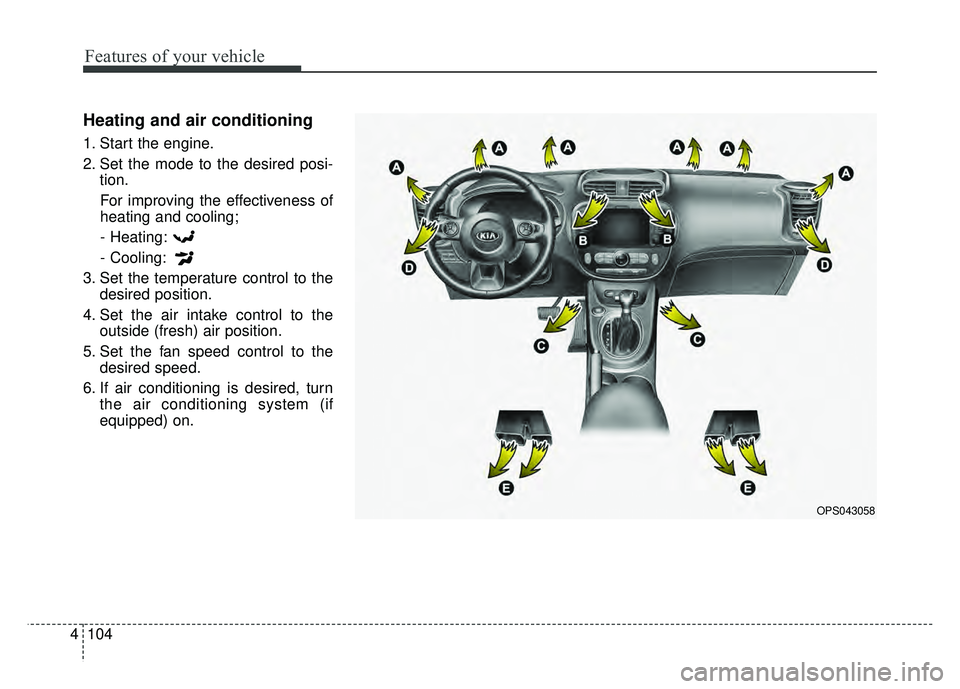
Heating and air conditioning
1. Start the engine.
2. Set the mode to the desired posi-
tion.
For improving the effectiveness of
heating and cooling;- Heating:
- Cooling:
3. Set the temperature control to the desired position.
4. Set the air intake control to the outside (fresh) air position.
5. Set the fan speed control to the desired speed.
6. If air conditioning is desired, turn the air conditioning system (if
equipped) on.
OPS043058
Page 192 of 620
Features of your vehicle
106
4
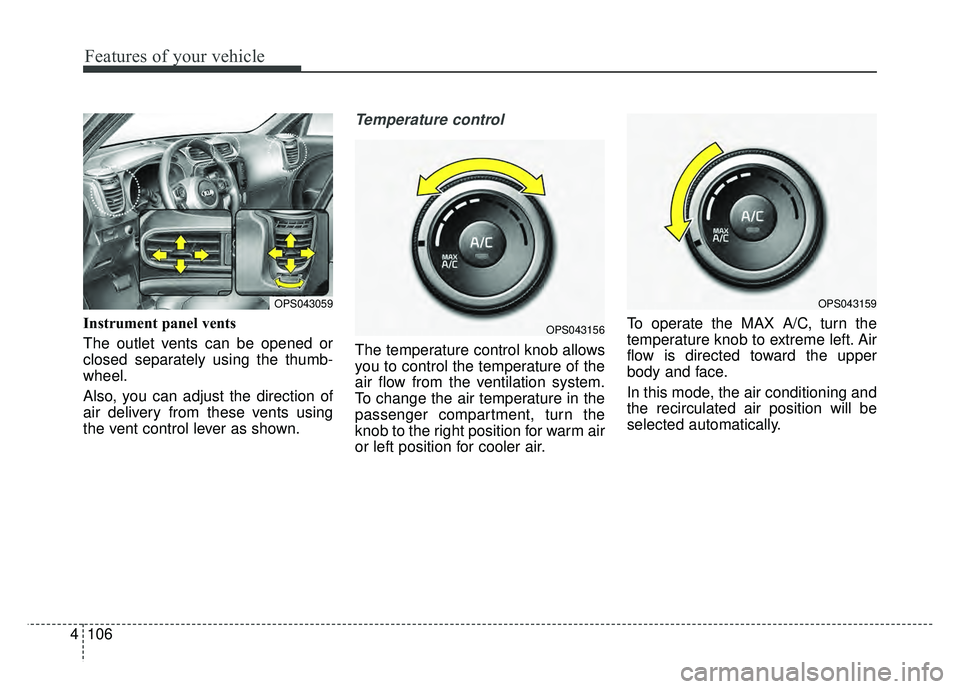
Instrument panel vents
The outlet vents can be opened or
closed separately using the thumb-
wheel.
Also, you can adjust the direction of
air delivery from these vents using
the vent control lever as shown.
Temperature control
The temperature control knob allows
you to control the temperature of the
air flow from the ventilation system.
To change the air temperature in the
passenger compartment, turn the
knob to the right position for warm air
or left position for cooler air. To operate the MAX A/C, turn the
temperature knob to extreme left. Air
flow is directed toward the upper
body and face.
In this mode, the air conditioning and
the recirculated air position will be
selected automatically.
OPS043059
OPS043156
OPS043159
Page 194 of 620
Features of your vehicle
108
4
Sunroof inside air recirculation
(if equipped)
If the sunroof opens while the heater
or Air Conditioning system operates,
the outside (fresh) air will be selected
automatically for ventilating the car.
Then, if you select the recirculated air
position, the outside (fresh) air will be
selected automatically after 3 minutes.
If you close the sunroof, the intake
mode will be changed to the previous
selected mode.
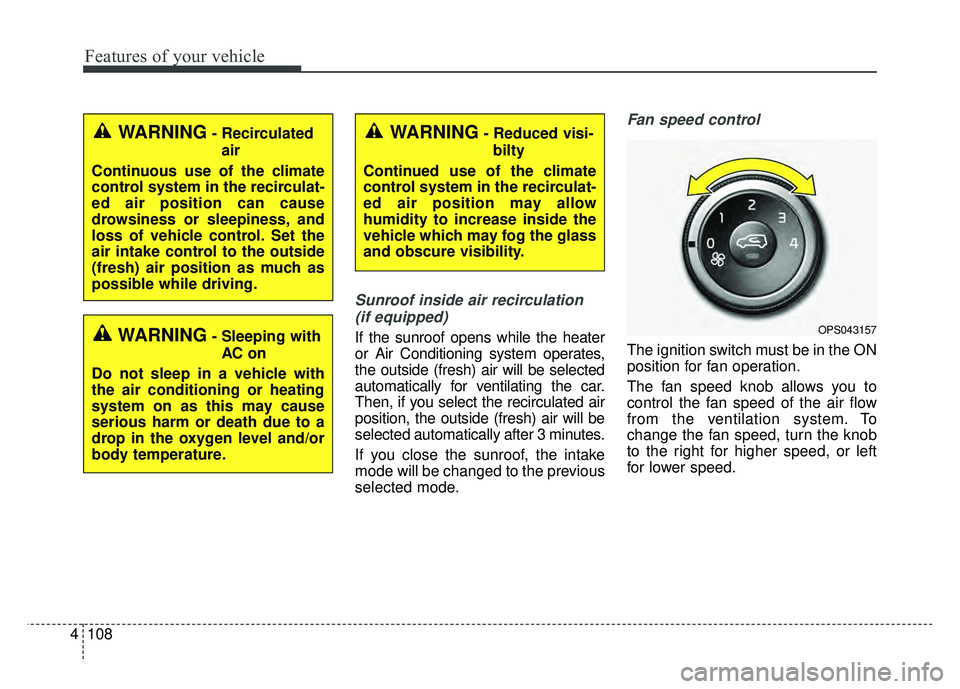
Fan speed control
The ignition switch must be in the ON
position for fan operation.
The fan speed knob allows you to
control the fan speed of the air flow
from the ventilation system. To
change the fan speed, turn the knob
to the right for higher speed, or left
for lower speed.
OPS043157
WARNING- Recirculated air
Continuous use of the climate
control system in the recirculat-
ed air position can cause
drowsiness or sleepiness, and
loss of vehicle control. Set the
air intake control to the outside
(fresh) air position as much as
possible while driving.WARNING- Reduced visi- bilty
Continued use of the climate
control system in the recirculat-
ed air position may allow
humidity to increase inside the
vehicle which may fog the glass
and obscure visibility.
WARNING- Sleeping with AC on
Do not sleep in a vehicle with
the air conditioning or heating
system on as this may cause
serious harm or death due to a
drop in the oxygen level and/or
body temperature.
Page 195 of 620
4109
Features of your vehicle
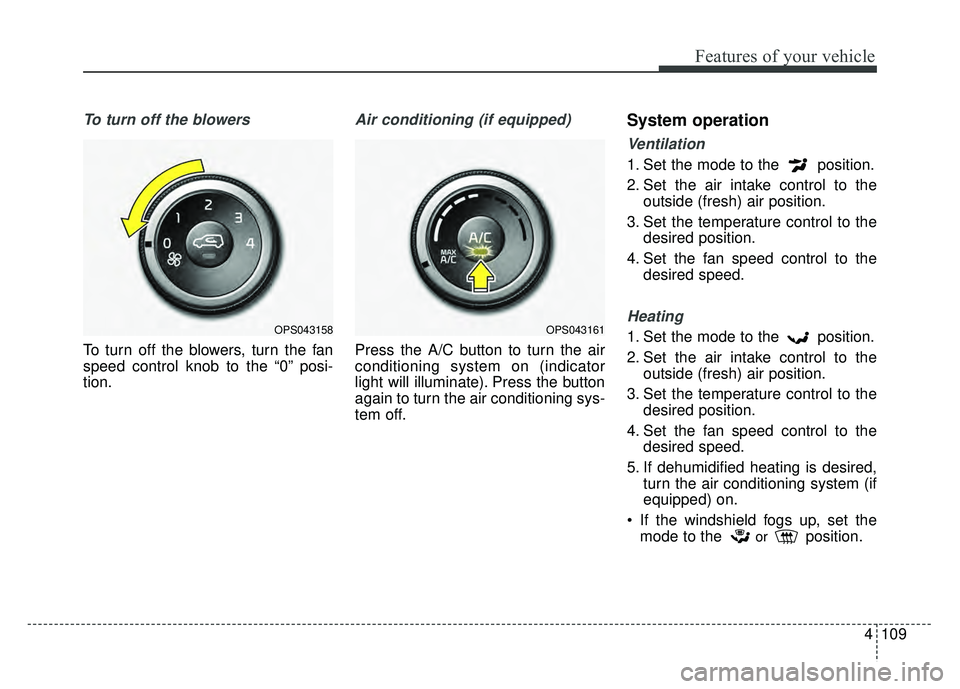
To turn off the blowers
To turn off the blowers, turn the fan
speed control knob to the “0” posi-
tion.
Air conditioning (if equipped)
Press the A/C button to turn the air
conditioning system on (indicator
light will illuminate). Press the button
again to turn the air conditioning sys-
tem off.
System operation
Ventilation
1. Set the mode to the position.
2. Set the air intake control to theoutside (fresh) air position.
3. Set the temperature control to the desired position.
4. Set the fan speed control to the desired speed.
Heating
1. Set the mode to the position.
2. Set the air intake control to theoutside (fresh) air position.
3. Set the temperature control to the desired position.
4. Set the fan speed control to the desired speed.
5. If dehumidified heating is desired, turn the air conditioning system (if
equipped) on.
If the windshield fogs up, set the mode to the
orposition.
OPS043161OPS043158
Page 196 of 620
Features of your vehicle
110
4
Operation Tips
To keep dust or unpleasant fumes
from entering the vehicle through
the ventilation system, temporarily
set the air intake control to the
recirculated air position. Be sure to
return the control to the fresh air
position when the irritation has
passed to keep fresh air in the
vehicle. This will help keep the driv-
er alert and comfortable.
Air for the heating/cooling system is drawn in through the grilles just
ahead of the windshield. Care
should be taken that these are not
blocked by leaves, snow, ice or
other obstructions.
To prevent interior fog on the wind- shield, set the air intake control to
the fresh air position and fan speed
to the desired position, turn on the
air conditioning system, and adjust
the temperature control to desired
temperature.Air conditioning (if equipped)
All Kia Air Conditioning Systems are
filled with R-134a refrigerant.
1. Start the engine. Press the air con- ditioning button.
2. Set the mode to the position.
3. Set the air intake control to the outside air or recirculated air posi-
tion.
4. Adjust the fan speed control and temperature control to maintain
maximum comfort.
When maximum cooling is desired, set the temperature control to the
extreme left position, set the mode
control to the MAX A/C position,
then set the fan speed control to
the highest speed.CAUTION- Excessive A/C
When using the air condition- ing system, monitor the tem-perature gauge closely whiledriving up hills or in heavytraffic when outside tempera-tures are high. Air condition-ing system operation maycause engine overheating.Continue to use the blower fanbut turn the air conditioningsystem off if the temperaturegauge indicates engine over-heating.
When opening the windows in humid weather air condition-ing may create water dropletsinside the vehicle. Sinceexcessive water droplets maycause damage to electricalequipment, air conditioningshould only be used with thewindows closed.
Page 200 of 620
Features of your vehicle
114
4
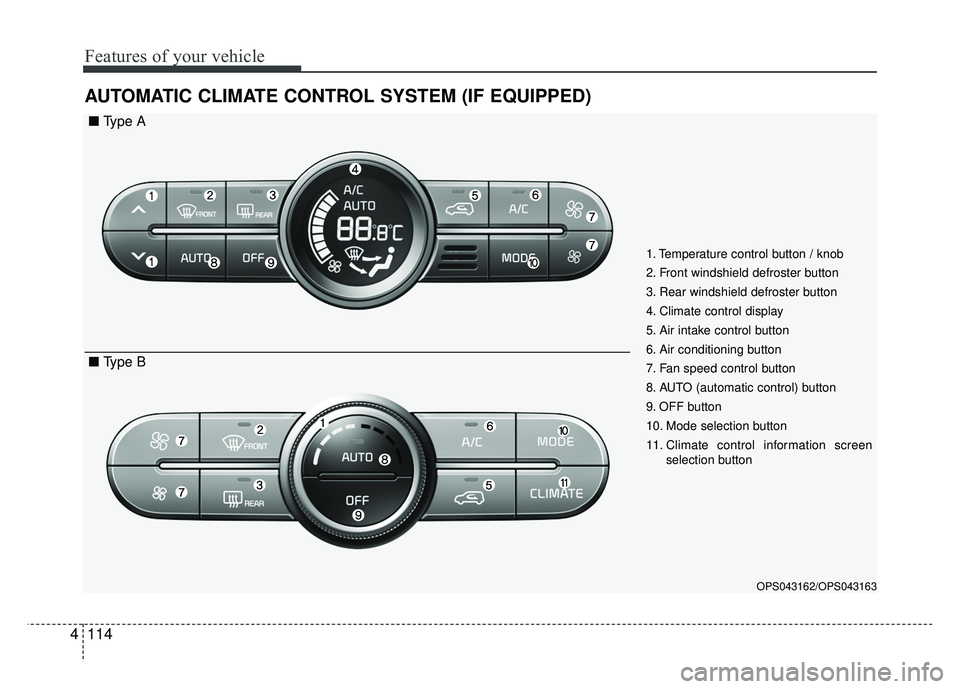
AUTOMATIC CLIMATE CONTROL SYSTEM (IF EQUIPPED)
OPS043162/OPS043163
1. Temperature control button / knob
2. Front windshield defroster button
3. Rear windshield defroster button
4. Climate control display
5. Air intake control button
6. Air conditioning button
7. Fan speed control button
8. AUTO (automatic control) button
9. OFF button
10. Mode selection button
11. Climate control information screen
selection button
■ Type A
■ Type B
Page 201 of 620
4115
Features of your vehicle
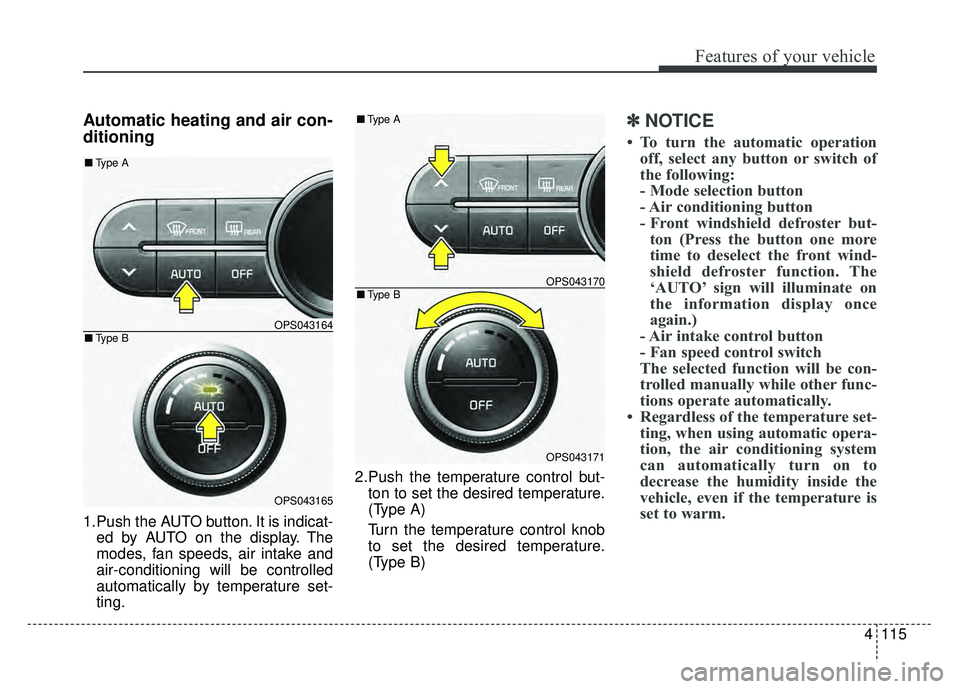
Automatic heating and air con-
ditioning
1.Push the AUTO button. It is indicat-ed by AUTO on the display. The
modes, fan speeds, air intake and
air-conditioning will be controlled
automatically by temperature set-
ting. 2.Push the temperature control but-
ton to set the desired temperature.
(Type A)
Turn the temperature control knob
to set the desired temperature.
(Type B)
✽ ✽ NOTICE
• To turn the automatic operation
off, select any button or switch of
the following:
- Mode selection button
- Air conditioning button
- Front windshield defroster but-ton (Press the button one more
time to deselect the front wind-
shield defroster function. The
‘AUTO’ sign will illuminate on
the information display once
again.)
- Air intake control button
- Fan speed control switch
The selected function will be con-
trolled manually while other func-
tions operate automatically.
• Regardless of the temperature set- ting, when using automatic opera-
tion, the air conditioning system
can automatically turn on to
decrease the humidity inside the
vehicle, even if the temperature is
set to warm.
OPS043164
OPS043165
■ Type B
■Type A
OPS043170
OPS043171
■Type B
■Type A
Page 202 of 620
Features of your vehicle
116
4
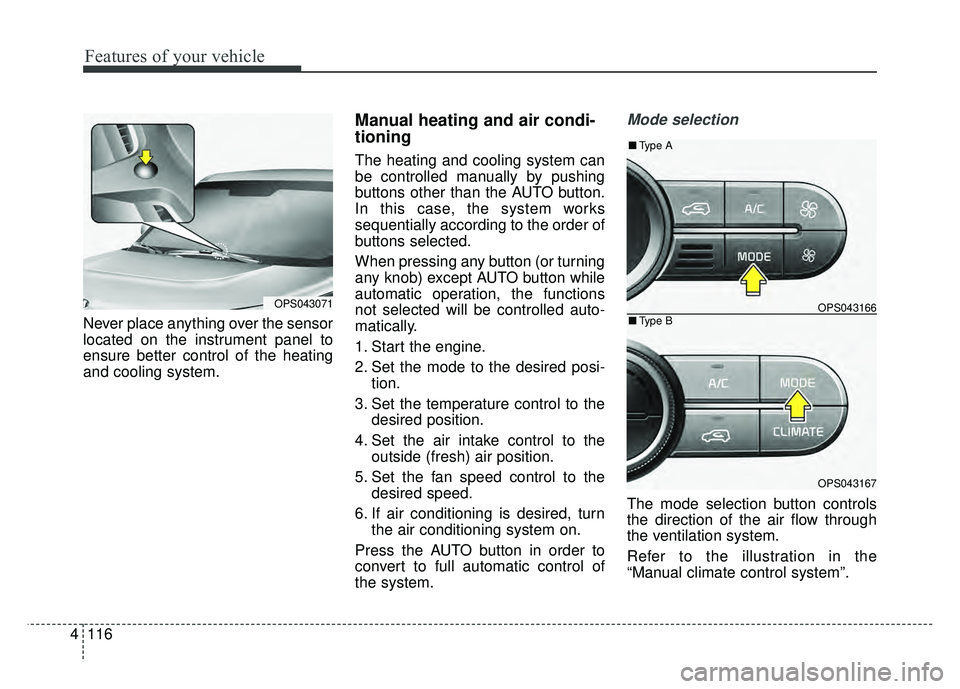
Never place anything over the sensor
located on the instrument panel to
ensure better control of the heating
and cooling system.
Manual heating and air condi-
tioning
The heating and cooling system can
be controlled manually by pushing
buttons other than the AUTO button.
In this case, the system works
sequentially according to the order of
buttons selected.
When pressing any button (or turning
any knob) except AUTO button while
automatic operation, the functions
not selected will be controlled auto-
matically.
1. Start the engine.
2. Set the mode to the desired posi-
tion.
3. Set the temperature control to the desired position.
4. Set the air intake control to the outside (fresh) air position.
5. Set the fan speed control to the desired speed.
6. If air conditioning is desired, turn the air conditioning system on.
Press the AUTO button in order to
convert to full automatic control of
the system.
Mode selection
The mode selection button controls
the direction of the air flow through
the ventilation system.
Refer to the illustration in the
“Manual climate control system”.
OPS043071OPS043166
OPS043167
■ Type B
■Type A
Page 204 of 620
Features of your vehicle
118
4
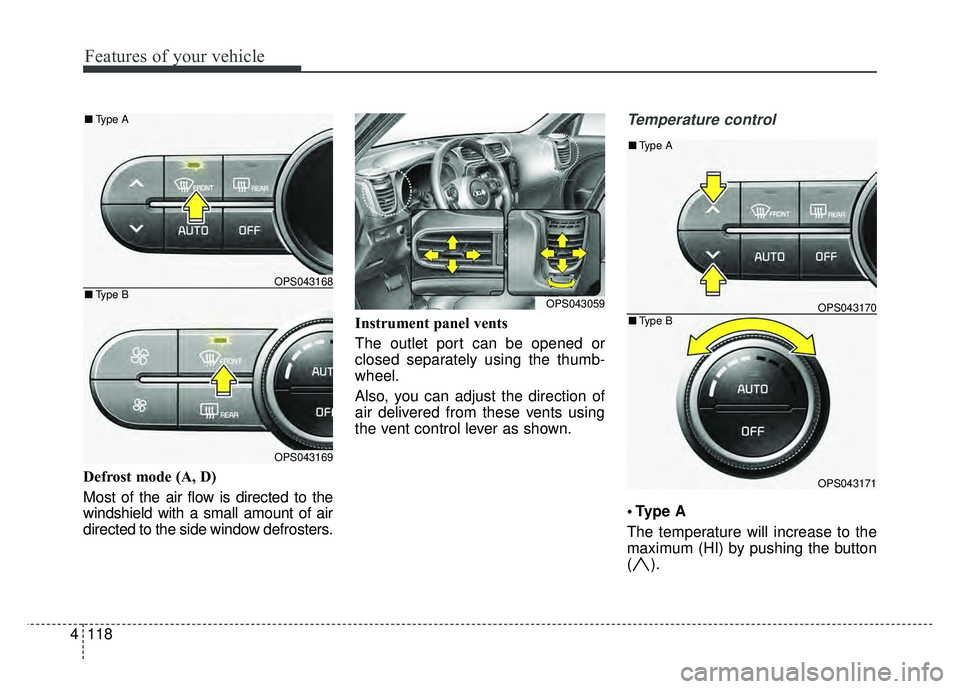
Defrost mode (A, D)
Most of the air flow is directed to the
windshield with a small amount of air
directed to the side window defrosters. Instrument panel vents
The outlet port can be opened or
closed separately using the thumb-
wheel.
Also, you can adjust the direction of
air delivered from these vents using
the vent control lever as shown.
Temperature control
A
The temperature will increase to the
maximum (HI) by pushing the button
().
OPS043168
OPS043169
■
Type B
■Type A
OPS043059OPS043170
OPS043171
■Type B
■Type A