brake KIA SOUL 2018 Manual PDF
[x] Cancel search | Manufacturer: KIA, Model Year: 2018, Model line: SOUL, Model: KIA SOUL 2018Pages: 620, PDF Size: 13.29 MB
Page 390 of 620
671
Driving your vehicle
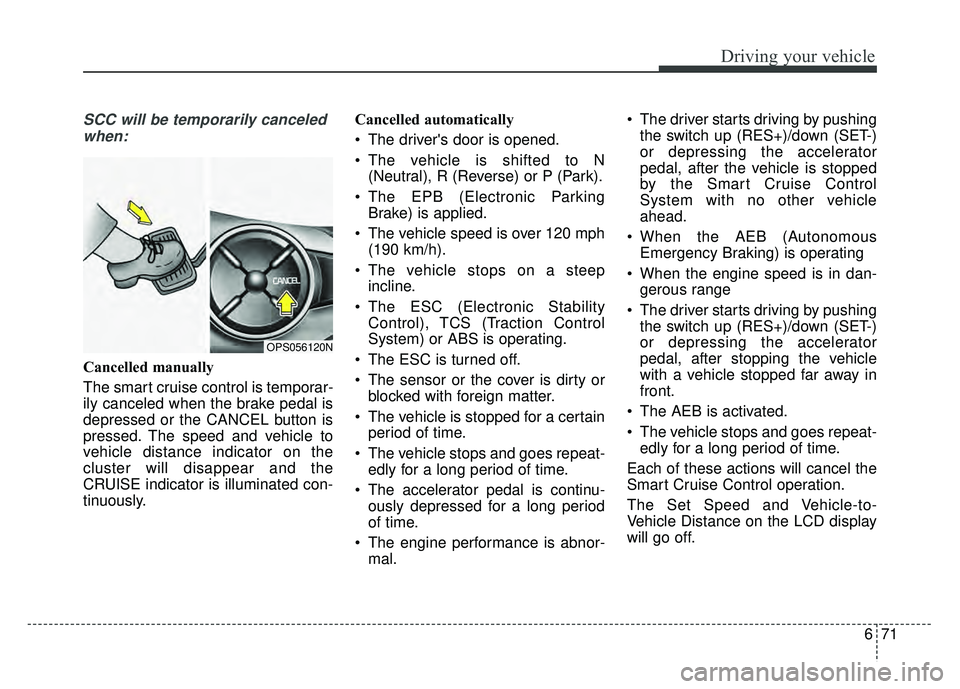
SCC will be temporarily canceledwhen:
Cancelled manually
The smart cruise control is temporar-
ily canceled when the brake pedal is
depressed or the CANCEL button is
pressed. The speed and vehicle to
vehicle distance indicator on the
cluster will disappear and the
CRUISE indicator is illuminated con-
tinuously. Cancelled automatically
The driver's door is opened.
The vehicle is shifted to N
(Neutral), R (Reverse) or P (Park).
The EPB (Electronic Parking Brake) is applied.
The vehicle speed is over 120 mph (190 km/h).
The vehicle stops on a steep incline.
The ESC (Electronic Stability Control), TCS (Traction Control
System) or ABS is operating.
The ESC is turned off.
The sensor or the cover is dirty or blocked with foreign matter.
The vehicle is stopped for a certain period of time.
The vehicle stops and goes repeat- edly for a long period of time.
The accelerator pedal is continu- ously depressed for a long period
of time.
The engine performance is abnor- mal. The driver starts driving by pushing
the switch up (RES+)/down (SET-)
or depressing the accelerator
pedal, after the vehicle is stopped
by the Smart Cruise Control
System with no other vehicle
ahead.
When the AEB (Autonomous Emergency Braking) is operating
When the engine speed is in dan- gerous range
The driver starts driving by pushing the switch up (RES+)/down (SET-)
or depressing the accelerator
pedal, after stopping the vehicle
with a vehicle stopped far away in
front.
The AEB is activated.
The vehicle stops and goes repeat- edly for a long period of time.
Each of these actions will cancel the
Smart Cruise Control operation.
The Set Speed and Vehicle-to-
Vehicle Distance on the LCD display
will go off.
OPS056120N
Page 391 of 620
Driving your vehicle
72
6
In a condition the Smart Cruise
Control is cancelled automatically,
the Smart Cruise Control will not
resume even though the RES+ or
SET- switch is pushed.
✽ ✽
NOTICE
If the system is automatically can-
celled, the warning chime will sound
and a message (“Smart Cruise
Control canceled”) will appear for a
few seconds.
You must adjust the vehicle speed by
depressing the accelerator or brake
pedal according to the road condi-
tions ahead and driving condition.
Always check the road conditions.
Do not rely on the warning chime.
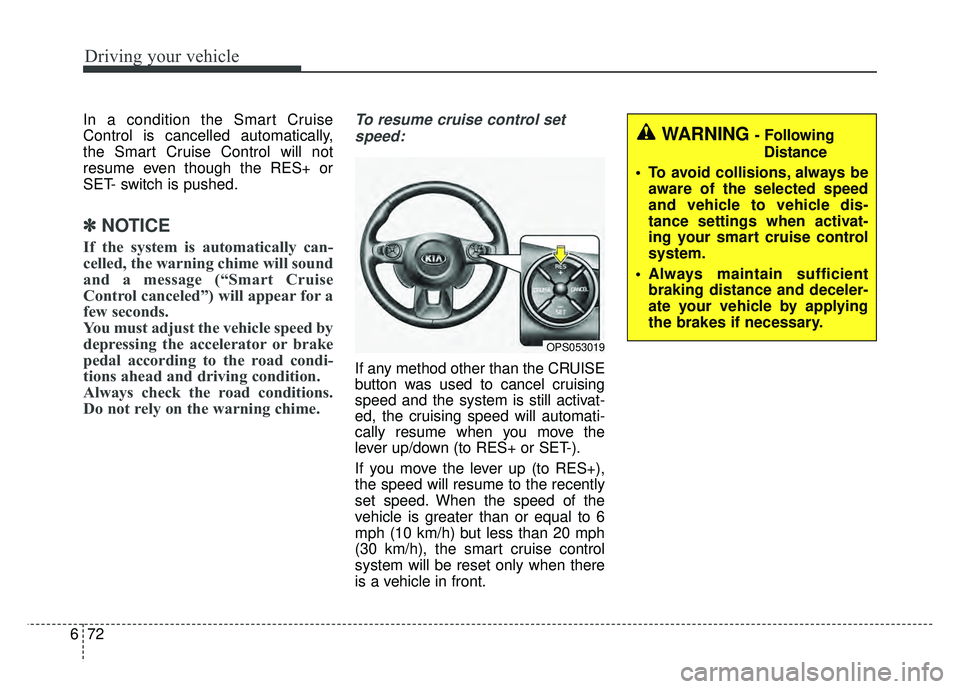
To resume cruise control set
speed:
If any method other than the CRUISE
button was used to cancel cruising
speed and the system is still activat-
ed, the cruising speed will automati-
cally resume when you move the
lever up/down (to RES+ or SET-).
If you move the lever up (to RES+),
the speed will resume to the recently
set speed. When the speed of the
vehicle is greater than or equal to 6
mph (10 km/h) but less than 20 mph
(30 km/h), the smart cruise control
system will be reset only when there
is a vehicle in front.
WARNING - Following Distance
To avoid collisions, always be aware of the selected speed
and vehicle to vehicle dis-
tance settings when activat-
ing your smart cruise control
system.
Always maintain sufficient braking distance and deceler-
ate your vehicle by applying
the brakes if necessary.
OPS053019
Page 392 of 620
673
Driving your vehicle
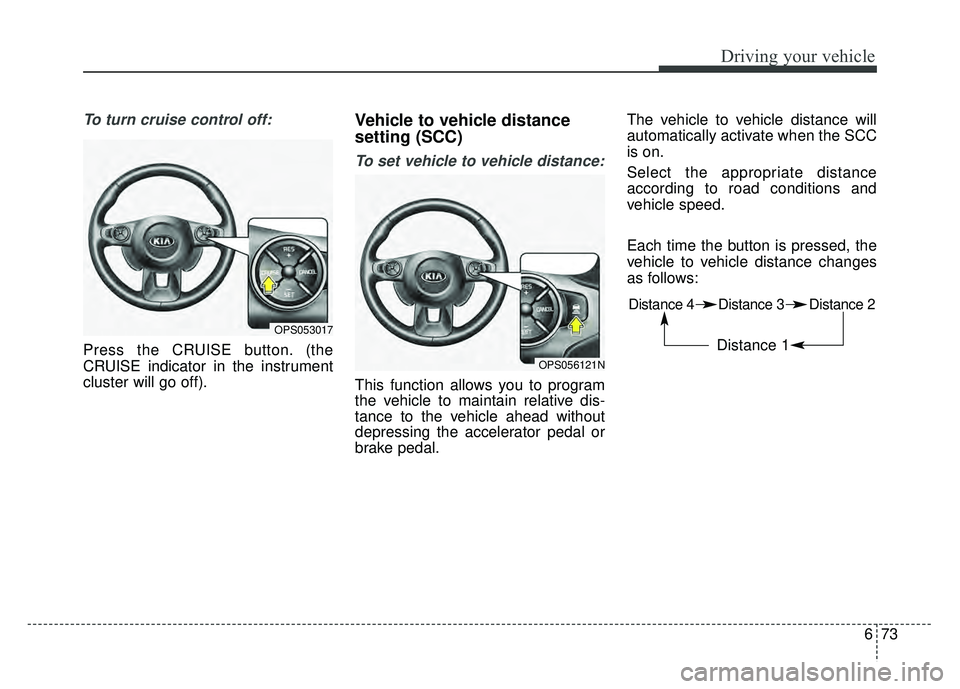
To turn cruise control off:
Press the CRUISE button. (the
CRUISE indicator in the instrument
cluster will go off).
Vehicle to vehicle distance
setting (SCC)
To set vehicle to vehicle distance:
This function allows you to program
the vehicle to maintain relative dis-
tance to the vehicle ahead without
depressing the accelerator pedal or
brake pedal.The vehicle to vehicle distance will
automatically activate when the SCC
is on.
Select the appropriate distance
according to road conditions and
vehicle speed.
Each time the button is pressed, the
vehicle to vehicle distance changes
as follows:
OPS053017
OPS056121N
Distance 4 Distance 3 Distance 2
Distance 1
Page 394 of 620
675
Driving your vehicle
The vehicle will maintain the setspeed, when the lane ahead is clear.
The vehicle will slow down or speed up within selected speed to
maintain the selected distance,
when there is a vehicle ahead of
you in the lane. (A vehicle will
appear in front of your vehicle in
the LCD display only when there is
an actual vehicle in front of you)
If the vehicle ahead speeds up, your vehicle will travel at a steady
cruising speed after accelerating to
the selected speed.
The warning chime sounds and LCD display blinks if it is hard to
maintain the selected distance to
the vehicle ahead.
If the warning chime sounds, actively adjust the vehicle speed by
depressing the brake pedal
according to the road condition
ahead and driving condition.
Even if the warning chime is not acti- vated, always pay attention to the
driving conditions to prevent danger-
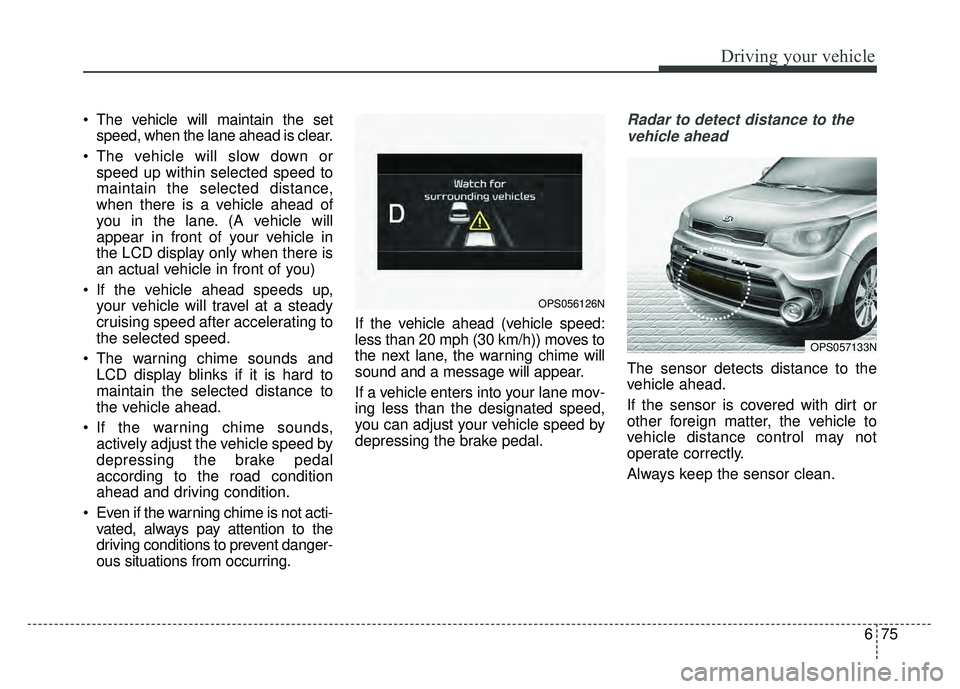
ous situations from occurring. If the vehicle ahead (vehicle speed:
less than 20 mph (30 km/h)) moves to
the next lane, the warning chime will
sound and a message will appear.
If a vehicle enters into your lane mov-
ing less than the designated speed,
you can adjust your vehicle speed by
depressing the brake pedal.Radar to detect distance to the
vehicle ahead
The sensor detects distance to the
vehicle ahead.
If the sensor is covered with dirt or
other foreign matter, the vehicle to
vehicle distance control may not
operate correctly.
Always keep the sensor clean.
OPS057133N
OPS056126N
Page 396 of 620
677
Driving your vehicle
Use only genuine Kia parts torepair or replace a damaged sen-
sor or sensor cover. Do not apply
paint to the sensor cover.To adjust the sensitivity of
Smart Cruise Control
The sensitivity of vehicle speed when
following the front vehicle to maintain
the set distance can be adjusted. Go
to the User Settings Mode (Driving
Assist) and select SCC (Smart
Cruise Control). You may select one
of the three stages you prefer.
Slow:
Vehicle speed following the front
vehicle to maintain the set distance
is slower than normal speed.
Normal: Vehicle speed following the front
vehicle to maintain the set distance
is normal
Fast: Vehicle speed following the front
vehicle to maintain the set distance
is faster than normal speed.
✽ ✽ NOTICE
The system remembers the last
selected mode.
To convert to cruise control
mode:
The driver may choose to only use
the cruise control mode (speed con-
trol function) by doing as follows:
1.Turn the SCC on (the cruise indi-
cator light will be on but the system
will not be activated).
2.Push the distance to distance switch for more than 2 seconds.
3.Choose between “Smart cruise control (SCC) mode” and “Cruise
control (CC) mode”.
WARNING
When using the cruise control
mode, you must manually
assess the distance to other
vehicles as the system will not
automatically brake to slow
down for other vehicles.
Page 397 of 620
Driving your vehicle
78
6
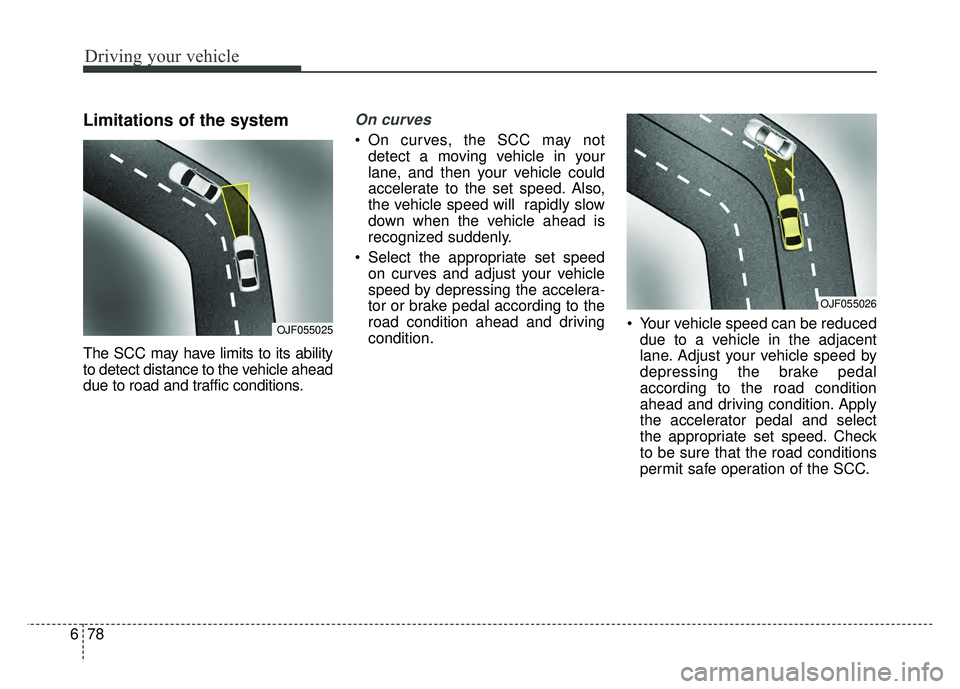
Limitations of the system
The SCC may have limits to its ability
to detect distance to the vehicle ahead
due to road and traffic conditions.
On curves
On curves, the SCC may not
detect a moving vehicle in your
lane, and then your vehicle could
accelerate to the set speed. Also,
the vehicle speed will rapidly slow
down when the vehicle ahead is
recognized suddenly.
Select the appropriate set speed on curves and adjust your vehicle
speed by depressing the accelera-
tor or brake pedal according to the
road condition ahead and driving
condition. Your vehicle speed can be reduced
due to a vehicle in the adjacent
lane. Adjust your vehicle speed by
depressing the brake pedal
according to the road condition
ahead and driving condition. Apply
the accelerator pedal and select
the appropriate set speed. Check
to be sure that the road conditions
permit safe operation of the SCC.
OJF055025
OJF055026
Page 398 of 620
679
Driving your vehicle
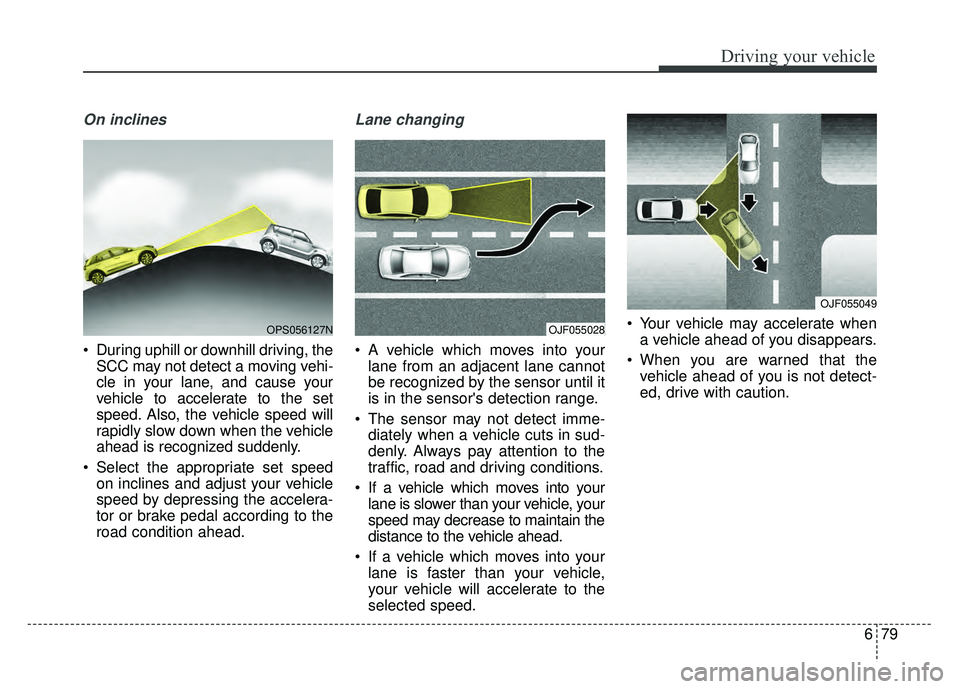
On inclines
During uphill or downhill driving, theSCC may not detect a moving vehi-
cle in your lane, and cause your
vehicle to accelerate to the set
speed. Also, the vehicle speed will
rapidly slow down when the vehicle
ahead is recognized suddenly.
Select the appropriate set speed on inclines and adjust your vehicle
speed by depressing the accelera-
tor or brake pedal according to the
road condition ahead.
Lane changing
A vehicle which moves into yourlane from an adjacent lane cannot
be recognized by the sensor until it
is in the sensor's detection range.
The sensor may not detect imme- diately when a vehicle cuts in sud-
denly. Always pay attention to the
traffic, road and driving conditions.
If a vehicle which moves into your lane is slower than your vehicle, your
speed may decrease to maintain the
distance to the vehicle ahead.
If a vehicle which moves into your lane is faster than your vehicle,
your vehicle will accelerate to the
selected speed. Your vehicle may accelerate when
a vehicle ahead of you disappears.
When you are warned that the vehicle ahead of you is not detect-
ed, drive with caution.
OPS056127NOJF055028
OJF055049
Page 399 of 620
Driving your vehicle
80
6
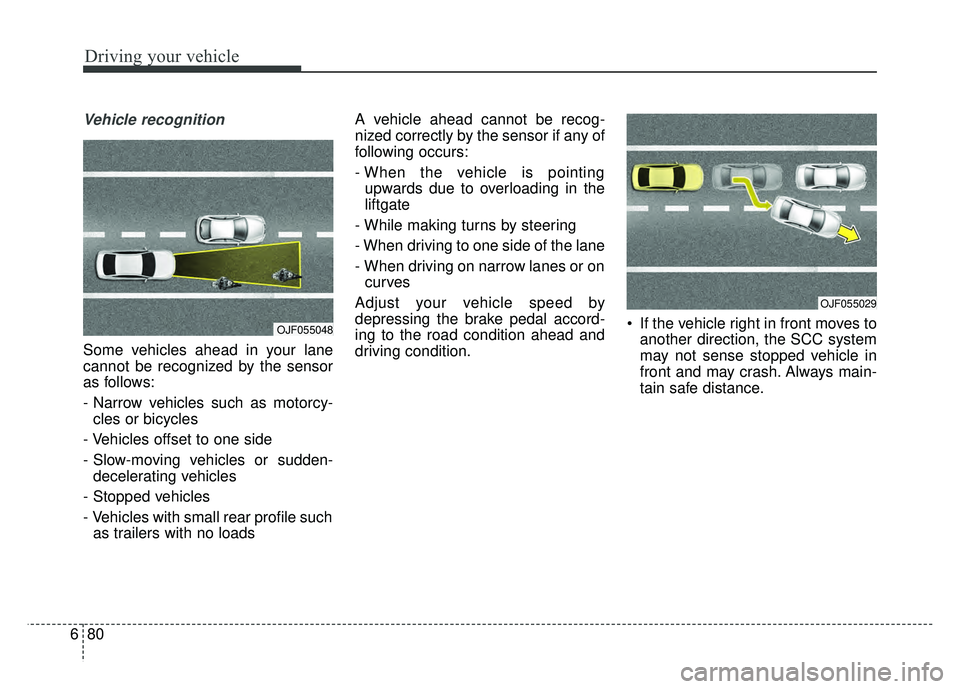
Vehicle recognition
Some vehicles ahead in your lane
cannot be recognized by the sensor
as follows:
- Narrow vehicles such as motorcy-
cles or bicycles
- Vehicles offset to one side
- Slow-moving vehicles or sudden- decelerating vehicles
- Stopped vehicles
- Vehicles with small rear profile such as trailers with no loads A vehicle ahead cannot be recog-
nized correctly by the sensor if any of
following occurs:
- When the vehicle is pointing
upwards due to overloading in the
liftgate
- While making turns by steering
- When driving to one side of the lane
- When driving on narrow lanes or on curves
Adjust your vehicle speed by
depressing the brake pedal accord-
ing to the road condition ahead and
driving condition. If the vehicle right in front moves to
another direction, the SCC system
may not sense stopped vehicle in
front and may crash. Always main-
tain safe distance.
OJF055048
OJF055029
Page 400 of 620
681
Driving your vehicle
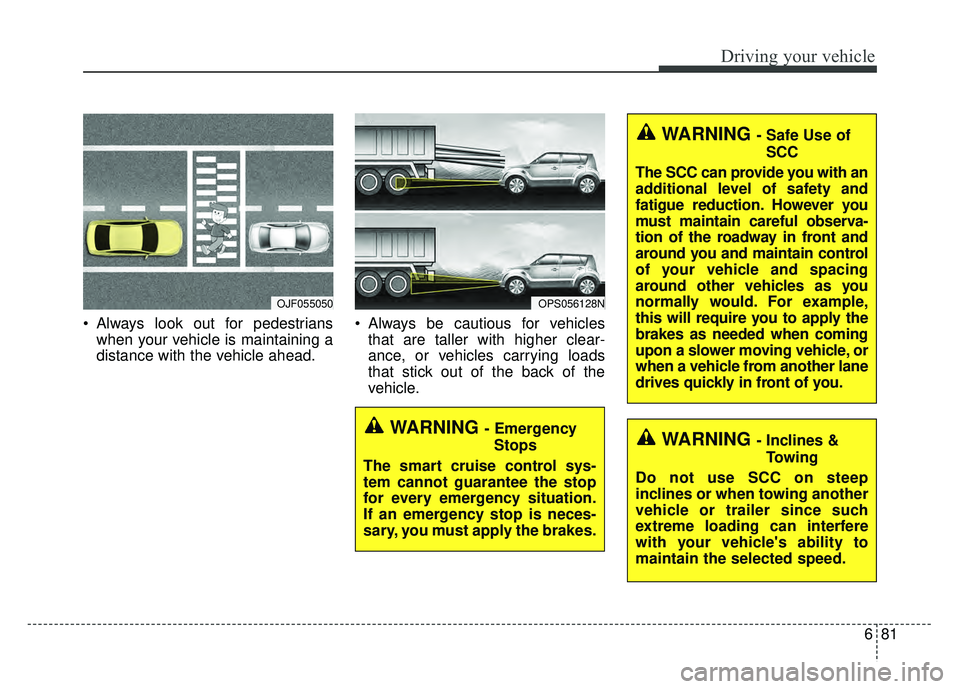
Always look out for pedestrianswhen your vehicle is maintaining a
distance with the vehicle ahead. Always be cautious for vehicles
that are taller with higher clear-
ance, or vehicles carrying loads
that stick out of the back of the
vehicle.
OJF055050OPS056128N
WARNING - Emergency
Stops
The smart cruise control sys-
tem cannot guarantee the stop
for every emergency situation.
If an emergency stop is neces-
sary, you must apply the brakes.
WARNING - Safe Use of SCC
The SCC can provide you with an
additional level of safety and
fatigue reduction. However you
must maintain careful observa-
tion of the roadway in front and
around you and maintain control
of your vehicle and spacing
around other vehicles as you
normally would. For example,
this will require you to apply the
brakes as needed when coming
upon a slower moving vehicle, or
when a vehicle from another lane
drives quickly in front of you.
WARNING - Inclines & Towing
Do not use SCC on steep
inclines or when towing another
vehicle or trailer since such
extreme loading can interfere
with your vehicle's ability to
maintain the selected speed.
Page 401 of 620
Driving your vehicle
82
6
When using the Smart Cruise
Control take the following precau-
tions:
If an emergency stop is necessary,
you must apply the brakes. The
vehicle cannot be stopped at every
emergency situation by using the
Smart Cruise Control System.
Keep a safe distance according to road conditions and vehicle speed.
If the vehicle to vehicle distance is
too close during a high-speed driv-
ing, a serious collision may result.
Always maintain sufficient braking distance and decelerate your vehi-
cle by applying the brakes if neces-
sary.
The Smart Cruise Control System cannot recognize a stopped vehi-
cle, pedestrians or an oncoming
vehicle. Always look ahead cau-
tiously to prevent unexpected and
sudden situations from occurring. Vehicles moving in front of you with
a frequent lane change may cause
a delay in the system's reaction or
may cause the system to react to a
vehicle actually in an adjacent
lane. Always drive cautiously to
prevent unexpected and sudden
situations from occurring.
Always be aware of the selected speed and vehicle to vehicle dis-
tance. The driver should not solely
rely on the system but always pay
attention to driving conditions and
control your vehicle speed.
The Smart Cruise Control System may not recognize complex driving
situations so always pay attention
to driving conditions and control
your vehicle speed.
Make sure to be well informed of the owner's manual and practice
using the smart cruise control sys-
tem to ensure the safe use of the
system. After an engine start, please stop
for several seconds. If system ini-
tialization is not completed, the
SCC does not normally operate.
After an engine start, if any objects are not detected or the sensor
cover is obscured with foreign sub-
stances, there is a possibility that
the SCC system may not work.
The following conditions may cause a malfunction: over-loading
the liftgate, suspension modifica-
tion, tire replacement with unau-
thorized tires or tires with different
tread wear and pressure levels.