load KIA SOUL 2021 Navigation System Quick Reference Guide
[x] Cancel search | Manufacturer: KIA, Model Year: 2021, Model line: SOUL, Model: KIA SOUL 2021Pages: 211, PDF Size: 6.67 MB
Page 36 of 211
2-2
Pairing to an Android smartphone via
Android Auto
When you connect an Android smartphone to the vehicle with
Android Auto, you can run and control applications on the phone
through the widescreen using its user-friendly interface.
1 To use Android Auto, first check the following.
\225Visit the Android Auto website at https://www.android.
com/auto to check the list of countries, device types, and
models that support Android Auto.
\225Download and install the Android Auto application from
Google Play Store. It is not possible to install Android Auto
in countries that do not support the feature.
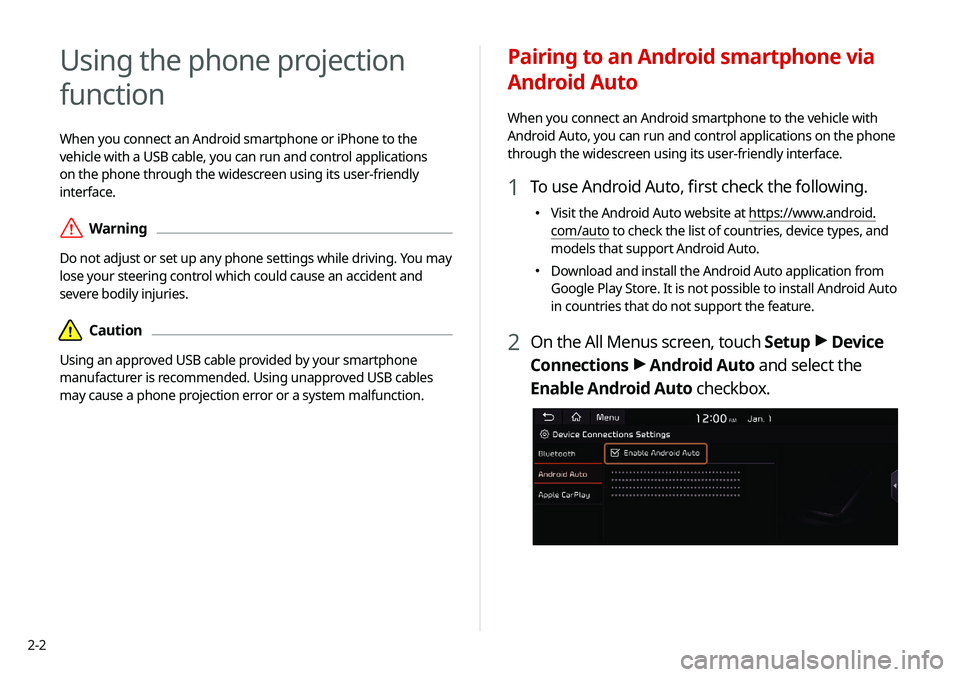
2 On the All Menus screen, touch Setup >
Device
Connections >
Android Auto and select the
Enable Android Auto checkbox.
Using the phone projection
function
When you connect an Android smartphone or iPhone to the
vehicle with a USB cable, you can run and control applications
on the phone through the widescreen using its user-friendly
interface.
\335Warning
Do not adjust or set up any phone settings while driving. You may
lose your steering control which could cause an accident and
severe bodily injuries.
\334Caution
Using an approved USB cable provided by your smartphone
manufacturer is recommended. Using unapproved USB cables
may cause a phone projection error or a system malfunction.
Page 95 of 211
5-27
COPYING OR USE OF THE PRODUCT EXCEPT AS PERMITTED
BY THIS EULA IS UNAUTHORIZED AND IS COPYRIGHT
INFRINGEMENT UNDER THE LAWS OF YOUR COUNTRY. IF
YOU COPY OR USE THE PRODUCT WITHOUT COMPANY'S
PERMISSION, EXCEPT AS PERMITTED BY THIS EULA, YOU ARE
VIOLATING THE LAW AND LIABLE TO COMPANY AND ITS
LICENSORS FOR DAMAGES, AND YOU MAY BE SUBJECT TO
CRIMINAL PENALTIES.
THE PRODUCT MAY INCLUDE ENFORCEMENT TECHNOLOGY
DESIGNED TO PREVENT (i) UNAUTHORIZED COPYING OF THE
PRODUCT ONTO PHYSICAL STORAGE MEDIA OR VIA TRANSFER
OVER THE INTERNET OR OTHER ELECTRONIC COMMUNICATION
MEANS AND/OR (ii) ILLEGAL USAGE OF THE PRODUCT OTHER
THAN BY A SPECIFICALLY AHTORIZED DEVICE. YOU AGREE THAT
COMPANY MAY USE THESE MEASURES TO PROTECT COMPANY
AND THE LICENSORS AGAINST COPYRIGHT INFRINGEMENT.
Uploads. The Product may provide functionality through which
you are able to upload certain information about your use of the
Product (collectively, "Uploads") to COMPANY's servers or receive
other services from COMPANY (collectively, the "Services"). If
you use such functionality, you authorize COMPANY to retain
your Uploads on its servers. COMPANY will have no obligation
to provide any Services, may change the form and nature of
any Services at any time with or without notice to you, will have
no liability whatsoever to you for any failure of the Product or
Services to transmit your Uploads to or from COMPANY's servers,
may cease providing any Services at any time with or without
notice to you, and will have no obligation to retain your Uploads (or
any other materials you may provide to COMPANY) on its servers
or return your Uploads (or any other materials you may provide
to COMPANY) to you before deleting them from its servers.
Terms and Conditions
Personal Use Only. You agree to use this Product together
with COMPANY's authorized application for the solely personal,
non-commercial purposes for which you were licensed, and
not for service bureau, time-sharing or other similar purposes.
Accordingly, but subject to the restrictions set forth in the
following paragraphs, you agree not to otherwise reproduce,
copy, modify, decompile, disassemble, create any derivative
works of, or reverse engineer any portion of this Data, and may
not transfer or distribute it in any form, for any purpose, except
to the extent permitted by mandatory laws. You may not assign
this EULA or any of the rights or licenses granted under this EULA,
except when installed in the system for which it was created.
Restrictions. Except where you have been specifically licensed
to do so by COMPANY, and without limiting the preceding
paragraph, you may not use the Product (i) with any products,
systems, or applications installed or otherwise connected to or
in communication with vehicles, capable of vehicle navigation,
positioning, dispatch, real time route guidance, fleet management
or similar applications; or (ii) with or in communication with any
positioning devices or any mobile or wireless-connected electronic
or computer devices, including without limitation cellular phones,
palmtop and handheld computers, pagers, and personal digital
assistants or PDAs.
Page 105 of 211
6-3
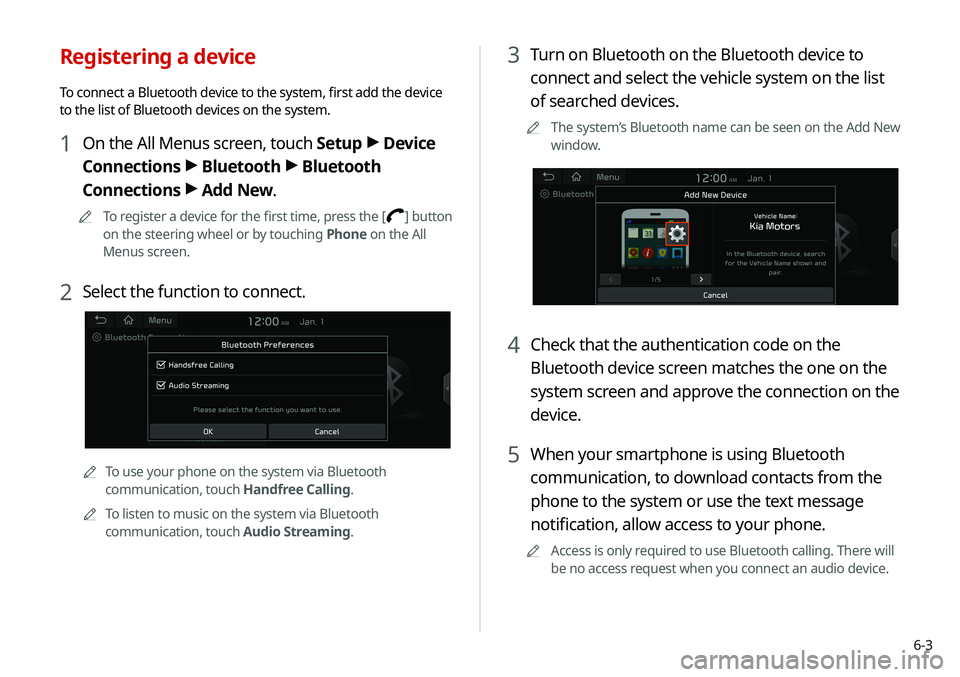
3 Turn on Bluetooth on the Bluetooth device to
connect and select the vehicle system on the list
of searched devices.
0000
A
The system’s Bluetooth name can be seen on the Add New
window.
4 Check that the authentication code on the
Bluetooth device screen matches the one on the
system screen and approve the connection on the
device.
5 When your smartphone is using Bluetooth
communication, to download contacts from the
phone to the system or use the text message
notification, allow access to your phone.
0000
A
Access is only required to use Bluetooth calling. There will
be no access request when you connect an audio device.
Registering a device
To connect a Bluetooth device to the system, first add the device
to the list of Bluetooth devices on the system.
1 On the All Menus screen, touch Setup >
Device
Connections >
Bluetooth >
Bluetooth
Connections >
Add New.
0000
A
To register a device for the first time, press the [] button
on the steering wheel or by touching Phone on the All
Menus screen.
2 Select the function to connect.
0000
A
To use your phone on the system via Bluetooth
communication, touch Handfree Calling.
0000
A
To listen to music on the system via Bluetooth
communication, touch Audio Streaming.
Page 109 of 211
6-7
0000
A
The download may not work in some phone models.
0000
A
You can download up to 50 call records for each list.
0000
A
Call durations do not appear on the system screen.
0000
A
You cannot download call records when the download is
prohibited by the phone. Some phone models may require
approval for a download. When a successful download is not
made, check the phone screen or its settings.
0000
A
When call records are newly downloaded, the previous
records are removed.
0000
A
Learn more about receiving calls while using a Bluetooth
connection.
> See “ Accepting an incoming call over Bluetooth.”
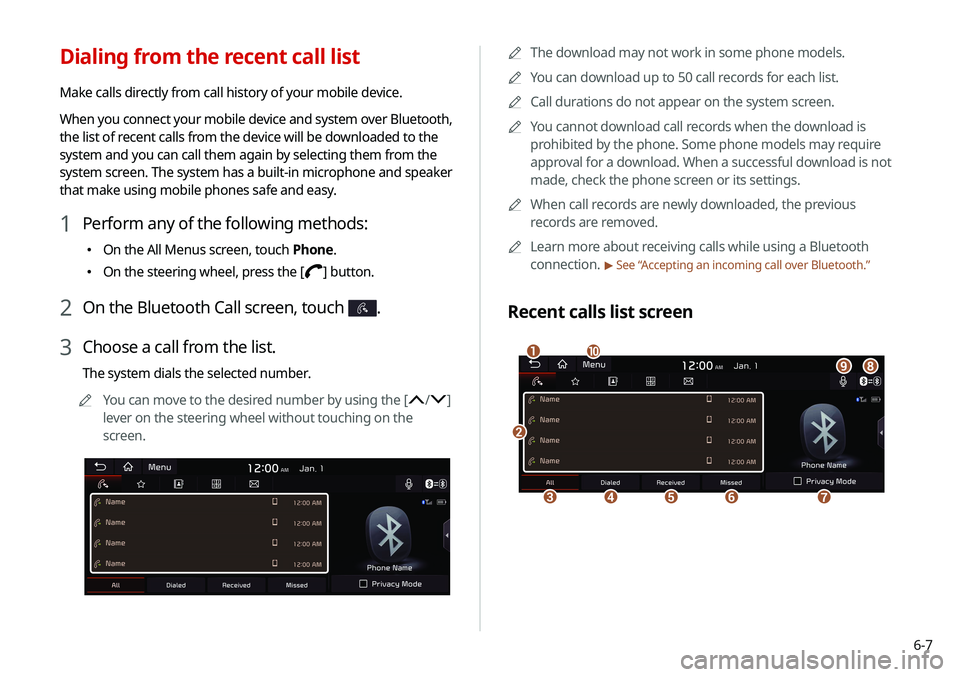
Recent calls list screen
\037
\036\035\034\033
\032\031\030\027
\026
Dialing from the recent call list
Make calls directly from call history of your mobile device.
When you connect your mobile device and system over Bluetooth,
the list of recent calls from the device will be downloaded to the
system and you can call them again by selecting them from the
system screen. The system has a built-in microphone and speaker
that make using mobile phones safe and easy.
1 Perform any of the following methods:
\225
On the All Menus screen, touch Phone.
\225On the steering wheel, press the [] button.
2 On the Bluetooth Call screen, touch .
3 Choose a call from the list.
The system dials the selected number.
0000
A
You can move to the desired number by using the [
/]
lever on the steering wheel without touching on the
screen.
Page 110 of 211
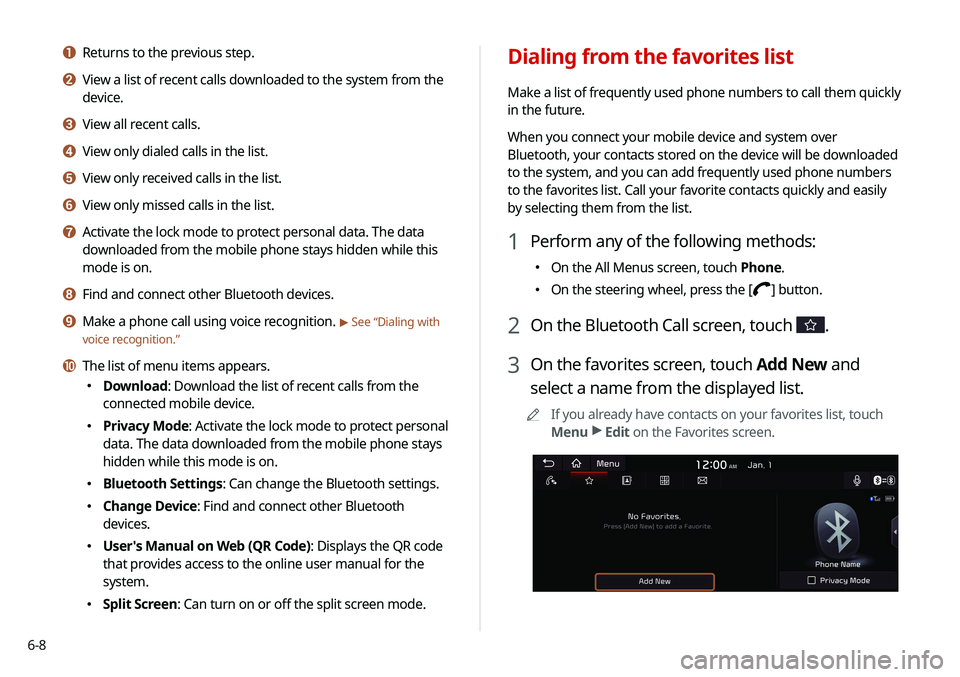
6-8
Dialing from the favorites list
Make a list of frequently used phone numbers to call them quickly
in the future.
When you connect your mobile device and system over
Bluetooth, your contacts stored on the device will be downloaded
to the system, and you can add frequently used phone numbers
to the favorites list. Call your favorite contacts quickly and easily
by selecting them from the list.
1 Perform any of the following methods:
\225On the All Menus screen, touch Phone.
\225On the steering wheel, press the [] button.
2 On the Bluetooth Call screen, touch .
3 On the favorites screen, touch Add New and
select a name from the displayed list.
0000
A
If you already have contacts on your favorites list, touch
Menu >
Edit on the Favorites screen.
a Returns to the previous step.
b View a list of recent calls downloaded to the system from the
device.
c View all recent calls.
d View only dialed calls in the list.
e View only received calls in the list.
f View only missed calls in the list.
g Activate the lock mode to protect personal data. The data
downloaded from the mobile phone stays hidden while this
mode is on.
h Find and connect other Bluetooth devices.
i Make a phone call using voice recognition. > See “Dialing with
voice recognition.”
j The list of menu items appears.
\225 Download: Download the list of recent calls from the
connected mobile device.
\225Privacy Mode: Activate the lock mode to protect personal
data. The data downloaded from the mobile phone stays
hidden while this mode is on.
\225Bluetooth Settings: Can change the Bluetooth settings.
\225Change Device: Find and connect other Bluetooth
devices.
\225User's Manual on Web (QR Code): Displays the QR code
that provides access to the online user manual for the
system.
\225Split Screen: Can turn on or off the split screen mode.
Page 111 of 211
6-9
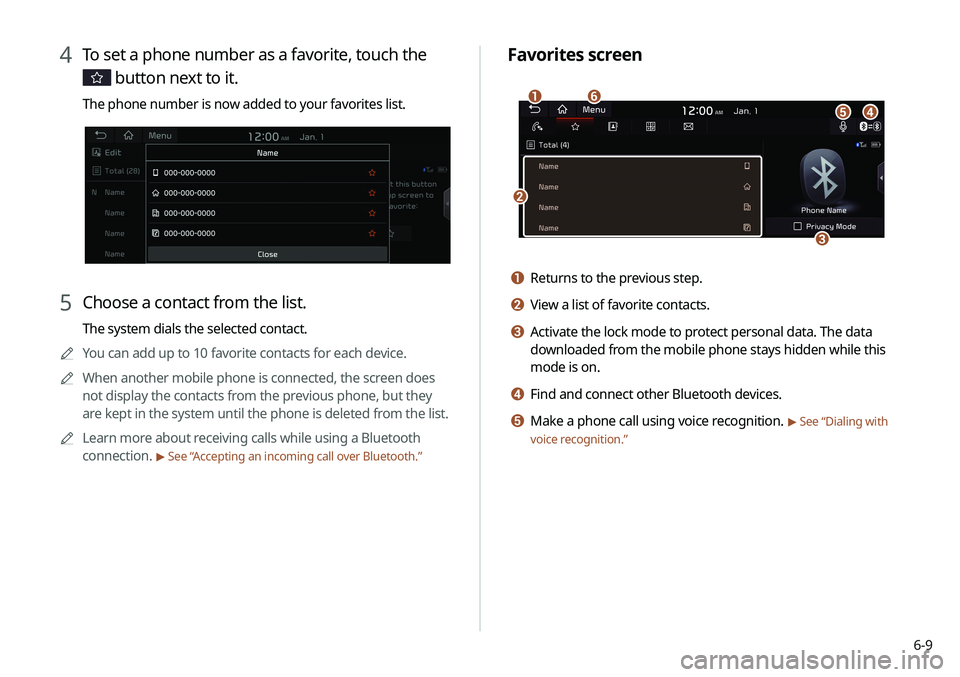
Favorites screen
\037
\036
\035\034\033
\032
a Returns to the previous step.
b View a list of favorite contacts.
c Activate the lock mode to protect personal data. The data
downloaded from the mobile phone stays hidden while this
mode is on.
d Find and connect other Bluetooth devices.
e Make a phone call using voice recognition. > See “Dialing with
voice recognition.”
4 To set a phone number as a favorite, touch the
button next to it.
The phone number is now added to your favorites list.
5 Choose a contact from the list.
The system dials the selected contact.
0000
A
You can add up to 10 favorite contacts for each device.
0000
A
When another mobile phone is connected, the screen does
not display the contacts from the previous phone, but they
are kept in the system until the phone is deleted from the list.
0000
A
Learn more about receiving calls while using a Bluetooth
connection.
> See “ Accepting an incoming call over Bluetooth.”
Page 112 of 211
6-10
Dialing from the contacts
You can use contacts from the connected mobile device on the
system.
When you connect your mobile device with the system via
Bluetooth, contacts from the device are downloaded to the
system, and you can choose to call them from the system screen.
The system has a built-in microphone and speaker that make
using mobile phones safe and easy.
1 Perform any of the following methods:
\225On the All Menus screen, touch Phone.
\225On the steering wheel, press the [] button.
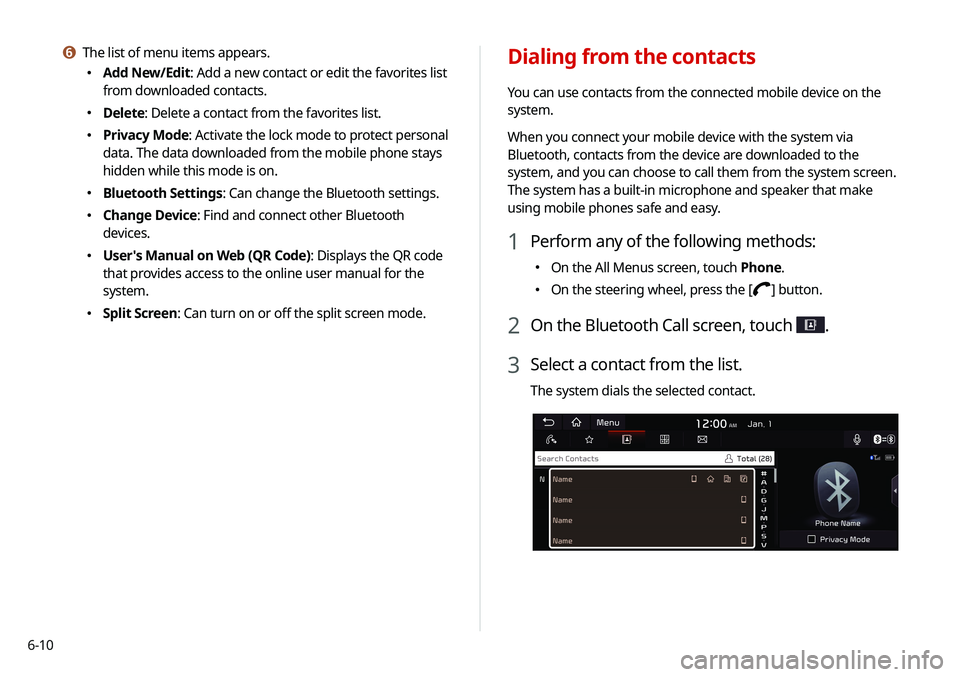
2 On the Bluetooth Call screen, touch .
3 Select a contact from the list.
The system dials the selected contact.
f The list of menu items appears.
\225
Add New/Edit: Add a new contact or edit the favorites list
from downloaded contacts.
\225Delete: Delete a contact from the favorites list.
\225Privacy Mode: Activate the lock mode to protect personal
data. The data downloaded from the mobile phone stays
hidden while this mode is on.
\225Bluetooth Settings: Can change the Bluetooth settings.
\225Change Device: Find and connect other Bluetooth
devices.
\225User's Manual on Web (QR Code): Displays the QR code
that provides access to the online user manual for the
system.
\225Split Screen: Can turn on or off the split screen mode.
Page 113 of 211
6-11
0000
A
When another mobile phone is connected, the screen does
not display the contacts downloaded from the previous
phone, but they are kept in the system until the phone is
deleted from the list.
0000
A
Learn more about receiving calls while using a Bluetooth
connection.
> See “ Accepting an incoming call over Bluetooth.”
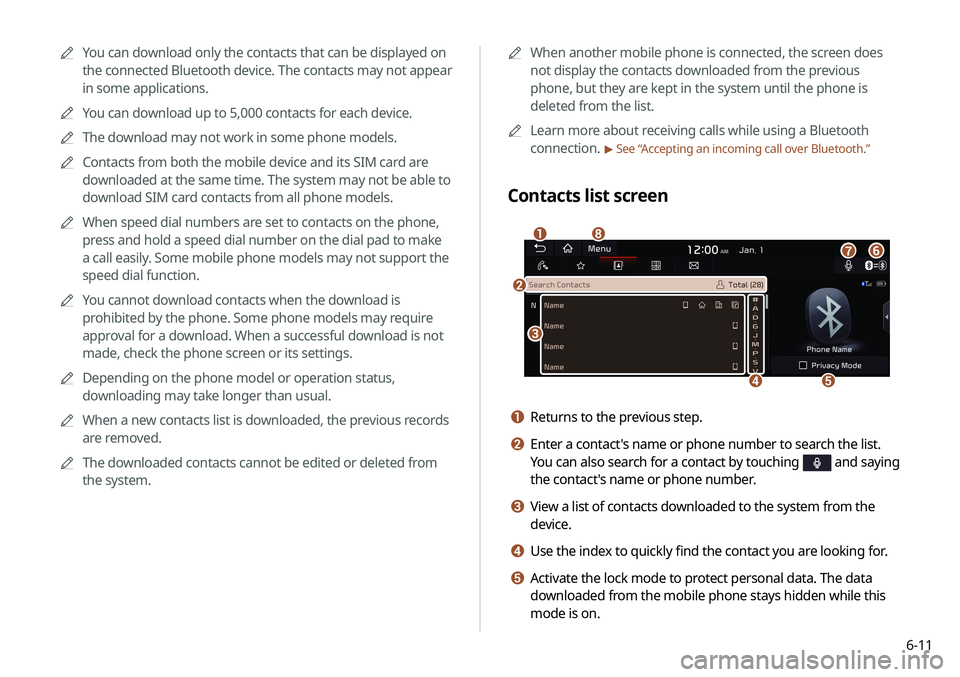
Contacts list screen
\037
\036
\035
\034
\033
\032
\031
\030
a Returns to the previous step.
b Enter a contact's name or phone number to search the list.
You can also search for a contact by touching
and saying
the contact's name or phone number.
c View a list of contacts downloaded to the system from the
device.
d Use the index to quickly find the contact you are looking for.
e Activate the lock mode to protect personal data. The data
downloaded from the mobile phone stays hidden while this
mode is on.
0000
A
You can download only the contacts that can be displayed on
the connected Bluetooth device. The contacts may not appear
in some applications.
0000
A
You can download up to 5,000 contacts for each device.
0000
A
The download may not work in some phone models.
0000
A
Contacts from both the mobile device and its SIM card are
downloaded at the same time. The system may not be able to
download SIM card contacts from all phone models.
0000
A
When speed dial numbers are set to contacts on the phone,
press and hold a speed dial number on the dial pad to make
a call easily. Some mobile phone models may not support the
speed dial function.
0000
A
You cannot download contacts when the download is
prohibited by the phone. Some phone models may require
approval for a download. When a successful download is not
made, check the phone screen or its settings.
0000
A
Depending on the phone model or operation status,
downloading may take longer than usual.
0000
A
When a new contacts list is downloaded, the previous records
are removed.
0000
A
The downloaded contacts cannot be edited or deleted from
the system.
Page 114 of 211
6-12
Using the dial pad
Enter a phone number using the dial pad to make a call.
When you connect your mobile device to the system via
Bluetooth, you can enter and dial a phone number from the
system screen, without interacting with the device. The system
has a built-in microphone and speaker that make using mobile
phones safe and easy.
\335Warning
Do not manually dial a call while driving. Distraction by the use
of a mobile phone may cause you not to recognize traffic flow
around and not to cope with unexpected situations. As a result, a
traffic accident may occur.
1 Perform any of the following methods:
\225On the All Menus screen, touch Phone.
\225On the steering wheel, press the [] button.
2 On the Bluetooth Call screen, touch .
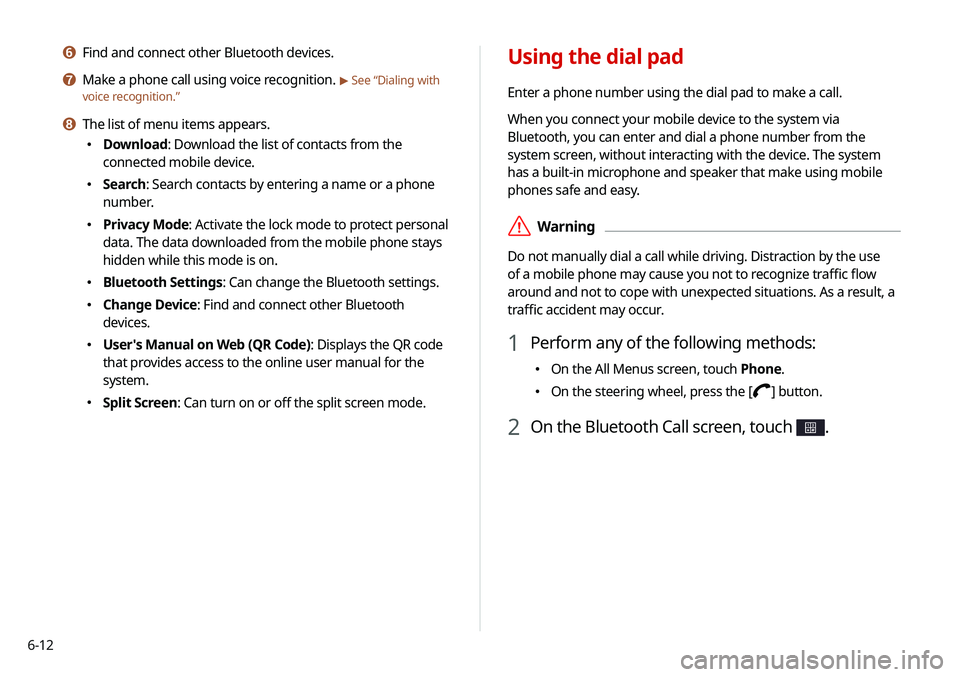
f Find and connect other Bluetooth devices.
g Make a phone call using voice recognition. > See “Dialing with
voice recognition.”
h The list of menu items appears.
\225 Download: Download the list of contacts from the
connected mobile device.
\225Search: Search contacts by entering a name or a phone
number.
\225Privacy Mode: Activate the lock mode to protect personal
data. The data downloaded from the mobile phone stays
hidden while this mode is on.
\225Bluetooth Settings: Can change the Bluetooth settings.
\225Change Device: Find and connect other Bluetooth
devices.
\225User's Manual on Web (QR Code): Displays the QR code
that provides access to the online user manual for the
system.
\225Split Screen: Can turn on or off the split screen mode.
Page 115 of 211
6-13
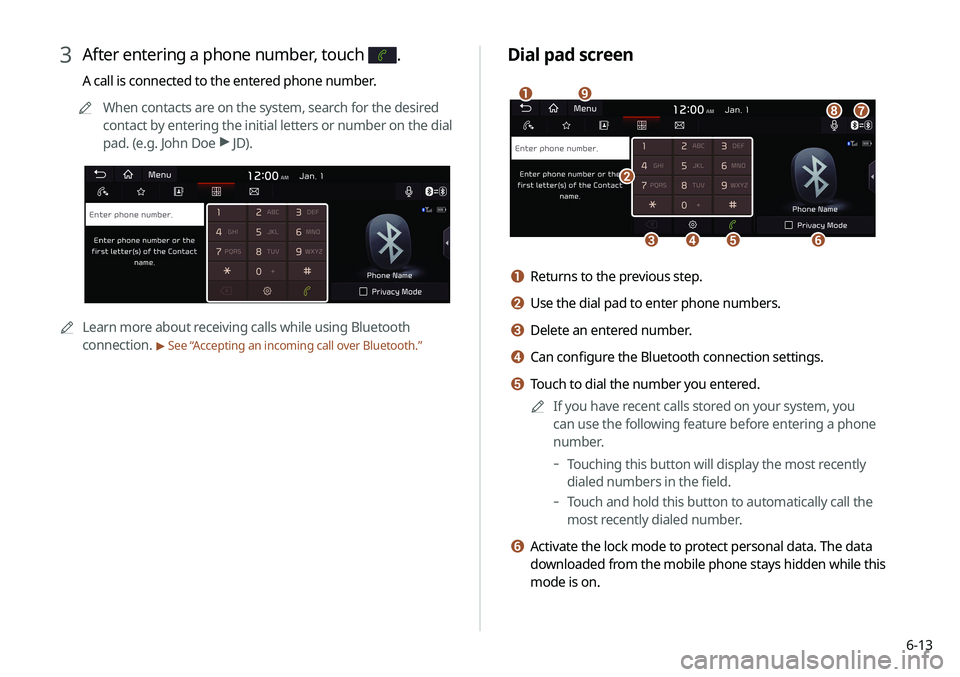
Dial pad screen
\037
\036\035\034
\033
\032
\031
\030
\027
a Returns to the previous step.
b Use the dial pad to enter phone numbers.
c Delete an entered number.
d Can configure the Bluetooth connection settings.
e Touch to dial the number you entered.0000
A
If you have recent calls stored on your system, you
can use the following feature before entering a phone
number.
-Touching this button will display the most recently
dialed numbers in the field.
-Touch and hold this button to automatically call the
most recently dialed number.
f Activate the lock mode to protect personal data. The data
downloaded from the mobile phone stays hidden while this
mode is on.
3 After entering a phone number, touch .
A call is connected to the entered phone number.
0000
A
When contacts are on the system, search for the desired
contact by entering the initial letters or number on the dial
pad. (e.g. John Doe >
JD).
0000A Learn more about receiving calls while using Bluetooth
connection.
> See “ Accepting an incoming call over Bluetooth.”