set KIA SOUL 2023 Quick Reference Guide
[x] Cancel search | Manufacturer: KIA, Model Year: 2023, Model line: SOUL, Model: KIA SOUL 2023Pages: 348, PDF Size: 12.26 MB
Page 111 of 348

5-11
2 Enter the location data such as place name, address, or coordinates and
then press OK.
A
To access the online user's manual on the Search screen, press >
User's Manual
on Web (QR Code) and then scan the displayed QR code.
A
When there are any similar matches, the recommendations appear at the left of
keypad.
3 Select a destination from the search result.
A
You can see the sites in the list on the preview screen at the right.
A
To sort the search results in a different order, press on the attribute to toggle between
options.
4 Check the location of the destination and then press Set as Destination.
A
If you press Parking at the bottom right of the screen, the map screen displays the
location icon of the parking a lot.
5 Select a route and press Start Guidance.
Page 112 of 348

5-12
Searching for nearby points of interest(POI)
You can set a destination after searching the nearby points of interest by the category.
1 On the Navigation Menu screen, press POI Categories.
AAvailable icons and their arrangement may differ depending on the vehicle model
and specifications.
2 Select a desired point according to the instructions.
A
To access the online user's manual on the POI Categories screen, press >
User's
Manual on Web (QR Code) and then scan the displayed QR code.
A
The screen may differ depending on the vehicle model and specifications.
Page 113 of 348

5-13
3 Select a destination from the search result.
A
To display the result of search around a specific location, select a sort criteria from the
list on the left of the screen.
A
To sort the search results in a different order, press on the attribute to toggle between
options.
A
The screen may differ depending on the vehicle model and specifications.
Option A
Option B (EV only)
Option C (EV only)
4 Check the location of the destination and then press Set as Destination.
Page 114 of 348
5-14
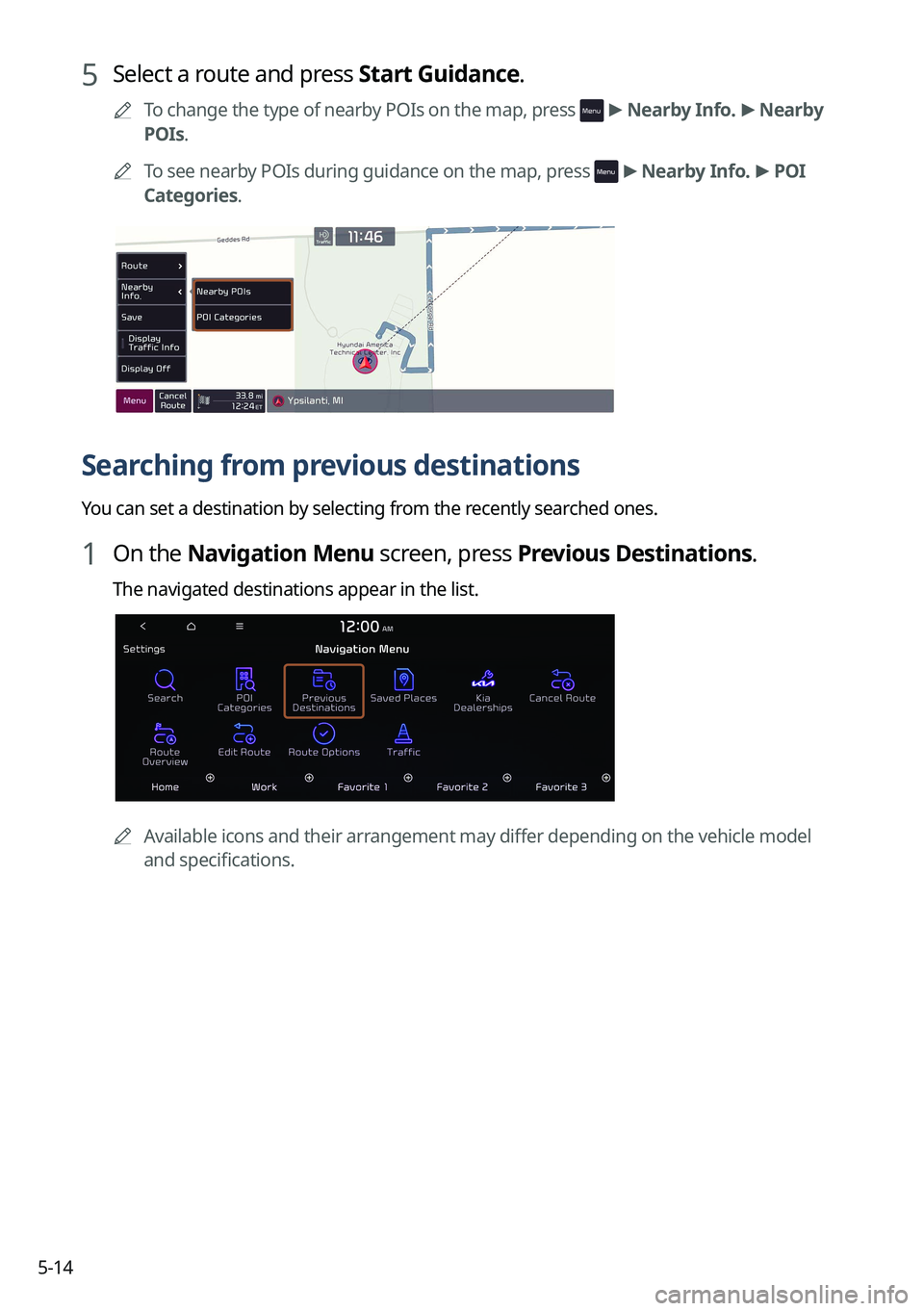
5 Select a route and press Start Guidance.
A
To change the type of nearby POIs on the map, press >
Nearby Info. >
Nearby
POIs.
A
To see nearby POIs during guidance on the map, press
>
Nearby Info. >
POI
Categories.
Searching from previous destinations
You can set a destination by selecting from the recently searched ones.
1 On the Navigation Menu screen, press Previous Destinations.
The navigated destinations appear in the list.
A Available icons and their arrangement may differ depending on the vehicle model
and specifications.
Page 115 of 348

5-15
2 Select the desired destination from the list.
A
To access the online user's manual on the Previous Destinations screen, press >
User's Manual on Web (QR Code) and then scan the displayed QR code.
A
To sort the search results in a different order, press on the attribute to toggle between
options.
3 Check the location of the destination and then press Set as Destination.
4 Select a route and press Start Guidance.
Deleting a previous destination
1 On the Previous Destinations screen, press Delete.
2 Select the destination(s) to delete and press Delete.
You can delete the selected place(s) or all places.
Searching for Kia Dealerships
You can easily search for service centers or service stations.
1 On the Navigation Menu screen, press Kia Dealerships.
A
Available icons and their arrangement may differ depending on the vehicle model
and specifications.
Page 116 of 348

5-16
2 Select a Kia Dealerships from the list.
A
To access the online user's manual, on the Kia Dealerships screen, press >
User's Manual on Web (QR Code) and then scan the displayed QR code.
A
To sort the search results in a different order, press on the attribute to toggle between
options.
3 Check the location of the destination and then press Set as Destination.
4 Select a route and press Start Guidance.
Editing the route
You can edit the waypoints on the way to the destination. You can add up to two waypoints.
Setting a waypoint
You can search for the desired place and set it as a waypoint.
1 On the Navigation Menu screen, press the desired search method to
search for a waypoint.
A
Available icons and their arrangement may differ depending on the vehicle model
and specifications.
A
For more information about the waypoint search:
> see "Searching by keyword,"
" Searching from previous destinations," "Searching for nearby points of interest(POI),"
" Searching for restaurants," "Searching for emergency services."
Page 120 of 348
5-20
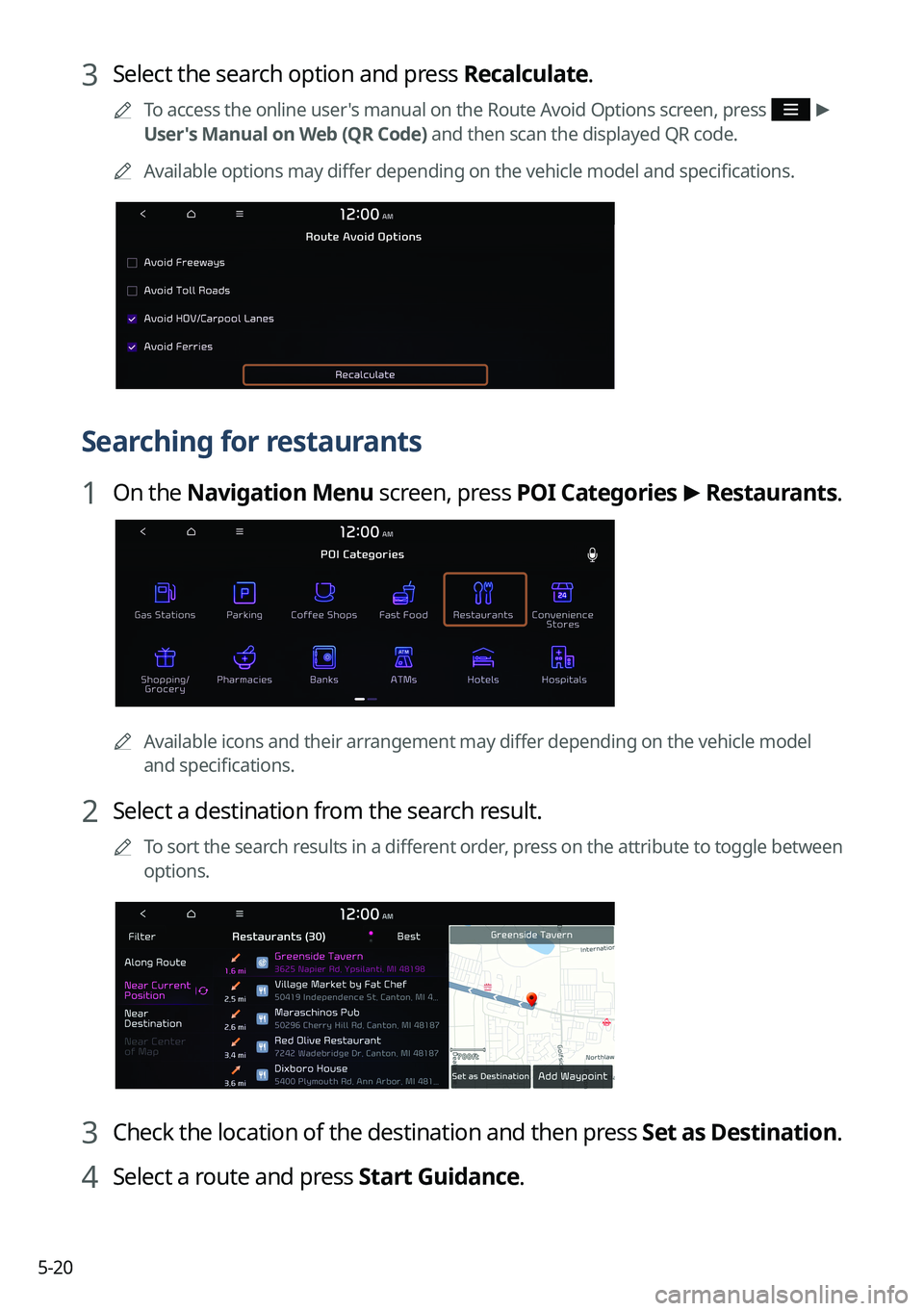
3 Select the search option and press Recalculate.
A
To access the online user's manual on the Route Avoid Options screen, press >
User's Manual on Web (QR Code) and then scan the displayed QR code.
A
Available options may differ depending on the vehicle model and specifications.
Searching for restaurants
1 On the Navigation Menu screen, press POI Categories >
Restaurants.
A
Available icons and their arrangement may differ depending on the vehicle model
and specifications.
2 Select a destination from the search result.
A
To sort the search results in a different order, press on the attribute to toggle between
options.
3 Check the location of the destination and then press Set as Destination.
4 Select a route and press Start Guidance.
Page 121 of 348

5-21
Searching for emergency services
1 On the Navigation Menu screen, press POI Categories.
AAvailable icons and their arrangement may differ depending on the vehicle model
and specifications.
2 Select the type of emergency service.
3 Select a destination from the search result.
A
To sort the search results in a different order, press on the attribute to toggle between
options.
4 Check the location of the destination and then press Set as Destination.
5 Select a route and press Start Guidance.
Page 122 of 348
5-22
Using saved favorite places
After registering the current location or frequently visited places, you can easily set any of
them as a destination.
Saving a searched place as a favorite place
You can search and register the desired place.
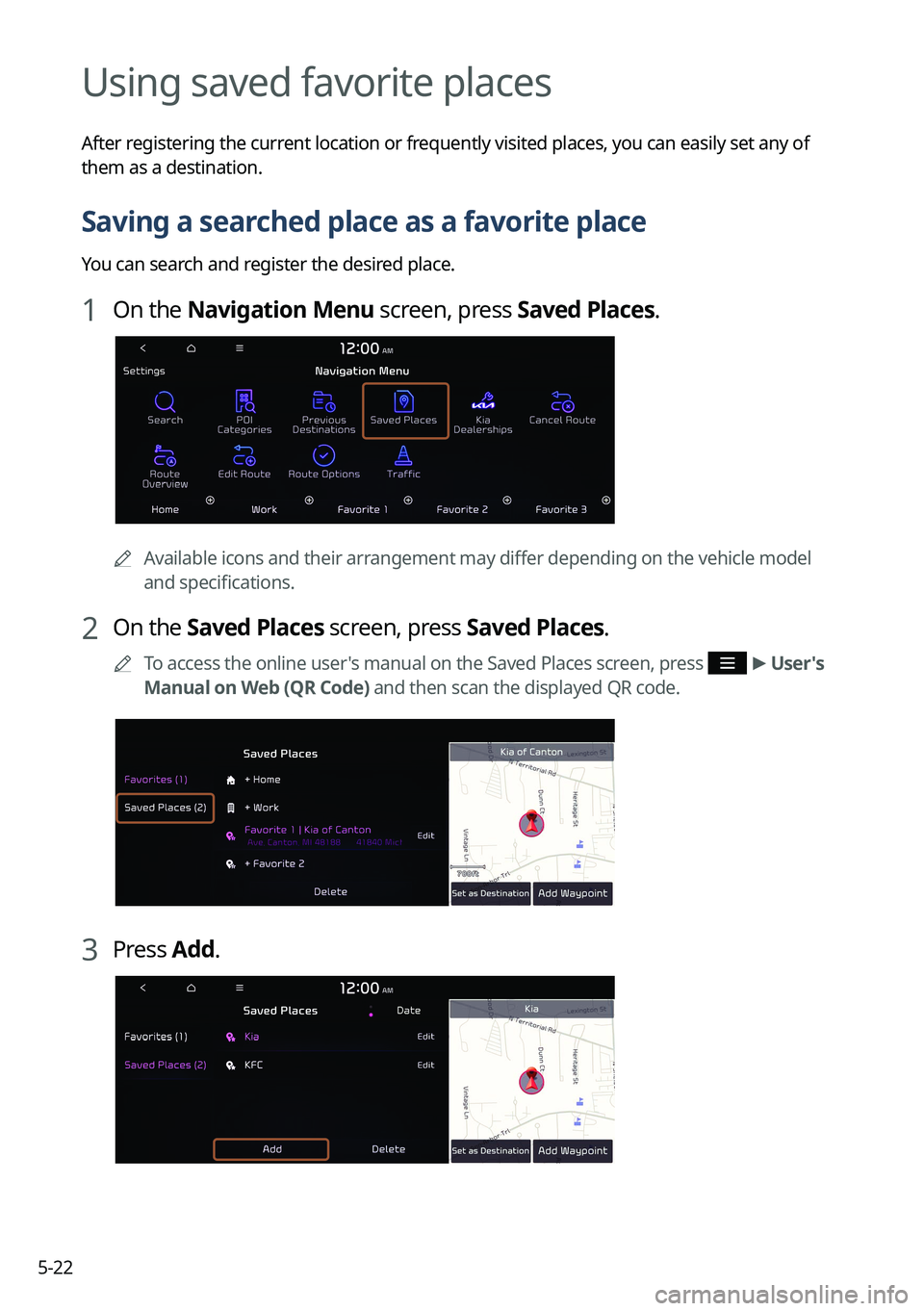
1 On the Navigation Menu screen, press Saved Places.
AAvailable icons and their arrangement may differ depending on the vehicle model
and specifications.
2 On the Saved Places screen, press Saved Places.
A
To access the online user's manual on the Saved Places screen, press >
User's
Manual on Web (QR Code) and then scan the displayed QR code.
3 Press Add.
Page 125 of 348

5-25
Setting a saved favorite place as the destination
You can set any in the saved places of the navigation system as a destination.
1 On the Navigation Menu screen, press Saved Places.
2 Select the desired option from the left of the screen.
3 Select the place to set as a destination.
4 Check the location of the destination and then press Set as Destination.
5 Select a route and press Start Guidance.
Setting a frequently visited place as the destination
You can set your home, office, or other frequently visited places as a destination directly from
your favorites list once you add them.
At the bottom of the Navigation Menu screen, press a desired shortcut
button.
A
When guidance to a destination is in progress, press Change Destination.
A
Available icons and their arrangement may differ depending on the vehicle model and
specifications.