power KIA Soul EV 2017 2.G User Guide
[x] Cancel search | Manufacturer: KIA, Model Year: 2017, Model line: Soul EV, Model: KIA Soul EV 2017 2.GPages: 470, PDF Size: 16.76 MB
Page 58 of 470
345
Safety features of your vehicle
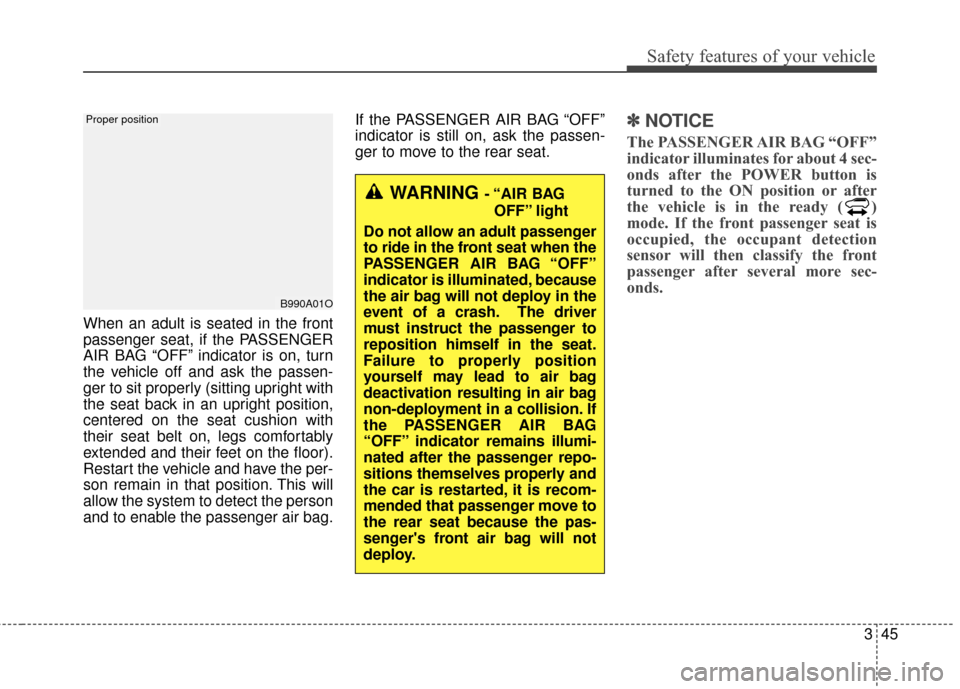
When an adult is seated in the front
passenger seat, if the PASSENGER
AIR BAG “OFF” indicator is on, turn
the vehicle off and ask the passen-
ger to sit properly (sitting upright with
the seat back in an upright position,
centered on the seat cushion with
their seat belt on, legs comfortably
extended and their feet on the floor).
Restart the vehicle and have the per-
son remain in that position. This will
allow the system to detect the person
and to enable the passenger air bag.If the PASSENGER AIR BAG “OFF”
indicator is still on, ask the passen-
ger to move to the rear seat.
✽ ✽
NOTICE
The PASSENGER AIR BAG “OFF”
indicator illuminates for about 4 sec-
onds after the POWER button is
turned to the ON position or after
the vehicle is in the ready ( )
mode. If the front passenger seat is
occupied, the occupant detection
sensor will then classify the front
passenger after several more sec-
onds.
B990A01O
Proper position
WARNING - “AIR BAG
OFF” light
Do not allow an adult passenger
to ride in the front seat when the
PASSENGER AIR BAG “OFF”
indicator is illuminated, because
the air bag will not deploy in the
event of a crash. The driver
must instruct the passenger to
reposition himself in the seat.
Failure to properly position
yourself may lead to air bag
deactivation resulting in air bag
non-deployment in a collision. If
the PASSENGER AIR BAG
“OFF” indicator remains illumi-
nated after the passenger repo-
sitions themselves properly and
the car is restarted, it is recom-
mended that passenger move to
the rear seat because the pas-
senger's front air bag will not
deploy.
Page 62 of 470
349
Safety features of your vehicle
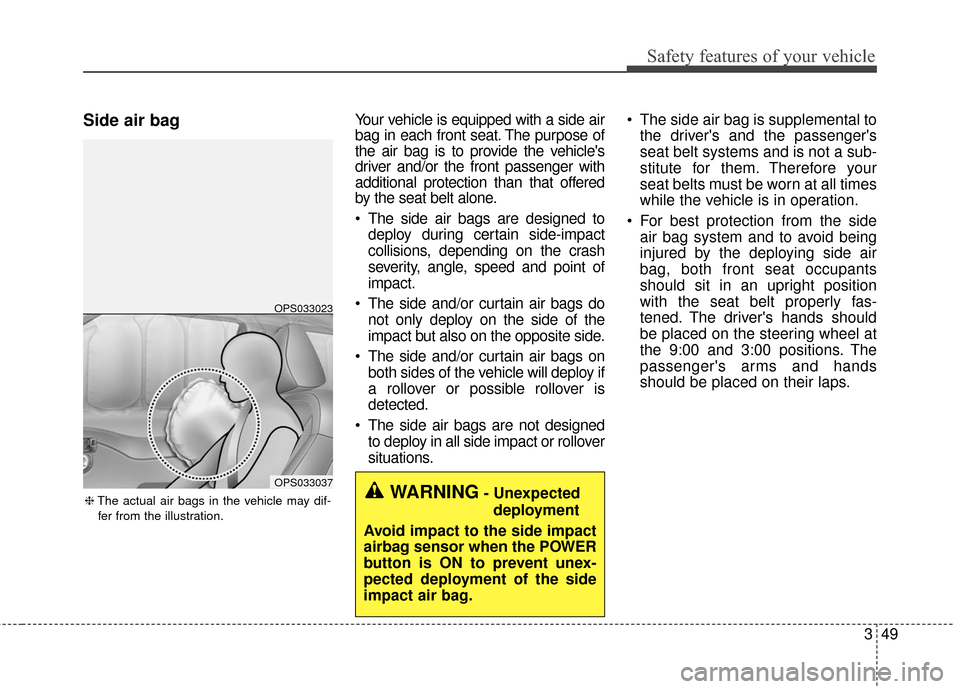
Side air bagYour vehicle is equipped with a side air
bag in each front seat. The purpose of
the air bag is to provide the vehicle's
driver and/or the front passenger with
additional protection than that offered
by the seat belt alone.
The side air bags are designed todeploy during certain side-impact
collisions, depending on the crash
severity, angle, speed and point of
impact.
The side and/or curtain air bags do not only deploy on the side of the
impact but also on the opposite side.
The side and/or curtain air bags on both sides of the vehicle will deploy if
a rollover or possible rollover is
detected.
The side air bags are not designed to deploy in all side impact or rollover
situations. The side air bag is supplemental to
the driver's and the passenger's
seat belt systems and is not a sub-
stitute for them. Therefore your
seat belts must be worn at all times
while the vehicle is in operation.
For best protection from the side air bag system and to avoid being
injured by the deploying side air
bag, both front seat occupants
should sit in an upright position
with the seat belt properly fas-
tened. The driver's hands should
be placed on the steering wheel at
the 9:00 and 3:00 positions. The
passenger's arms and hands
should be placed on their laps.
OPS033037
OPS033023
❈ The actual air bags in the vehicle may dif-
fer from the illustration.WARNING- Unexpected deployment
Avoid impact to the side impact
airbag sensor when the POWER
button is ON to prevent unex-
pected deployment of the side
impact air bag.
Page 74 of 470
Features of your vehicle
44
Record your key number
The key code num-
ber is stamped on
the key code tag
attached to the key
set. Should you
lose your keys, this number will
enable an authorized Kia dealer to
duplicate the keys easily. Remove
the key code tag and store it in a safe
place. Also, record the key code
number and keep it in a safe and
handy place, but not in the vehicle.
Smart key function
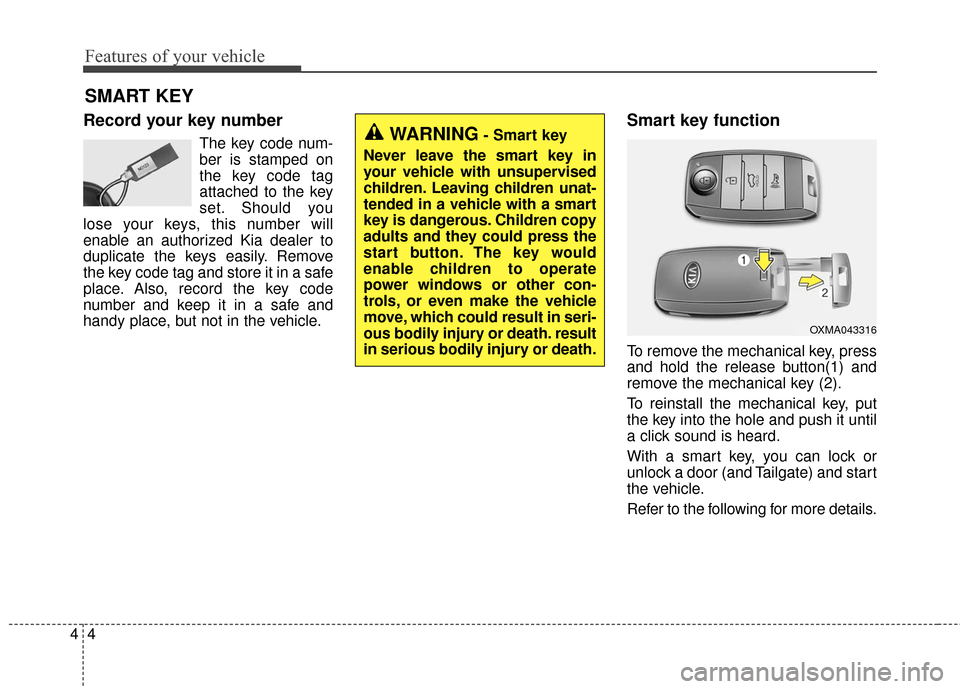
To remove the mechanical key, press
and hold the release button(1) and
remove the mechanical key (2).
To reinstall the mechanical key, put
the key into the hole and push it until
a click sound is heard.
With a smart key, you can lock or
unlock a door (and Tailgate) and start
the vehicle.
Refer to the following for more details.
SMART KEY
OXMA043316
WARNING- Smart key
Never leave the smart key in
your vehicle with unsupervised
children. Leaving children unat-
tended in a vehicle with a smart
key is dangerous. Children copy
adults and they could press the
start button. The key would
enable children to operate
power windows or other con-
trols, or even make the vehicle
move, which could result in seri-
ous bodily injury or death. result
in serious bodily injury or death.
Page 75 of 470
45
Features of your vehicle
Door Lock
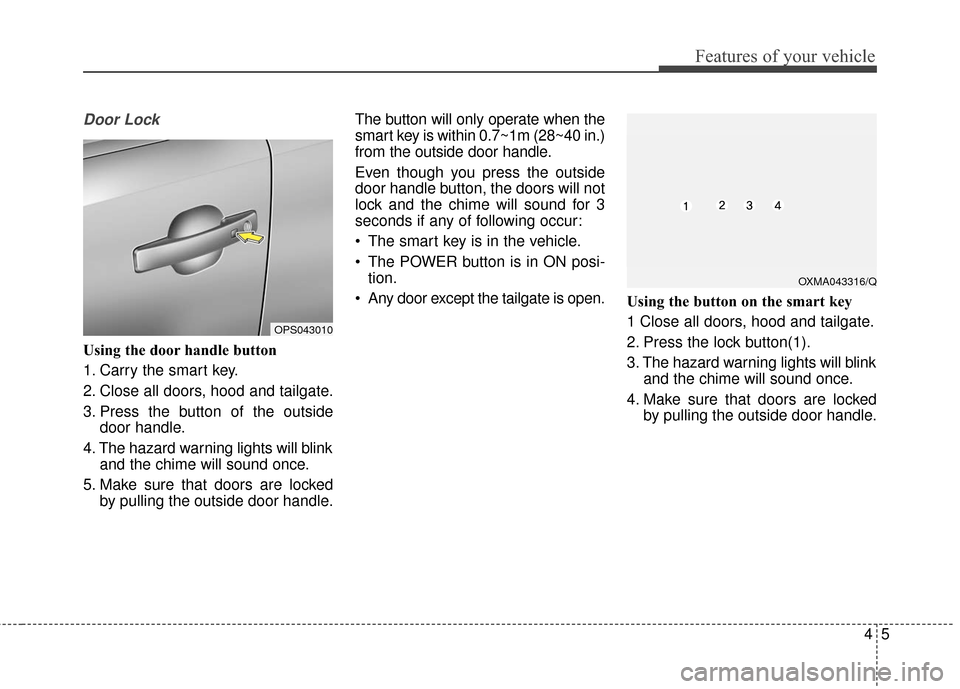
Using the door handle button
1. Carry the smart key.
2. Close all doors, hood and tailgate.
3. Press the button of the outsidedoor handle.
4. The hazard warning lights will blink and the chime will sound once.
5. Make sure that doors are locked by pulling the outside door handle. The button will only operate when the
smart key is within 0.7~1m (28~40 in.)
from the outside door handle.
Even though you press the outside
door handle button, the doors will not
lock and the chime will sound for 3
seconds if any of following occur:
• The smart key is in the vehicle.
The POWER button is in ON posi-
tion.
Any door except the tailgate is open. Using the button on the smart key
1 Close all doors, hood and tailgate.
2. Press the lock button(1).
3. The hazard warning lights will blink
and the chime will sound once.
4. Make sure that doors are locked by pulling the outside door handle.
OXMA043316/Q
OPS043010
Page 77 of 470
47
Features of your vehicle
Tailgate unlocking
Using the tailgate handle button
1. Carry the smart key.
2. Press the tailgate handle button.
3. When all doors are locked, thehazard warning lights will blink two
times.
Once the tailgate is opened and
then closed, the tailgate will lock
automatically.
If you are within 0.7~1 m (28~40 in.)
from the outside tailgate handle, with
your smart key in possession, the
tailgate will unlock and open when
you press the tailgate handle switch.
Using the button on the smart key
1. Press the tailgate unlock button(3) for more than 1 second.
2. When all doors are locked, the hazard warning lights will blink two
times.
Panic
1. Press the panic button(4) for morethan 1 second.
2. The horn sounds and hazard warning light flash for about 30
seconds.
Start-up
You can start the vehicle without
inserting the key. For detailed infor-
mation refer to the “POWER button”
in chapter 5.
Loss of the smart key
A maximum of 2 smart keys can be
registered to a single vehicle.
If you happen to lose your smart key,
you will not be able to start the vehi-
cle. You should immediately take the
vehicle and remaining key to your
authorized Kia dealer(tow the vehi-
cle, if necessary) to protect it from
potential theft.
Page 78 of 470
Features of your vehicle
84
Smart key precautions
The smart key will not work if anyof the following occur:
- The smart key is close to a radio transmitter such as a radio sta-
tion or an airport which can inter-
fere with normal operation of the
smart key.
- The smart key is near a mobile two way radio system or a cellu-
lar phone.
- Another vehicle’s smart key is being operated close to your
vehicle.
When the smart key does not work correctly, open and close the door
with the mechanical key and contact
an authorized Kia dealer. If the smart key is in close proximity
to your cell phone or smart phone,
the signal from the smart key could
be blocked by normal operation of
your cell phone or smart phone.
This is especially important when
the phone is active such as making
a call, receiving calls, text messag-
ing, and/or sending/receiving
emails. Avoid placing the smart key
and your cell phone or smart phone
in the same pants or jacket pocket
and maintain adequate distance
between the two devices.
✽ ✽ NOTICE
If the smart key is inoperative due to
exposure to water or liquids, it will
not be covered by your manufactur-
er’s vehicle warranty.
Smart key immobilizer system
Your vehicle is equipped with an elec-
tronic immobilizer system to reduce
the risk of unauthorized vehicle use.
Your immobilizer system is com-
prised of a small transponder in the
smart key and electronic devices
inside the vehicle.
With the immobilizer system, when-
ever you turn the POWER button to
the ON position by pressing the but-
ton while carrying the smart key, it
checks and determines and verifies if
the smart key is valid or not.
If the key is determined to be valid,
the vehicle will start.
If the key is determined to be invalid,
the vehicle will not start.
CAUTION
Keep the smart key away from
water or any liquid as it canbecome damaged and not func-tion properly.
Page 79 of 470
49
Features of your vehicle
To deactivate the immobilizersystem:
Turn the POWER button to the ON
position by pressing the button while
carrying the smart key.
To activate the immobilizer system:
Turn the POWER button to the OFF
position. The immobilizer system
activates automatically. Without a
valid smart key for your vehicle, the
vehicle will not start.
In order to prevent theft of your vehi-
cle, do not leave spare keys anywhere
in your vehicle. Your Immobilizer pass-
word is a customer unique password
and should be kept confidential. Do
not leave this number anywhere in
your vehicle.
✽ ✽ NOTICE
When starting the vehicle, do not use
the key with other immobilizer keys
around. Otherwise the vehicle may
not start or may stop soon after it
starts. Keep each key separate in
order to avoid a starting malfunction.
Do not put metal accessories near
the smart key.
The vehicle may not start because
the metal accessories may interrupt
the transponder signal from transmit-
ting normally.
✽ ✽NOTICE
If you need additional keys or lose
your keys, contact an authorized
Kia dealer.
This device complies with
Industry Canada licence-exempt
RSS standard(s).
Operation is subject to the following
two conditions:
(1) This device may not cause inter-
ference, and
(2) This device must accept any interference, including interfer-
ence that may cause undesired
operation of the device.
✽ ✽NOTICE
Changes or modifications not
expressly approved by the party
responsible for compliance could void
the user’s authority to operate the
equipment. If the keyless entry sys-
tem is inoperative due to changes or
modifications not expressly approved
by the party responsible for compli-
ance, it will not be covered by your
manufacturer’s vehicle warranty.
CAUTION- Immobilizer
damage
Do not expose your immobilizersystem to moisture, static elec-tricity and rough handling. Thismay damage your immobilizer.
CAUTION- Immobilizer
alterations
Do not change, alter or adjustthe immobilizer system becauseit could cause the immobilizersystem to malfunction.
Page 82 of 470
Features of your vehicle
12
4
Operating door locks from
inside the vehicle
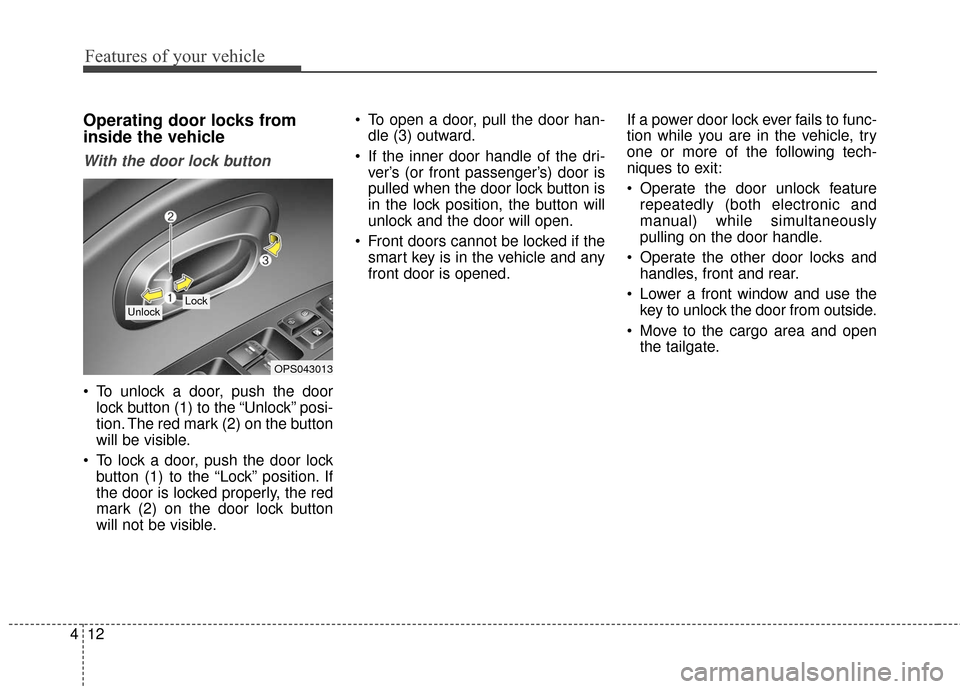
With the door lock button
To unlock a door, push the door
lock button (1) to the “Unlock” posi-
tion. The red mark (2) on the button
will be visible.
To lock a door, push the door lock button (1) to the “Lock” position. If
the door is locked properly, the red
mark (2) on the door lock button
will not be visible. To open a door, pull the door han-
dle (3) outward.
If the inner door handle of the dri- ver’s (or front passenger’s) door is
pulled when the door lock button is
in the lock position, the button will
unlock and the door will open.
Front doors cannot be locked if the smart key is in the vehicle and any
front door is opened. If a power door lock ever fails to func-
tion while you are in the vehicle, try
one or more of the following tech-
niques to exit:
Operate the door unlock feature
repeatedly (both electronic and
manual) while simultaneously
pulling on the door handle.
Operate the other door locks and handles, front and rear.
Lower a front window and use the key to unlock the door from outside.
Move to the cargo area and open the tailgate.
OPS043013
Lock Unlock
Page 87 of 470
417
Features of your vehicle
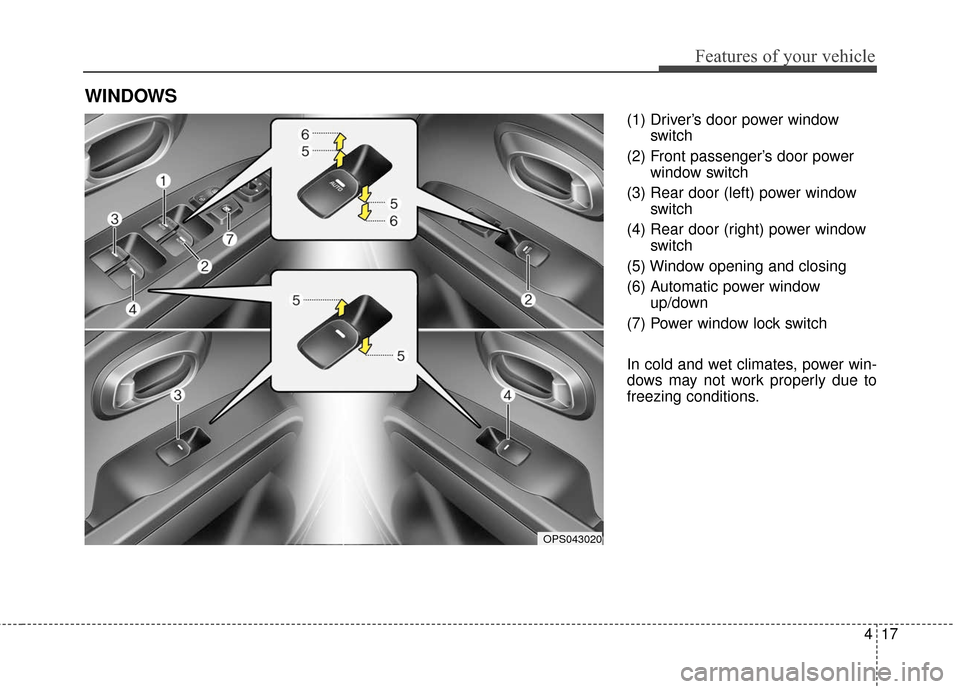
(1) Driver’s door power windowswitch
(2) Front passenger’s door power window switch
(3) Rear door (left) power window switch
(4) Rear door (right) power window switch
(5) Window opening and closing
(6) Automatic power window up/down
(7) Power window lock switch
In cold and wet climates, power win-
dows may not work properly due to
freezing conditions.
WINDOWS
OPS043020
Page 88 of 470
Features of your vehicle
18
4
Power windows
The POWER button must be in the
ON position for power windows to
operate.
Each door has a power window
switch that controls the door's win-
dow. The driver has a power window
lock button which can block the oper-
ation of the rear passenger windows.
The power windows can be operated
for approximately 30 seconds after
the vehicle turned off or turned to the
ACC position. However, if the front
doors are opened, the power win-
dows cannot be operated even with-
in the 30 second period.
✽ ✽
NOTICE
While driving with the rear windows
down or with the sunroof (if
equipped) in an open (or partially
open) position, your vehicle may
demonstrate a wind buffeting or
pulsation noise. This noise is a nor-
mal occurrence and can be reduced
or eliminated by taking the follow-
ing actions. If the noise occurs with
one or both of the rear windows
down, partially lower both front
windows approximately one inch. If
you experience the noise with the
sunroof open, slightly reduce the
size of the sunroof opening.
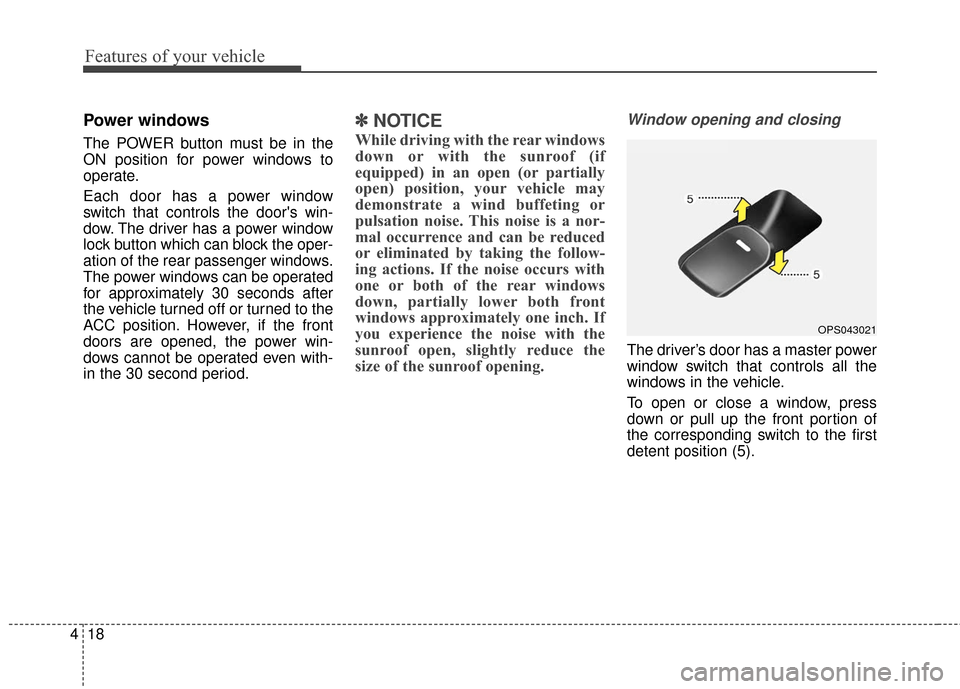
Window opening and closing
The driver’s door has a master power
window switch that controls all the
windows in the vehicle.
To open or close a window, press
down or pull up the front portion of
the corresponding switch to the first
detent position (5).
OPS043021