USB port KIA SOUL EV 2018 User Guide
[x] Cancel search | Manufacturer: KIA, Model Year: 2018, Model line: SOUL EV, Model: KIA SOUL EV 2018Pages: 496, PDF Size: 15.13 MB
Page 290 of 496
4159
Features of your vehicle
iPod®
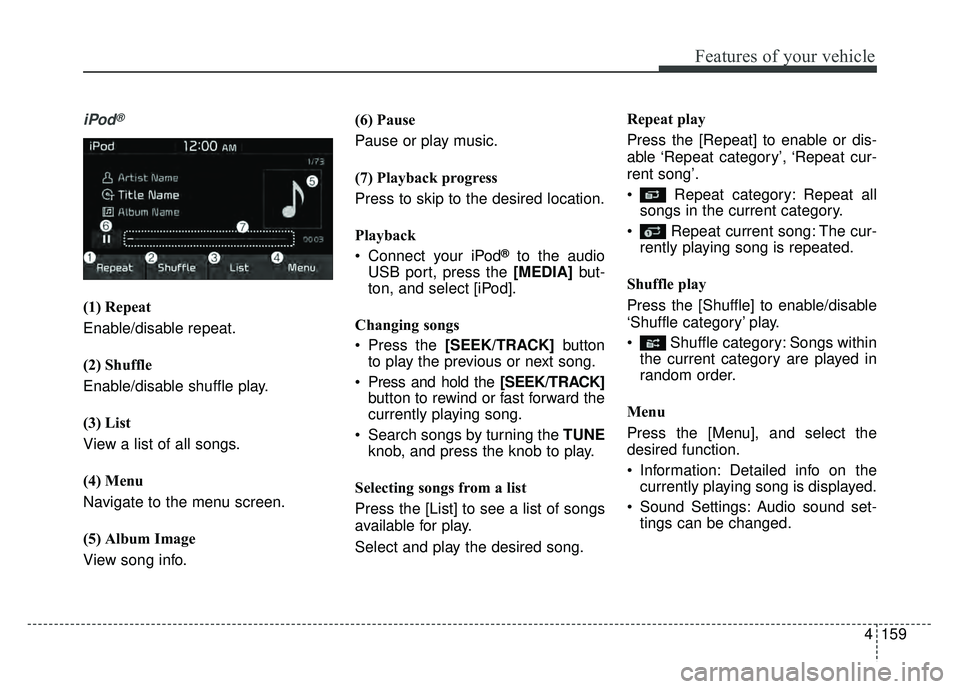
(1) Repeat
Enable/disable repeat.
(2) Shuffle
Enable/disable shuffle play.
(3) List
View a list of all songs.
(4) Menu
Navigate to the menu screen.
(5) Album Image
View song info.(6) Pause
Pause or play music.
(7) Playback progress
Press to skip to the desired location.
Playback
Connect your iPod
®to the audio
USB port, press the [MEDIA] but-
ton, and select [iPod].
Changing songs
Press the [SEEK/TRACK] button
to play the previous or next song.
Press and hold the [SEEK/TRACK] button to rewind or fast forward the
currently playing song.
Search songs by turning the TUNE knob, and press the knob to play.
Selecting songs from a list
Press the [List] to see a list of songs
available for play.
Select and play the desired song. Repeat play
Press the [Repeat] to enable or dis-
able ‘Repeat category’, ‘Repeat cur-
rent song’.
Repeat category: Repeat all
songs in the current category.
Repeat current song: The cur- rently playing song is repeated.
Shuffle play
Press the [Shuffle] to enable/disable
‘Shuffle category’ play.
Shuffle category: Songs within the current category are played in
random order.
Menu
Press the [Menu], and select the
desired function.
Information: Detailed info on the currently playing song is displayed.
Sound Settings: Audio sound set- tings can be changed.
Page 307 of 496
176
4
Features of your vehicle
Siri
✽
✽
NOTICE - Using Siri
• Android device is not supported to
use Siri.
• If you want to use Siri, you have to connect your iOS device to multi-
media system through Bluetooth
®
Wireless Technology. (Please
check whether your iOS device
supports Siri and turning Siri On)
• If the iOS version is changed, the functions and response may be dif-
ferent according to the iOS device
and the latest version.
• Siri automatically stops in the fol- lowing events.
1) Outgoing and incoming phone calls.
2) Media (USB, etc.) is connected. (Siri mode is maintained when
iPod
®s are connected)
3) Rear camera is activated (option).
4) Vehicle is started or engine is turned off. (Continued)(Continued)
5) Screen transition buttons, such as RADIO or MEDIA, are
selected.
6) When a pop-up message is dis- played on the screen due to
accidental execution of Siri.
• The microphone is located above the driver’s seat. To ensure proper
Siri, state your voice while main-
taining proper driving posture.
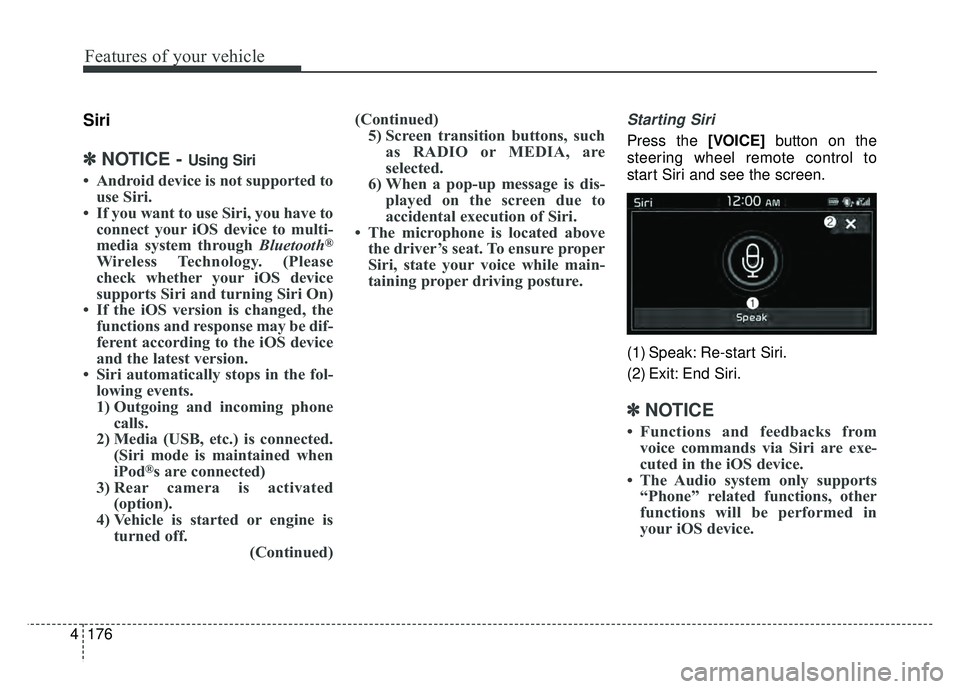
Starting Siri
Press the [VOICE] button on the
steering wheel remote control to
start Siri and see the screen.
(1) Speak: Re-start Siri.
(2) Exit: End Siri.
✽ ✽ NOTICE
• Functions and feedbacks from
voice commands via Siri are exe-
cuted in the iOS device.
• The Audio system only supports “Phone” related functions, other
functions will be performed in
your iOS device.
Page 486 of 496

Index
2I
A/V Mode . . . . . . . . . . . . . . . . . . . . . . . . . . . . . . . . . . . 4-\
48
Abnormal lamp operation . . . . . . . . . . . . . . . . . . . . . . . 4-82
ACTIVE ECO SYSTEM . . . . . . . . . . . . . . . . . . . . . . . 5-10
Air bag warning label . . . . . . . . . . . . . . . . . . . . . . . . . . 3-58
Air bag warning light . . . . . . . . . . . . . . . . . . . . . . . . . . 3-37
Air bags. . . . . . . . . . . . . . . . . . . . . . . . . . . . . . . . . . . . \
. 3-34Air bag warning label. . . . . . . . . . . . . . . . . . . . . . . . 3-58
Air bag warning light . . . . . . . . . . . . . . . . . . . . . . . . 3-37
Curtain air bag . . . . . . . . . . . . . . . . . . . . . . . . . . . . . 3-51
Driver's and passenger's front air bag . . . . . . . . . . . 3-46
Inflation and non-inflation conditions . . . . . . . . . . . 3-52
Occupant Detection System (ODS) . . . . . . . . . . . . . 3-41
Operation . . . . . . . . . . . . . . . . . . . . . . . . . . . . . . . . . 3-35
Side air bag. . . . . . . . . . . . . . . . . . . . . . . . . . . . . . . . 3-49
SRS Care . . . . . . . . . . . . . . . . . . . . . . . . . . . . . . . . . 3-57
SRS components and functions . . . . . . . . . . . . . . . . 3-38
Air conditioner compressor label . . . . . . . . . . . . . . . . . . 8-8
Airconditioning system Automatic climate control system . . . . . . . . . . . . . . 4-94
Antenna . . . . . . . . . . . . . . . . . . . . . . . . . . . . . . . . . . . . \
4-128
Anti-lock brake system (ABS) . . . . . . . . . . . . . . . . . . . 5-23
Appearance care . . . . . . . . . . . . . . . . . . . . . . . . . . . . . . 7-73 Exterior care . . . . . . . . . . . . . . . . . . . . . . . . . . . . . . . 7-73
Interior care . . . . . . . . . . . . . . . . . . . . . . . . . . . . . . . 7-78
Audio system . . . . . . . . . . . . . . . . . . . . . . . . . . . . . . . 4-128 Antenna . . . . . . . . . . . . . . . . . . . . . . . . . . . . . . . . . 4-128 Audio . . . . . . . . . . . . . . . . . . . . . . . . . . . . . . . . . . . 4-\
141
AUX, USB and iPod
®port. . . . . . . . . . . . . . . . . . . 4-129
Bluetooth®Wireless Technology . . . . . . . . . . . . . . 4-137
How vehicle audio works . . . . . . . . . . . . . . . . . . . . 4-131
Speaker lights . . . . . . . . . . . . . . . . . . . . . . . . . . . . . 4-130
Using iPod
®device . . . . . . . . . . . . . . . . . . . . . . . . 4-136
Using the USB device . . . . . . . . . . . . . . . . . . . . . . 4-135
Speaker lights . . . . . . . . . . . . . . . . . . . . . . . . . . . . . 4-130
Auto defogging system . . . . . . . . . . . . . . . . . . . . . . . . 4-115
Auto door lock/unlock feature . . . . . . . . . . . . . . . . . . . 4-13
Auto light position . . . . . . . . . . . . . . . . . . . . . . . . . . . . 4-83
Automatic climate control system . . . . . . . . . . . . . . . . 4-94 Air conditioning . . . . . . . . . . . . . . . . . . . . . . . . . . . 4-103
Automatic heating and air conditioning. . . . . . . . . . 4-95
Automatic Ventilation. . . . . . . . . . . . . . . . . . . . . . . 4-106
Climate control air filter . . . . . . . . . . . . . . . . . . . . . . 109
Manual heating and air conditioning . . . . . . . . . . . . 4-96
System operation . . . . . . . . . . . . . . . . . . . . . . . . . . 4-107
AUX, USB and iPod
®port . . . . . . . . . . . . . . . . . . . . . 4-129
Battery. . . . . . . . . . . . . . . . . . . . . . . . . . . . . . . . . . . . \
. . 7-33
Battery replacement (smart key). . . . . . . . . . . . . . . . . . . 4-9
Battery saver function . . . . . . . . . . . . . . . . . . . . . . . . . . 4-81
Before driving . . . . . . . . . . . . . . . . . . . . . . . . . . . . . . . . . 5-3
Bonnet see the hood . . . . . . . . . . . . . . . . . . . . . . . . . . . 4-22
A
B