heating KIA SOUL EV 2018 User Guide
[x] Cancel search | Manufacturer: KIA, Model Year: 2018, Model line: SOUL EV, Model: KIA SOUL EV 2018Pages: 496, PDF Size: 15.13 MB
Page 253 of 496
Features of your vehicle
122
4
If you want to cool your seat cush-
ion, press the switch (blue color).
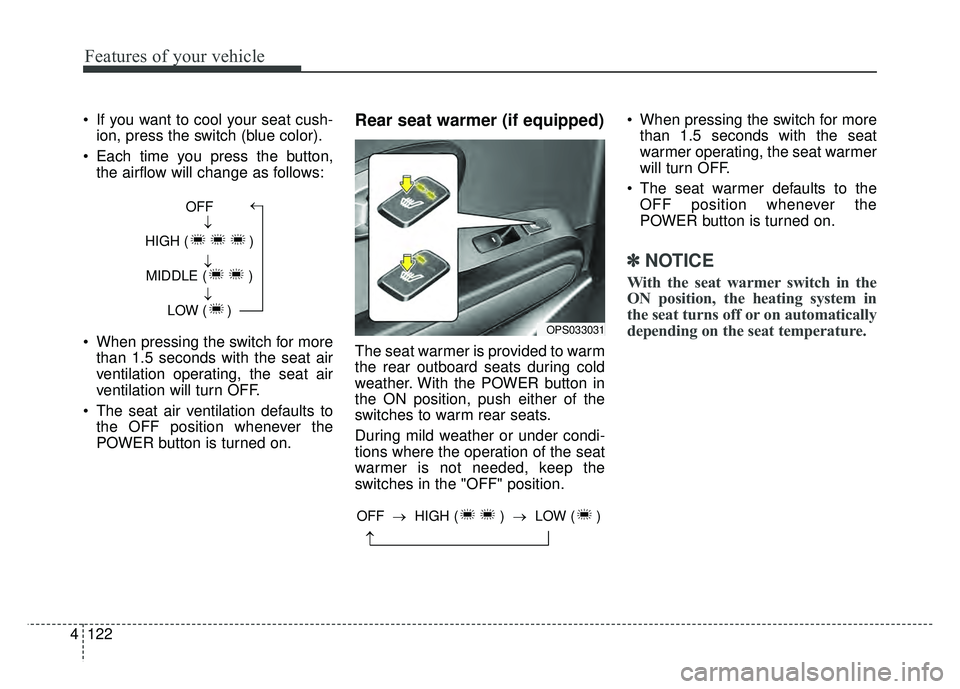
Each time you press the button, the airflow will change as follows:
When pressing the switch for more than 1.5 seconds with the seat air
ventilation operating, the seat air
ventilation will turn OFF.
The seat air ventilation defaults to the OFF position whenever the
POWER button is turned on.Rear seat warmer (if equipped)
The seat warmer is provided to warm
the rear outboard seats during cold
weather. With the POWER button in
the ON position, push either of the
switches to warm rear seats.
During mild weather or under condi-
tions where the operation of the seat
warmer is not needed, keep the
switches in the "OFF" position. When pressing the switch for more
than 1.5 seconds with the seat
warmer operating, the seat warmer
will turn OFF.
The seat warmer defaults to the OFF position whenever the
POWER button is turned on.
✽ ✽ NOTICE
With the seat warmer switch in the
ON position, the heating system in
the seat turns off or on automatically
depending on the seat temperature.
OFF
HIGH ( ) MIDDLE ( ) LOW ( )→→→→
OPS033031
→
OFF → HIGH ( ) →LOW ( )
Page 353 of 496
541
Driving your vehicle
If at all possible, avoid sharp turns or
abrupt maneuvers, do not load your
roof rack with heavy cargo, and
never modify your vehicle in any way.Rocking the vehicle
If it is necessary to rock the vehicle
to free it from snow, sand, or mud,
first turn the steering wheel right and
left to clear the area around your
front wheels. Then, shift back and
forth between R (Reverse) and any
forward gear. Do not race the vehicle,
and spin the wheels as little as pos-
sible. If you are still stuck after a few
tries, have the vehicle pulled out by a
tow vehicle to avoid overheating and
possible damage to the gear.The ESC system should be turned
OFF prior to rocking the vehicle.CAUTION- Vehicle rocking
Prolonged rocking may causeoverheating, gear damage orfailure, and tire damage.
WARNING- Replacement
tires
Always use the size and type of
tires recommended in the tire
section of the manual.
Installation of variant tires can
affect the safety and perform-
ance of your vehicle.
WARNING
- Sudden vehicle movement
Do not attempt to rock the vehi-
cle if people or objects are near-
by. The vehicle may suddenly
move forward or backwards as
it becomes unstuck.
CAUTION- Spinning tires
Do not spin the wheels, espe- cially at speeds more than 35mph (56 km/h). Spinning thewheels at high speeds when thevehicle is stationary couldcause a tire to overheat whichcould result in tire damage thatmay injure bystanders.
Page 356 of 496
Driving your vehicle
44
5
Driving off-road
Drive carefully off-road because your
vehicle may be damaged by rocks or
roots of trees. Become familiar with
the off-road conditions where you
are going to drive before you begin
driving.
Highway driving
Tires
Adjust the tire inflation pressures to
specification. Low tire inflation pres-
sures will result in overheating and
possible failure of the tires.
Avoid using worn or damaged tires
which may result in reduced traction
or tire failure.
Never exceed the maximum tire
inflation pressure shown on the tires.
WARNING- Under/over
inflated tires
Always check the tires for prop-
er inflation before driving.
Underinflated or overinflated
tires can cause poor handling,
loss of vehicle control, and sud-
den tire failure leading to acci-
dents, injuries, and even death.
For proper tire pressures, refer
to “Tires and wheels” in section
8.WARNING- Tire tread
Always check the tire tread
before driving your vehicle.
Worn-out tires can result in loss
of vehicle control. Worn-out
tires should be replaced as
soon as possible. For further
information and tread limits,
refer to "Tires and wheels" in
section 7.
Page 374 of 496
What to do in an emergency
86
IF THE VEHICLE OVERHEATS
1. Pull off the road and stop as soonas it is safe to do so.
2. Place the shift lever in P and set the parking brake. If the air condi-
tioning is on, turn it off.
3. If coolant is running out under the vehicle or steam is coming out
from underneath the hood, stop
the vehicle. Do not open the hood
until the coolant has stopped run-
ning or the steaming has stopped.
If there is no visible loss of coolant
and no steam, leave the vehicle
running and check to be sure cool-
ing fan is operating. If the fan is not
running, turn the vehicle off.
4. Check for coolant leaking from the radiator, hoses or under the vehi-
cle. (If the air conditioning had
been in use, it is normal for cold
water to be draining from it when
you stop). 5. If you cannot find the cause of the
overheating, wait until the radiator
temperature has returned to nor-
mal. Then, if coolant has been lost,
carefully add coolant to the reser-
voir to bring the fluid level in the
reservoir up to the halfway mark.
6. Proceed with caution, keeping alert for further signs of overheat-
ing. If overheating happens again,
call an authorized Kia dealer for
assistance.
Serious loss of coolant indicates
there is a leak in the cooling system
and this should be checked as soon
as possible by an authorized Kia
dealer.
WARNING- Radiator cap
Do not remove the radiator cap
when the radiator is hot. This
may result in coolant being
blown out of the opening and
cause serious burns.
Page 486 of 496

Index
2I
A/V Mode . . . . . . . . . . . . . . . . . . . . . . . . . . . . . . . . . . . 4-\
48
Abnormal lamp operation . . . . . . . . . . . . . . . . . . . . . . . 4-82
ACTIVE ECO SYSTEM . . . . . . . . . . . . . . . . . . . . . . . 5-10
Air bag warning label . . . . . . . . . . . . . . . . . . . . . . . . . . 3-58
Air bag warning light . . . . . . . . . . . . . . . . . . . . . . . . . . 3-37
Air bags. . . . . . . . . . . . . . . . . . . . . . . . . . . . . . . . . . . . \
. 3-34Air bag warning label. . . . . . . . . . . . . . . . . . . . . . . . 3-58
Air bag warning light . . . . . . . . . . . . . . . . . . . . . . . . 3-37
Curtain air bag . . . . . . . . . . . . . . . . . . . . . . . . . . . . . 3-51
Driver's and passenger's front air bag . . . . . . . . . . . 3-46
Inflation and non-inflation conditions . . . . . . . . . . . 3-52
Occupant Detection System (ODS) . . . . . . . . . . . . . 3-41
Operation . . . . . . . . . . . . . . . . . . . . . . . . . . . . . . . . . 3-35
Side air bag. . . . . . . . . . . . . . . . . . . . . . . . . . . . . . . . 3-49
SRS Care . . . . . . . . . . . . . . . . . . . . . . . . . . . . . . . . . 3-57
SRS components and functions . . . . . . . . . . . . . . . . 3-38
Air conditioner compressor label . . . . . . . . . . . . . . . . . . 8-8
Airconditioning system Automatic climate control system . . . . . . . . . . . . . . 4-94
Antenna . . . . . . . . . . . . . . . . . . . . . . . . . . . . . . . . . . . . \
4-128
Anti-lock brake system (ABS) . . . . . . . . . . . . . . . . . . . 5-23
Appearance care . . . . . . . . . . . . . . . . . . . . . . . . . . . . . . 7-73 Exterior care . . . . . . . . . . . . . . . . . . . . . . . . . . . . . . . 7-73
Interior care . . . . . . . . . . . . . . . . . . . . . . . . . . . . . . . 7-78
Audio system . . . . . . . . . . . . . . . . . . . . . . . . . . . . . . . 4-128 Antenna . . . . . . . . . . . . . . . . . . . . . . . . . . . . . . . . . 4-128 Audio . . . . . . . . . . . . . . . . . . . . . . . . . . . . . . . . . . . 4-\
141
AUX, USB and iPod
®port. . . . . . . . . . . . . . . . . . . 4-129
Bluetooth®Wireless Technology . . . . . . . . . . . . . . 4-137
How vehicle audio works . . . . . . . . . . . . . . . . . . . . 4-131
Speaker lights . . . . . . . . . . . . . . . . . . . . . . . . . . . . . 4-130
Using iPod
®device . . . . . . . . . . . . . . . . . . . . . . . . 4-136
Using the USB device . . . . . . . . . . . . . . . . . . . . . . 4-135
Speaker lights . . . . . . . . . . . . . . . . . . . . . . . . . . . . . 4-130
Auto defogging system . . . . . . . . . . . . . . . . . . . . . . . . 4-115
Auto door lock/unlock feature . . . . . . . . . . . . . . . . . . . 4-13
Auto light position . . . . . . . . . . . . . . . . . . . . . . . . . . . . 4-83
Automatic climate control system . . . . . . . . . . . . . . . . 4-94 Air conditioning . . . . . . . . . . . . . . . . . . . . . . . . . . . 4-103
Automatic heating and air conditioning. . . . . . . . . . 4-95
Automatic Ventilation. . . . . . . . . . . . . . . . . . . . . . . 4-106
Climate control air filter . . . . . . . . . . . . . . . . . . . . . . 109
Manual heating and air conditioning . . . . . . . . . . . . 4-96
System operation . . . . . . . . . . . . . . . . . . . . . . . . . . 4-107
AUX, USB and iPod
®port . . . . . . . . . . . . . . . . . . . . . 4-129
Battery. . . . . . . . . . . . . . . . . . . . . . . . . . . . . . . . . . . . \
. . 7-33
Battery replacement (smart key). . . . . . . . . . . . . . . . . . . 4-9
Battery saver function . . . . . . . . . . . . . . . . . . . . . . . . . . 4-81
Before driving . . . . . . . . . . . . . . . . . . . . . . . . . . . . . . . . . 5-3
Bonnet see the hood . . . . . . . . . . . . . . . . . . . . . . . . . . . 4-22
A
B