warning KIA SOUL EV 2018 Owners Manual
[x] Cancel search | Manufacturer: KIA, Model Year: 2018, Model line: SOUL EV, Model: KIA SOUL EV 2018Pages: 496, PDF Size: 15.13 MB
Page 441 of 496
751
Maintenance
FUSES
A vehicle’s electrical system is pro-
tected from electrical overload dam-
age by fuses.
This vehicle has 3 (or 4) fuse panels,
one located in the driver’s side panel
bolster, the other in the motor com-
partment near the battery.
If any of your vehicle’s lights, acces-
sories, or controls do not work, check
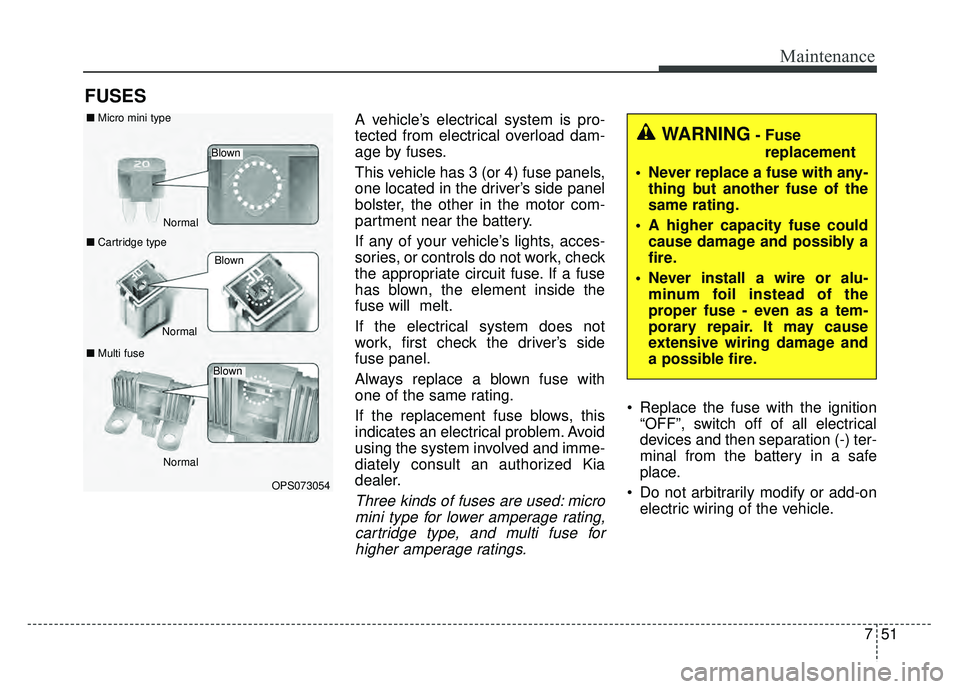
the appropriate circuit fuse. If a fuse
has blown, the element inside the
fuse will melt.
If the electrical system does not
work, first check the driver’s side
fuse panel.
Always replace a blown fuse with
one of the same rating.
If the replacement fuse blows, this
indicates an electrical problem. Avoid
using the system involved and imme-
diately consult an authorized Kia
dealer.
Three kinds of fuses are used: micromini type for lower amperage rating,cartridge type, and multi fuse forhigher amperage ratings.
Replace the fuse with the ignition “OFF”, switch off of all electrical
devices and then separation (-) ter-
minal from the battery in a safe
place.
Do not arbitrarily modify or add-on electric wiring of the vehicle.
WARNING- Fuse
replacement
Never replace a fuse with any- thing but another fuse of the
same rating.
A higher capacity fuse could cause damage and possibly a
fire.
Never install a wire or alu- minum foil instead of the
proper fuse - even as a tem-
porary repair. It may cause
extensive wiring damage and
a possible fire.
OPS073054
Normal
Normal
■
Micro mini type
■ Cartridge type
■ Multi fuse
Blown
Blown
Normal
Blown
Page 442 of 496
Maintenance
52
7
✽
✽
NOTICE
The actual fuse/relay panel label
may differ depending on equip-
ment/options.
CAUTION - Fuse
Replacement
Do not use a screwdriver or anyother metal object to removefuses because it may cause ashort circuit and damage thesystem.
CAUTION - Fuse
Replacement
Do not input any other objectsexcept fuses or relays intofuse/relay terminals such as adriver or wiring. It may causecontact failure and system mal-function.
WARNING- Fuse fire
Do not remove fuses, relays and
terminals fastened with bolts or
nuts. The fuses, relays and ter-
minals may be fastened incom-
pletely, and it may cause a pos-
sible fire. If fuses, relays and
terminals fastened with bolts or
nuts are blown, we recommend
that you consult with an author-
ized Kia dealer.WARNING- Electrical Fire
Always ensure replacements fuses and relays are securely
fastened when installed.
Failure to do so can result in a
vehicle fire.
We recommend that you do not remove fuses, relays and termi-
nals that are fastened with
bolts or nuts. If they are not
completely re-installed, such
looseness may cause electrical
arcing and a possible fire. If
fuses, relays and terminals fas-
tened with bolts or nuts need
replacement, consult with an
authorized Kia dealer.
Page 453 of 496
763
Maintenance
LIGHT BULBS
Use only the bulbs of the specifiedwattage.
If you don’t have necessary tools, the correct bulbs and the expertise,
consult an authorized Kia dealer. In
many cases, it is difficult to replace
vehicle light bulbs because other
parts of the vehicle must be
removed before you can get to the
bulb. This is especially true if you
have to remove the headlight
assembly to get to the bulb(s).
Removing/installing the headlight
assembly can result in damage to
the vehicle.
Do not install additional bulb or LED. If you install that, the lamp
may not be operated properly and
fuse box or electric wiring system
may have problem.
WARNING - Lights
Prior to working on the light,
firmly apply the parking brake,
ensure that the ignition switch
is turned to the LOCK position
and turn off the lights to avoid
sudden movement of the vehi-
cle and burning your fingers or
receiving an electric shock.
CAUTION- Light
replacement
Be sure to replace the burned-out bulb with one of the samewattage rating. Otherwise, itmay cause damage to the fuseor electric wiring system.
Page 454 of 496
Maintenance
64
7
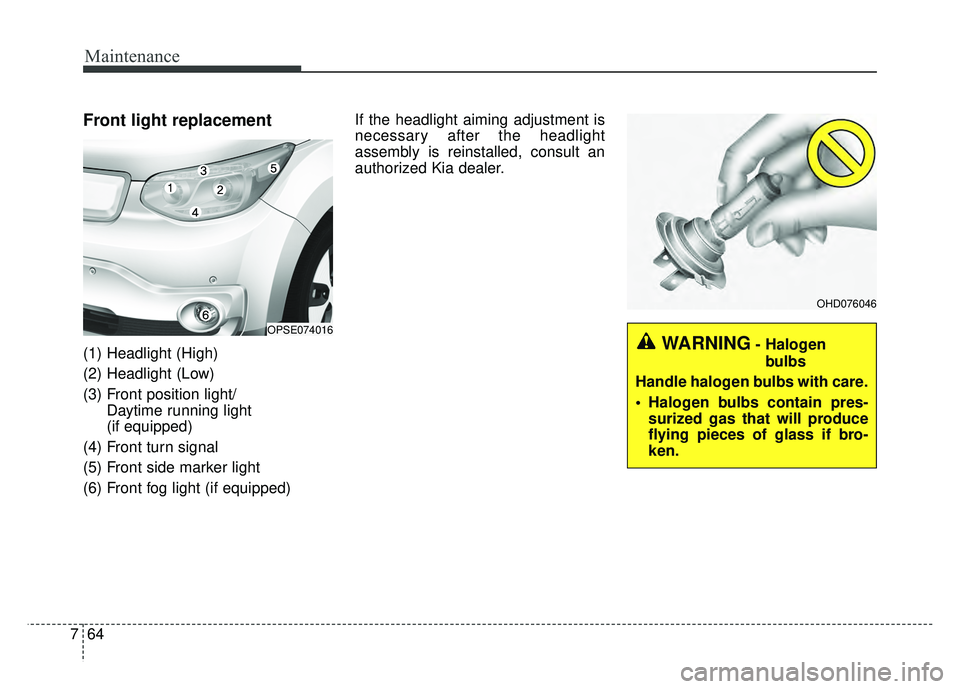
Front light replacement
(1) Headlight (High)
(2) Headlight (Low)
(3) Front position light/
Daytime running light
(if equipped)
(4) Front turn signal
(5) Front side marker light
(6) Front fog light (if equipped) If the headlight aiming adjustment is
necessary after the headlight
assembly is reinstalled, consult an
authorized Kia dealer.
OPSE074016
OHD076046
WARNING- Halogen
bulbs
Handle halogen bulbs with care.
Halogen bulbs contain pres- surized gas that will produce
flying pieces of glass if bro-
ken.
Page 462 of 496
Maintenance
72
7
Interior light bulb replacement
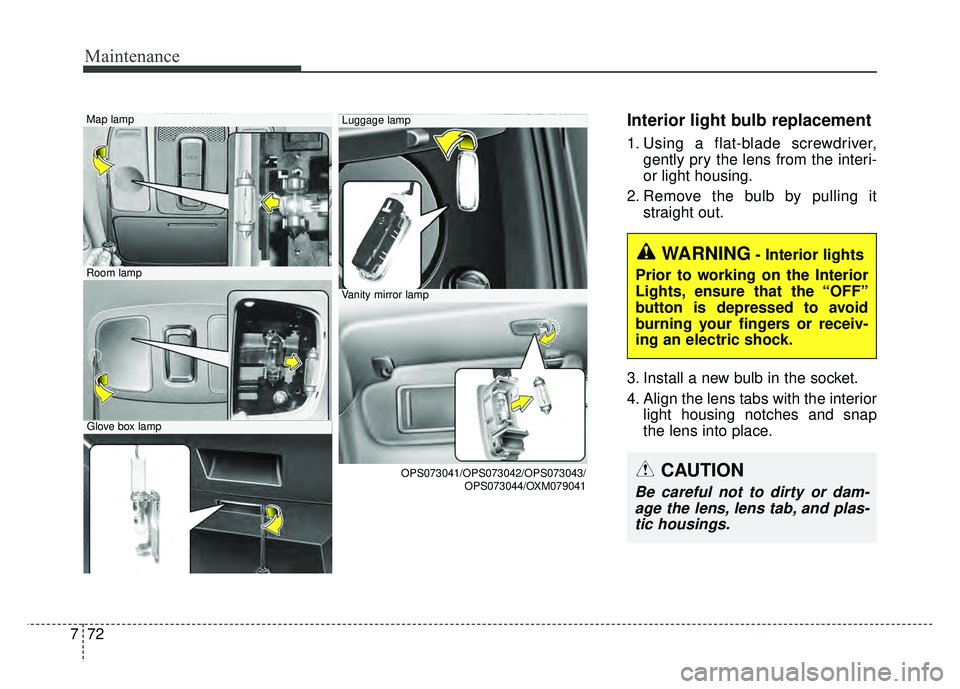
1. Using a flat-blade screwdriver,
gently pry the lens from the interi-
or light housing.
2. Remove the bulb by pulling it straight out.
3. Install a new bulb in the socket.
4. Align the lens tabs with the interior light housing notches and snap
the lens into place.
Map lamp
Room lamp
Glove box lamp
Luggage lamp
Vanity mirror lamp
OPS073041/OPS073042/OPS073043/ OPS073044/OXM079041
WARNING- Interior lights
Prior to working on the Interior
Lights, ensure that the “OFF”
button is depressed to avoid
burning your fingers or receiv-
ing an electric shock.
CAUTION
Be careful not to dirty or dam- age the lens, lens tab, and plas-tic housings.
Page 463 of 496
773
Maintenance
APPEARANCE CARE
Exterior care
Exterior general caution
It is very important to follow the label
directions when using any chemical
cleaner or polish. Read all warning
and caution statements that appear
on the label.
Finish maintenance
Washing
To help protect your vehicle’s finish
from rust and deterioration, wash it
thoroughly and frequently at least once
a month with lukewarm or cold water.
If you use your vehicle for off-road
driving, you should wash it after each
off-road trip. Pay special attention to
the removal of any accumulation of
salt, dirt, mud, and other foreign mate-
rials. Make sure the drain holes in the
lower edges of the doors and rocker
panels are kept clear and clean.
Insects, tar, tree sap, bird droppings,
industrial pollution and similar
deposits can damage your vehicle’s
finish if not removed immediately.Even prompt washing with plain
water may not completely remove all
these deposits. A mild soap, safe for
use on painted surfaces, may be
used.
After washing, rinse the vehicle thor-
oughly with lukewarm or cold water.
Do not allow soap to dry on the fin-
ish.
After washing the vehicle, test the
brakes while driving slowly to see if
they have been affected by water. If
braking performance is impaired, dry
the brakes by applying them lightly
while maintaining a slow forward
speed.
CAUTION
Do not use strong soap, chem-
ical detergents or hot water,and do not wash the vehicle indirect sunlight or when thebody of the vehicle is warm.
Be careful when washing the side windows of your vehicle.Especially, with high-pressurewater. Water may leak throughthe windows and wet the inte-rior.
To prevent damage to the plastic parts and lamps, donot clean with chemical sol-vents or strong detergents.
Page 464 of 496
Maintenance
74
7
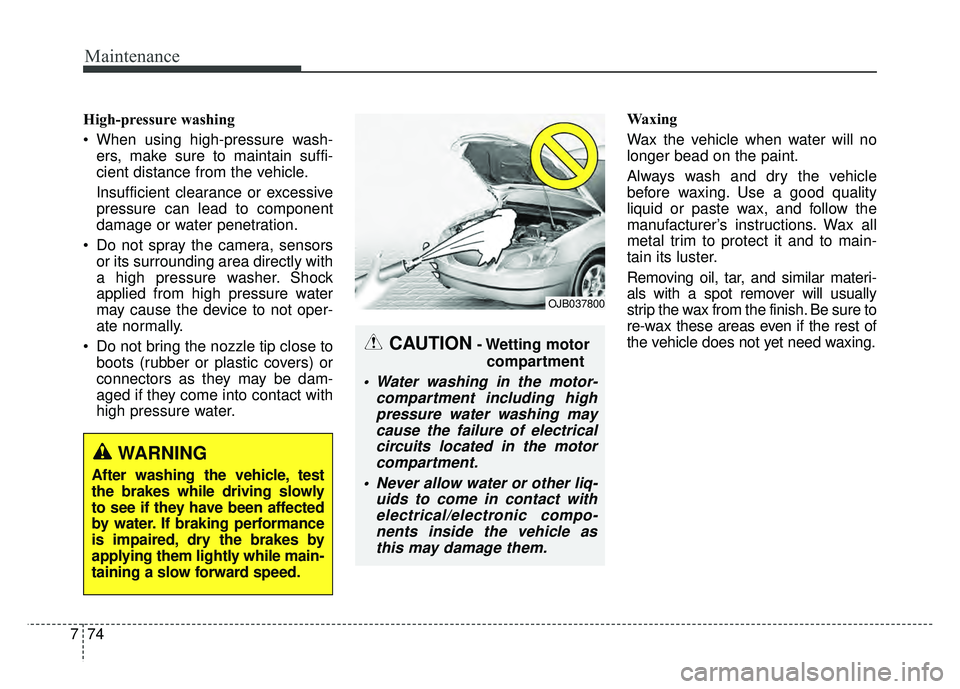
High-pressure washing
When using high-pressure wash-
ers, make sure to maintain suffi-
cient distance from the vehicle.
Insufficient clearance or excessive
pressure can lead to component
damage or water penetration.
Do not spray the camera, sensors or its surrounding area directly with
a high pressure washer. Shock
applied from high pressure water
may cause the device to not oper-
ate normally.
Do not bring the nozzle tip close to boots (rubber or plastic covers) or
connectors as they may be dam-
aged if they come into contact with
high pressure water. Waxing
Wax the vehicle when water will no
longer bead on the paint.
Always wash and dry the vehicle
before waxing. Use a good quality
liquid or paste wax, and follow the
manufacturer’s instructions. Wax all
metal trim to protect it and to main-
tain its luster.
Removing oil, tar, and similar materi-
als with a spot remover will usually
strip the wax from the finish. Be sure to
re-wax these areas even if the rest of
the vehicle does not yet need waxing.
CAUTION- Wetting motor
compartment
Water washing in the motor- compartment including highpressure water washing maycause the failure of electricalcircuits located in the motorcompartment.
Never allow water or other liq- uids to come in contact withelectrical/electronic compo-nents inside the vehicle asthis may damage them.
OJB037800
WARNING
After washing the vehicle, test
the brakes while driving slowly
to see if they have been affected
by water. If braking performance
is impaired, dry the brakes by
applying them lightly while main-
taining a slow forward speed.
Page 483 of 496
813
Specifications, Consumer information and Reporting safety defects
The electrical system of your vehicle is designed to per-
form under all reasonably expected operating conditions.
However, before any additional electrical equipment is
installed in your vehicle, consult an Authorized Kia
Dealer, in order to ensure that you do not void your war-
ranty.
Certain electrical equipment, or the way in which it is
installed, may adversely affect the operation of your vehi-
cle, including such systems as the engine control system,
the audio system and the electrical charging system and
thus potentially void all or part of your warranty.
We assume no responsibility for any expense you may
incur or for any malfunction of your vehicle or any of its
components or systems that may result from the installa-
tion of additional electrical equipment that is not supplied,
or recommended for installation by, Kia.Installation of a mobile two-way radio system
If a mobile two-way radio system is installed improperly,
or if an excessively powerful type of system is used, other
electronic systems may be adversely affected. To avoid
damage to your vehicle, consult an Authorized Kia Dealer
concerning the proper equipment and installation.
Kia motor vehicles are designed and manufactured to
meet or exceed all applicable safety standards.
For your safety, however, we strongly urge you to read
and follow all directions in this Owner's Manual, particu-
larly the information under the headings "NOTICE",
"CAUTION" and "WARNING".
If, after reading this manual, you have any questions
regarding the operation of your vehicle, safety issues and
defects please contact your Kia's toll-free Consumer
Assistance hot line as below:
National Consumer Affairs Manager
Kia Motors America, Inc.
P.O. Box 52410
Irvine, CA 92619-2410
1-800-333-4Kia (4542)
ELECTRICAL EQUIPMENT (U.S. ONLY)
Page 486 of 496

Index
2I
A/V Mode . . . . . . . . . . . . . . . . . . . . . . . . . . . . . . . . . . . 4-\
48
Abnormal lamp operation . . . . . . . . . . . . . . . . . . . . . . . 4-82
ACTIVE ECO SYSTEM . . . . . . . . . . . . . . . . . . . . . . . 5-10
Air bag warning label . . . . . . . . . . . . . . . . . . . . . . . . . . 3-58
Air bag warning light . . . . . . . . . . . . . . . . . . . . . . . . . . 3-37
Air bags. . . . . . . . . . . . . . . . . . . . . . . . . . . . . . . . . . . . \
. 3-34Air bag warning label. . . . . . . . . . . . . . . . . . . . . . . . 3-58
Air bag warning light . . . . . . . . . . . . . . . . . . . . . . . . 3-37
Curtain air bag . . . . . . . . . . . . . . . . . . . . . . . . . . . . . 3-51
Driver's and passenger's front air bag . . . . . . . . . . . 3-46
Inflation and non-inflation conditions . . . . . . . . . . . 3-52
Occupant Detection System (ODS) . . . . . . . . . . . . . 3-41
Operation . . . . . . . . . . . . . . . . . . . . . . . . . . . . . . . . . 3-35
Side air bag. . . . . . . . . . . . . . . . . . . . . . . . . . . . . . . . 3-49
SRS Care . . . . . . . . . . . . . . . . . . . . . . . . . . . . . . . . . 3-57
SRS components and functions . . . . . . . . . . . . . . . . 3-38
Air conditioner compressor label . . . . . . . . . . . . . . . . . . 8-8
Airconditioning system Automatic climate control system . . . . . . . . . . . . . . 4-94
Antenna . . . . . . . . . . . . . . . . . . . . . . . . . . . . . . . . . . . . \
4-128
Anti-lock brake system (ABS) . . . . . . . . . . . . . . . . . . . 5-23
Appearance care . . . . . . . . . . . . . . . . . . . . . . . . . . . . . . 7-73 Exterior care . . . . . . . . . . . . . . . . . . . . . . . . . . . . . . . 7-73
Interior care . . . . . . . . . . . . . . . . . . . . . . . . . . . . . . . 7-78
Audio system . . . . . . . . . . . . . . . . . . . . . . . . . . . . . . . 4-128 Antenna . . . . . . . . . . . . . . . . . . . . . . . . . . . . . . . . . 4-128 Audio . . . . . . . . . . . . . . . . . . . . . . . . . . . . . . . . . . . 4-\
141
AUX, USB and iPod
®port. . . . . . . . . . . . . . . . . . . 4-129
Bluetooth®Wireless Technology . . . . . . . . . . . . . . 4-137
How vehicle audio works . . . . . . . . . . . . . . . . . . . . 4-131
Speaker lights . . . . . . . . . . . . . . . . . . . . . . . . . . . . . 4-130
Using iPod
®device . . . . . . . . . . . . . . . . . . . . . . . . 4-136
Using the USB device . . . . . . . . . . . . . . . . . . . . . . 4-135
Speaker lights . . . . . . . . . . . . . . . . . . . . . . . . . . . . . 4-130
Auto defogging system . . . . . . . . . . . . . . . . . . . . . . . . 4-115
Auto door lock/unlock feature . . . . . . . . . . . . . . . . . . . 4-13
Auto light position . . . . . . . . . . . . . . . . . . . . . . . . . . . . 4-83
Automatic climate control system . . . . . . . . . . . . . . . . 4-94 Air conditioning . . . . . . . . . . . . . . . . . . . . . . . . . . . 4-103
Automatic heating and air conditioning. . . . . . . . . . 4-95
Automatic Ventilation. . . . . . . . . . . . . . . . . . . . . . . 4-106
Climate control air filter . . . . . . . . . . . . . . . . . . . . . . 109
Manual heating and air conditioning . . . . . . . . . . . . 4-96
System operation . . . . . . . . . . . . . . . . . . . . . . . . . . 4-107
AUX, USB and iPod
®port . . . . . . . . . . . . . . . . . . . . . 4-129
Battery. . . . . . . . . . . . . . . . . . . . . . . . . . . . . . . . . . . . \
. . 7-33
Battery replacement (smart key). . . . . . . . . . . . . . . . . . . 4-9
Battery saver function . . . . . . . . . . . . . . . . . . . . . . . . . . 4-81
Before driving . . . . . . . . . . . . . . . . . . . . . . . . . . . . . . . . . 5-3
Bonnet see the hood . . . . . . . . . . . . . . . . . . . . . . . . . . . 4-22
A
B
Page 489 of 496

I5
Index
Gauges . . . . . . . . . . . . . . . . . . . . . . . . . . . . . . . . . . . . \
. 4-42
Glove box . . . . . . . . . . . . . . . . . . . . . . . . . . . . . . . . . . 4-11\
6
Glove box lamp. . . . . . . . . . . . . . . . . . . . . . . . . . . . . . . 4-92
Gross vehicle weight. . . . . . . . . . . . . . . . . . . . . . . . . . . . 8-3
Hazard warning flasher . . . . . . . . . . . . . . . . . . . . . . . . . . 6-2
Hazardous driving conditions . . . . . . . . . . . . . . . . . . . . 5-40
Headlamp escort . . . . . . . . . . . . . . . . . . . . . . . . . . . . . . 4-81
Headlight bulb replacement . . . . . . . . . . . . . . . . . . . . . 7-66
Headlight position. . . . . . . . . . . . . . . . . . . . . . . . . . . . . 4-83
Headrest(front) . . . . . . . . . . . . . . . . . . . . . . . . . . . . . . . . 3-6
Heated steering wheel. . . . . . . . . . . . . . . . . . . . . . . . . . 4-32
HeaterAutomatic climate control system . . . . . . . . . . . . . . 4-94
High - beam operation . . . . . . . . . . . . . . . . . . . . . . . . . 4-84
Hight adjustment. . . . . . . . . . . . . . . . . . . . . . . . . . . . . . 3-16
Highway driving . . . . . . . . . . . . . . . . . . . . . . . . . . . . . . 5-43
Hill-start assist control (HAC) . . . . . . . . . . . . . . . . . . . 5-30
Hood . . . . . . . . . . . . . . . . . . . . . . . . . . . . . . . . . . . . \
. . . 4-22
Horn . . . . . . . . . . . . . . . . . . . . . . . . . . . . . . . . . . . . \
. . . 4-32 Immobilizer system . . . . . . . . . . . . . . . . . . . . . . . . . . . . 4-8
Impact sensing door unlock system . . . . . . . . . . . . . . . 4-13
Indicator Lights. . . . . . . . . . . . . . . . . . . . . . . . . . . . . . . 4-72
Inside rearview mirror . . . . . . . . . . . . . . . . . . . . . . . . . 4-35
Instrument cluster . . . . . . . . . . . . . . . . . . . . . . . . . . . . . 4-40
A/V Mode. . . . . . . . . . . . . . . . . . . . . . . . . . . . . . . . . 4-48
Energy consumption. . . . . . . . . . . . . . . . . . . . . . . . . 4-61
EV information mode. . . . . . . . . . . . . . . . . . . . . . . . 4-47
Gauges . . . . . . . . . . . . . . . . . . . . . . . . . . . . . . . . . . . 4-\
42
Indicator Lights . . . . . . . . . . . . . . . . . . . . . . . . . . . . 4-72
Instrument panel illumination . . . . . . . . . . . . . . . . . 4-41
LCD Display . . . . . . . . . . . . . . . . . . . . . . . . . . . . . . 4-46
LCD Display Control . . . . . . . . . . . . . . . . . . . . . . . . 4-41
LCD Modes . . . . . . . . . . . . . . . . . . . . . . . . . . . . . . . 4-46
One time driving information mode . . . . . . . . . . . . 4-63
Range . . . . . . . . . . . . . . . . . . . . . . . . . . . . . . . . . . . . \
4-64
Service Mode . . . . . . . . . . . . . . . . . . . . . . . . . . . . . . 4-48
Trip A/B . . . . . . . . . . . . . . . . . . . . . . . . . . . . . . . . . . 4-62\
Trip computer . . . . . . . . . . . . . . . . . . . . . . . . . . . . . . 4-61
User settings mode . . . . . . . . . . . . . . . . . . . . . . . . . . 4-49
Warning and Indicator lights . . . . . . . . . . . . . . . . . . 4-65
Warning lights . . . . . . . . . . . . . . . . . . . . . . . . . . . . . 4-65
Warning Messages . . . . . . . . . . . . . . . . . . . . . . . . . . 4-52
Instrument panel fuse . . . . . . . . . . . . . . . . . . . . . . . . . . 7-52
Instrument panel overview . . . . . . . . . . . . . . . . . . . . . . . 2-5
Interior care. . . . . . . . . . . . . . . . . . . . . . . . . . . . . . . . . . 7-78\
G
H
I