key KIA SOUL EV 2018 Owner's Guide
[x] Cancel search | Manufacturer: KIA, Model Year: 2018, Model line: SOUL EV, Model: KIA SOUL EV 2018Pages: 496, PDF Size: 15.13 MB
Page 304 of 496
![KIA SOUL EV 2018 Owners Guide 4173
Features of your vehicle
Operation during calls
Incoming call with Bluetooth®
Wireless Technology connected ➟
Select [Accept].
(1) Call duration: Call duration display.
(2) Caller name: If th](/img/2/55107/w960_55107-303.png "KIA SOUL EV 2018 Owners Guide 4173
Features of your vehicle
Operation during calls
Incoming call with Bluetooth®
Wireless Technology connected ➟
Select [Accept].
(1) Call duration: Call duration display.
(2) Caller name: If th")
4173
Features of your vehicle
Operation during calls
Incoming call with Bluetooth®
Wireless Technology connected ➟
Select [Accept].
(1) Call duration: Call duration display.
(2) Caller name: If the caller number is in your contacts, the corresponding
name is displayed.
(3) Incoming phone number: Incoming phone number is displayed.
(4) Keypad: Number keypad for Automatic Response Service input
is displayed.
(5) Private: Call is transferred to a cell phone.
(6) Outgoing Volume: Adjust outgo- ing voice volume.
(7) End: End call.
✽ ✽ NOTICE
• Some Bluetooth®Wireless Technology
devices may not support the
Private function.
• The outgoing voice volume may vary depending on the type of
Bluetooth
®Wireless Technology
device. If the outgoing voice vol-
ume is too high or low, adjust the
Out Vol.
Favorites
Select the [PHONE] button on the
audio system ➟ Select [Favorites] ➟
Favorites list displayed.
(1) Favorites list: A list of paired favorites is displayed.
Connect a call when selected. (2) Add to Favorites: Add a down-
loaded phone number to favorites.
(3) Delete: Delete a saved favorites.
✽ ✽ NOTICE
• Up to 20 favorites can be paired
for each paired Bluetooth®
Wireless Technology device.
• Favorites can be accessed when the Bluetooth
®Wireless Technology
device they were paired from is
connected.
• The audio system does not down- load favorites from Bluetooth
®
Wireless Technology devices.
Favorites must be newly saved
before use.
• To add to favorites, contacts must be downloaded first.
• Saved favorites are not updated even if the contacts of the connected
Bluetooth
®Wireless Technology
device are changed. In this case,
favorites need to be deleted and
added again.
Page 306 of 496
![KIA SOUL EV 2018 Owners Guide 4175
Features of your vehicle
Dial
Select the [PHONE]button on the
audio ➟Select [Dial].
(1) Phone number entry window: The phone number entered using the
keypad is displayed.
(2) Clear - Press to](/img/2/55107/w960_55107-305.png "KIA SOUL EV 2018 Owners Guide 4175
Features of your vehicle
Dial
Select the [PHONE]button on the
audio ➟Select [Dial].
(1) Phone number entry window: The phone number entered using the
keypad is displayed.
(2) Clear - Press to")
4175
Features of your vehicle
Dial
Select the [PHONE]button on the
audio ➟Select [Dial].
(1) Phone number entry window: The phone number entered using the
keypad is displayed.
(2) Clear - Press to delete individual digits.
- Press and hold to delete theentire phone number.
(3) Keypad: Enter phone number.
(4)
Bluetooth®Wireless Technology
phone name
- The name of the connected
Bluetooth®Wireless Technology
device is displayed.
- Contacts matching the keypad number/letter input are displayed.(5) Call
- Enter and select a phone num-ber to call.
- Select without entering a phone number to see the most recent
dialed call.
Connections
Select the [PHONE] button on the
audio ➟Select [Connections].
- For connections setting, refer to Setup ➟Select [Bluetooth] ➟
Select [Connections] page.
Setup
Select the [PHONE] button on the
audio ➟Select [Settings].
- For phone Setup, refer to Setup page ➟Select [Bluetooth].
Page 317 of 496
55
Driving your vehicle
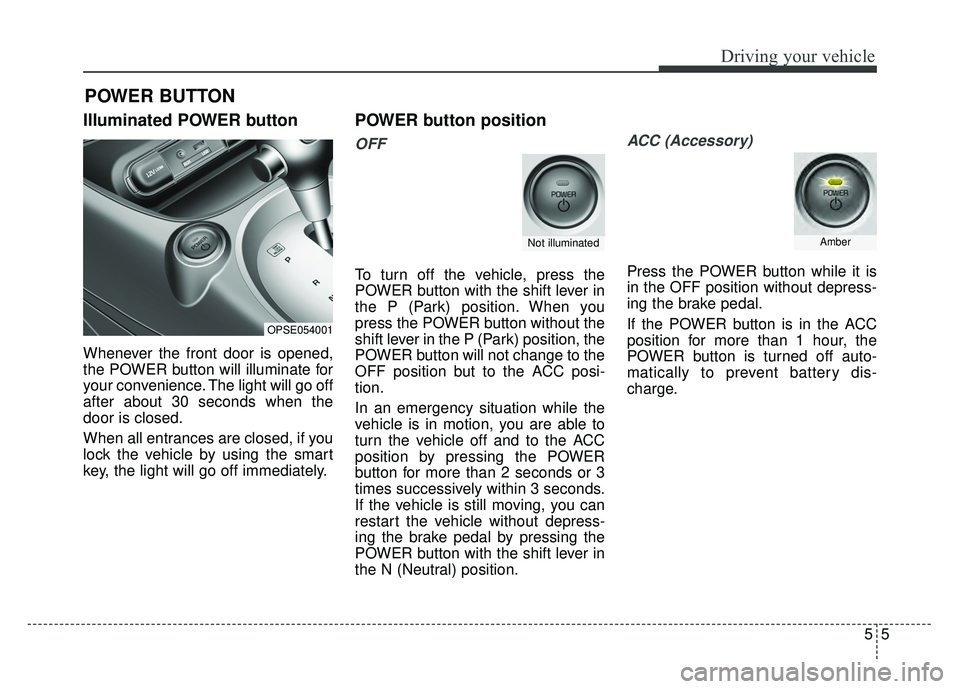
Illuminated POWER button
Whenever the front door is opened,
the POWER button will illuminate for
your convenience. The light will go off
after about 30 seconds when the
door is closed.
When all entrances are closed, if you
lock the vehicle by using the smart
key, the light will go off immediately.
POWER button position
OFF
To turn off the vehicle, press the
POWER button with the shift lever in
the P (Park) position. When you
press the POWER button without the
shift lever in the P (Park) position, the
POWER button will not change to the
OFF position but to the ACC posi-
tion.
In an emergency situation while the
vehicle is in motion, you are able to
turn the vehicle off and to the ACC
position by pressing the POWER
button for more than 2 seconds or 3
times successively within 3 seconds.
If the vehicle is still moving, you can
restart the vehicle without depress-
ing the brake pedal by pressing the
POWER button with the shift lever in
the N (Neutral) position.
ACC (Accessory)
Press the POWER button while it is
in the OFF position without depress-
ing the brake pedal.
If the POWER button is in the ACC
position for more than 1 hour, the
POWER button is turned off auto-
matically to prevent battery dis-
charge.
POWER BUTTON
OPSE054001
Not illuminatedAmber
Page 319 of 496
57
Driving your vehicle
Starting the vehicle
1. Carry the smart key or leave itinside the vehicle.
2. Make sure the parking brake is firmly applied
3. Place the transaxle shift lever in P (Park). Depress the brake pedal
fully.
4. Press the POWER button until the ready " " indicator light in the
cluster is turned on. Even if the smart key is in the vehi-
cle, if it is far away from you, the
vehicle may not start.
When the POWER button is in the ACC position or above, if any door
is opened, the system checks for
the smart key. If the smart key is
not in the vehicle, a message "key
is not in the vehicle" will appear on
the LCD display. And if all doors
are closed, the chime will sound for
5 seconds. The indicator or warn-
ing will turn off while the vehicle is
moving. Always have the smart key
with you.CAUTION
If the vehicle stalls while thevehicle is in motion, do notattempt to move the shift leverto the P (Park) position. If thetraffic and road conditions per-mit, you may put the shift leverin the N (Neutral) position whilethe vehicle is still moving andpress the POWER button in anattempt to restart the vehicle.
WARNING- Proper
footwear
Always wear appropriate shoes
when operating your vehicle.
Unsuitable shoes (high heels, ski
boots, sandals, etc.) may inter-
fere with your ability to use the
brake and accelerator pedals.
Page 320 of 496
Driving your vehicle
85
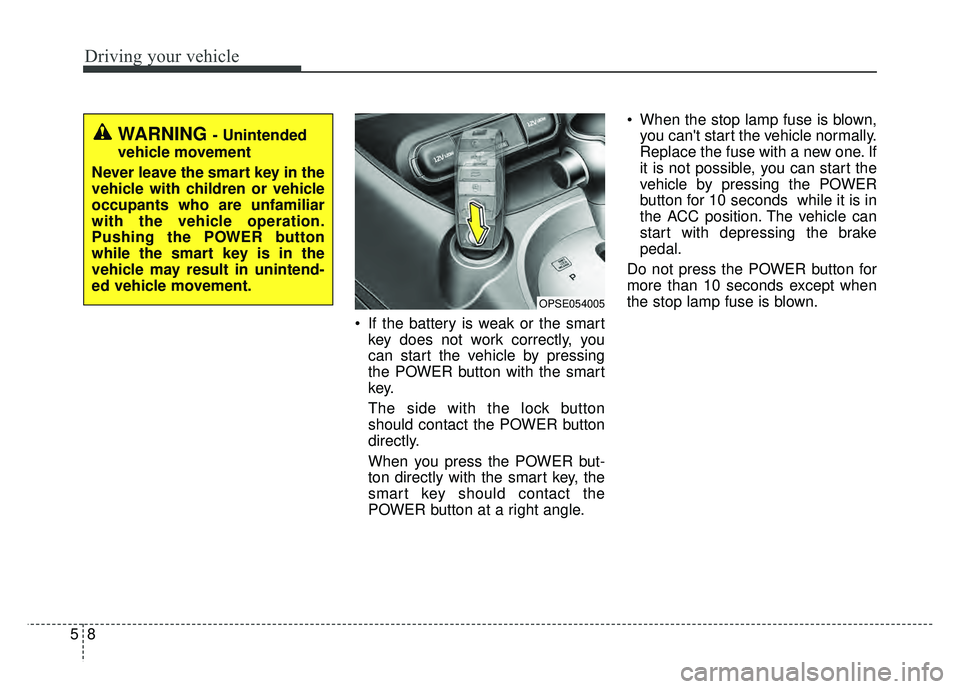
If the battery is weak or the smartkey does not work correctly, you
can start the vehicle by pressing
the POWER button with the smart
key.
The side with the lock button
should contact the POWER button
directly.
When you press the POWER but-
ton directly with the smart key, the
smart key should contact the
POWER button at a right angle. When the stop lamp fuse is blown,
you can't start the vehicle normally.
Replace the fuse with a new one. If
it is not possible, you can start the
vehicle by pressing the POWER
button for 10 seconds while it is in
the ACC position. The vehicle can
start with depressing the brake
pedal.
Do not press the POWER button for
more than 10 seconds except when
the stop lamp fuse is blown.
OPSE054005
WARNING - Unintended
vehicle movement
Never leave the smart key in the
vehicle with children or vehicle
occupants who are unfamiliar
with the vehicle operation.
Pushing the POWER button
while the smart key is in the
vehicle may result in unintend-
ed vehicle movement.
Page 326 of 496
Driving your vehicle
14
5
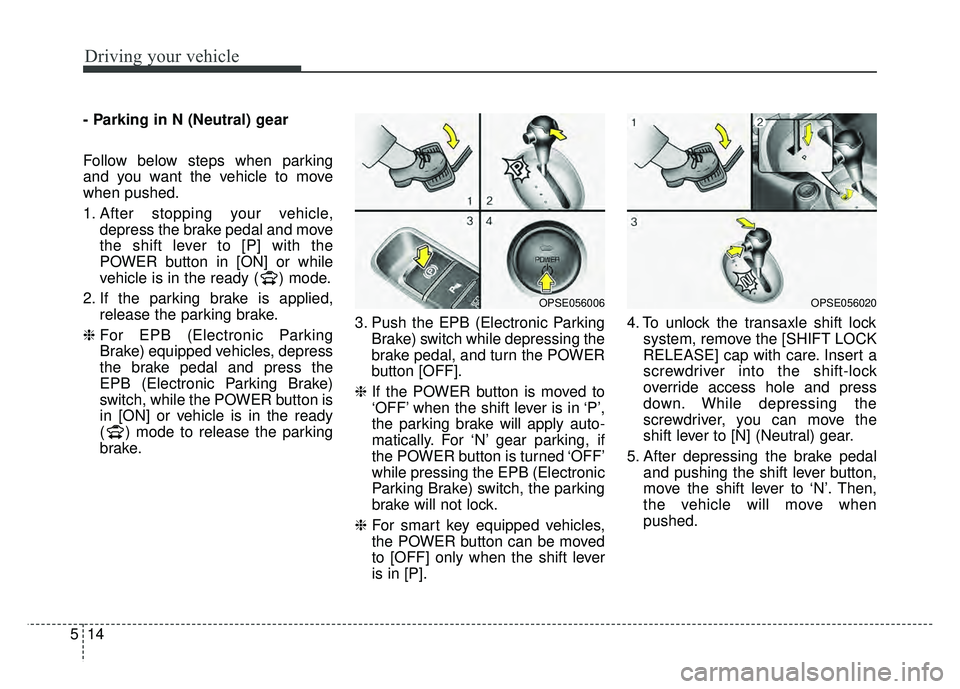
- Parking in N (Neutral) gear
Follow below steps when parking
and you want the vehicle to move
when pushed.
1. After stopping your vehicle,
depress the brake pedal and move
the shift lever to [P] with the
POWER button in [ON] or while
vehicle is in the ready ( ) mode.
2. If the parking brake is applied, release the parking brake.
❈ For EPB (Electronic Parking
Brake) equipped vehicles, depress
the brake pedal and press the
EPB (Electronic Parking Brake)
switch, while the POWER button is
in [ON] or vehicle is in the ready
( ) mode to release the parking
brake. 3. Push the EPB (Electronic Parking
Brake) switch while depressing the
brake pedal, and turn the POWER
button [OFF].
❈ If the POWER button is moved to
‘OFF’ when the shift lever is in ‘P’,
the parking brake will apply auto-
matically. For ‘N’ gear parking, if
the POWER button is turned ‘OFF’
while pressing the EPB (Electronic
Parking Brake) switch, the parking
brake will not lock.
❈ For smart key equipped vehicles,
the POWER button can be moved
to [OFF] only when the shift lever
is in [P]. 4. To unlock the transaxle shift lock
system, remove the [SHIFT LOCK
RELEASE] cap with care. Insert a
screwdriver into the shift-lock
override access hole and press
down. While depressing the
screwdriver, you can move the
shift lever to [N] (Neutral) gear.
5. After depressing the brake pedal and pushing the shift lever button,
move the shift lever to ‘N’. Then,
the vehicle will move when
pushed.
OPSE056006OPSE056020
Page 333 of 496
521
Driving your vehicle
System warning
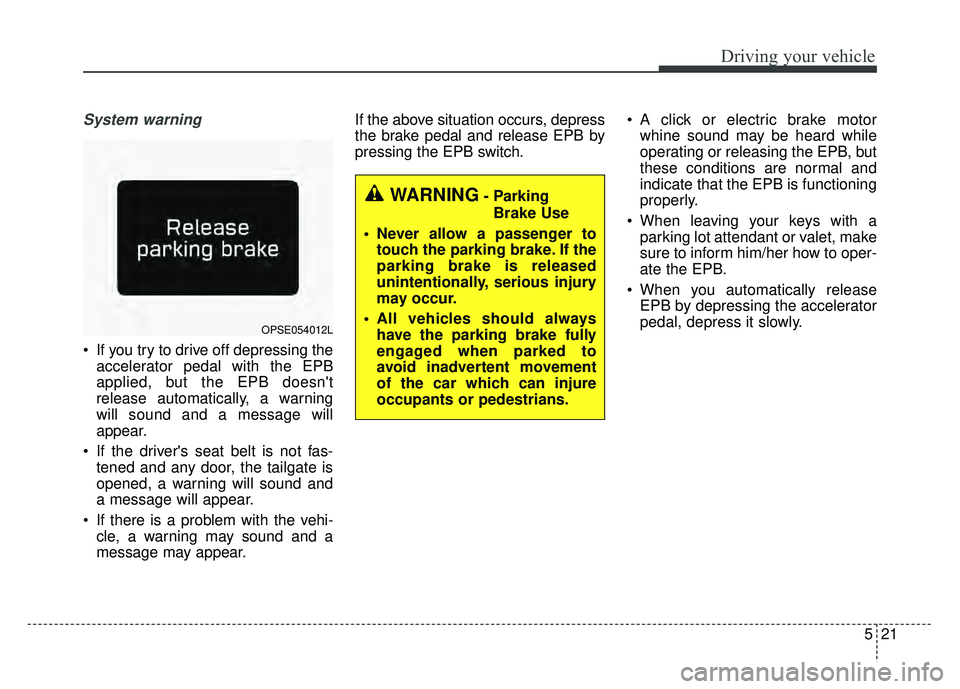
If you try to drive off depressing theaccelerator pedal with the EPB
applied, but the EPB doesn't
release automatically, a warning
will sound and a message will
appear.
If the driver's seat belt is not fas- tened and any door, the tailgate is
opened, a warning will sound and
a message will appear.
If there is a problem with the vehi- cle, a warning may sound and a
message may appear. If the above situation occurs, depress
the brake pedal and release EPB by
pressing the EPB switch.
A click or electric brake motor
whine sound may be heard while
operating or releasing the EPB, but
these conditions are normal and
indicate that the EPB is functioning
properly.
When leaving your keys with a parking lot attendant or valet, make
sure to inform him/her how to oper-
ate the EPB.
When you automatically release EPB by depressing the accelerator
pedal, depress it slowly.
OPSE054012L
WARNING- Parking
Brake Use
Never allow a passenger to touch the parking brake. If the
parking brake is released
unintentionally, serious injury
may occur.
All vehicles should always have the parking brake fully
engaged when parked to
avoid inadvertent movement
of the car which can injure
occupants or pedestrians.
Page 359 of 496
547
Driving your vehicle
Use high quality ethylene gly-
col coolant
Your vehicle is delivered with high qual-
ity ethylene glycol coolant in the cool-
ing system. It is the only type of coolant
that should be used because it helps
prevent corrosion in the cooling sys-
tem, lubricates the water pump and
prevents freezing. Be sure to replace
or replenish your coolant in accor-
dance with the maintenance schedule
in section 7. Before winter, have your
coolant tested to assure that its freez-
ing point is sufficient for the tempera-
tures anticipated during the winter.
Check battery and cables
Winter puts additional burdens on
the battery system. Visually inspect
the battery and cables as described
in section 7. The level of charge in
your battery can be checked by an
authorized Kia dealer or a service
station.
To keep locks from freezing
To keep the locks from freezing,
squirt an approved de-icer fluid or
glycerine into the key opening. If a
lock is covered with ice, squirt it with
an approved de-icing fluid to remove
the ice. If the lock is frozen internally,
you may be able to thaw it out by
using a heated key. Handle the heat-
ed key with care to avoid injury.
Use approved window washer
anti-freeze in system
To keep the water in the window
washer system from freezing, add an
approved window washer anti-freeze
solution in accordance with instruc-
tions on the container. Window wash-
er anti-freeze is available from an
authorized Kia dealer and most auto
parts outlets. Do not use coolant or
other types of anti-freeze as these
may damage the paint finish.
Don’t let your parking brake
freeze
Under some conditions your parking
brake can freeze in the engaged
position. This is most likely to happen
when there is an accumulation of
snow or ice around or near the rear
brakes or if the brakes are wet. If
there is a risk the parking brake may
freeze, apply it only temporarily while
you put the gear shift lever in P
(Park, automatic transaxle) or in first
or reverse gear (manual transaxle)
and block the rear wheels so the
vehicle cannot roll. Then release the
parking brake.
CAUTION- Snow chains
Chains that are the wrong sizeor improperly installed candamage your vehicle's brakelines, suspension, body andwheels.
Stop driving and retighten the chains any time you hear themhitting the vehicle.
Page 444 of 496
Maintenance
54
7
Fuse switch
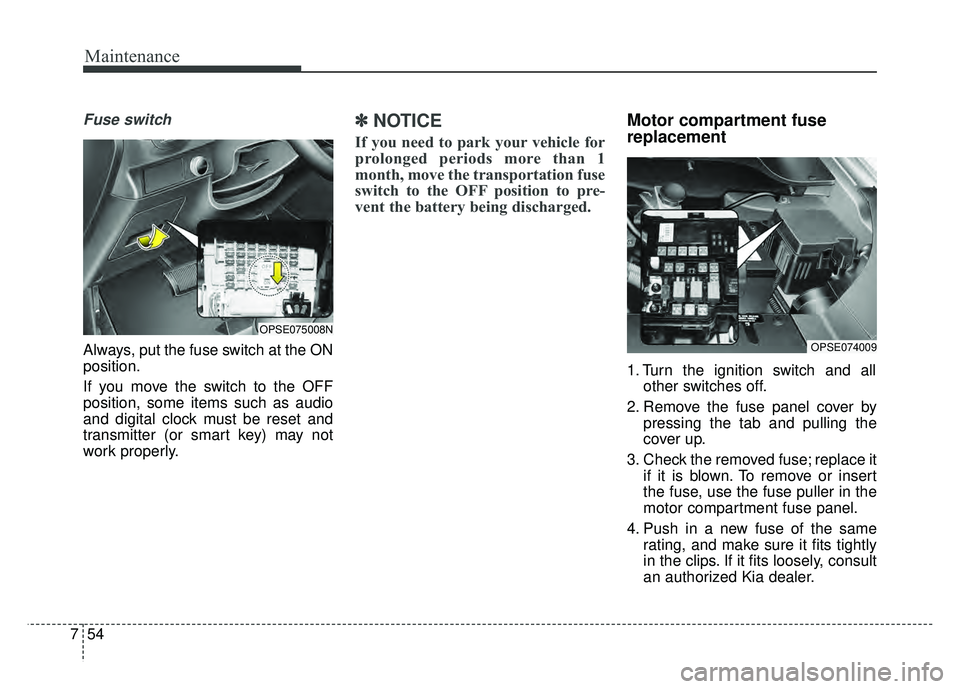
Always, put the fuse switch at the ON
position.
If you move the switch to the OFF
position, some items such as audio
and digital clock must be reset and
transmitter (or smart key) may not
work properly.
✽ ✽
NOTICE
If you need to park your vehicle for
prolonged periods more than 1
month, move the transportation fuse
switch to the OFF position to pre-
vent the battery being discharged.
Motor compartment fuse
replacement
1. Turn the ignition switch and all
other switches off.
2. Remove the fuse panel cover by pressing the tab and pulling the
cover up.
3. Check the removed fuse; replace it if it is blown. To remove or insert
the fuse, use the fuse puller in the
motor compartment fuse panel.
4. Push in a new fuse of the same rating, and make sure it fits tightly
in the clips. If it fits loosely, consult
an authorized Kia dealer.
OPSE074009
OPSE075008N
Page 447 of 496
757
Maintenance
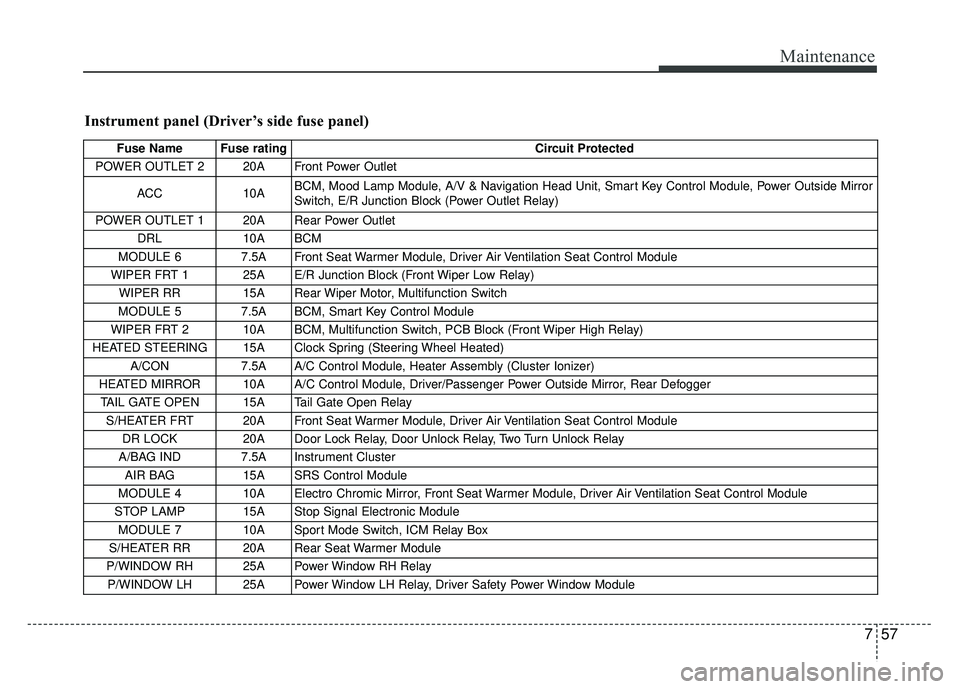
Instrument panel (Driver’s side fuse panel)
Fuse Name Fuse ratingCircuit Protected
POWER OUTLET 2 20A Front Power Outlet
ACC 10A BCM, Mood Lamp Module, A/V & Navigation Head Unit, Smart Key Control Module, Power Outside Mirror
Switch, E/R Junction Block (Power Outlet Relay)
POWER OUTLET 1 20A Rear Power Outlet DRL 10A BCM
MODULE 6 7.5A Front Seat Warmer Module, Driver Air Ventilation Seat Control Module
WIPER FRT 1 25A E/R Junction Block (Front Wiper Low Relay) WIPER RR 15A Rear Wiper Motor, Multifunction Switch
MODULE 5 7.5A BCM, Smart Key Control Module
WIPER FRT 2 10A BCM, Multifunction Switch, PCB Block (Front Wiper High Relay)
HEATED STEERING 15A Clock Spring (Steering Wheel Heated) A/CON 7.5A A/C Control Module, Heater Assembly (Cluster Ionizer)
HEATED MIRROR 10A A/C Control Module, Driver/Passenger Power Outside Mirror, Rear Defogger TAIL GATE OPEN 15A Tail Gate Open Relay S/HEATER FRT 20A Front Seat Warmer Module, Driver Air Ventilation Seat Control Module DR LOCK 20A Door Lock Relay, Door Unlock Relay, Two Turn Unlock Relay
A/BAG IND 7.5A Instrument Cluster AIR BAG 15A SRS Control Module
MODULE 4 10A Electro Chromic Mirror, Front Seat Warmer Module, Driver Air Ventilation Seat Control Module
STOP LAMP 15A Stop Signal Electronic Module MODULE 7 10A Sport Mode Switch, ICM Relay Box
S/HEATER RR 20A Rear Seat Warmer Module
P/WINDOW RH 25A Power Window RH Relay P/WINDOW LH 25A Power Window LH Relay, Driver Safety Power Window Module