lock KIA SOUL EV 2018 Workshop Manual
[x] Cancel search | Manufacturer: KIA, Model Year: 2018, Model line: SOUL EV, Model: KIA SOUL EV 2018Pages: 496, PDF Size: 15.13 MB
Page 155 of 496
Features of your vehicle
24
4
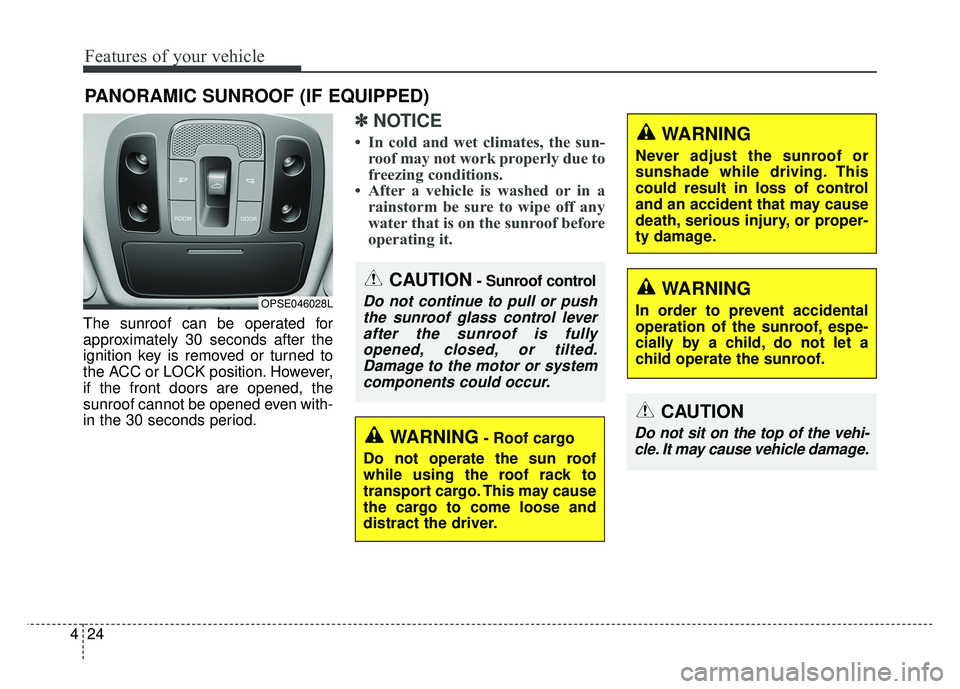
The sunroof can be operated for
approximately 30 seconds after the
ignition key is removed or turned to
the ACC or LOCK position. However,
if the front doors are opened, the
sunroof cannot be opened even with-
in the 30 seconds period.
✽ ✽
NOTICE
• In cold and wet climates, the sun-
roof may not work properly due to
freezing conditions.
• After a vehicle is washed or in a rainstorm be sure to wipe off any
water that is on the sunroof before
operating it.
PANORAMIC SUNROOF (IF EQUIPPED)
CAUTION- Sunroof control
Do not continue to pull or push
the sunroof glass control leverafter the sunroof is fullyopened, closed, or tilted.Damage to the motor or systemcomponents could occur.OPSE046028L
WARNING- Roof cargo
Do not operate the sun roof
while using the roof rack to
transport cargo. This may cause
the cargo to come loose and
distract the driver.
CAUTION
Do not sit on the top of the vehi- cle. It may cause vehicle damage.
WARNING
Never adjust the sunroof or
sunshade while driving. This
could result in loss of control
and an accident that may cause
death, serious injury, or proper-
ty damage.
WARNING
In order to prevent accidental
operation of the sunroof, espe-
cially by a child, do not let a
child operate the sunroof.
Page 162 of 496
431
Features of your vehicle
(Continued)
• When you operate the steeringwheel in low temperature, abnor-
mal noise may occur. If tempera-
ture rises, the noise will likely dis-
appear. This is a normal condition.
• When the charging system warn- ing light comes on due to the low
voltage (When the alternator or
battery) does not operate normal-
ly or it malfunctions), the steering
wheel may require increased
steering effort.Tilt and telescopic steering
Tilt and telescopic steering allows
you to adjust the steering wheel
before you drive. You can also raise it
to give your legs more room when
you exit and enter the vehicle.
The steering wheel should be posi-
tioned so that it is comfortable for
you to drive, while permitting you to
see the instrument panel warning
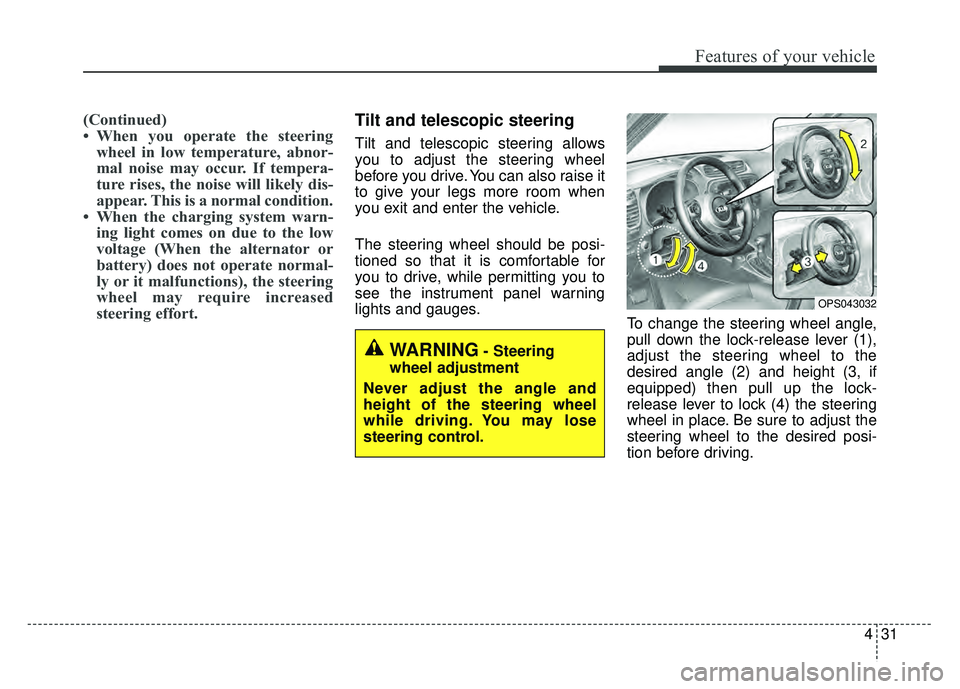
lights and gauges. To change the steering wheel angle,
pull down the lock-release lever (1),
adjust the steering wheel to the
desired angle (2) and height (3, if
equipped) then pull up the lock-
release lever to lock (4) the steering
wheel in place. Be sure to adjust the
steering wheel to the desired posi-
tion before driving.
OPS043032
WARNING- Steering
wheel adjustment
Never adjust the angle and
height of the steering wheel
while driving. You may lose
steering control.
Page 170 of 496
439
Features of your vehicle
Electric type
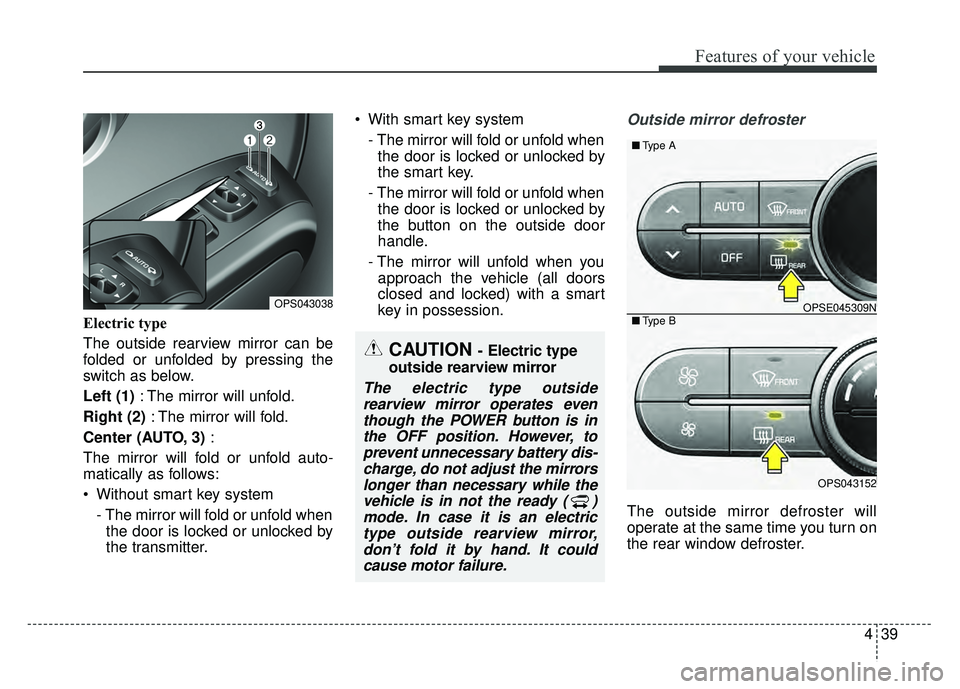
The outside rearview mirror can be
folded or unfolded by pressing the
switch as below.
Left (1): The mirror will unfold.
Right (2) : The mirror will fold.
Center (AUTO, 3) :
The mirror will fold or unfold auto-
matically as follows:
Without smart key system - The mirror will fold or unfold whenthe door is locked or unlocked by
the transmitter. With smart key system
- The mirror will fold or unfold whenthe door is locked or unlocked by
the smart key.
- The mirror will fold or unfold when the door is locked or unlocked by
the button on the outside door
handle.
- The mirror will unfold when you approach the vehicle (all doors
closed and locked) with a smart
key in possession.
Outside mirror defroster
The outside mirror defroster will
operate at the same time you turn on
the rear window defroster.
CAUTION - Electric type
outside rearview mirror
The electric type outside rearview mirror operates eventhough the POWER button is inthe OFF position. However, toprevent unnecessary battery dis-charge, do not adjust the mirrorslonger than necessary while thevehicle is in not the ready ( )mode. In case it is an electrictype outside rearview mirror,don’t fold it by hand. It couldcause motor failure.
OPS043038OPSE045309N
OPS043152
■ Type B
■Type A
Page 181 of 496
Features of your vehicle
50
4
Door
Auto Lock
Off:
The auto door lock operation will
be deactivated.
Enable on speed: All doors will be automatically
locked when the vehicle speed
exceeds 9.3mph (15km/h).
Enable on shift: All doors will be automatically
locked if the reduction gear shift
lever is shifted from the P (Park)
position to the R (Reverse), N
(Neutral), or D (Drive) position. Auto Unlock
Off:
The auto door unlock operation will
be canceled.
Vehicle off: All doors will be automatically
unlocked when the POWER button
is set to the OFF position.
On shift P: All doors will be automatically
unlocked if the reduction gear shift
lever is shifted to the P (Park) posi-
tion.
Driver Door Unlock: All doors will be automatically
unlocked if the driver's door is
unlocked. Two Press Unlock
Off:
The two press unlock function will
be deactivated. Therefore, all doors
will unlock if the door is unlocked.
On: The driver’s door will unlock if the
door is unlocked. When the door is
unlocked again within 4 seconds,
all doors will unlock.
Horn Feedback
Off: The Horn feedback operation will
be deactivated.
On: After locking the door by pressing
the lock button on the transmitter, if
you press the lock button again
within 4 seconds, the warning
sound will operate once to indicate
that all doors are locked.
Page 199 of 496
Features of your vehicle
68
4
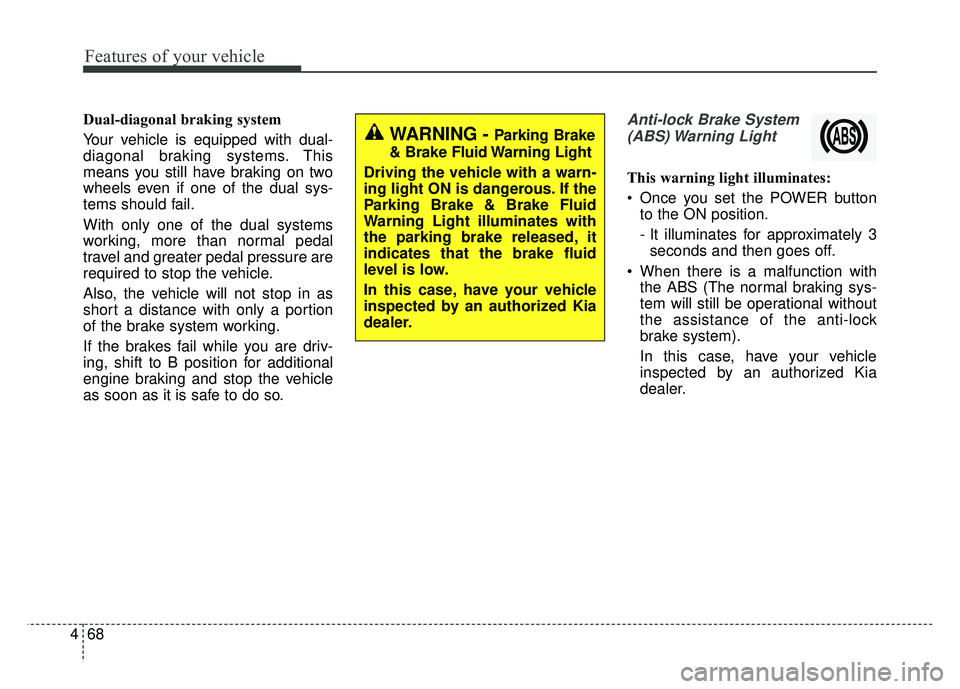
Dual-diagonal braking system
Your vehicle is equipped with dual-
diagonal braking systems. This
means you still have braking on two
wheels even if one of the dual sys-
tems should fail.
With only one of the dual systems
working, more than normal pedal
travel and greater pedal pressure are
required to stop the vehicle.
Also, the vehicle will not stop in as
short a distance with only a portion
of the brake system working.
If the brakes fail while you are driv-
ing, shift to B position for additional
engine braking and stop the vehicle
as soon as it is safe to do so.Anti-lock Brake System
(ABS) Warning Light
This warning light illuminates:
Once you set the POWER button to the ON position.
- It illuminates for approximately 3seconds and then goes off.
When there is a malfunction with the ABS (The normal braking sys-
tem will still be operational without
the assistance of the anti-lock
brake system).
In this case, have your vehicle
inspected by an authorized Kia
dealer.
WARNING - Parking Brake
& Brake Fluid Warning Light
Driving the vehicle with a warn-
ing light ON is dangerous. If the
Parking Brake & Brake Fluid
Warning Light illuminates with
the parking brake released, it
indicates that the brake fluid
level is low.
In this case, have your vehicle
inspected by an authorized Kia
dealer.
Page 209 of 496
Features of your vehicle
78
4
Non-operational conditions of
parking assist system
Parking assist system may not
operate normally when:
1. Moisture is frozen to the sensor. (It will operate normally when moisture
melts.)
2. Sensor is covered with foreign matter, such as snow or water, or
the sensor cover is blocked. (It will
operate normally when the materi-
al is removed or the sensor is no
longer blocked.)
3. Sensor is stained with foreign mat- ter such as snow or water. (Sensing
range will return to normal when
removed.)
4. The parking assist button is off.
There is a possibility of parking assist system malfunction when:
1. Driving on uneven road surfaces such as unpaved roads, gravel,
bumps, or gradient.
2. Objects generating excessive noise such as vehicle horns, loud motor-
cycle engines, or truck air brakes
can interfere with the sensor.
3. Heavy rain or water spray.
4. Wireless transmitters or mobile phones present near the sensor.
5. Sensor is covered with snow.
Detecting range may decrease when:
1. Outside air temperature is extremely hot or cold.
2. Undetectable objects smaller than 39 in (1 m) and narrower than 5.5
in (14 cm) in diameter.
The following objects may not be
recognized by the sensor:
1. Sharp or slim objects such as ropes, chains or small poles.
2. Objects, which tend to absorb sen- sor frequency such as clothes,
spongy material or snow.
✽ ✽NOTICE
1. The warning may not sound
sequentially depending on the
speed and shapes of the objects
detected.
2. The parking assist system may malfunction if the vehicle bumper
height or sensor installation has
been modified. Any non-factory
installed equipment or accessories
may also interfere with the sensor
performance.
3. Sensor may not recognize objects less than 12 in (30 cm) from the
sensor, or it may sense an incor-
rect distance. Use with caution. (Continued)
Page 212 of 496
481
Features of your vehicle
Headlamp escort (if equipped)
If you turn the POWER button to the
ACC or OFF position with the head-
lights ON, the headlights remain on
for about 5 minutes. However, if the
driver’s door is opened and closed,
the headlights are turned off after 15
seconds.
The headlights can be turned off by
pressing the lock button on the smart
key twice or turning the light switch to
the OFF or Auto position. However, if
you turn the light switch to the Auto
position when it is dark outside, the
headlights will not be turned off
immediately.
Battery saver function
The purpose of this feature is toprevent the battery from being dis-
charged. The system automatically
turns off the parking lights when
the driver turns the vehicle off and
opens the driver-side door (in that
order).
With this feature, the parking lights will turn off automatically if the driv-
er parks on the side of the road at
night.
If necessary, to keep the lights on
when the vehicle is turned off, per-
form the following:
1) Open the driver-side door.
2) Turn the parking lights OFF and ON again using the light switch
on the steering column.
Daytime running light
(if equipped)
The Daytime Running Lights (DRL)
can make it easier for others to see
the front of your vehicle during the
day. DRL can be helpful in many dif-
ferent driving conditions, and it is
especially helpful after dawn and
before sunset.
The DRL system turns OFF when:
1. The headlight switch is ON.
2. The engine is OFF.
3. The front fog light is ON.
4. Engaging the Parking Brake
LIGHTING
Page 221 of 496
Features of your vehicle
90
4
Do not use the interior lights for
extended periods when the v ehicle is
not in the ready ( ) mode.
It may cause battery discharge.
Interior lamp AUTO cut
When all entrances are closed, if you lock the vehicle by using the
smart key, all interior lamp will be
off after a few seconds.
If you do not operate anything in the vehicle after turning off the
POWER button, the lights will turn
off after 20 minutes.
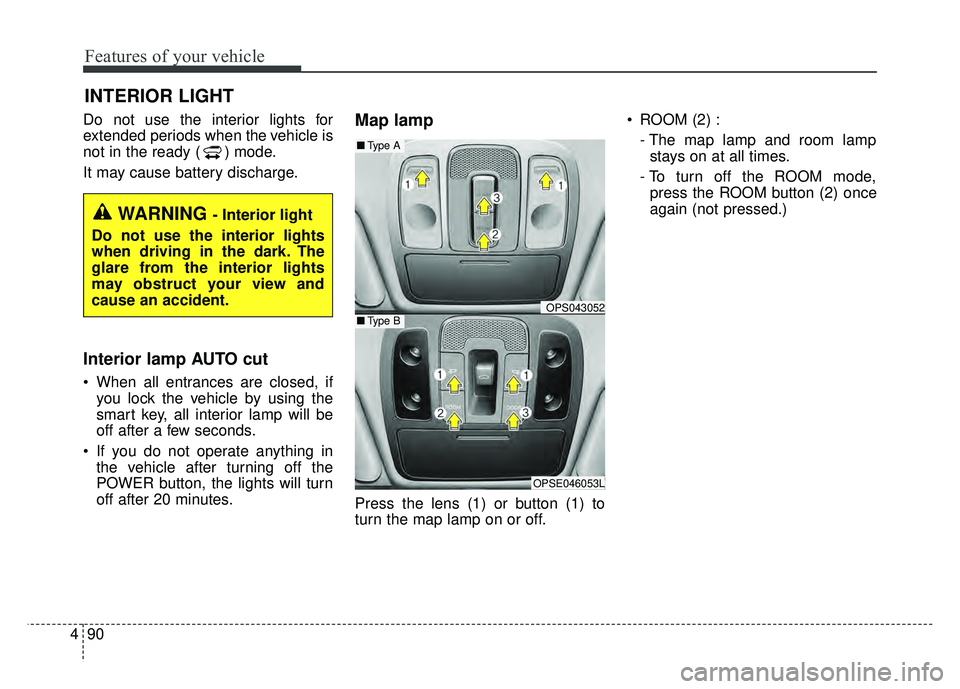
Map lamp
Press the lens (1) or button (1) to
turn the map lamp on or off. ROOM (2) :
- The map lamp and room lampstays on at all times.
- To turn off the ROOM mode, press the ROOM button (2) once
again (not pressed.)
INTERIOR LIGHT
WARNING - Interior light
Do not use the interior lights
when driving in the dark. The
glare from the interior lights
may obstruct your view and
cause an accident.
OPS043052
OPSE046053L
■ Type B
■Type A
Page 222 of 496
491
Features of your vehicle
DOOR (3) :- The map lamp and room lampcomes on when a door is opened.
The lamps go out after approxi-
mately 30 seconds.
- The map lamp and room lamp comes on for approximately 30
seconds when doors are unlocked
with a smart key as long as the
doors are not opened.
- The map lamp and room lamp will stay on for approximately 20 min-
utes if a door is opened with the
POWER button in the ACC or
LOCK/OFF position.
- The map lamp and room lamp will stay on continuously if the door is
opened with the POWER button
in the ON position.
- The map lamp and room lamp will go out immediately if the POWER
button is changed to the ON posi-
tion or all doors are locked.
- To turn off the DOOR mode, press the DOOR button (3) once
again (not pressed).✽ ✽ NOTICE
• When the lamp is turned on by
pressing the lens (1), the lamp does
not turn off even if the DOOR
mode or ROOM mode is not
selected (not pressed).
• If the ROOM button and DOOR button are pressed at the same
time, the map lamp and room
lamp will stay on at all times
(ROOM mode will be selected).
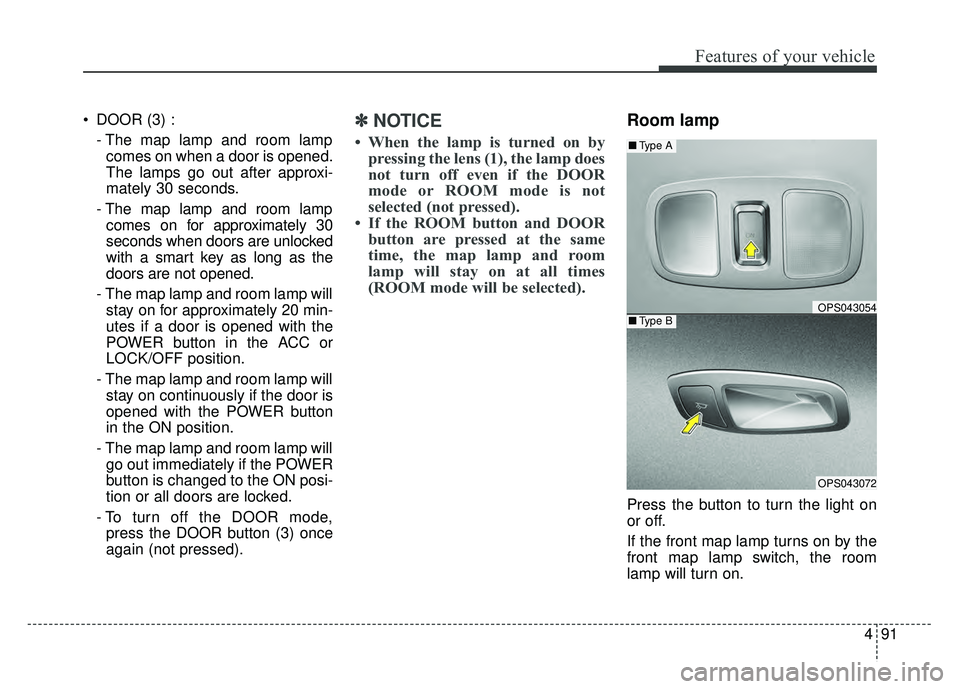
Room lamp
Press the button to turn the light on
or off.
If the front map lamp turns on by the
front map lamp switch, the room
lamp will turn on.
OPS043054
OPS043072
■ Type B
■Type A
Page 238 of 496
4107
Features of your vehicle
System operation
Ventilation
1. Set the mode to the position.
2. Set the air intake control to theoutside (fresh) air position.
3. Set the temperature control to the desired position.
4. Set the fan speed control to the desired speed.
Heating
1. Set the mode to the position.
2. Set the air intake control to theoutside (fresh) air position.
3. Set the temperature control to the desired position.
4. Set the fan speed control to the desired speed.
5. If dehumidified heating is desired, turn the air conditioning system on.
If the windshield fogs up, set the mode to the
orposition. Operation Tips
To keep dust or unpleasant fumes
from entering the vehicle through
the ventilation system, temporarily
set the air intake control to the
recirculated air position. Be sure to
return the control to the fresh air
position when the irritation has
passed to keep fresh air in the
vehicle. This will help keep the driv-
er alert and comfortable.
Air for the heating/cooling system is drawn in through the grilles just
ahead of the windshield. Care
should be taken that these are not
blocked by leaves, snow, ice or
other obstructions.
To prevent interior fog on the wind- shield, set the air intake control to
the fresh air position and fan speed
to the desired position, turn on the
air conditioning system, and adjust
the temperature control to desired
temperature.
Air conditioning
All Kia Air Conditioning Systems are
filled with R-134a refrigerant.
1. Start the vehicle. Press the air conditioning button.
2. Set the mode to the position.
3. Set the air intake control to the outside air or recirculated air posi-
tion.
4. Adjust the fan speed control and temperature control to maintain
maximum comfort.
When maximum cooling is desired, set the temperature control to the
extreme left position, set the mode
control to the MAX A/C position,
then set the fan speed control to
the highest speed.