Plug in KIA SOUL EV 2018 Owners Manual
[x] Cancel search | Manufacturer: KIA, Model Year: 2018, Model line: SOUL EV, Model: KIA SOUL EV 2018Pages: 496, PDF Size: 15.13 MB
Page 6 of 496
Electric Vehicle Guide
❈This is an electric vehicle guide to assist drivers with
understanding their vehicle.
Refer to the following content for electric vehicle details
and precautions
Review of Electric Vehicle ........................................................2
Main Components of Electric Vehicle.......................................4
High voltage battery .................................................................5
EV Mode ........................................................................\
..........7
■ Available Range .................................................................7■ Near by stations .................................................................8■ Energy Information .............................................................8■ ECO Driving .......................................................................9\
■ Setting Charging Times .....................................................9■ Setting Climate Times ......................................................11■ EV Setting ........................................................................\
11
Charge Types for Electric Vehicle...........................................13
Charge Indicator Lamp for Electric Vehicle ............................15
Reserved Charging ................................................................16
Reserved Climate Control. ....................................................18
Precautions for Charging Electric Vehicle ..............................19
Charging Electric Vehicle (Normal Charge) ...........................22
■ How to Connect Normal Charger .....................................22■ Unlock Charging Door in Emergency ...............................25■ Emergency Release of the Charging connector
lock system .......................................................................2\
6
■ Checking Charging Status................................................26■ How to Disconnect Normal Charger ................................27
Charging Electric Vehicle (Quick Charge) ..............................28
■ How to Connect Quick Charger .......................................28■ Unlock Charging Door in Emergency ...............................31■ Checking Charging Status................................................31■ How to Disconnect Quick Charger ...................................33
Charging Electric Vehicle (Trickle Charge) .............................34
■ How to Connect Portable Charging Cable
(ICCB: In-Cable Control Box) ...........................................34
■ Unlock Charging Door in Emergency ...............................38■ Emergency Release of the Charging connector
lock system .......................................................................3\
9
■ Checking Charging Status................................................39■ Charging Status Indicator Lamp for Portable Charging
Cable ........................................................................\
........40
■ How to Disconnect Portable Charging Cable
(ICCB: In-CableControl Box) ............................................41
■ Precautions for Portable Charging Cable
(ICCB: In-Cable Control Box) ...........................................43
Driving Electric Vehicle ...........................................................44
■ How to Start the Vehicle ...................................................44■ How to Stop the Vehicle ...................................................45■ Pedestrian Warning System .............................................46■ Active ECO system ..........................................................46■ Range ........................................................................\
.......47■ Tips for Improving Distance to Empty ..............................48■ Motor Operation Gauge....................................................48■ State of charge (SOC) gauge for high voltage battery.....49■ Warning Message on LCD Display (related to charge)....50■ Warning Lamp and Indicator Lamp
(related to electric vehicle) ...............................................53
Safety Precautions for Electric Vehicle...................................56
■ Service Plug .....................................................................59
Environmental Friendliness Mark ...........................................59
Page 24 of 496
19
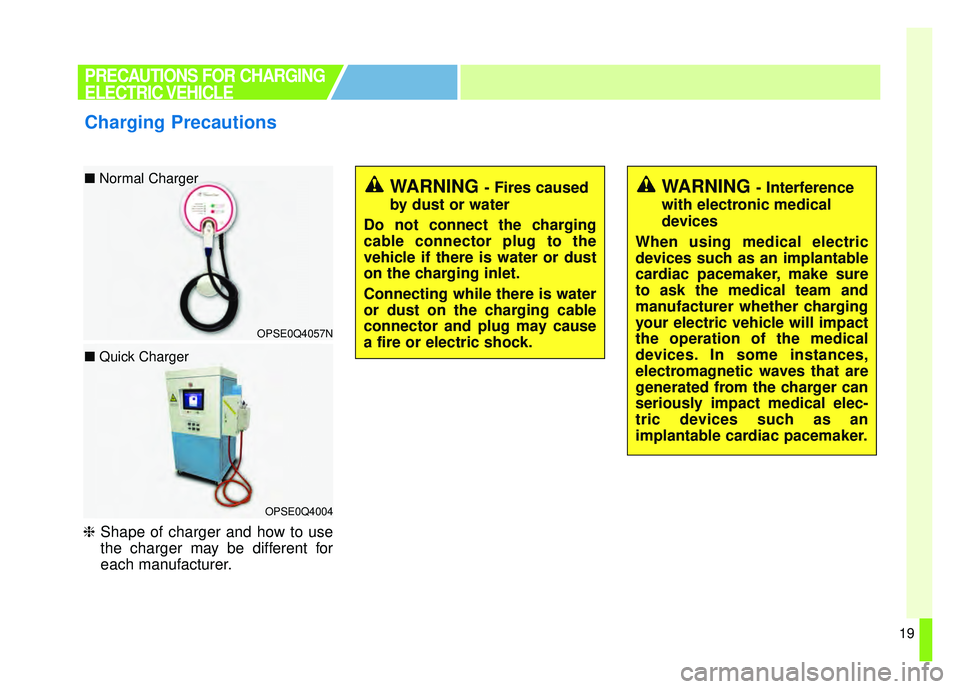
❈Shape of charger and how to use
the charger may be different for
each manufacturer.
PRECAUTIONS FOR CHARGING
ELECTRIC VEHICLE
Charging Precautions
OPSE0Q4057N
■ Normal Charger
OPSE0Q4004
■ Quick Charger
WARNING - Fires caused
by dust or water
Do not connect the charging
cable connector plug to the
vehicle if there is water or dust
on the charging inlet.
Connecting while there is water
or dust on the charging cable
connector and plug may cause
a fire or electric shock.WARNING - Interference
with electronic medical
devices
When using medical electric
devices such as an implantable
cardiac pacemaker, make sure
to ask the medical team and
manufacturer whether charging
your electric vehicle will impact
the operation of the medical
devices. In some instances,
electromagnetic waves that are
generated from the charger can
seriously impact medical elec-
tric devices such as an
implantable cardiac pacemaker.
Page 25 of 496
20
Comply with the following in orderto prevent electrical shock when
charging:
– Use a waterproof charger.
– Make sure to not touch thecharging connector and charg-
ing plug when your hand is wet.
Do not stand in water or snow
when connecting the charging
cable.
– Do not charge when there is lightning.
– Do not charge when the charg- ing connector and plug is wet.
PRECAUTIONS FOR CHARGING
ELECTRIC VEHICLE
WARNING - Touching the
charging connector
Do not to touch the charging
connector, charging plug, and
the charging inlet when con-
necting the cable to the charger
and the charging inlet on the
vehicle. Doing so may result in
electrocution.WARNING - Charging cable
Immediately stop charging when you find abnormal
symptoms (smell, smoke).
Replace the charging cable if the cable coating is damaged
to prevent electrical shock.
When connecting or removing the charging cable, make sure
to hold the charging connec-
tor handle and charging plug.
If you pull the cable itself
(without using the handle), the
internal wires may disconnect
or get damaged. This may lead
to electric shock or fire.
Page 26 of 496
21
Always keep the charging connec-tor and charging plug in clean and
dry condition. Be sure to keep the
charging cable in a condition
where there is no water or mois-
ture.
Make sure to use the designated charger for charging the electric
vehicle. Using any other charger
may cause failure.
Before charging the battery, turn the vehicle [OFF].
Be careful not to drop the charging connector. The charging connec-
tor can be damaged.
PRECAUTIONS FOR CHARGING
ELECTRIC VEHICLE
WARNING - Cooling fan
Do not touch the cooling fan
while vehicle is charging. When
the vehicle is switched [OFF]
while charging, the cooling fan
inside the motor compartment
may automatically operate.
Page 29 of 496
24
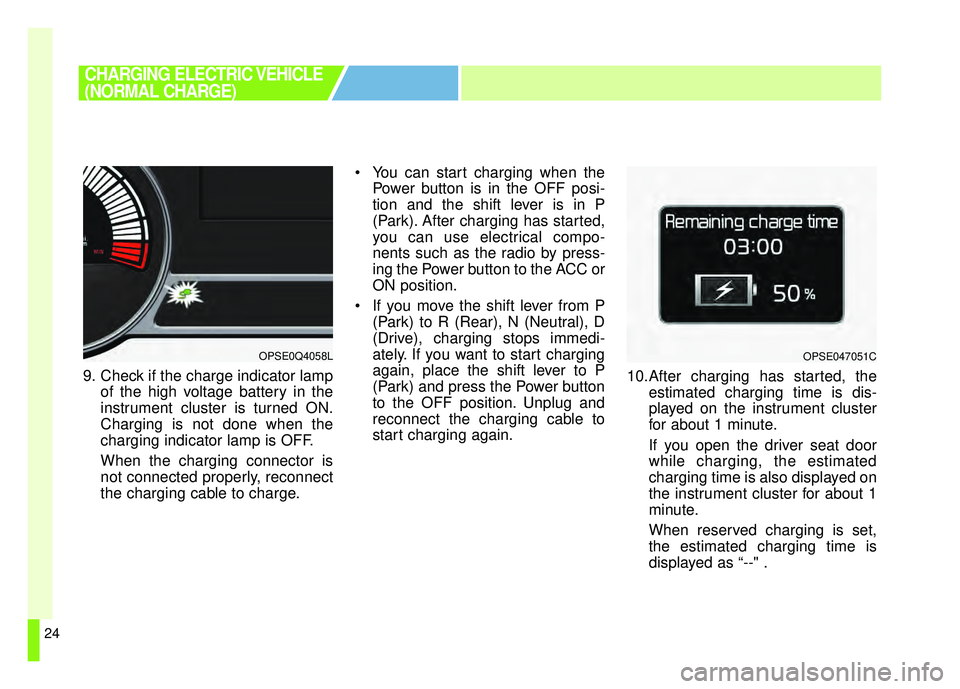
9. Check if the charge indicator lampof the high voltage battery in the
instrument cluster is turned ON.
Charging is not done when the
charging indicator lamp is OFF.
When the charging connector is
not connected properly, reconnect
the charging cable to charge. You can start charging when the
Power button is in the OFF posi-
tion and the shift lever is in P
(Park). After charging has started,
you can use electrical compo-
nents such as the radio by press-
ing the Power button to the ACC or
ON position.
If you move the shift lever from P (Park) to R (Rear), N (Neutral), D
(Drive), charging stops immedi-
ately. If you want to start charging
again, place the shift lever to P
(Park) and press the Power button
to the OFF position. Unplug and
reconnect the charging cable to
start charging again. 10.After charging has started, the
estimated charging time is dis-
played on the instrument cluster
for about 1 minute.
If you open the driver seat door
while charging, the estimated
charging time is also displayed on
the instrument cluster for about 1
minute.
When reserved charging is set,
the estimated charging time is
displayed as “--" .
OPSE0Q4058L
CHARGING ELECTRIC VEHICLE
(NORMAL CHARGE)
OPSE047051C
Page 32 of 496
27
■
■How to Disconnect Normal
Charger
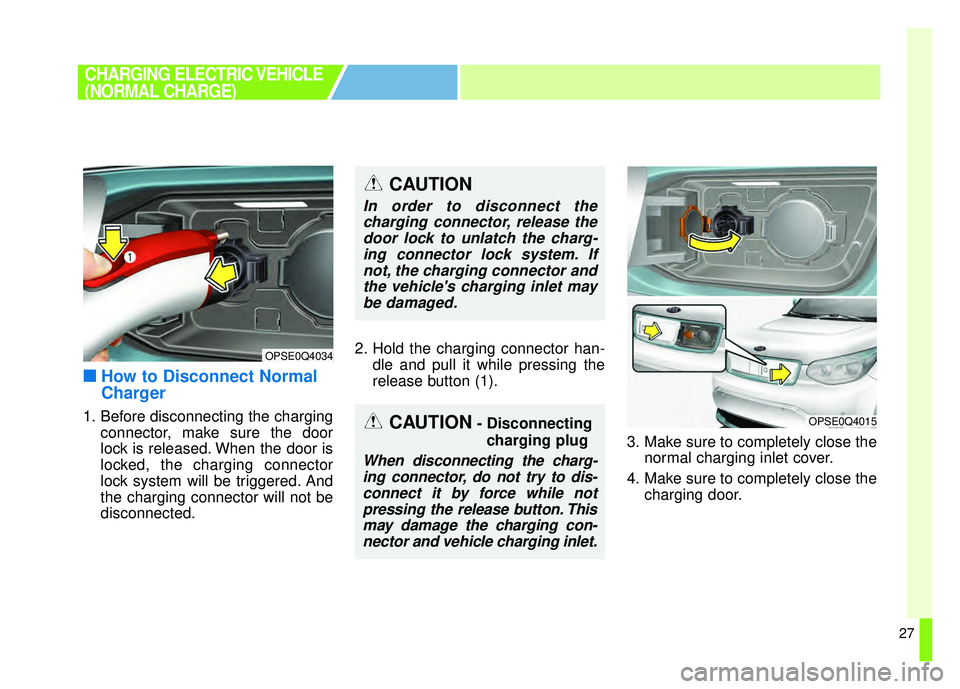
1. Before disconnecting the charging
connector, make sure the door
lock is released. When the door is
locked, the charging connector
lock system will be triggered. And
the charging connector will not be
disconnected. 2. Hold the charging connector han-
dle and pull it while pressing the
release button (1).
3. Make sure to completely close thenormal charging inlet cover.
4. Make sure to completely close the charging door.
CHARGING ELECTRIC VEHICLE
(NORMAL CHARGE)
OPSE0Q4034
OPSE0Q4015
CAUTION
In order to disconnect thecharging connector, release thedoor lock to unlatch the charg-ing connector lock system. Ifnot, the charging connector andthe vehicle's charging inlet maybe damaged.
CAUTION- Disconnecting
charging plug
When disconnecting the charg-ing connector, do not try to dis-connect it by force while notpressing the release button. Thismay damage the charging con-nector and vehicle charging inlet.
Page 36 of 496
31
❈During cold weather, quick charg-
ing may not be available to prevent
high voltage battery degradation.
You can start charging when the Power button is in the OFF posi-
tion and the shift lever is in P
(Park).
After charging has started, you
can use electrical components
such as the radio by pressing the
Power button to ACC or ON posi-
tion.
If you move the shift lever from P (Park) to R (Reverse), N (Neutral),
D (Drive), charging stops immedi-
ately. If you want to start charging
again, place the shift lever to P
(Park) and press the Power button
to the OFF position. Unplug and
reconnect the charging cable to
start charging again.
■ ■Unlock Charging Door in
Emergency
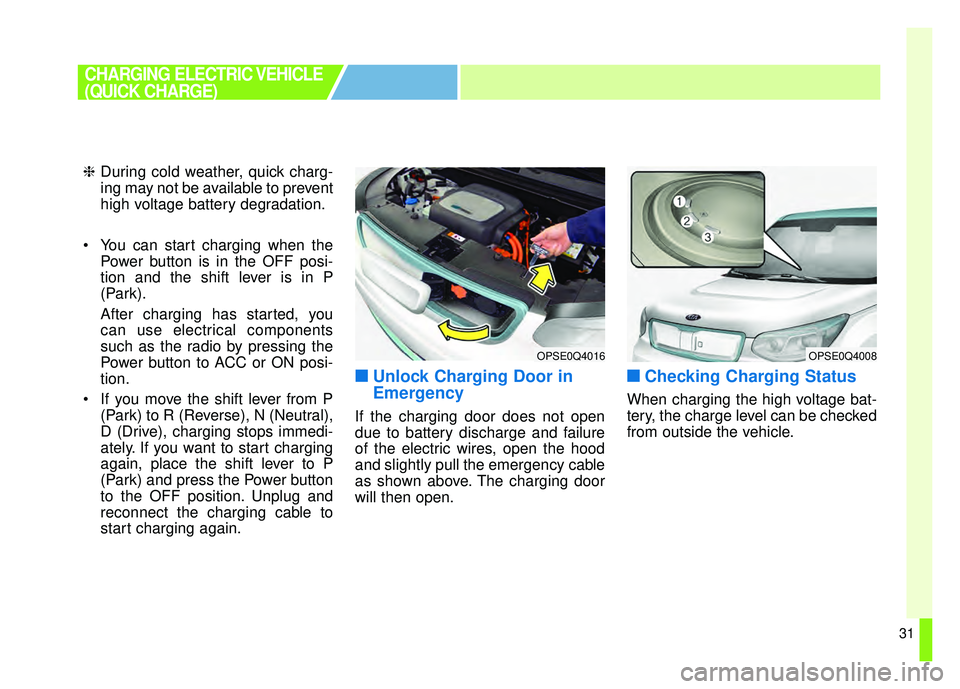
If the charging door does not open
due to battery discharge and failure
of the electric wires, open the hood
and slightly pull the emergency cable
as shown above. The charging door
will then open.
■ ■Checking Charging Status
When charging the high voltage bat-
tery, the charge level can be checked
from outside the vehicle.
OPSE0Q4016OPSE0Q4008
CHARGING ELECTRIC VEHICLE
(QUICK CHARGE)
Page 38 of 496
33
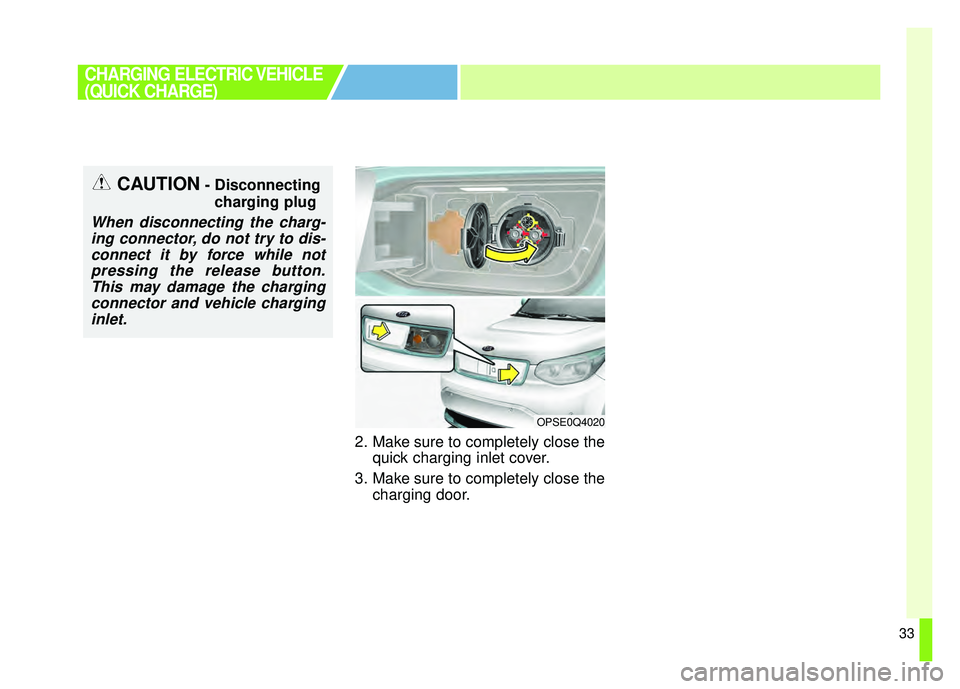
2. Make sure to completely close thequick charging inlet cover.
3. Make sure to completely close the charging door.
CHARGING ELECTRIC VEHICLE
(QUICK CHARGE)
OPSE0Q4020
CAUTION- Disconnecting
charging plug
When disconnecting the charg-ing connector, do not try to dis-connect it by force while notpressing the release button.This may damage the chargingconnector and vehicle charginginlet.
Page 39 of 496
34
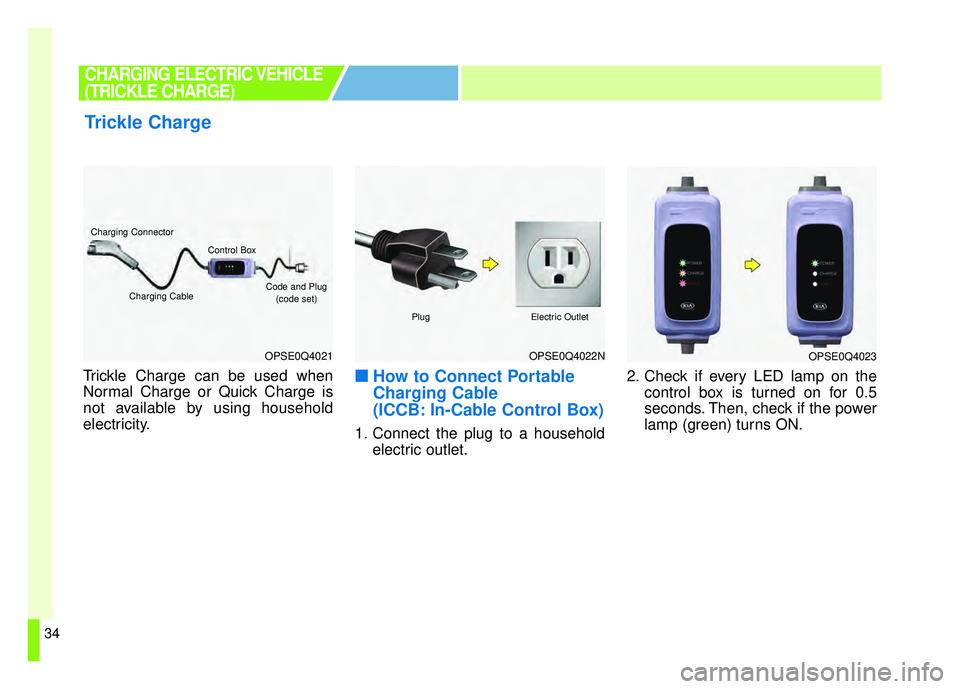
Trickle Charge can be used when
Normal Charge or Quick Charge is
not available by using household
electricity.■ ■How to Connect Portable
Charging Cable
(ICCB: In-Cable Control Box)
1. Connect the plug to a household
electric outlet. 2. Check if every LED lamp on the
control box is turned on for 0.5
seconds. Then, check if the power
lamp (green) turns ON.
Trickle Charge
CHARGING ELECTRIC VEHICLE
(TRICKLE CHARGE)
OPSE0Q4021OPSE0Q4022N
Charging Connector
Charging Cable
Control Box
Code and Plug
(code set)
PlugElectric Outlet
OPSE0Q4023
Page 42 of 496
37
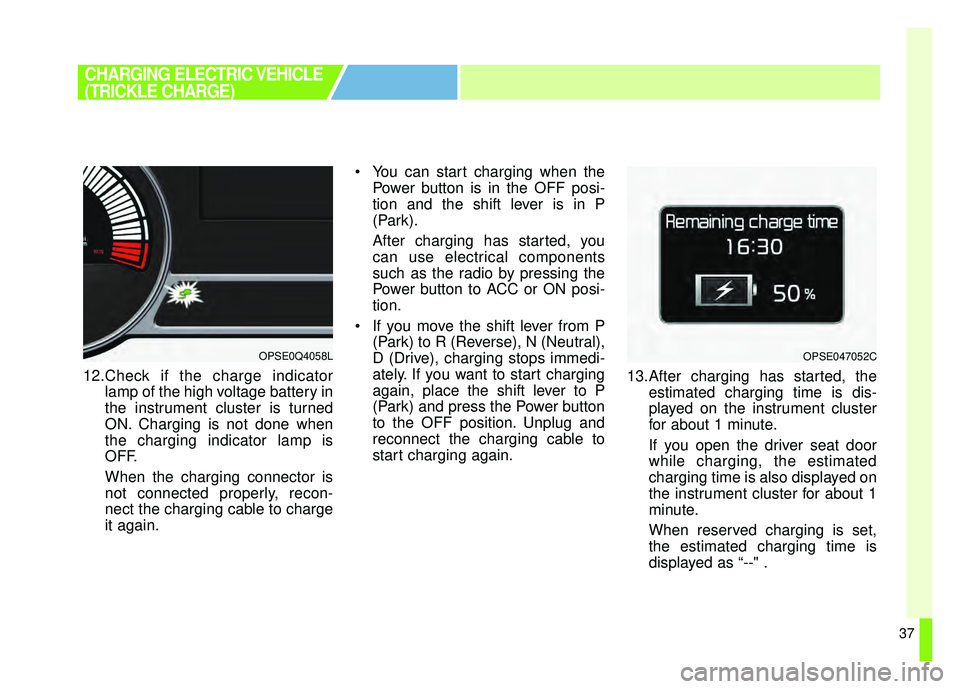
12.Check if the charge indicatorlamp of the high voltage battery in
the instrument cluster is turned
ON. Charging is not done when
the charging indicator lamp is
OFF.
When the charging connector is
not connected properly, recon-
nect the charging cable to charge
it again. You can start charging when the
Power button is in the OFF posi-
tion and the shift lever is in P
(Park).
After charging has started, you
can use electrical components
such as the radio by pressing the
Power button to ACC or ON posi-
tion.
If you move the shift lever from P (Park) to R (Reverse), N (Neutral),
D (Drive), charging stops immedi-
ately. If you want to start charging
again, place the shift lever to P
(Park) and press the Power button
to the OFF position. Unplug and
reconnect the charging cable to
start charging again. 13.After charging has started, the
estimated charging time is dis-
played on the instrument cluster
for about 1 minute.
If you open the driver seat door
while charging, the estimated
charging time is also displayed on
the instrument cluster for about 1
minute.
When reserved charging is set,
the estimated charging time is
displayed as “--" .
CHARGING ELECTRIC VEHICLE
(TRICKLE CHARGE)
OPSE0Q4058LOPSE047052C