light KIA SPECTRA5 2006 Repair Manual
[x] Cancel search | Manufacturer: KIA, Model Year: 2006, Model line: SPECTRA5, Model: KIA SPECTRA5 2006Pages: 273, PDF Size: 2.83 MB
Page 160 of 273
443
1
2
3
4
5
6
7
8
9
Driving your vehicle
✽ ✽
NOTICEWhen in operation, the fog lights
consume large amounts of vehicle
electrical power. Only use the fog
lights when visibility is poor or
unnecessary battery and generator
drain could occur.
Daytime running light
(if equipped)Daytime Running Lights (DRL) can
make it easier for others to see the
front of your vehicle during the day.
DRL can be helpful in many different
driving conditions, and it is especial-
ly helpful after dawn and before sun-
set.
The DRL system will make your
headlights turn OFF when:
1. The head light switch is ON.
2. The parking brake engaged.
3. Engine stops.
LD CAN (ENG) 4.qxd 7/29/05 10:17 AM Page 43
Page 161 of 273
Driving your vehicle44
4
1
2
3
4
5
6
7
8
9
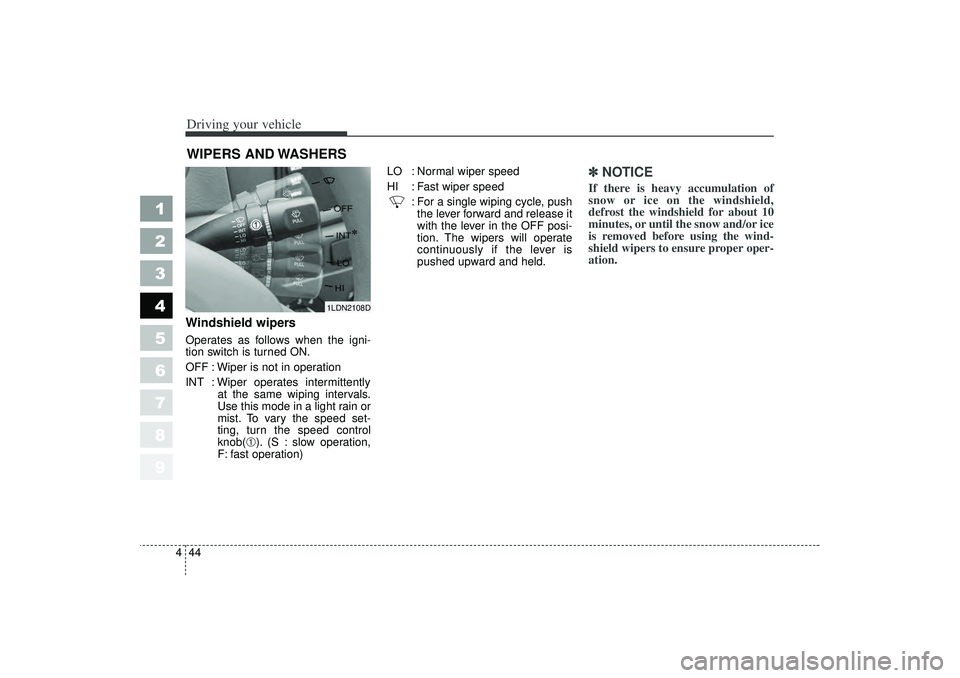
Windshield wipers Operates as follows when the igni-
tion switch is turned ON.
OFF : Wiper is not in operation
INT : Wiper operates intermittently
at the same wiping intervals.
Use this mode in a light rain or
mist. To vary the speed set-
ting, turn the speed control
knob(
➀). (S : slow operation,
F: fast operation) LO : Normal wiper speed
HI : Fast wiper speed
: For a single wiping cycle, pushthe lever forward and release it
with the lever in the OFF posi-
tion. The wipers will operate
continuously if the lever is
pushed upward and held.
✽ ✽ NOTICEIf there is heavy accumulation of
snow or ice on the windshield,
defrost the windshield for about 10
minutes, or until the snow and/or ice
is removed before using the wind-
shield wipers to ensure proper oper-
ation.
WIPERS AND WASHERS
1LDN2108D
LD CAN (ENG) 4.qxd 7/29/05 10:17 AM Page 44
Page 165 of 273
Driving your vehicle48
4
1
2
3
4
5
6
7
8
9
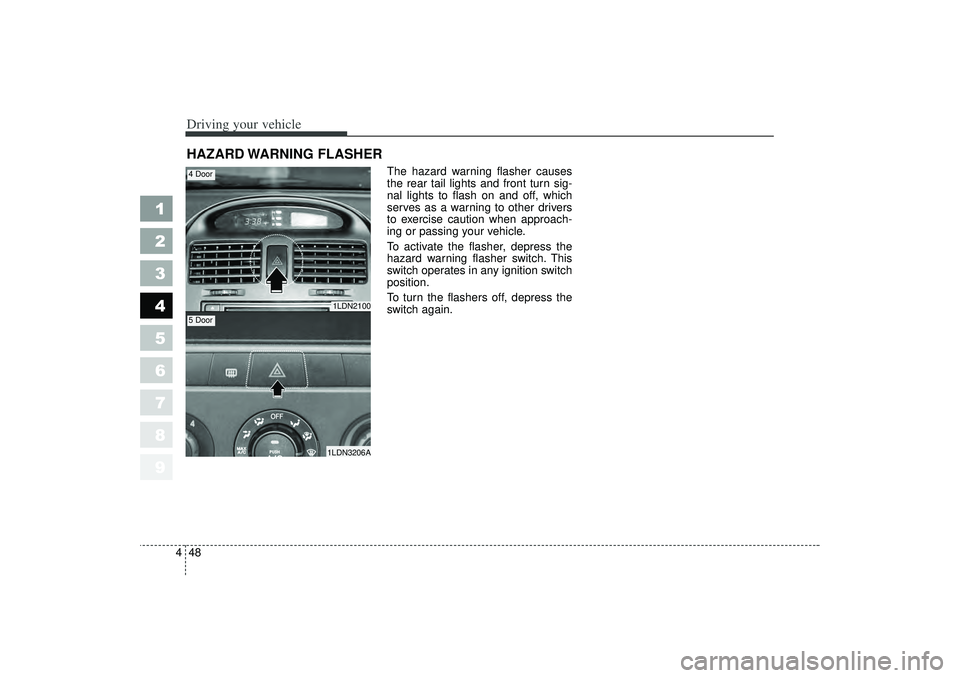
The hazard warning flasher causes
the rear tail lights and front turn sig-
nal lights to flash on and off, which
serves as a warning to other drivers
to exercise caution when approach-
ing or passing your vehicle.
To activate the flasher, depress the
hazard warning flasher switch. This
switch operates in any ignition switch
position.
To turn the flashers off, depress the
switch again.
HAZARD WARNING FLASHER
1LDN21001LDN3206A
4 Door5 Door
LD CAN (ENG) 4.qxd 7/29/05 10:17 AM Page 48
Page 170 of 273

453
1
2
3
4
5
6
7
8
9
Driving your vehicle
Air intake control button This is used to select outside (fresh)
air position or recirculated air posi-
tion.
To change the air intake control posi-
tion, push the control button.Recirculated air position
The indicator light on the
button is illuminated when
the recirculated air posi-
tion is selected.
With the recirculated air
position selected, air from
passenger compartment
will be drawn through the
heating system and heat-
ed or cooled according to
the function selected. Outside (fresh) air position
The indicator light on the
button is not illuminated
when the outside (fresh)
air position is selected.
With the outside (fresh) air
position selected, air
enters the vehicle from
outside and is heated or
cooled according to the
function selected.
1LDN2125A
LD CAN (ENG) 4.qxd 7/29/05 10:17 AM Page 53
Page 171 of 273
Driving your vehicle54
4
1
2
3
4
5
6
7
8
9
✽ ✽
NOTICEIt should be noted that prolonged
operation of the heating in recircu-
lated air position will cause fogging
of the windshield and side windows
and the air within the passenger
compartment will become stale.
In addition, prolonged use of the air
conditioning with the “recirculated
air position” selected, will result in
excessively dry air in the passenger
compartment.
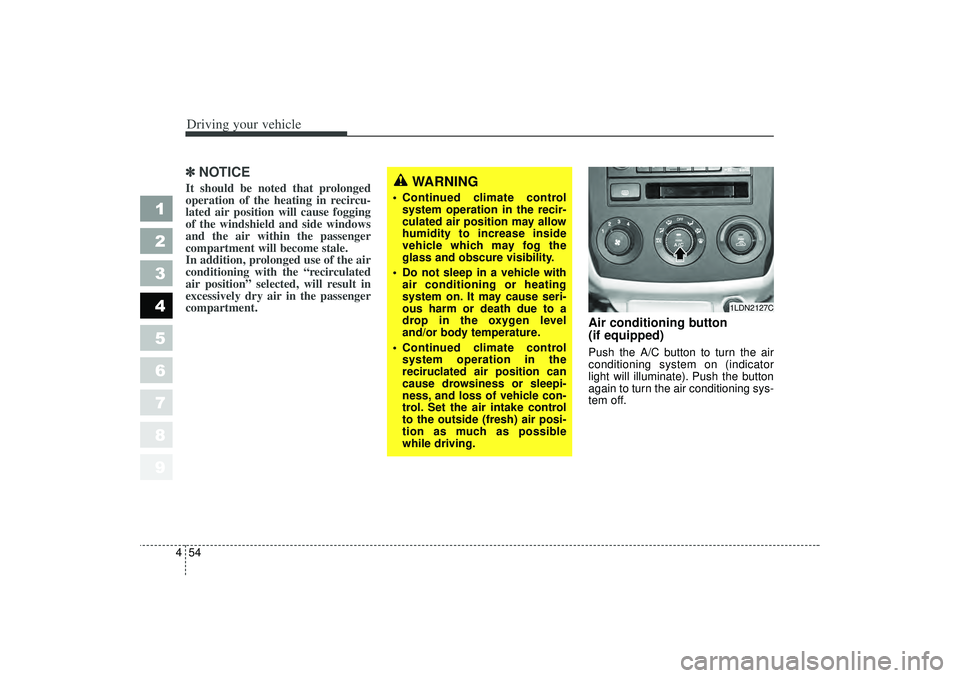
Air conditioning button
(if equipped) Push the A/C button to turn the air
conditioning system on (indicator
light will illuminate). Push the button
again to turn the air conditioning sys-
tem off.
WARNING
Continued climate control
system operation in the recir-
culated air position may allow
humidity to increase inside
vehicle which may fog the
glass and obscure visibility.
Do not sleep in a vehicle with
air conditioning or heating
system on. It may cause seri-
ous harm or death due to a
drop in the oxygen level
and/or body temperature.
Continued climate control
system operation in the
reciruclated air position can
cause drowsiness or sleepi-
ness, and loss of vehicle con-
trol. Set the air intake control
to the outside (fresh) air posi-
tion as much as possible
while driving.
1LDN2127C
LD CAN (ENG) 4.qxd 7/29/05 10:17 AM Page 54
Page 173 of 273
Driving your vehicle56
4
1
2
3
4
5
6
7
8
9
When maximum cooling is desired,
set the temperature control to the
extreme left position and set the air
intake control to the recirculated air
position, then set the fan speed
control to the highest speed.✽ ✽
NOTICE When using the air conditioning
system, monitor the temperature
gauge closely while driving up
hills or in heavy traffic when out-
side temperatures are high. Air
conditioning system operation
may cause engine overheating.
Continue to use the blower fan but
turn the air conditioning system
off if the temperature gauge indi-
cates engine overheating.
When opening the windows in humid weather air conditioning
may create water droplets inside
the vehicle. Since excessive water
droplets may cause damage to
electrical equipment, air condi-
tioning should only be run with
the windows closed.
Air conditioning system oper-
ation tips If the vehicle has been parked in
direct sunlight during hot weather,
open the windows for a short time
to let the hot air inside the vehicle
escape.
To help reduce moisture inside of
windows on rainy humid days,
decrease the humidity inside the
vehicle by operating the air condi-
tioning system.
During air conditioning system
operation, you may occasionally
notice a slight change in engine
speed at idle as the air condition-
ing compressor cycles on. This is
a normal system operation charac-
teristics.
Use the air conditioning system
every month if only for a few min-
utes to ensure maximum system
performance.
When using the air conditioning
system, you may notice clear water
dripping (or even pudding) on the
ground under the passenger side
of the vehicle. This is a normal sys-
tem operation characteristics.
The air conditioning system
includes a function that automati-
cally turns the air conditioning
compressor off if engine coolant
temperature approaches an over
heating level. The air conditioning
compressor operation will resume
once engine coolant temperature
returns to the normal range. Also,
the air conditioning compressor is
automatically turned off for a few
seconds when the accelerator is
fully depressed (wide open throt-
tle).
When operating the air condition-
ing system use the outside (fresh)
air position.
Operating the air conditioning sys-
tem in the recirculated air position
does provide maximum cooling,
however, continual operation in this
mode may cause the air inside the
vehicle to become stale.
LD CAN (ENG) 4.qxd 7/29/05 10:17 AM Page 56
Page 177 of 273
Driving your vehicle60
4
1
2
3
4
5
6
7
8
9
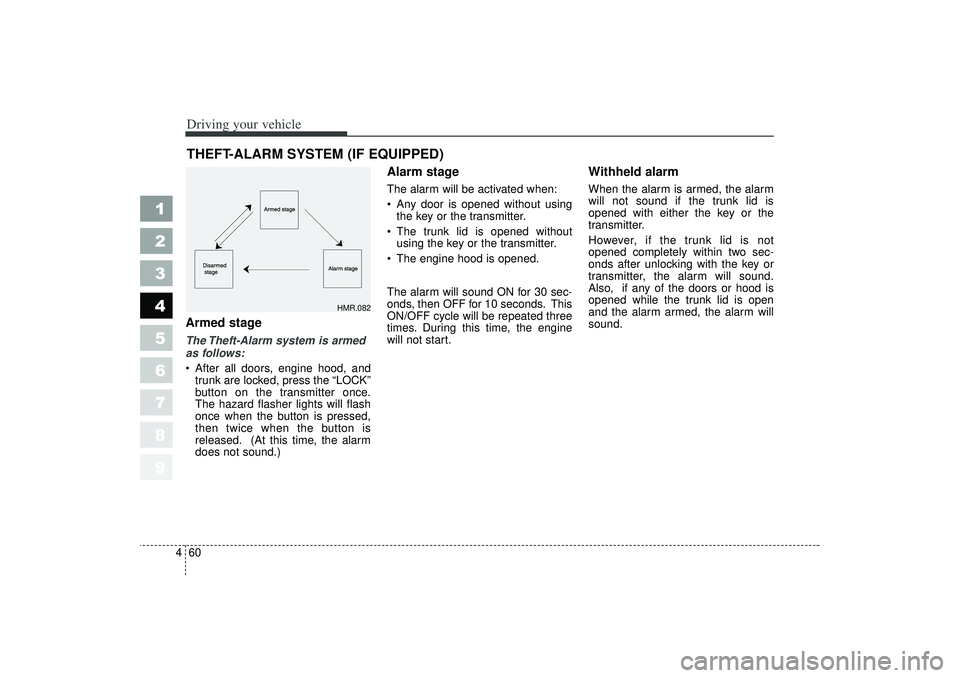
Armed stageThe Theft-Alarm system is armed
as follows:
After all doors, engine hood, and
trunk are locked, press the “LOCK”
button on the transmitter once.
The hazard flasher lights will flash
once when the button is pressed,
then twice when the button is
released. (At this time, the alarm
does not sound.)
Alarm stageThe alarm will be activated when:
Any door is opened without using
the key or the transmitter.
The trunk lid is opened without
using the key or the transmitter.
The engine hood is opened.
The alarm will sound ON for 30 sec-
onds, then OFF for 10 seconds. This
ON/OFF cycle will be repeated three
times. During this time, the engine
will not start.
Withheld alarmWhen the alarm is armed, the alarm
will not sound if the trunk lid is
opened with either the key or the
transmitter.
However, if the trunk lid is not
opened completely within two sec-
onds after unlocking with the key or
transmitter, the alarm will sound.
Also, if any of the doors or hood is
opened while the trunk lid is open
and the alarm armed, the alarm will
sound.
THEFT-ALARM SYSTEM (IF EQUIPPED)
HMR.082
LD CAN (ENG) 4.qxd 7/29/05 10:17 AM Page 60
Page 183 of 273
55
Driving tips
BEFORE DRIVING Before entering vehicle: Be sure that all windows, outsidemirror(s), and outside lights are
clean.
Check the condition of the tires.
Check under the vehicle for any sign of leaks.
Be sure there are no obstacles behind you if you intend to back up.Necessary inspections Fluid levels, such as engine oil,
engine coolant, brake fluid, and
washer fluid should be checked on a
regular basis, with the exact interval
depending on the fluid. Further
details are provided in Section 7,
Maintenance.
Before starting Close and lock all doors.
Position the seat so that all con-trols are easily reached.
Adjust the inside and outside rearview mirrors.
Be sure that all lights work.
Check all gauges.
Check the operation of warning lights when the ignition switch is
turned to the ON position.
Release the parking brake and make sure the brake warning light
goes out.
For safe operation, be sure you are
familiar with your vehicle and its
equipment.
1
2
3
4
5
6
7
8
9
WARNING
- Driving under
the influence of alcohol or
drugs
Drinking and driving is danger-
ous. Drunk driving is the num-
ber one contributor to the high-
way death toll each year. Even a
small amount of alcohol will
affect your reflexes, perceptions
and judgement.
You are much more likely to
have a serious accident if you
drink and drive.
If you are drinking or taking
drugs, don’t drive. Do not ride
with a driver who has been
drinking or taking drugs.
Choose a designated driver or
call a cab.
Driving while under the influ-
ence of drugs is as dangerous
or more dangerous than driving
drunk.
LD CAN (ENG) 5.qxd 7/29/05 10:18 AM Page 5
Page 185 of 273

57
Driving tips
SPECIAL DRIVING CONDITIONS Hazardous driving conditions When hazardous driving conditions
are encountered such as water,
snow, ice, mud, sand, or similar haz-
ards, follow these suggestions:
Drive cautiously and allow extradistance for braking.
Avoid sudden movements in brak- ing or steering.
When braking, pump the brake pedal with a light up-and-down
motion until the vehicle is stopped.✽ ✽ NOTICEDo not pump the brake pedal on a
vehicle equipped with ABS.
If stalled in snow, mud, or sand,
use second gear. Accelerate slow-
ly to avoid spinning the drive
wheels.
Use sand, rock salt, tire chains, or other non-slip material under the
drive wheels to provide traction
when stalled in ice, snow, or mud.
Rocking the vehicle If it is necessary to rock the vehicle
to free it from snow, sand, or mud,
first turn the steering wheel right and
left to clear the area around your
front wheels. Then, shift back and
forth between 1 (First) and R
(Reverse) in vehicles equipped with
a manual transaxle or R (Reverse)
and any forward gear in vehicles
equipped with an automatic
transaxle. Do not race the engine,
and spin the wheels as little as pos-
sible. If you are still stuck after a few
tries, have the vehicle pulled out by a
tow vehicle to avoid engine overheat-
ing and possible damage to the
transaxle.✽ ✽ NOTICEProlonged rocking may cause engine
over-heating, transaxle damage or
failure, and tire damage.
1
2
3
4
5
6
7
8
9
WARNING
- Downshifting
Downshifting with an automatic
transaxle, while driving on slip-
pery surfaces can cause an
accident. The sudden change in
tire speed could cause the tires
to skid. Be careful when down-
shifting on slippery surfaces.
LD CAN (ENG) 5.qxd 7/29/05 10:18 AM Page 7
Page 186 of 273
Driving tips85
Driving at night Because night driving presents more
hazards than driving in the daylight,
here are some important tips to
remember:
Slow down and keep more dis-tance between you and other vehi-
cles, as it may be more difficult to
see at night, especially in areas
where there may not be any street
lights.
Adjust your mirrors to reduce the glare from other driver's head-
lights.
Keep your headlights clean and properly aimed on vehicles not
equipped with the automatic head-
light aiming feature. Dirty or
improperly aimed headlights will
make it much more difficult to see
at night.
Avoid staring directly at the head- lights of oncoming vehicles. You
could be temporarily blinded, and it
will take several seconds for your
eyes to readjust to the darkness.
Driving in the rain Rain and wet roads can make driving
dangerous, especially if you’re not
prepared for the slick pavement.
Here are a few things to consider
when driving in the rain:
A heavy rainfall will make it harderto see and will increase the dis-
tance needed to stop your vehicle,
so slow down.
Keep your windshield wiping equipment in good shape. Replace
your windshield wiper blades when
they show signs of streaking or
missing areas on the windshield.
If your tires are not in good condi- tion, making a quick stop on wet
pavement can cause a skid and
possibly lead to an accident. Be
sure your tires are in good shape.
Turn on your headlights to make it easier for others to see you.
1
2
3
4
5
6
7
8
9
WARNING
- Spinning tires
Do not spin the wheels, espe-
cially at speeds more than 56
km/h (35 mph). Spinning the
wheels at high speeds when the
vehicle is stationary could
cause a tire to overheat, explode
and injure bystanders.
LD CAN (ENG) 5.qxd 7/29/05 10:18 AM Page 8