display KIA SPECTRA5 2008 User Guide
[x] Cancel search | Manufacturer: KIA, Model Year: 2008, Model line: SPECTRA5, Model: KIA SPECTRA5 2008Pages: 298, PDF Size: 5.38 MB
Page 131 of 298
3 121
Knowing your vehicle
1
2
3
4
5
6
7
8
9
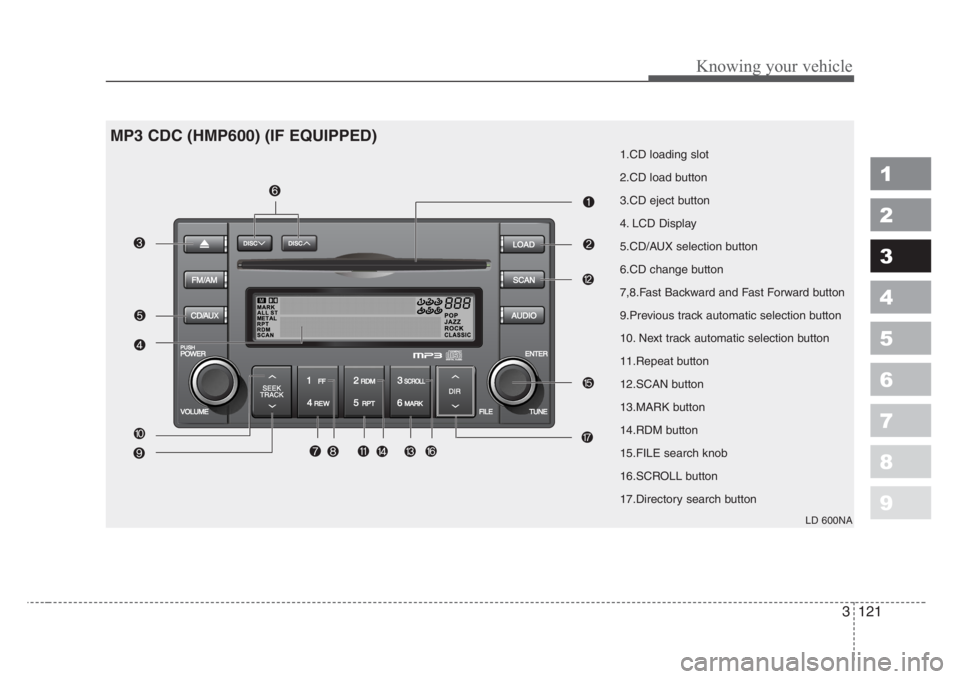
1.CD loading slot
2.CD load button
3.CD eject button
4. LCD Display
5.CD/AUX selection button
6.CD change button
7,8.Fast Backward and Fast Forward button
9.Previous track automatic selection button
10. Next track automatic selection button
11.Repeat button
12.SCAN button
13.MARK button
14.RDM button
15.FILE search knob
16.SCROLL button
17.Directory search button
LD 600NA
MP3 CDC (HMP600) (IF EQUIPPED)
Page 132 of 298
![KIA SPECTRA5 2008 User Guide Knowing your vehicle
122 3
1
2
3
4
5
6
7
8
9
1. CD loading slot
Push [LOAD] button to open CD slot.
Please face printed side upward and
gently push in. This CDC supports
only 12 cm CDs.
2. CD load but](/img/2/58071/w960_58071-131.png "KIA SPECTRA5 2008 User Guide Knowing your vehicle
122 3
1
2
3
4
5
6
7
8
9
1. CD loading slot
Push [LOAD] button to open CD slot.
Please face printed side upward and
gently push in. This CDC supports
only 12 cm CDs.
2. CD load but")
Knowing your vehicle
122 3
1
2
3
4
5
6
7
8
9
1. CD loading slot
Push [LOAD] button to open CD slot.
Please face printed side upward and
gently push in. This CDC supports
only 12 cm CDs.
2. CD load button
Pressing the "LOAD" button opens
an empty tray of lowest order in the
CDC deck. When a CD is loaded, the
slot closes and the CD plays. To load
CDs in all empty slots, press the
"LOAD" button for more than 1.5 sec-
onds. Be sure to insert only one CD
into slot at a time. Then, lastly loaded
CD is played. If you do not load CDs
or press any button for 10 seconds
after pressing the "LOAD" button, the
LOAD function will be canceled.
3. CD eject button
Push button to eject the CD dur-
ing CD playback. Push this button for
more than 1.5 seconds to eject all
the CDs. If CD number 3 is currently
playing, ejecting order is 3,4,5,6,1,2.4. LCD display
It indicates location of CD in CD
deck. When loading and ejecting CD,
corresponding CD indicator number
blinks.
5. CD/AUX selection button
CD Select
When power is off while CD is loaded
or radio/AUX is playing, push [CD]
button to play CDC. When there is no
available CD, "no disc" message will
be indicated for 2 seconds and
returns to previous mode.
AUX-IN Select
• When the AUX device (such as
portable MP3 players) is connect-
ed to vehicle's AUX-IN terminal,
you can switch to AUX-IN mode by
pressing CD/AUX button.
• With a CD loaded and AUX device
connected at the same time, this
button switches between AUX-IN
mode and CD mode.
AUX 3.5mm STEREO MINI PLUG
✽
NOTICE
• If the AUX device is not connect-
ed, you cannot switch to AUX-IN
mode.
• When the AUX device is discon-
nected while in AUX-IN mode, the
unit automatically switches its
mode to last selected mode (CD
mode or RADIO mode).
• The quality of sound may be
defected or distorted when the
unit's EQ (BASS/MID/TREBLE)
control and AUX device's EQ con-
trol are both enabled (not flat).
When you want to use the unit's
EQ control feature, disable the
AUX device's EQ control feature,
and vice versa.
Page 133 of 298
![KIA SPECTRA5 2008 User Guide 6. CD change button
Push [DISC ] button to change to
next CD (From CD 1 to CD 2).
Push [DISC ] button to change to
previous CD (From CD 2 to CD 1). If
changer is not fully load, the
changes will be ne](/img/2/58071/w960_58071-132.png "KIA SPECTRA5 2008 User Guide 6. CD change button
Push [DISC ] button to change to
next CD (From CD 1 to CD 2).
Push [DISC ] button to change to
previous CD (From CD 2 to CD 1). If
changer is not fully load, the
changes will be ne")
6. CD change button
Push [DISC ] button to change to
next CD (From CD 1 to CD 2).
Push [DISC ] button to change to
previous CD (From CD 2 to CD 1). If
changer is not fully load, the
changes will be next available CD.
7. Fast Backward button
During CD playback, push [REW]
button to fast backward. For first 5
seconds 5X and 15X after 5 sec-
onds. While the button is pressed
sound is reduced to 12dB.
8. Fast Forward button
During CD playback, push [FF] but-
ton to fast forward. For first 5 sec-
onds 5X and 15X after 5 seconds.
While the button is pressed sound is
reduced to 12dB.
9. Previous track automatic
selection button
Push [TRACK ] button to go to
beginning of currently playing track.
Push again to move to beginning of
previous track.
10. Next track automatic selec-
tion button
Push [SEEK ] button to go to move
to beginning of next track.
11. Repeat button
Push [RPT] button to repeat current
track. Push again to disable.
12. SCAN button
Push [SCAN] button to listen each
track for 10 seconds. Push again to
disable.
13. Book Mark button
This is selecting desired tracks.
Select desired tracks and push
[MARK] button for more than 2 sec-
onds. [M] symbol will be indicated
and push for within 1 second to play
[M] selected tracks.
14. RDM button
This button randomly selects track.
✽
NOTICE
Using CD-R/CD-RW, it may not be
played according to CD manufac-
turer, or how it was created. If it
does not play, please avoid using it.
It could cause problems on the sys-
tem.
15. File search knob
Turn knob left and right to change
track. Push within 5 seconds to play
selected track. It will return to cur-
rently playing track number after 5
seconds.
16. Scroll button
If the tile is too long for MP3/WMA
files, push [SCROLL] button to indi-
cate on LCD display screen.
17. Directory search button
For MP3/WMA files, if there are more
than 2 directories in a CD, push
[Directory Search] buttons to search.
Select desired directory and use
"File Search knob" to search file.
Push "File Search knob" within 5
seconds otherwise it will go back to
current playing track.
3 123
Knowing your vehicle
1
2
3
4
5
6
7
8
9
Page 219 of 298
63
In case of an emergency
TIRES PRESSURE MONITORING SYSTEM (TPMS) (IF EQUIPPED)
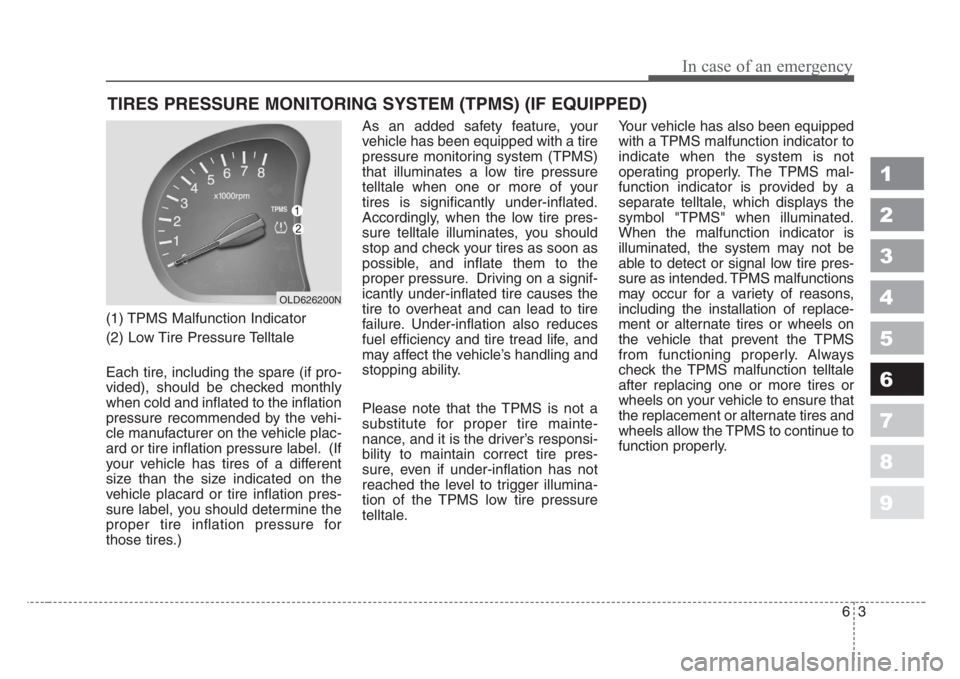
(1) TPMS Malfunction Indicator
(2) Low Tire Pressure Telltale
Each tire, including the spare (if pro-
vided), should be checked monthly
when cold and inflated to the inflation
pressure recommended by the vehi-
cle manufacturer on the vehicle plac-
ard or tire inflation pressure label. (If
your vehicle has tires of a different
size than the size indicated on the
vehicle placard or tire inflation pres-
sure label, you should determine the
proper tire inflation pressure for
those tires.)As an added safety feature, your
vehicle has been equipped with a tire
pressure monitoring system (TPMS)
that illuminates a low tire pressure
telltale when one or more of your
tires is significantly under-inflated.
Accordingly, when the low tire pres-
sure telltale illuminates, you should
stop and check your tires as soon as
possible, and inflate them to the
proper pressure. Driving on a signif-
icantly under-inflated tire causes the
tire to overheat and can lead to tire
failure. Under-inflation also reduces
fuel efficiency and tire tread life, and
may affect the vehicle’s handling and
stopping ability.
Please note that the TPMS is not a
substitute for proper tire mainte-
nance, and it is the driver’s responsi-
bility to maintain correct tire pres-
sure, even if under-inflation has not
reached the level to trigger illumina-
tion of the TPMS low tire pressure
telltale.Your vehicle has also been equipped
with a TPMS malfunction indicator to
indicate when the system is not
operating properly. The TPMS mal-
function indicator is provided by a
separate telltale, which displays the
symbol "TPMS" when illuminated.
When the malfunction indicator is
illuminated, the system may not be
able to detect or signal low tire pres-
sure as intended. TPMS malfunctions
may occur for a variety of reasons,
including the installation of replace-
ment or alternate tires or wheels on
the vehicle that prevent the TPMS
from functioning properly. Always
check the TPMS malfunction telltale
after replacing one or more tires or
wheels on your vehicle to ensure that
the replacement or alternate tires and
wheels allow the TPMS to continue to
function properly.
1
2
3
4
5
6
7
8
9
OLD626200N
Page 279 of 298

Maintenance
34 7
1
2
3
4
5
6
7
8
9
87 - Load Index, a numerical code
associated with the maximum
load the tire can carry.
H - Speed Rating Symbol. See the
speed rating chart in this section
for additional information.
Wheel size designation
Wheels are also marked with impor-
tant information that you need if you
ever have to replace one. The follow-
ing explains what the letters and
numbers in the wheel size designa-
tion mean.
Example wheel size designation:
6.0JX15
6.0 - Rim width in inches.
J - Rim contour designation.
15 - Rim diameter in inches.Tire speed ratings
The chart below lists many of the dif-
ferent speed ratings currently being
used for passenger cars. The speed
rating is part of the tire size designa-
tion on the sidewall of the tire. This
symbol corresponds to that tire's
designed maximum safe operating
speed.3. Checking tire life (TIN : Tire
Identification Number)
Any tires that are over 6 years, based
on the manufacturing date, tire
strength and performance, decline
with age naturally (even unused
spare tires). Therefore, the tires
(including the spare tire) should be
replaced by new ones. You can find
the manufacturing date on the tire
sidewall (possibly on the inside of the
wheel), displaying the DOT Code.
The DOT Code is a series of num-
bers on a tire consisting of numbers
and English letters. The manufactur-
ing date is designated by the last four
digits (characters) of the DOT code.
DOT : XXXX XXXX OOOO
The front part of the DOT means a
plant code number, tire size and
tread pattern and the last four num-
bers indicate week and year manu-
factured.
For example:
DOT XXXX XXXX 1606 represents
that the tire was produced in the 16th
week of 2006.
S 180 km/h (112 mph)
T 190 km/h (118 mph)
H 210 km/h (130 mph)
V 240 km/h (149 mph)
Z Above 240 km/h (149 mph)
Maximum Speed Speed
Rating
Symbol