light KIA SPECTRA5 2008 Repair Manual
[x] Cancel search | Manufacturer: KIA, Model Year: 2008, Model line: SPECTRA5, Model: KIA SPECTRA5 2008Pages: 298, PDF Size: 5.38 MB
Page 184 of 298

451
1
2
3
4
5
6
7
8
9
Driving your vehicle
Air intake control button
This is used to select outside (fresh)
air position or recirculated air posi-
tion.
To change the air intake control posi-
tion, push the control button.
Recirculated air position
The indicator light on the
button is illuminated when
the recirculated air posi-
tion is selected.
With the recirculated air
position selected, air from
passenger compartment
will be drawn through the
heating system and heat-
ed or cooled according to
the function selected.
Outside (fresh) air position
The indicator light on the
button is not illuminated
when the outside (fresh)
air position is selected.
With the outside (fresh) air
position selected, air
enters the vehicle from
outside and is heated or
cooled according to the
function selected.
OLD026125N
Page 185 of 298

Driving your vehicle
52 4
1
2
3
4
5
6
7
8
9
✽
NOTICE
Prolonged use of the air condition-
ing with the “recirculated air posi-
tion” selected, will result in exces-
sively dry air in the passenger com-
partment.
Air conditioning button
(if equipped)
Push the A/C button to turn the air
conditioning system on (indicator
light will illuminate). Push the button
again to turn the air conditioning sys-
tem off.
WARNING - Reciruclated
air
• Continued climate control
system operation in the recir-
culated air position may allow
humidity to increase inside
vehicle which may fog the
glass and obscure visibility.
• Continued climate control
system operation in the
reciruclated air position can
slightly reduce oxygen levels
which can lead to cause
drowsiness or sleepiness, and
loss of vehicle control. Set the
air intake control to the out-
side (fresh) air position as
much as possible while driv-
ing.
OLD026127
Page 187 of 298

Driving your vehicle
54 4
1
2
3
4
5
6
7
8
9
• When maximum cooling is desired,
set the temperature control to the
extreme left position and set the air
intake control to the recirculated air
position, then set the fan speed
control to the highest speed.
✽
NOTICE
• When using the air conditioning
system, monitor the temperature
gauge closely while driving up
hills or in heavy traffic when out-
side temperatures are high. Air
conditioning system operation
may cause engine overheating.
Continue to use the blower fan but
turn the air conditioning system
off if the temperature gauge indi-
cates engine overheating.
• With opening the windows in
humid weather air conditioning
may cause to make water drops.
Be careful because excessive water
drop may cause to damage electri-
cal equipment. In this case, close
the windows and turn on the air
conditioning system.
Air conditioning system oper-
ation tips
• If the vehicle has been parked in
direct sunlight during hot weather,
open the windows for a short time
to let the hot air inside the vehicle
escape.
• To help reduce moisture inside of
windows on rainy humid days,
decrease the humidity inside the
vehicle by operating the air condi-
tioning system.
• During air conditioning system
operation, you may occasionally
notice a slight change in engine
speed at idle as the air condition-
ing compressor cycles on. This is a
normal system operation charac-
teristics.
• Use the air conditioning system
every month if only for a few min-
utes to ensure maximum system
performance.
• When using the air conditioning
system, you may notice clear water
dripping (or even puddling) on the
ground under the passenger side
of the vehicle. This is a normal sys-
tem operation characteristics.• The air conditioning system
includes a function that automati-
cally turns the air conditioning
compressor off if engine coolant
temperature approaches an over
heating level. The air conditioning
compressor operation will resume
once engine coolant temperature
returns to the normal range. Also,
the air conditioning compressor is
automatically turned off for a few
seconds when the accelerator is
fully depressed (wide open throt-
tle).
• When operating the air condition-
ing system use the outside (fresh)
air position.
• Operating the air conditioning sys-
tem in the recirculated air position
does provide maximum cooling,
however, continual operation in this
mode may cause the air inside the
vehicle to become stale.
Page 190 of 298
457
1
2
3
4
5
6
7
8
9
Driving your vehicle
• For maximum defrosting, set the
temperature control to the extreme
right/hot position and the fan speed
control to the highest speed.
• If warm air to the floor is desired
while defrosting or defogging, set
the mode to the floor- defrost posi-
tion.
• Before driving, clear all snow and
ice from the windshield, rear win-
dow, outside rear view mirrors, and
all side windows.
• Clear all snow and ice from the
hood and air inlet in the cowl grill to
improve heater and defroster effi-
ciency and to reduce the probabili-
ty of fogging up inside of the wind-
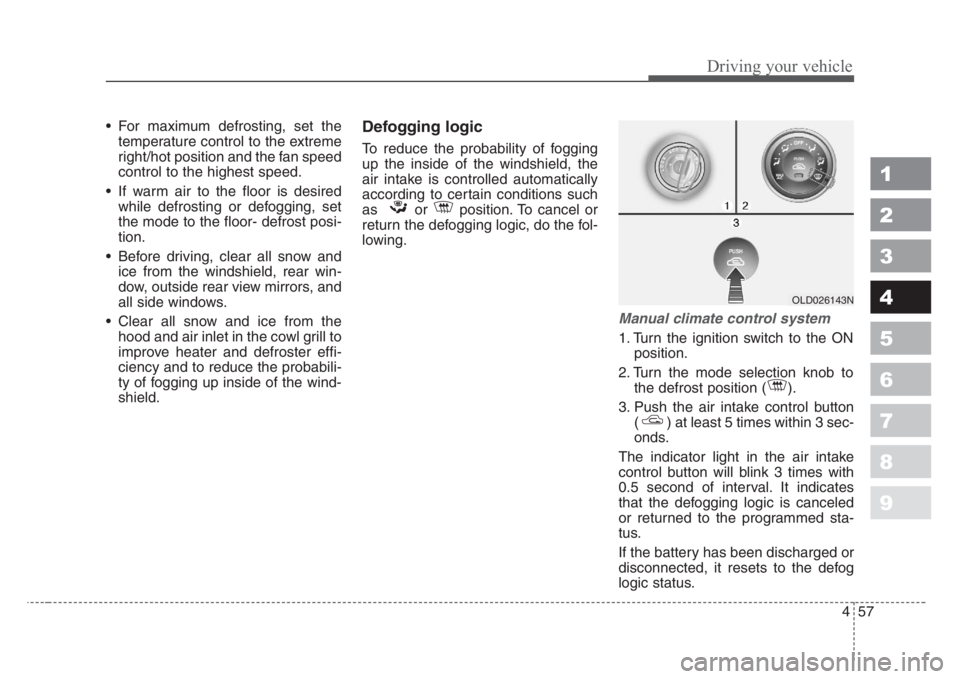
shield.Defogging logic
To reduce the probability of fogging
up the inside of the windshield, the
air intake is controlled automatically
according to certain conditions such
as or position. To cancel or
return the defogging logic, do the fol-
lowing.
Manual climate control system
1. Turn the ignition switch to the ON
position.
2. Turn the mode selection knob to
the defrost position ( ).
3. Push the air intake control button
( ) at least 5 times within 3 sec-
onds.
The indicator light in the air intake
control button will blink 3 times with
0.5 second of interval. It indicates
that the defogging logic is canceled
or returned to the programmed sta-
tus.
If the battery has been discharged or
disconnected, it resets to the defog
logic status.
OLD026143N
Page 195 of 298

55
Driving tips
BEFORE DRIVING
Before entering vehicle:
• Be sure that all windows, outside
mirror(s), and outside lights are
clean.
• Check the condition of the tires.
• Check under the vehicle for any
sign of leaks.
• Be sure there are no obstacles
behind you if you intend to back up.
Necessary inspections
Fluid levels, such as engine oil,
engine coolant, brake fluid, and
washer fluid should be checked on a
regular basis, with the exact interval
depending on the fluid. Further
details are provided in Section 7,
Maintenance.
Before starting
• Close and lock all doors.
• Position the seat so that all con-
trols are easily reached.
• Adjust the inside and outside
rearview mirrors.
• Be sure that all lights work.
• Check all gauges.
• Check the operation of warning
lights when the ignition switch is
turned to the ON position.
• Release the parking brake and
make sure the brake warning light
goes out.
For safe operation, be sure you are
familiar with your vehicle and its
equipment.
1
2
3
4
5
6
7
8
9
WARNING- Driving under
the influence of alcohol or
drugs
Drinking and driving is danger-
ous. Drunk driving is the num-
ber one contributor to the high-
way death toll each year. Even a
small amount of alcohol will
affect your reflexes, perceptions
and judgement.
You are much more likely to
have a serious accident if you
drink and drive.
If you are drinking or taking
drugs, don’t drive. Do not ride
with a driver who has been
drinking or taking drugs.
Choose a designated driver or
call a cab.
Driving while under the influ-
ence of drugs is as dangerous
or more dangerous than driving
drunk.
Page 197 of 298

57
Driving tips
SPECIAL DRIVING CONDITIONS
Hazardous driving conditions
When hazardous driving conditions
are encountered such as water,
snow, ice, mud, sand, or similar haz-
ards, follow these suggestions:
• Drive cautiously and allow extra
distance for braking.
• Avoid sudden movements in brak-
ing or steering.
• When braking, pump the brake
pedal with a light up-and-down
motion until the vehicle is stopped.• If stalled in snow, mud, or sand,
use second gear. Accelerate slow-
ly to avoid spinning the drive
wheels.
• Use sand, rock salt, tire chains, or
other non-slip material under the
drive wheels to provide traction
when stalled in ice, snow, or mud.
Rocking the vehicle
If it is necessary to rock the vehicle
to free it from snow, sand, or mud,
first turn the steering wheel right and
left to clear the area around your
front wheels. Then, shift back and
forth between 1 (First) and R
(Reverse) in vehicles equipped with
a manual transaxle or R (Reverse)
and any forward gear in vehicles
equipped with an automatic
transaxle. Do not race the engine,
and spin the wheels as little as pos-
sible. If you are still stuck after a few
tries, have the vehicle pulled out by a
tow vehicle to avoid engine overheat-
ing and possible damage to the
transaxle.
1
2
3
4
5
6
7
8
9
WARNING - Downshifting
Downshifting with an automatic
transaxle, while driving on slip-
pery surfaces can cause an
accident. The sudden change in
tire speed could cause the tires
to skid. Be careful when down-
shifting on slippery surfaces.
CAUTION
Prolonged rocking may cause
engine over-heating, transaxle
damage or failure, and tire dam-
age.
WARNING
Do not pump the brake pedal on
a vehicle equipped with ABS.
Page 198 of 298

Driving tips
8 5
Driving at night
Because night driving presents more
hazards than driving in the daylight,
here are some important tips to
remember:
• Slow down and keep more dis-
tance between you and other vehi-
cles, as it may be more difficult to
see at night, especially in areas
where there may not be any street
lights.
• Adjust your mirrors to reduce the
glare from other driver's head-
lights.
• Keep your headlights clean and
properly aimed on vehicles not
equipped with the automatic head-
light aiming feature. Dirty or
improperly aimed headlights will
make it much more difficult to see
at night.
• Avoid staring directly at the head-
lights of oncoming vehicles. You
could be temporarily blinded, and it
will take several seconds for your
eyes to readjust to the darkness.
Driving in the rain
Rain and wet roads can make driving
dangerous, especially if you’re not
prepared for the slick pavement.
Here are a few things to consider
when driving in the rain:
• A heavy rainfall will make it harder
to see and will increase the dis-
tance needed to stop your vehicle,
so slow down.
• Keep your windshield wiping
equipment in good shape. Replace
your windshield wiper blades when
they show signs of streaking or
missing areas on the windshield.
• If your tires are not in good condi-
tion, making a quick stop on wet
pavement can cause a skid and
possibly lead to an accident. Be
sure your tires are in good shape.
• Turn on your headlights to make it
easier for others to see you.
1
2
3
4
5
6
7
8
9
WARNING- Spinning tires
Do not spin the wheels, espe-
cially at speeds more than 56
km/h (35 mph). Spinning the
wheels at high speeds when the
vehicle is stationary could
cause a tire to overheat, explode
and injure bystanders.
CAUTION
The TCS system (if equipped)
should be turned OFF prior to
rocking the vehicle.
Page 199 of 298

59
Driving tips
• Driving too fast through large pud-
dles can affect your brakes. If you
must go through puddles, try to
drive through them slowly.
• If you believe you may have gotten
your brakes wet, apply them lightly
while driving until normal braking
operation returns.Winter driving
• We recommend that you carry
emergency equipment, including a
window scraper, windshield de-
icer, a bag of sand or salt, flares, a
small shovel and jumper cables.
• Make sure you have sufficient eth-
ylene-glycol coolant in the radiator.
• Check the battery condition and
cables. Cold temperatures reduce
the capacity of any battery, so it
must be in excellent condition to
provide enough winter starting
power.
• Make sure the engine oil viscosity
is suitable for cold weather.
• Check the ignition system for loose
connections and damage.• Use antifreeze-formulated wind-
shield washer fluid. (Do not use
engine coolant antifreeze.)
• Do not use the parking brake if it
might freeze. When parking, shift
to 1 (First) or R (Reverse) with a
manual transaxle or P (Park) with
an automatic transaxle and block
the rear wheels.
1
2
3
4
5
6
7
8
9
Page 208 of 298

Driving tips
18 5
1
2
3
4
5
6
7
8
9
This section contains many time-
tested, important trailering tips and
safety rules. Many of these are
important for your safety and that of
your passengers. Please read this
section carefully before you pull a
trailer.
Load-pulling components such as
the engine, transaxle, wheel assem-
blies, and tires are forced to work
harder against the load of the added
weight. The engine is required to
operate at relatively higher speeds
and under greater loads. This addi-
tional burden generates extra heat
which creates more wear in engine,
and a shortened engine life. The trail-
er also adds considerably to wind
resistance, increasing the pulling
requirements.If you do decide to pull a trailer
Here are some important points if
you decide to pull a trailer:
• Consider using a sway control. You
can ask a hitch dealer about sway
control.
• After your odometer indicates 800
km (500 miles) or more, you can
tow a trailer. For the first 800 km
(500 miles) that you tow a trailer,
don’t drive over 80 km/h (50 mph)
and don’t make starts at full throt-
tle. This helps your engine and
other parts of your vehicle “wear” in
at the heavier loads.
• Always drive your vehicle at a mod-
erate speed (less than 100 km/h
(60 mph)).
• The important considerations have
to do with weight:Weight of the trailer
How heavy can a trailer safely be? It
should never weigh more than the
maximum trailer weight with trailer
brakes. But even that can be too
heavy.
If you feel that the trailer is adversely
affecting the movement of your vehi-
cle, reduce your speed, avoid
uneven or winding roads, avoid
roads with steep grades, and/or light-
en your trailer load.
Page 210 of 298

Driving tips
20 5
1
2
3
4
5
6
7
8
9
Safety chains
You should always attach chains
between your vehicle and your trail-
er. Cross the safety chains under the
tongue of the trailer so that the
tongue will not drop to the road if it
becomes separated from the hitch.
Instructions about safety chains may
be provided by the hitch manufactur-
er or by the trailer manufacturer.
Follow the manufacturer’s recom-
mendation for attaching safety
chains. Always leave just enough
slack so you can turn with your trail-
er. And, never allow safety chains to
drag on the ground.
Trailer brakes
If your trailer weighs more than the
maximum weight for a trailer without
brakes, then the trailer needs its own
brakes. You must consult with a
knowledgeable and reputable trailer
vendor to determine which brake
equipped trailer is right for your
needs. Be sure to read and follow the
instructions for the trailer brakes so
you’ll be able to install, adjust and
maintain them properly.
Driving with a trailer
Towing a trailer requires experience.
You must gain that experience slow-
ly and carefully which practicing with
an unloaded or lightly loaded trailer.
Before setting out for the open road,
you must get to know your trailer.
Acquaint yourself with the feel of
handling and braking with the trailer.
And always keep in mind that the
vehicle you are driving is now a good
deal longer and not nearly so
responsive as your vehicle is by
itself.
Before you start, check the trailer
hitch and platform, safety chains,
electrical connector(s), lights, tires
and mirror adjustment. If the trailer
has electric brakes, start your vehicle
and trailer moving and then apply the
trailer brake controller by hand to be
sure the brakes are working. This lets
you check your electrical connection
at the same time.
During your trip, check occasionally
to be sure that the load is secure,
and that the lights and any trailer
brakes are still working.
WARNING
Do not use a trailer with its own
brakes unless you are absolute-
ly certain that you have properly
set up the brake system. This is
not a task for amateurs. Use an
experienced, competent trailer
shop for this work.