garage KIA Sportage 2006 JE_ / 2.G Owner's Manual
[x] Cancel search | Manufacturer: KIA, Model Year: 2006, Model line: Sportage, Model: KIA Sportage 2006 JE_ / 2.GPages: 354, PDF Size: 3.62 MB
Page 23 of 354
Knowing your vehicle66
3
1
2
3
4
5
6
7
8
9
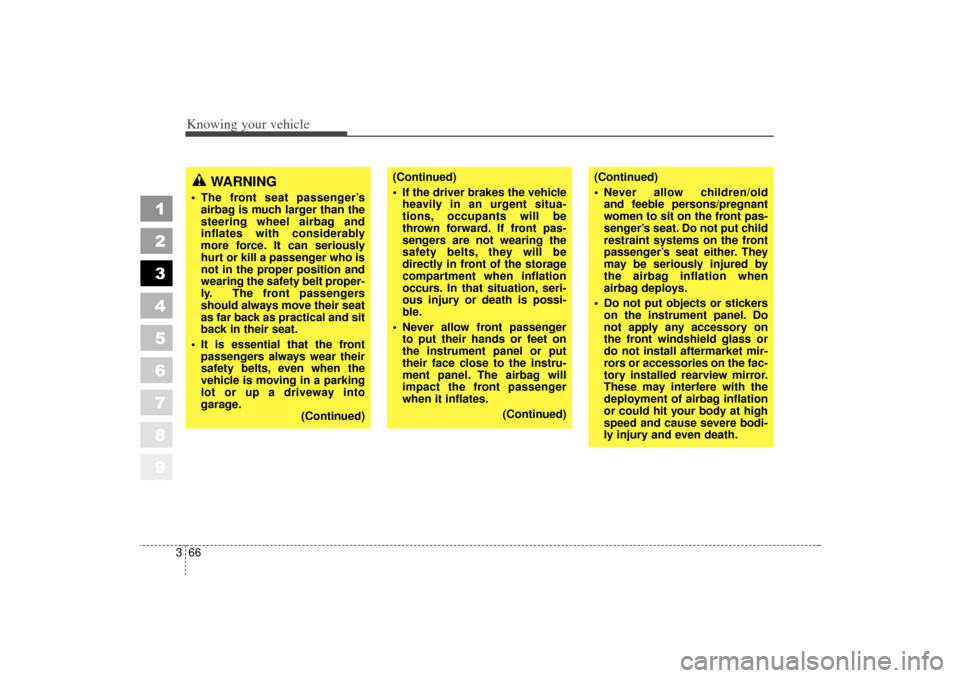
(Continued)
If the driver brakes the vehicle
heavily in an urgent situa-
tions, occupants will be
thrown forward. If front pas-
sengers are not wearing the
safety belts, they will be
directly in front of the storage
compartment when inflation
occurs. In that situation, seri-
ous injury or death is possi-
ble.
Never allow front passenger to put their hands or feet on
the instrument panel or put
their face close to the instru-
ment panel. The airbag will
impact the front passenger
when it inflates.
(Continued)
(Continued)
Never allow children/old and feeble persons/pregnant
women to sit on the front pas-
senger’s seat. Do not put child
restraint systems on the front
passenger’s seat either. They
may be seriously injured by
the airbag inflation when
airbag deploys.
Do not put objects or stickers on the instrument panel. Do
not apply any accessory on
the front windshield glass or
do not install aftermarket mir-
rors or accessories on the fac-
tory installed rearview mirror.
These may interfere with the
deployment of airbag inflation
or could hit your body at high
speed and cause severe bodi-
ly injury and even death.
WARNING
The front seat passenger’sairbag is much larger than the
steering wheel airbag and
inflates with considerably
more force. It can seriously
hurt or kill a passenger who is
not in the proper position and
wearing the safety belt proper-
ly. The front passengers
should always move their seat
as far back as practical and sit
back in their seat.
It is essential that the front passengers always wear their
safety belts, even when the
vehicle is moving in a parking
lot or up a driveway into
garage. (Continued)
KM CAN (ENG) 3 (55~)new.qxd 7/29/05 9:37 AM Page 66
Page 174 of 354
Driving your vehicle54
4
1
2
3
4
5
6
7
8
9
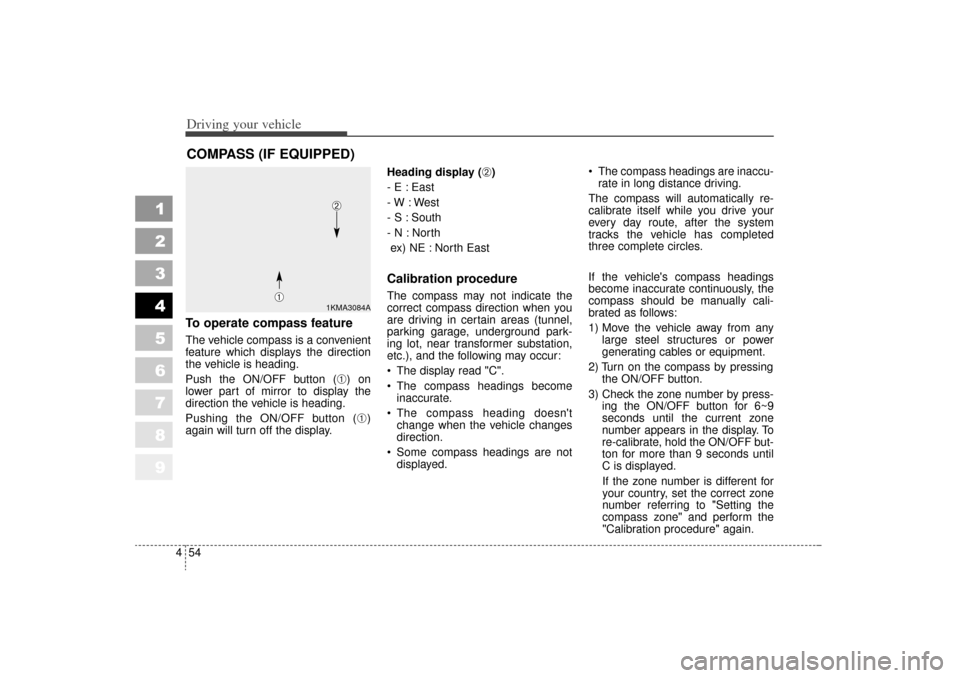
To operate compass featureThe vehicle compass is a convenient
feature which displays the direction
the vehicle is heading.
Push the ON/OFF button (
➀) on
lower part of mirror to display the
direction the vehicle is heading.
Pushing the ON/OFF button (➀)
again will turn off the display. Heading display (
➁)
- E : East
- W : West
- S : South
- N : North ex) NE : North East
Calibration procedureThe compass may not indicate the
correct compass direction when you
are driving in certain areas (tunnel,
parking garage, underground park-
ing lot, near transformer substation,
etc.), and the following may occur:
The display read "C".
The compass headings become inaccurate.
The compass heading doesn't change when the vehicle changes
direction.
Some compass headings are not displayed. The compass headings are inaccu-
rate in long distance driving.
The compass will automatically re-
calibrate itself while you drive your
every day route, after the system
tracks the vehicle has completed
three complete circles.
If the vehicle's compass headings
become inaccurate continuously, the
compass should be manually cali-
brated as follows:
1) Move the vehicle away from any large steel structures or power
generating cables or equipment.
2) Turn on the compass by pressing the ON/OFF button.
3) Check the zone number by press- ing the ON/OFF button for 6~9
seconds until the current zone
number appears in the display. To
re-calibrate, hold the ON/OFF but-
ton for more than 9 seconds until
C is displayed.
If the zone number is different for
your country, set the correct zone
number referring to "Setting the
compass zone" and perform the
"Calibration procedure" again.
COMPASS (IF EQUIPPED)
1KMA3084A
➀
➁
KM CAN (ENG) 4 new.qxd 7/29/05 9:35 AM Page 54
Page 215 of 354
53
Driving tips
EMISSION CONTROL SYSTEMThe emission control system of your
vehicle is covered by a written limited
warranty. Please see the warranty
information contained in the
Warranty & Consumer Information
Manual in your vehicle.Vehicle modifications This vehicle should not be modified.
Modification of your Kia could affect
its performance, safety or durability
and may even violate governmental
safety and emissions regulations.
In addition, damage or performance
problems resulting from any modifi-
cation may not be covered under
warranty.
Engine exhaust gas precau-
tions (carbon monoxide) Carbon monoxide can be presentwith other exhaust fumes.
Therefore, if you smell exhaust
fumes of any kind inside your vehi-
cle, have it inspected and repaired
immediately. If you ever suspect
exhaust fumes are coming into
your vehicle, drive it only with all
the windows fully open. Have your
vehicle checked and repaired
immediately. Do not operate the engine in con-
fined or closed areas (such as
garages) any more than what is
necessary to move the vehicle in or
out of the area.
When the vehicle is stopped in an open area for more than a short
time with the engine running,
adjust the ventilation system (as
needed) to draw outside air into the
vehicle.
Never sit in a parked or stopped vehicle for any extended time with
the engine running.
When the engine stalls or fails to start, excessive attempts to re-
start the engine may cause dam-
age to the emission control sys-
tem.
1
2
3
4
5
6
7
8
9
WARNING -
Exhaust
Engine exhaust gases contain
carbon monoxide (CO). Though
colorless and odorless, it is
dangerous and could be lethal if
inhaled. Follow the instructions
following to avoid CO poison-
ing.
KM CAN (ENG) 5 new.qxd 7/29/05 9:38 AM Page 3
Page 257 of 354
545
Driving tips
1
2
3
4
5
6
7
8
9
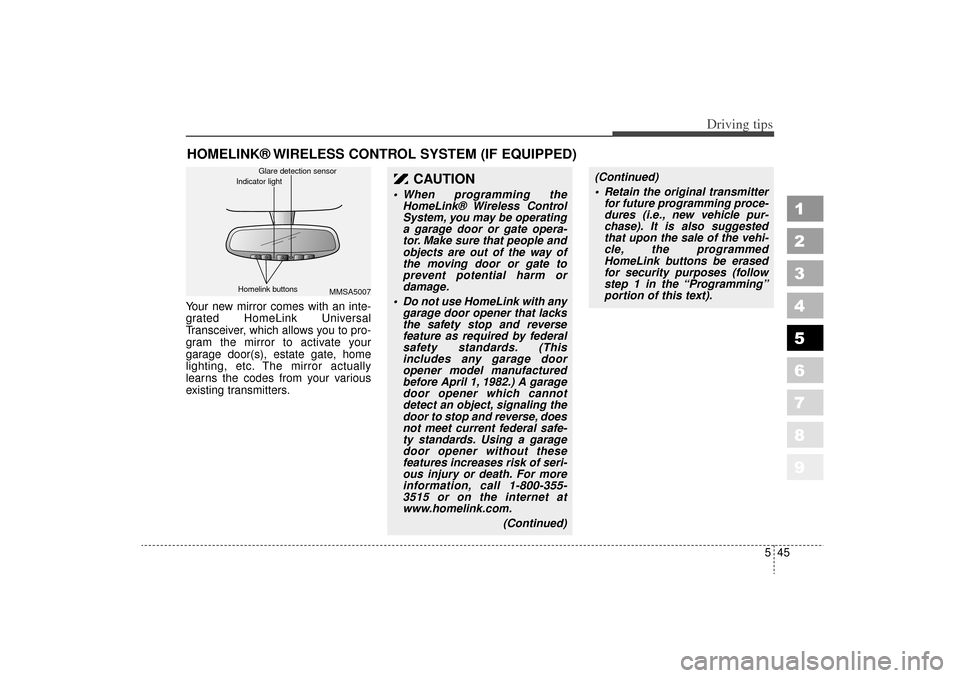
HOMELINK® WIRELESS CONTROL SYSTEM (IF EQUIPPED)Your new mirror comes with an inte-
grated HomeLink Universal
Transceiver, which allows you to pro-
gram the mirror to activate your
garage door(s), estate gate, home
lighting, etc. The mirror actually
learns the codes from your various
existing transmitters.
CAUTION
When programming theHomeLink® Wireless Control
System, you may be operating
a garage door or gate opera-
tor. Make sure that people and
objects are out of the way of
the moving door or gate to
prevent potential harm or
damage.
Do not use HomeLink with any garage door opener that lacks
the safety stop and reverse
feature as required by federal
safety standards. (This
includes any garage door
opener model manufactured
before April 1, 1982.) A garage
door opener which cannot
detect an object, signaling the
door to stop and reverse, does
not meet current federal safe-
ty standards. Using a garage
door opener without these
features increases risk of seri-
ous injury or death. For more
information, call 1-800-355-
3515 or on the internet at
www.homelink.com.
(Continued)
(Continued)
Retain the original transmitterfor future programming proce-
dures (i.e., new vehicle pur-
chase). It is also suggested
that upon the sale of the vehi-
cle, the programmed
HomeLink buttons be erased
for security purposes (follow
step 1 in the “Programming”
portion of this text).
MMSA5007
Homelink buttons Glare detection sensor
Indicator light
KM CAN (ENG) 5 new.qxd 7/29/05 9:39 AM Page 45
Page 258 of 354
Driving tips46
5
1
2
3
4
5
6
7
8
9
ProgrammingYour vehicle may require the ignition
switch to be turned to the ACC posi-
tion for programming and/or opera-
tion of HomeLink. It is also recom-
mended that a new battery be
replaced in the hand-held transmitter
of the device being programmed to
HomeLink for quicker training and
accurate transmission of the radio-
frequency.
Follow these steps to train your
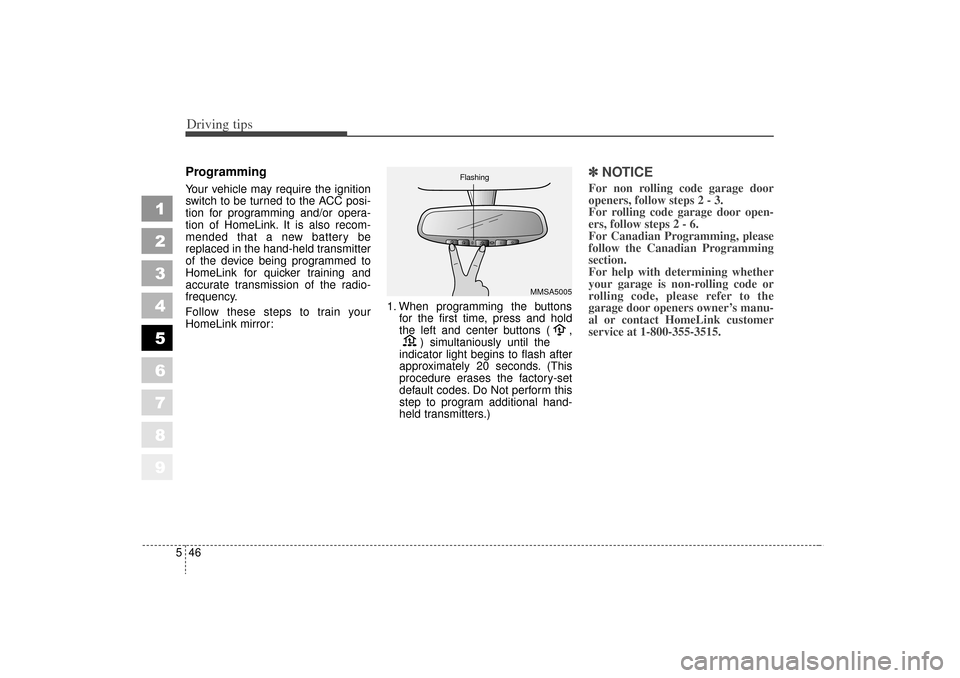
HomeLink mirror: 1. When programming the buttons
for the first time, press and hold
the left and center buttons ( , ) simultaniously until the
indicator light begins to flash after
approximately 20 seconds. (This
procedure erases the factory-set
default codes. Do Not perform this
step to program additional hand-
held transmitters.)
✽ ✽ NOTICEFor non rolling code garage door
openers, follow steps 2 - 3.
For rolling code garage door open-
ers, follow steps 2 - 6.
For Canadian Programming, please
follow the Canadian Programming
section.
For help with determining whether
your garage is non-rolling code or
rolling code, please refer to the
garage door openers owner’s manu-
al or contact HomeLink customer
service at 1-800-355-3515.
MMSA5005
Flashing
KM CAN (ENG) 5 new.qxd 7/29/05 9:39 AM Page 46
Page 259 of 354
547
Driving tips
1
2
3
4
5
6
7
8
9
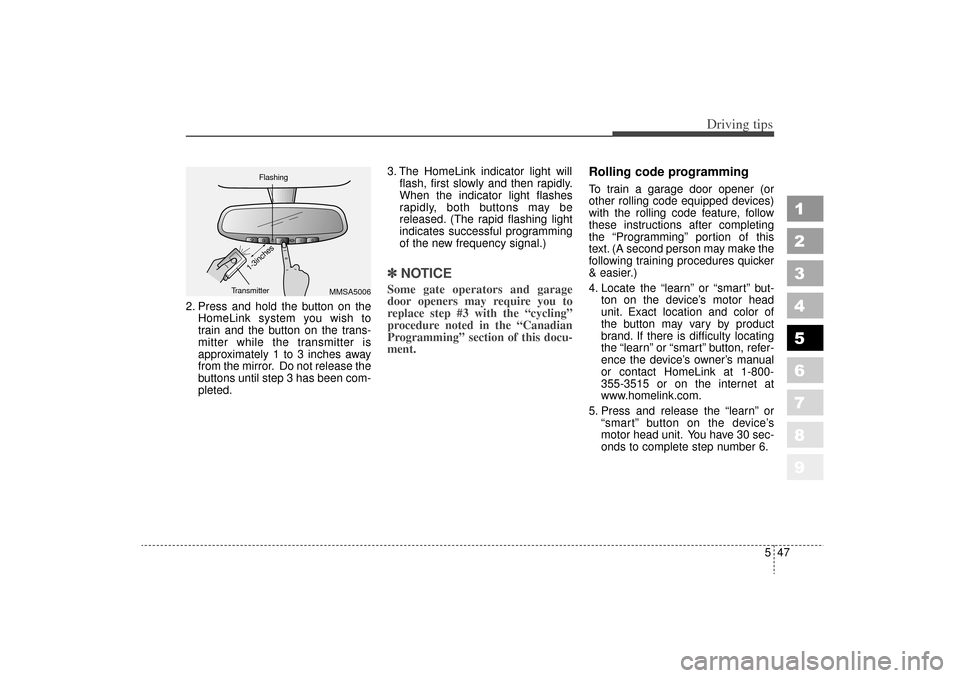
2. Press and hold the button on theHomeLink system you wish to
train and the button on the trans-
mitter while the transmitter is
approximately 1 to 3 inches away
from the mirror. Do not release the
buttons until step 3 has been com-
pleted. 3. The HomeLink indicator light will
flash, first slowly and then rapidly.
When the indicator light flashes
rapidly, both buttons may be
released. (The rapid flashing light
indicates successful programming
of the new frequency signal.)
✽ ✽NOTICESome gate operators and garage
door openers may require you to
replace step #3 with the “cycling”
procedure noted in the “Canadian
Programming” section of this docu-
ment.
Rolling code programmingTo train a garage door opener (or
other rolling code equipped devices)
with the rolling code feature, follow
these instructions after completing
the “Programming” portion of this
text. (A second person may make the
following training procedures quicker
& easier.)
4. Locate the “learn”or “smart” but-
ton on the device’ s motor head
unit. Exact location and color of
the button may vary by product
brand. If there is difficulty locating
the “learn” or “smart” button, refer-
ence the device’ s owner’s manual
or contact HomeLink at 1-800-
355-3515 or on the internet at
www.homelink.com.
5. Press and release the “learn”or
“ smart” button on the device’ s
motor head unit. You have 30 sec-
onds to complete step number 6.
MMSA5006
Flashing
Transmitter
1-3inches
KM CAN (ENG) 5 new.qxd 7/29/05 9:39 AM Page 47
Page 260 of 354
Driving tips48
5
1
2
3
4
5
6
7
8
9
6. Return to the vehicle and firmly
press and release the pro-
grammed HomeLink button up to
three times. The rolling code
equipped device should now rec-
ognize the HomeLink signal and
activate when the HomeLink but-
ton is pressed. The remaining two
buttons may now be programmed
if this has not previously been
done. Refer to the “Programming”
portion of this text.
Operating HomeLink To operate, simply press the pro-
grammed HomeLink button.
Activation will now occur for the
trained product (garage door, securi-
ty system, entry door lock, estate
gate, or home or office lighting). For
convenience, the hand-held trans-
mitter of the device may also be used
at any time. The HomeLink Wireless
Controls System (once programmed)
or the original hand-held transmitter
may be used to activate the device
(e.g. garage door, entry door lock,
etc.). In the event that there are still
programming difficulties, contact
HomeLink at 1-800-355-3515 or on
the internet at www.homelink.com.
Erasing programmed
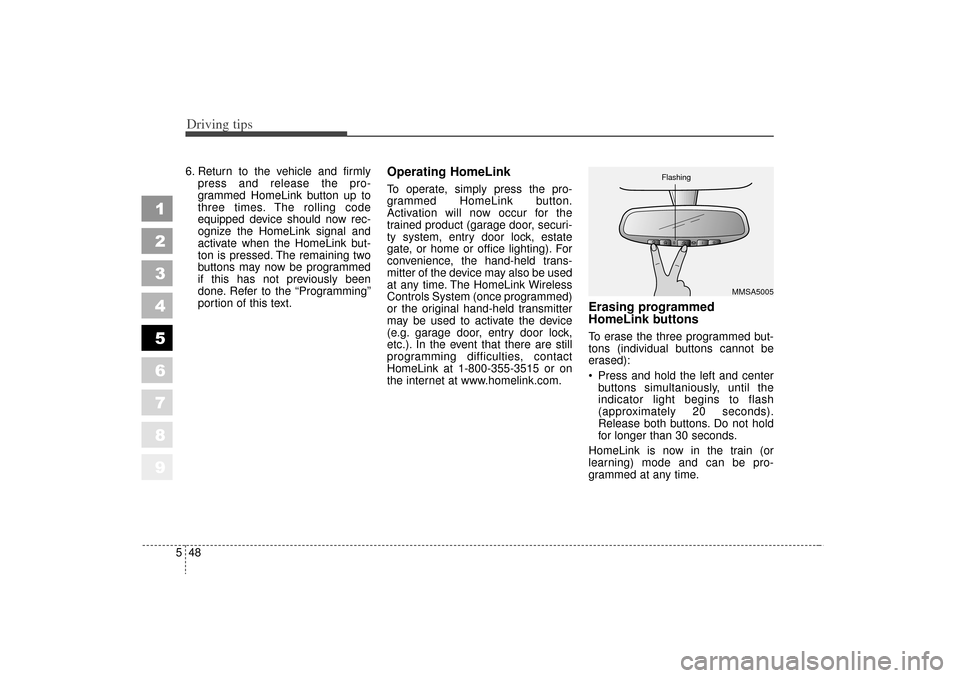
HomeLink buttonsTo erase the three programmed but-
tons (individual buttons cannot be
erased):
Press and hold the left and center
buttons simultaniously, until the
indicator light begins to flash
(approximately 20 seconds).
Release both buttons. Do not hold
for longer than 30 seconds.
HomeLink is now in the train (or
learning) mode and can be pro-
grammed at any time.
MMSA5005
Flashing
KM CAN (ENG) 5 new.qxd 7/29/05 9:39 AM Page 48
Page 261 of 354
549
Driving tips
1
2
3
4
5
6
7
8
9
Reprogramming a single
HomeLink buttonTo program a device to HomeLink
using a HomeLink button previously
trained, follow these steps:
1. Press and hold the desiredHomeLink button. Do NOT release
until step 4 has been completed.
2. When the indicator light begins to flash slowly (after 20 seconds),
position the hand-held transmitter
1 to 3 inches away from the
HomeLink surface.
3. Press and hold the hand-held transmitter button (or press and
“cycle” - as described in
“Canadian Programming ”above).
4. The HomeLink indicator light will flash, first slowly and then rapidly.
When the indicator light begins to
flash rapidly, release both buttons.
The previous device has now been
erased and the new device can be
activated by pushing the HomeLink
button that has just been pro-
grammed. This procedure will not
affect any other programmed
HomeLink buttons.
Gate operator programming &
canadian programmingDuring programming, your hand-held
transmitter may automatically stop
transmitting. Continue to press and
hold the HomeLink button (note
steps 2 through 4 in the
“Programming” portion of this text)
while you press and re-press
(“cycle”) your handheld transmitter
every two seconds until the frequen-
cy signal has been learned. The indi-
cator light will flash slowly and then
rapidly after several seconds upon
successful training.✽ ✽ NOTICEIf programming a garage door
opener or gate, it is advised to
unplug the device during the
“cycling” process to prevent possi-
ble motor burn-up.
AccessoriesIf you would like additional informa-
tion on the HomeLink Wireless
Control System, HomeLink compati-
ble products, or to purchase other
accessories such as the HomeLink®
Lighting Package, please contact
HomeLink at 1-800-355-3515 or on
the internet at www.homelink.com.
KM CAN (ENG) 5 new.qxd 7/29/05 9:39 AM Page 49