steering wheel KIA Sportage 2007 JE_ / 2.G User Guide
[x] Cancel search | Manufacturer: KIA, Model Year: 2007, Model line: Sportage, Model: KIA Sportage 2007 JE_ / 2.GPages: 350, PDF Size: 3.58 MB
Page 121 of 350
43
Driving your vehicle
1
2
3
4
5
6
7
8
9
START
Turn the ignition key to the START
position to start the engine. The
engine will crank until you release
the key; then it returns to the ON
position. The brake warning lamp
can be checked in this position.✽ ✽
NOTICEIf difficulty is experienced in turn-
ing the ignition key, turn the steer-
ing wheel right and left to release the
tension and then turn the key.
Automatic transaxleWhen turning the ignition switch to
the LOCK position, the shift lever
must be in the P (Park) position.
WARNING -
Ignition key
• Never turn the ignition switch to LOCK or ACC while the
vehicle is moving. This would
result in loss of directional
control and braking function,
which could cause an immedi-
ate accident.
Before leaving the driver’s seat, always make sure the
shift lever is engaged in 1
st
gear for manual transaxle or P
(Park) for automatic transaxle,
set the parking brake fully and
shut the engine off.
Unexpected and sudden vehi-
cle movement may occur if
these precautions are not
taken.
(Continued)
(Continued)
Never reach for the ignitionswitch, or any other controls
through the steering wheel
while the vehicle is in motion.
The presence of your hand or
arm in this area could cause a
loss of vehicle control, an
accident and serious bodily
injury or death.
Do not place any movable objects around the driver’s
seat as they may move while
driving, interfere with the dri-
ver and lead to an accident.
Page 133 of 350
415
Driving your vehicle
You must consciously take theeffort to learn how to corner in a
4WD vehicle. Do not rely on your
experience in conventional 2WD
vehicles in choosing safe cornering
speed in 4WD mode. For starters,
you must drive more slowly in
4WD.
Drive carefully off-road because your vehicle may be damaged by
rocks or roots of trees. Become
familiar with the off-road conditions
where you are going to drive
before you begin driving. Always hold the steering wheel
firmly when you are driving off-
road.
Make sure all passengers are wearing seat belts.
1
2
3
4
5
6
7
8
9
WARNING -
4WD
Reduce speed when you turn
corners. The center of gravity of
4WD vehicles is higher than that
of conventional 2WD vehicles,
making them more likely to roll
over when you turn corners too
fast.
WARNING -
Steering
wheel
Do not grab inside of the steer-
ing wheel when you are driving
off-road. Your arm may be hurt
by a sudden steering maneuver
or from steering wheel rebound
due to impact with objects on
the ground. You could lose con-
trol of the steering wheel.
1KMN4415
Page 134 of 350
Driving your vehicle16
4
1
2
3
4
5
6
7
8
9
If you need to drive in water, stop
your vehicle, set your transfer to
“4WD LOCK” and drive at less than
8 km/h (5 mph).
✽ ✽
NOTICE• Do not drive in water if the level is
higher than the bottom of the vehi-
cle.
• Check your brake condition once you are out of mud or water. Press
the brake pedal several times as
you move slowly until you feel nor-
mal braking forces return.
• Shorten your scheduled mainte- nance interval if you drive in off-
road conditions such as sand,
mud or water (see “Maintenance
Schedule” in the Index). Always
wash you car thoroughly after off
road use, especially cleaning the
under side of the vehicle.
• Since the driving torque is always applied to the 4 wheels the perfor-
mance of the 4WD vehicle is great-
ly affected by the condition of the
tires. Be sure to equip the vehicle
with four tires of the same size and
type.
• A full time four wheel drive vehi- cle cannot be towed by an ordi-
nary tow truck. Make sure that
the vehicle is placed on a flat bed
truck for moving.
WARNING -
Wind danger
If you are driving in heavy wind,
the vehicle's higher center of
gravity decreases your steering
control capacity and requires
you to drive more slowly.
WARNING -
Driving
through water
Drive slowly. If you are driving
too fast in water, the water spray
can get into the engine com-
partment and wet the ignition
system, causing your vehicle to
suddenly stall. If this happens
and your vehicle is in a tilted
position, your vehicle may roll
over.
Page 135 of 350
417
Driving your vehicle
1
2
3
4
5
6
7
8
9
WARNING -
4WD driving
Avoid high cornering speed.
Do not make quick steering wheel movements, such as
sharp lane changes or fast,
sharp turns.
The risk of rollover is greatly increased if you lose control
of your vehicle at high speed.
In a collision, an unbelted per- son is significantly more likely
to die compared to a person
wearing a seat belt.
Loss of control often occurs if two or more wheels drop off
the roadway and the driver
over steers to re-enter the
roadway. In the event your
vehicle leaves the roadway, do
not steer sharply. Instead,
slow down before pulling back
into the travel lanes.
WARNING -
Jacked vehi-
cle
While the full-time 4WD vehicle
is being raised on a jack, never
start the engine or cause the
tires to rotate.
There is the danger that rotating
tires touching the ground could
cause the vehicle to go off the
jack and to jump forward.
WARNING
Your vehicle is equipped with
tires designed to provide for
safe ride and handling capabili-
ty. Do not use a size and type of
tire and wheel that is different
from the one that is originally
installed on your vehicle. It can
affect the safety and perfor-
mance of your vehicle, which
could lead to handling failure or
rollover and serious injury.
When replacing the tires, be
sure to equip all four tires with
the tire and wheel of the same
size, type, tread, brand and
load-carrying capacity. If you
nevertheless decide to equip
your vehicle with any tire/wheel
combination not recommended
by Kia for off road driving, you
should not use these tires for
highway driving.
CAUTION -
Mud or snow
If one of the front or rear wheels begins to spin in mud, snow,etc. the vehicle can sometimesbe driven out by depressing theaccelerator pedal further; how-ever avoid running the enginecontinuously at high rpmbecause doing so could dam-age the 4WD system.
Page 143 of 350
425
Driving your vehicle
1
2
3
4
5
6
7
8
9
Power steeringPower Steering uses energy from the
engine to assist you in steering the
vehicle. If the engine is off or if the
power steering system becomes
inoperative, the vehicle may still be
steered, but it will require increased
steering effort.
Should you notice any change in the
effort required to steer during normal
vehicle operation, have the power
steering checked by an Authorized
Kia Dealer.
✽ ✽NOTICE• Never hold the steering wheel
against a stop (extreme right or
left turn) for more than 5 seconds
with the engine running. Holding
the steering wheel for more than 5
seconds in either position may
cause damage to the power steer-
ing pump.
• If the power steering drive belt breaks or if the power steering
pump malfunctions, the steering
effort will greatly increase.
✽ ✽
NOTICEIf the vehicle is parked for extended
periods outside in cold weather
(below -10°C/14°F), the power steer-
ing may require increased effort
when the engine is first started. This
is caused by increased fluid viscosity
due to the cold weather and does not
indicate a malfunction.
When this happens, increase the
engine RPM by depressing accelera-
tor until the RPM reaches 1,500 rpm
then release or let the engine idle for
two or three minutes to warm up the
fluid.
STEERING WHEEL
Page 144 of 350
Driving your vehicle26
4
1
2
3
4
5
6
7
8
9
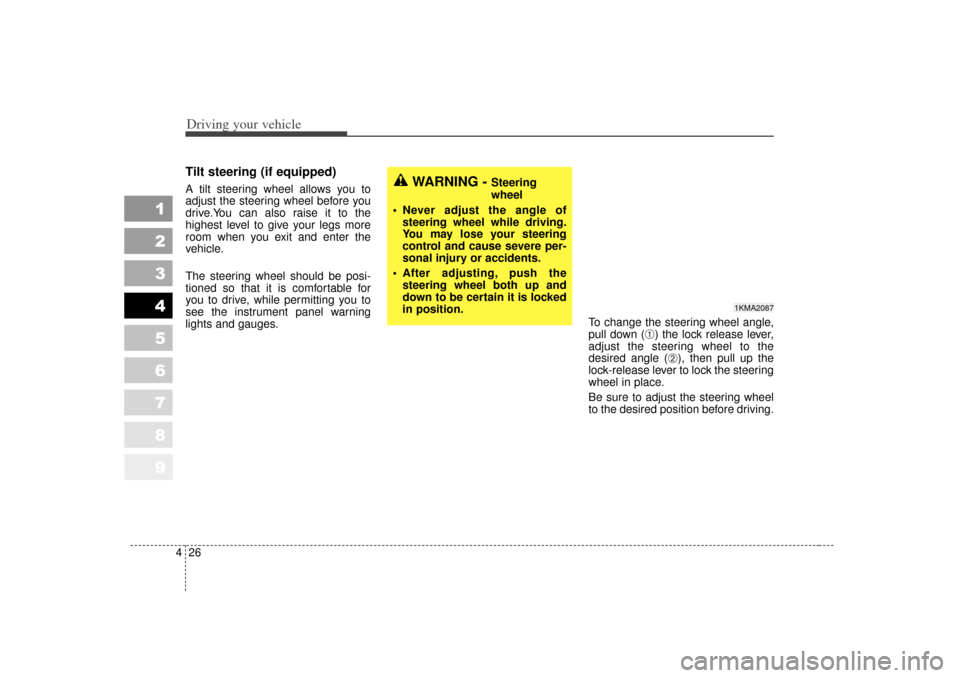
Tilt steering (if equipped)A tilt steering wheel allows you to
adjust the steering wheel before you
drive.You can also raise it to the
highest level to give your legs more
room when you exit and enter the
vehicle.
The steering wheel should be posi-
tioned so that it is comfortable for
you to drive, while permitting you to
see the instrument panel warning
lights and gauges. To change the steering wheel angle,
pull down (
➀) the lock release lever,
adjust the steering wheel to the
desired angle (
➁), then pull up the
lock-release lever to lock the steering
wheel in place.
Be sure to adjust the steering wheel
to the desired position before driving.
WARNING -
Steering
wheel
Never adjust the angle of steering wheel while driving.
You may lose your steering
control and cause severe per-
sonal injury or accidents.
After adjusting, push the steering wheel both up and
down to be certain it is locked
in position.
1KMA2087
Page 145 of 350
427
Driving your vehicle
1
2
3
4
5
6
7
8
9
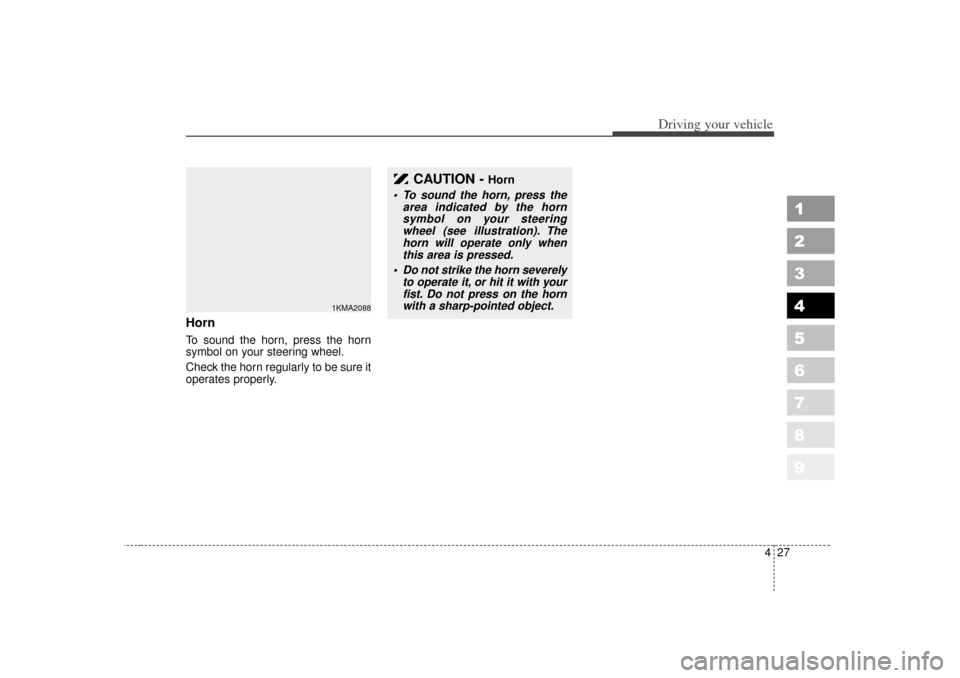
HornTo sound the horn, press the horn
symbol on your steering wheel.
Check the horn regularly to be sure it
operates properly.
CAUTION -
Horn
To sound the horn, press thearea indicated by the hornsymbol on your steeringwheel (see illustration). Thehorn will operate only whenthis area is pressed.
Do not strike the horn severely to operate it, or hit it with yourfist. Do not press on the hornwith a sharp-pointed object.
1KMA2088
Page 146 of 350
Driving your vehicle28
4
1
2
3
4
5
6
7
8
9
The cruise control system allows you
to program the vehicle to maintain a
constant speed without resting your
foot on the accelerator pedal.
With cruise control, you can set and
automatically maintain any speed of
between 40 km/h (24 mph) and
160 km/h (96 mph).
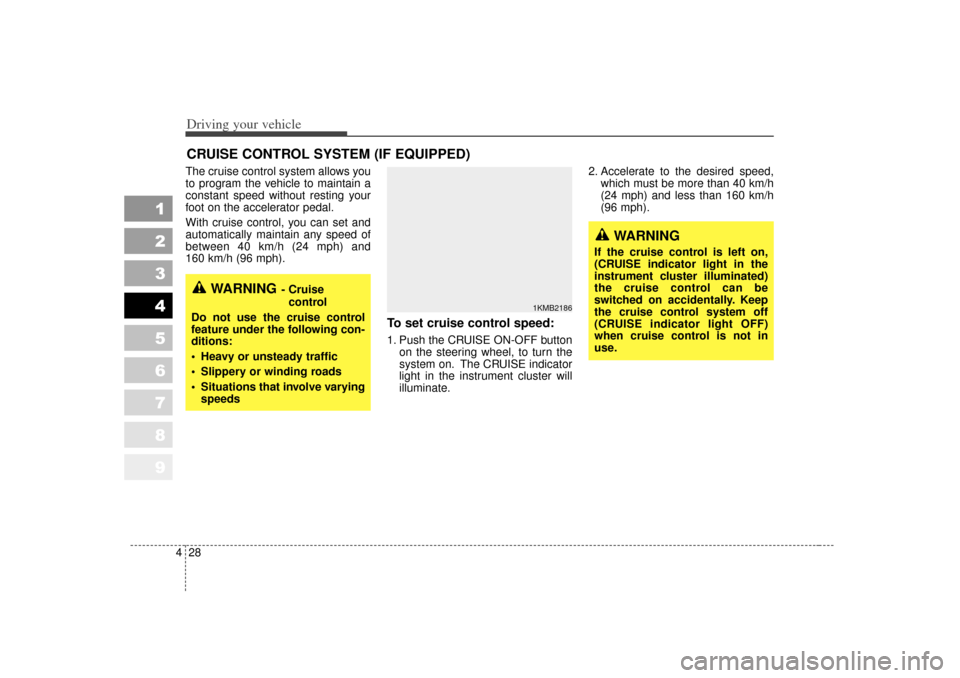
To set cruise control speed:1. Push the CRUISE ON-OFF button
on the steering wheel, to turn the
system on. The CRUISE indicator
light in the instrument cluster will
illuminate. 2. Accelerate to the desired speed,
which must be more than 40 km/h
(24 mph) and less than 160 km/h
(96 mph).
CRUISE CONTROL SYSTEM (IF EQUIPPED)
WARNING
- Cruise
control
Do not use the cruise control
feature under the following con-
ditions:
Heavy or unsteady traffic
Slippery or winding roads
Situations that involve varying speeds
WARNING
If the cruise control is left on,
(CRUISE indicator light in the
instrument cluster illuminated)
the cruise control can be
switched on accidentally. Keep
the cruise control system off
(CRUISE indicator light OFF)
when cruise control is not in
use.
1KMB2186
Page 147 of 350
429
Driving your vehicle
1
2
3
4
5
6
7
8
9
3. Push down the SET/COAST switch,and release it at the speed you
want. The “SET” indicator light in the
instrument cluster will illuminate.
Release the accelerator at the
same time. The desired speed will
automatically be maintained.
The SET function cannot be activateduntil approximately 2 seconds after theCRUISE ON-OFF button has beenengaged.
On a steep grade, the vehicle maymomentarily slow down while goingdownhill.
To cancel cruise control, do
one of the following: Press the brake pedal.
Press the clutch pedal with a manu- al transaxle or shift into N (Neutral)
with an automatic transaxle.
Pull the CANCEL switch.Each of these actions will cancel cruise control operation (the “SET”indicator light in the instrument clus-ter will go OFF), but it will not turn thesystem off. If you wish to resumecruise control operation, push up theRES/ACC switch located on yoursteering wheel. You will return to yourpreviously preset speed.
1KMB2187
1KMB2188
Page 151 of 350
433
Driving your vehicle
1
2
3
4
5
6
7
8
9
The Traction Control System (TCS)
helps the vehicle accelerate on slip-
pery road surfaces by preventing the
drive wheels from spinning exces-
sively. It also provides improved dri-
ving force and steering.
TCS operationTCS ON condition
When the ignition is turnedON, TCS and TCS OFF
indicator light illuminate for
approximately 3 seconds,
then TCS is turned on.
Press the TCS OFF button to turn TCS off. (TCS OFF
indicator will illuminate). To
turn the TCS on, press the
TCS OFF button (TCS OFF
indicator light will go off).
When starting the engine, you may hear a slight tick-
ing sound. This is the TCS
performing an automatic
system self-check and does
not indicate a problem.
When operating
When the TCS is in opera-
tion, TCS indicator light
blinks.
When the traction control system is operating prop-
erly, you can feel a slight
pulsation in the vehicle.
This is only the effect of
brake control and indi-
cates nothing unusual.
When moving out of mud or driving on a slippery
road, pressing the accel-
erator pedal may not
cause the engine rpm
(revolutions per minute) to
increase.
TRACTION CONTROL SYSTEM (IF EQUIPPED)
1KMA2127
-
TCS