audio KIA Sportage 2010 SL / 3.G User Guide
[x] Cancel search | Manufacturer: KIA, Model Year: 2010, Model line: Sportage, Model: KIA Sportage 2010 SL / 3.GPages: 371, PDF Size: 5.23 MB
Page 130 of 371
3121
Knowing your vehicle
1
2
3
4
5
6
7
8
9
✽ ✽NOTICE -Using iPod device
• Some iPod models might not sup-
port the communication protocol
and the files will not be played.
(iPod models supported: Mini, 4G,
Photo, Nano, 5G)
• The order of search or playback of songs in the iPod can be different
from the order searched in the
audio system.
• If the iPod crashes due to its own trouble, reset iPod. (Reset: Refer
to iPod manual)
• iPod may not operate normally on low battery.CAUTION - Using iPod
device
You need the power cable exclusive for iPod in order tooperate iPod with the buttonson the audio system. The PCcable provided by Apple maycause malfunction and do notuse it for vehicle use.
When connecting the device with iPod cable, push in thejack fully not to interfere withcommunication.
When adjusting the sound effects of iPod and the audiosystem, the sound effects ofboth devices will overlap eachand might cause reduce ordistort the quality of thesound.
Deactivate (turn off) the equal- izer function of iPod whenadjusting the audio system’svolume, and turn off the equal-izer of the audio system whenusing the equalizer of iPod.
(Continued)
(Continued) When the iPod cable is con- nected, the system can beswitched to the AUX modeeven without the iPod deviceand can cause noise.Disconnect iPod cable whenyou are not using the iPoddevice.
Page 132 of 371
3123
Knowing your vehicle
1
2
3
4
5
6
7
8
9
1. FM Selection Button
Turns to FM/AM mode and toggles
FM1 and FM2 and AM when the but-
ton is pressed each time.
2. SAT Selection Button
Turns to SAT mode, and toggles in
the order of SAT1
➟SAT2➟SAT3➟
SAT1➟... when the button is pressed
each time.
3. CD Selection Button
If there is a cd in the CDP DECK it
plays the CD.
Press CD button to automatically
insert CD when the disc is ejected
from the deck by pressing CD
EJECT.
4. AUX Selection Button
If the auxiliary device is connected, it
turns to AUX MODE to play the
sound from the auxiliary player.
If no Disc and auxiliary device is con-
nected, it displays "NO Media" for 5
seconds and returns to the previous
mode.
5. Automatic Channel Selection Button
When the [SEEK ] button is
pressed, it reduces the band fre-
quency by 200KHz to automatically
select channel. Stops at the previ-
ous frequency if no channel is
found.
When the [SEEK ] button is pressed, it increases the band fre-
quency by 200KHz to automatically
select channel. Stops at the previ-
ous frequency if no channel is
found.
6. Power ON/OFF & Volume Control Button
Turns on/off the set when the IGNI-
TION SWITCH is on ACC or ON. If
the button is turned to the right, it
increases the volume and left,
decreases the volume.
7. SCAN Selection Button
When the button is pressed, it auto-
matically only [SCAN] up. The sound
hearing for 5 seconds per all
searched station preset.
8. MUTE Selection Button
When inputting [MUTE] key, indicate
"AUDIO MUTE" at the some time with
output [MUTE].
9. INFO Selection Button
Displays the information of the chan-
nel currently played by SAT.
10. SET UP Selection Button
Press this button to turn to the
SCROLL, SDVC, SIRIUS and adjust-
ment mode.
If no action is taken for 5 seconds
after pressing the button, it will return
to the play mode.(After entering SET
UP mode, move between items using
the left, right and PUSH functions of
the TUNE button.)
The set up item changes from
SCROLL
➟ SDVC➟SIRIUS➟SCROLL
➟...
Page 137 of 371
Knowing your vehicle
128
3
1
2
3
4
5
6
7
8
9
(Continued)
Take cautions for static elec- tricity when mounting or dis-mounting the external USBdevice.
Encoded MP3 PLAYER is not recognizable.
Depending on the condition of the external USB device, theconnected external USBdevice can be unrecognizable.
When the formatted byte/sec- tor setting of External USBdevices is not either 512BYTEor 2048BYTE, then the devicewill not be recognized.
Only the USB device format- ted to FAT 12/16/32.
USB device without USB IF authentication may not be rec-ognizable.
Make sure the USB connection terminal does not come incontact with human body orany object.
(Continued)(Continued) If you repeat mounting or dis- mounting USB device in ashort period of time, it maybreak the device.
You might hear strange noise when mounting or dismount-ing a USB device.
If you dismount the external USB device during playback inUSB mode, the external USBdevice can be damaged or mal-function. Therefore, mount theexternal USB device when theengine is turned off or inanother mode.
Depending on the type and capacity of the external USBdevice or the type of the filesstored in the device, there is adifference in the time taken forrecognition of the device, butthis is not a trouble and youonly have to wait.
(Continued)(Continued) Do not use the USB device for other purposes than playingmusic files.
Use of USB accessories such as the recharger or heaterusing USB I/F may lower theperformance or cause trouble.
If you use devices such as the USB hub you purchased sepa-rately, the vehicle’s audio sys-tem may not recognize theUSB device. Connect the USBdevice directly to the multime-dia terminal of the vehicle.
Page 143 of 371
Knowing your vehicle
134
3
1
2
3
4
5
6
7
8
9
✽ ✽
NOTICE - Using iPod device
• Some iPod models might not sup-
port the communication protocol
and the files will not be played.
(iPod models supported: Mini, 4G,
Photo, Nano, 5G)
• The order of search or playback of songs in the iPod can be different
from the order searched in the
audio system.
• If the iPod crashes due to its own trouble, reset iPod. (Reset: Refer
to iPod manual)
• iPod may not operate normally on low battery.CAUTION - Using iPod
device
You need the power cable exclusive for iPod in order tooperate iPod with the buttonson the audio system. The PCcable provided by Apple maycause malfunction and do notuse it for vehicle use.
When connecting the device with iPod cable, push in thejack fully not to interfere withcommunication.
When adjusting the sound effects of iPod and the audiosystem, the sound effects ofboth devices will overlap eachand might cause reduce ordistort the quality of thesound.
Deactivate (turn off) the equal- izer function of iPod whenadjusting the audio system’svolume, and turn off the equal-izer of the audio system whenusing the equalizer of iPod.
(Continued)
(Continued) When the iPod cable is con- nected, the system can beswitched to the AUX modeeven without the iPod deviceand can cause noise.Disconnect iPod cable whenyou are not using the iPoddevice.
Page 146 of 371
3137
Knowing your vehicle
1
2
3
4
5
6
7
8
9
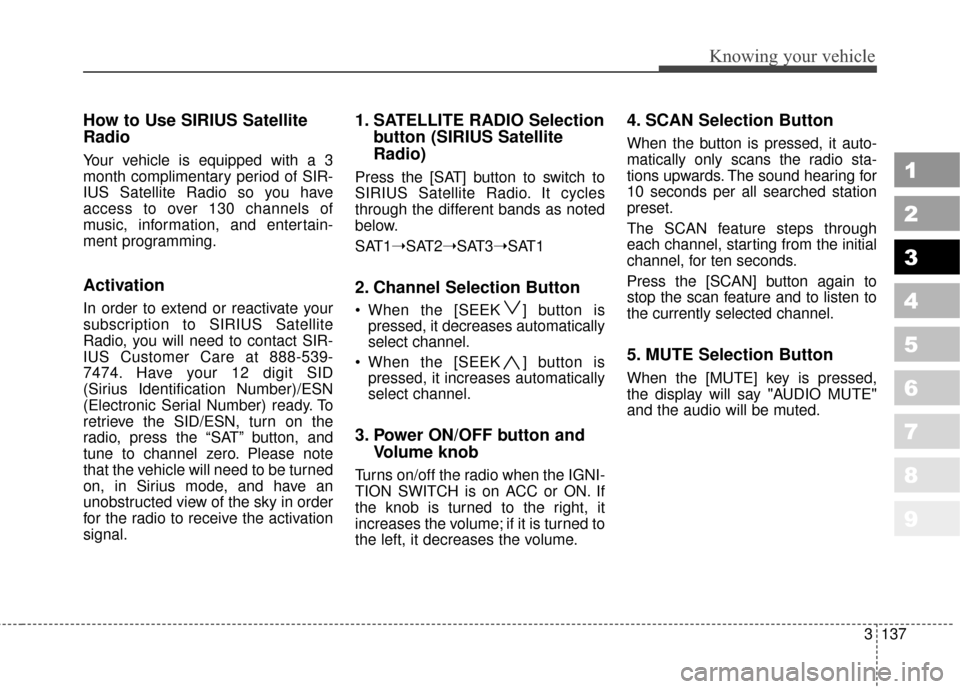
How to Use SIRIUS Satellite
Radio
Your vehicle is equipped with a 3
month complimentary period of SIR-
IUS Satellite Radio so you have
access to over 130 channels of
music, information, and entertain-
ment programming.
Activation
In order to extend or reactivate your
subscription to SIRIUS Satellite
Radio, you will need to contact SIR-
IUS Customer Care at 888-539-
7474. Have your 12 digit SID
(Sirius Identification Number)/ESN
(Electronic Serial Number) ready. To
retrieve the SID/ESN, turn on the
radio, press the “SAT” button, and
tune to channel zero. Please note
that the vehicle will need to be turned
on, in Sirius mode, and have an
unobstructed view of the sky in order
for the radio to receive the activation
signal.
1. SATELLITE RADIO Selectionbutton (SIRIUS Satellite
Radio)
Press the [SAT] button to switch to
SIRIUS Satellite Radio. It cycles
through the different bands as noted
below.
SAT1➝SAT2➝SAT3➝SAT1
2. Channel Selection Button
When the [SEEK ] button is
pressed, it decreases automatically
select channel.
When the [SEEK ] button is pressed, it increases automatically
select channel.
3. Power ON/OFF button and Volume knob
Turns on/off the radio when the IGNI-
TION SWITCH is on ACC or ON. If
the knob is turned to the right, it
increases the volume; if it is turned to
the left, it decreases the volume.
4. SCAN Selection Button
When the button is pressed, it auto-
matically only scans the radio sta-
tions upwards. The sound hearing for
10 seconds per all searched station
preset.
The SCAN feature steps through
each channel, starting from the initial
channel, for ten seconds.
Press the [SCAN] button again to
stop the scan feature and to listen to
the currently selected channel.
5. MUTE Selection Button
When the [MUTE] key is pressed,
the display will say "AUDIO MUTE"
and the audio will be muted.
Page 295 of 371
611
In case of an emergency
1
2
3
4
5
6
7
8
9
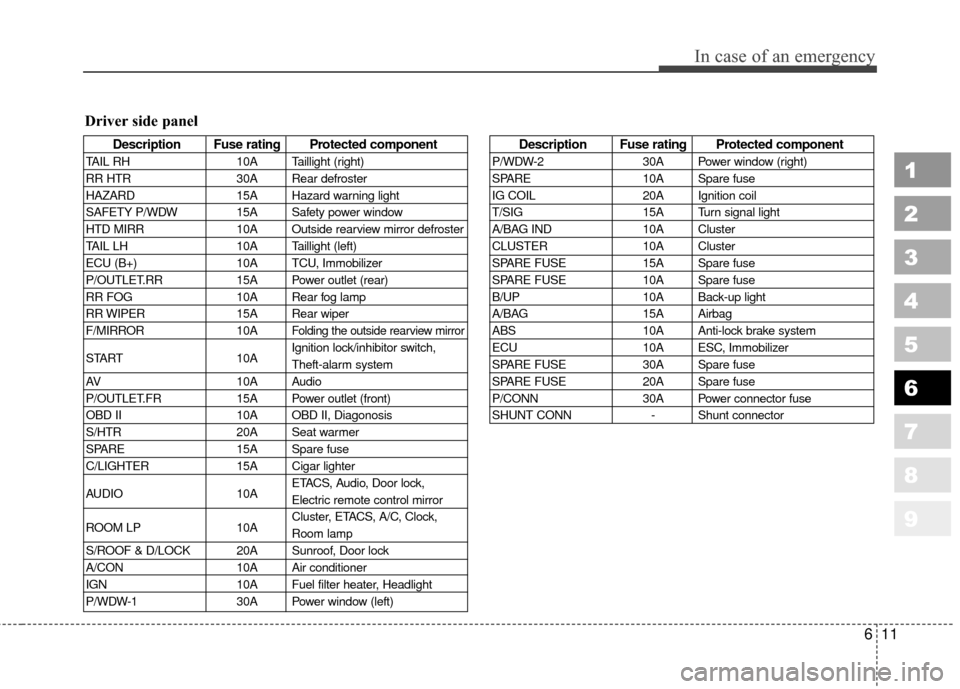
Description Fuse rating Protected component
TAIL RH10A Taillight (right)
RR HTR 30A Rear defroster
HAZARD 15A Hazard warning light
SAFETY P/WDW 15A Safety power window
HTD MIRR 10A Outside rearview mirror defroster
TAIL LH 10A Taillight (left)
ECU (B+) 10A TCU, Immobilizer
P/OUTLET.RR 15A Power outlet (rear)
RR FOG 10A Rear fog lamp
RR WIPER 15A Rear wiper
F/MIRROR 10A
Folding the outside rearview mirror
START10AIgnition lock/inhibitor switch,
Theft-alarm system
AV 10A Audio
P/OUTLET.FR 15A Power outlet (front)
OBD II 10A OBD II, Diagonosis
S/HTR 20A Seat warmer
SPARE 15A Spare fuse
C/LIGHTER 15A Cigar lighter
AUDIO 10AETACS, Audio, Door lock,
Electric remote control mirror
ROOM LP 10ACluster, ETACS, A/C, Clock,
Room lamp
S/ROOF & D/LOCK 20A Sunroof, Door lock
A/CON 10A Air conditioner
IGN 10A Fuel filter heater, Headlight
P/WDW-1 30A Power window (left)
Description Fuse rating Protected component
P/WDW-230A Power window (right)
SPARE 10A Spare fuse
IG COIL 20A Ignition coil
T/SIG 15A Turn signal light
A/BAG IND 10A Cluster
CLUSTER 10A Cluster
SPARE FUSE 15A Spare fuse
SPARE FUSE 10A Spare fuse
B/UP 10A Back-up light
A/BAG 15A Airbag
ABS 10A Anti-lock brake system
ECU 10A ESC, Immobilizer
SPARE FUSE 30A Spare fuse
SPARE FUSE 20A Spare fuse
P/CONN 30A Power connector fuse
SHUNT CONN - Shunt connector
Driver side panel
Page 297 of 371
613
In case of an emergency
1
2
3
4
5
6
7
8
9
Power connector fuse
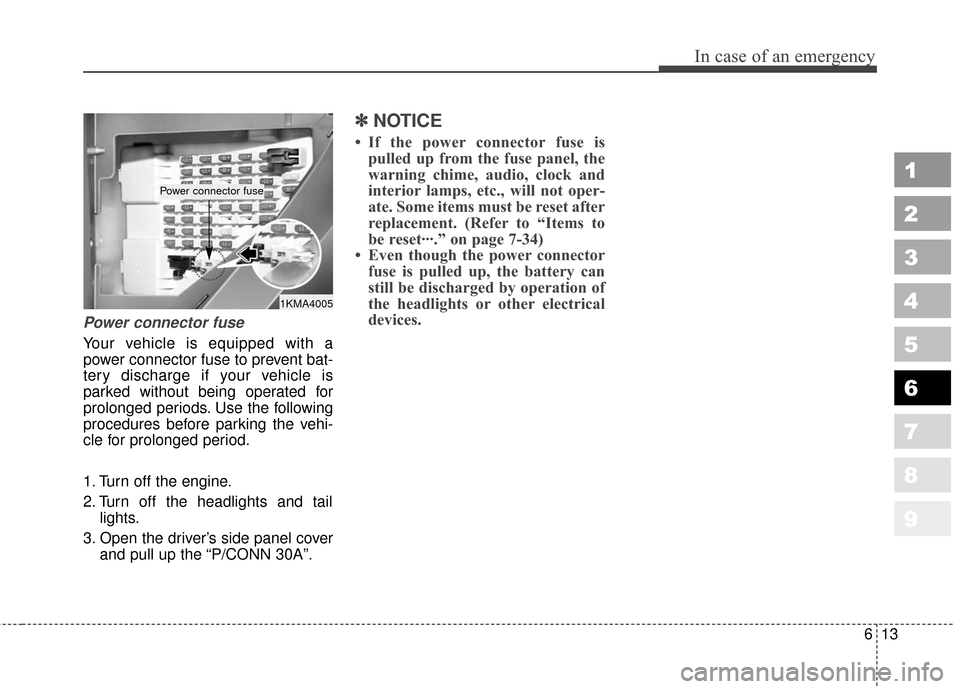
Your vehicle is equipped with a
power connector fuse to prevent bat-
tery discharge if your vehicle is
parked without being operated for
prolonged periods. Use the following
procedures before parking the vehi-
cle for prolonged period.
1. Turn off the engine.
2. Turn off the headlights and taillights.
3. Open the driver’s side panel cover and pull up the “P/CONN 30A”.
✽ ✽NOTICE
• If the power connector fuse is
pulled up from the fuse panel, the
warning chime, audio, clock and
interior lamps, etc., will not oper-
ate. Some items must be reset after
replacement. (Refer to “Items to
be reset···.” on page 7-34)
• Even though the power connector fuse is pulled up, the battery can
still be discharged by operation of
the headlights or other electrical
devices.
1KMA4005
Power connector fuse
Page 343 of 371
Maintenance
34
7
1
2
3
4
5
6
7
8
9
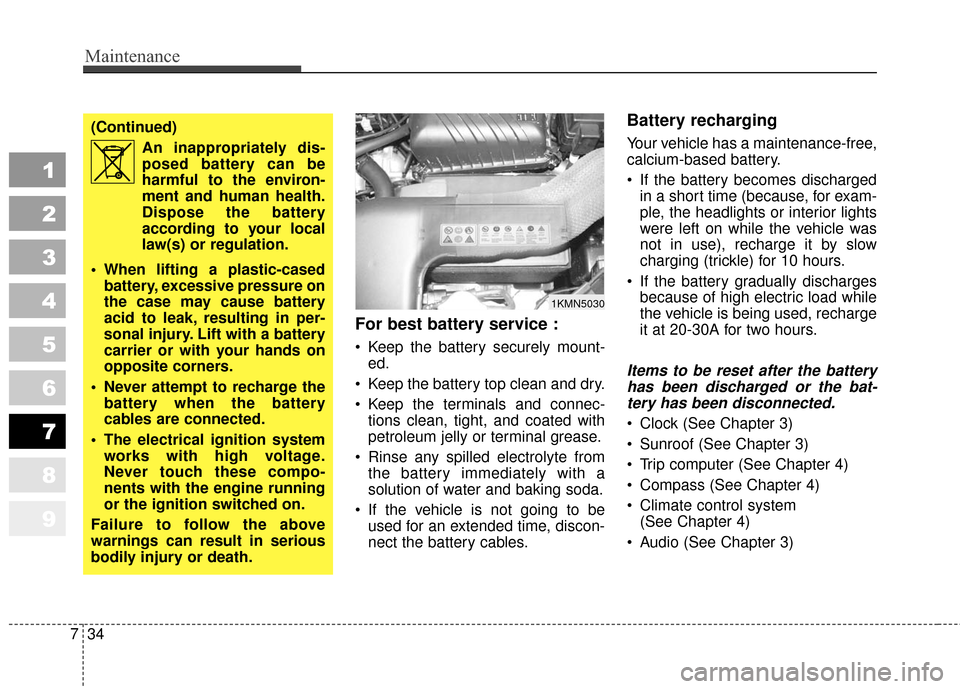
For best battery service :
Keep the battery securely mount-
ed.
Keep the battery top clean and dry.
Keep the terminals and connec- tions clean, tight, and coated with
petroleum jelly or terminal grease.
Rinse any spilled electrolyte from the battery immediately with a
solution of water and baking soda.
If the vehicle is not going to be used for an extended time, discon-
nect the battery cables.
Battery recharging
Your vehicle has a maintenance-free,
calcium-based battery.
If the battery becomes dischargedin a short time (because, for exam-
ple, the headlights or interior lights
were left on while the vehicle was
not in use), recharge it by slow
charging (trickle) for 10 hours.
If the battery gradually discharges because of high electric load while
the vehicle is being used, recharge
it at 20-30A for two hours.
Items to be reset after the batteryhas been discharged or the bat-tery has been disconnected.
Clock (See Chapter 3)
Sunroof (See Chapter 3)
Trip computer (See Chapter 4)
Compass (See Chapter 4)
Climate control system (See Chapter 4)
Audio (See Chapter 3)
1KMN5030
(Continued) An inappropriately dis-
posed battery can be
harmful to the environ-
ment and human health.
Dispose the battery
according to your local
law(s) or regulation.
When lifting a plastic-cased battery, excessive pressure on
the case may cause battery
acid to leak, resulting in per-
sonal injury. Lift with a battery
carrier or with your hands on
opposite corners.
Never attempt to recharge the battery when the battery
cables are connected.
The electrical ignition system works with high voltage.
Never touch these compo-
nents with the engine running
or the ignition switched on.
Failure to follow the above
warnings can result in serious
bodily injury or death.
Page 369 of 371

Index
29
1
2
3
4
5
6
7
8
9
Air cleaner. . . . . . . . . . . . . . . . . . . . . . . . . . . . . . . . . . 7-29\
Airbags-supplemental restraint system . . . . . . . . . . 3-55
Audio system . . . . . . . . . . . . . . . . . . . . . . . . . . . . . . . 3-105
Automatic climate control system. . . . . . . . . . . . . . . 4-71
Automatic transaxle . . . . . . . . . . . . . . . . . . . . . . 4-6, 7-25
Battery . . . . . . . . . . . . . . . . . . . . . . . . . . . . . . . . . . . . \
. 7-33
Before driving . . . . . . . . . . . . . . . . . . . . . . . . . . . . . . . . 5-5
Brake system . . . . . . . . . . . . . . . . . . . . . . . . . . . . . . . . 4-18
Brakes and clutch . . . . . . . . . . . . . . . . . . . . . . . . . . . . 7-22
Climate control air filter . . . . . . . . . . . . . . . . . . . . . . 7-30
Compass . . . . . . . . . . . . . . . . . . . . . . . . . . . . . . . . . . . 4-\
51
Cruise control system. . . . . . . . . . . . . . . . . . . . . . . . . 4-26
Defroster . . . . . . . . . . . . . . . . . . . . . . . . . . . . . . . . . . . 4-\
61
Door locks . . . . . . . . . . . . . . . . . . . . . . . . . . . . . . . . . . . 3-\
9
Electrical circuit protection . . . . . . . . . . . . . . . . . . . . . 6-7
Electronic stability control . . . . . . . . . . . . . . . . . . . . 4-30
Emergency starting . . . . . . . . . . . . . . . . . . . . . . . . . . . 6-4Emission control system . . . . . . . . . . . . . . . . . . . . . . . 5-3
Engine compartment . . . . . . . . . . . . . . . . . . . . . . . . . 7-15
Engine cooling system . . . . . . . . . . . . . . . . . . . . . . . . 7-19
Engine oil and oil filter . . . . . . . . . . . . . . . . . . . . . . . 7-17
Explanation of scheduled maintenance items . . . . . . 7-8
Exterior care . . . . . . . . . . . . . . . . . . . . . . . . . . . . . . . . 7-50
Four wheel drive (4WD) . . . . . . . . . . . . . . . . . . . . . . 4-12
Fuel filler lid . . . . . . . . . . . . . . . . . . . . . . . . . . . . . . . . 3-81
Fuel requirements . . . . . . . . . . . . . . . . . . . . . . . . . . . . 5-2
Gauges . . . . . . . . . . . . . . . . . . . . . . . . . . . . . . . . . . . . \
. 4-34
Hazard warning flasher . . . . . . . . . . . . . . . . . . . . . . . 4-62
Homelink® wireless control system . . . . . . . . . . . . . 5-45
Hood. . . . . . . . . . . . . . . . . . . . . . . . . . . . . . . . . . \
. . . . . 3-80
How to use this manual . . . . . . . . . . . . . . . . . . . . . . . . 1-2
If you have a flat tire . . . . . . . . . . . . . . . . . . . . . . . . . 6-19
Ignition switch . . . . . . . . . . . . . . . . . . . . . . . . . . . . . . . 4-2
Immobilizer system . . . . . . . . . . . . . . . . . . . . . . . . . . . 3-6
In case of an emergency while driving . . . . . . . . . . . . 6-2
Instrument cluster . . . . . . . . . . . . . . . . . . . . . . . . . . . 4-33
A
B
C
D
E
G
F
H
I