fuel KIA SPORTAGE 2015 Features and Functions Guide
[x] Cancel search | Manufacturer: KIA, Model Year: 2015, Model line: SPORTAGE, Model: KIA SPORTAGE 2015Pages: 42, PDF Size: 1.72 MB
Page 3 of 42
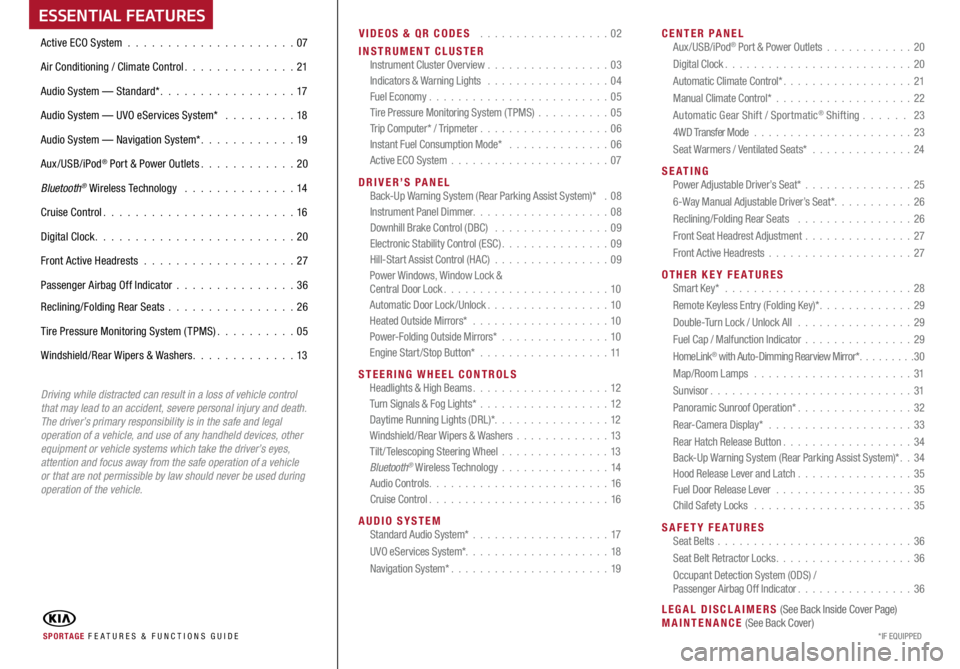
ESSENTIAL FEATURESVIDEOS & QR CODES . . . . . . . . . . . . . . . . . . 02
INSTRUMENT CLUSTER Instrument Cluster Overview . . . . . . . . . . . . . . . . . 03
Indicators & Warning Lights . . . . . . . . . . . . . . . . . 04
Fuel Economy . . . . . . . . . . . . . . . . . . . . . . . . . 05
Tire Pressure Monitoring System (TPMS) . . . . . . . . . .05
Trip Computer* / Tripmeter . . . . . . . . . . . . . . . . . . 06
Instant Fuel Consumption Mode* . . . . . . . . . . . . . . 06
Active ECO System . . . . . . . . . . . . . . . . . . . . . . 07
DRIVER’S PANEL
Back-Up Warning System (Rear Parking Assist System)* . 08
Instrument Panel Dimmer . . . . . . . . . . . . . . . . . . . 08
Downhill Brake Control (DBC) . . . . . . . . . . . . . . . . 09
Electronic Stability Control (ESC) . . . . . . . . . . . . . . . 09
H
ill-Start Assist Control (HAC) . . . . . . . . . . . . . . . . 09
Power Windows, Window Lock &
Central Door Lock . . . . . . . . . . . . . . . . . . . . . . . 10
Automatic Door Lock /Unlock . . . . . . . . . . . . . . . . . 10
Heated Outside Mirrors* . . . . . . . . . . . . . . . . . . . 10
Power-Folding Outside Mirrors* . . . . . . . . . . . . . . . 10
Engine Start/Stop Button* . . . . . . . . . . . . . . . . . . 11
STEERING WHEEL CONTROLS
Headlights & High Beams . . . . . . . . . . . . . . . . . . . 12
Turn Signals & Fog Lights* . . . . . . . . . . . . . . . . . . 12
Daytime Running Lights (DRL)* . . . . . . . . . . . . . . . . 12
Windshield/Rear Wipers & Washers . . . . . . . . . . . . .13
Tilt/ Telescoping Steering Wheel . . . . . . . . . . . . . . .13
B
luetooth® Wireless Technology . . . . . . . . . . . . . . . 14
Audio Controls . . . . . . . . . . . . . . . . . . . . . . . . . 16
Cruise Control . . . . . . . . . . . . . . . . . . . . . . . . . 16
AUDIO SYSTEM
Standard Audio System* . . . . . . . . . . . . . . . . . . . 17
UVO eServices System* . . . . . . . . . . . . . . . . . . . . 18
Navigation System* . . . . . . . . . . . . . . . . . . . . . . 19
CENTER PANEL
Aux/USB/iPod
® Port & Power Outlets . . . . . . . . . . . . 20
Digital Clock . . . . . . . . . . . . . . . . . . . . . . . . . . 20
Automatic Climate Control* . . . . . . . . . . . . . . . . . . 21
M
anual Climate Control* . . . . . . . . . . . . . . . . . . . 22
Automatic Gear Shift / Sportmatic
® Shifting . . . . . . 23
4WD Transfer Mode . . . . . . . . . . . . . . . . . . . . . . 23
Seat Warmers / Ventilated Seats* . . . . . . . . . . . . . .24
SE ATING
Power Adjustable Driver’s Seat* . . . . . . . . . . . . . . .25
6-Way Manual Adjustable Driver’s Seat* . . . . . . . . . . . 26
Reclining/Folding Rear Seats . . . . . . . . . . . . . . . . 26
Front Seat Headrest Adjustment . . . . . . . . . . . . . . .27
Front Active Headrests . . . . . . . . . . . . . . . . . . . . 27
OTHER KEY FEATURES
Smart Key* . . . . . . . . . . . . . . . . . . . . . . . . . . 28
Remote Keyless Entry (Folding Key)* . . . . . . . . . . . . . 29
Double-Turn Lock / Unlock All . . . . . . . . . . . . . . . . 29
F
uel Cap / Malfunction Indicator . . . . . . . . . . . . . . .29
HomeLink
® with Auto-Dimming Rearview Mirror* . . . . . . . . .30
Map/Room Lamps . . . . . . . . . . . . . . . . . . . . . . 31
Sunvisor . . . . . . . . . . . . . . . . . . . . . . . . . . . . 31
Panoramic Sunroof Operation* . . . . . . . . . . . . . . . . 32
Rear-Camera Display* . . . . . . . . . . . . . . . . . . . . 33
Rear Hatch Release Button . . . . . . . . . . . . . . . . . . 34
Back-Up Warning System (Rear Parking Assist System)* . . 34
Hood Release Lever and Latch . . . . . . . . . . . . . . . .35
Fuel Door Release Lever . . . . . . . . . . . . . . . . . . . 35
Child Safety Locks . . . . . . . . . . . . . . . . . . . . . . 35
S
AFETY FEATURES
Seat Belts . . . . . . . . . . . . . . . . . . . . . . . . . . . 36
Seat Belt Retractor Locks . . . . . . . . . . . . . . . . . . . 36
Occupant Detection System (ODS) /
Passenger Airbag Off Indicator . . . . . . . . . . . . . . . . 36
LEGAL DISCLAIMERS (See Back Inside Cover Page)
MAINTENANCE (See Back Cover)
Active ECO System . . . . . . . . . . . . . . . . . . . . .
07
Air Conditioning / Climate Control . . . . . . . . . . . . . . 21
Audio System — Standard* . . . . . . . . . . . . . . . . . 17
Audio System — UVO eServices System* . . . . . . . . . 18
Audio System — Navigation System* . . . . . . . . . . . . 19
Aux/USB/iPod
® Port & Power Outlets . . . . . . . . . . . . 20
Bluetooth
® Wireless Technology . . . . . . . . . . . . . . 14
Cruise Control . . . . . . . . . . .
. . . . . . . . . . . . . 16
Digital Clock . . . . . . . . . . . . . . . . . . . . . . . . . 20
Front Active Headrests . . . . . . . . . . . . . . . . . . . 27
Passenger Airbag Off Indicator . . . . . . . . . . . . . . .36
Reclining/Folding Rear Seats . . . . . . . . . . . . . . . . 26
Tire Pressure Monitoring System (TPMS) . . . . . . . . . . 05
Windshield/Rear Wipers & Washers . . . . . . . . . . . . . 13
SPORTAGE FE ATURES & FUNCTIONS GUIDE *IF EQUIPPED
Driving while distracted can result in a loss of vehicle control
that may lead to an accident, severe personal injury and death.
The driver’s primary responsibility is in the safe and legal
operation of a vehicle, and use of any handheld devices, other
equipment or vehicle systems which take the driver’s eyes,
attention and focus away from the safe operation of a vehicle
or that are not permissible by law should never be used during
operation of the vehicle.
Page 4 of 42
SPORTAGE FEATURES & FUNCTIONS GUIDE2*IF EQUIPPED
VIDEOS & QR \fODES -\Q SMARTPHONES\b TABLETS AND \fOMPUTER\QS
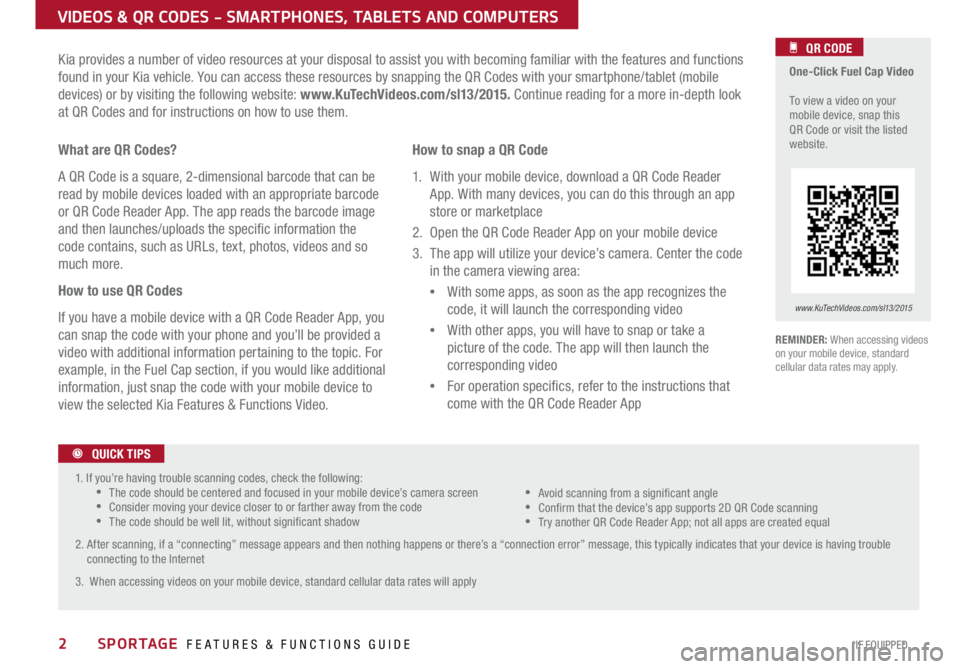
Kia provides a number of video resources at your disposal to assist you with becoming familiar with the features and functions
found in your Kia vehicle. You can access these resources by snapping the QR Codes with your smartphone/tablet (mobile
devices) or by visiting the following website: www.KuTechVideos.com/sl13/2015. Continue reading for a more in-depth look
at QR Codes and for instructions on how to use them.
REMINDER: When accessing videos
on your mobile device, standard
cellular data rates may apply .
One-Click Fuel Cap Video
To view a video on your
mobile device, snap this
QR Code or visit the listed
website .
www.KuTechVideos.com/sl13/2015
What are QR Codes?
A QR Code is a square, 2-dimensional barcode that can be
read by mobile devices loaded with an appropriate barcode
or QR Code Reader App. The app reads the barcode image
and then launches/uploads the specic information the
code contains, such as URLs, text, photos, videos and so
much more.
How to use QR Codes
If you have a mobile device with a QR Code Reader App, you
can snap the code with your phone and you’ll be provided a
video with additional information pertaining to the topic. For
example, in the Fuel Cap section, if you would like additional
information, just snap the code with your mobile device to
view the selected Kia Features & Functions Video. How to snap a QR Code
1. With your mobile device, download a QR Code Reader
App . With many devices, you can do this through an app
store or marketplace
2. Open the QR Code Reader App on your mobile device
3. The app will utilize your device’s camera. Center the code in the camera viewing area:
With some apps, as soon as the app recognizes the
code, it will launch the corresponding video
With other apps, you will have to snap or take a
picture of the code. The app will then launch the
corresponding video
For operation specics, refer to the instructions that
come with the QR Code Reader App
QR CODE
1. If you’re having trouble scanning codes, check the following:
The code should be centered and focused in your mobile device’s camera screen
Consider moving your device closer to or farther away from the code
The code should be well lit, without signicant shadow
2. After scanning, if a “connecting” message appears and then nothing happens or there’s a “connection error” message, this typically indicates that your device is having trouble connecting to the Internet
3. When accessing videos on your mobile device, standard cellular data rates will apply
Avoid scanning from a signicant angle
Conrm that the device’s app supports 2D QR Code scanning
Try another QR Code Reader App; not all apps are created equal
QUICK TIPS
Page 5 of 42
3
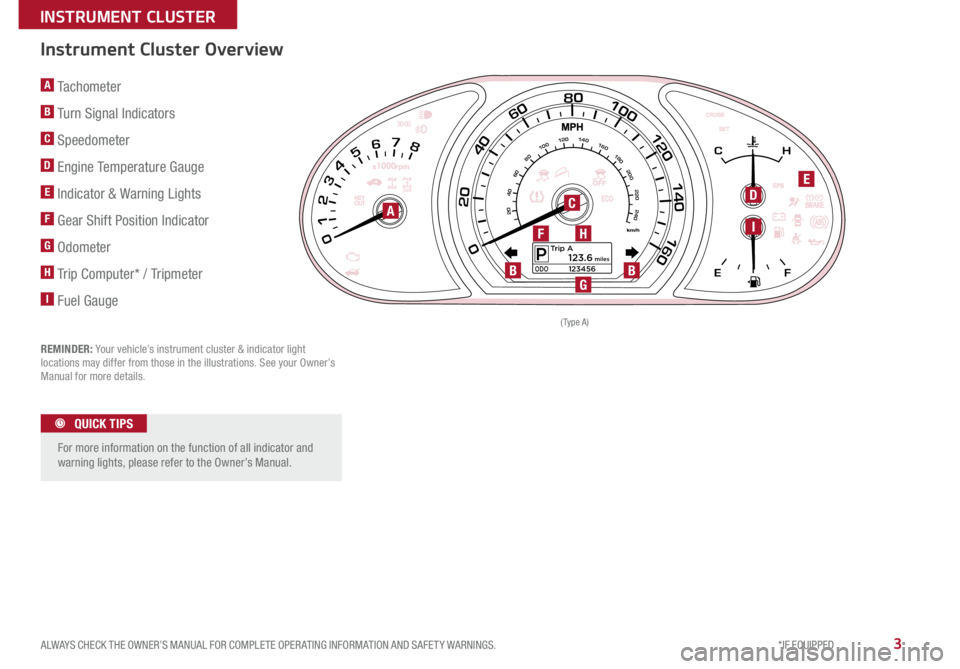
A Tachometer
B Turn Signal Indicators
C Speedometer
D Engine Temperature Gauge
E Indicator & Warning Lights
F Gear Shift Position Indicator
G Odometer
H Trip Computer* / Tripmeter
I Fuel Gauge
REMINDER: Your vehicle’s instrument cluster & indicator light
locations may differ from those in the illustrations
See your Owner’s
Manual for more details
Instrument Cluster Overview
For more information on the function of all indicator and
warning lights, please refer to the Owner’s Manual
QUICK TIPS
80100
120
140
1600
20
40
6080100120140160180200
220
240
40
20
60
0 1
2 3 4 5 6 7 8C H
E F
Trip AP123456ODO123.6 mile\f
80100
120
140
1600
20
40
6080100120140160180200
220
240
40
20
60
0 1
2 3 4 5 6 7 8C H
E F
Trip AP123456ODO123.6 mile\f
( Type A )
ACDE
IH
G
F
BB
ALWAYS CHECK THE OWNER’S MANUAL FOR COMPLETE OPER ATING INFORMATION AND SAFET Y WARNINGS. *IF EQUIPPED
INSTRUMENT CLUSTER
Page 6 of 42
SPORTAGE FEATURES & FUNCTIONS GUIDE4*IF EQUIPPED
INSTRUMENT \fLUSTER
TRIP A
Average Speed
E/T
72°F24025mi.N
2489.4 mi.
64 MPH
23:47
REMINDER: Your vehicle’s instrument cluster &
indicator light locations may differ from those in
the illustrations . See your Owner’s Manual for
more details .
( Type B)
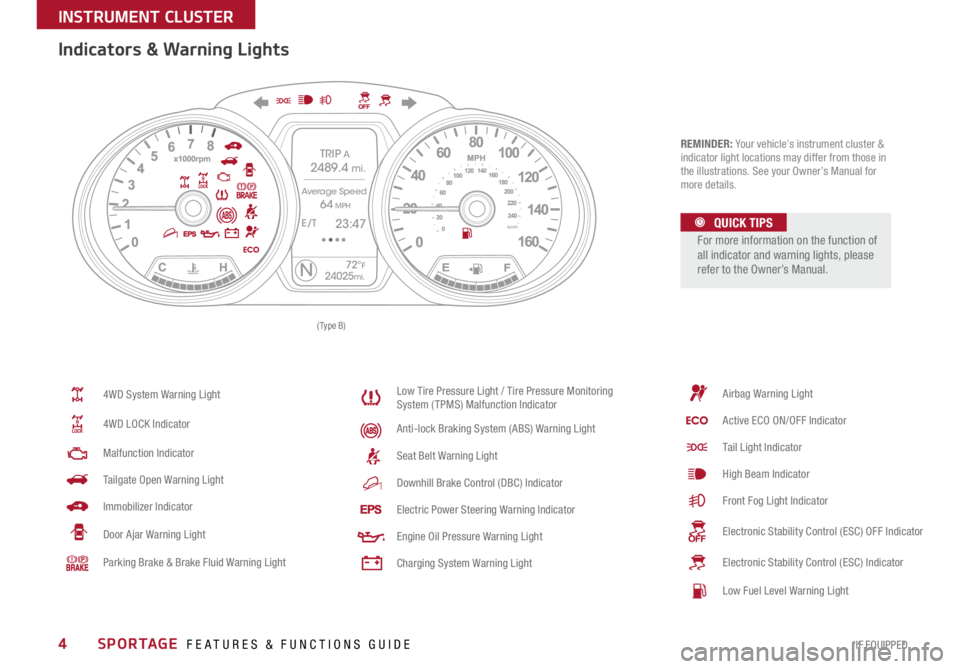
Indicators & Warning Lights
4WD System Warning Light
4WD LOCK Indicator
Malfunction Indicator
Tailgate Open Warning Light
Immobilizer Indicator
Door Ajar Warning Light
Parking Brake & Brake Fluid Warning Light
Low Tire Pressure Light / Tire Pressure Monitoring
System (TPMS) Malfunction Indicator
Anti-lock Braking System (ABS) Warning Light
Seat Belt Warning Light
Downhill Brake Control (DBC) Indicator
Electric Power Steering Warning Indicator
Engine Oil Pressure Warning Light
Charging System Warning Light
Airbag Warning Light
Active ECO ON/OFF Indicator
Tail Light Indicator
High Beam Indicator
Front Fog Light Indicator
Electronic Stability Control (ESC) OFF Indicator
Electronic Stability Control (ESC) Indicator
Low Fuel Level Warning Light
For more information on the function of
all indicator and warning lights, please
refer to the Owner’s Manual.
QUICK TIPS
Page 7 of 42
5
Fuel Economy
There are several factors that contribute to your
vehicle’s fuel economy, including maintenance of
your vehicle, driving style, environmental conditions,
vehicle weight and vehicle aerodynamics
Below are
tips on how to help improve fuel economy:
• K
eep your vehicle in good condition with regular
maintenance
• D
on’t let the engine idle longer than necessary
•D
rive at a moderate speed, accelerating
smoothly and at a moderate rate
• K
eep tires inflated to the recommended pressure
•T
ravel lightly, without carrying unnecessary
weight in your vehicles
• A
void placing large or heavy items on roof racks
•A
void hilly, winding or poorly maintained roads
REMINDER: Driving range varies depending on a vehicle’s fuel
tank size, e g , 1 2-gal vs 24-gal Even though the two vehicles'
MPG may be the same, the vehicle with the larger tank will have
the greater range
F
or more information on Fuel Economy, you can snap the QR Code
to the right to view a video or refer to the brochure, "GETTING
MORE OUT OF EVERY GALLON, FUEL-SAVING TIPS TO DRIVE BY"
available at your local dealership.
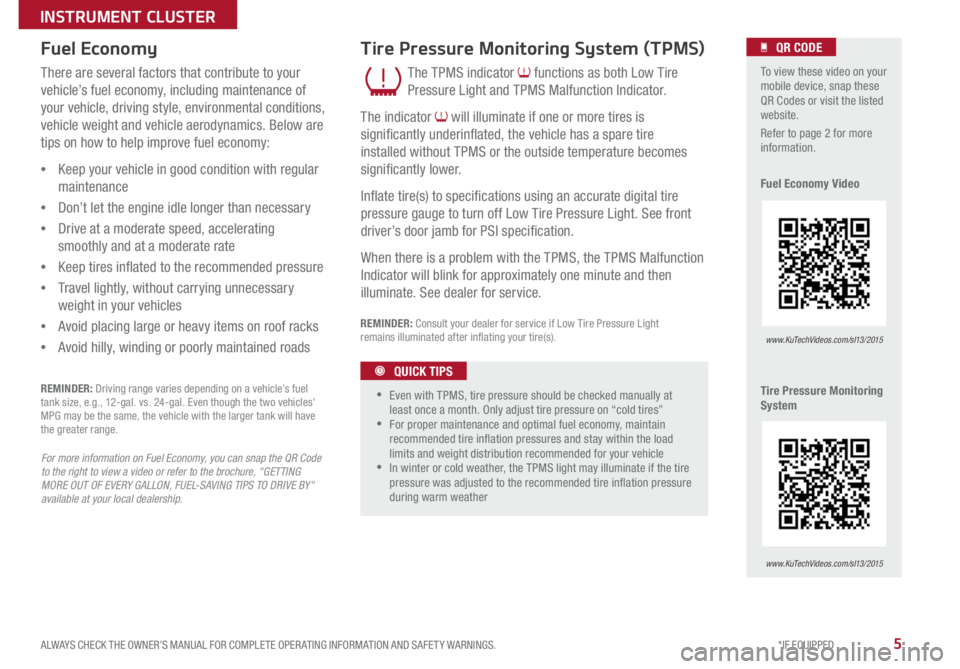
The TPMS indicator functions as both Low Tire
Pressure Light and TPMS Malfunction Indicator
The indicator
will illuminate if one or more tires is
significantly underinflated, the vehicle has a spare tire
installed without TPMS or the outside temperature becomes
significantly lower
I
nflate tire(s) to specifications using an accurate digital tire
pressure gauge to turn off Low Tire Pressure Light
See front
driver’s door jamb for PSI specification
W
hen there is a problem with the TPMS, the TPMS Malfunction
Indicator will blink for approximately one minute and then
illuminate
See dealer for service
Tire Pressure Monitoring System (TPMS)
REMINDER: Consult your dealer for service if Low Tire Pressure Light
remains illuminated after inflating your tire(s)
To view these video on your
mobile device, snap these
QR Codes or visit the listed
website
R
efer to page 2 for more
information
F
uel Economy Video
Tire Pressure Monitoring
System
www.KuTechVideos.com/sl13/2015
www.KuTechVideos.com/sl13/2015
QR CODE
•
•Even with TPMS, tire pressure should be checked manually at
least once a month Only adjust tire pressure on “cold tires”
•For proper maintenance and optimal fuel economy, maintain
recommended tire inflation pressures and stay within the load
limits and weight distribution recommended for your vehicle
•In winter or cold weather, the TPMS light may illuminate if the tire
pressure was adjusted to the recommended tire inflation pressure
during warm weather
QUICK TIPS
ALWAYS CHECK THE OWNER’S MANUAL FOR COMPLETE OPER ATING INFORMATION AND SAFET Y WARNINGS. *IF EQUIPPED
INSTRUMENT CLUSTER
Page 8 of 42
SPORTAGE FEATURES & FUNCTIONS GUIDE6*IF EQUIPPED
INSTRUMENT \fLUSTERTRIP A
Average Speed
E/T
-12°F324025mi.N
2489.4 mi.
64 MPH
23:47
72°F24025mi.N
030 60
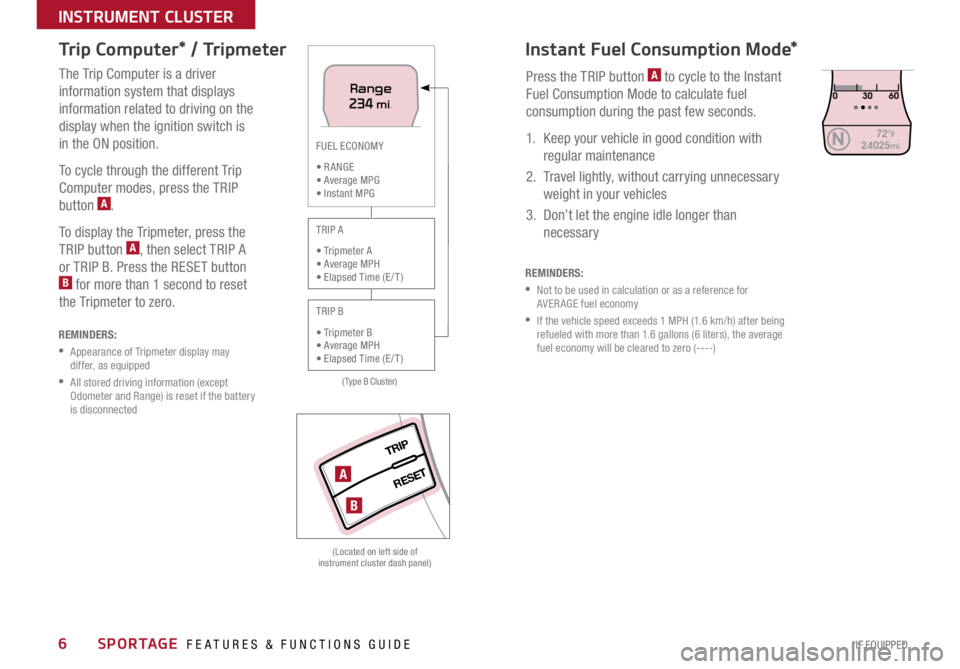
Press the TRIP button A to cycle to the Instant
Fuel Consumption Mode to calculate fuel
consumption during the past few seconds.
1. Keep your vehicle in good condition with regular maintenance
2. Travel lightly, without carrying unnecessary weight in your vehicles
3. Don’t let the engine idle longer than necessary
REMINDERS:
Not to be used in calculation or as a reference for
AVER AGE fuel economy
If the vehicle speed exceeds 1 MPH (1.6 km/h) after being
refueled with more than 1.6 gallons (6 liters), the average
fuel economy will be cleared to zero (----)
Instant Fuel \fonsumption Mode*
Trip \fomputer* / Tripmeter
REMINDERS:
Appearance of Tripmeter display may
differ, as equipped
All stored driving information (except
Odometer and Range) is reset if the battery
is disconnected
The Trip Computer is a driver
information system that displays
information related to driving on the
display when the ignition switch is
in the ON position.
To cycle through the different Trip
Computer modes, press the TRIP
button
A.
To display the Tripmeter, press the
TRIP button
A, then select TRIP A
or TRIP B. Press the RESET button
B for more than 1 second to reset
the Tripmeter to zero.
(Located on left side of
instrument cluster dash panel)
TRIP
RESET
(Type B Cluster)
FUEL ECONOMY
• R ANGE
• Average MPG
• Instant MPG
TRIP A
• Tripmeter A
• Average MPH
• Elapsed Time (E / T )
TRIP B
• Tripmeter B
• Average MPH
• Elapsed Time (E / T )
Range234 mi .
A
B
Page 9 of 42
7ALWAYS CHECK THE OWNER’S MANUAL FOR COMPLETE OPER ATING INFORMATION AND SAFET Y WARNINGS. *IF EQUIPPED
INSTRUMENT \fLUSTER
Active E\fO System
For more information on the Active ECO indicator, refer to your Owner’s Manual or contact
your local dealership.
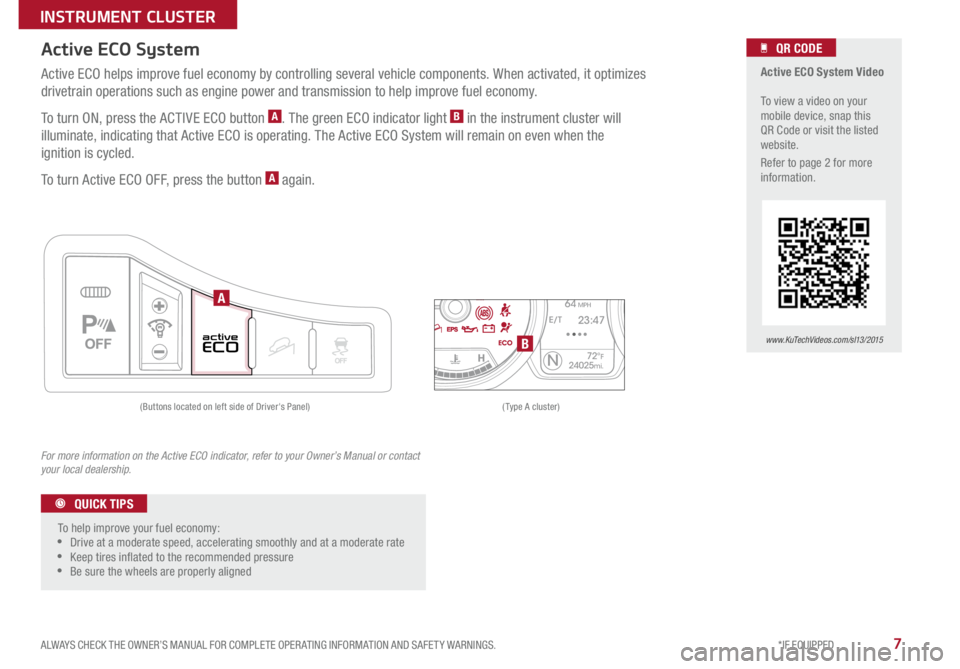
Active ECO helps improve fuel economy by controlling several vehicle components. When activated, it optimizes
drivetrain operations such as engine power and transmission to help improve fuel economy.
To turn ON, press the ACTIVE ECO button
A. The green ECO indicator light B in the instrument cluster will
illuminate, indicating that Active ECO is operating. The Active ECO System will remain on even when the
ignition is cycled.
To turn Active ECO OFF, press the button
A again .
TRIP A
Average Speed
E/T
72°F24025mi.N
2489.4 mi.
64 MPH
23:47
(Type A cluster)
(Buttons located on left side of Driver's Panel)
P
Active ECO System Video
To view a video on your
mobile device, snap this
QR Code or visit the listed
website .
Refer to page 2 for more
information .
www.KuTechVideos.com/sl13/2015
QR CODE
To help improve your fuel economy:
Drive at a moderate speed, accelerating smoothly and at a moderate rate
Keep tires inated to the recommended pressure
Be sure the wheels are properly aligned
QUICK TIPS
A
B
Page 31 of 42
29
Double-Turn Lock/Unlock All
•Turn clockwise once to unlock Driver’s Door
•T
urn clockwise again within 4 seconds to unlock All Doors
•T
urn counterclockwise once to Lock All Doors
Lock Unlock
Fuel Cap / Malfunction
Indicator (Check
Engine Light)
Tighten for ONE CLICK to prevent
Malfunction Indicator
from
illuminating
REMINDER: The Fuel Door Release Lever is
located on the lower part of the driver’s door sill
Remote Keyless Entry (Folding Key)*
HOLD
HOLD
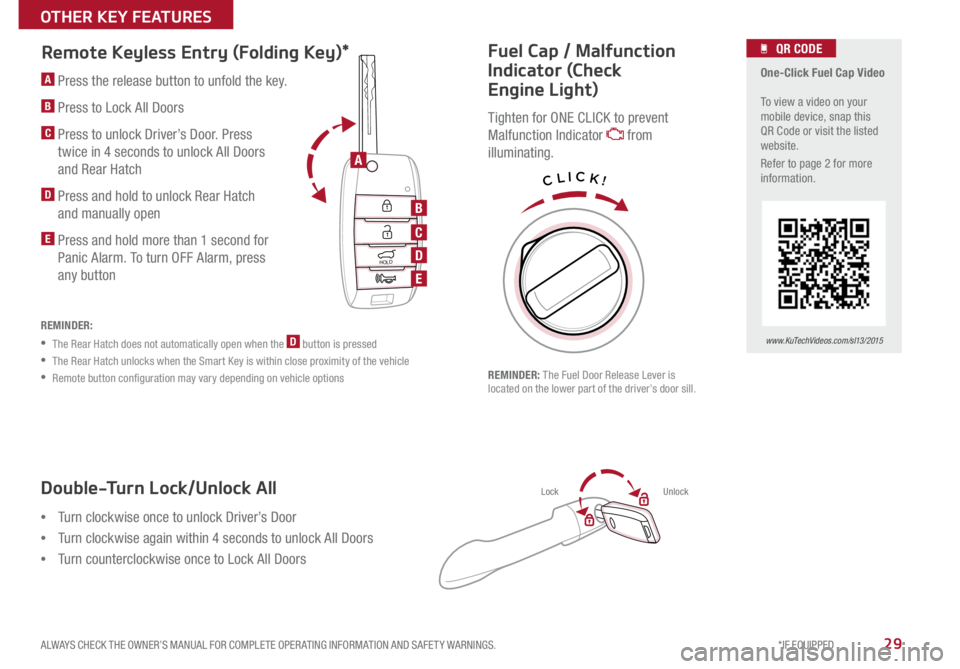
A Press the release button to unfold the key
B Press to Lock All Doors
C Press to unlock Driver’s Door Press
twice in 4 seconds to unlock All Doors
and Rear Hatch
D Press and hold to unlock Rear Hatch and manually open
E Press and hold more than 1 second for Panic Alarm
To turn OFF Alarm, press
any button
REMINDER:
• The Rear Hatch does not automatically open when the D button is pressed
• The Rear Hatch unlocks when the Smart Key is within close proximity of the vehicle
• Remote button configuration may vary depending on vehicle options
One-Click Fuel Cap Video
To view a video on your
mobile device, snap this
QR Code or visit the listed
website
R
efer to page 2 for more
information
www.KuTechVideos.com/sl13/2015
QR CODE
CLICK!
A
B
C
D
E
ALWAYS CHECK THE OWNER’S MANUAL FOR COMPLETE OPER ATING INFORMATION AND SAFET Y WARNINGS. *IF EQUIPPED
OTHER KEY FEATURES
Page 37 of 42

35ALWAYS CHECK THE OWNER’S MANUAL FOR COMPLETE OPER ATING INFORMATION AND SAFET Y WARNINGS. *IF EQUIPPED
OTHER KEY FEATURES
Opening the Hood:
1. Pull the Hood Release Lever
A to unlatch the Hood
2. In the front of the vehicle, lift the Hood slightly, push the secondary Latch
B to the left inside of the Hood’s center and lift the Hood
Closing the Hood:
Lower the Hood about halfway and then press down to securely lock in place.
Hood Release Lever and Latch
Lift the Lever C upward to release the fuel door.
Fuel Door Release Lever
(Lever located on the driver’s floor near door sill)
AB
C
\fhild Safety Locks
Located on the rear edge of the rear passenger doors.
Insert the ignition key into the hole and turn the key to
the LOCK position to disable the inner door handles from
opening the rear doors .
REMINDER: Child Safety Lock is located on rear passenger’s door jamb.
Page 40 of 42
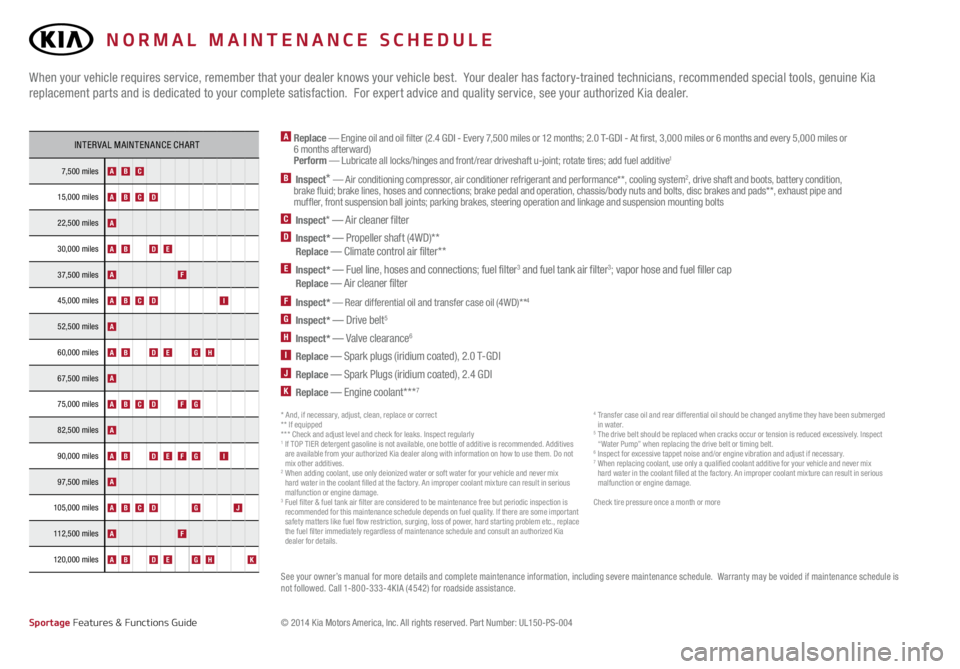
A Replace — Engine oil and oil filter (2.4 GDI - Every 7,500 miles or 12 months; 2.0 T-GDI - At first, 3,000 miles or 6 months and every 5,000 miles or
6 months afterward)
Perform — Lubricate all locks/hinges and front /rear driveshaft u-joint; rotate tires; add fuel additive
1
B Inspect* — Air conditioning compressor, air conditioner refrigerant and performance* *, cooling system2, drive shaft and boots, battery condition,
brake fluid; brake lines, hoses and connections; brake pedal and operation, chassis/body nuts and bolts, disc brakes and pads* *, exhaust pipe and
muffler, front suspension ball joints; parking brakes, steering operation and linkage and suspension mounting bolts
C Inspect* — Air cleaner filterD Inspect* — Propeller shaft (4WD)* *
Replace — Climate control air filter* *E Inspect* — Fuel line, hoses and connections; fuel filter3 and fuel tank air filter3; vapor hose and fuel filler cap
Replace — Air cleaner filter
F Inspect* — Rear differential oil and transfer case oil (4WD)* *4
G Inspect* — Drive belt5
H Inspect* — Valve clearance6
I Replace — Spark plugs (iridium coated), 2.0 T-GDIJ Replace — Spark Plugs (iridium coated), 2.4 GDIK Replace — Engine coolant* * *7
When your vehicle requires service, remember that your dealer knows your vehicle best. Your dealer has factory-trained technicians, recommended special tools, genuine Kia
replacement parts and is dedicated to your complete satisfaction. For expert advice and quality service, see your authorized Kia dealer.
See your owner’s manual for more details and complete maintenance information, including severe maintenance schedule. Warranty may be voided if maintenance schedule is
not followed. Call 1-800-333-4KIA (4542) for roadside assistance.
INTERVAL MAINTENANCE CHART
7,500 miles ABC
15,000 milesABCD
22,500 milesA
30,000 milesABDE
37,500 milesAF
45,000 milesABCDI
52,500 milesA
60,000 milesABDEGH
67,500 milesA
75,000 milesABCDFG
82,500 milesA
90,000 milesABDEFGI
97,500 milesA
105,000 miles ABCDGJ
112,500 milesAF
120,000 milesABDEGHK
*IF EQUIPPED
© 2014 Kia Motors America, Inc. All rights reserved. Part Number: UL150-PS-004
* And, if necessary, adjust, clean, replace or correct
** If equipped
* * * Check and adjust level and check for leaks. Inspect regularly
1 If TOP TIER detergent gasoline is not available, one bottle of additive is recommended. Additives
are available from your authorized Kia dealer along with information on how to use them. Do not
mix other additives.
2 When adding coolant, use only deionized water or soft water for your vehicle and never mix
hard water in the coolant filled at the factory. An improper coolant mixture can result in serious
malfunction or engine damage.
3 Fuel filter & fuel tank air filter are considered to be maintenance free but periodic inspection is
recommended for this maintenance schedule depends on fuel quality. If there are some important
safety matters like fuel flow restriction, surging, loss of power, hard starting problem etc., replace
the fuel filter immediately regardless of maintenance schedule and consult an authorized Kia
dealer for details.
4 Transfer case oil and rear differential oil should be changed anytime they have been submerged
in wa ter.
5 The drive belt should be replaced when cracks occur or tension is reduced excessively. Inspect
“Water Pump” when replacing the drive belt or timing belt.
6 Inspect for excessive tappet noise and/or engine vibration and adjust if necessary. 7 When replacing coolant, use only a qualified coolant additive for your vehicle and never mix
hard water in the coolant filled at the factory. An improper coolant mixture can result in serious
malfunction or engine damage.
Check tire pressure once a month or more
Sportage Features & Functions Guide
NORMAL MAINTENANCE SCHEDULE