turn signal KIA Sportage 2015 QL / 4.G Owner's Manual
[x] Cancel search | Manufacturer: KIA, Model Year: 2015, Model line: Sportage, Model: KIA Sportage 2015 QL / 4.GPages: 499, PDF Size: 16.07 MB
Page 15 of 499
25
Your vehicle at a glance
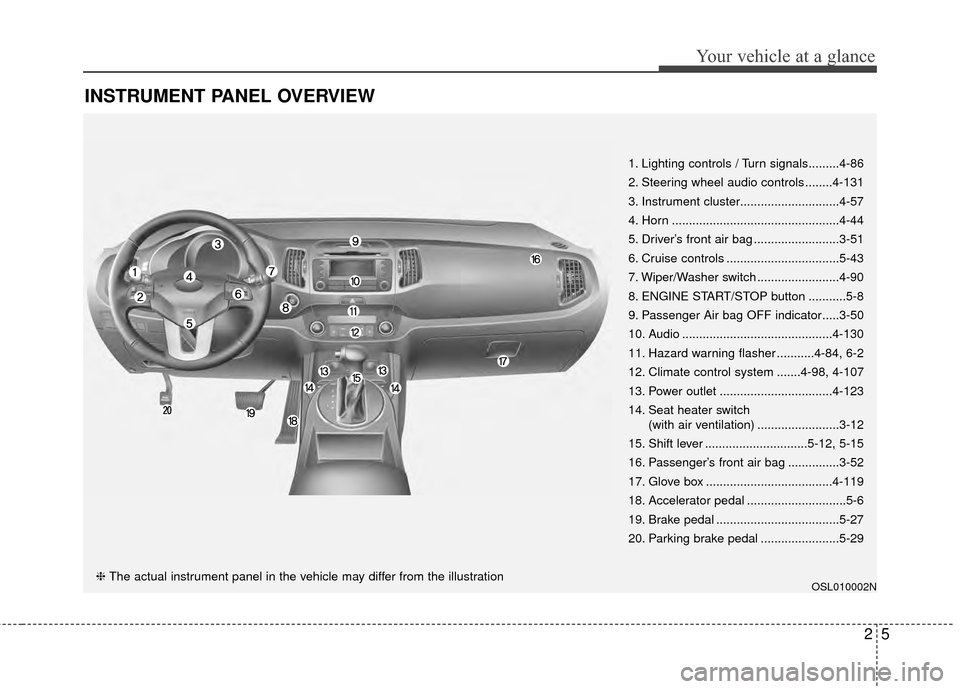
INSTRUMENT PANEL OVERVIEW
OSL010002N
1. Lighting controls / Turn signals.........4-86
2. Steering wheel audio controls ........4-131
3. Instrument cluster.............................4-57
4. Horn .................................................4-44
5. Driver’s front air bag .........................3-51
6. Cruise controls .................................5-43
7. Wiper/Washer switch ........................4-90
8. ENGINE START/STOP button ...........5-8
9. Passenger Air bag OFF indicator.....3-50
10. Audio ............................................4-130
11. Hazard warning flasher ...........4-84, 6-2
12. Climate control system .......4-98, 4-107
13. Power outlet .................................4-123
14. Seat heater switch(with air ventilation) ........................3-12
15. Shift lever ..............................5-12, 5-15
16. Passenger’s front air bag ...............3-52
17. Glove box .....................................4-119
18. Accelerator pedal .............................5-6
19. Brake pedal ....................................5-27
20. Parking brake pedal .......................5-29
❈ The actual instrument panel in the vehicle may differ from the illustration
Page 63 of 499
347
Safety features of your vehicle
C040900AHM-EU
How does the air bag system
operate
Air bags are activated (able toinflate if necessary) only when the
ignition switch is turned to the ON
or START position.
Air bags inflate instantly in the event of a serious frontal collision
or side collision in order to help
protect the occupants from serious
physical injury.
Also, the side and/or curtain air
bags inflate instantly in the event of
a rollover in order to help protect
the occupants from serious physi-
cal injury.
There is no single speed at which the air bags will inflate.
Generally, air bags are designed to
inflate based upon the severity of a
collision and its direction. These
two factors determine whether the
sensors produce an electronic
deployment/ inflation signal. Air bag deployment depends on a
number of factors including vehicle
speed, angles of impact and the
density and stiffness of the vehi-
cles or objects which your vehicle
hits in the collision. The determin-
ing factors are not limited to those
mentioned above.
The front air bags will completely inflate and deflate in an instant.
It is virtually impossible for you to
see the air bags inflate during an
accident.
It is much more likely that you will
simply see the deflated air bags
hanging out of their storage com-
partments after the collision.
In order to help provide protection in a severe collision, the air bags
must inflate rapidly. The speed of
the air bag inflation is a conse-
quence of extremely short time in
which a collision occurs and the
need to inflate the air bag between
the occupant and the vehicle struc-
tures before the occupant impacts
those structures. This speed of inflation reduces the
risk of serious or life-threatening
injuries in a severe collision and is
thus a necessary part of the air
bag design.
However, air bag inflation can also
cause injuries which can include
facial abrasions, bruises and bro-
ken bones because the inflation
speed also causes the air bags to
expand with a great deal of force.
There are even circumstances under which contact with the
steering wheel or passenger air
bag can cause fatal injuries,
especially if the occupant is
positioned excessively close to
the steering wheel or passenger
air bag.
Page 92 of 499
45
Features of your vehicle
To activate the immobilizer sys-tem:
Turn the ignition key to the OFF posi-
tion. The immobilizer system acti-
vates automatically. Without a valid
ignition key for your vehicle, the
engine will not start.
To deactivate the immobilizersystem:
Insert the ignition key into the key
cylinder and turn it to the ON posi-
tion.
In order to prevent theft of your vehi-
cle, do not leave spare keys or your
key number anywhere in the vehicle.
The ignition key and key number are
unique to your vehicle, and therefore,
should be kept confidential.
✽ ✽ NOTICE
When starting the engine, do not use
the key with other immobilizer keys
around. Otherwise the engine may
not start or may stop soon after it
starts. Keep each key separately in
order to avoid a starting malfunc-
tion.
Do not put metal accessories near
the ignition switch.
Metal accessories may interrupt the
transponder signal and may prevent
the engine from being started.
✽ ✽NOTICE
If you need additional keys or lose
your keys, consult an authorized Kia
dealer.
CAUTION- Immobilizer
damage
Do not expose your immobilizer
system to moisture, static elec-tricity and rough handling. Thismay damage your immobilizer.
CAUTION- Immobilizer alterations
Do not change, alter or adjust
the immobilizer system becauseit could cause the immobilizersystem to malfunction.
Page 139 of 499
Features of your vehicle
52
4
6.Return to the vehicle and firmly
press and release the programmed
HomeLink
®button up to three
times. The rolling code equipped
device should now recognize the
HomeLink
®signal and activate
when the HomeLink®button is
pressed. The remaining two but-
tons may now be programmed if
this has not previously been done.
Refer to the “Programming” portion
of this text. Operating HomeLink
®
To operate, simply press the pro-
grammed HomeLink®button.
Activation will now occur for the
trained product (garage door, securi-
ty system, entry door lock, estate
gate, or home or office lighting). For
convenience, the hand-held trans-
mitter of the device may also be used
at any time. The HomeLink
®Wireless
Controls System (once programmed)
or the original hand-held transmitter
may be used to activate the device
(e.g. garage door, entry door lock,
etc.). In the event that there are still
programming difficulties, contact
HomeLink
®at 1-800-355-3515 or on
the internet at www.homelink®.com. Erasing programmed HomeLink
®
buttons
To erase the three programmed but-
tons (individual buttons cannot be
erased):
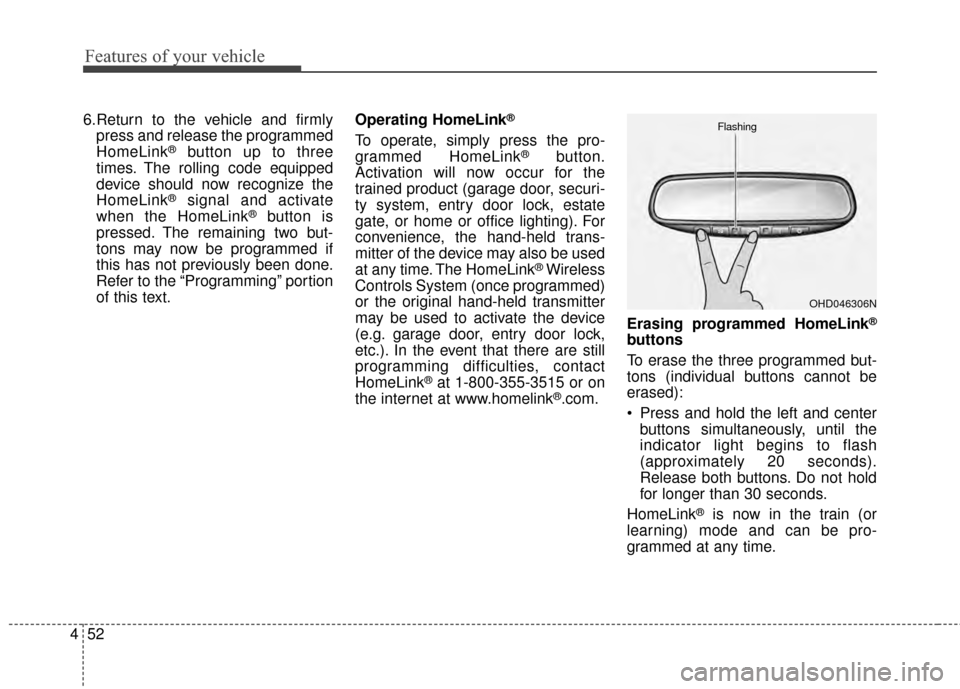
Press and hold the left and center
buttons simultaneously, until the
indicator light begins to flash
(approximately 20 seconds).
Release both buttons. Do not hold
for longer than 30 seconds.
HomeLink
®is now in the train (or
learning) mode and can be pro-
grammed at any time.
OHD046306N
Flashing
Page 144 of 499
457
Features of your vehicle
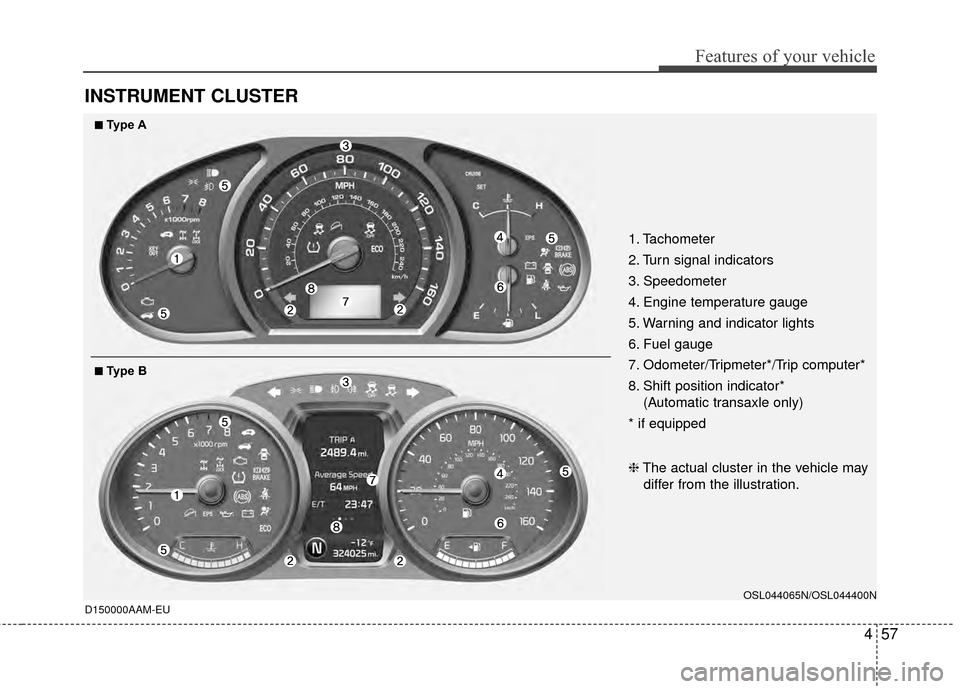
INSTRUMENT CLUSTER
D150000AAM-EU
1. Tachometer
2. Turn signal indicators
3. Speedometer
4. Engine temperature gauge
5. Warning and indicator lights
6. Fuel gauge
7. Odometer/Tripmeter*/Trip computer*
8. Shift position indicator*(Automatic transaxle only)
* if equipped
OSL044065N/OSL044400N
❈ The actual cluster in the vehicle may
differ from the illustration.
■
■Type B
■
■Type A
Page 154 of 499
467
Features of your vehicle
D150304AHM-EU-U1
Seat belt warning
As a reminder to the driver, the seat
belt warning light will blink for
approximately 6 seconds each time
you turn the ignition switch ON,
regardless of belt fastening.
If the driver's seat belt is not fastened
when the ignition switch is turned on,
the seat belt warning light and the
seat belt warning chime will operate
for approximately 6 seconds. But if it
is fastened within the 6 seconds, the
warning light will blink until the 6 sec-
onds are up The warning chime will
turn off immediately.If the driver's seat belt is disconnect-
ed after the ignition switch is turned
to the ON position, the seat belt
warning light will blink for approxi-
mately 6 seconds. But if it is fastened
within the 6 seconds the warning
light will turn off immediately. If the
driver's seat belt is not fastened
when the vehicle speed exceeds 10
km/h (6 mph), the seat belt warning
light and chime will operate approxi-
mately 11 times with a pattern of 6
seconds on and 24 seconds off until
the belt is fastened or the vehicle
speed decreases below 5 km/h (3
mph).
For front passenger’s seat belt warn-
ing light on the center facia, refer to
‘seat belt’ in section 3.
D150305AHM
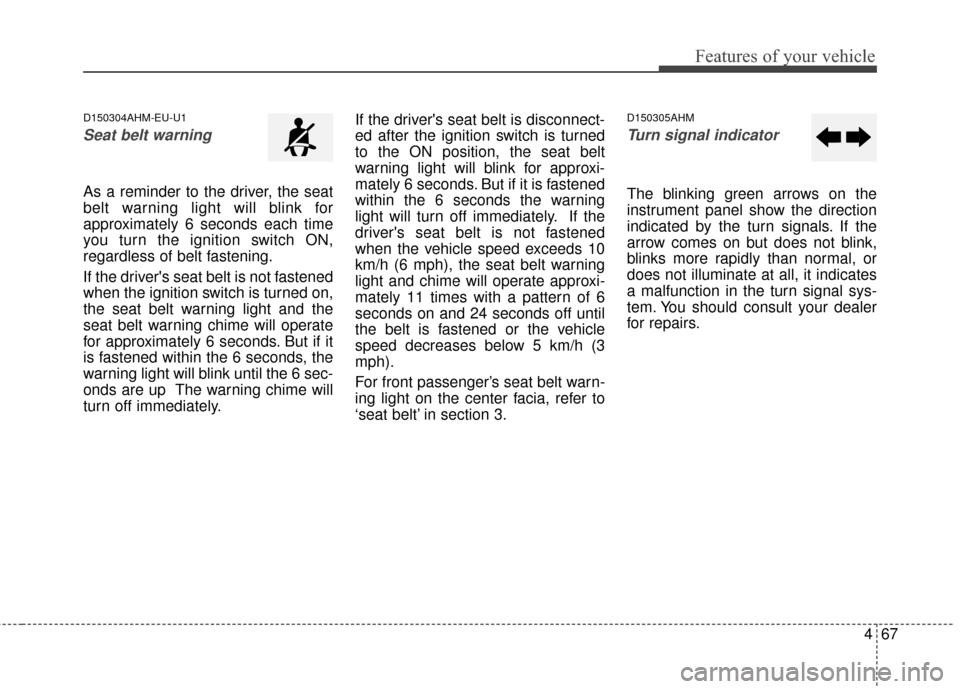
Turn signal indicator
The blinking green arrows on the
instrument panel show the direction
indicated by the turn signals. If the
arrow comes on but does not blink,
blinks more rapidly than normal, or
does not illuminate at all, it indicates
a malfunction in the turn signal sys-
tem. You should consult your dealer
for repairs.
Page 171 of 499
Features of your vehicle
84
4
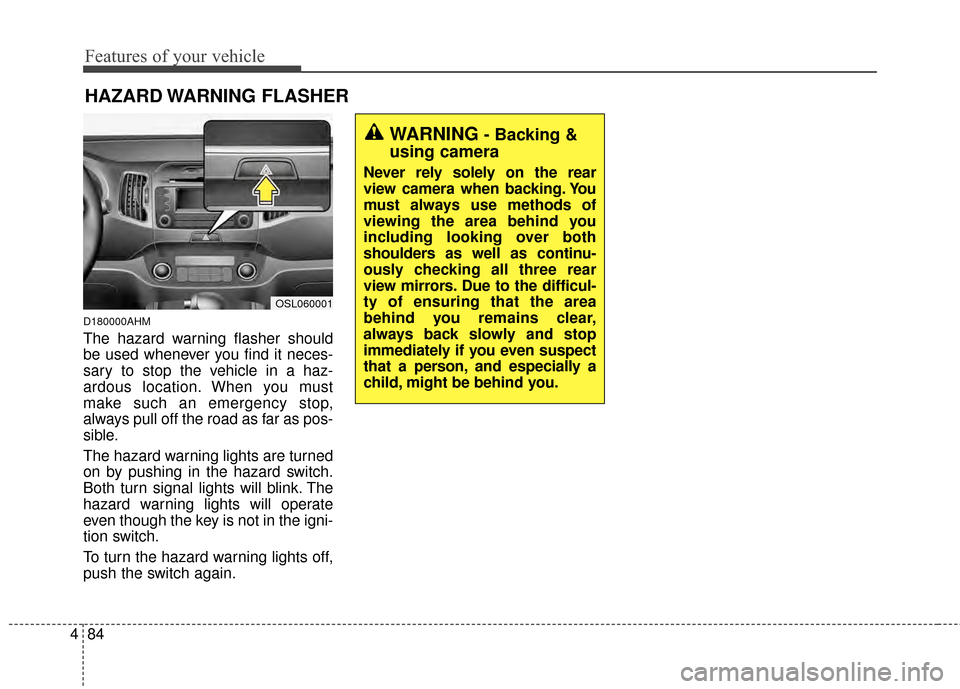
D180000AHM
The hazard warning flasher should
be used whenever you find it neces-
sary to stop the vehicle in a haz-
ardous location. When you must
make such an emergency stop,
always pull off the road as far as pos-
sible.
The hazard warning lights are turned
on by pushing in the hazard switch.
Both turn signal lights will blink. The
hazard warning lights will operate
even though the key is not in the igni-
tion switch.
To turn the hazard warning lights off,
push the switch again.
HAZARD WARNING FLASHER
OSL060001
WARNING- Backing &
using camera
Never rely solely on the rear
view camera when backing. You
must always use methods of
viewing the area behind you
including looking over both
shoulders as well as continu-
ously checking all three rear
view mirrors. Due to the difficul-
ty of ensuring that the area
behind you remains clear,
always back slowly and stop
immediately if you even suspect
that a person, and especially a
child, might be behind you.
Page 175 of 499
Features of your vehicle
88
4
To flash the headlights, pull the lever
towards you. It will return to the nor-
mal (low beam) position when
released. The headlight switch does
not need to be on to use this flashing
feature.D190600AUN-U1
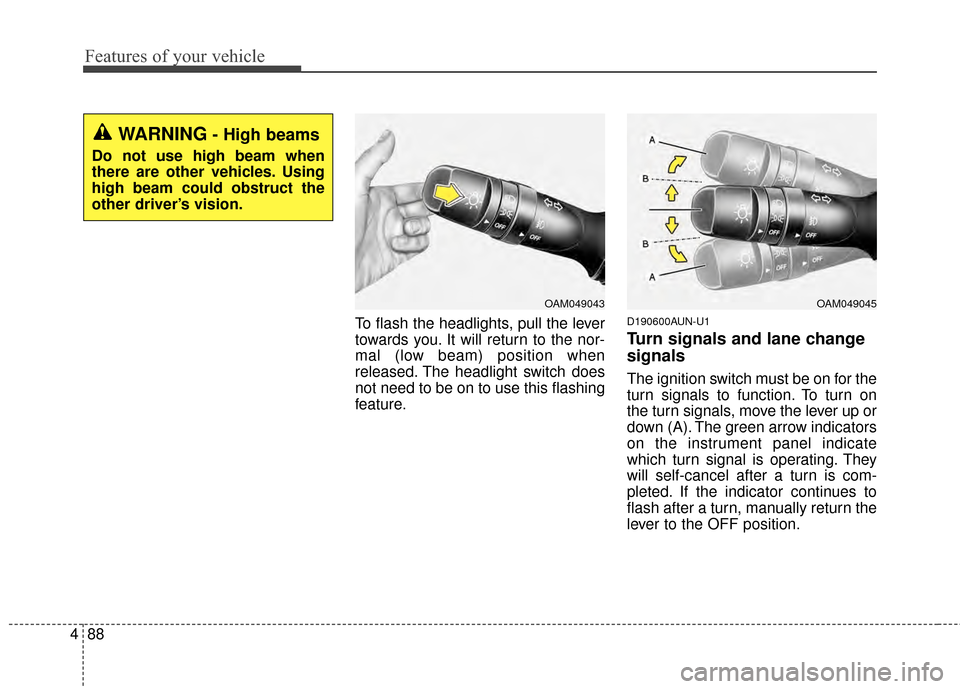
Turn signals and lane change
signals
The ignition switch must be on for the
turn signals to function. To turn on
the turn signals, move the lever up or
down (A). The green arrow indicators
on the instrument panel indicate
which turn signal is operating. They
will self-cancel after a turn is com-
pleted. If the indicator continues to
flash after a turn, manually return the
lever to the OFF position.
OAM049045OAM049043
WARNING- High beams
Do not use high beam when
there are other vehicles. Using
high beam could obstruct the
other driver’s vision.
Page 176 of 499
489
Features of your vehicle
To signal a lane change, move the
turn signal lever slightly and hold it in
position (B). The lever will return to
the OFF position when released.
If an indicator stays on and does not
flash or if it flashes abnormally, one
of the turn signal bulbs may be
burned out and will require replace-
ment.
One-touch lane change function (if equipped)
To activate an one-touch lane
change function, move the turn sig-
nal lever slightly for less than 1.5
second and then release it. The lane
change signals will blink 3 times.
✽ ✽ NOTICE
If an indicator flash is abnormally
quick or slow, a bulb may be burned
out or have a poor electrical connec-
tion in the circuit.
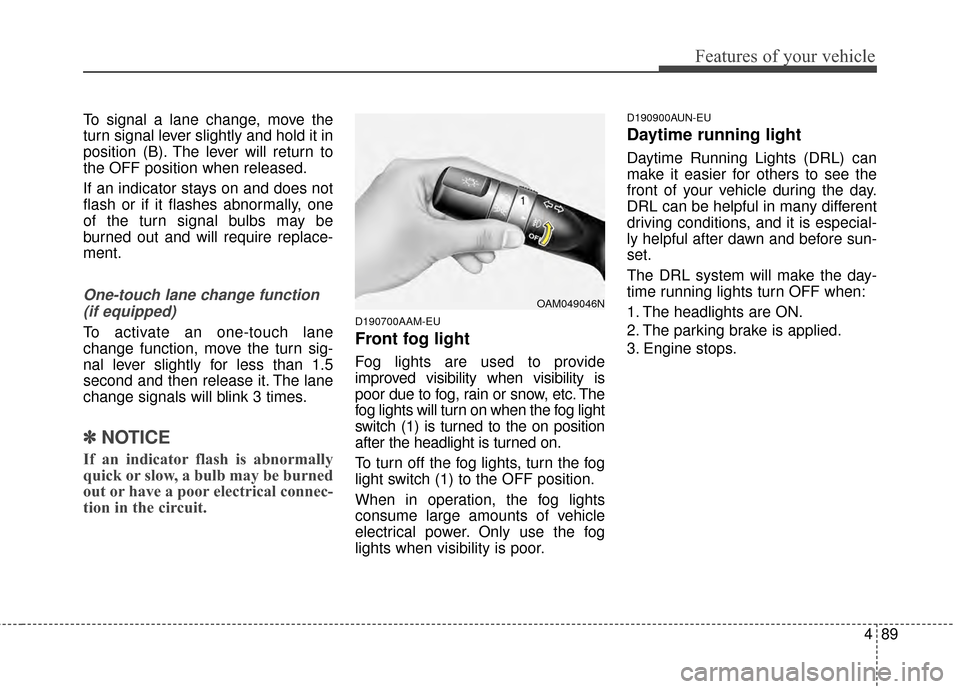
D190700AAM-EU
Front fog light
Fog lights are used to provide
improved visibility when visibility is
poor due to fog, rain or snow, etc. The
fog lights will turn on when the fog light
switch (1) is turned to the on position
after the headlight is turned on.
To turn off the fog lights, turn the fog
light switch (1) to the OFF position.
When in operation, the fog lights
consume large amounts of vehicle
electrical power. Only use the fog
lights when visibility is poor.
D190900AUN-EU
Daytime running light
Daytime Running Lights (DRL) can
make it easier for others to see the
front of your vehicle during the day.
DRL can be helpful in many different
driving conditions, and it is especial-
ly helpful after dawn and before sun-
set.
The DRL system will make the day-
time running lights turn OFF when:
1. The headlights are ON.
2. The parking brake is applied.
3. Engine stops.
OAM049046N
Page 217 of 499
Features of your vehicle
130
4
✽
✽
NOTICE
If you install an after market HID
head lamp, your vehicle’s audio and
electronic device may malfunction.
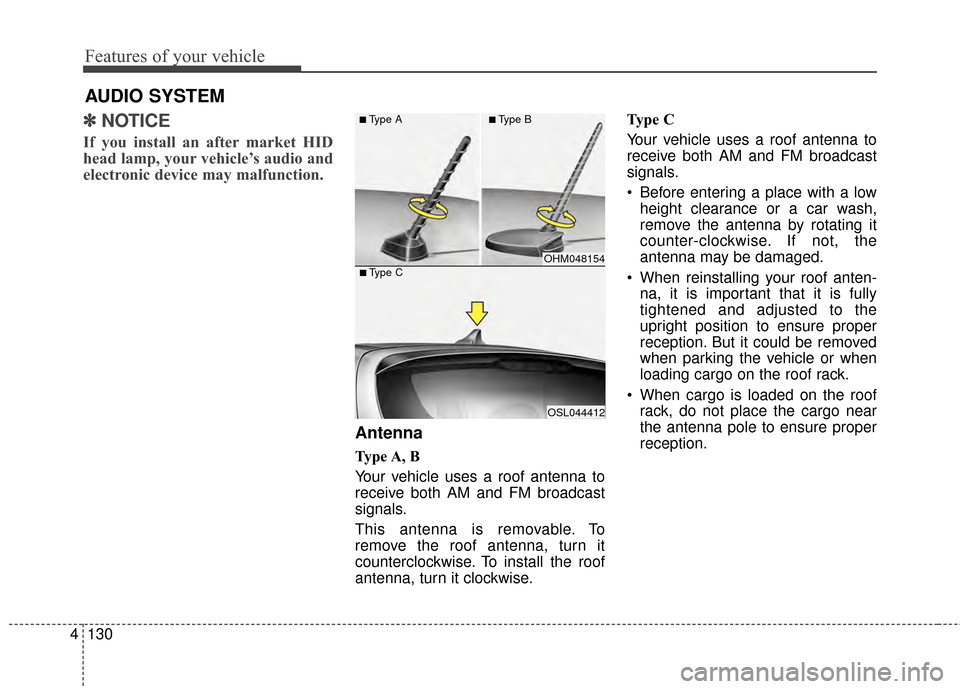
Antenna
Type A, B
Your vehicle uses a roof antenna to
receive both AM and FM broadcast
signals.
This antenna is removable. To
remove the roof antenna, turn it
counterclockwise. To install the roof
antenna, turn it clockwise. Type C
Your vehicle uses a roof antenna to
receive both AM and FM broadcast
signals.
• Before entering a place with a low
height clearance or a car wash,
remove the antenna by rotating it
counter-clockwise. If not, the
antenna may be damaged.
When reinstalling your roof anten- na, it is important that it is fully
tightened and adjusted to the
upright position to ensure proper
reception. But it could be removed
when parking the vehicle or when
loading cargo on the roof rack.
When cargo is loaded on the roof rack, do not place the cargo near
the antenna pole to ensure proper
reception.
AUDIO SYSTEM
OHM048154
OSL044412
■Type C
■Type A■Type B