display KIA Sportage 2017 QL / 4.G Manual PDF
[x] Cancel search | Manufacturer: KIA, Model Year: 2017, Model line: Sportage, Model: KIA Sportage 2017 QL / 4.GPages: 595, PDF Size: 16.22 MB
Page 388 of 595
Driving your vehicle
62
6
✽ ✽
NOTICE
The system may temporarily cancel
due to the strong electric waves.
Pay great caution to the vehicle in
front, when it has heavy loading
extended rearward, or when it has
higher ground clearance.
The sensor only detects pedestri- an, not carts, bicycles, motorcy-
cles, luggage bags, or strollers.
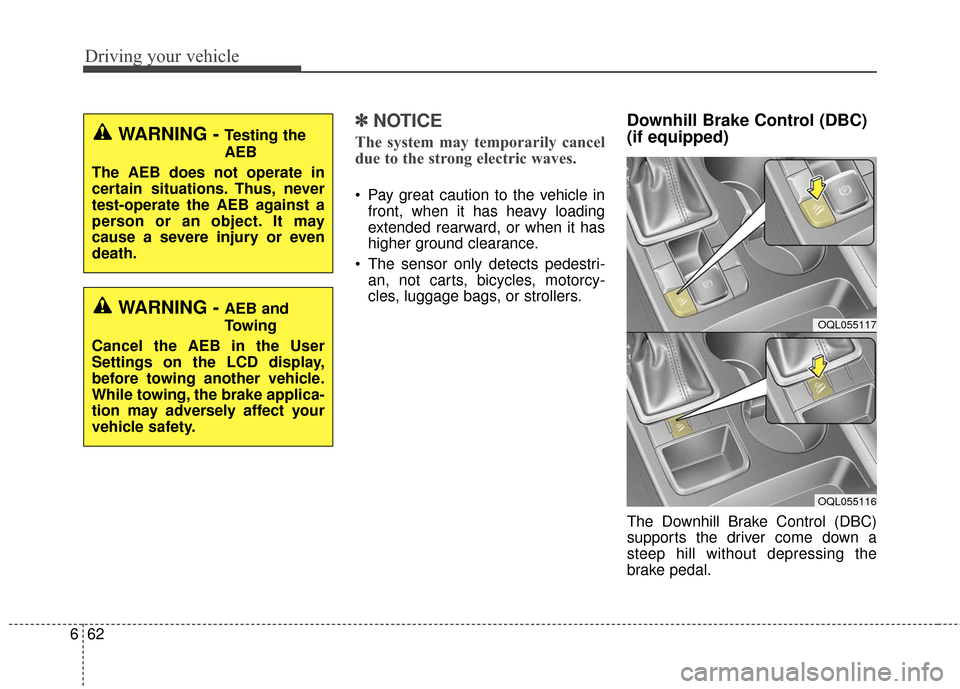
Downhill Brake Control (DBC)
(if equipped)
The Downhill Brake Control (DBC)
supports the driver come down a
steep hill without depressing the
brake pedal.
WARNING - Testing the
AEB
The AEB does not operate in
certain situations. Thus, never
test-operate the AEB against a
person or an object. It may
cause a severe injury or even
death.
WARNING - AEB and
Towing
Cancel the AEB in the User
Settings on the LCD display,
before towing another vehicle.
While towing, the brake applica-
tion may adversely affect your
vehicle safety.OQL055117
OQL055116
Page 396 of 595
Driving your vehicle
70
6
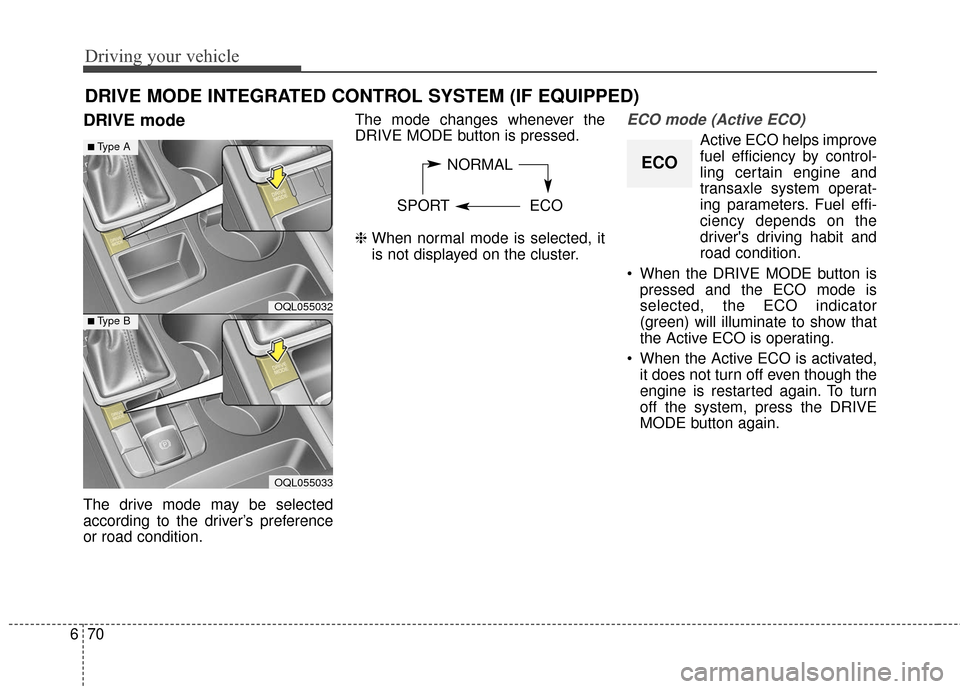
DRIVE mode
The drive mode may be selected
according to the driver’s preference
or road condition. The mode changes whenever the
DRIVE MODE button is pressed.
❈
When normal mode is selected, it
is not displayed on the cluster.
ECO mode (Active ECO)
Active ECO helps improve
fuel efficiency by control-
ling certain engine and
transaxle system operat-
ing parameters. Fuel effi-
ciency depends on the
driver's driving habit and
road condition.
When the DRIVE MODE button is pressed and the ECO mode is
selected, the ECO indicator
(green) will illuminate to show that
the Active ECO is operating.
When the Active ECO is activated, it does not turn off even though the
engine is restarted again. To turn
off the system, press the DRIVE
MODE button again.
DRIVE MODE INTEGRATED CONTROL SYSTEM (IF EQUIPPED)
NORMAL
SPORT ECO
OQL055032
■Type A
■Type B
OQL055033
ECO
Page 400 of 595
Driving your vehicle
74
6
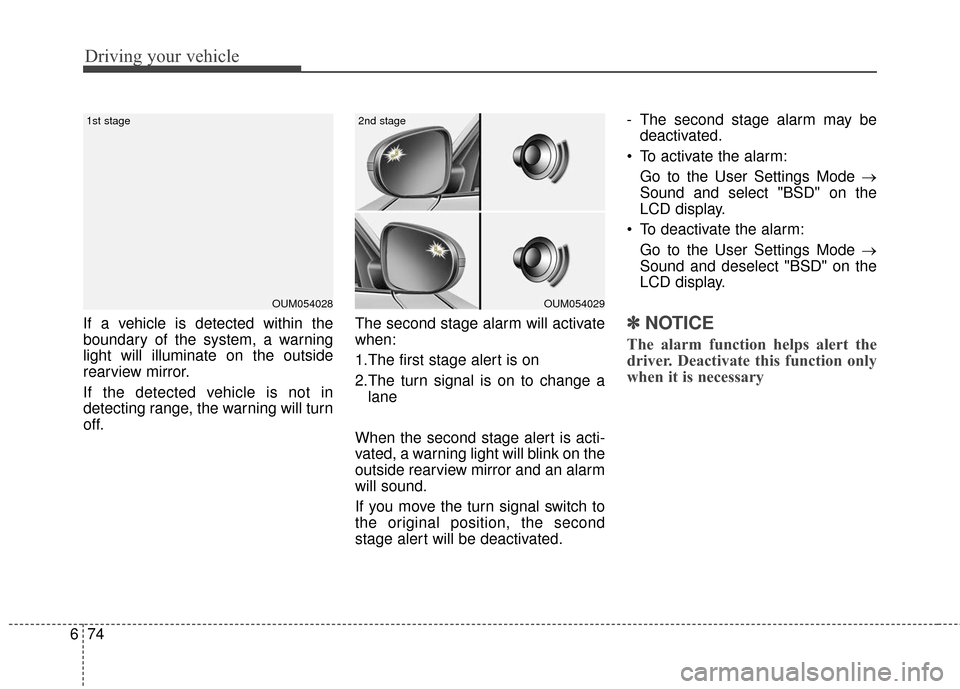
If a vehicle is detected within the
boundary of the system, a warning
light will illuminate on the outside
rearview mirror.
If the detected vehicle is not in
detecting range, the warning will turn
off. The second stage alarm will activate
when:
1.The first stage alert is on
2.The turn signal is on to change a
lane
When the second stage alert is acti-
vated, a warning light will blink on the
outside rearview mirror and an alarm
will sound.
If you move the turn signal switch to
the original position, the second
stage alert will be deactivated. - The second stage alarm may be
deactivated.
To activate the alarm: Go to the User Settings Mode →
Sound and select "BSD" on the
LCD display.
To deactivate the alarm: Go to the User Settings Mode →
Sound and deselect "BSD" on the
LCD display.✽ ✽
NOTICE
The alarm function helps alert the
driver. Deactivate this function only
when it is necessary
OUM054029
2nd stage
OUM054028
1st stage
Page 401 of 595
675
Driving your vehicle
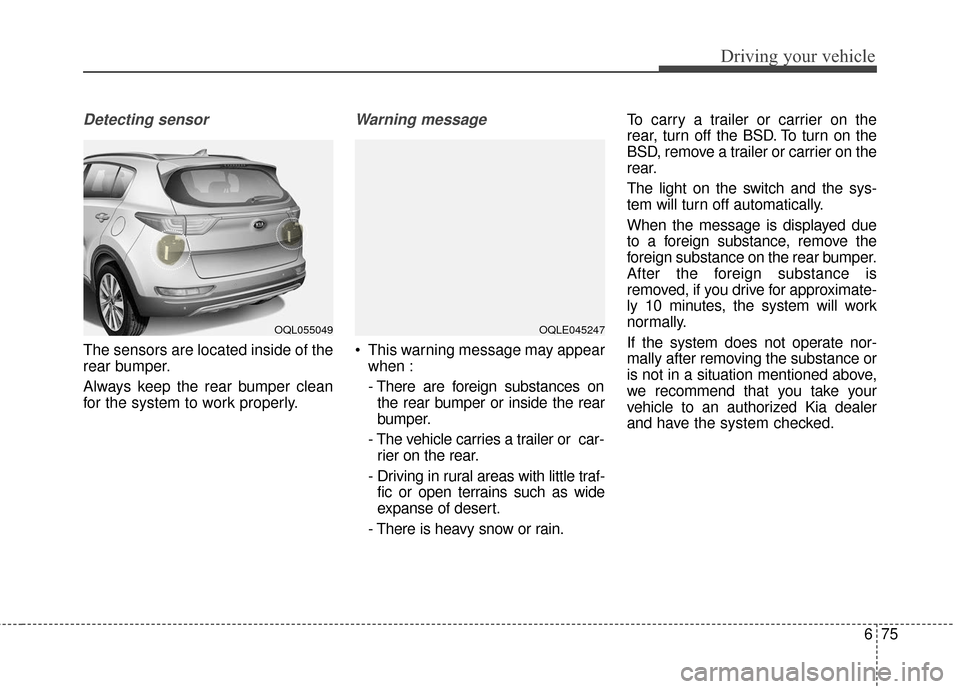
Detecting sensor
The sensors are located inside of the
rear bumper.
Always keep the rear bumper clean
for the system to work properly.
Warning message
This warning message may appearwhen :
- There are foreign substances onthe rear bumper or inside the rear
bumper.
- The vehicle carries a trailer or car- rier on the rear.
- Driving in rural areas with little traf- fic or open terrains such as wide
expanse of desert.
- There is heavy snow or rain. To carry a trailer or carrier on the
rear, turn off the BSD. To turn on the
BSD, remove a trailer or carrier on the
rear.
The light on the switch and the sys-
tem will turn off automatically.
When the message is displayed due
to a foreign substance, remove the
foreign substance on the rear bumper.
After the foreign substance is
removed, if you drive for approximate-
ly 10 minutes, the system will work
normally.
If the system does not operate nor-
mally after removing the substance or
is not in a situation mentioned above,
we recommend that you take your
vehicle to an authorized Kia dealer
and have the system checked.
OQL055049OQLE045247
Page 440 of 595
What to do in an emergency
87
TIRE PRESSURE MONITORING SYSTEM (TPMS) (IF EQUIPPED)
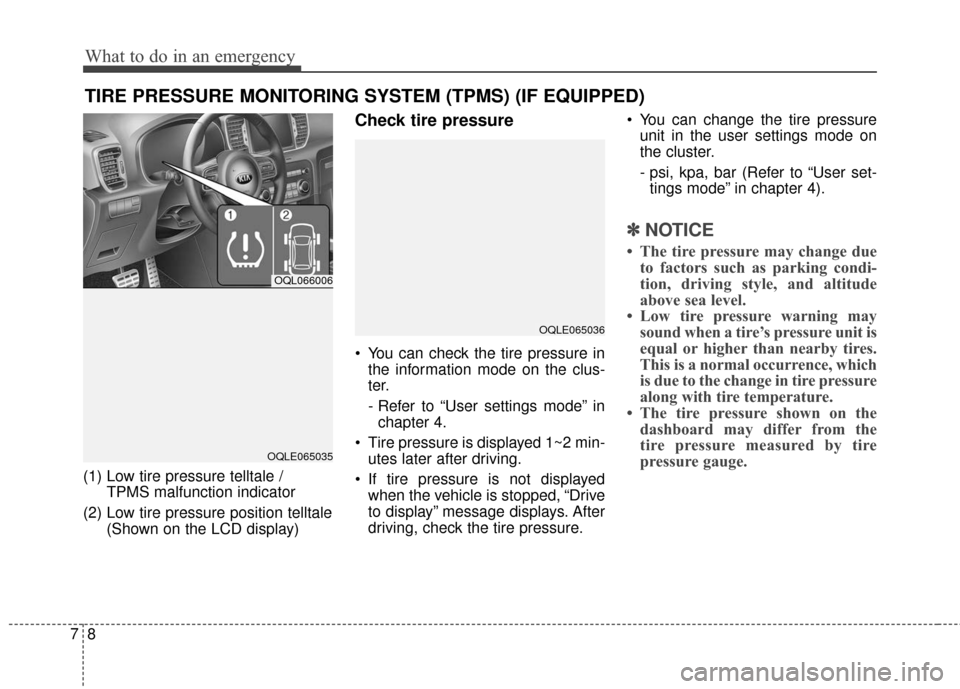
(1) Low tire pressure telltale / TPMS malfunction indicator
(2) Low tire pressure position telltale (Shown on the LCD display)
Check tire pressure
You can check the tire pressure inthe information mode on the clus-
ter.
- Refer to “User settings mode” inchapter 4.
Tire pressure is displayed 1~2 min- utes later after driving.
If tire pressure is not displayed when the vehicle is stopped, “Drive
to display” message displays. After
driving, check the tire pressure. You can change the tire pressure
unit in the user settings mode on
the cluster.
- psi, kpa, bar (Refer to “User set-tings mode” in chapter 4).
✽ ✽ NOTICE
• The tire pressure may change due
to factors such as parking condi-
tion, driving style, and altitude
above sea level.
• Low tire pressure warning may sound when a tire’s pressure unit is
equal or higher than nearby tires.
This is a normal occurrence, which
is due to the change in tire pressure
along with tire temperature.
• The tire pressure shown on the dashboard may differ from the
tire pressure measured by tire
pressure gauge.
OQL066006
OQLE065035
OQLE065036
Page 458 of 595
What to do in an emergency
26
7
✽ ✽
NOTICE
Carefully remove any extra sealant
applied on the tire air pressure sen-
sor and wheel after repairing the
tire.
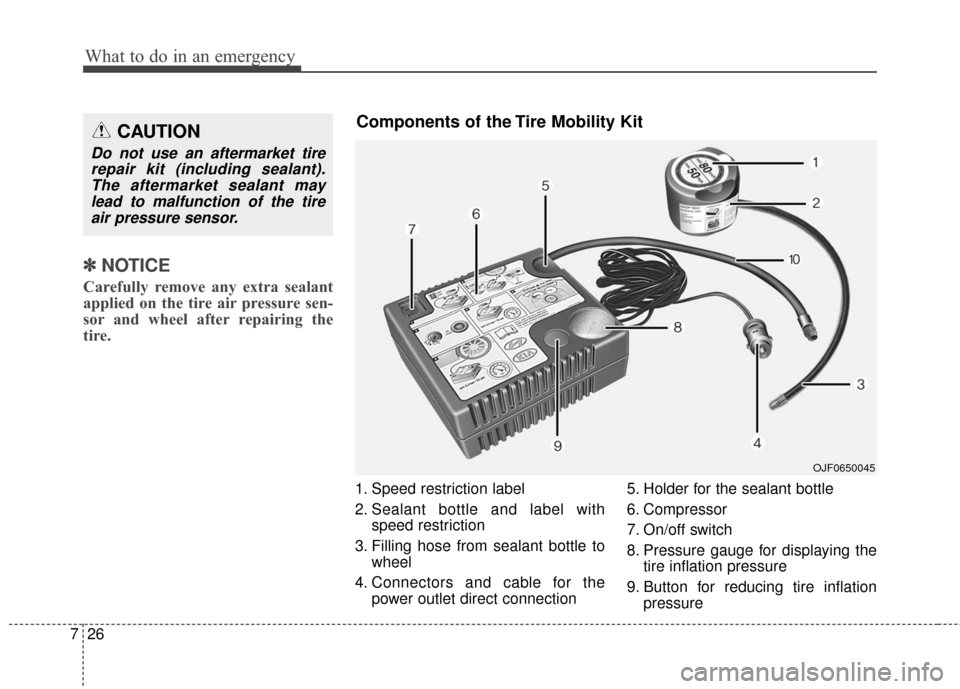
1. Speed restriction label
2. Sealant bottle and label with
speed restriction
3. Filling hose from sealant bottle to wheel
4. Connectors and cable for the power outlet direct connection 5. Holder for the sealant bottle
6. Compressor
7. On/off switch
8. Pressure gauge for displaying the
tire inflation pressure
9. Button for reducing tire inflation pressure
CAUTION
Do not use an aftermarket tirerepair kit (including sealant).The aftermarket sealant maylead to malfunction of the tireair pressure sensor.
OJF0650045
Components of the Tire Mobility Kit
Page 522 of 595
Maintenance
54
8
3. Checking tire life (TIN : Tire
Identification Number)
Any tires that are over 6 years old,
based on the manufacturing date,
(including the spare tire) should be
replaced by new ones. You can find
the manufacturing date on the tire
sidewall (possibly on the inside of the
wheel), displaying the DOT Code.
The DOT Code is a series of num-
bers on a tire consisting of numbers
and English letters. The manufactur-
ing date is designated by the last four
digits (characters) of the DOT code.
DOT : XXXX XXXX OOOO
The front part of the DOT means a
plant code number, tire size and
tread pattern and the last four num-
bers indicate week and year manu-
factured.
For example:
DOT XXXX XXXX 1616 represents
that the tire was produced in the 16th
week of 2016.
4. Tire ply composition and mate-rial
The number of layers or plies of rub-
ber-coated fabric in the tire. Tire
manufacturers also must indicate the
materials in the tire, which include
steel, nylon, polyester, and others.
The letter "R" means radial ply con-
struction; the letter "D" means diago-
nal or bias ply construction; and the
letter "B" means belted-bias ply con-
struction.
5. Maximum permissible inflationpressure
This number is the greatest amount of
air pressure that should be put in the
tire. Do not exceed the maximum per-
missible inflation pressure. Refer to
the Tire and Loading Information label
for recommended inflation pressure.
6. Maximum load rating
This number indicates the maximum
load in kilograms and pounds that can
be carried by the tire. When replacing
the tires on the vehicle, always use a
tire that has the same load rating as
the factory installed tire.
7. Uniform tire quality grading
Quality grades can be found where
applicable on the tire sidewall
between tread shoulder and maxi-
mum section width.
For example:
TREADWEAR 440
TRACTION A
TEMPERATURE A
WARNING - Tire age
Replace tires within the recom-
mended time frame. Failure to
replace tires as recommended
can result in sudden tire failure,
which could lead to a loss of
control and an accident.
Page 531 of 595
863
Maintenance
✽ ✽NOTICE
• When replacing fuse, turn the
ignition “OFF” and turn off
switches of all electrical devices
then remove battery (-) terminal.
• The actual fuse/relay panel label may differ from equipped items.
Inner panel fuse replacement
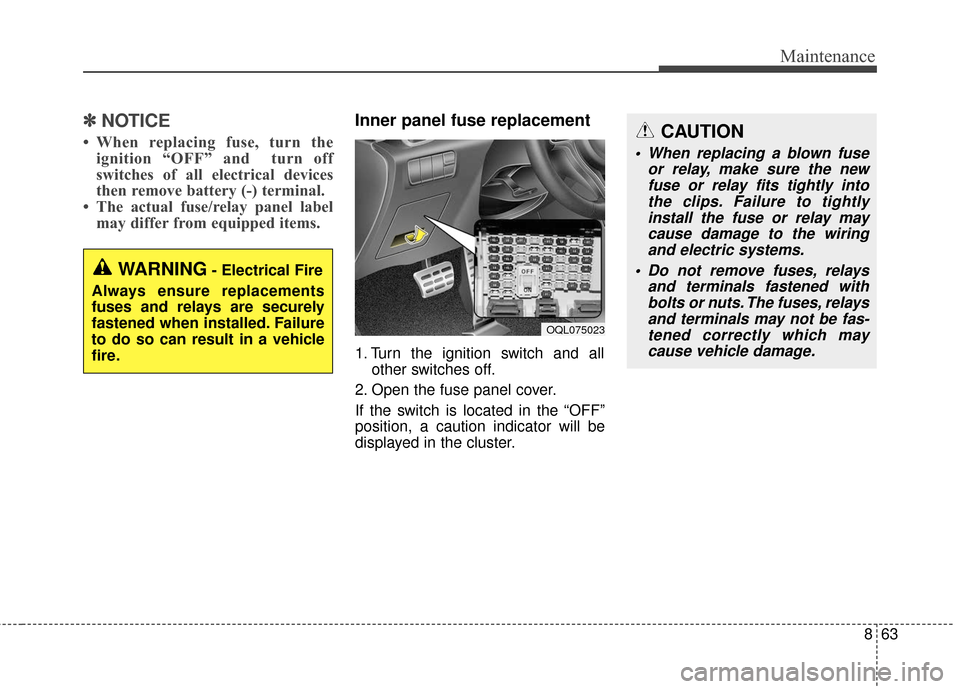
1. Turn the ignition switch and all
other switches off.
2. Open the fuse panel cover.
If the switch is located in the “OFF”
position, a caution indicator will be
displayed in the cluster.
OQL075023
WARNING- Electrical Fire
Always ensure replacements
fuses and relays are securely
fastened when installed. Failure
to do so can result in a vehicle
fire.
CAUTION
When replacing a blown fuse or relay, make sure the newfuse or relay fits tightly intothe clips. Failure to tightlyinstall the fuse or relay maycause damage to the wiringand electric systems.
Do not remove fuses, relays and terminals fastened withbolts or nuts. The fuses, relaysand terminals may not be fas-tened correctly which maycause vehicle damage.
Page 533 of 595
865
Maintenance
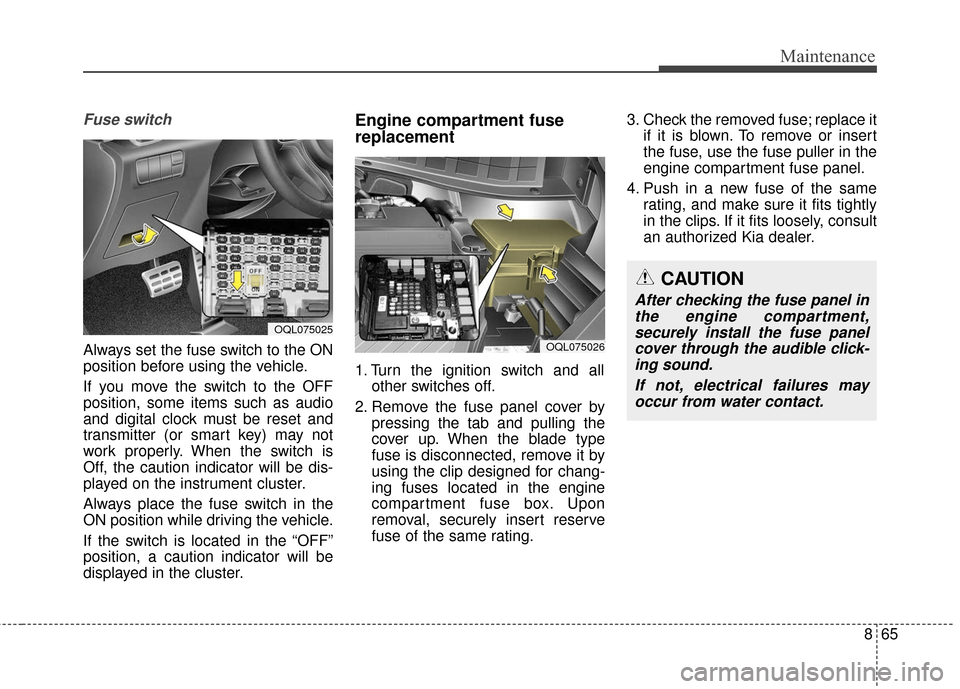
Fuse switch
Always set the fuse switch to the ON
position before using the vehicle.
If you move the switch to the OFF
position, some items such as audio
and digital clock must be reset and
transmitter (or smart key) may not
work properly. When the switch is
Off, the caution indicator will be dis-
played on the instrument cluster.
Always place the fuse switch in the
ON position while driving the vehicle.
If the switch is located in the “OFF”
position, a caution indicator will be
displayed in the cluster.
Engine compartment fuse
replacement
1. Turn the ignition switch and allother switches off.
2. Remove the fuse panel cover by pressing the tab and pulling the
cover up. When the blade type
fuse is disconnected, remove it by
using the clip designed for chang-
ing fuses located in the engine
compartment fuse box. Upon
removal, securely insert reserve
fuse of the same rating. 3. Check the removed fuse; replace it
if it is blown. To remove or insert
the fuse, use the fuse puller in the
engine compartment fuse panel.
4. Push in a new fuse of the same rating, and make sure it fits tightly
in the clips. If it fits loosely, consult
an authorized Kia dealer.
OQL075025
CAUTION
After checking the fuse panel inthe engine compartment,securely install the fuse panelcover through the audible click-ing sound.
If not, electrical failures mayoccur from water contact.
OQL075026
Page 590 of 595
I5
Index
Do not use methanol ....................................................1-4
Fuel Additives ..............................................................1-4
Gasoline containing alcohol and methanol ..................1-3
Operation in foreign countries ......................................1-5
Fuses ........................................................................\
......8-62 Engine compartment fuse replacement ......................8-65
Fuse/relay panel description ......................................8-68
Inner panel fuse replacement ......................................8-63
Gross vehicle weight........................................................9-6\
Hood ........................................................................\
......4-43 Closing the hood ........................................................4-44
Opening the hood ......................................................4-43
How to use this manual ..................................................1-2
If the engine overheats ....................................................7-7
If the engine will not start ..............................................7-4 If engine doesn't turn over or turns over slowly ..........7-4
If engine turns over normally but does not start ..........7-4
If you have a flat tire ....................................................7-15 Changing tires ............................................................7-17 Jack and tools ..............................................................7-15
Removing and storing the spare tire ..........................7-16
If you have a flat tire (With Tire Mobility Kit) ............7-24 Checking the tire inflation pressure ............................7-30
Components of the Tire Mobility Kit ........................7-26
Distributing the sealant ..............................................7-30
Introduction ................................................................7-24
Notes on the safe use of the Tire Mobility Kit ..........7-25
Technical Data ............................................................7-31
Using the Tire Mobility Kit ........................................7-27
Important safety precautions ..........................................3-2 Air bag hazards ............................................................3-2
Always wear your seat belt ..........................................3-2
Control your speed ......................................................3-3
Driver distraction ........................................................3-2
Keep your vehicle in safe condition ............................3-3
Restrain all children ....................................................3-2
In case of an emergency while driving ............................7-3 If the engine stalls at a crossroad or crossing ..............7-3
If the engine stalls while driving ..................................7-3
If you have a flat tire while driving ..............................7-3
Instrument cluster ..........................................................4-69 Gauges ........................................................................\
4-71
Instrument Cluster Control ........................................4-70
LCD Display Control ..................................................4-70
Transaxle Shift Indicator ............................................4-74
Instrument panel overview ..............................................2-5
Interior features............................................................4-165
G
H
I