alarm KIA SPORTAGE 2022 User Guide
[x] Cancel search | Manufacturer: KIA, Model Year: 2022, Model line: SPORTAGE, Model: KIA SPORTAGE 2022Pages: 630, PDF Size: 9.69 MB
Page 348 of 630
563
Driving your vehicle
- For pedestrians, the vehiclespeed is greater than or equal to
5 mph (8 km/h) and less than 40
mph (60 km/h). (Depending on
the condition of pedestrians and
the surrounding environment the
possible maximum operating
speed may be reduced.)
FCA controls the brakes within cer- tain limit to release shock from the
collision.
FCA controls the maximum brakes
just before the collision.
- If you select “Warning Only”, FCA
activates and produces only warn-
ing alarms in accordance with the
collision risk levels. You should
control the brake directly because
FCA do not control the brake.Brake operation
In an urgent situation, the brakingsystem enters into the ready status
for prompt reaction to assist the
driver in depressing the brake
pedal.
FCA provides additional braking power for optimum braking per-
formance, when the driver
depresses the brake pedal.
The braking control is automatical- ly deactivated, when the driver
sharply depresses the accelerator
pedal, or when the driver abruptly
operates the steering wheel.
The braking control is automatical- ly canceled, when risk factors dis-
appear.
CAUTION
The driver should always paygreat caution to vehicle opera-tion, even though there is nowarning message or warningalarm.
WARNING
FCA cannot avoid all collisions.
FCA might not completely stop
the vehicle before a collision,
due to ambient, weather and
road conditions. The driver has
the responsibility to drive safely
and control the vehicle.
WARNING
FCA operates in accordance
with certain risk factors, such as
the distance from the
vehicle/passer-by in front, the
speed of the vehicle/passer-by in
front, and the driver's vehicle
operation.
Page 351 of 630
Driving your vehicle
66
5
✽ ✽
NOTICE
• FCA is only a supplemental sys-
tem for the driver’s convenience.
The driver has the ultimate
responsibility to control and oper-
ate the vehicle safely. Do not solely
depend on FCA. Rather, maintain
a safe braking distance, and, if
necessary, depress the brake pedal
to lower the driving speed.
• In certain instances and under certain driving conditions, FCA
may activate unintentionally. This
initial warning message appears
on the LCD display with a warn-
ing chime.
Also, in certain instances the front
view camera may not detect the
vehicle or pedestrian ahead. FCA
may not activate and the warning
message will not be displayed.
• FCA may unnecessarily produce the warning message and the
warning alarms. Also, due to the
sensing limitation, FCA may not
produce the warning message and
the warning alarm at all.
(Continued)(Continued)
• When there is a malfunction with
FCA, the braking control does not
operate upon detecting a collision
risk even with other braking sys-
tems normally operating.
• FCA operates only for the vehi- cle/pedestrian in front, while driv-
ing forward. It does not operate
for any animals or vehicles in the
opposite direction.
• FCA does not recognize the vehi- cle, which transversally drives
across the crossroad, or the vehi-
cle, which is parked in the trans-
versal direction.
• If the vehicle in front stops sud- denly, you may have less control of
the brake system. Therefore,
always keep safe distance between
your vehicle and the vehicle in
front of you.
• FCA may activate during braking and the vehicle may stop suddenly.
And the load in the vehicle may
endanger passengers. Therefore,
always be mindful of the load vol-
ume in the vehicle. (Continued)(Continued)
• FCA may not activate if the driver
applies the brake pedal to avoid
risk of collision.
• FCA does not operate when the vehicle is in reverse. In these cir-
cumstances, you must maintain a
safe braking distance, and if nec-
essary, depress the brake pedal to
reduce the driving speed in order
to maintain a safe dis tance.
• The regular braking function will operate normally even if There is a
problem with the FCA brake con-
trol system or other functions. In
this case, the braking control will
not operate in an imminent colli-
sion.
• FCA may not activate according to driving condition, traffic on the
road, weather, road condition, etc.
• FCA may not activate in response to all types of vehicles.
Page 354 of 630
569
Driving your vehicle
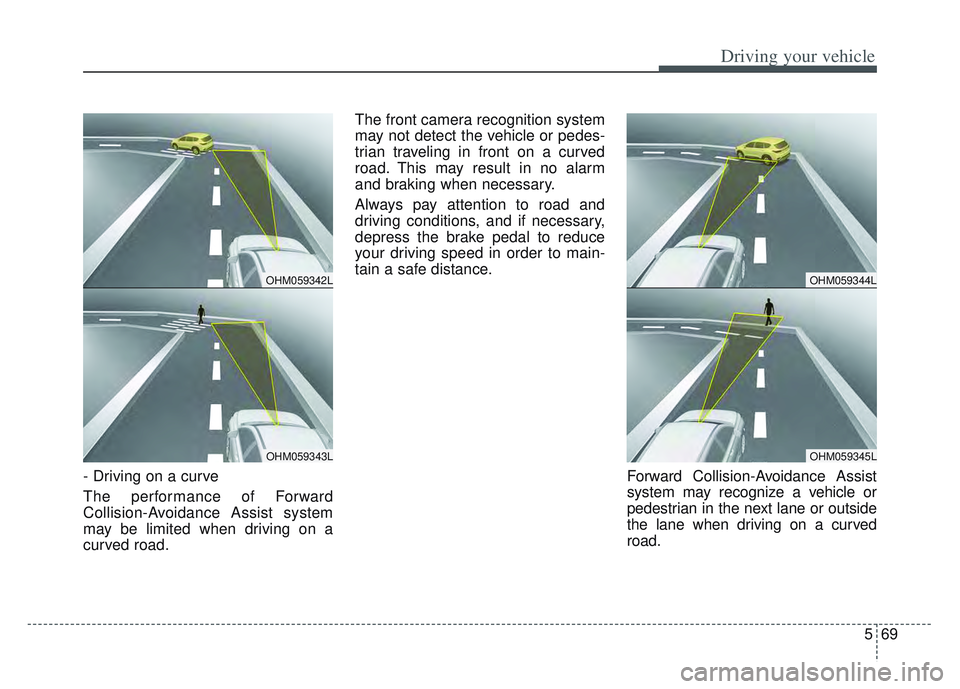
- Driving on a curve
The performance of Forward
Collision-Avoidance Assist system
may be limited when driving on a
curved road.The front camera recognition system
may not detect the vehicle or pedes-
trian traveling in front on a curved
road. This may result in no alarm
and braking when necessary.
Always pay attention to road and
driving conditions, and if necessary,
depress the brake pedal to reduce
your driving speed in order to main-
tain a safe distance.
Forward Collision-Avoidance Assist
system may recognize a vehicle or
pedestrian in the next lane or outside
the lane when driving on a curved
road.
OHM059342L
OHM059343L
OHM059344L
OHM059345L
Page 355 of 630
Driving your vehicle
70
5
If this occurs, the system may unnec-
essarily alarm the driver and apply the
brake.
Always pay attention to road and driv-
ing conditions, while driving.
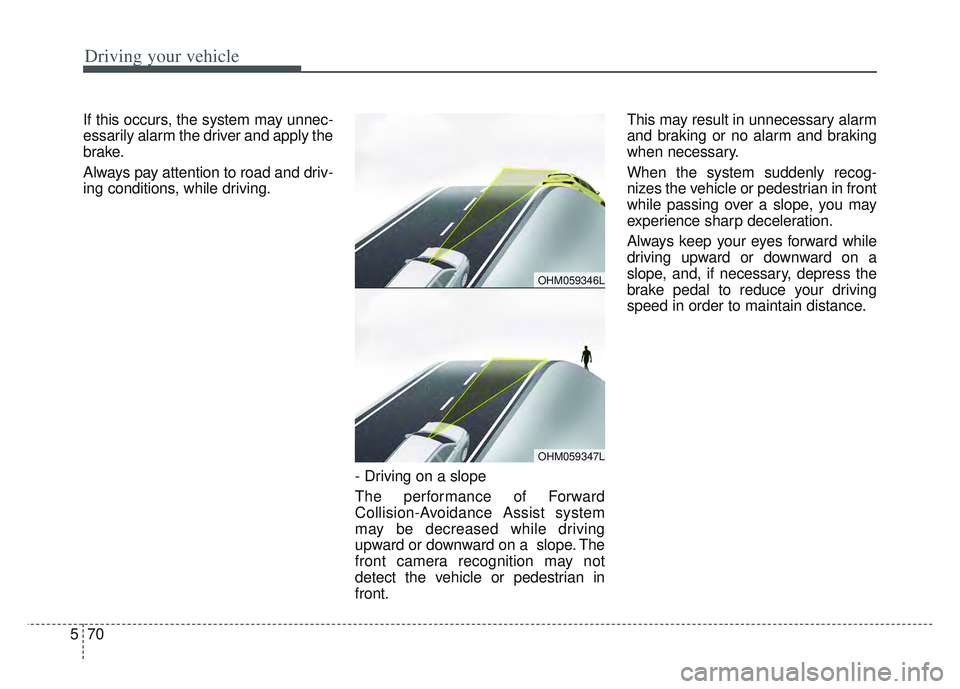
- Driving on a slope
The performance of Forward
Collision-Avoidance Assist system
may be decreased while driving
upward or downward on a slope. The
front camera recognition may not
detect the vehicle or pedestrian in
front.This may result in unnecessary alarm
and braking or no alarm and braking
when necessary.
When the system suddenly recog-
nizes the vehicle or pedestrian in front
while passing over a slope, you may
experience sharp deceleration.
Always keep your eyes forward while
driving upward or downward on a
slope, and, if necessary, depress the
brake pedal to reduce your driving
speed in order to maintain distance.
OHM059346L
OHM059347L
Page 361 of 630
Driving your vehicle
76
5
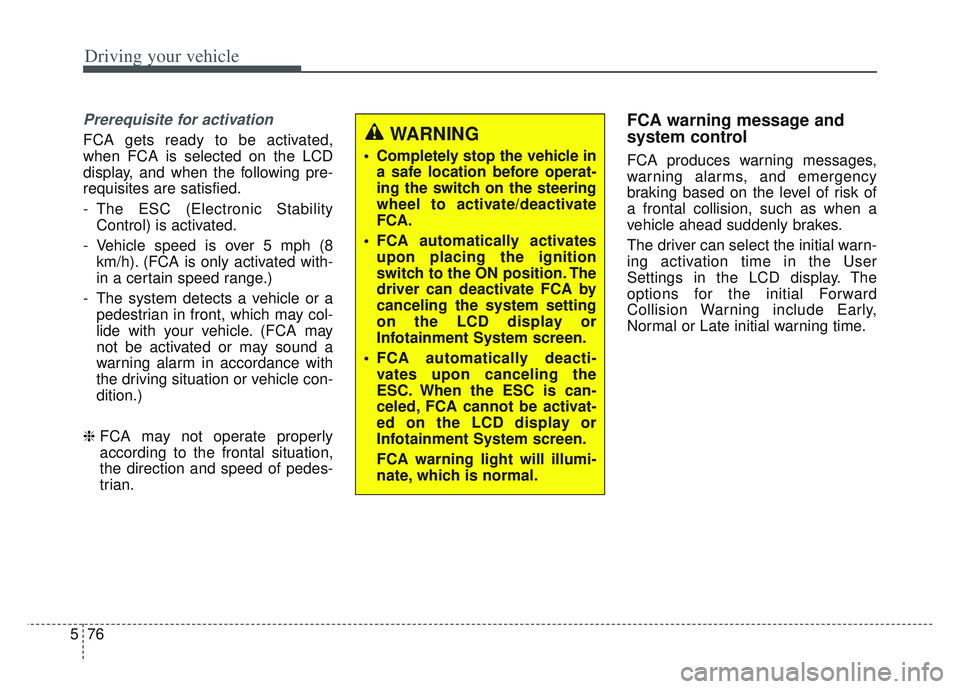
Prerequisite for activation
FCA gets ready to be activated,
when FCA is selected on the LCD
display, and when the following pre-
requisites are satisfied.
- The ESC (Electronic Stability
Control) is activated.
- Vehicle speed is over 5 mph (8 km/h). (FCA is only activated with-
in a certain speed range.)
- The system detects a vehicle or a pedestrian in front, which may col-
lide with your vehicle. (FCA may
not be activated or may sound a
warning alarm in accordance with
the driving situation or vehicle con-
dition.)
❈ FCA may not operate properly
according to the frontal situation,
the direction and speed of pedes-
trian.
FCA warning message and
system control
FCA produces warning messages,
warning alarms, and emergency
braking based on the level of risk of
a frontal collision, such as when a
vehicle ahead suddenly brakes.
The driver can select the initial warn-
ing activation time in the User
Settings in the LCD display. The
options for the initial Forward
Collision Warning include Early,
Normal or Late initial warning time.
WARNING
Completely stop the vehicle in
a safe location before operat-
ing the switch on the steering
wheel to activate/deactivate
FCA.
FCA automatically activates upon placing the ignition
switch to the ON position. The
driver can deactivate FCA by
canceling the system setting
on the LCD display or
Infotainment System screen.
FCA automatically deacti- vates upon canceling the
ESC. When the ESC is can-
celed, FCA cannot be activat-
ed on the LCD display or
Infotainment System screen.
FCA warning light will illumi-
nate, which is normal.
Page 362 of 630
577
Driving your vehicle
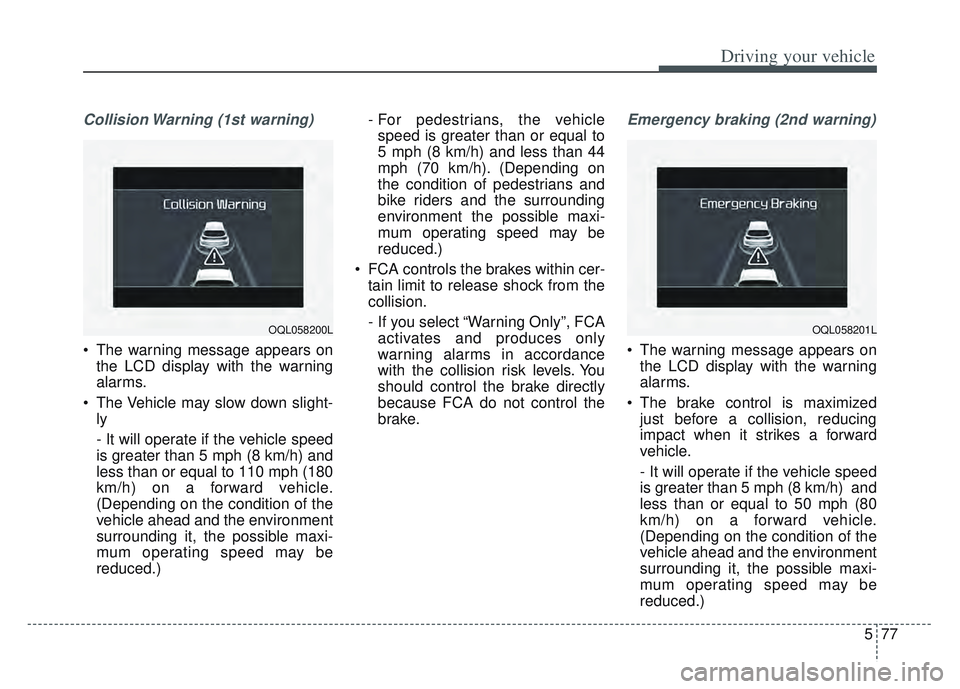
Collision Warning (1st warning)
The warning message appears onthe LCD display with the warning
alarms.
The Vehicle may slow down slight- ly
- It will operate if the vehicle speed
is greater than 5 mph (8 km/h) and
less than or equal to 110 mph (180
km/h) on a forward vehicle.
(Depending on the condition of the
vehicle ahead and the environment
surrounding it, the possible maxi-
mum operating speed may be
reduced.) - For pedestrians, the vehicle
speed is greater than or equal to
5 mph (8 km/h) and less than 44
mph (70 km/h). (Depending on
the condition of pedestrians and
bike riders and the surrounding
environment the possible maxi-
mum operating speed may be
reduced.)
FCA controls the brakes within cer- tain limit to release shock from the
collision.
- If you select “Warning Only”, FCAactivates and produces only
warning alarms in accordance
with the collision risk levels. You
should control the brake directly
because FCA do not control the
brake.
Emergency braking (2nd warning)
The warning message appears on the LCD display with the warning
alarms.
The brake control is maximized just before a collision, reducing
impact when it strikes a forward
vehicle.
- It will operate if the vehicle speed
is greater than 5 mph (8 km/h) and
less than or equal to 50 mph (80
km/h) on a forward vehicle.
(Depending on the condition of the
vehicle ahead and the environment
surrounding it, the possible maxi-
mum operating speed may be
reduced.)
OQL058201LOQL058200L
Page 363 of 630
Driving your vehicle
78
5
- For pedestrians, the vehicle
speed is greater than or equal to
5 mph (8 km/h) and less than 44
mph (70 km/h). (Depending on
the condition of pedestrians and
bike riders and the surrounding
environment the possible maxi-
mum operating speed may be
reduced.)
FCA controls the brakes within cer- tain limit to release shock from the
collision.
FCA controls the maximum brakes
just before the collision.
- If you select “Warning Only”,FCA activates and produces only
warning alarms in accordance
with the collision risk levels. You
should control the brake directly
because FCA do not control the
brake.Brake operation
In an urgent situation, the braking system enters into the ready status
for prompt reaction to assist the
driver in depressing the brake
pedal.
FCA provides additional braking power for optimum braking per-
formance, when the driver
depresses the brake pedal.
The braking control is automatical- ly deactivated, when the driver
sharply depresses the accelerator
pedal, or when the driver abruptly
operates the steering wheel.
The braking control is automatical- ly canceled, when risk factors dis-
appear.CAUTION
The driver should always pay great caution to vehicle opera-tion, even though there is nowarning message or warningalarm.
If any other warning sound such as seat belt warningchime is already generated,Forward Collision-AvoidanceAssist warning may notsound.
Excessive audio volume may disturb the sound of the sys-tem warning alarm.
Page 367 of 630
Driving your vehicle
82
5
(Continued)
If the vehicle in front stops
suddenly, you may have less
control of the brake system.
Therefore, always keep safe
distance between your vehicle
and the vehicle in front of you.
FCA may activate during brak- ing and the vehicle may stop
suddenly. And the load in the
vehicle may endanger passen-
gers. Therefore, always be
mindful of the load volume in
the vehicle.
FCA may not activate if the driver applies the brake pedal
to avoid risk of collision.
FCA does not operate when the vehicle is in reverse. In
these circumstances, you
must maintain a safe braking
distance, and if necessary,
depress the brake pedal to
reduce the driving speed in
order to maintain a safe dis
tance.
(Continued)WARNING
FCA is only a supplementalsystem for the driver’s con-
venience. The driver has the
ultimate responsibility to con-
trol and operate the vehicle
safely. Do not solely depend
on FCA. Rather, maintain a
safe braking distance, and, if
necessary, depress the brake
pedal to lower the driving
speed.
In certain instances and under certain driving condi-
tions, FCA may activate unin-
tentionally. This initial warning
message appears on the LCD
display with a warning chime.
Also, in certain instances the
front radar sensor or camera
recognition system may not
detect the vehicle or pedestri-
an ahead. FCA may not acti-
vate and the warning mes-
sage will not be displayed.
(Continued)
(Continued)
FCA may unnecessarily pro-duce the warning message
and the warning alarms. Also,
due to the sensing limitation,
FCA may not produce the
warning message and the
warning alarm at all.
When there is a malfunction with FCA, the braking control
does not operate upon detect-
ing a collision risk even with
other braking systems nor-
mally operating.
FCA operates only for the vehicle/pedestrian in front,
while driving forward. It does
not operate for any animals or
vehicles in the opposite direc-
tion.
FCA does not recognize the vehicle, which transversally
drives across the crossroad,
or the vehicle, which is parked
in the transversal direction.
(Continued)
Page 370 of 630
585
Driving your vehicle
If not using headlamp or usingweak light in the night or in a tun-
nel.
Backlight is shining in the driving direction of the vehicle. (Including
oncoming vehicle headlights.)
When the rear part of the front vehicle is small or low.
When a trailer or other vehicle is towing the front vehicle.
When the ground clearance of the front vehicle is high.
When a front vehicle makes sud- den lane changes unexpectedly.
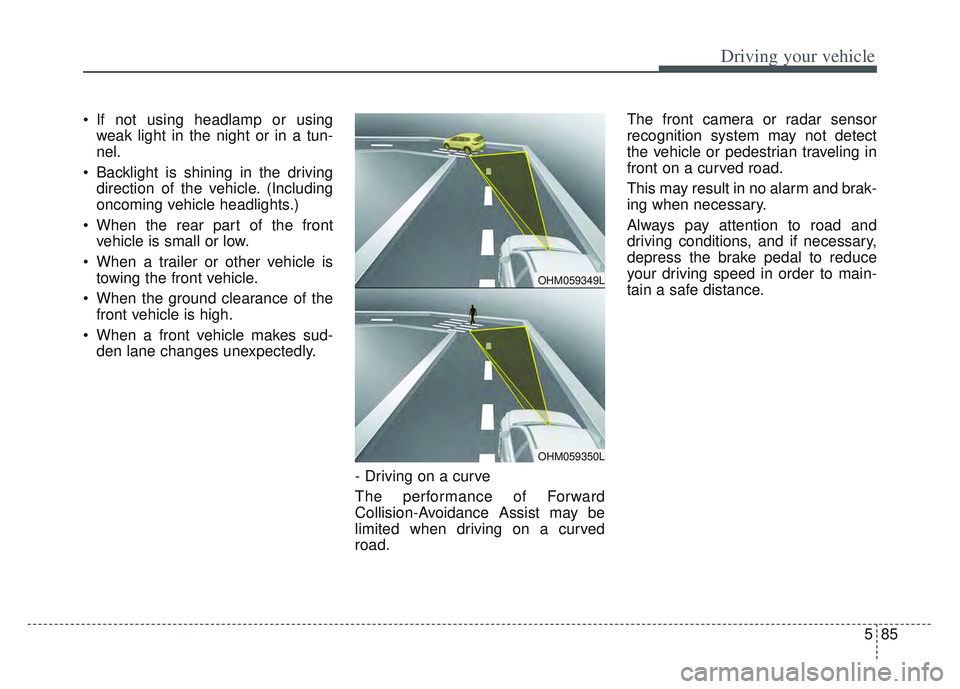
- Driving on a curve
The performance of Forward
Collision-Avoidance Assist may be
limited when driving on a curved
road. The front camera or radar sensor
recognition system may not detect
the vehicle or pedestrian traveling in
front on a curved road.
This may result in no alarm and brak-
ing when necessary.
Always pay attention to road and
driving conditions, and if necessary,
depress the brake pedal to reduce
your driving speed in order to main-
tain a safe distance.
OHM059349L
OHM059350L
Page 371 of 630
Driving your vehicle
86
5
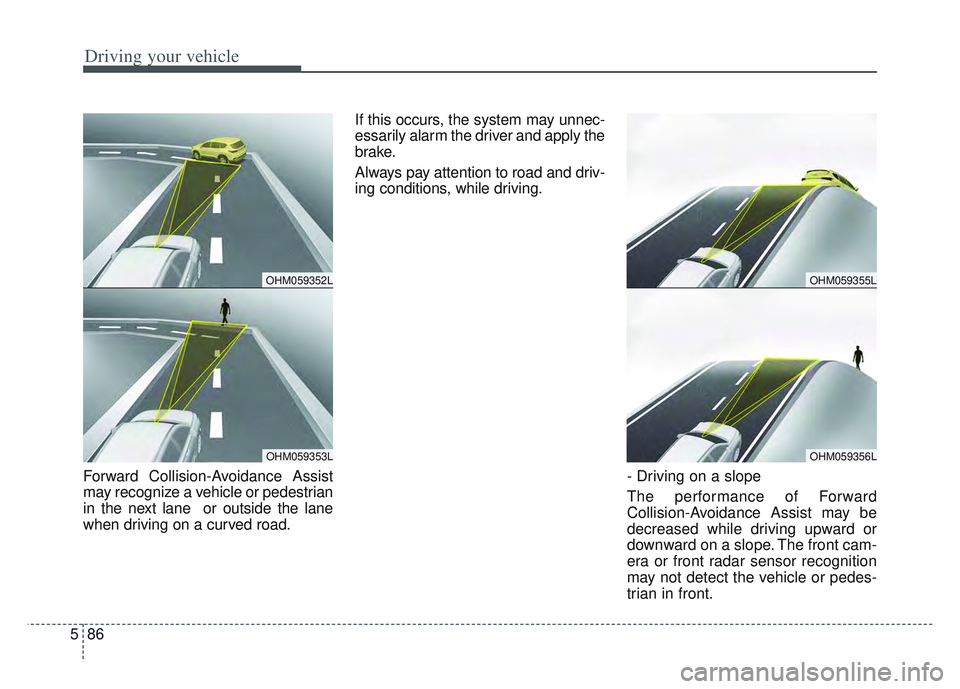
Forward Collision-Avoidance Assist
may recognize a vehicle or pedestrian
in the next lane or outside the lane
when driving on a curved road. If this occurs, the system may unnec-
essarily alarm the driver and apply the
brake.
Always pay attention to road and driv-
ing conditions, while driving.
- Driving on a slope
The performance of Forward
Collision-Avoidance Assist may be
decreased while driving upward or
downward on a slope. The front cam-
era or front radar sensor recognition
may not detect the vehicle or pedes-
trian in front.
OHM059355L
OHM059356L
OHM059352L
OHM059353L