change time KIA STINGER 2018 User Guide
[x] Cancel search | Manufacturer: KIA, Model Year: 2018, Model line: STINGER, Model: KIA STINGER 2018Pages: 551, PDF Size: 13.75 MB
Page 168 of 551
481
Features of your vehicle
Master warning mode(if equipped)
This warning light informs the driv- er the following situations
- LED head lamp malfunction (if equipped)
- Smart Cruise Control with Stop & Go malfunction (if equipped)
- Forward Collision-Avoidance Assist malfunction (if equipped)
- Blind-Spot Collision Warning radar blind (if equipped)
- Smart Cruise Control with Stop & Go radar blind (if equipped)
- Lamp malfunction
- High Beam Assist malfunction (if equipped)
The Master Warning Light illumi-
nates if one or more of the above
warning situations occur. At this time,
the LCD Modes Icon will change
from ( ) to ( ). If the warning situation is solved, the
master warning light will be turned off
and the LCD Modes Icon will be
changed back to its previous icon ( ).
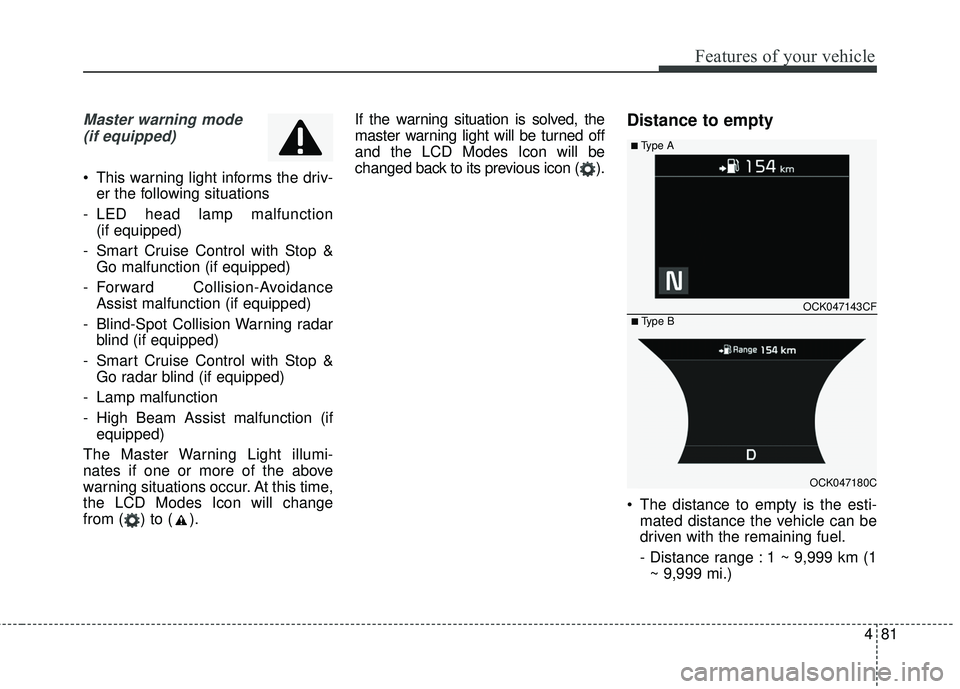
Distance to empty
The distance to empty is the esti-
mated distance the vehicle can be
driven with the remaining fuel.
- Distance range : 1 ~ 9,999 km (1~ 9,999 mi.)
OCK047143CF
OCK047180C
■ Type B
■ Type A
Page 172 of 551
485
Features of your vehicle
Light
One Touch Turn Signal :- Off: The one touch turn signalfunction will be deactivated.
- 3, 5, 7 Flashes : The lane change signals will blink 3, 5 or 7 times
when the turn signal lever is
moved slightly.
❈ For more details, refer to “Light” in
this chapter.
Ambient light brightness : Adjust the brightness of the Ambient light.
- Off/Level 1,2,3,4
Ambient Light Color : Select the color of the ambient light.
- white, orange, red, bluegreen,blue, violet
Head Light Delay : - If this item checked, the headlight delay function will be activat-
ed. Sound
Park Assist System Vol. (if
equipped) :
- Adjust the Park Assist Systemvolume. (Level 1 ~ 3)
❈ For more details, refer to “Parking
Assist System” in this chapter.
Welcome Sound (if equipped) : - If this item checked, the welcomesound function will be activated. Convenience
Seat Easy Access (if equipped)
- Off : The seat easy access func-tion will be deactivated.
- Normal/Extended : When you turn off the engine, the driver’s
seat will automatically move rear
for you to enter or exit the vehicle
more comfortably.
If you change the Engine
Start/Stop Button from OFF posi-
tion to the ACC function, the dri-
ver’s seat will return to the original
position.
❈ For more details, refer to “Driver
Position Memory System” in chap-
ter 3.
Page 174 of 551
487
Features of your vehicle
Tire Pressure Unit (if equipped)- Choose the tire pressure unit.(psi, kPa, bar)
Torque Unit(if equipped) - Choose the torque unit. (N·m,lb·ft)
Language
Choose the language
Reset
You can reset the menus in the User
Settings Mode. All menus in the User
Settings Mode are initialized, except
language and service interval.Warning Messages (if equipped)
Shift to P
This warning message illuminates if you try to turn off the engine without
the transmission in P (Park) posi-
tion.
At this time, the Engine Start/Stop Button turns to the ACC position (If
you press the Engine Start/Stop
Button once more, it will turn to the
ON position).
Low Key Battery
This warning message illuminatesif the battery of the smart key is
discharged when the Engine
Start/Stop Button changes to the
OFF position.
Press brake pedal to start engine
This warning message illuminatesif the Engine Start/Stop Button
changes to the ACC position twice
by pressing the button repeatedly
without depressing the brake pedal.
It means that you should depress the brake pedal to start the engine.
Key not in vehicle
This warning message will illumi-nates when a door is opened or
closed with the ignition in ACC
position and the smart key is not in
the vehicle.
Particularly when a door is closed
and the smart key is not in the
vehicle, alarm sound will beep.
If so, turn off the ignition or carry
the smart key in your pocket.
It means that you should always have the smart key with you.
Page 206 of 551
4119
Features of your vehicle
✽ ✽NOTICE
• Do not place any accessories,
stickers or tint the windshield.
• Have the windshield glass replaced from an authorized dealer.
• Do not remove or damage related parts of the High Beam Assist sys-
tem.
• Be careful that water doesn’t get into the High Beam Assist unit.
• Do not place objects on the dash- board that reflect light such as
mirrors, white paper, etc. The sys-
tem may malfunction if sunlight is
reflected.
• At times, the High Beam Assist system may not work properly,
always check the road conditions
for your safety. When the system
does not operate normally, manu-
ally change between the high
beam and low beam.
Turn signals and lane change
signals
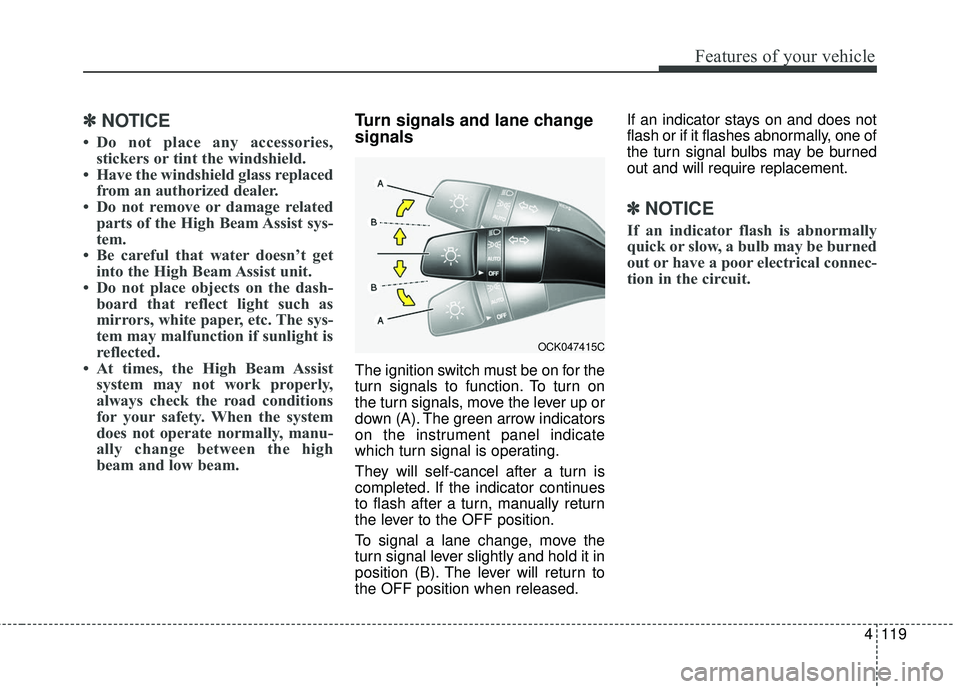
The ignition switch must be on for the
turn signals to function. To turn on
the turn signals, move the lever up or
down (A). The green arrow indicators
on the instrument panel indicate
which turn signal is operating.
They will self-cancel after a turn is
completed. If the indicator continues
to flash after a turn, manually return
the lever to the OFF position.
To signal a lane change, move the
turn signal lever slightly and hold it in
position (B). The lever will return to
the OFF position when released. If an indicator stays on and does not
flash or if it flashes abnormally, one of
the turn signal bulbs may be burned
out and will require replacement.
✽ ✽
NOTICE
If an indicator flash is abnormally
quick or slow, a bulb may be burned
out or have a poor electrical connec-
tion in the circuit.
OCK047415C
Page 207 of 551
Features of your vehicle
120
4
One-touch lane change function
(if equipped)
To activate an one-touch lane
change function, move the turn sig-
nal lever slightly and then release it.
The lane change signals will blink 3,
5 or 7 times.
You can choose one-touch lane
change blinking function in “One
touch turn lamp” of “User setting”.
Refer to “User setting” in chapter 4
✽ ✽
NOTICE
If the turn signal indicator stays on
and does not flash, or if it flashes
abnormally, a bulb may be burned
out or have a poor electrical connec-
tion in the circuit. The bulb may
require replacement.
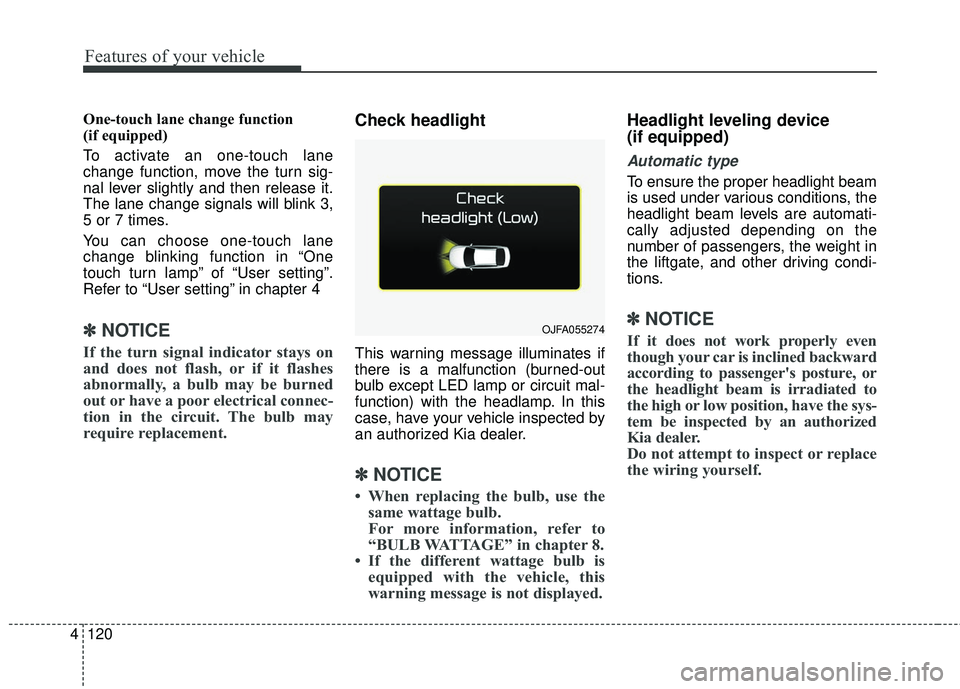
Check headlight
This warning message illuminates if
there is a malfunction (burned-out
bulb except LED lamp or circuit mal-
function) with the headlamp. In this
case, have your vehicle inspected by
an authorized Kia dealer.
✽ ✽NOTICE
• When replacing the bulb, use the
same wattage bulb.
For more information, refer to
“BULB WATTAGE” in chapter 8.
• If the different wattage bulb is equipped with the vehicle, this
warning message is not displayed.
Headlight leveling device
(if equipped)
Automatic type
To ensure the proper headlight beam
is used under various conditions, the
headlight beam levels are automati-
cally adjusted depending on the
number of passengers, the weight in
the liftgate, and other driving condi-
tions.
✽ ✽ NOTICE
If it does not work properly even
though your car is inclined backward
according to passenger's posture, or
the headlight beam is irradiated to
the high or low position, have the sys-
tem be inspected by an authorized
Kia dealer.
Do not attempt to inspect or replace
the wiring yourself.OJFA055274
Page 214 of 551
4127
Features of your vehicle
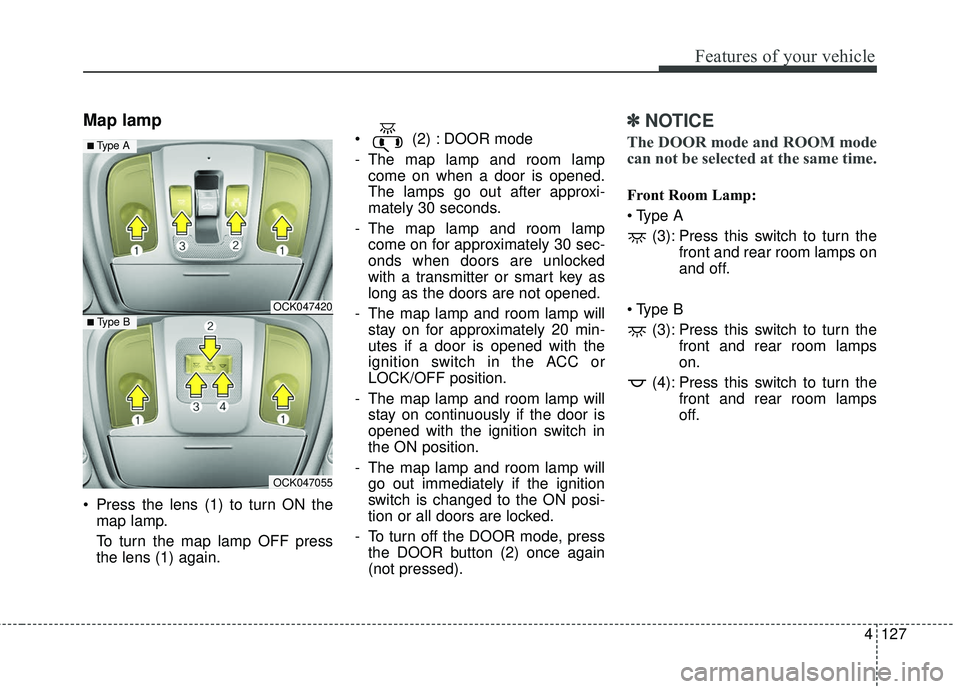
Map lamp
Press the lens (1) to turn ON themap lamp.
To turn the map lamp OFF press
the lens (1) again. (2) : DOOR mode
- The map lamp and room lamp
come on when a door is opened.
The lamps go out after approxi-
mately 30 seconds.
- The map lamp and room lamp come on for approximately 30 sec-
onds when doors are unlocked
with a transmitter or smart key as
long as the doors are not opened.
- The map lamp and room lamp will stay on for approximately 20 min-
utes if a door is opened with the
ignition switch in the ACC or
LOCK/OFF position.
- The map lamp and room lamp will stay on continuously if the door is
opened with the ignition switch in
the ON position.
- The map lamp and room lamp will go out immediately if the ignition
switch is changed to the ON posi-
tion or all doors are locked.
- To turn off the DOOR mode, press the DOOR button (2) once again
(not pressed).
✽ ✽ NOTICE
The DOOR mode and ROOM mode
can not be selected at the same time.
Front Room Lamp:
(3): Press this switch to turn the front and rear room lamps on
and off.
(3): Press this switch to turn the front and rear room lamps
on.
(4): Press this switch to turn the front and rear room lamps
off.
OCK047420
OCK047055
■ Type B
■ Type A
Page 230 of 551
4143
Features of your vehicle
✽ ✽NOTICE
When opening the windows in humid
weather, air conditioning may create
water droplets inside the vehicle.
Since excessive water droplets may
cause damage to electrical equip-
ment, air conditioning should only be
used with the windows closed.
Air conditioning system operation tips
If the vehicle has been parked in
direct sunlight during hot weather,
open the windows for a short time
to let the hot air inside the vehicle
escape.
To help reduce moisture inside of the windows on rainy or humid
days, decrease the humidity inside
the vehicle by operating the air
conditioning system.
During air conditioning system operation, you may occasionally
notice a slight change in engine
speed as the air conditioning com-
pressor cycles. This is a normal
system operation characteristic.
Use the air conditioning system every month only for a few minutes
to ensure maximum system per-
formance. When using the air conditioning
system, you may notice clear water
dripping (or even puddling) on the
ground under the passenger side
of the vehicle. This is a normal sys-
tem operation characteristic.
Operating the air conditioning sys- tem in the recirculated air position
provides maximum cooling, how-
ever, continual operation in this
mode may cause the air inside the
vehicle to become stale.
During cooling operation, you may occasionally notice a misty air flow
because of rapid cooling and
humid air intake. This is a normal
system operation characteristic.CAUTION - Excessive A/C
Use
When using the air conditioningsystem, monitor the tempera-ture gauge closely while drivingup hills or in heavy traffic whenoutside temperatures are high.Air conditioning system opera-tion may cause engine over-heating. Continue to use theblower fan but turn the air con-ditioning system off if the tem-perature gauge indicates engineoverheating.
Page 231 of 551
Features of your vehicle
144
4
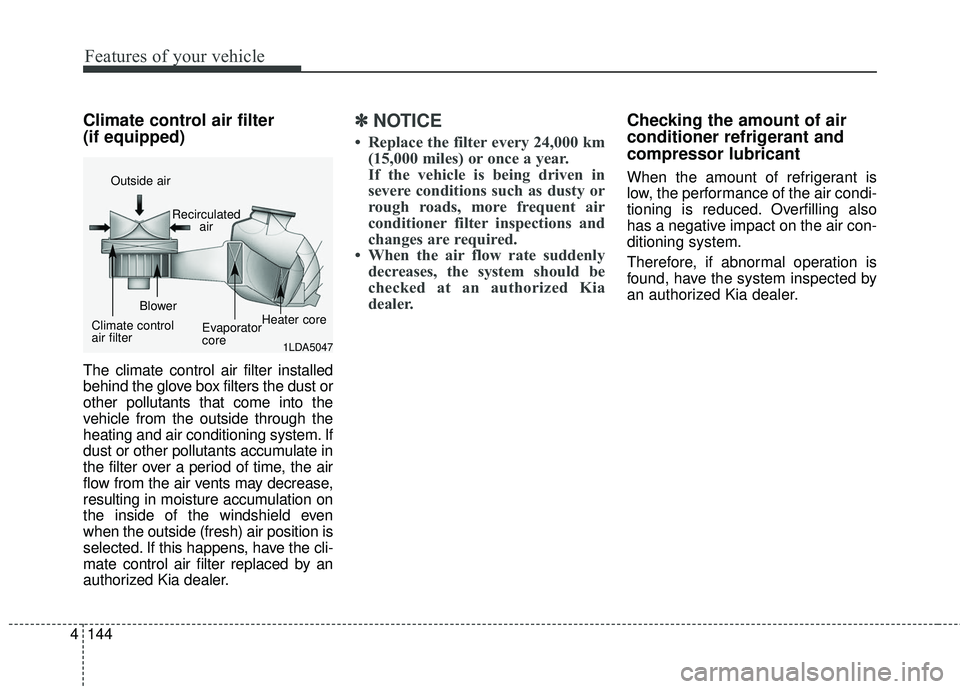
Climate control air filter
(if equipped)
The climate control air filter installed
behind the glove box filters the dust or
other pollutants that come into the
vehicle from the outside through the
heating and air conditioning system. If
dust or other pollutants accumulate in
the filter over a period of time, the air
flow from the air vents may decrease,
resulting in moisture accumulation on
the inside of the windshield even
when the outside (fresh) air position is
selected. If this happens, have the cli-
mate control air filter replaced by an
authorized Kia dealer.
✽ ✽
NOTICE
• Replace the filter every 24,000 km
(15,000 miles) or once a year.
If the vehicle is being driven in
severe conditions such as dusty or
rough roads, more frequent air
conditioner filter inspections and
changes are required.
• When the air flow rate suddenly decreases, the system should be
checked at an authorized Kia
dealer.
Checking the amount of air
conditioner refrigerant and
compressor lubricant
When the amount of refrigerant is
low, the performance of the air condi-
tioning is reduced. Overfilling also
has a negative impact on the air con-
ditioning system.
Therefore, if abnormal operation is
found, have the system inspected by
an authorized Kia dealer.
1LDA5047
Outside air
Recirculatedair
Climate control
air filter Blower
Evaporator
coreHeater core
Page 240 of 551
4153
Features of your vehicle
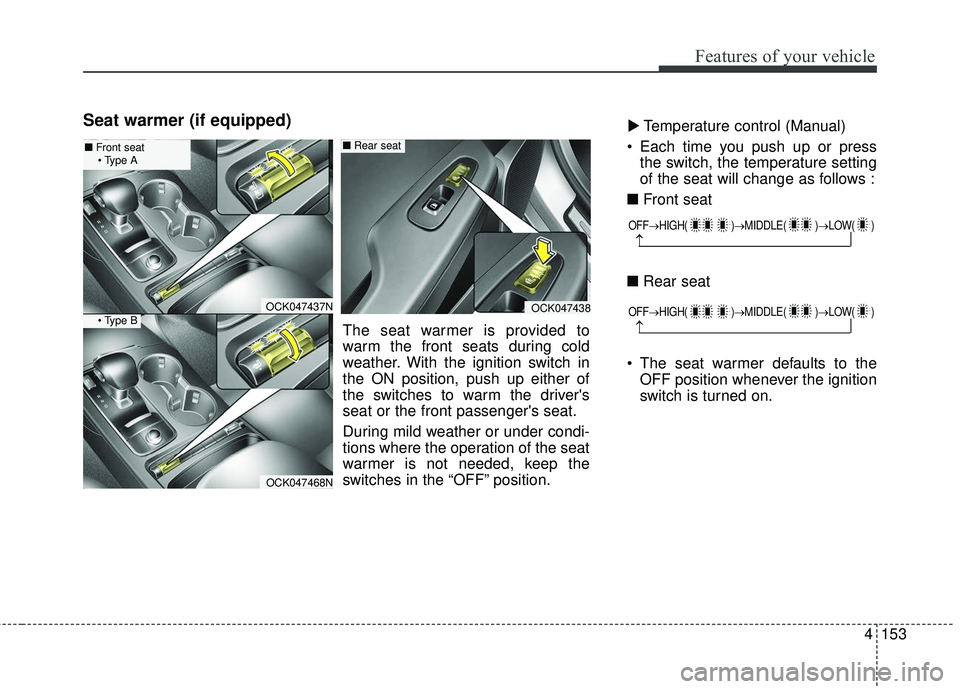
Seat warmer (if equipped)Temperature control (Manual)
Each time you push up or press the switch, the temperature setting
of the seat will change as follows :
■ Front seat
■ Rear seat
The seat warmer defaults to the OFF position whenever the ignition
switch is turned on.▼
OFF→ HIGH( )→ MIDDLE( )→LOW( )
→
OFF→HIGH( )→ MIDDLE( )→LOW( )
→
OCK047437N
OCK047468N
OCK047438
The seat warmer is provided to
warm the front seats during cold
weather. With the ignition switch in
the ON position, push up either of
the switches to warm the driver's
seat or the front passenger's seat.
During mild weather or under condi-
tions where the operation of the seat
warmer is not needed, keep the
switches in the “OFF” position.
■Rear seat■Front seat
Page 241 of 551
Features of your vehicle
154
4
Temperature control(Automatic)
The seat warmer starts to automati-
cally control the seat temperature in
order to prevent low-temperature
burns after being manually turned
ON.
You may manually push up the but-
ton to increase the seat temperature.
However, it soon returns to the auto-
matic mode again.
When pushing up the switch for more than 1.5 seconds with the
seat warmer operating, the seat
warmer will turn OFF.
The seat warmer defaults to the OFF position whenever the Engine
Start/Stop button is in the ON posi-
tion.✽ ✽ NOTICE
With the seat warmer switch in the
ON position, the heating system in
the seat turns off or on automatically
depending on the seat temperature.
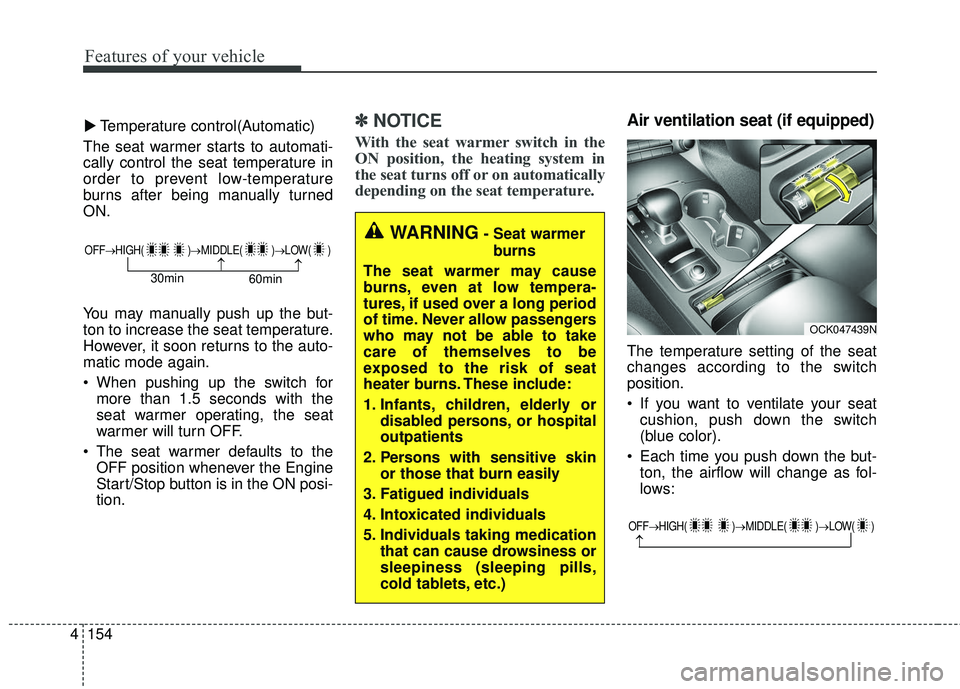
Air ventilation seat (if equipped)
The temperature setting of the seat
changes according to the switch
position.
If you want to ventilate your seat
cushion, push down the switch
(blue color).
Each time you push down the but- ton, the airflow will change as fol-
lows:
▼
WARNING- Seat warmer
burns
The seat warmer may cause
burns, even at low tempera-
tures, if used over a long period
of time. Never allow passengers
who may not be able to take
care of themselves to be
exposed to the risk of seat
heater burns. These include:
1. Infants, children, elderly or disabled persons, or hospital
outpatients
2. Persons with sensitive skin or those that burn easily
3. Fatigued individuals
4. Intoxicated individuals
5. Individuals taking medication that can cause drowsiness or
sleepiness (sleeping pills,
cold tablets, etc.)
OFF→ HIGH( )→ MIDDLE( )→LOW( )
→→30min
60min
OFF→HIGH( )→ MIDDLE( )→LOW( )
→
OCK047439N