instrument panel KIA STINGER 2018 Owner's Manual
[x] Cancel search | Manufacturer: KIA, Model Year: 2018, Model line: STINGER, Model: KIA STINGER 2018Pages: 551, PDF Size: 13.75 MB
Page 221 of 551
Features of your vehicle
134
4
✽ ✽
NOTICE
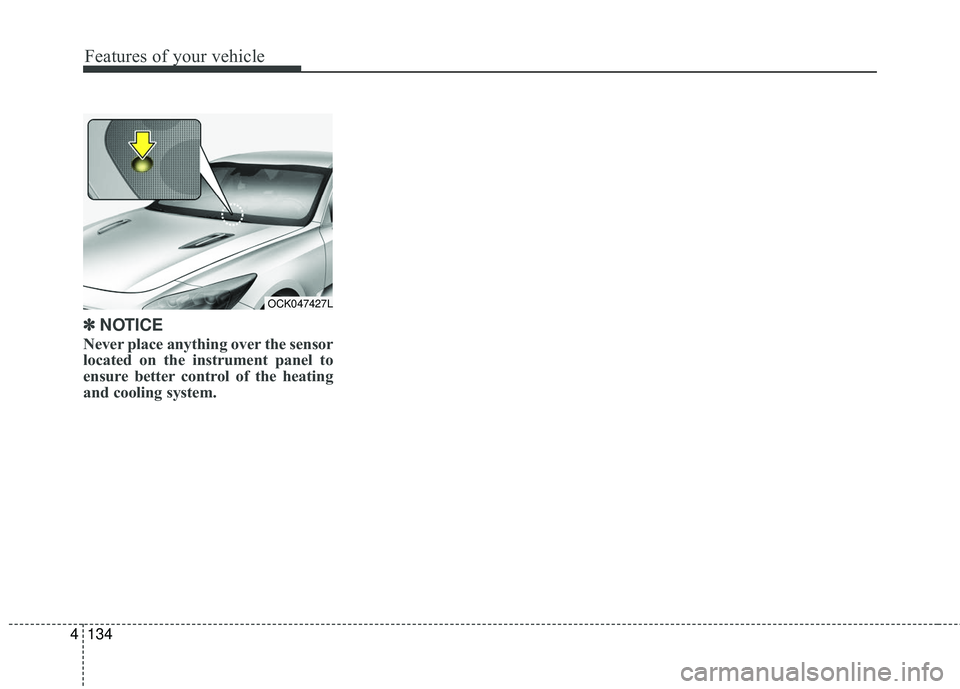
Never place anything over the sensor
located on the instrument panel to
ensure better control of the heating
and cooling system.
OCK047427L
Page 224 of 551
4137
Features of your vehicle
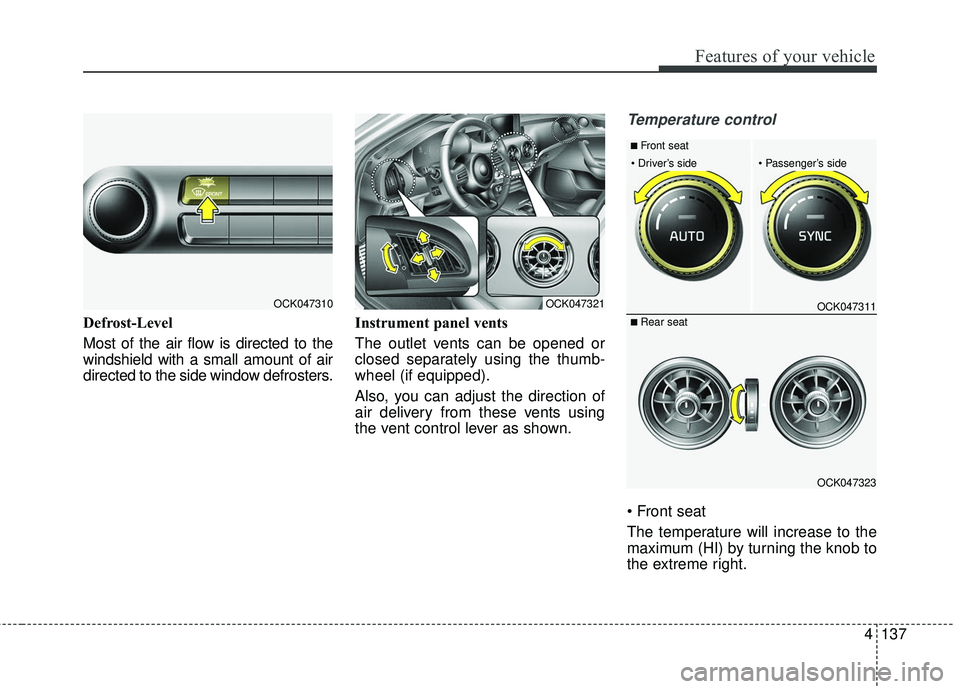
Defrost-Level
Most of the air flow is directed to the
windshield with a small amount of air
directed to the side window defrosters.Instrument panel vents
The outlet vents can be opened or
closed separately using the thumb-
wheel (if equipped).
Also, you can adjust the direction of
air delivery from these vents using
the vent control lever as shown.
Temperature control
The temperature will increase to the
maximum (HI) by turning the knob to
the extreme right.
OCK047310OCK047321OCK047311
OCK047323
■ Rear seat
■ Front seat
Page 365 of 551
Driving your vehicle
112
5
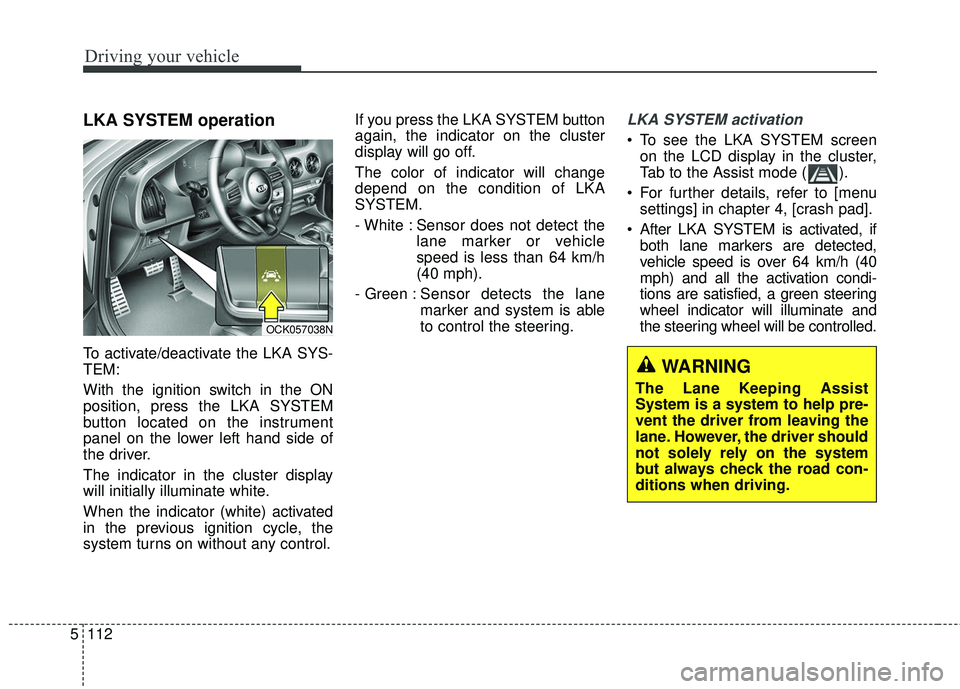
LKA SYSTEM operation
To activate/deactivate the LKA SYS-
TEM:
With the ignition switch in the ON
position, press the LKA SYSTEM
button located on the instrument
panel on the lower left hand side of
the driver.
The indicator in the cluster display
will initially illuminate white.
When the indicator (white) activated
in the previous ignition cycle, the
system turns on without any control. If you press the LKA SYSTEM button
again, the indicator on the cluster
display will go off.
The color of indicator will change
depend on the condition of LKA
SYSTEM.
- White : Sensor does not detect the
lane marker or vehicle
speed is less than 64 km/h
(40 mph).
- Green : Sensor detects the lane
marker and system is able
to control the steering.
LKA SYSTEM activation
To see the LKA SYSTEM screen
on the LCD display in the cluster,
Tab to the Assist mode ( ).
For further details, refer to [menu settings] in chapter 4, [crash pad].
After LKA SYSTEM is activated, if both lane markers are detected,
vehicle speed is over 64 km/h (40
mph) and all the activation condi-
tions are satisfied, a green steering
wheel indicator will illuminate and
the steering wheel will be controlled.
OCK057038N
WARNING
The Lane Keeping Assist
System is a system to help pre-
vent the driver from leaving the
lane. However, the driver should
not solely rely on the system
but always check the road con-
ditions when driving.
Page 485 of 551
757
Maintenance
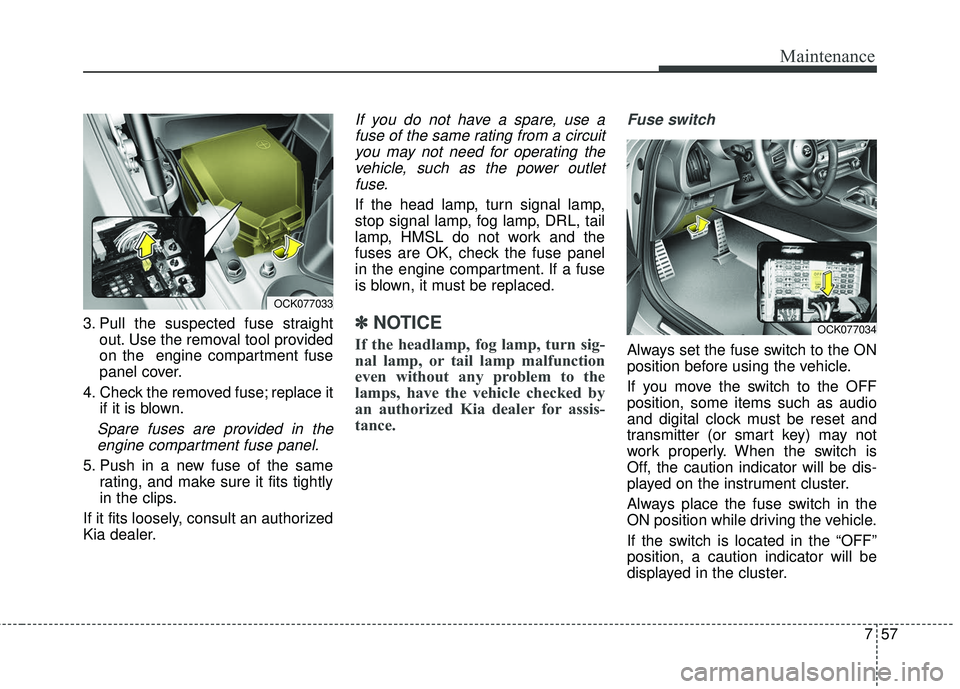
3. Pull the suspected fuse straightout. Use the removal tool provided
on the engine compartment fuse
panel cover.
4. Check the removed fuse; replace it if it is blown.
Spare fuses are provided in theengine compartment fuse panel.
5. Push in a new fuse of the same rating, and make sure it fits tightly
in the clips.
If it fits loosely, consult an authorized
Kia dealer.
If you do not have a spare, use a fuse of the same rating from a circuityou may not need for operating thevehicle, such as the power outletfuse.
If the head lamp, turn signal lamp,
stop signal lamp, fog lamp, DRL, tail
lamp, HMSL do not work and the
fuses are OK, check the fuse panel
in the engine compartment. If a fuse
is blown, it must be replaced.
✽ ✽ NOTICE
If the headlamp, fog lamp, turn sig-
nal lamp, or tail lamp malfunction
even without any problem to the
lamps, have the vehicle checked by
an authorized Kia dealer for assis-
tance.
Fuse switch
Always set the fuse switch to the ON
position before using the vehicle.
If you move the switch to the OFF
position, some items such as audio
and digital clock must be reset and
transmitter (or smart key) may not
work properly. When the switch is
Off, the caution indicator will be dis-
played on the instrument cluster.
Always place the fuse switch in the
ON position while driving the vehicle.
If the switch is located in the “OFF”
position, a caution indicator will be
displayed in the cluster.
OCK077033
OCK077034
Page 491 of 551
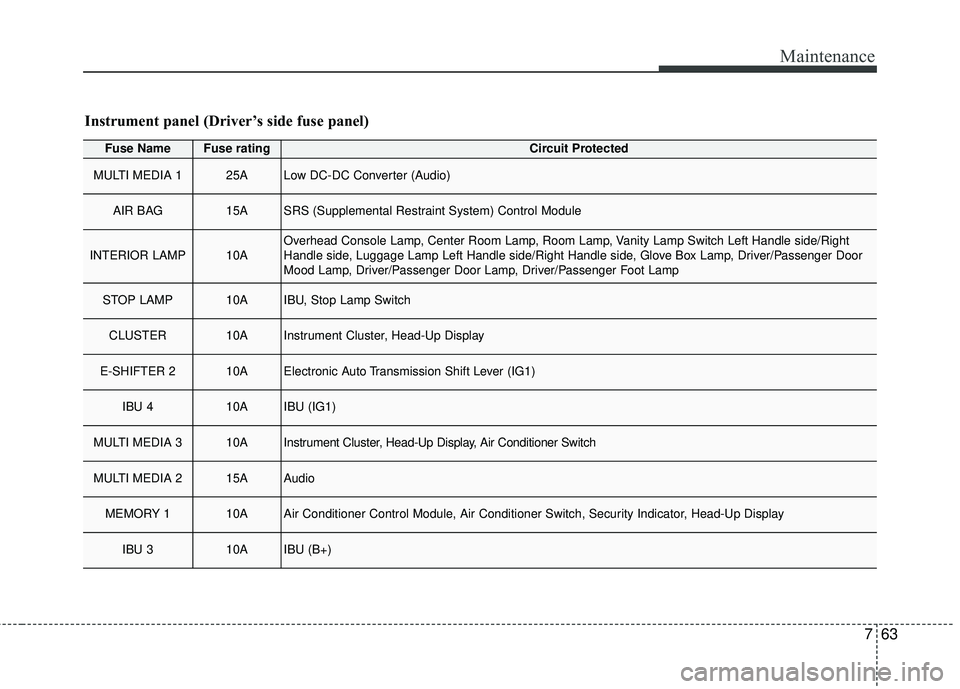
763
Maintenance
Fuse NameFuse ratingCircuit Protected
MULTI MEDIA 125ALow DC-DC Converter (Audio)
AIR BAG15ASRS (Supplemental Restraint System) Control Module
INTERIOR LAMP10AOverhead Console Lamp, Center Room Lamp, Room Lamp, Vanity Lamp Switch Left Handle side/Right
Handle side, Luggage Lamp Left Handle side/Right Handle side, Glove Box Lamp, Driver/Passenger Door
Mood Lamp, Driver/Passenger Door Lamp, Driver/Passenger Foot Lamp
STOP LAMP10AIBU, Stop Lamp Switch
CLUSTER10AInstrument Cluster, Head-Up Display
E-SHIFTER 210AElectronic Auto Transmission Shift Lever (IG1)
IBU 410AIBU (IG1)
MULTI MEDIA 310AInstrument Cluster, Head-Up Display, Air Conditioner Switch
MULTI MEDIA 215AAudio
MEMORY 110AAir Conditioner Control Module, Air Conditioner Switch, Security Indicator, Head-Up Display
IBU 310AIBU (B+)
Instrument panel (Driver’s side fuse panel)
Page 496 of 551
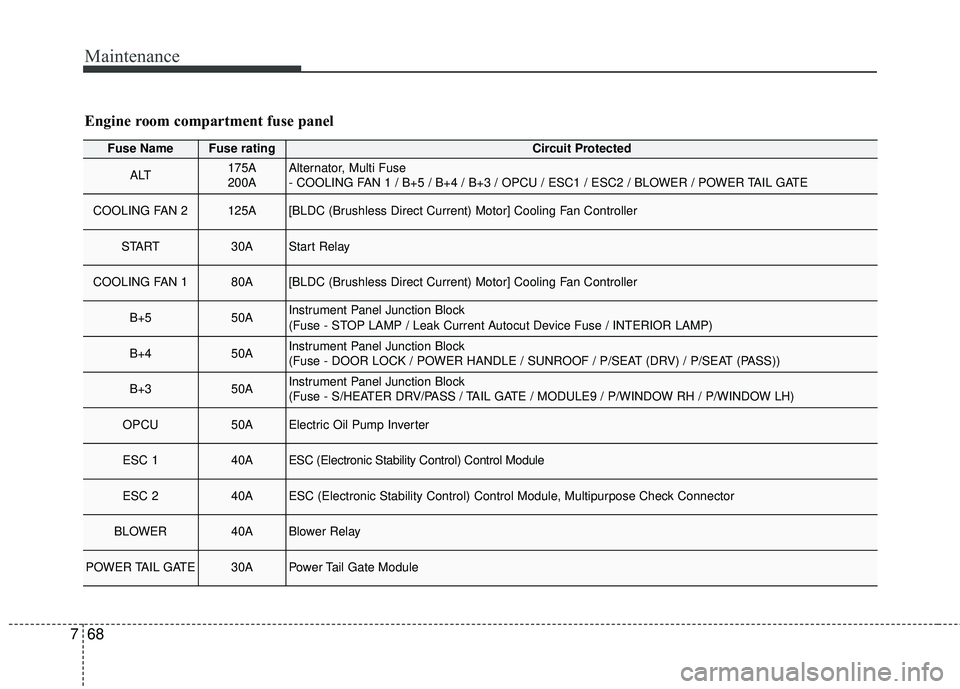
Maintenance
68
7
Fuse NameFuse ratingCircuit Protected
ALT175A
200AAlternator, Multi Fuse
- COOLING FAN 1 / B+5 / B+4 / B+3 / OPCU / ESC1 / ESC2 / BLOWER / POWER TAIL GATE
COOLING FAN 2125A[BLDC (Brushless Direct Current) Motor] Cooling Fan Controller
START30AStart Relay
COOLING FAN 180A[BLDC (Brushless Direct Current) Motor] Cooling Fan Controller
B+550AInstrument Panel Junction Block
(Fuse - STOP LAMP / Leak Current Autocut Device Fuse / INTERIOR LAMP)
B+450AInstrument Panel Junction Block
(Fuse - DOOR LOCK / POWER HANDLE / SUNROOF / P/SEAT (DRV) / P/SEAT (PASS))
B+350AInstrument Panel Junction Block
(Fuse - S/HEATER DRV/PASS / TAIL GATE / MODULE9 / P/WINDOW RH / P/WINDOW LH)
OPCU50AElectric Oil Pump Inverter
ESC 140AESC (Electronic Stability Control) Control Module
ESC 240AESC (Electronic Stability Control) Control Module, Multipurpose Check Connector
BLOWER40ABlower Relay
POWER TAIL GATE30APower Tail Gate Module
Engine room compartment fuse panel
Page 497 of 551
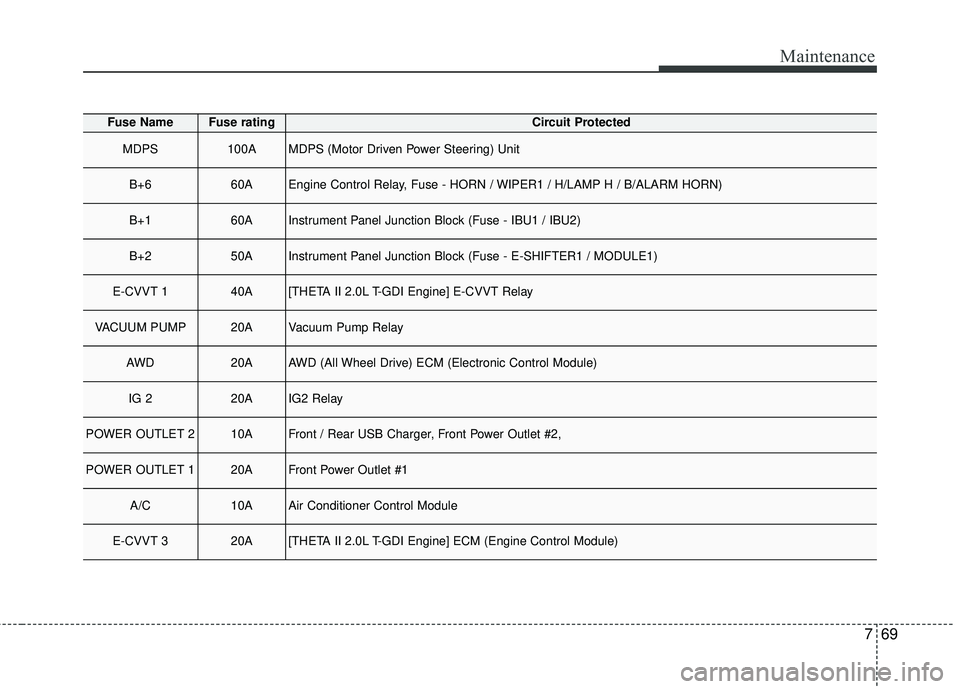
769
Maintenance
Fuse NameFuse ratingCircuit Protected
MDPS100AMDPS (Motor Driven Power Steering) Unit
B+660AEngine Control Relay, Fuse - HORN / WIPER1 / H/LAMP H / B/ALARM HORN)
B+160AInstrument Panel Junction Block (Fuse - IBU1 / IBU2)
B+250AInstrument Panel Junction Block (Fuse - E-SHIFTER1 / MODULE1)
E-CVVT 140A[THETA II 2.0L T-GDI Engine] E-CVVT Relay
VACUUM PUMP20AVacuum Pump Relay
AWD20AAWD (All Wheel Drive) ECM (Electronic Control Module)
IG 220AIG2 Relay
POWER OUTLET 210AFront / Rear USB Charger, Front Power Outlet #2,
POWER OUTLET 120AFront Power Outlet #1
A/C10AAir Conditioner Control Module
E-CVVT 320A[THETA II 2.0L T-GDI Engine] ECM (Engine Control Module)
Page 546 of 551

I5
Index
Fuses . . . . . . . . . . . . . . . . . . . . . . . . . . . . . . . . . . . . \
. . . 7-54Engine compartment fuse replacement . . . . . . . . . . 7-58
Fuse/relay panel description. . . . . . . . . . . . . . . . . . . 7-60
Inner panel fuse replacement . . . . . . . . . . . . . . . . . . 7-56
Gross vehicle weight. . . . . . . . . . . . . . . . . . . . . . . . . . . . 8-6
Head Up Display (HUD) . . . . . . . . . . . . . . . . . . . . . . 4-105 Description . . . . . . . . . . . . . . . . . . . . . . . . . . . . . . . 4-105
Head up display information . . . . . . . . . . . . . . . . . 4-106
Head up display ON/OFF . . . . . . . . . . . . . . . . . . . 4-106
Head up display setting . . . . . . . . . . . . . . . . . . . . . 4-106
Hood . . . . . . . . . . . . . . . . . . . . . . . . . . . . . . . . . . . . \
. . . 4-39 Closing the hood . . . . . . . . . . . . . . . . . . . . . . . . . . . 4-40
Opening the hood . . . . . . . . . . . . . . . . . . . . . . . . . . . 4-39
How to use this manual . . . . . . . . . . . . . . . . . . . . . . . . . 1-2
If the engine overheats . . . . . . . . . . . . . . . . . . . . . . . . . . 6-7
If the engine will not start . . . . . . . . . . . . . . . . . . . . . . . 6-4 If engine doesn't turn over or turns over slowly . . . . 6-4
If engine turns over normally but does not start . . . . 6-4 If you have a flat tire . . . . . . . . . . . . . . . . . . . . . . . . . . 6-14
Changing tires . . . . . . . . . . . . . . . . . . . . . . . . . . . . . 6-16
Jack and tools . . . . . . . . . . . . . . . . . . . . . . . . . . . . . . 6-14
Removing and storing the spare tire . . . . . . . . . . . . 6-15
Important safety precautions . . . . . . . . . . . . . . . . . . . . . 3-2 Air bag hazards . . . . . . . . . . . . . . . . . . . . . . . . . . . . . 3-2
Always wear your seat belt . . . . . . . . . . . . . . . . . . . . 3-2
Control your speed . . . . . . . . . . . . . . . . . . . . . . . . . . . 3-3
Driver distraction . . . . . . . . . . . . . . . . . . . . . . . . . . . . 3-2
Keep your vehicle in safe condition. . . . . . . . . . . . . . 3-3
Restrain all children . . . . . . . . . . . . . . . . . . . . . . . . . . 3-2
In case of an emergency while driving . . . . . . . . . . . . . . 6-3 If the engine stalls at a crossroad or crossing . . . . . . 6-3
If the engine stalls while driving . . . . . . . . . . . . . . . . 6-3
If you have a flat tire while driving . . . . . . . . . . . . . . 6-3
Instrument cluster . . . . . . . . . . . . . . . . . . . . . . . . . . . . . 4-67 Gauges . . . . . . . . . . . . . . . . . . . . . . . . . . . . . . . . . . . 4-\
69
Instrument cluster control . . . . . . . . . . . . . . . . . . . . 4-68
LCD display control . . . . . . . . . . . . . . . . . . . . . . . . . 4-68
Transaxle Shift Indicator . . . . . . . . . . . . . . . . . . . . . 4-72
Instrument panel overview . . . . . . . . . . . . . . . . . . . . . . . 2-5
Interior features. . . . . . . . . . . . . . . . . . . . . . . . . . . . . . 4-152 Air ventilation seat . . . . . . . . . . . . . . . . . . . . . . . . . 4-154
Coat hook . . . . . . . . . . . . . . . . . . . . . . . . . . . . . . . . 4-161
Cup holder . . . . . . . . . . . . . . . . . . . . . . . . . . . . . . . 4-152
Floor mat anchor (s) . . . . . . . . . . . . . . . . . . . . . . . . 4-162
Luggage net (Holder) . . . . . . . . . . . . . . . . . . . . . . . 4-162
Power outlet . . . . . . . . . . . . . . . . . . . . . . . . . . . . . . 4-156
H
G
I