start stop button KIA STINGER 2018 Workshop Manual
[x] Cancel search | Manufacturer: KIA, Model Year: 2018, Model line: STINGER, Model: KIA STINGER 2018Pages: 551, PDF Size: 13.75 MB
Page 254 of 551
Driving your vehicle
Before driving . . . . . . . . . . . . . . . . . . . . . . . . . . . . . . 5-5
• Before entering vehicle . . . . . . . . . . . . . . . . . . . . . . . . . 5-5
. . . . . . . . . . . . . . . . . . . . . . . . . . 5-5
. . . . . . . . . . . . . . . . . . . . . . . . . . . . . . . . 5-5
Engine start/stop button . . . . . . . . . . . . . . . . . . . . . 5-7
. . . . . . . . . . . . . . 5-7
. . . . . . . . . . . . . 5-9
Automatic transmission . . . . . . . . . . . . . . . . . . . . . 5-11
. . . . . . . . . . . . . . . 5-11
. . . . . . . . . . . . . . . . . . . . . . . . 5-17
Automatic transmission (shift-by-wire) . . . . . . . . 5-20
. . . . . . . . . . . . . . . 5-20
. . . . . . . . . . . . . . . . . . . . . . . . . . . . . . . . . . . . \
. 5-27
. . . . . . . . . . . . . . . . . . . . . . . . 5-30
All Wheel Drive (AWD) . . . . . . . . . . . . . . . . . . . . . 5-35
. . . . . . . . . . . . . . . . . . . 5-35
Limited Slip Differential (LSD) . . . . . . . . . . . . . . 5-39
Brake system . . . . . . . . . . . . . . . . . . . . . . . . . . . . . . 5-40
. . . . . . . . . . . . . . . . . . . . . . . . . . . . . . . . 5-40
. . . . . . . . . . . . . . . . . . . . . 5-42
. . . . . . . . . . . . . . . . 5-44
. . . . . . . . . . . . . . . . . . . . . . . . . . . . . . . . . . . 5-\
50
. . . . . . . . . . . . . . . . . . . . . . . . . . . . 5-53
. . . . . . . . . . . . . . 5-56
. . . . . . . . . . . . 5-60
. . . . . . . . . . . . . . . . . 5-61
Forward Collision-avoidance Assist (FCA) . . . . . 5-64
. . . . . . . . . . . . . . . . . . . 5-64
. . . . . . . . 5-67
. . . . . . . . . . . . . . . . . . . . . . . . . . . . . . 5-68
. . . . . . . . . . . . . . . . 5-68
. . . . . . . . . . . . . . . . . . . . . . . . . . . 5-70
. . . . . . . . . . . . . . . . . . . . . . . 5-725
Page 260 of 551
57
Driving your vehicle
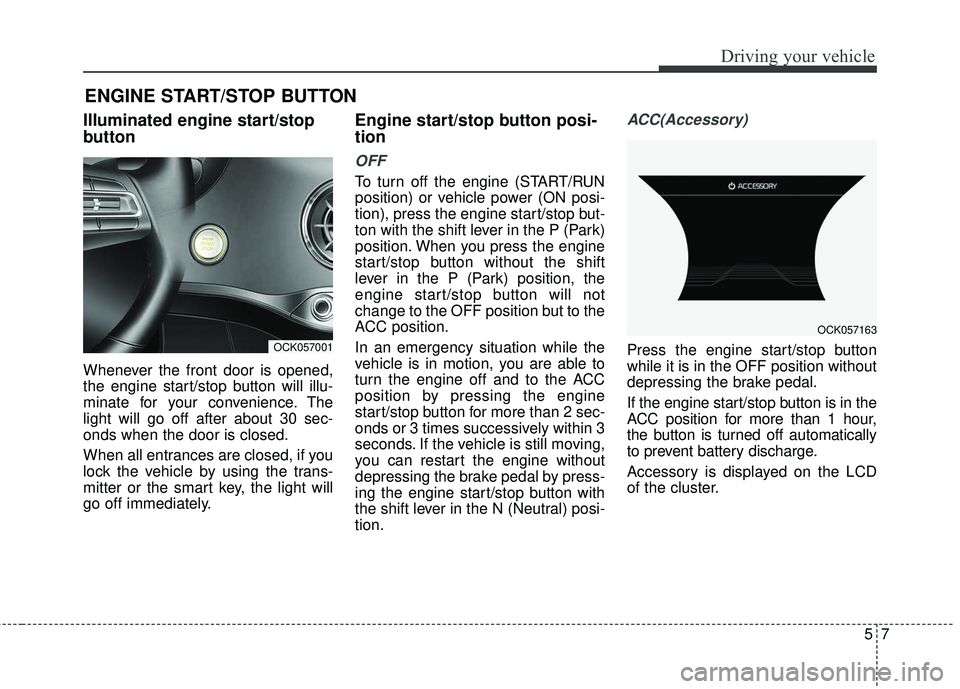
Illuminated engine start/stop
button
Whenever the front door is opened,
the engine start/stop button will illu-
minate for your convenience. The
light will go off after about 30 sec-
onds when the door is closed.
When all entrances are closed, if you
lock the vehicle by using the trans-
mitter or the smart key, the light will
go off immediately.
Engine start/stop button posi-
tion
OFF
To turn off the engine (START/RUN
position) or vehicle power (ON posi-
tion), press the engine start/stop but-
ton with the shift lever in the P (Park)
position. When you press the engine
start/stop button without the shift
lever in the P (Park) position, the
engine start/stop button will not
change to the OFF position but to the
ACC position.
In an emergency situation while the
vehicle is in motion, you are able to
turn the engine off and to the ACC
position by pressing the engine
start/stop button for more than 2 sec-
onds or 3 times successively within 3
seconds. If the vehicle is still moving,
you can restart the engine without
depressing the brake pedal by press-
ing the engine start/stop button with
the shift lever in the N (Neutral) posi-
tion.
ACC(Accessory)
Press the engine start/stop button
while it is in the OFF position without
depressing the brake pedal.
If the engine start/stop button is in the
ACC position for more than 1 hour,
the button is turned off automatically
to prevent battery discharge.
Accessory is displayed on the LCD
of the cluster.
ENGINE START/STOP BUTTON
OCK057001
OCK057163
Page 261 of 551
Driving your vehicle
85
ON
Press the engine start/stop button
while it is in the ACC position without
depressing the brake pedal.
The warning lights can be checked
before the engine is started. Do not
leave the engine start/stop button in
the ON position for a long time. The
battery may discharge, because the
engine is not running.
START/RUN
To start the engine, depress the
brake pedal and press the ENGINE
START/ STOP button with the shift
lever in the P (Park) or the N
(Neutral) position. For your safety,
start the engine with the shift lever in
the P (Park) position.
If you press the engine start/stop but-
ton without depressing the brake
pedal for automatic transmission vehi-
cles, the engine will not start and the
engine start/stop button changes as
follow:
OFF ➔ACC ➔ON ➔OFF or ACC
✽ ✽
NOTICE
If you leave the ENGINE START/
STOP button in the ACC or ON
position for a long time, the battery
will discharge.
WARNING- Starting
vehicle
Never press the engine
start/stop button while the vehi-
cle is in motion except in an
emergency. This would result in
loss of directional control and
braking function, which could
cause an accident.
Page 262 of 551
59
Driving your vehicle
Starting the engine with a
smart key
1.Carry the smart key or place itinside the vehicle.
2.Make sure the parking brake is firmly applied
3.Place the transmission shift lever in P (Park). Depress the brake pedal
fully.
You can also start the engine whenthe shift lever is in the N (Neutral)position.
4.Press the engine start/stop button while depressing the brake pedal.
It should be started withoutdepressing the accelerator.
5.Do not wait for the engine to warm up while the vehicle remains sta-
tionary.
Start driving at moderate engine
speeds. (Steep accelerating and
decelerating should be avoided.) Even if the smart key is in the vehi-
cle, if it is far away from you, the
engine may not start.
When the engine start/stop button is in the ACC position or above, if
any door is opened, the system
checks for the smart key. If the
smart key is not in the vehicle, a
message “key is not in the vehicle”
will appear on the LCD display. And
if all doors are closed, the chime
will sound for 5 seconds. The indi-
cator or warning will turn off while
the vehicle is moving. Always have
the smart key with you.
WARNING - Unintended
vehicle movement
Never leave the smart key in the
vehicle with children or vehicle
occupants who are unfamiliar
with the vehicle operation.
Pushing the engine start/stop
button while the smart key is in
the vehicle may result in unin-
tended engine activation and/or
unintended vehicle movement.
Page 263 of 551
Driving your vehicle
10
5
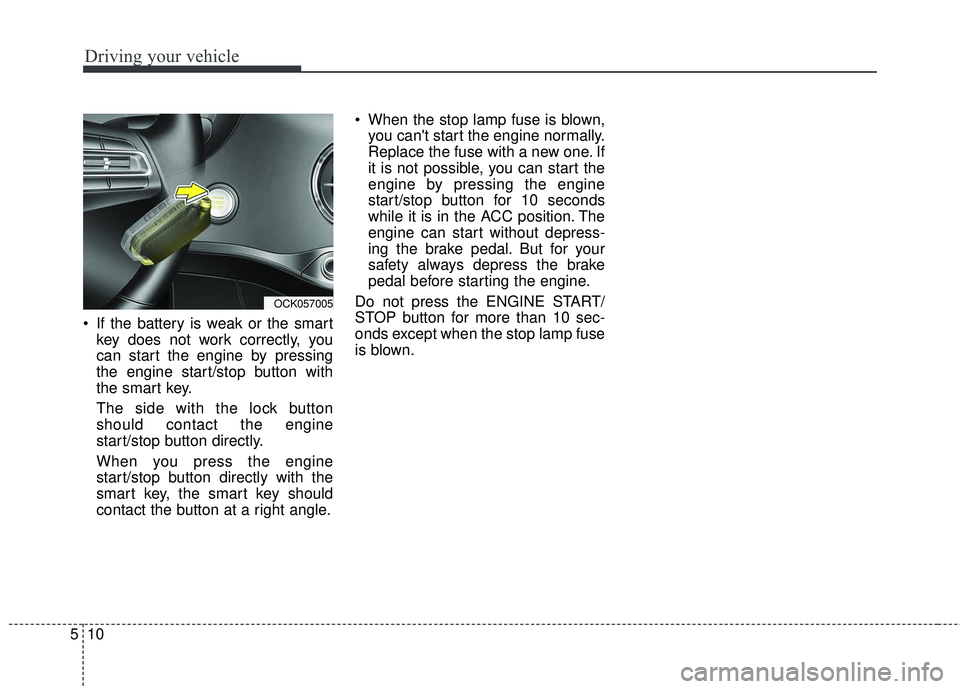
If the battery is weak or the smart
key does not work correctly, you
can start the engine by pressing
the engine start/stop button with
the smart key.
The side with the lock button
should contact the engine
start/stop button directly.
When you press the engine
start/stop button directly with the
smart key, the smart key should
contact the button at a right angle. When the stop lamp fuse is blown,
you can't start the engine normally.
Replace the fuse with a new one. If
it is not possible, you can start the
engine by pressing the engine
start/stop button for 10 seconds
while it is in the ACC position. The
engine can start without depress-
ing the brake pedal. But for your
safety always depress the brake
pedal before starting the engine.
Do not press the ENGINE START/
STOP button for more than 10 sec-
onds except when the stop lamp fuse
is blown.
OCK057005
Page 270 of 551
517
Driving your vehicle
5. Move the shift lever.
6. Remove the tool from the shiftlockoverride access hole then install
the cap.
7. We recommend that the system be inspected by an authorized Kia
dealer.
Ignition key interlock system
The ignition key cannot be removed
unless the shift lever is in the P
(Park) position. Even if the ignition
switch is in the LOCK position, the
key cannot be removed.
If your vehicle is equipped with
engine start/stop button, the button
will not change to the OFF position
unless the shift lever is in the P
(Park) position.
Good driving practices
Never move the gear shift leverfrom P (Park) to any other position
with the accelerator pedal
depressed.
Never move the gear shift lever into P (Park) when the vehicle is in
motion.
Slow down before shifting to a lower gear. Otherwise, the lower
gear may not be engaged.
Always use the parking brake. Do not depend on placing the trans-
mission in P (Park) to keep the
vehicle from moving.
Optimum vehicle performance and economy is obtained by smoothly
depressing and releasing the
accelerator pedal.
✽ ✽ NOTICE- Kickdown
Mechanism
Use the kickdown mechanism for
maximum acceleration. Depress the
accelerator pedal beyond the pres-
sure point. The automatic transmis-
sion will shift to a lower gear
depending on the engine speed.
Moving up a steep grade from astanding start
To move up a steep grade from a
standing start, depress the brake
pedal, shift the shift lever to D
(Drive). Depress the accelerator
gradually while releasing the brake
pedal.
Page 271 of 551
Driving your vehicle
18
5
Launch Control
Launch Control Operation
When using Launch Control with
an engine that is not warmed up
enough, a driver should always
make sure that the engine’s cool-
ing water is warmed up and reach-
es a recommended temperature.
To operate ESC Off state 2, Press and hold ESC button for more than
3 seconds in Sports mode. (Status
Display on Cluster Screen)
For launching, stop the vehicle and keep a steering wheel straight.
Footbrakes, EPB and Auto Hold must be released for smooth
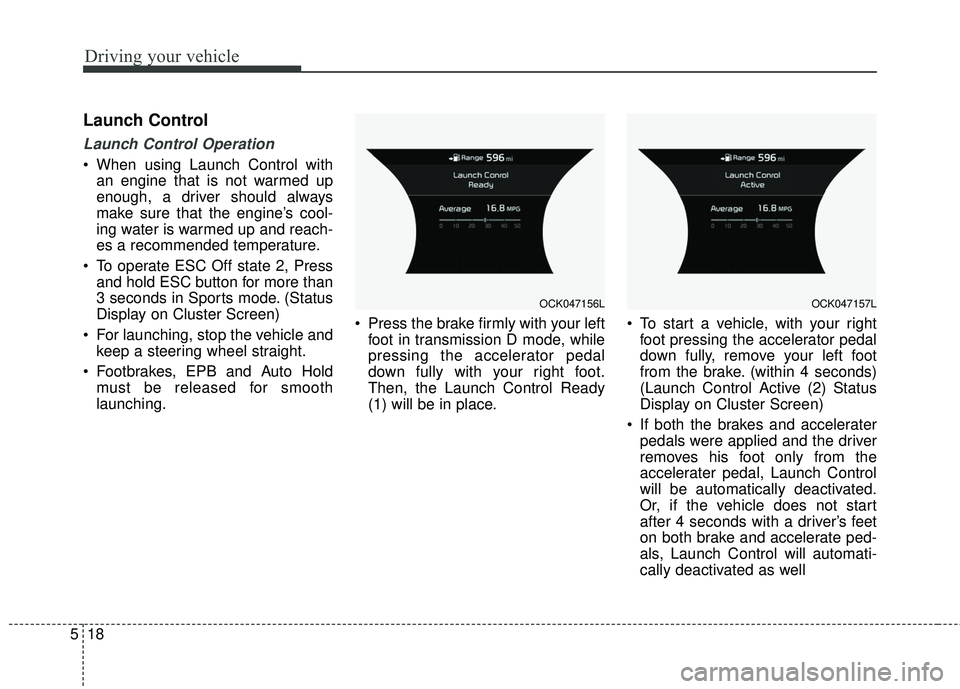
launching. Press the brake firmly with your left
foot in transmission D mode, while
pressing the accelerator pedal
down fully with your right foot.
Then, the Launch Control Ready
(1) will be in place. To start a vehicle, with your right
foot pressing the accelerator pedal
down fully, remove your left foot
from the brake. (within 4 seconds)
(Launch Control Active (2) Status
Display on Cluster Screen)
If both the brakes and accelerater pedals were applied and the driver
removes his foot only from the
accelerater pedal, Launch Control
will be automatically deactivated.
Or, if the vehicle does not start
after 4 seconds with a driver’s feet
on both brake and accelerate ped-
als, Launch Control will automati-
cally deactivated as well
OCK047156LOCK047157L
Page 274 of 551
521
Driving your vehicle
Transmission ranges
The indicator in the instrument clus-
ter displays the shift lever position
when the engine start/stop button is
in the ON position.
However, if the gear is in N (Neutral)
or P (Park), the position is displayed
on the instrument cluster when the
engine start/stop button is in the OFF
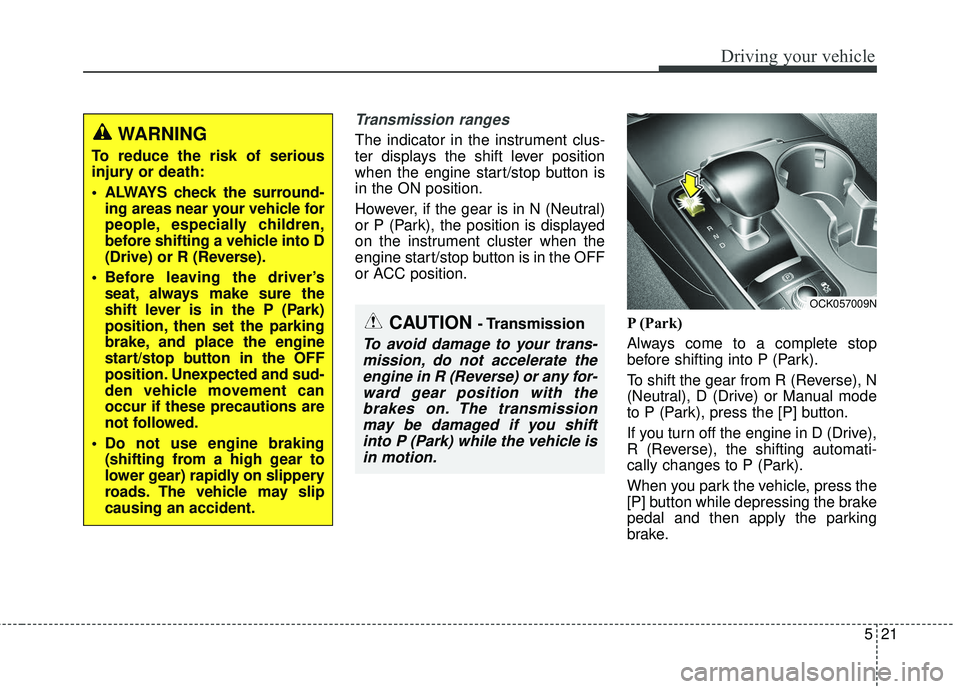
or ACC position.P (Park)
Always come to a complete stop
before shifting into P (Park).
To shift the gear from R (Reverse), N
(Neutral), D (Drive) or Manual mode
to P (Park), press the [P] button.
If you turn off the engine in D (Drive),
R (Reverse), the shifting automati-
cally changes to P (Park).
When you park the vehicle, press the
[P] button while depressing the brake
pedal and then apply the parking
brake.WARNING
To reduce the risk of serious
injury or death:
ALWAYS check the surround-ing areas near your vehicle for
people, especially children,
before shifting a vehicle into D
(Drive) or R (Reverse).
Before leaving the driver’s seat, always make sure the
shift lever is in the P (Park)
position, then set the parking
brake, and place the engine
start/stop button in the OFF
position. Unexpected and sud-
den vehicle movement can
occur if these precautions are
not followed.
Do not use engine braking (shifting from a high gear to
lower gear) rapidly on slippery
roads. The vehicle may slip
causing an accident.
OCK057009N
CAUTION - Transmission
To avoid damage to your trans-mission, do not accelerate theengine in R (Reverse) or any for-ward gear position with thebrakes on. The transmissionmay be damaged if you shiftinto P (Park) while the vehicle isin motion.
Page 275 of 551
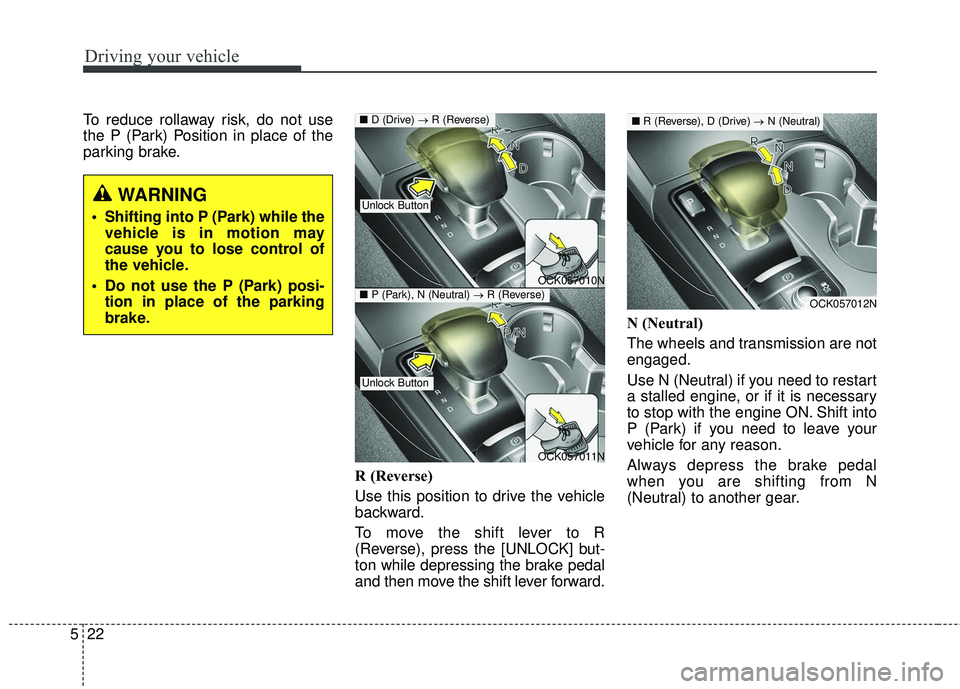
Driving your vehicle
22
5
To reduce rollaway risk, do not use
the P (Park) Position in place of the
parking brake.
R (Reverse)
Use this position to drive the vehicle
backward.
To move the shift lever to R
(Reverse), press the [UNLOCK] but-
ton while depressing the brake pedal
and then move the shift lever forward.N (Neutral)
The wheels and transmission are not
engaged.
Use N (Neutral) if you need to restart
a stalled engine, or if it is necessary
to stop with the engine ON. Shift into
P (Park) if you need to leave your
vehicle for any reason.
Always depress the brake pedal
when you are shifting from N
(Neutral) to another gear.
WARNING
Shifting into P (Park) while the
vehicle is in motion may
cause you to lose control of
the vehicle.
Do not use the P (Park) posi- tion in place of the parking
brake.
OCK057010N
OCK057011N
■ D (Drive) → R (Reverse)
Unlock Button
Unlock Button
■P (Park), N (Neutral) →R (Reverse)OCK057012N
■R (Reverse), D (Drive) →N (Neutral)
Page 276 of 551
![KIA STINGER 2018 Workshop Manual 523
Driving your vehicle
To turn off the engine, re-press the
engine start/stop button to the ON
position, press the [P] button, and
press the engine start/stop button to
the OFF position.
When eithe](/img/2/40391/w960_40391-275.png "KIA STINGER 2018 Workshop Manual 523
Driving your vehicle
To turn off the engine, re-press the
engine start/stop button to the ON
position, press the [P] button, and
press the engine start/stop button to
the OFF position.
When eithe")
523
Driving your vehicle
To turn off the engine, re-press the
engine start/stop button to the ON
position, press the [P] button, and
press the engine start/stop button to
the OFF position.
When either the driver's door or the
front passenger's door is opened
with the engine start/stop button in
the ACC position and the shift lever
in N (Neutral) position, the engine is
automatically turned OFF and the
transmission automatically changes
to the P (Park) position.D (Drive)
This is the normal driving position. The
transmission will automatically shift
through a 8-gear sequence, providing
the best fuel economy and power.
WARNING
To avoid inadvertent vehiclemovement, do not shift into
gear unless your foot is firmly
on the brake pedal.
D not permit your vehicle to idle in the N (Neutral) position
for an extended period of
time as this will preclude the
wheels and the transmission
from engaging. While parking
the vehicle with the engine
running, depress the brake
pedal, shift the vehicle to the
P (Park) position and apply
the parking brake.
Do not drive with the shift lever in N (Neutral). The
engine brake will not work
and may lead to an accident.
OCK057013N
OCK057014N
■ R (Reverse) → D (Drive)
■P (Park), N (Neutral) →D (Drive)
Unlock Button
Unlock Button