display KIA STINGER 2018 Repair Manual
[x] Cancel search | Manufacturer: KIA, Model Year: 2018, Model line: STINGER, Model: KIA STINGER 2018Pages: 551, PDF Size: 13.75 MB
Page 354 of 551
5101
Driving your vehicle
Your vehicle may be equipped with
the ISG system, which reduces fuel
consumption by automatically shut-
ting down the engine, when the vehi-
cle is at a standstill. (For example :
red light, stop sign and traffic jam)
The engine starts automatically as
soon as the starting conditions are
met.
The ISG system is ON whenever the
engine is running.
✽ ✽NOTICE
When the engine automatically
starts by the ISG system, some
warning lights (ABS, ESC, ESC
OFF, EPS or Parking brake warn-
ing light) may turn on for a few sec-
onds.
This happens because of low battery
voltage. It does not mean the system
has malfunctioned.
Auto stop
To stop the engine in idle stop
mode
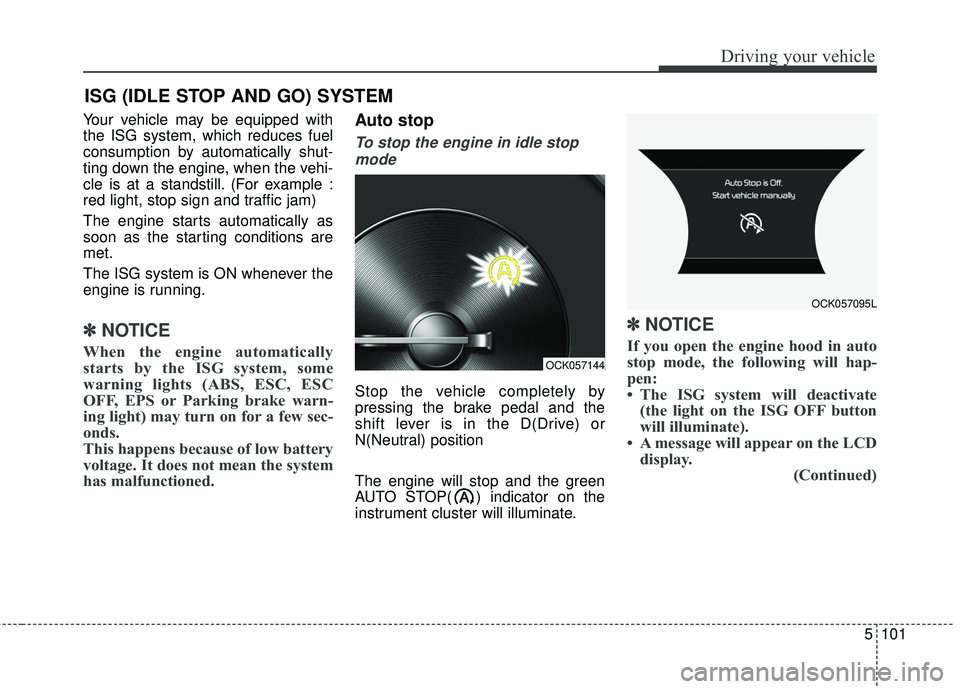
Stop the vehicle completely by
pressing the brake pedal and the
shift lever is in the D(Drive) or
N(Neutral) position
The engine will stop and the green
AUTO STOP( ) indicator on the
instrument cluster will illuminate.
✽ ✽ NOTICE
If you open the engine hood in auto
stop mode, the following will hap-
pen:
• The ISG system will deactivate
(the light on the ISG OFF button
will illuminate).
• A message will appear on the LCD display. (Continued)
ISG (IDLE STOP AND GO) SYSTEM
OCK057144
OCK057095L
Page 356 of 551
5103
Driving your vehicle
Condition of ISG system oper-
ation
The ISG system will operateunder the following condition:
- The driver’s seat belt is fastened.
- The driver’s door and engine hood are closed.
- The brake vacuum pressure is ade- quate.
- The battery is sufficiently charged.
- The outside temperature is between 14°F to 95°F (-10°C to 35°C).
- The engine coolant temperature is not too low.
✽ ✽ NOTICE
• If the ISG system does not meet
the operation condition, the ISG
system is deactivated. The light on
the ISG OFF button will illumi-
nate and a message “Auto Stop
conditions not met” will appear on
the LCD display.
• If the light or notice comes on con- tinuously, please check the opera-
tion condition.
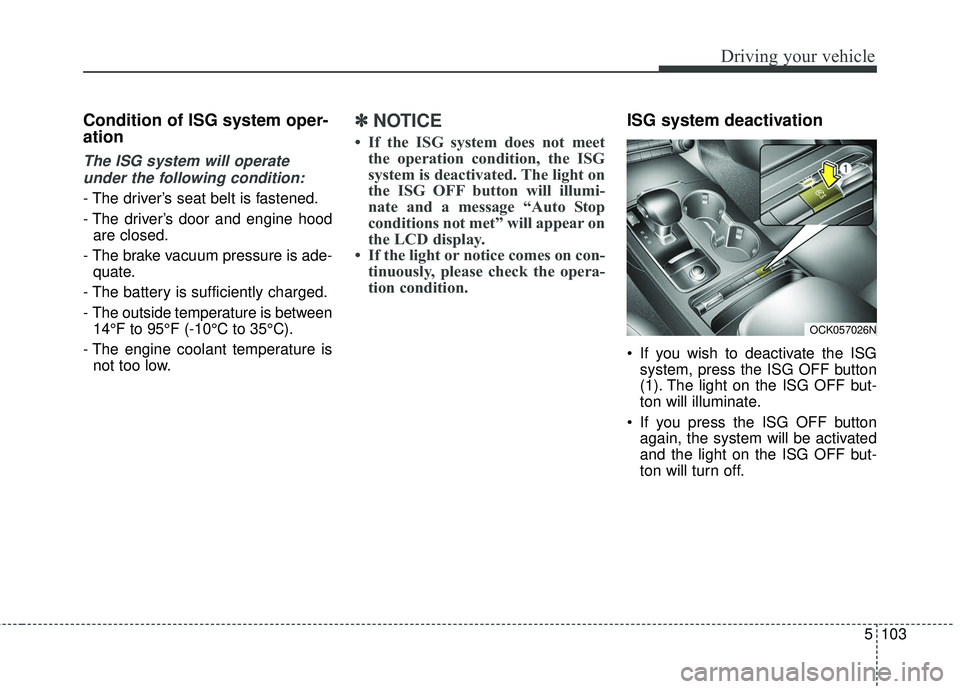
ISG system deactivation
If you wish to deactivate the ISG
system, press the ISG OFF button
(1). The light on the ISG OFF but-
ton will illuminate.
If you press the ISG OFF button again, the system will be activated
and the light on the ISG OFF but-
ton will turn off.
OCK057026N
Page 365 of 551
Driving your vehicle
112
5
LKA SYSTEM operation
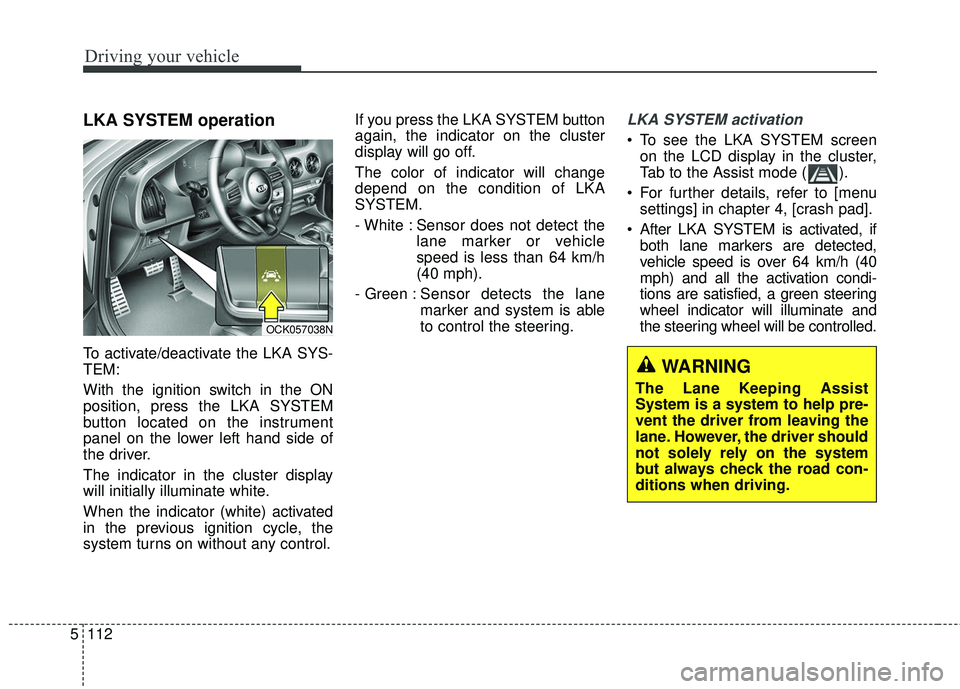
To activate/deactivate the LKA SYS-
TEM:
With the ignition switch in the ON
position, press the LKA SYSTEM
button located on the instrument
panel on the lower left hand side of
the driver.
The indicator in the cluster display
will initially illuminate white.
When the indicator (white) activated
in the previous ignition cycle, the
system turns on without any control. If you press the LKA SYSTEM button
again, the indicator on the cluster
display will go off.
The color of indicator will change
depend on the condition of LKA
SYSTEM.
- White : Sensor does not detect the
lane marker or vehicle
speed is less than 64 km/h
(40 mph).
- Green : Sensor detects the lane
marker and system is able
to control the steering.
LKA SYSTEM activation
To see the LKA SYSTEM screen
on the LCD display in the cluster,
Tab to the Assist mode ( ).
For further details, refer to [menu settings] in chapter 4, [crash pad].
After LKA SYSTEM is activated, if both lane markers are detected,
vehicle speed is over 64 km/h (40
mph) and all the activation condi-
tions are satisfied, a green steering
wheel indicator will illuminate and
the steering wheel will be controlled.
OCK057038N
WARNING
The Lane Keeping Assist
System is a system to help pre-
vent the driver from leaving the
lane. However, the driver should
not solely rely on the system
but always check the road con-
ditions when driving.
Page 366 of 551
5113
Driving your vehicle
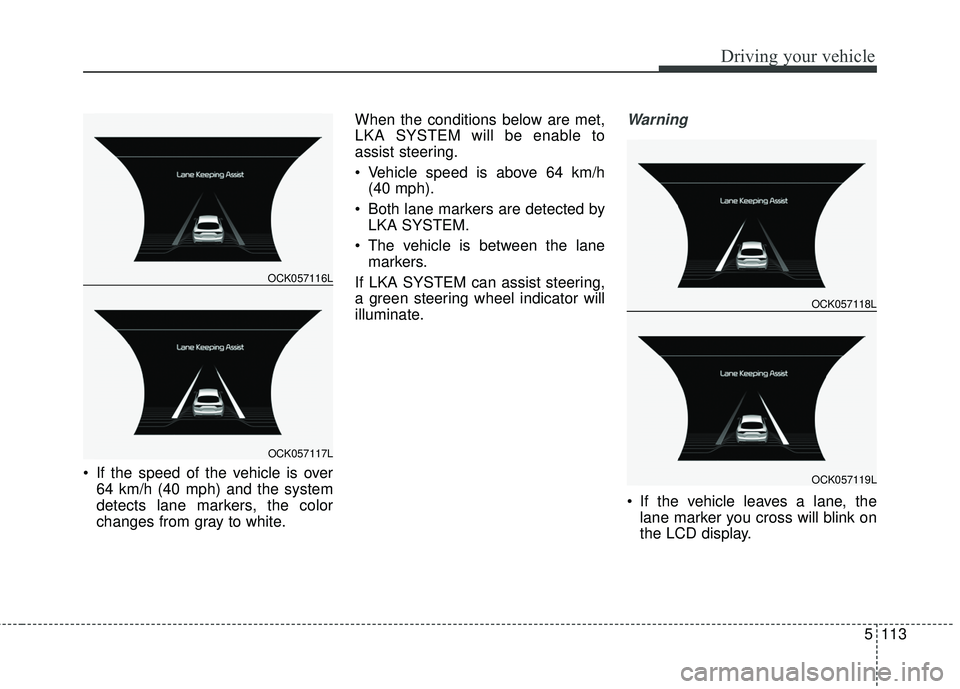
If the speed of the vehicle is over64 km/h (40 mph) and the system
detects lane markers, the color
changes from gray to white. When the conditions below are met,
LKA SYSTEM will be enable to
assist steering.
Vehicle speed is above 64 km/h
(40 mph).
Both lane markers are detected by LKA SYSTEM.
The vehicle is between the lane markers.
If LKA SYSTEM can assist steering,
a green steering wheel indicator will
illuminate.
Warning
If the vehicle leaves a lane, the lane marker you cross will blink on
the LCD display.
OCK057116L
OCK057117L
OCK057118L
OCK057119L
Page 371 of 551
Driving your vehicle
118
5
LKA system fail indicator
The LKA system fail indicator (yel-
low) will illuminate with an audible
warning if the LKA system is not
working properly. In this case, have
the system checked by an authorized
Kia dealer. When there is a problem with the sys-
tem do one of the following:
Turn the system on after turning
the engine off and on again.
Check if the ignition switch is in the ON position.
Check if the system is affected by the weather. (ex: fog, heavy rain,
etc.)
Check if there is foreign matter on the camera lens
If the problem is not solved, have the
system checked by an authorized
Kia dealer.
LKA SYSTEM Function
Change
The driver can change LKA to Lane
Departure Warning System (LDW
system) or change the LKA SYSTEM
mode between Standard LKA and
Active LKA from the User Settings
Mode on the LCD display.
The driver can choose them by plac-
ing the ignition switch to the ON posi-
tion and by selecting ‘User Settings’,
‘Driving Assist’, and ‘Lane Keeping
Assist’.
The system is automatically set to
Standard LKA.
Page 376 of 551
5123
Driving your vehicle
- The second stage alarm may bedeactivated.
To activate the alarm: Go to the User Settings Mode →
Driving Assist and select “BCW” on
the LCD display.
To deactivate the alarm: Go to the User Settings Mode →
Driving Assist and deselect “BCW”
on the LCD display.
✽ ✽
NOTICE
The alarm function helps alert the
driver. Deactivate this function only
when it is necessary
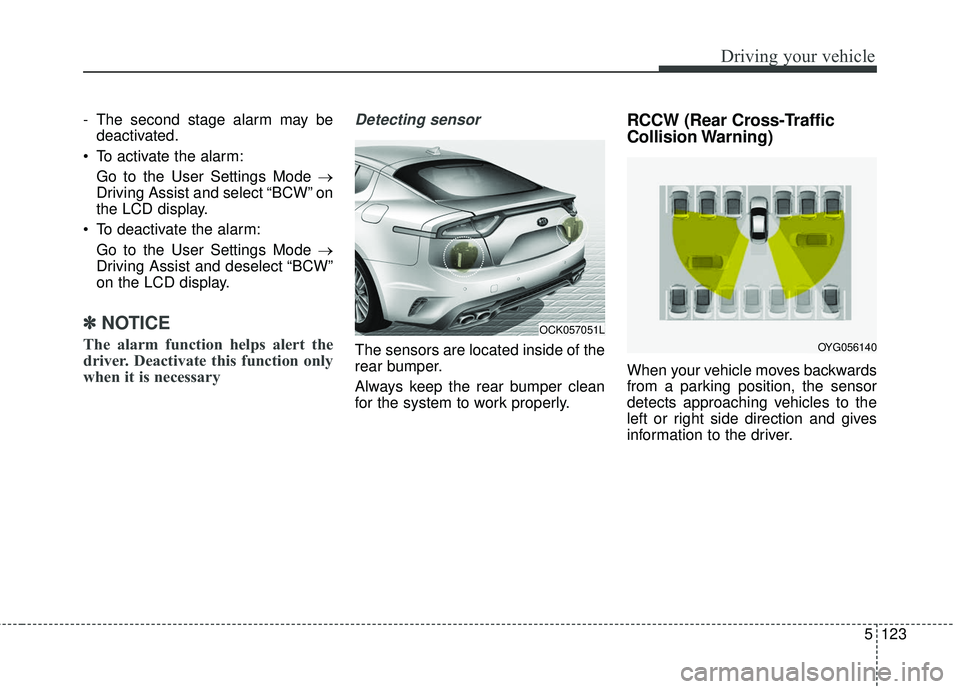
Detecting sensor
The sensors are located inside of the
rear bumper.
Always keep the rear bumper clean
for the system to work properly.
RCCW (Rear Cross-Traffic
Collision Warning)
When your vehicle moves backwards
from a parking position, the sensor
detects approaching vehicles to the
left or right side direction and gives
information to the driver.
OCK057051L
OYG056140
Page 382 of 551

5129
Driving your vehicle
The Driver Attention Warning (DAW),
system is to warn the driver with any
hazardous driving situations upon
detecting the driver's fatigue level or
inattentive driving practices.System setting and activation
System setting
The Driver Attention Warning sys-tem is set to be in the OFF posi-
tion, when your vehicle is first
delivered to you from the factory.
To turn ON the Driver Attention Warning system, turn on the
engine, and then select 'User
Settings →Assist →Driver
Attention Warning →Normal/Early'
on the LCD display. The driver can select the Driver
Attention Warning system mode.
- Off : The Driver Attention Warningsystem is deactivated.
- Normal : The Driver Attention Warning system alerts the driver
of his/her fatigue level or inatten-
tive driving practices.
- Early : The Driver Attention Warning system alerts the driver
of his/her fatigue level or inatten-
tive driving practices faster than
Normal mode.
The set-up of the Driver Attention Warning system will be main-
tained, as selected, when the
engine is re-started.
DRIVER ATTENTION WARNING (DAW, IF EQUIPPED)
Page 383 of 551

Driving your vehicle
130
5
Display of the driver's attention
level
The driver can monitor their driving conditions on the LCD display. - Select 'User Settings Mode' and
then 'Assist' on the LCD display.
(For more information, refer to
"LCD Display" in chapter 4.)
The driver's attention level is dis- played on the scale of 1 to 5. The
lower the number is, the more inat-
tentive the driver is.
The number decreases when the driver does not take a break for a
certain period of time.
The number increases when the driver attentively drives for a cer-
tain period of time.
When the driver turns on the sys- tem while driving, it displays ‘Last
Break time’ and level reflected that.
Take a break
The "Consider taking a break"message appears on the LCD dis-
play and a warning sounds in order
to suggest the driver to take a
break, when the driver's attention
level is below 1.
The Driver Attention Warning sys- tem does not suggest the driver to
take a break, when the total driving
time is shorter than 10 minutes.
OCK057137L
OCK057138L
OCK057139L
Page 384 of 551

5131
Driving your vehicle
Resetting the system
The last break time is set to 00:00and the driver's attention level is
set to 5 (very attentive) when the
driver resets the Driver Attention
Warning system.
The driver attention warning sys- tem resets in the following situa-
tions. - The engine is turned OFF.
- The driver unfastens the seat belt
and then opens the driver’s door.
- Stop lasting more than 10 min- utes.
The driver attention warning sys- tem operates again, when the driv-
er restarts driving.
System disabled
The Driver Attention Warning system
enters the ready status and displays
the 'Disabled' screen in the following
situations.
- The camera sensor keeps failing todetect the lanes.
- Driving speed remains under 60 km/h (37 mph) or over 180 km/h
(112 mph).
OCK057140L
Page 408 of 551
What to do in an emergency
86
TIRE PRESSURE MONITORING SYSTEM (TPMS)
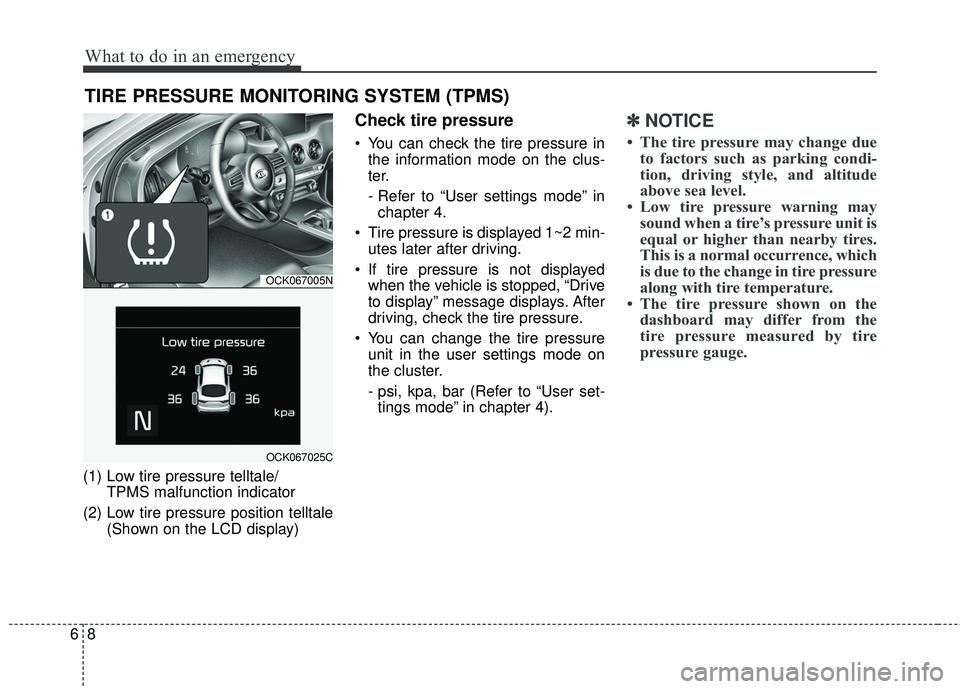
(1) Low tire pressure telltale/TPMS malfunction indicator
(2) Low tire pressure position telltale (Shown on the LCD display)
Check tire pressure
You can check the tire pressure inthe information mode on the clus-
ter.
- Refer to “User settings mode” inchapter 4.
Tire pressure is displayed 1~2 min- utes later after driving.
If tire pressure is not displayed when the vehicle is stopped, “Drive
to display” message displays. After
driving, check the tire pressure.
You can change the tire pressure unit in the user settings mode on
the cluster.
- psi, kpa, bar (Refer to “User set-tings mode” in chapter 4).
✽ ✽ NOTICE
• The tire pressure may change due
to factors such as parking condi-
tion, driving style, and altitude
above sea level.
• Low tire pressure warning may sound when a tire’s pressure unit is
equal or higher than nearby tires.
This is a normal occurrence, which
is due to the change in tire pressure
along with tire temperature.
• The tire pressure shown on the dashboard may differ from the
tire pressure measured by tire
pressure gauge.
OCK067005N
OCK067025C