alarm KIA STINGER 2020 User Guide
[x] Cancel search | Manufacturer: KIA, Model Year: 2020, Model line: STINGER, Model: KIA STINGER 2020Pages: 555, PDF Size: 13.49 MB
Page 322 of 555
569
Driving your vehicle
FCA warning message and
system control
The FCA system produces warning
messages, warning alarms, and
emergency braking based on the
level of risk of a frontal collision, such
as when a vehicle ahead suddenly
brakes, or when the system detects
that a collision with a pedestrian is
imminent.
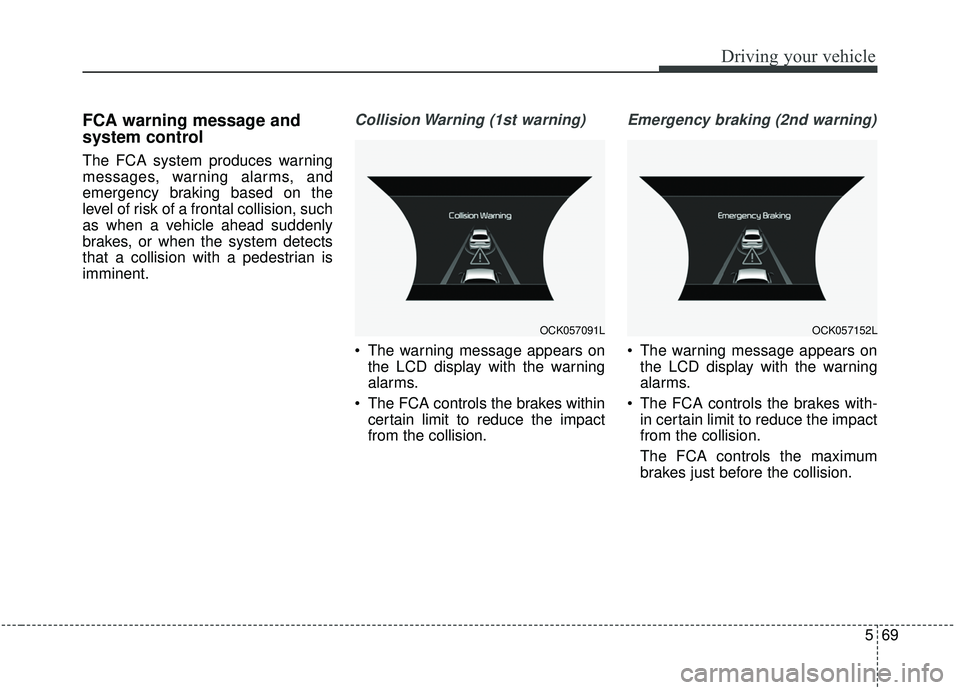
Collision Warning (1st warning)
The warning message appears onthe LCD display with the warning
alarms.
The FCA controls the brakes within certain limit to reduce the impact
from the collision.
Emergency braking (2nd warning)
The warning message appears onthe LCD display with the warning
alarms.
The FCA controls the brakes with- in certain limit to reduce the impact
from the collision.
The FCA controls the maximum
brakes just before the collision.
OCK057091LOCK057152L
Page 323 of 555
Driving your vehicle
70
5
Brake operation
• In an urgent situation, the braking
system enters into the ready status
for prompt reaction against the dri-
ver’s depressing the brake pedal.
The FCA provides additional brak- ing power for optimum braking per-
formance when the driver depress-
es the brake pedal.
The braking control is automatical- ly deactivated, when the driver
sharply depresses the accelerator
pedal, or when the driver abruptly
operates the steering wheel.
The braking control is automatical- ly canceled when risk factors dis-
appear.
The driver should always exercise
caution when operating the vehicle,
even though there is no warning
message or warning alarm.
✽ ✽ NOTICE
The FCA system assesses the risk of
a collision by monitoring several
variables such as the distance to the
vehicle/pedestrian ahead, the speed
of the vehicle/pedestrian ahead, and
the driver's operation of the vehicle.
Certain conditions such as
inclement weather and road condi-
tions may affect the operation of the
FCA system.
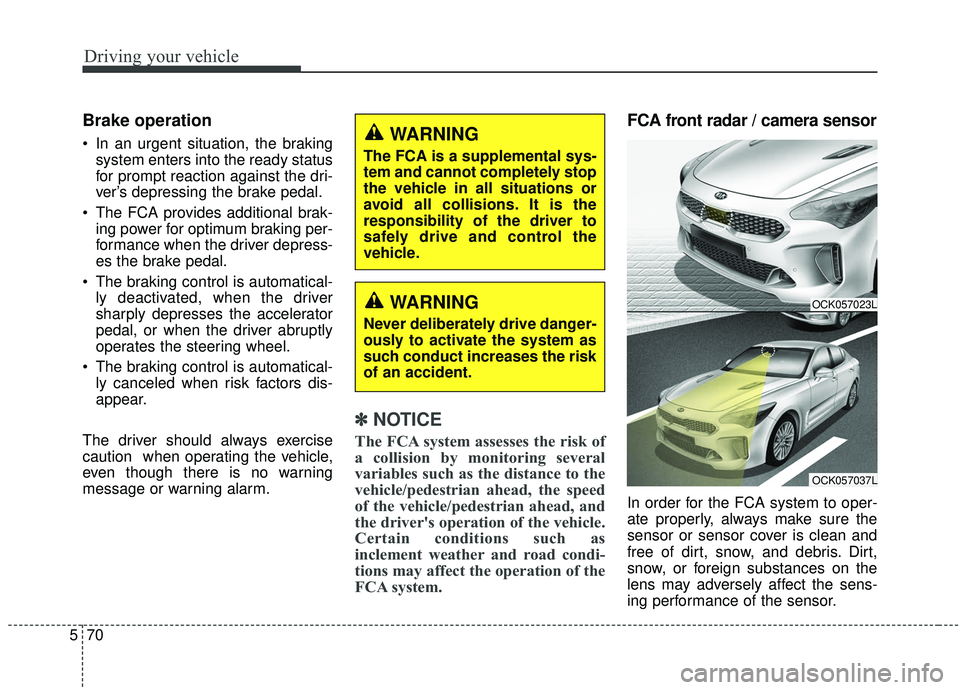
FCA front radar / camera sensor
In order for the FCA system to oper-
ate properly, always make sure the
sensor or sensor cover is clean and
free of dirt, snow, and debris. Dirt,
snow, or foreign substances on the
lens may adversely affect the sens-
ing performance of the sensor.
WARNING
Never deliberately drive danger-
ously to activate the system as
such conduct increases the risk
of an accident.
OCK057023L
OCK057037L
WARNING
The FCA is a supplemental sys-
tem and cannot completely stop
the vehicle in all situations or
avoid all collisions. It is the
responsibility of the driver to
safely drive and control the
vehicle.
Page 324 of 555
571
Driving your vehicle
✽ ✽NOTICE
• Do not install any accessories, such
as a license plate bracket or
bumper sticker near the sensor
area. Do not replace the bumper
by yourself. Doing so may adverse-
ly affect the sensing performance.
• Always keep the sensor/bumper area clean.
• Use only a soft cloth to wash the vehicle. Also, do not spray highly
pressurized water on the sensor
installed on the bumper.
• Be careful not to apply unneces- sary force on the frontal sensor
area. When the sensor moves out
of the correct position due to
external force, the system may not
operate correctly and may not
provide a warning light or mes-
sage. In this case, we recommend
you have the vehicle inspected by
an authorized Kia dealer.
• Use only the genuine Kia sensor cover. Do not arbitrarily apply
paint on the sensor cover. (Continued)(Continued)
• Do not tint the window or install
stickers, or accessories around the
inside mirror where the camera is
installed.
• Make sure the frontal camera installation point does not get wet.
• Do not impact or arbitrarily remove any radar/camera compo-
nents.
• Do not place reflective objects(white paper or mirror etc.)
on the dashboard. The system may
activate unnecessarily due to
reflection of the sunlight.
• Excessive audio system volume may prevent occupants from hear-
ing the FCA system warning
alarm.
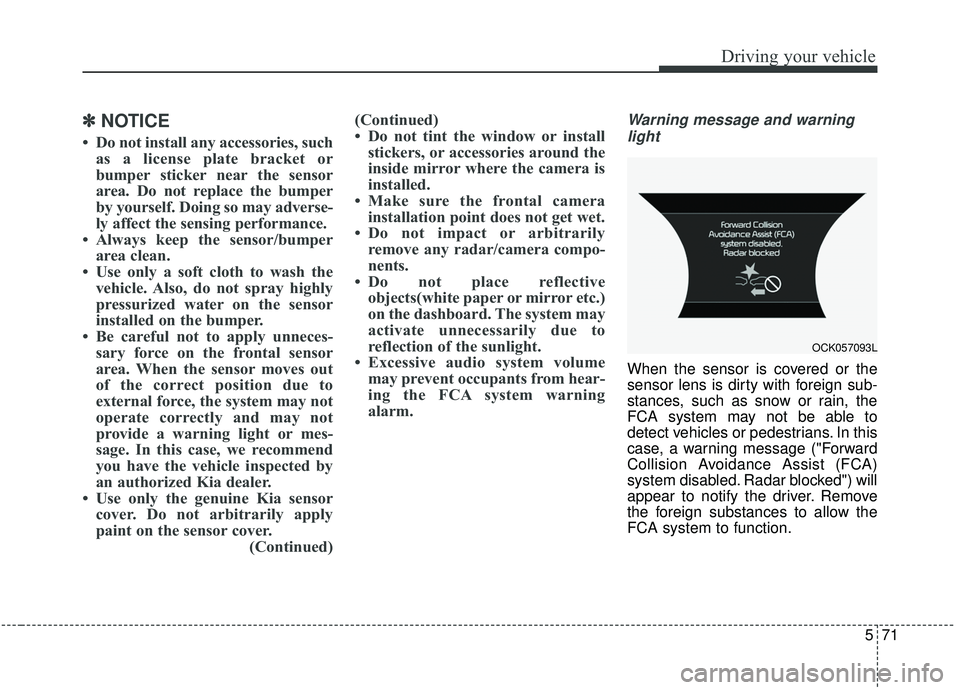
Warning message and warning
light
When the sensor is covered or the
sensor lens is dirty with foreign sub-
stances, such as snow or rain, the
FCA system may not be able to
detect vehicles or pedestrians. In this
case, a warning message ("Forward
Collision Avoidance Assist (FCA)
system disabled. Radar blocked") will
appear to notify the driver. Remove
the foreign substances to allow the
FCA system to function.
OCK057093L
Page 326 of 555
573
Driving your vehicle
Due to sensing limitation, the FCAmay not produce warning mes-
sages or warning alarms in certain
situations. Read the section
"Limitation of the system" for more
information.
When there is a malfunction with the FCA, the automatic braking
control does not operate even with
other braking systems normally
operating.
The FCA only recognizes vehicles and pedestrians in front of it while
driving forward. It does not identify
any animals or vehicles in the
opposite direction.
The FCA can not recognize cross- traffic or parked vehicles present-
ing a sideprofile.
The FCA system may not activate if the driver applies the brake pedal
to avoid the risk of a collision.
The FCA system does not operate when the vehicle is in reverse. In
these cases, you must maintain a
safe braking distance, and if nec-
essary, depress the brake pedal to
reduce the driving speed.Limitation of the system
The FCA system is designed to mon-
itor the vehicle ahead or a pedestrian
on the roadway through radar signals
and camera recognition to warn the
driver that a collision is imminent,
and if necessary, apply emergency
braking. In certain situations, the
radar sensor or the camera may not
be able to detect the vehicle or
pedestrian ahead. In these cases,
the FCA system may not operate.
The driver must pay careful attention
in the following situations where the
FCA operation may be limited:
Recognizing vehicles
The sensor may be limited when:
- The radar or the camera is con-taminated with foreign substances.
- It heavily rains or snows.
- There is electromagnetic interfer- ence.
- Something in the path of travel deflects the radar waves.
- The vehicle in front has a narrow body. (i.e. motor cycle and bicycle)
- The driver's view is not clear due to backlight, reflected light, or dark-
ness.
- The camera cannot contain the full image of the vehicle in front.
- The vehicle in front is a special vehicle, such as a heavily-loaded
truck or a trailer.
- The outside brightness is greatly changed, such as entering/exiting
a tunnel.
Page 328 of 555
575
Driving your vehicle
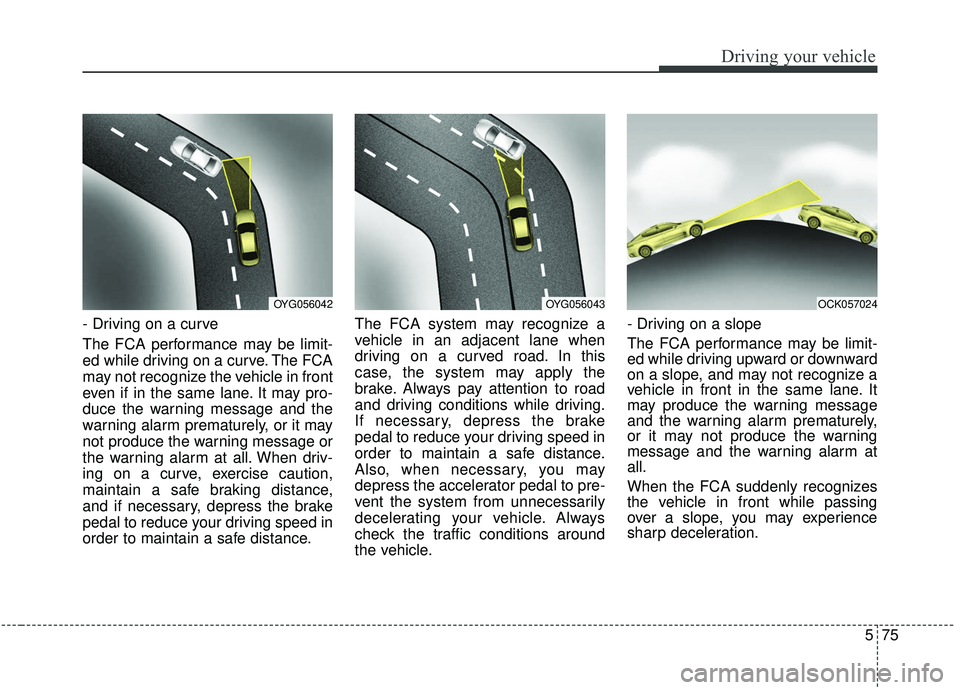
- Driving on a curve
The FCA performance may be limit-
ed while driving on a curve. The FCA
may not recognize the vehicle in front
even if in the same lane. It may pro-
duce the warning message and the
warning alarm prematurely, or it may
not produce the warning message or
the warning alarm at all. When driv-
ing on a curve, exercise caution,
maintain a safe braking distance,
and if necessary, depress the brake
pedal to reduce your driving speed in
order to maintain a safe distance.The FCA system may recognize a
vehicle in an adjacent lane when
driving on a curved road. In this
case, the system may apply the
brake. Always pay attention to road
and driving conditions while driving.
If necessary, depress the brake
pedal to reduce your driving speed in
order to maintain a safe distance.
Also, when necessary, you may
depress the accelerator pedal to pre-
vent the system from unnecessarily
decelerating your vehicle. Always
check the traffic conditions around
the vehicle.- Driving on a slope
The FCA performance may be limit-
ed while driving upward or downward
on a slope, and may not recognize a
vehicle in front in the same lane. It
may produce the warning message
and the warning alarm prematurely,
or it may not produce the warning
message and the warning alarm at
all.
When the FCA suddenly recognizes
the vehicle in front while passing
over a slope, you may experience
sharp deceleration.
OYG056042OYG056043OCK057024
Page 357 of 555

Driving your vehicle
104
5
(Continued)
• If you move the transmission lever
from N to D (manual mode) or R
without depressing the brake
pedal after stopping engine auto-
matically, the engine does not
restart automatically and a warn-
ing chime alarms. When this hap-
pens, press the brake pedal for
auto start.
Auto start
To restart the engine from idle
stop mode
Release the brake pedal.
or
Move the shift gear to the R (Reverse) position or the manual
mode while depressing the brake
pedal.
The engine will start and the green
AUTO STOP indicator ( ) on the
instrument cluster will go out.
The engine will also restart auto- matically without any driveractions if the following occurs:
- The fan speed of manual climate control system is set above the 3rd
position when the air conditioning is
on.
- The fan speed of automatic climate control system is set above the 6th
position when the air conditioning is
on.
- When a certain amount of time has passed with the climate control sys-
tem on.
- When the defroster is on.
- The brake vacuum pressure is low.
- The battery charging status is low.
- The vehicle speed exceeds 1 km/h (1 mph).
- Engine is turned off by Auto Stop for a long time.
- If you unfasten the seat belt or open the driver's door while depressing
the brake pedal.
OCK057096L
OCK057145
Page 366 of 555
5113
Driving your vehicle
Do not disassemble the front viewcamera temporarily for tinted win-
dows or attaching any types of
coatings and accessories. If you
disassemble the camera and
assemble it again, take your vehi-
cle to an authorized Kia dealer and
have the system checked.
When you replace the windshield glass, front view camera or sys-
tem, take your vehicle to an author-
ized Kia dealer and have the sys-
tem checked.
The system is designed to detect lane markers using a front view
camera. If the lane markers are
hard to detect, then the system
may be limited. Always be cautious
when using the system. When the lane markers are hard to
detect, please refer to “Driver’s
Attention”.
Do not remove or damage the related parts of LKA system.
Do not place objects on the dash- board that reflect light such as mir-
rors, white paper, etc. This may
prevent the system from function-
ing.
You may not hear warning sound of LKA system because of excessive
audio sound.
If you drive with your hands off the steering wheel, the LKA system
will stop controlling the steering
wheel after the hands off alarm.
Afterwards, if you drive with your
hands on the steering wheel, the
control will be activated again.✽ ✽
NOTICE
• If the vehicle speed is high, steer-
ing torque for assistance will not
be enough to keep your vehicle
within the lane. If so, the vehicle
may move out of its lane. Obey
speed limit when using LKA sys-
tem.
• If you attach objects to the steer- ing wheel, the system may not
assist steering.
• If you attach objects to the steer- ing wheel, hands off alarm may
not work properly.
Page 377 of 555
Driving your vehicle
124
5
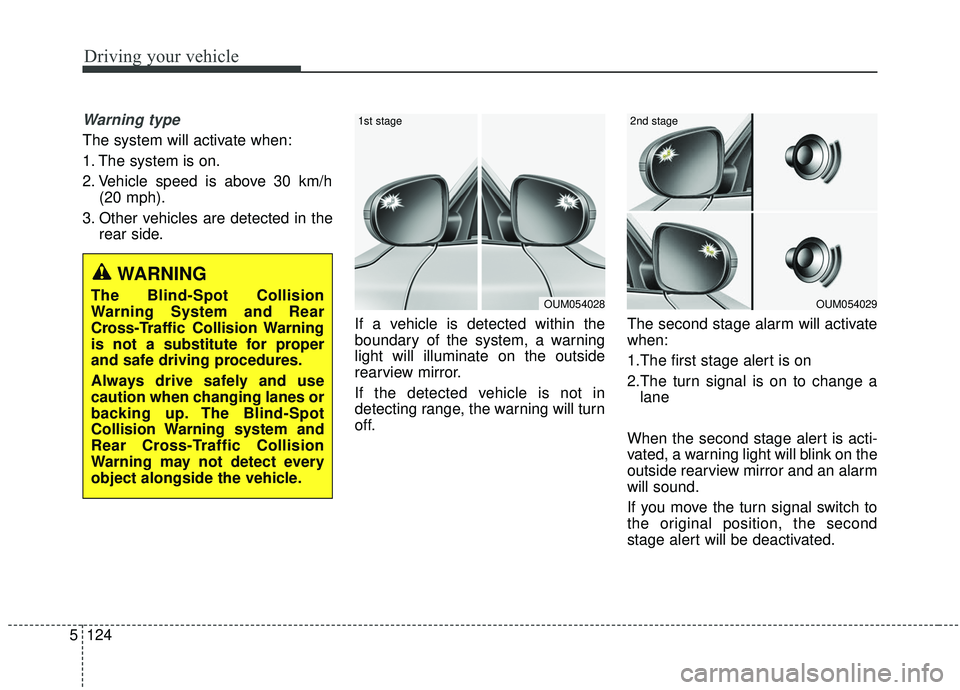
Warning type
The system will activate when:
1. The system is on.
2. Vehicle speed is above 30 km/h
(20 mph).
3. Other vehicles are detected in the rear side.
If a vehicle is detected within the
boundary of the system, a warning
light will illuminate on the outside
rearview mirror.
If the detected vehicle is not in
detecting range, the warning will turn
off. The second stage alarm will activate
when:
1.The first stage alert is on
2.The turn signal is on to change a
lane
When the second stage alert is acti-
vated, a warning light will blink on the
outside rearview mirror and an alarm
will sound.
If you move the turn signal switch to
the original position, the second
stage alert will be deactivated.
OUM054029
2nd stage
OUM054028
1st stage
WARNING
The Blind-Spot Collision
Warning System and Rear
Cross-Traffic Collision Warning
is not a substitute for proper
and safe driving procedures.
Always drive safely and use
caution when changing lanes or
backing up. The Blind-Spot
Collision Warning system and
Rear Cross-Traffic Collision
Warning may not detect every
object alongside the vehicle.
Page 378 of 555

5125
Driving your vehicle
- The second stage alarm can bedeactivated.
To activate the alarm: Go to the User Settings Mode →
Driver Assistance and select
"Blind-Spot Collision Warning
Sound" on the LCD display.
To deactivate the alarm: Go to the User Settings Mode →
Driver Assistance and deselect
"Blind-Spot Collision Warning
Sound" on the LCD display.
✽ ✽
NOTICE
The alarm function helps alert the
driver. Deactivate this function only
when it is necessary.
Detecting sensor
The sensors are located inside of the
rear bumper.
Always keep the rear bumper clean
for the system to work properly.
RCCW (Rear Cross-Traffic
Collision Warning)
When your vehicle moves backwards
from a parking position, the sensor
detects approaching vehicles to the
left or right side direction and gives
information to the driver.
OCK057051L
OYG056140
Page 487 of 555
Maintenance
56
7
✽ ✽
NOTICE- Remodeling
Prohibited
Do not rewire your vehicle in any
way as doing so may affect the per-
formance of several safety features
in your vehicle. Rewiring your vehi-
cle may also void your warranty and
cause you to be responsible for any
subsequent vehicle damage which
may result.
✽ ✽ NOTICE- Window tinting
precaution
Window tint(especially metallic
film) might cause communication
disorder or poor radio reception,
and malfunction of the automatic
lighting system due to excessive
change of illumination inside the
vehicle. The solution used might also
flow into electric, electronic devices
causing disorder and failure.
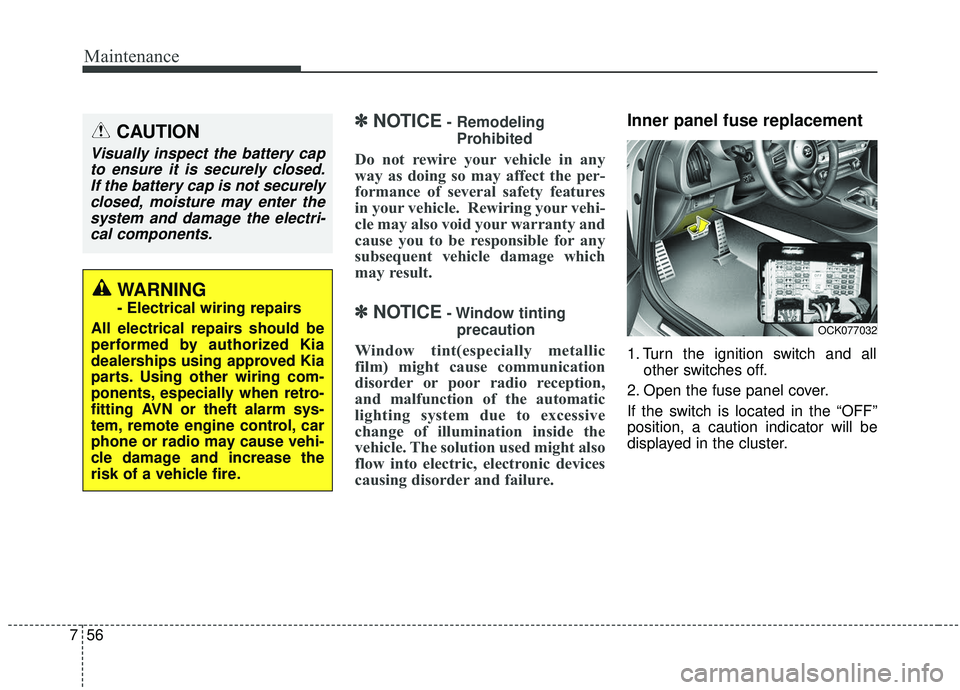
Inner panel fuse replacement
1. Turn the ignition switch and all other switches off.
2. Open the fuse panel cover.
If the switch is located in the “OFF”
position, a caution indicator will be
displayed in the cluster.
CAUTION
Visually inspect the battery cap to ensure it is securely closed.If the battery cap is not securelyclosed, moisture may enter thesystem and damage the electri-cal components.
WARNING
- Electrical wiring repairs
All electrical repairs should be
performed by authorized Kia
dealerships using approved Kia
parts. Using other wiring com-
ponents, especially when retro-
fitting AVN or theft alarm sys-
tem, remote engine control, car
phone or radio may cause vehi-
cle damage and increase the
risk of a vehicle fire.
OCK077032