wheel KIA STINGER 2020 Owner's Manual
[x] Cancel search | Manufacturer: KIA, Model Year: 2020, Model line: STINGER, Model: KIA STINGER 2020Pages: 555, PDF Size: 13.49 MB
Page 140 of 555

453
Features of your vehicle
Electric type (if equipped)
Adjust the steering wheel angle (2)
and position (3) with the switch (1) on
the steering column. Move the steer-
ing wheel, so it points toward your
chest, not toward your face. Make
sure you can see the instrument
panel warning lights and gauges.
After adjusting, push the steering
wheel both up and down to be cer-
tain it is locked in position. Always
adjust the position of the steering
wheel before driving.
✽ ✽ NOTICE
To prevent discharge of the battery,
do not operate when the engine is
stopped.
Heated steering wheel
With the Engine Start/Stop Button in
the ON position, pressing the heat-
ed steering wheel button warms the
steering wheel. The indicator on the
button will illuminate.
To turn the heated steering wheel off,
press the button once again. The
indicator on the button will turn off.
▼
OCK047038N
OCK047039N
Page 141 of 555

Features of your vehicle
54
4
✽ ✽
NOTICE
The heated steering wheel will turn
off automatically approximately 30
minutes after the heated steering
wheel is turned on.
Horn
To sound the horn, press the horn
symbols on your steering wheel.
Check the horn regularly to be sure it
operates properly.
✽ ✽NOTICE
To sound the horn, press the area
indicated by the horn symbol on
your steering wheel (see illustra-
tion). The horn will operate only
when this area is pressed.
CAUTION
Do not install any type of grip
cover for the steering wheel, itmay impair the function of theheated steering wheel system.
When cleaning the heated steering wheel, do not use anorganic solvent such as paintthinner, benzene, alcohol andgasoline. Doing so may dam-age the surface of the steeringwheel.
If the surface of the steering wheel is damaged by a sharpobject, damage to the heatedsteering wheel componentscould occur.
WARNING
If the steering wheel becomes
too warm, turn the system off.
The heated steering wheel may
cause burns even at low tem-
peratures, especially if used for
long periods of time.
OCK047052L
Page 155 of 555

Features of your vehicle
68
4
Instrument Cluster Control
Adjusting Instrument Cluster
Illumination
The brightness of the instrument
panel illumination is changed by
pressing the illumination control button
(“+” or “-”) when the Engine Start/Stop
button is ON, or the taillights are
turned on. If you hold the illumination control
button (“+” or “-”), the brightness
will be changed continuously.
If the brightness reaches to the maximum or minimum level, an
alarm will sound.
LCD Display Control
The LCD display modes can be
changed by using the control buttons
on the steering wheel.
OCK047047L
OCK047138LOCK047048L
OCK047049L
■Type A
■Type B
Page 161 of 555

Features of your vehicle
74
4
Trip Modes Fuel Economy
Average Fuel Economy (1)
The average fuel economy is calcu-
lated by the total driving distance
and fuel consumption since the last
average fuel economy reset.
- Fuel economy range: 0.0 ~ 99.9L/100km or MPG
The average fuel economy can be reset both manually and automati-
cally.
✽ ✽ NOTICE
The fuel economy may vary signifi-
cantly based on driving conditions,
driving habits, and condition of the
vehicle.
Manual reset
To clear the average fuel economy
manually, press the OK button
(reset) on the steering wheel for
more than 1 second when the aver-
age fuel economy is displayed.
OCK047141C
Accumulated Info
Digital speedometer
Drive Info
TRIP
Drive Mode
Page 173 of 555
Features of your vehicle
86
4
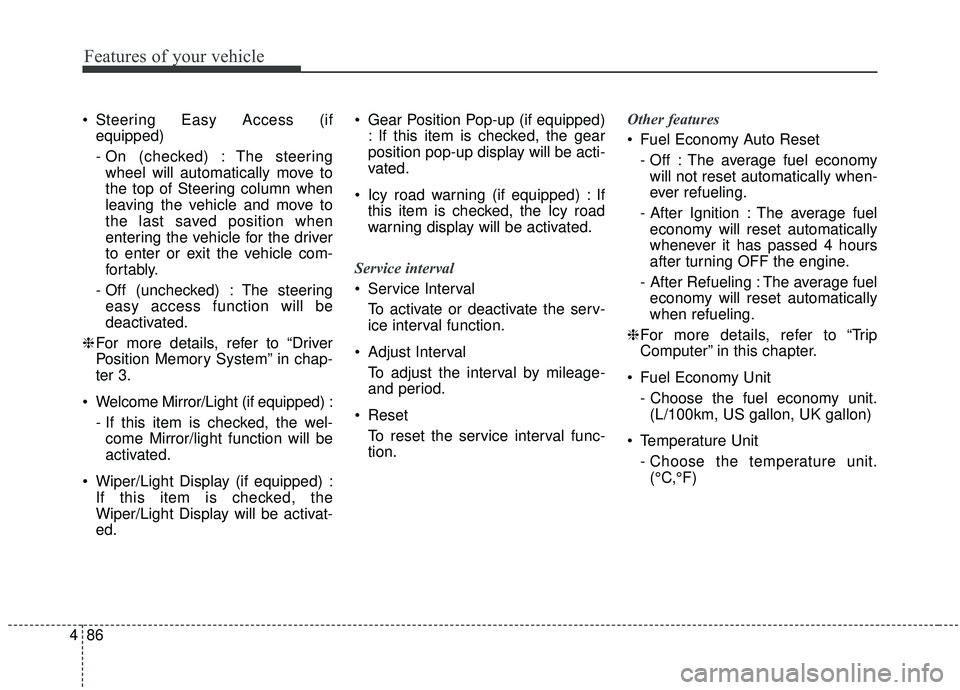
Steering Easy Access (if
equipped)
- On (checked) : The steeringwheel will automatically move to
the top of Steering column when
leaving the vehicle and move to
the last saved position when
entering the vehicle for the driver
to enter or exit the vehicle com-
fortably.
- Off (unchecked) : The steering easy access function will be
deactivated.
❈ For more details, refer to “Driver
Position Memory System” in chap-
ter 3.
Welcome Mirror/Light (if equipped) : - If this item is checked, the wel-come Mirror/light function will be
activated.
Wiper/Light Display (if equipped) : If this item is checked, the
Wiper/Light Display will be activat-
ed. Gear Position Pop-up (if equipped)
: If this item is checked, the gear
position pop-up display will be acti-
vated.
Icy road warning (if equipped) : If this item is checked, the Icy road
warning display will be activated.
Service interval
Service Interval To activate or deactivate the serv-
ice interval function.
Adjust Interval To adjust the interval by mileage-
and period.
Reset To reset the service interval func-
tion. Other features
Fuel Economy Auto Reset
- Off : The average fuel economywill not reset automatically when-
ever refueling.
- After Ignition : The average fuel economy will reset automatically
whenever it has passed 4 hours
after turning OFF the engine.
- After Refueling : The average fuel economy will reset automatically
when refueling.
❈ For more details, refer to “Trip
Computer” in this chapter.
Fuel Economy Unit - Choose the fuel economy unit.(L/100km, US gallon, UK gallon)
Temperature Unit - Choose the temperature unit.(°C,°F)
Page 177 of 555

Features of your vehicle
90
4
✽ ✽
NOTICE
If the icy road warning light appears
while driving, you should drive
more attentively and refraining
from speeding, rapid acceleration,
sudden braking or sharp turning.
Check headlight LED
This warning message illuminates if
LED headlamp malfunctions.
Check headlight cooling fan
This warning message illuminates if
LED headlamp cooling fan malfunc-
tions.
Check shift lever
If there is a problem with the main
function of the shift lever, this warn-
ing is displayed.
Low Washer Fluid
This warning message illuminates
on the service reminder mode if
the washer fluid level in the reser-
voir is nearly empty.
It means that you should refill the washer fluid.
Turn on FUSE SWITCH
This warning message illuminatesif the fuse switch under the steer-
ing wheel is OFF.
It means that you should turn the fuse switch on.
❈ For more details, refer to “Fuses” in
chapter 7.
Page 180 of 555

493
Features of your vehicle
Parking Brake & BrakeFluid Warning Light
This warning light illuminates:
Once you set the Engine Start/Stop Button to the ON position.
- It illuminates for approximately 3seconds
When the parking brake is applied, the warning light will remain on.
When the brake fluid level in the reservoir is low.
- If the warning light illuminateswith the parking brake released, it
indicates the brake fluid level in
reservoir is low. If the brake fluid level in the reservoir
is low:
1. Drive carefully to the nearest safe
location and stop your vehicle.
2. With the engine stopped, check the brake fluid level immediately
and add fluid as required (For
more details, refer to “Brake Fluid”
in chapter 7). Then check all brake
components for fluid leaks. If any
leak on the brake system is still
found, the warning light remains
on, or the brakes do not operate
properly, do not drive the vehicle.
In this case, have your vehicle
towed to an authorized Kia dealer
and inspected. Dual-diagonal braking system
Your vehicle is equipped with dual-
diagonal braking systems. This
means you still have braking on two
wheels even if one of the dual sys-
tems should fail.
With only one of the dual systems
working, greater pedal pressure will
be required to stop the vehicle.
Also, the vehicle will require
increased stopping distance with
only a portion of the brake system
working.
If the brakes fail while you are driv-
ing, shift to a lower gear for addition-
al engine braking and stop the vehi-
cle as soon as it is safe to do so.
Driving the vehicle with a warning
light ON is dangerous. If the Parking
Brake & Brake Fluid Warning Light
illuminate with the parking brake
released, this indicates that the
brake fluid level is low.
In this case, have your vehicle inspect-
ed by an authorized Kia dealer.
Page 186 of 555
499
Features of your vehicle
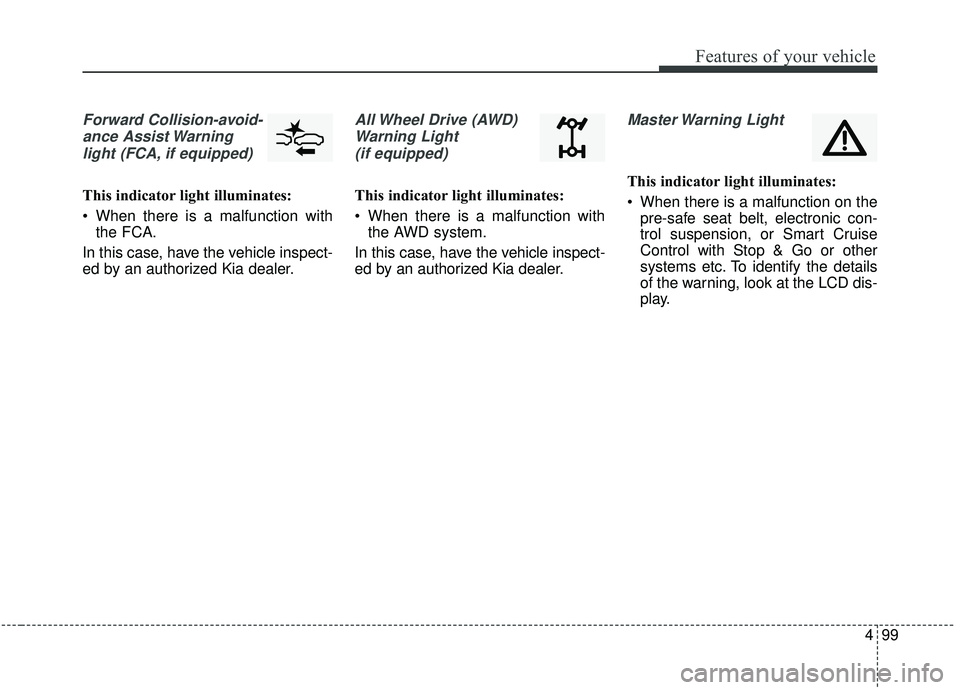
Forward Collision-avoid-ance Assist Warninglight (FCA, if equipped)
This indicator light illuminates:
When there is a malfunction with the FCA.
In this case, have the vehicle inspect-
ed by an authorized Kia dealer.
All Wheel Drive (AWD) Warning Light (if equipped)
This indicator light illuminates:
When there is a malfunction with the AWD system.
In this case, have the vehicle inspect-
ed by an authorized Kia dealer.
Master Warning Light
This indicator light illuminates:
When there is a malfunction on the pre-safe seat belt, electronic con-
trol suspension, or Smart Cruise
Control with Stop & Go or other
systems etc. To identify the details
of the warning, look at the LCD dis-
play.
Page 224 of 555

4137
Features of your vehicle
Defrost-Level
Most of the air flow is directed to the
windshield with a small amount of air
directed to the side window defrosters.Instrument panel vents
The outlet vents can be opened or
closed separately using the thumb-
wheel (if equipped).
Also, you can adjust the direction of
air delivery from these vents using
the vent control lever as shown.
Temperature control
The temperature will increase to the
maximum (HI) by turning the knob to
the extreme right.
OCK047310OCK048321NOCK047311
OCK047323
■ Rear seat
■ Front seat
Page 254 of 555

Driving your vehicle
Before driving . . . . . . . . . . . . . . . . . . . . . . . . . . . . . . 5-5
• Before entering vehicle . . . . . . . . . . . . . . . . . . . . . . . . . 5-5
. . . . . . . . . . . . . . . . . . . . . . . . . . 5-5
. . . . . . . . . . . . . . . . . . . . . . . . . . . . . . . . 5-5
Engine start/stop button . . . . . . . . . . . . . . . . . . . . . 5-7
. . . . . . . . . . . . . . 5-7
. . . . . . . . . . . . . 5-9
Automatic transmission . . . . . . . . . . . . . . . . . . . . . 5-11
. . . . . . . . . . . . . . . 5-11
. . . . . . . . . . . . . . . . . . . . . . . . 5-17
Automatic transmission (shift-by-wire) . . . . . . . . 5-20
. . . . . . . . . . . . . . . 5-20
. . . . . . . . . . . . . . . . . . . . . . . . . . . . . . . . . . . . \
. 5-27
. . . . . . . . . . . . . . . . . . . . . . . . 5-30
The Eco-coasting system . . . . . . . . . . . . . . . . . . . . 5-35
. . . . . . . . . . . . . . . . 5-35
. . . . . . . . . . . . . . 5-35
. . . . . . 5-36
All Wheel Drive (AWD) . . . . . . . . . . . . . . . . . . . . . 5-37
. . . . . . . . . . . . . . . . . . . 5-37
Limited Slip Differential (LSD) . . . . . . . . . . . . . . 5-41
Brake system . . . . . . . . . . . . . . . . . . . . . . . . . . . . . . 5-42
. . . . . . . . . . . . . . . . . . . . . . . . . . . . . . . . 5-42
. . . . . . . . . . . . . . . . . . . . . 5-44
. . . . . . . . . . . . . . . . 5-46
. . . . . . . . . . . . . . . . . . . . . . . . . . . . . . . . . . . 5-\
52
. . . . . . . . . . . . . . . . . . . . . . . . . . . . 5-55
. . . . . . . . . . . . . . 5-58
. . . . . . . . . . . . 5-62
. . . . . . . . . . . . . . . . . 5-63
Forward Collision-avoidance Assist (FCA) . . . . . 5-66
. . . . . . . . . . . . . . . . . . . 5-66
. . . . . . . . 5-69
. . . . . . . . . . . . . . . . . . . . . . . . . . . . . . 5-70
. . . . . . . . . . . . . . . . 5-70
. . . . . . . . . . . . . . . . . . . . . . . . . . . 5-72
. . . . . . . . . . . . . . . . . . . . . . . 5-73
Cruise control system. . . . . . . . . . . . . . . . . . . . . . . 5-80
. . . . . . . . . . . . . . . . . . . . . 5-81
. . . . . . . . . . . . . . . . . . 5-82
. . . . . . . . . . . . . . . . . . . . . . . 5-82
5