knob KIA STINGER 2021 Owners Manual
[x] Cancel search | Manufacturer: KIA, Model Year: 2021, Model line: STINGER, Model: KIA STINGER 2021Pages: 585, PDF Size: 10.87 MB
Page 17 of 585
25
Your vehicle at a glance
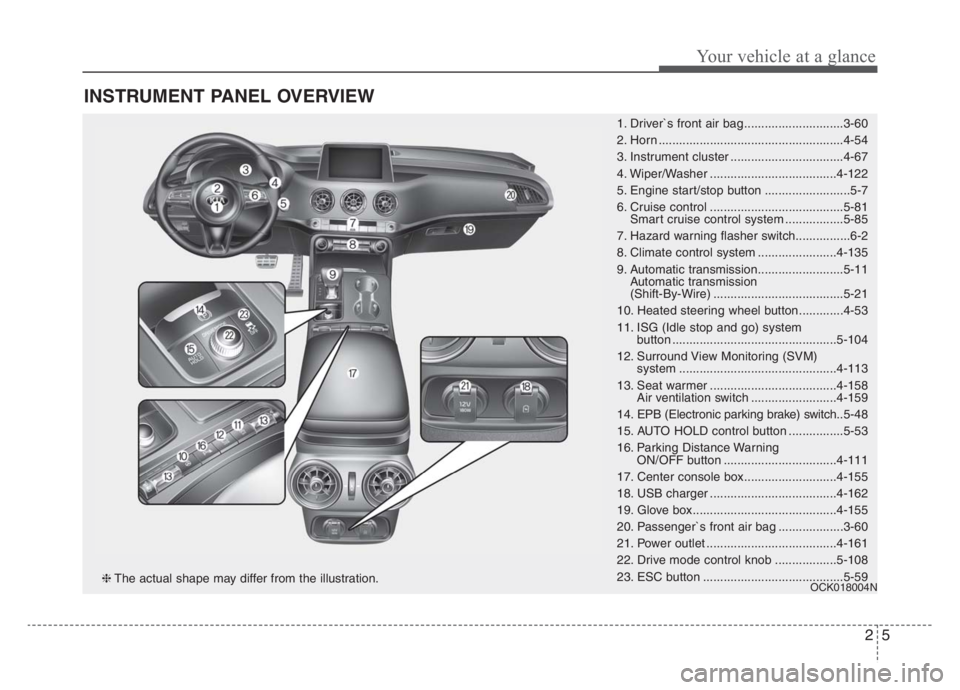
INSTRUMENT PANEL OVERVIEW
1. Driver`s front air bag .............................3-60
2. Horn ......................................................4-54
3. Instrument cluster .................................4-67
4. Wiper/Washer .....................................4-122
5. Engine start/stop button .........................5-7
6. Cruise control .......................................5-81
Smart cruise control system .................5-85
7. Hazard warning flasher switch................6-2
8. Climate control system .......................4-135
9. Automatic transmission.........................5-11
Automatic transmission
(Shift-By-Wire) ......................................5-21
10. Heated steering wheel button.............4-53
11. ISG (Idle stop and go) system
button ................................................5-104
12. Surround View Monitoring (SVM)
system ..............................................4-113
13. Seat warmer .....................................4-158
Air ventilation switch .........................4-159
14. EPB (Electronic parking brake) switch..5-48
15. AUTO HOLD control button ................5-53
16. Parking Distance Warning
ON/OFF button .................................4-111
17. Center console box...........................4-155
18. USB charger .....................................4-162
19. Glove box ..........................................4-155
20. Passenger`s front air bag ...................3-60
21. Power outlet ......................................4-161
22. Drive mode control knob ..................5-108
23. ESC button .........................................5-59
OCK018004N❈The actual shape may differ from the illustration.
Page 30 of 585

Safety features of your vehicle
12 3
Storing positions into memory
using the buttons on the door
Storing driver’s seat positions
1. Press the Parking button while the
engine start/stop button is ON.
2. Adjust the driver's seat, including
leg extension if equipped and out-
side rearview mirrors and head up
display comfortable for the driver.
3. Press SET button on the control
panel. The system will beep once.
4. Press one of the memory buttons
(1 or 2) within 4 seconds after
pressing the SET button. The sys-
tem will beep twice when memory
has been successfully stored.
When recalling an adjustment mem-
ory button while sitting in the vehicle,
you can be surprised by the setting
chosen if the memory has been
adjusted by someone else. If that
occurs, immediately push the seat
position control knob in the direction
of the desired position to stop further
undesired movement.Recalling positions from memory
1. Press the Parking button while the
engine start/stop button is ON.
2. To recall the position in the memo-
ry, press the desired memory but-
ton (1 or 2). The system will beep
once, then the driver’s seat will
automatically adjust to the stored
position.
Adjusting the control switch for the
driver’s seat while the system is
recalling the stored position will
cause the movement to stop and
move in the direction that the control
switch is moved.
WARNING - Driver
Position Memory System
Never attempt to operate the
driver position memory system
while the vehicle is moving.
This could result in loss of con-
trol, and an accident causing
death or serious injury.
Page 207 of 585
Features of your vehicle
118 4
Battery saver function
The purpose of this feature is to
prevent the battery from being dis-
charged if the lights are left in the
ON position. The system automati-
cally shuts off the parking lights 30
seconds after the ignition key is
removed and the driver’s door is
opened and closed.
With this feature, the parking lights
will turn off automatically if the driver
parks on the side of the road at night
and opens the driver’s side door.
If necessary, to keep the parking
lights on when the ignition key is
removed, perform the following:
1) Open the driver-side door.
2) Turn the parking lights OFF and
ON again using the light switch
on the steering column.
Daytime running light
The Daytime Running Lights (DRL)
can make it easier for others to see the
front of your vehicle during the day.
DRL can be helpful in many different
driving conditions, and it is especially
helpful after dawn and before sunset.
The DRL system will turn the dedi-
cated lamp OFF when :
1.The headlight switch is on
- It includes that the headlight is on
in the dark when the headlight
switch is in the auto light position.
2.The engine is off
3.Engaging the Parking Brake
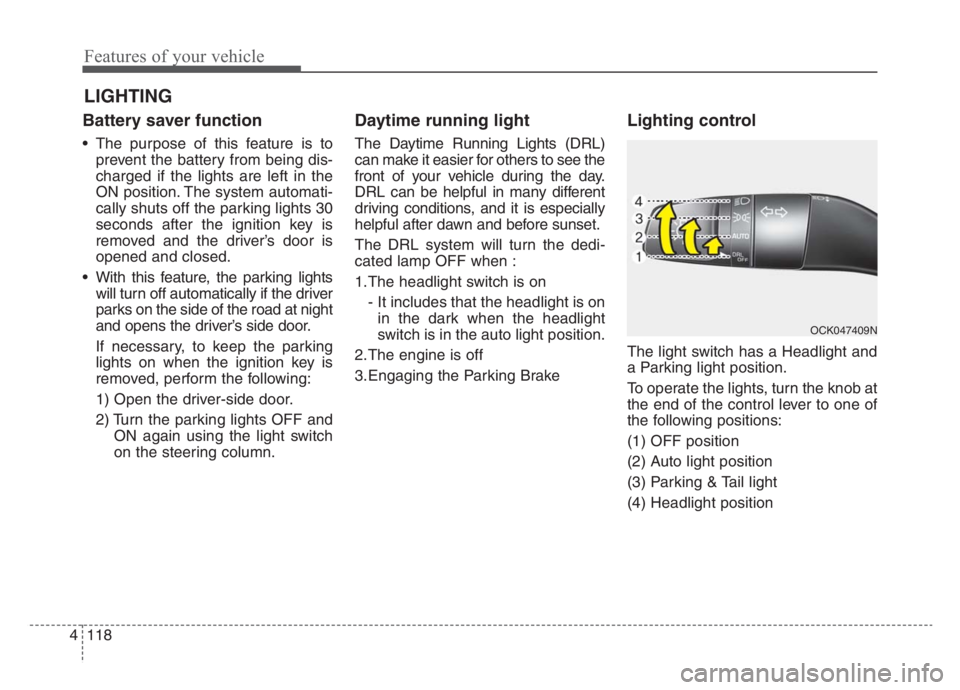
Lighting control
The light switch has a Headlight and
a Parking light position.
To operate the lights, turn the knob at
the end of the control lever to one of
the following positions:
(1) OFF position
(2) Auto light position
(3) Parking & Tail light
(4) Headlight position
LIGHTING
OCK047409N
Page 215 of 585

Features of your vehicle
126 4
A : Wiper speed control (front)
· MIST – Single wipe
· OFF – Off
· INT – Intermittent wipe
AUTO* – Auto control wipe
· LO – Low wiper speed
· HI – High wiper speed
B : Intermittent control wipe time
adjustment
C : Wash with brief wipes (front)*
* if equipped
Windshield wipers
Operates as follows when the igni-
tion switch is turned ON.
MIST : For a single wiping cycle,
move the lever to this (MIST)
position and release it. The
wipers will operate continu-
ously if the lever is held in this
position.
OFF : Wiper is not in operation
INT : Wiper operates intermittently at
the same wiping intervals. Use
this mode in light rain or mist.
To vary the speed setting, turn
the speed control knob.
LO : Normal wiper speed
HI : Fast wiper speed
✽ ✽
NOTICE
If there is heavy accumulation of
snow or ice on the windshield, defrost
the windshield for about 10 minutes,
or until the snow and/or ice is
removed before using the windshield
wipers to ensure proper operation.
If you do not remove the snow and/or
ice before using the wiper and wash-
er, it may damage the wiper and
washer system.
WIPERS AND WASHERS
Windshield wiper/washer
OCK047417L
Page 216 of 585

4127
Features of your vehicle
Auto control (if equipped)
The rain sensor (A) located on the
upper end of the windshield glass
senses the amount of rainfall and
controls the wiping cycle for the
proper interval. The more it rains, the
faster the wiper operates. When the
rain stops, the wiper stops.
To vary the speed setting, turn the
speed control knob (1).
If the wiper switch is set in AUTO
mode when the ignition switch is ON,
the wiper will operate once to per-
form a self-check of the system. Set
the wiper to OFF position when the
wiper is not in use.
OCK047458N
CAUTION
When washing the vehicle, set
the wiper switch in the OFF
position to stop the auto wiper
operation.
The wiper may operate and be
damaged if the switch is set in
the AUTO mode while washing
the vehicle.
Do not remove the sensor
cover located on the upper
end of the passenger side
windshield glass. Damage to
system parts could occur and
may not be covered by your
vehicle warranty.
When starting the vehicle in
winter, set the wiper switch in
the OFF position. Otherwise,
wipers may operate and ice
may damage the windshield
wiper blades. Always remove
all snow and ice and defrost
the windshield properly prior
to operating the windshield
wipers.
WARNING
When the ignition switch is ON
and the windshield wiper switch
is placed in the AUTO mode,
use caution in the following sit-
uations to avoid any injury to
the hands or other parts of the
body:
Do not touch the upper end of
the windshield glass facing
the rain sensor.
Do not wipe the upper end of
the windshield glass with a
damp or wet cloth.
Do not put pressure on the
windshield glass.
Page 224 of 585

4135
Features of your vehicle
AUTOMATIC CLIMATE CONTROL SYSTEM
OCK047300/OCK047322
1. Driver’s temperature control knob
2. AUTO (automatic control) button
3. Front windshield defroster button
4. Rear window/mirrors defroster button
5. Air conditioning button
6. Air intake control buttons
7. OFF button
8. Fan speed control buttons
9. Mode selection button
10. Passenger's temperature control knob
11. SYNC temperature control selection but-
ton
12. Climate control display
13. Rear temperature control knob
■ ■
Rear seat
■ ■
Front seat
CAUTION
Operating the blower when the
ignition switch is in the ON posi-
tion could cause the battery to
discharge. Operate the blower
when the engine is running.
Page 225 of 585

Features of your vehicle
136 4
Automatic heating and air con-
ditioning
1. Press the AUTO button. The
modes, fan speeds, air intake and
air-conditioning will be controlled
automatically by setting the tem-
perature.2. Turn the temperature control knob
to the desired temperature.
✽ ✽
NOTICE
• To turn the automatic operation
off, select any button or switch of
the following:
- Mode selection button
- Air conditioning button
- Front windshield defroster button
(Press the button one more time
to deselect the front windshield
defroster function. The ‘AUTO’
sign will illuminate on the infor-
mation display once again.)
- Air intake control button
- Fan speed control switch
The selected function will be con-
trolled manually while other func-
tions operate automatically.
• For your convenience and to
improve the effectiveness of the
climate control, use the AUTO
button and set the temperature to
73°F (23°C).
OCK047307
■Driver’s side■Passenger’s side
OCK047311
Page 227 of 585

Features of your vehicle
138 4
Manual heating and air condi-
tioning
The heating and cooling system can
be controlled manually by pressing
buttons or turning knob(s) other than
the AUTO button. In this case, the
system works sequentially according
to the order of buttons or knob(s)
selected.
1. Start the engine.
2. Set the mode to the desired posi-
tion.
For improving the effectiveness of
heating and cooling;
- Heating:
- Cooling:
3. Set the temperature control to the
desired position.
4. Set the air intake control to the
outside (fresh) air position.
5. Set the fan speed control to the
desired speed.
6. If air conditioning is desired, turn
the air conditioning system on.
Press the AUTO button in order to
convert to full automatic control of
the system.
Mode selection
OCK048309N
Page 229 of 585

Features of your vehicle
140 4
Defrost-Level
Most of the air flow is directed to the
windshield with a small amount of air
directed to the side window defrosters.Instrument panel vents
The outlet vents can be opened or
closed separately using the thumb-
wheel (if equipped).
Also, you can adjust the direction of
air delivery from these vents using
the vent control lever as shown.
Temperature control
The temperature will increase to the
maximum (HI) by turning the knob to
the extreme right.
OCK047310OCK048321NOCK047311
OCK047323
■ Rear seat
■ Front seat
Page 230 of 585

4141
Features of your vehicle
The temperature will decrease to the
minimum (Lo) by turning the knob to
the extreme left.
When turning the knob, the tempera-
ture will increase or decrease by
1°F/0.5°C. When set to the lowest
temperature setting, the air condi-
tioning will operate continuously.
Turn the rear seat temperature con-
trol knob to adjust temperature.
The front and rear seat side temper-
ature is adjusted individually.✽ ✽NOTICE
When starting the vehicle in cold
weather using manual temperature
control, operate the system in the
following method to improve heat-
ing.
• Turn off or lower the blower, right
after starting the engine.
• Allow the engine to warm up dur- ing this time since the air flow
from the heater is still cold.
• After a few minutes of engine warm up, turn on or set the fan to
a higher level and adjust the tem-
perature setting to hot.
Adjusting the driver and passenger
side temperature equally
Press the “SYNC” button to adjust
the driver and passenger side tem-
perature equally.
The passenger side temperature
will be set to the same temperature
as the driver side temperature.
Turn the driver side temperature control knob. The driver and pas-
senger side temperature will be
adjusted equally.
OCK047312