tire KIA TELLURIDE 2022 Navigation System Quick Reference Guide
[x] Cancel search | Manufacturer: KIA, Model Year: 2022, Model line: TELLURIDE, Model: KIA TELLURIDE 2022Pages: 316, PDF Size: 10.53 MB
Page 96 of 316
5-2
Navigation functions
Navigation Menu overview
You can use the navigation system conveniently through various functions on the Navigation
Menu screen.
Perform any of the following methods:
\225On the All Menus screen, press Navigation Menu.
\225On the control panel, press the [
NAV] button.
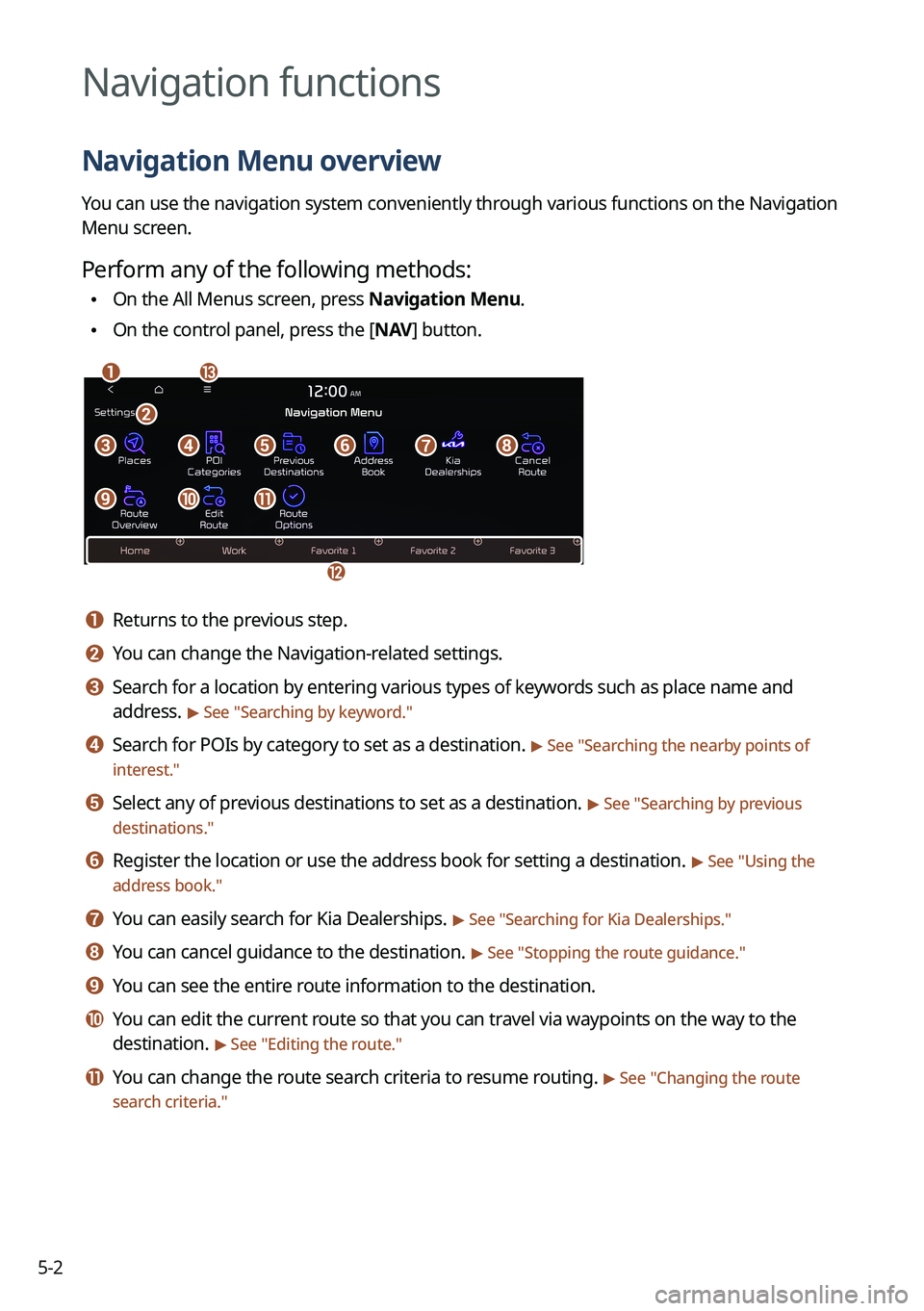
\037\036
\035
\034
\033\032\031\030\027
\026\025\024
\023
a a Returns to the previous step.
b b You can change the Navigation-related settings.
c c Search for a location by entering various types of keywords such as place name and
address.
> See " Searching by keyword."
d d Search for POIs by category to set as a destination. > See "Searching the nearby points of
interest."
e e Select any of previous destinations to set as a destination. > See " Searching by previous
destinations."
f f Register the location or use the address book for setting a destination. > See " Using the
address book."
g g You can easily search for Kia Dealerships. > See "Searching for Kia Dealerships."
h h You can cancel guidance to the destination. > See " Stopping the route guidance."
i i You can see the entire route information to the destination.
j j You can edit the current route so that you can travel via waypoints on the way to the
destination.
> See "Editing the route."
k k You can change the route search criteria to resume routing. > See "Changing the route
search criteria."
Page 99 of 316

5-5
0000
A
Vehicle location may not be displayed correctly if:
000DThe vehicle is driving on a Y-shaped or winding road with narrow angles.
000DThe vehicle is driving closely to another road.
000DThe vehicle is driving on a road where there are many tall buildings in the vicinity.
000DThe vehicle is driving on a new road or a road under construction.
000DThe vehicle is transported by a ferry or heavy-duty transport vehicle.
000DThe vehicle is driving in a rugged mountain area or on a steep curve road.
000DThe vehicle is entering a public road after making a turn through the turntable in an
underground parking lot or multi-story parking lot.
000DThe vehicle stops and starts repeatedly or moves slowly in front of an intersection.
000DThe system reboots after the vehicle battery has been recharged or replaced.
000DThe vehicle is driving on a slippery road due to heavy snow, etc.
000DThe tires have been replaced recently or spare tires (or studless tires) are used.
000DImproper-sized tires are used or the pressure of each tire is different.
000DThe replaced tire is worn out or the studless tires have been used for over two seasons.
000DA roof carrier is installed on the vehicle.
000DOn a highway continued driving causes the system to perform map matching\
or apply
the updated GPS data.
0000
A
Navigation service may not be provided correctly under the following conditions:
000DWhen the vehicle drives on a straight road continuously, the system may guide you to
drive straight. It is not a malfunction.
000DGuidance may not be followed immediately after the vehicle makes a turn at an
intersection or drives through an intersection.
000DThe system may guide you to make a U-turn in a prohibited area.
000DThe system may guide you to a traffic-blocked road (e.g. no-entry road or road under
construction).
000DThe system may guide you to a road away from the destination when there is no road
to the destination or there are only narrow roads on the way.
000DGuidance may not be proper when the vehicle is off the route.
000DGuidance may not match the actual distance on an overpass or underpass due to the
difference of the start point.
000DWhen you are driving at high speeds, route recalculations may take longer.
0000
A
Because the navigation system is used for information purposes only, Kia does not
assume responsibility of the accuracy of the information.
0000
A
When the traffic information is not received, the status icon appears at the top of the map
screen.
000DHD Radio: The system is using the HD radio data. If no traffic information is available,
the status icon (
) will be displayed instead.
Page 127 of 316
5-33
Third-Party Copyright Notices. The third-party sourced data has been incorporated into
or made a part of the Product and is being sublicensed to you subject to the terms and
conditions of this EULA. In this regard, you shall not remove or tamper with any intellectual
property rights notice attached or used in relation to data supplied by the Licensors.
Entire Agreement.
This EULA is the entire agreement between COMPANY (and the Licensors)
and you pertaining to the subject matter hereof, and supersedes in their entirety any and all
previous written or oral communications or documents (including, if you are obtaining an
update, any agreement that may have been included with an earlier version of the Product)
with respect to such subject matter.
Governing Law. This EULA shall be governed by the laws of the jurisdiction in which you
reside at the date of acquisition of the Product. Should you at that moment reside outside
the European Union or Switzerland, the law of the jurisdiction within the European Union
or Switzerland where you acquired the Product shall apply. In all other cases, or if the
jurisdiction where you acquired the Product cannot be defined, the laws of the Republic of
Korea shall apply. This EULA will not be governed by the U.N. Convention on Contracts for
the International Sale of Goods. The courts competent at your place of r\
esidence at the time
you acquired the Product shall have jurisdiction over any dispute arising out of, or relating to
this EULA, without prejudice to COMPANY's right to bring claims at your then current place of
residence.
Export Control. You agree not to export or re-export from anywhere any part of the Product
in any form except in compliance with applicable export laws, rules and regulations, including
but not limited to the laws, rules and regulations administered by the Office of Foreign Assets
Control of the U.S. Department of Commerce and the Bureau of Industry and Security of the
U.S. Department of Commerce.
Miscellaneous. If any provision of this EULA is found to be invalid or unenforceable, it will be
enforced to the extent permissible and the remainder of this EULA will remain in full force and
effect. Failure by COMPANY to prosecute any right with respect to a default hereunder will
not constitute a waiver by COMPANY of the right to enforce rights with respect to the same or
any other breach. No refunds or replacements will be permitted on damaged Product.
Page 156 of 316
7-4
e e Displays the voice recognition help.
f f The list of menu items appears.
\225Split Screen: Can turn on or off the split screen mode.
Adjusting the voice guidance volume
Adjust the voice guidance volume when the system volume is so low or high and it interferes
with your driving.
When the voice recognition is active, use the Volume knob on the control
panel.
Seeing the voice recognition help
You can see more details on how to perform various functions by voice commands.
\334\334Caution
Park the vehicle at a safe place and see the help.
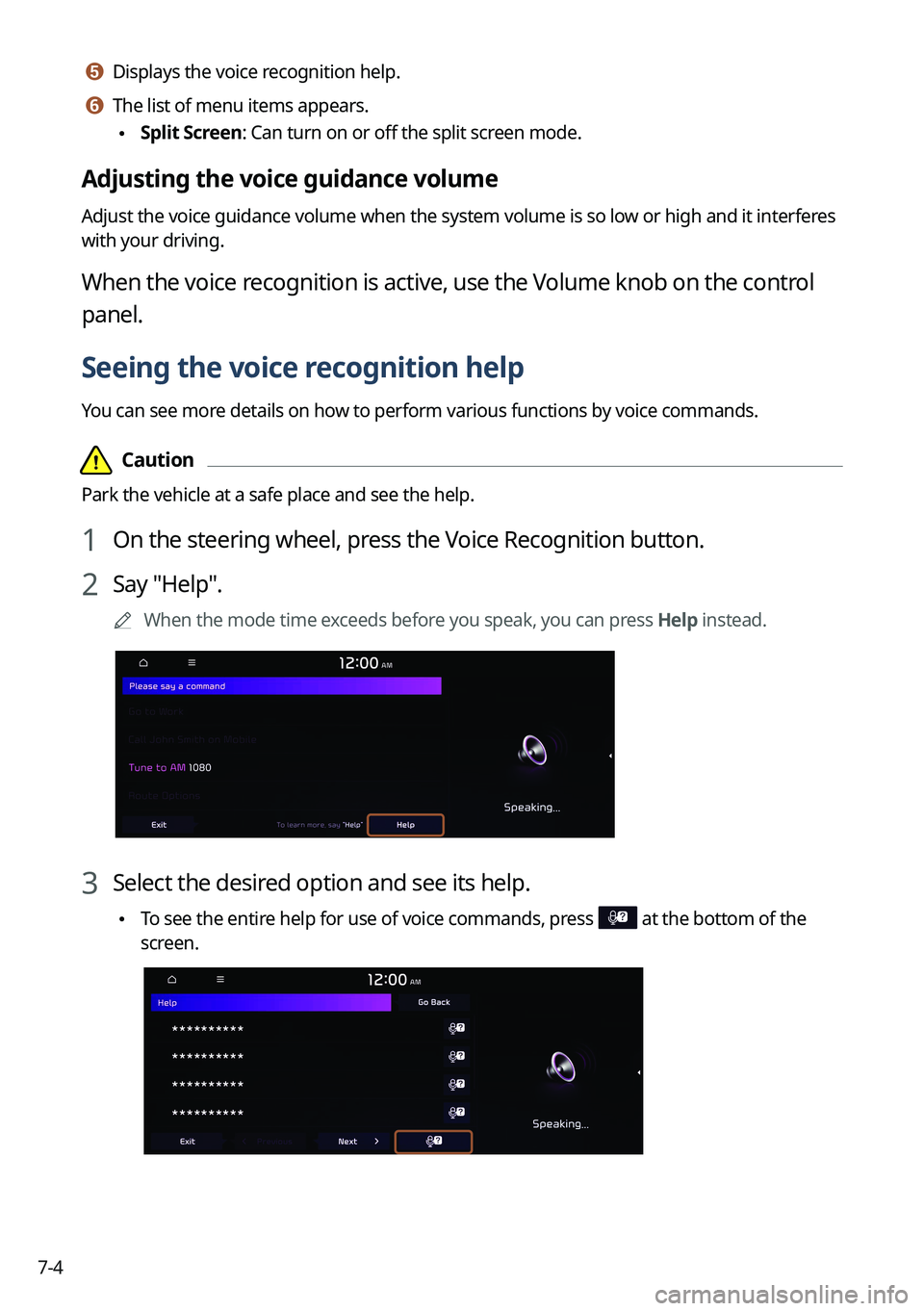
1 On the steering wheel, press the Voice Recognition button.
2 Say "Help".
0000
A
When the mode time exceeds before you speak, you can press Help instead.
3 Select the desired option and see its help.
\225To see the entire help for use of voice commands, press at the bottom of the
screen.
Page 157 of 316
7-5
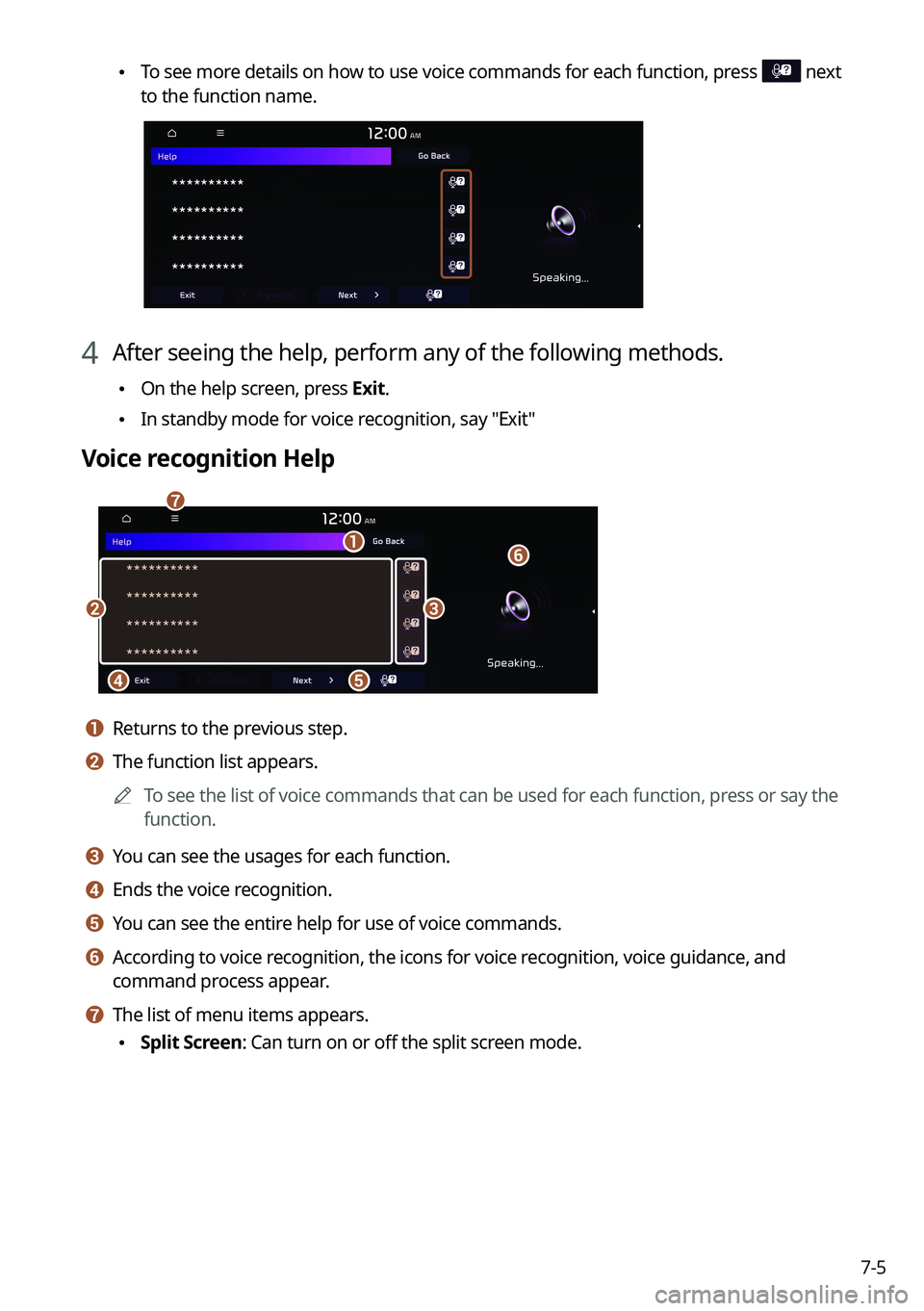
\225To see more details on how to use voice commands for each function, press next
to the function name.
4 After seeing the help, perform any of the following methods.
\225On the help screen, press Exit.
\225In standby mode for voice recognition, say "Exit"
Voice recognition Help
\037
\036
\035
\034\033
\032
\031
a a Returns to the previous step.
b b The function list appears.
0000
A
To see the list of voice commands that can be used for each function, press or say the
function.
c c You can see the usages for each function.
d d Ends the voice recognition.
e e You can see the entire help for use of voice commands.
f f According to voice recognition, the icons for voice recognition, voice guidance, and
command process appear.
g g The list of menu items appears.
\225Split Screen: Can turn on or off the split screen mode.
Page 159 of 316
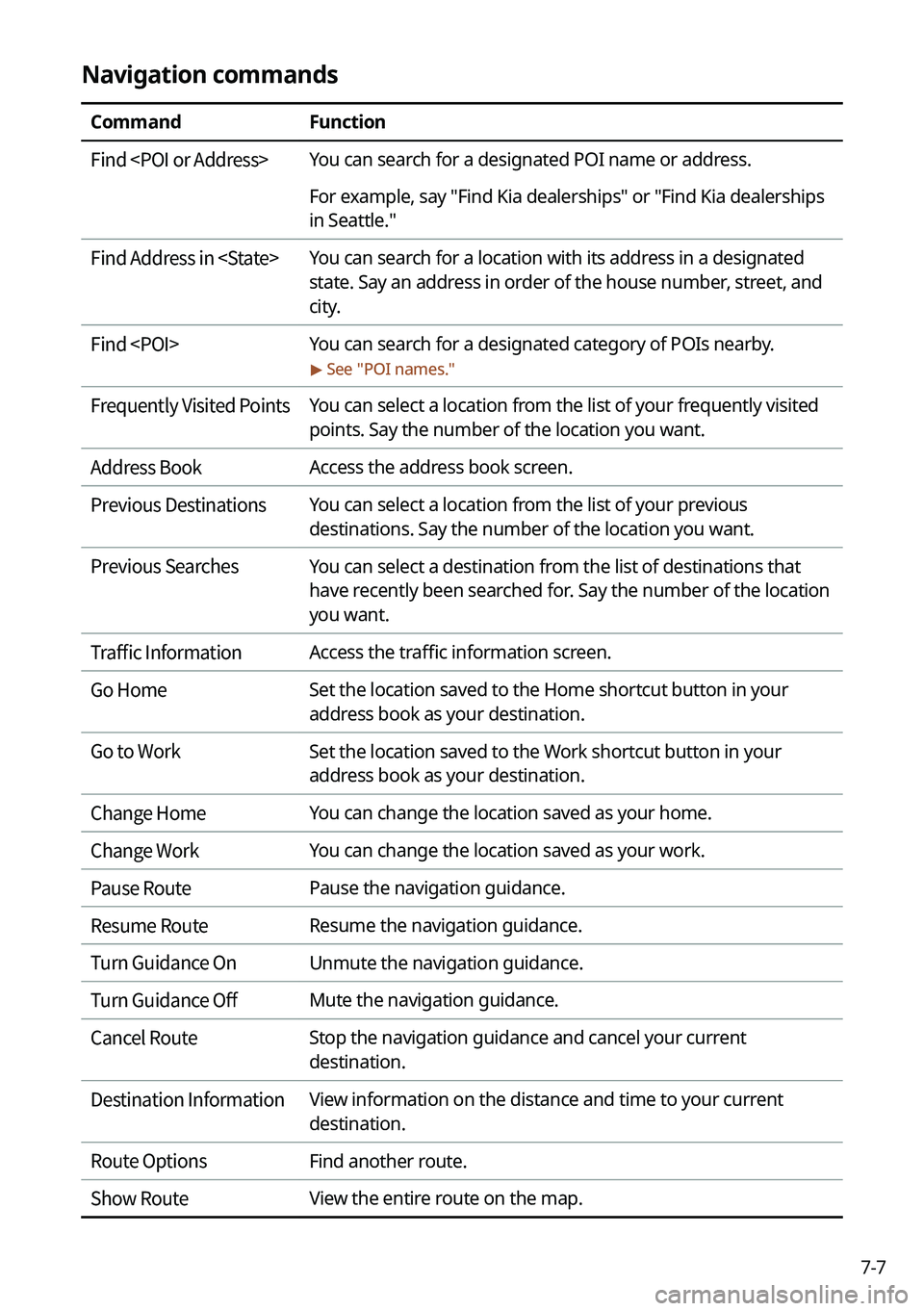
7-7
Navigation commands
CommandFunction
Find
For example, say "Find Kia dealerships" or "Find Kia dealerships
in Seattle."
Find Address in
state. Say an address in order of the house number, street, and
city.
Find
> See "
POI names."
Frequently Visited Points You can select a location from the list of your frequently visited
points. Say the number of the location you want.
Address Book Access the address book screen.
Previous Destinations You can select a location from the list of your previous
destinations. Say the number of the location you want.
Previous Searches You can select a destination from the list of destinations that
have recently been searched for. Say the number of the location
you want.
Traffic Information Access the traffic information screen.
Go Home Set the location saved to the Home shortcut button in your
address book as your destination.
Go to Work Set the location saved to the Work shortcut button in your
address book as your destination.
Change Home You can change the location saved as your home.
Change Work You can change the location saved as your work.
Pause Route Pause the navigation guidance.
Resume Route Resume the navigation guidance.
Turn Guidance On Unmute the navigation guidance.
Turn Guidance Off Mute the navigation guidance.
Cancel Route Stop the navigation guidance and cancel your current
destination.
Destination Information View information on the distance and time to your current
destination.
Route Options Find another route.
Show Route View the entire route on the map.
Page 165 of 316
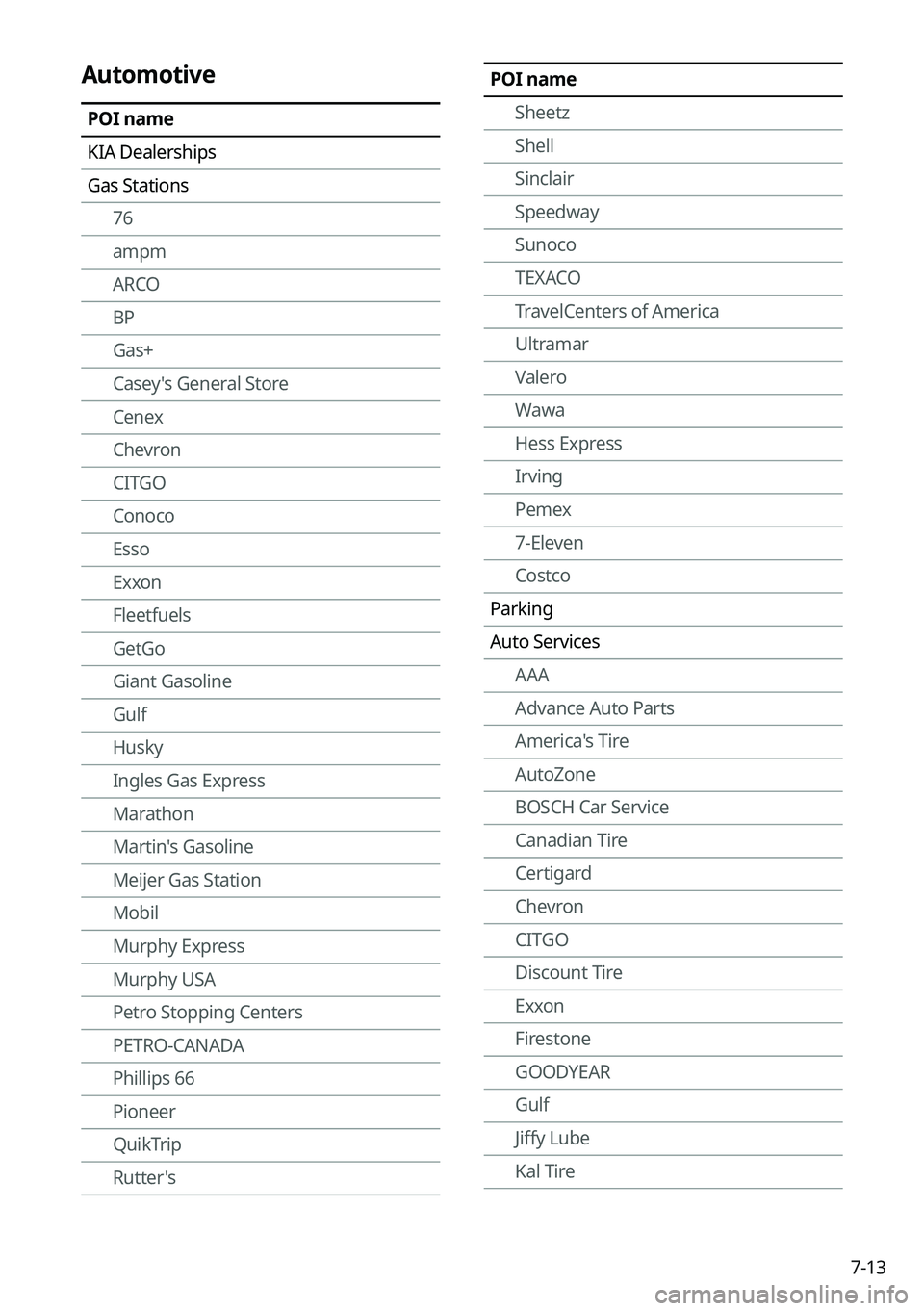
7-13
POI nameSheetz
Shell
Sinclair
Speedway
Sunoco
TEXACO
TravelCenters of America
Ultramar
Valero
Wawa
Hess Express
Irving
Pemex
7-Eleven
Costco
Parking
Auto Services AAA
Advance Auto Parts
America's Tire
AutoZone
BOSCH Car Service
Canadian Tire
Certigard
Chevron
CITGO
Discount Tire
Exxon
Firestone
GOODYEAR
Gulf
Jiffy Lube
Kal TireAutomotive
POI name
KIA Dealerships
Gas Stations76
ampm
ARCO
BP
Gas+
Casey's General Store
Cenex
Chevron
CITGO
Conoco
Esso
Exxon
Fleetfuels
GetGo
Giant Gasoline
Gulf
Husky
Ingles Gas Express
Marathon
Martin's Gasoline
Meijer Gas Station
Mobil
Murphy Express
Murphy USA
Petro Stopping Centers
PETRO-CANADA
Phillips 66
Pioneer
QuikTrip
Rutter's
Page 166 of 316
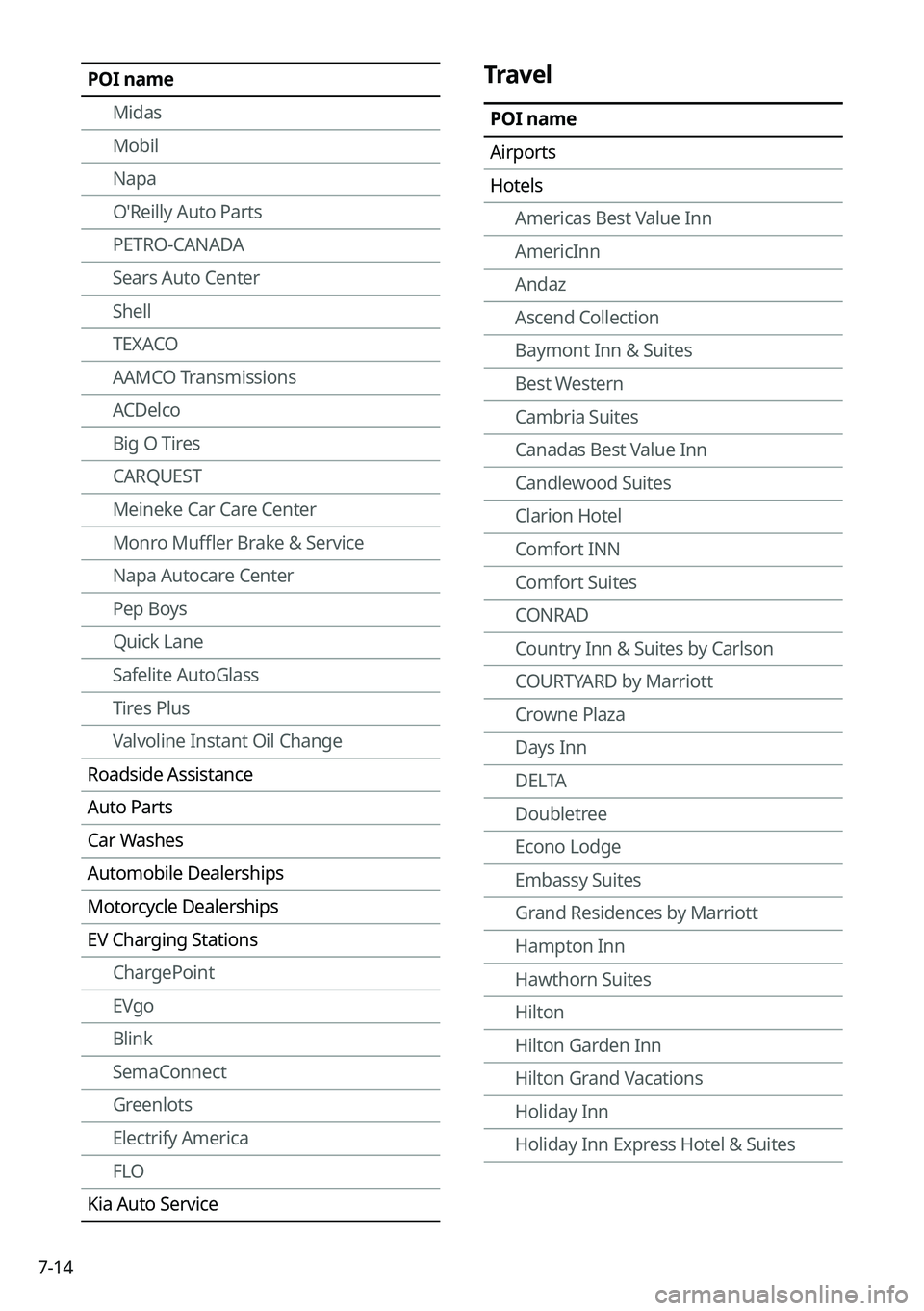
7-14
Travel
POI name
Airports
HotelsAmericas Best Value Inn
AmericInn
Andaz
Ascend Collection
Baymont Inn & Suites
Best Western
Cambria Suites
Canadas Best Value Inn
Candlewood Suites
Clarion Hotel
Comfort INN
Comfort Suites
CONRAD
Country Inn & Suites by Carlson
COURTYARD by Marriott
Crowne Plaza
Days Inn
DELTA
Doubletree
Econo Lodge
Embassy Suites
Grand Residences by Marriott
Hampton Inn
Hawthorn Suites
Hilton
Hilton Garden Inn
Hilton Grand Vacations
Holiday Inn
Holiday Inn Express Hotel & Suites
POI name
Midas
Mobil
Napa
O'Reilly Auto Parts
PETRO-CANADA
Sears Auto Center
Shell
TEXACO
AAMCO Transmissions
ACDelco
Big O Tires
CARQUEST
Meineke Car Care Center
Monro Muffler Brake & Service
Napa Autocare Center
Pep Boys
Quick Lane
Safelite AutoGlass
Tires Plus
Valvoline Instant Oil Change
Roadside Assistance
Auto Parts
Car Washes
Automobile Dealerships
Motorcycle Dealerships
EV Charging Stations ChargePoint
EVgo
Blink
SemaConnect
Greenlots
Electrify America
FLO
Kia Auto Service
Page 168 of 316
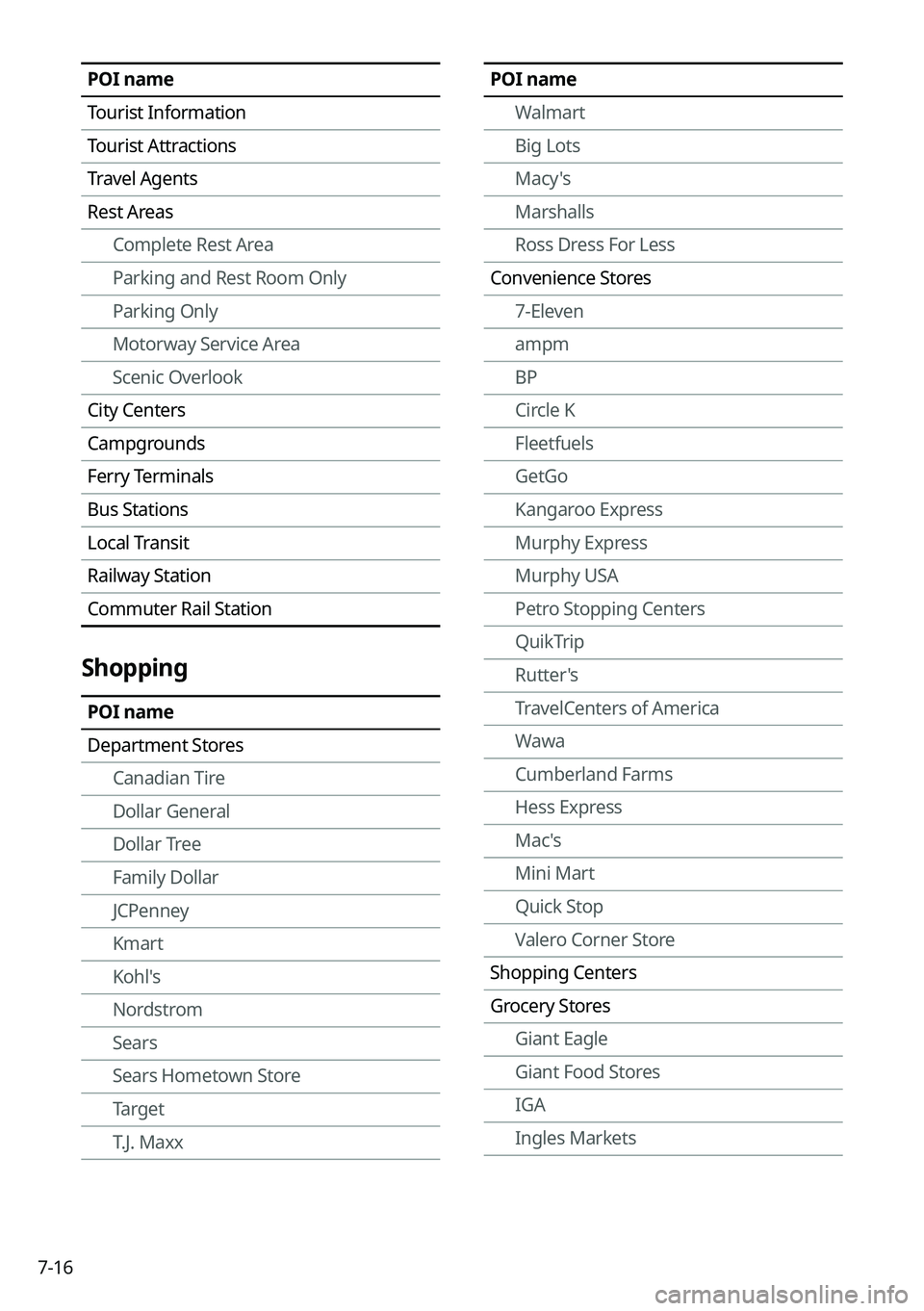
7-16
POI nameWalmart
Big Lots
Macy's
Marshalls
Ross Dress For Less
Convenience Stores 7-Eleven
ampm
BP
Circle K
Fleetfuels
GetGo
Kangaroo Express
Murphy Express
Murphy USA
Petro Stopping Centers
QuikTrip
Rutter's
TravelCenters of America
Wawa
Cumberland Farms
Hess Express
Mac's
Mini Mart
Quick Stop
Valero Corner Store
Shopping Centers
Grocery Stores Giant Eagle
Giant Food Stores
IGA
Ingles MarketsPOI name
Tourist Information
Tourist Attractions
Travel Agents
Rest AreasComplete Rest Area
Parking and Rest Room Only
Parking Only
Motorway Service Area
Scenic Overlook
City Centers
Campgrounds
Ferry Terminals
Bus Stations
Local Transit
Railway Station
Commuter Rail Station
Shopping
POI name
Department Stores Canadian Tire
Dollar General
Dollar Tree
Family Dollar
JCPenney
Kmart
Kohl's
Nordstrom
Sears
Sears Hometown Store
Target
T.J. Maxx
Page 266 of 316

9-78
Keyboard
You can change the keyboard type for each language to use when entering the text.
English Keyboard
You can select the keyboard type to use when entering the English text.
Default Keyboard
You can select the default keyboard type.
Units (if equipped)
You can specify the units to display on the system screen.
Distance and Speed
You can select the units for distance and vehicle speed to display on the\
screen.
Temperature
You can select the temperature unit to display on the screen.
Fuel Efficiency
You can select the unit for fuel economy to display on the screen.
Tire Pressure
You can select the unit for tire pressure to display on the screen.