phone KIA VENGA 2010 Owners Manual
[x] Cancel search | Manufacturer: KIA, Model Year: 2010, Model line: VENGA, Model: KIA VENGA 2010Pages: 379, PDF Size: 6.58 MB
Page 81 of 379
49
Features of your vehicle
Tailgate unlocking
If you are within 0.7 m (28 in.) from the
outside tailgate handle, with your smart
key in possession, the tailgate will unlock
and open when you press the tailgate
handle switch.
The hazard warning lights will blink twice
to indicate that the tailgate is unlocked.
Also, once the tailgate is opened and
then closed, the tailgate will lock auto-
matically.
Start-up
You can start the engine without inserting
the key. For detailed information refer to
“Starting the engine with a smart key” insection 5.Smart key precautions
✽✽
NOTICE
If, for some reason, you happen to lose your smart key, you will not be able to
start the engine. Tow the vehicle, if
necessary, and contact an authorized
KIA dealer.
A maximum of 2 smart keys can be
registered to a single vehicle. If you
lose a smart key, you should immedi-
ately take the vehicle and key to your
authorized KIA dealer to protect it
from potential theft.
The smart key will not work if any of
the following occurs:
- The smart key is close to a radiotransmitter such as a radio station or
an airport which can interfere with
normal operation of the smart key.
- The smart key is near a mobile two-
way radio system or a cellular
phone.
- Another vehicle’s smart key is being operated close to your vehicle.
When the smart key does not work
properly, open and close the door with
the mechanical key. If you have a
problem with the smart key, contact
an authorized KIA dealer.CAUTION
Keep the smart key away from
water or any liquid. If the keyless
entry system is inoperative due to exposure to water or liquids, it willnot be covered by your manufactur-er’s vehicle warranty.
Page 99 of 379
427
Features of your vehicle
(Continued)Use only approved portable plas-
tic fuel containers designed to
carry and store gasoline.
Do not use cellular phones while refueling. Electric current and/or
electronic interference from cel-
lular phones can potentially
ignite fuel vapors causing a fire.
When refueling, always shut the engine off. Sparks produced byelectrical components related to
the engine can ignite fuel vapors
causing a fire. Once refueling is
complete, check to make sure thefiller cap and filler door are
securely closed, before starting
the engine.
DO NOT use matches or a lighter and DO NOT SMOKE or leave a lit
cigarette in your vehicle while at
a gas station especially during
refueling. Automotive fuel is
highly flammable and can, when
ignited, result in fire.
(Continued)(Continued)
Do not get back into a vehicleonce you have begun refueling
since you can generate static
electricity by touching, rubbing
or sliding against any item or fab-
ric (polyester, satin, nylon, etc.)
capable of producing static elec-
tricity. Static electricity discharge
can ignite fuel vapors resulting in
rapid burning. If you must re-
enter the vehicle, you should
once again eliminate potentially
dangerous static electricity dis-
charge by touching a metal part
of the vehicle, away from the fuel
filler neck, nozzle or other gaso-
line source.
When using an approved portable fuel container, be sure toplace the container on the
ground prior to refueling. Static
electricity discharge from the
container can ignite fuel vapors
causing a fire. Once refueling has
begun, contact with the vehicleshould be maintained until the
filling is complete.
(Continued)WARNING - Refueling dan-
gers
Automotive fuels are flammable
materials. When refueling, please
note the following guidelines care-
fully. Failure to follow these guide-
lines may result in severe personal
injury, severe burns or death by fire
or explosion.
Read and follow all warning at the gas station facility.
Before refueling note the location of the Emergency Gasoline Shut-
Off, if available, at the gas station
facility.
Before touching the fuel nozzle, you should eliminate potentially
dangerous static electricity dis-
charge by touching another metal
part of the vehicle, a safe dis-
tance away from the fuel filler
neck, nozzle, or other gas source.
(Continued)
Page 130 of 379
Features of your vehicle
58
4
The sensing distance while the rear
parking assist system is in operation is
approximately 120 cm (47 in.).
When more than two objects are sensed at the same time, the closest
one will be recognized first.
Types of warning sound
When an object is 120 cm to 81 cm (47in. to 32 in.) from the rear bumper:
Buzzer beeps intermittently
When an object is 80 cm to 41 cm (31 in. to 16 in.) from the rear bumper:
Buzzer beeps more frequently
When an object is within 40 cm (15 in.) of the rear bumper:
Buzzer sounds continuously. Non-operational conditions of rear parking assist system
The rear parking assist system may
not operate properly when:
1. Moisture is frozen to the sensor. (It will
operate normally when the moisture has been cleared.)
2. The sensor is covered with foreign matter, such as snow or water, or the
sensor cover is blocked. (It will operate
normally when the material is removed
or the sensor is no longer blocked.)
3. Driving on uneven road surfaces (unpaved roads, gravel, bumps, gradi-ent).
4. Objects generating excessive noise (vehicle horns, loud motorcycle
engines, or truck air brakes) are within
range of the sensor.
5. Heavy rain or water spray exists.
6. Wireless transmitters or mobile phones are within range of the sensor.
7. The sensor is covered with snow.
8. Trailer towing. The detecting range may decrease when:
1. The sensor is stained with foreign mat-
ter such as snow or water. (The sens-
ing range will return to normal when
removed.)
2. Outside air temperature is extremely hot or cold.
The following objects may not be rec-
ognized by the sensor:
1. Sharp or slim objects such as ropes, chains or small poles.
2. Objects which tend to absorb the sen- sor frequency such as clothes, spongy
material or snow.
3. Undetectable objects smaller than 1 m (40 in.) and narrower than 14 cm (6 in.)
in diameter.
Page 168 of 379
Features of your vehicle
96
4
The power outlet is designed to provide
power for mobile telephones or other
devices designed to operate with vehicle
electrical systems. The devices should
draw less than 10 amps with the engine
running.
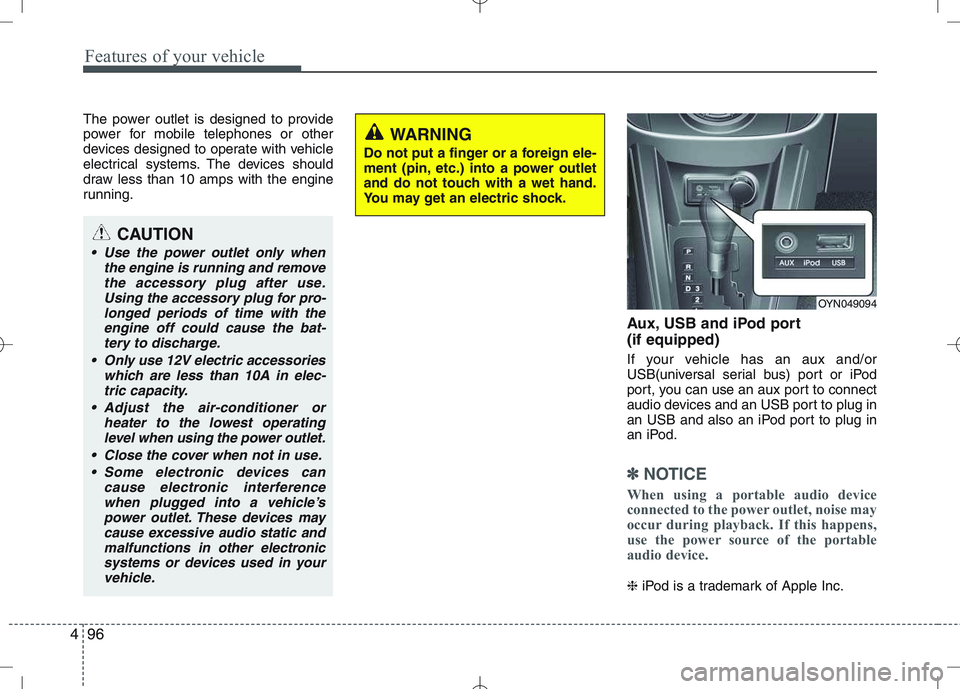
Aux, USB and iPod port (if equipped)
If your vehicle has an aux and/or
USB(universal serial bus) port or iPod
port, you can use an aux port to connect
audio devices and an USB port to plug in
an USB and also an iPod port to plug in
an iPod.
✽✽NOTICE
When using a portable audio device
connected to the power outlet, noise may
occur during playback. If this happens,
use the power source of the portable
audio device.
❈ iPod is a trademark of Apple Inc.
WARNING
Do not put a finger or a foreign ele-
ment (pin, etc.) into a power outlet
and do not touch with a wet hand.
You may get an electric shock.
OYN049094
CAUTION
Use the power outlet only when the engine is running and remove
the accessory plug after use.Using the accessory plug for pro-longed periods of time with the engine off could cause the bat-
tery to discharge.
Only use 12V electric accessories which are less than 10A in elec-tric capacity.
Adjust the air-conditioner or heater to the lowest operating
level when using the power outlet.
Close the cover when not in use. Some electronic devices can cause electronic interferencewhen plugged into a vehicle’s
power outlet. These devices may cause excessive audio static andmalfunctions in other electronicsystems or devices used in your
vehicle.
Page 173 of 379
4101
Features of your vehicle
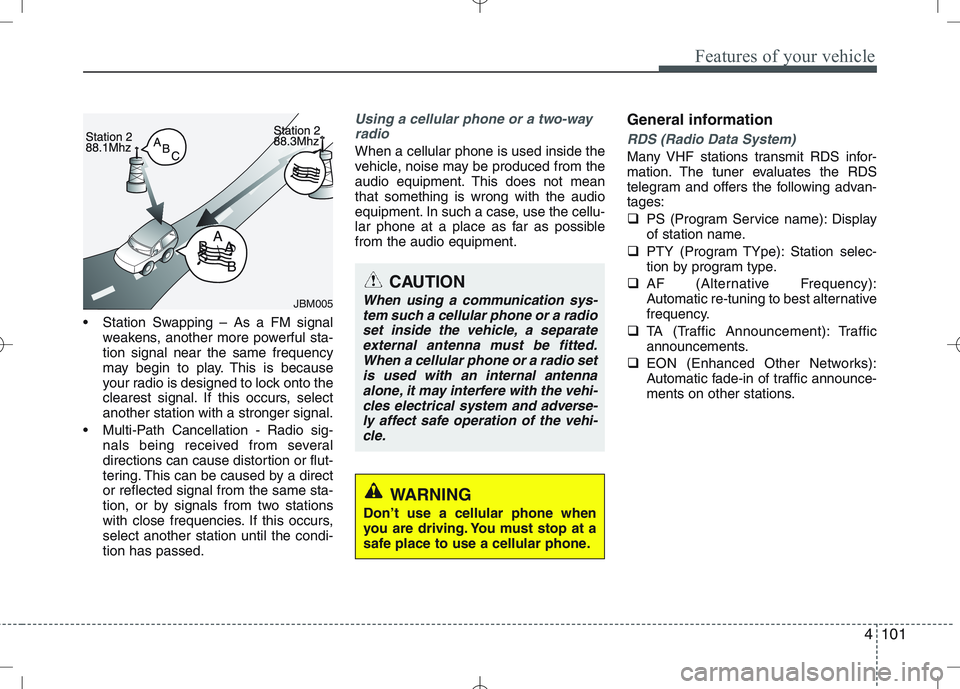
Station Swapping – As a FM signalweakens, another more powerful sta- tion signal near the same frequency
may begin to play. This is because
your radio is designed to lock onto the
clearest signal. If this occurs, selectanother station with a stronger signal.
Multi-Path Cancellation - Radio sig- nals being received from several
directions can cause distortion or flut-
tering. This can be caused by a director reflected signal from the same sta-
tion, or by signals from two stations
with close frequencies. If this occurs,select another station until the condi-tion has passed.
Using a cellular phone or a two-way
radio
When a cellular phone is used inside the
vehicle, noise may be produced from the
audio equipment. This does not meanthat something is wrong with the audio
equipment. In such a case, use the cellu-
lar phone at a place as far as possiblefrom the audio equipment. General informationRDS (Radio Data System)
Many VHF stations transmit RDS infor-
mation. The tuner evaluates the RDS
telegram and offers the following advan-tages:
PS (Program Service name): Display
of station name.
PTY (Program TYpe): Station selec-
tion by program type.
AF (Alternative Frequency):
Automatic re-tuning to best alternative
frequency.
TA (Traffic Announcement): Traffic
announcements.
EON (Enhanced Other Networks):
Automatic fade-in of traffic announce-
ments on other stations.
JBM005
CAUTION
When using a communication sys-
tem such a cellular phone or a radioset inside the vehicle, a separateexternal antenna must be fitted.When a cellular phone or a radio set
is used with an internal antennaalone, it may interfere with the vehi- cles electrical system and adverse-ly affect safe operation of the vehi-
cle.
WARNING
Don’t use a cellular phone when
you are driving. You must stop at a
safe place to use a cellular phone.
Page 174 of 379
Features of your vehicle
102
4
Notes on operating instructions
The following reading aids are used to
simplify these operating instructions:
Asks you to perform an action
Shows the unit’s reaction
✎ Provides extra info
Identifies a list
Class 1 laser product
CAUTION
Any inappropriate use of the device
may expose the user to invisiblelaser rays which exceed the limitsfor Class 1 laser products.CAUTION
Do not place beverages close to the audio system. The audio sys-tem mechanism may be damagedif you spill them.
Do not strike or allow anything to impact the audio system, damageto the system mechanisms could occur.
WARNING
Don’t use a cellular phone when
you are driving. You must stop at a
safe place to use a cellular phone.
WARNING
When driving your vehicle, be sure
to keep the volume of the unit set
low enough to allow you to hear
sounds coming from the outsides
(e.g. aware of the road and trafficconditions).
Page 175 of 379
4103
Features of your vehicle
Safety instructions Notes on USB stick (thumb drive) Notes on Bluetooth devicesNotes on Bluetooth® Technology*
Bluetooth is a short-range wireless
radio connectivity technology used
mainly for mobile phones, hand-held
PC’s and other devices.
Bluetooth SIG Inc. owns the Bluetooth
word, marking and logo; and any use
of such marks is under license. Other
trademarks and trade names are
those of their respective owners.
Bluetooth operates in 2.4 GHz fre-
quency range and transmits voiceand data at speeds of up to 1 mbps
within a range of up to 10 m.
The Head Unit supports the Hands
free Profile (HFP), the Advanced
Audio Distribution Profile (A2DP) and
the Audio Video Remote Control
Profile (AVRCP).
WARNING
Make all inputs via the remote con-
trol only when the vehicle is sta-
tionary, or have the passenger
make them. Otherwise, you may
endanger the occupants and other
road users.WARNING
In rare cases it is possible that an
Bluetooth device is not recognized
by the unit or may cause a malfunc-
tion. Please only use Bluetooth
devices that comply with theBluetooth specifications.WARNING
We strongly recommend only using USB sticks (thumb drives)
of well-known manufacturers.
On no account must other USB devices such as hard discs or
other digital equipment or multiplug USB hub be connected to
the USB hub. Connecting other
devices can cause malfunction or
even destroy the audio equip-ment.
Avoid using the USB memory when it might hinder your safetydriving.
It is possible that noise is heard during playback when using the
AUX-IN together with the poweroutlet due to system-related not a
malfunction. If this happens, use
the power source of the AUX
device.
In rare cases it is possible that an USB stick (thumb drive) is not
recognized by the unit or may
cause a malfunction. Please only
use USB sticks that comply withthe USB thumb drive specifica-tions.
WARNING
Avoid inserting any foreign objects
into the slot of this player. Failure to
observe this may cause malfunc-
tion due to the precise mechanismof this unit.
WARNING
Keep the volume level low enough
to be aware of road and traffic con-ditions.
WARNING
Do not open covers and do not
repair yourself. Refer servicing to
qualified personnel.
Page 193 of 379
4121
Features of your vehicle
Bluetooth
You can use a Bluetooth device in your
car to make a hands-free phone call or to
stream music onto your in-car speakers
(via this Head Unit). This Head Unit sup-
ports HFP, A2DP and AVRCP connec-tion.
Advanced Audio Distribution Profile
(A2DP)
This profile defines how high quality audio (stereo or mono) can be streamed
from one device to another over a
Bluetooth connection. For example:
music streamed from a mobile phone to
a wireless headset or car audio.
Audio/Video Remote Control Profile
(AVRCP)
This profile is designed to provide a stan-
dard interface to control TVs, Hi-fi equip-
ment, etc. to allow a single remote con-
trol (or other device) to control all of theA/V equipment to which a user has
access. It may be used in concert with
Advanced Audio Distribution Profile.Hands-Free Profile (HFP)
This is commonly used to allow car
handsfree kits to communicate with
mobile phones in the car.
Notes for mobile phones
Some functions (e.g. starting of speech
recognition) are not supported by all
mobile phones. We cannot guarantee
that all functions described will be sup-
ported by all mobile phones withBluetooth.
New device
This function allows you to add a new phone to the Head Units Bluetooth
Device List. Maximum of 5 devices can
be added to the list. If the list is full, the
oldest device will be replaced by the
newly added Bluetooth device, based on
last pairing date.
Pairing
To pair your Bluetooth-enabled device to
this Head Unit, make sure that no deviceis currently streaming to this Head Unitfirst.
Short press the SETUPbutton to
enter the Setup menu.
Short press the or button to
access the Bluetooth sub-menu.
Now select “New Device”.
Press the or button to select
the number of the first digit.
Press the or button to select the
next digit.
Repeat the above steps for the other
three digits.
Press the OKbutton to confirm the 4-
digit PIN for authentication and acti-
vate the “Discoverable Mode”.
In “Discoverable Mode” the Head Unit
broadcasts a Bluetooth ID.
Look for the “KIA-BLUETOOTH” on
your Bluetooth device.
Enter identically the same PIN in your
Bluetooth device and authenticate
pairing on your Bluetooth device.
When pairing is established, the ID of
the Bluetooth device and the service
list info will be stored in the Head Unit
Bluetooth Device List.
Page 194 of 379
Features of your vehicle
122
4
Device List
With this function you can browse
through and select bluetooth devices thatare stored in the Head Unit Bluetooth
Device List.
Short press the SETUPbutton to
enter the Setup menu.
Short press the or button to
access the Bluetooth sub-menu.
Press the button to browse the
Device List to select the required
device.
Press the OKbutton to start pairing
between the selected device and theHead Unit.
✎ Note: Whenever there is at least one
connected device active, in the dis-
play the Bluetooth icon is visible. Delete Device
This function allows you to delete a
Bluetooth device ID from the Head Unit
Bluetooth Device List.
Short press the SETUPbutton to
enter the Setup menu.
Short press the or button to
access the Bluetooth sub-menu.
Press the button to select Delete
Device.
Press the OKbutton to delete the
selected device from the Head Unit
Bluetooth Device List
Phone Volume
Short press the SETUPbutton to
enter the Setup menu.
Short press the or button to
access the Bluetooth sub-menu.
Select the option “Phone Volume”.
Press the or button to decrease
or increase the phone volume setting.
Default setting: 12
Setting range: 0 ... 35
During an ongoing call, user is
allowed to adjust the BT Phone vol-
ume. The adjusted volume is memo-
rized into Phone Volume setting. Answering a Call
Press the Callbutton on the Steering
Wheel Remote Control to accept an incoming call.
Terminate / Reject Call
Press the End Callbutton on the
Steering Wheel Remote Control to
terminate or reject a call.
Last Call Re-dial
Short press the Callbutton on the
Steering Wheel Remote Control to re-
dial last dialled number (one attempt).
Long press the Callbutton on the
Steering Wheel Remote Control to re-
dial last dialled number (twoattempts).
Private Call
This function allows you to have a private
call even if the phone is connected to theHead Unit.
Press the Callbutton on your phone
to start a private call.
OR
Press the End Callbutton on your
phone to end a private call.
Page 195 of 379
4123
Features of your vehicle
Transferring a Call
This function allows you to transfer a call
during an ongoing call.
From the tuner to the phone
From the phone to the tuner
Long press the Callbutton on the
Steering Wheel Remote Control to
transfer the ongoing call back to the
phone or back to the tuner again.
Audio Streaming
Start Audio Streaming
This function allows the Head Unit to
start streaming music from phone.
The Bluetooth device must be con- nected with the Head Unit.
Press the AUXbutton and select BT
AUDIO.
✎ The Head Unit starts streaming the
audio from the phone and will start
playing the audio files.
✎ The Head Unit has no control on the
sequence of track playback in phone. Next/Previous Track
This function allows you to select the
next/ previous track of phone‘s music
player by using the next/previous track
buttons on the Head Unit or SteeringWheel Remote Control.
Short press the or button on the
Head Unit or the Steering WheelRemote Control.
Suspend Audio Streaming
This function allows you to suspend
streaming music from the phone to theHead Unit.
Short press the Mutebutton on the
Steering Wheel Remote Control.
Press the AUXbutton and de-select
BT AUDIO.