ECO mode KIA VENGA 2011 User Guide
[x] Cancel search | Manufacturer: KIA, Model Year: 2011, Model line: VENGA, Model: KIA VENGA 2011Pages: 761, PDF Size: 34.65 MB
Page 155 of 761
479
Features of your vehicle
During air conditioning system opera-tion, you may occasionally notice a slight change in engine speed as the
air conditioning compressor cycles.
This is a normal system operation
characteristic.
Use the air conditioning system every month only for a few minutes to ensure
maximum system performance.
When using the air conditioning sys- tem, you may notice clear water drip-
ping (or even puddling) on the ground
under the passenger side of the vehi-
cle. This is a normal system operation
characteristic.
Operating the air conditioning system in the recirculated air position provides
maximum cooling, however, continual
operation in this mode may cause the
air inside the vehicle to become stale.
During cooling operation, you may occasionally notice a misty air flow
because of rapid cooling and humid air
intake. This is a normal system opera-
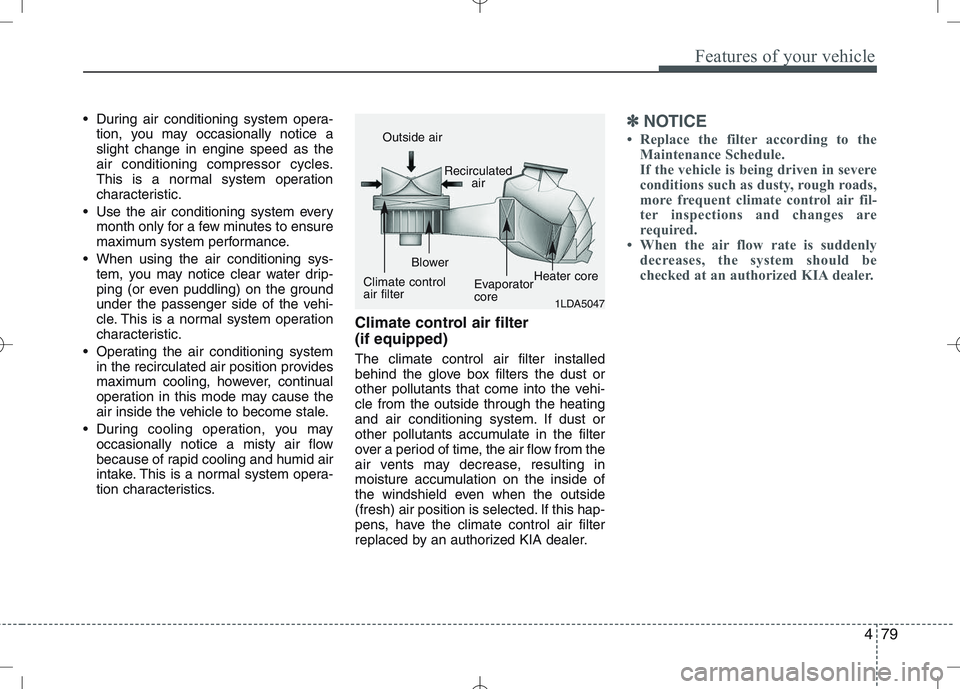
tion characteristics. Climate control air filter (if equipped) The climate control air filter installed
behind the glove box filters the dust or
other pollutants that come into the vehi-cle from the outside through the heating
and air conditioning system. If dust or
other pollutants accumulate in the filter
over a period of time, the air flow from the
air vents may decrease, resulting in
moisture accumulation on the inside of
the windshield even when the outside
(fresh) air position is selected. If this hap-
pens, have the climate control air filter
replaced by an authorized KIA dealer.✽✽
NOTICE
Replace the filter according to the Maintenance Schedule.
If the vehicle is being driven in severe
conditions such as dusty, rough roads,
more frequent climate control air fil-
ter inspections and changes are
required.
When the air flow rate is suddenly
decreases, the system should be
checked at an authorized KIA dealer.
1LDA5047
Outside air
Recirculatedair
Climate control air filter Blower
EvaporatorcoreHeater core
Page 159 of 761
483
Features of your vehicle
Manual heating and air condition- ing The heating and cooling system can be
controlled manually by pushing buttons
other than the AUTO button. In this case,
the system works sequentially according
to the order of buttons selected.
When pressing any button (or turning
any knob) except AUTO button while
automatic operation, the functions not
selected will be controlled automatically.
1. Start the engine.
2. Set the mode to the desired position.
3. Set the temperature control to thedesired position.
4. Set the air intake control to the outside (fresh) air position.
5. Set the fan speed control to the desired speed.
6. If air conditioning is desired, turn the air conditioning system on.
Press the AUTO button in order to con-
vert to full automatic control of the sys-tem.
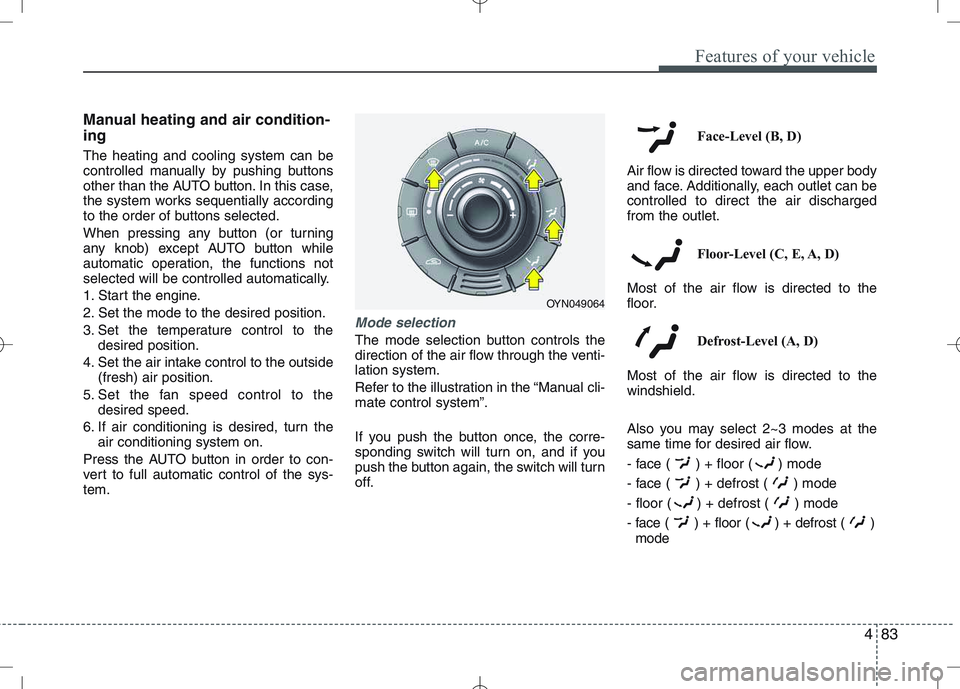
Mode selection
The mode selection button controls the
direction of the air flow through the venti-lation system.
Refer to the illustration in the “Manual cli- mate control system”.
If you push the button once, the corre-
sponding switch will turn on, and if you
push the button again, the switch will turn
off. Face-Level (B, D)
Air flow is directed toward the upper body
and face. Additionally, each outlet can becontrolled to direct the air dischargedfrom the outlet.
Floor-Level (C, E, A, D)
Most of the air flow is directed to the
floor.
Defrost-Level (A, D)
Most of the air flow is directed to thewindshield.
Also you may select 2~3 modes at the
same time for desired air flow.
- face ( ) + floor ( ) mode
- face ( ) + defrost ( ) mode
- floor ( ) + defrost ( ) mode
- face ( ) + floor ( ) + defrost ( ) mode
OYN049064
Page 161 of 761
485
Features of your vehicle
Temperature conversion
If the battery has been discharged or dis-
connected, the temperature mode dis-
play will reset to Centigrade.
This is normal condition. You can switch the
temperature mode between Centigrade to
Fahrenheit as follows;
While depressing the AUTO button,
depress the OFF button for 3 seconds or
more. The display will change from
Centigrade to Fahrenheit, or from
Fahrenheit to Centigrade.
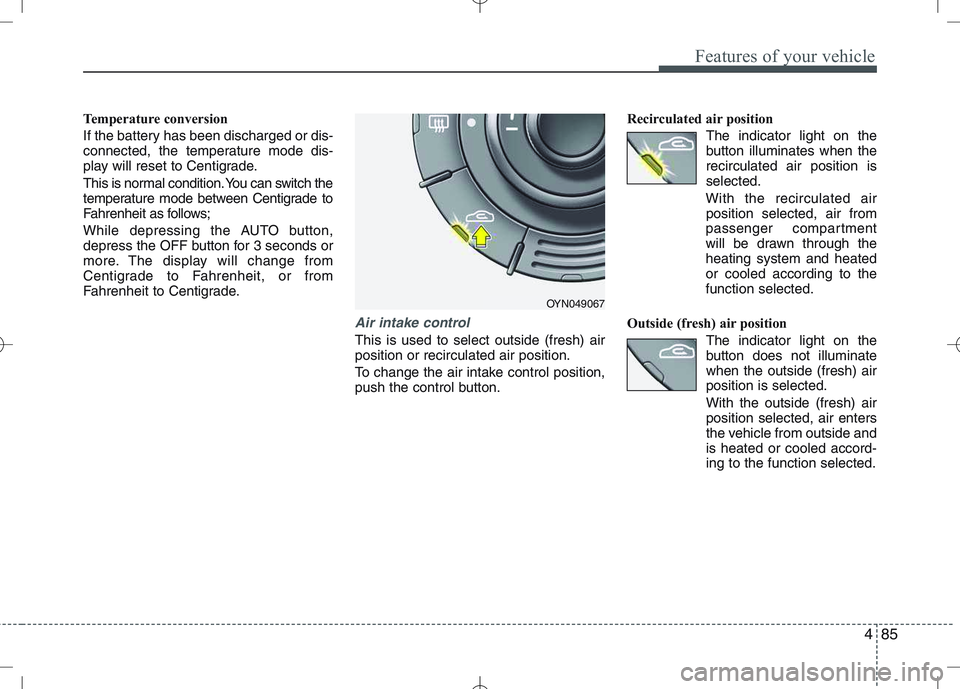
Air intake control
This is used to select outside (fresh) air position or recirculated air position.
To change the air intake control position,
push the control button.Recirculated air position
The indicator light on the
button illuminates when therecirculated air position isselected.
With the recirculated air position selected, air from
passenger compartment
will be drawn through theheating system and heatedor cooled according to thefunction selected.
Outside (fresh) air position The indicator light on the
button does not illuminatewhen the outside (fresh) airposition is selected. With the outside (fresh) air position selected, air enters
the vehicle from outside andis heated or cooled accord-ing to the function selected.
OYN049067
Page 169 of 761
493
Features of your vehicle
INTERIOR FEATURES
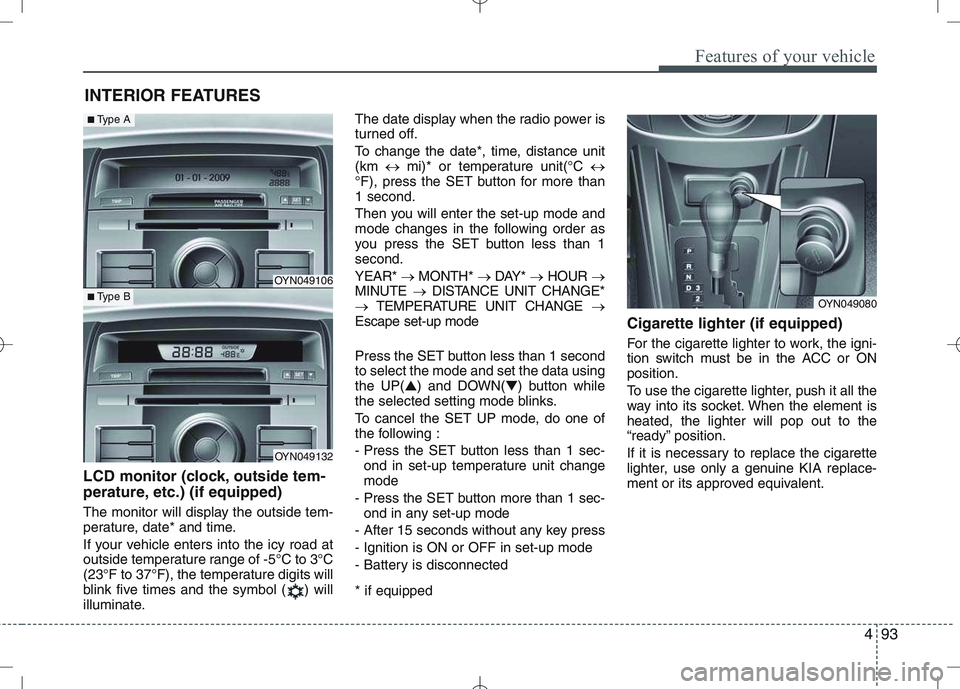
LCD monitor (clock, outside tem-
perature, etc.) (if equipped)
The monitor will display the outside tem-
perature, date* and time.
If your vehicle enters into the icy road at
outside temperature range of -5°C to 3°C
(23°F to 37°F), the temperature digits will
blink five times and the symbol ( ) will
illuminate. The date display when the radio power is
turned off.
To change the date*, time, distance unit (km
mi)* or temperature unit(°C
°F), press the SET button for more than1 second.
Then you will enter the set-up mode and
mode changes in the following order as
you press the SET button less than 1second. YEAR* MONTH* DAY* HOUR
MINUTE DISTANCE UNIT CHANGE*
TEMPERATURE UNIT CHANGE
Escape set-up mode
Press the SET button less than 1 second to select the mode and set the data usingthe UP( ▲) and DOWN( ▼) button while
the selected setting mode blinks.
To cancel the SET UP mode, do one of
the following :
- Press the SET button less than 1 sec-
ond in set-up temperature unit change mode
- Press the SET button more than 1 sec- ond in any set-up mode
- After 15 seconds without any key press
- Ignition is ON or OFF in set-up mode
- Battery is disconnected * if equipped Cigarette lighter (if equipped)
For the cigarette lighter to work, the igni-
tion switch must be in the ACC or ONposition.
To use the cigarette lighter, push it all the
way into its socket. When the element isheated, the lighter will pop out to the
“ready” position.
If it is necessary to replace the cigarette
lighter, use only a genuine KIA replace-
ment or its approved equivalent.
OYN049080
OYN049106
OYN049132
■
Type A
■Type B
Page 189 of 761
Driving your vehicle
14
5
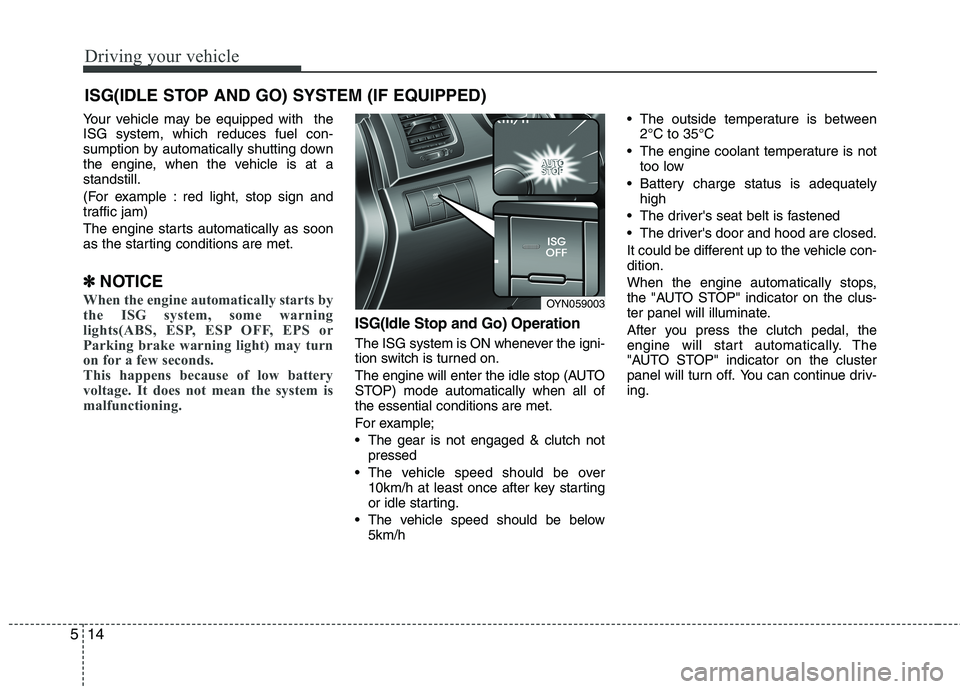
Your vehicle may be equipped with the ISG system, which reduces fuel con-
sumption by automatically shutting down
the engine, when the vehicle is at astandstill.
(For example : red light, stop sign and
traffic jam)
The engine starts automatically as soon
as the starting conditions are met.
✽
✽ NOTICE
When the engine automatically starts by
the ISG system, some warning
lights(ABS, ESP, ESP OFF, EPS or
Parking brake warning light) may turn
on for a few seconds.
This happens because of low battery
voltage. It does not mean the system is
malfunctioning.
ISG(Idle Stop and Go) Operation
The ISG system is ON whenever the igni-
tion switch is turned on.
The engine will enter the idle stop (AUTO
STOP) mode automatically when all ofthe essential conditions are met.
For example;
The gear is not engaged & clutch not
pressed
The vehicle speed should be over 10km/h at least once after key starting
or idle starting.
The vehicle speed should be below 5km/h The outside temperature is between
2°C to 35°C
The engine coolant temperature is not too low
Battery charge status is adequately high
The driver's seat belt is fastened
The driver's door and hood are closed.
It could be different up to the vehicle con- dition.
When the engine automatically stops,
the "AUTO STOP" indicator on the clus-
ter panel will illuminate.
After you press the clutch pedal, the
engine will start automatically. The
"AUTO STOP" indicator on the cluster
panel will turn off. You can continue driv-ing.
ISG(IDLE STOP AND GO) SYSTEM (IF EQUIPPED)
OYN059003
Page 190 of 761

515
Driving your vehicle
ISG auto-starting
Before and after the engine enters the
idle stop mode, the ISG system will auto-
matically check all the necessary items
such as the safety of the vehicle and pas-
senger comfort.
The engine will start automatically with-
out the driver's action if any of the follow-ing occurs:
If the brake vacuum pressure is low
If the fan speed of the manual climatecontrol system is set above the 3rd position when the air conditioning is on
If the fan speed of the automatic cli- mate control system is set above the6th position when the air conditioningis on
When a certain amount of time has passed with the climate control systemon
When the defroster is ON
When the battery charge status is low
If the vehicle speed is over 5km/h by rolling down a hill
It could be different up to the vehicle con-dition.
When the automatic starting occurs, the
"AUTO STOP" indicator on the cluster
will blink for 5 seconds. ISG(Idle Stop and Go) system
deactivation
If you desire to deactivate the ISG sys-
tem, you can do it temporarily by press-
ing the ISG OFF button located on the
left side of the instrument panel.
After pressing the ISG OFF button, the
light on the button will illuminate.
The ISG system will activate by pressing
the ISG OFF button again and the button
light will turn off. ✽
✽
NOTICE
When the ISG related sensors or sys-
tem error occurs, the ISG OFF button
light will illuminate. If the button light
is not turned off by pressing the ISG
OFF button again or if the ISG system
continuously does not work correctly,
please contact an authorized KIA
dealer as soon as possible.
Also, if the battery charging status is
low, the ISG OFF button light will
illuminate. When the button light
comes on, it may stop illuminating
after driving your vehicle at approxi-
mately 80 km/h for a maximum of two
hours and setting the fan speed con-
trol knob below the 2nd position. If
the button light continues to be illumi-
nated in spite of the procedure, please
contact an authorized KIA dealer as
soon as possible.
OYN059004
WARNING
When the engine is in Idle Stop
mode, it's possible to restart theengine without the driver taking
any action.
Before leaving the car or doing any-
thing in the engine room area, stop
the engine by turning the ignition key
to the LOCK position or removing it.
Page 215 of 761
Driving your vehicle
40
5
Your vehicle's fuel economy depends
mainly on your style of driving, where you
drive and when you drive.
Each of these factors affects how many
kilometers (miles) you can get from a
liter (gallon) of fuel. To operate your vehi-
cle as economically as possible, use the
following driving suggestions to help
save money in both fuel and repairs:
Drive smoothly. Accelerate at a moder-
ate rate. Don't make "jack-rabbit" starts or full-throttle shifts and maintain a
steady cruising speed. Don't race
between stoplights. Try to adjust your
speed to the traffic so you don't have to
change speeds unnecessarily. Avoid
heavy traffic whenever possible.
Always maintain a safe distance from
other vehicles so you can avoid unnec-
essary braking. This also reduces
brake wear.
Drive at a moderate speed. The faster you drive, the more fuel your vehicle
uses. Driving at a moderate speed,
especially on the highway, is one of the
most effective ways to reduce fuel con-sumption. Don't "ride" the brake or clutch pedal.
This can increase fuel consumption
and also increase wear on these com-
ponents. In addition, driving with your
foot resting on the brake pedal may
cause the brakes to overheat, which
reduces their effectiveness and may
lead to more serious consequences.
Take care of your tires. Keep them inflated to the recommended pressure.
Incorrect inflation, either too much or
too little, results in unnecessary tire
wear. Check the tire pressures at leastonce a month.
Be sure that the wheels are aligned correctly. Improper alignment can
result from hitting curbs or driving too
fast over irregular surfaces. Poor align-
ment causes faster tire wear and may
also result in other problems as well as
greater fuel consumption. Keep your vehicle in good condition.
For better fuel economy and reduced
maintenance costs, maintain your vehi-cle in accordance with the mainte-
nance schedule in Section 7. If you
drive your vehicle in severe conditions,more frequent maintenance is required
(see Section 7 for details).
Keep your vehicle clean. For maximum service, your vehicle should be kept
clean and free of corrosive materials. It
is especially important that mud, dirt,
ice, etc. not be allowed to accumulate
on the underside of the vehicle. This
extra weight can result in increased
fuel consumption and also contributeto corrosion.
Travel lightly. Don't carry unnecessary weight in your vehicle. Weight reduces
fuel economy.
Don't let the engine idle longer than necessary. If you are waiting (and not
in traffic), turn off your engine and
restart only when you're ready to go.
ECONOMICAL OPERATION
Page 232 of 761
557
Driving your vehicle
If you do decide to pull a trailer
Here are some important points if you
decide to pull a trailer:
Consider using a sway control. You canask a hitch dealer about sway control.
Do not do any towing with your car dur- ing its first 2,000 km (1,200 miles) in
order to allow the engine to properly
break in. Failure to heed this caution
may result in serious engine or
transaxle damage.
When towing a trailer, be sure to con- sult an authorized KIA dealer for fur-
ther information on additional require-
ments such as a towing kit, etc.
Always drive your vehicle at a moder- ate speed (less than 100 km/h / 60
mph). If your vehicle is a commercial
vehicle, drive less than 80 km/h.
On a long uphill grade, do not exceed 70 km/h (45 mph) or the posted towing
speed limit, whichever is lower.
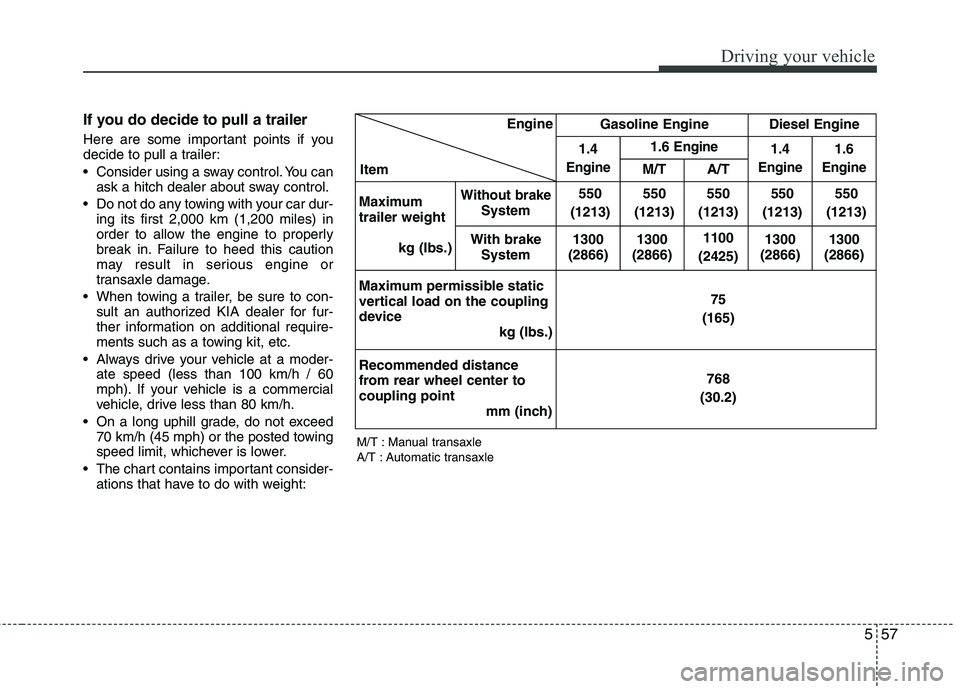
The chart contains important consider- ations that have to do with weight: M/T : Manual transaxle
A/T : Automatic transaxleEngine
Item Gasoline Engine
Diesel Engine
1.4
Engine
1.6 Engine1.4
Engine
1.6
EngineM/T A/T
Maximum trailer weight kg (Ibs.)
Without brakeSystem 550
(1213) 550
(1213)
550
(1213) 550
(1213) 550
(1213)
With brake System 1300
(2866) 1300
(2866)
1100
(2425) 1300
(2866) 1300
(2866)
Maximum permissible static
vertical load on the coupling
device kg (Ibs.) 75
(165)
Recommended distance
from rear wheel center tocoupling point mm (inch) 768
(30.2)
Page 350 of 761
kia, the company
Thank you for becoming the owner of a new Kia vehicle. As a global car manufacturing company focused on building high- quality vehicles at value prices, Kia Motors is dedicated to providing you
with Service above your expectation and delight customer experience. In our Kia dealerships you will experience our “ Family-like Care”
promise, that creates feelings of warmth, hospitality and trust – feelings of being looked after by people who care.
All information contained in this Owner’s Manual is accurate at the
time of publication. However, Kia reserves the right to make changesat any time so that our policy of continual product improvement can becarried out. This manual applies to all Kia models and includes descriptions and
explanations of optional as well as standard equipment. As a result, youmay encounter material in this manual that is not applicable to yourspecific Kia vehicle.
Enjoy your vehicle & experience Kia “Family-like Care” !
YN RHD FOREWORD.QXP 9/11/2010 11:59 AM Page 1
Page 351 of 761
i
Thank you for choosing a KIA vehicle. When you require service, remember that your dealer
knows your vehicle best. Your dealer has factory-trainedtechnicians, recommended special tools, genuine KIAreplacement parts and is dedicated to your complete sat-isfaction. Because subsequent owners require this important infor- mation as well, this publication should remain with thevehicle if it is sold. This manual will familiarize you with operational, main- tenance and safety information about your new vehicle. It
is supplemented by a Warranty and Maintenance bookthat provides important information on all warranties
regarding your vehicle. We urge you to read these publi-cations carefully and follow the recommendations to helpassure enjoyable and safe operation of your new vehicle.
KIA offers a great variety of options, components and
features for its various models. Therefore, some of theequipment described in this manual, along with the vari-ous illustrations, may not be applicable to your particularvehicle.
The information and specifications provided in this man-
ual were accurate at the time of printing. KIA reservesthe right to discontinue or change specifications or designat any time without notice and without incurring anyobligation. If you have questions, always check with your
authorised KIA dealer.
We assure you of our continuing interest in your motor-
ing pleasure and satisfaction in your KIA vehicle. © 2010 Kia Motors Europe GmbH All rights reserved. Reproduction by any means, elec- tronic or mechanical, including photocopying, recording,or by any information storage and retrieval system ortranslation in whole or part is not permitted without writ-ten authorization from Kia Motors Europe GmbH.
Foreword
YN RHD FOREWORD.QXP 9/11/2010 11:59 AM Page 2