ABS KIA VENGA 2011 Owner's Guide
[x] Cancel search | Manufacturer: KIA, Model Year: 2011, Model line: VENGA, Model: KIA VENGA 2011Pages: 761, PDF Size: 34.65 MB
Page 476 of 761
455
Features of your vehicle
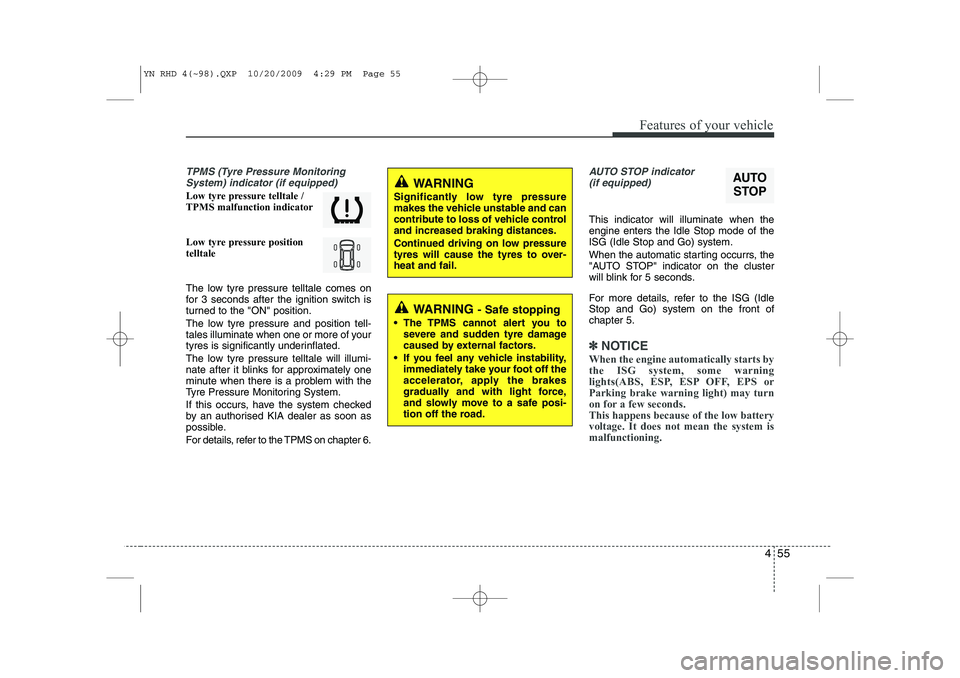
TPMS (Tyre Pressure MonitoringSystem) indicator (if equipped)
Low tyre pressure telltale / TPMS malfunction indicator
Low tyre pressure position telltale
The low tyre pressure telltale comes on
for 3 seconds after the ignition switch is
turned to the "ON" position.
The low tyre pressure and position tell-
tales illuminate when one or more of your
tyres is significantly underinflated.
The low tyre pressure telltale will illumi-
nate after it blinks for approximately one
minute when there is a problem with the
Tyre Pressure Monitoring System.
If this occurs, have the system checked
by an authorised KIA dealer as soon as
possible.
For details, refer to the TPMS on chapter 6.
AUTO STOP indicator(if equipped)
This indicator will illuminate when the engine enters the Idle Stop mode of theISG (Idle Stop and Go) system.
When the automatic starting occurrs, the
"AUTO STOP" indicator on the cluster
will blink for 5 seconds.
For more details, refer to the ISG (Idle Stop and Go) system on the front ofchapter 5.
✽✽ NOTICE
When the engine automatically starts by
the ISG system, some warning
lights(ABS, ESP, ESP OFF, EPS orParking brake warning light) may turn
on for a few seconds. This happens because of the low batteryvoltage. It does not mean the system ismalfunctioning.
AUTO
STOPWARNING
Significantly low tyre pressure
makes the vehicle unstable and can
contribute to loss of vehicle controland increased braking distances.
Continued driving on low pressure
tyres will cause the tyres to over-heat and fail.
WARNING - Safe stopping
The TPMS cannot alert you to severe and sudden tyre damage
caused by external factors.
If you feel any vehicle instability, immediately take your foot off the
accelerator, apply the brakes
gradually and with light force,
and slowly move to a safe posi-
tion off the road.
YN RHD 4(~98).QXP 10/20/2009 4:29 PM Page 55
Page 479 of 761

Features of your vehicle
58
4
The sensing distance whilst the rear
parking assist system is in operation is
approximately 120 cm (47 in.).
When more than two objects are sensed at the same time, the closest
one will be recognized first.
Types of warning sound
When an object is 120 cm to 81 cm (47in. to 32 in.) from the rear bumper:
Buzzer beeps intermittently
When an object is 80 cm to 41 cm (31 in. to 16 in.) from the rear bumper:
Buzzer beeps more frequently
When an object is within 40 cm (15 in.) of the rear bumper:
Buzzer sounds continuously. Non-operational conditions of rear parking assist system
The rear parking assist system may
not operate properly when:
1. Moisture is frozen to the sensor. (It will
operate normally when the moisture has been cleared.)
2. The sensor is covered with foreign matter, such as snow or water, or the
sensor cover is blocked. (It will operate
normally when the material is removed
or the sensor is no longer blocked.)
3. Driving on uneven road surfaces (unpaved roads, gravel, bumps, gradi-ent).
4. Objects generating excessive noise (vehicle horns, loud motorcycle
engines, or truck air brakes) are within
range of the sensor.
5. Heavy rain or water spray exists.
6. Wireless transmitters or mobile phones are within range of the sensor.
7. The sensor is covered with snow.
8. Trailer towing. The detecting range may decrease when:
1. The sensor is stained with foreign mat-
ter such as snow or water. (The sens-
ing range will return to normal when
removed.)
2. Outside air temperature is extremely hot or cold.
The following objects may not be rec-
ognized by the sensor:
1. Sharp or slim objects such as ropes, chains or small poles.
2. Objects which tend to absorb the sen- sor frequency such as clothes, spongy
material or snow.
3. Undetectable objects smaller than 1 m (40 in.) and narrower than 14 cm (6 in.)
in diameter.
YN RHD 4(~98).QXP 10/20/2009 4:30 PM Page 58
Page 566 of 761
Driving your vehicle
14
5
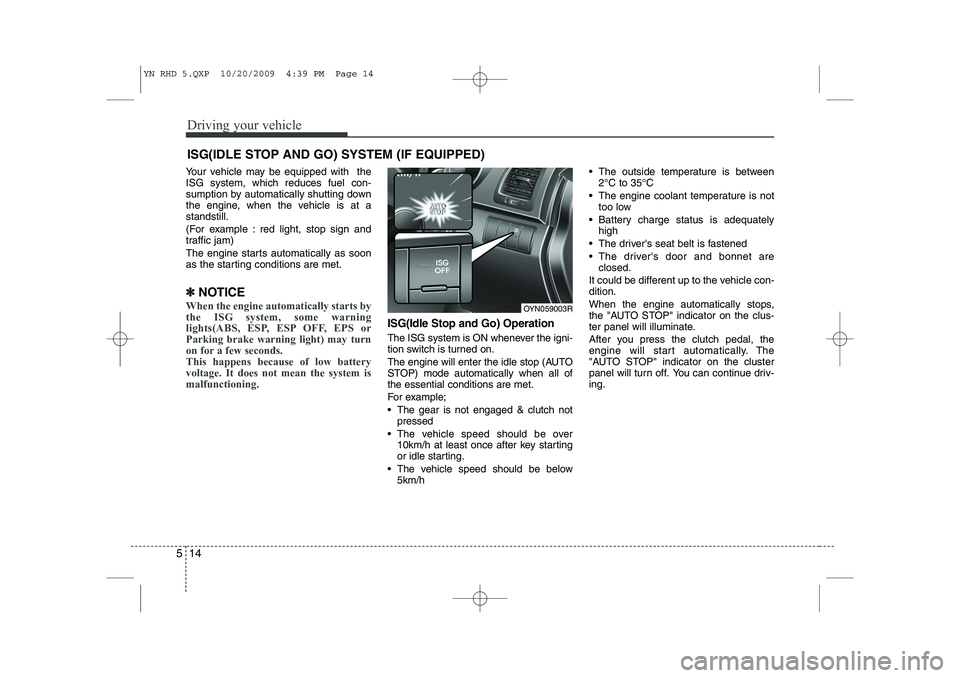
Your vehicle may be equipped with the ISG system, which reduces fuel con-
sumption by automatically shutting down
the engine, when the vehicle is at astandstill.
(For example : red light, stop sign and
traffic jam)
The engine starts automatically as soon
as the starting conditions are met.
✽
✽ NOTICE
When the engine automatically starts by
the ISG system, some warning
lights(ABS, ESP, ESP OFF, EPS orParking brake warning light) may turn
on for a few seconds. This happens because of low batteryvoltage. It does not mean the system ismalfunctioning.
ISG(Idle Stop and Go) Operation
The ISG system is ON whenever the igni-
tion switch is turned on.
The engine will enter the idle stop (AUTO
STOP) mode automatically when all ofthe essential conditions are met.
For example;
The gear is not engaged & clutch not
pressed
The vehicle speed should be over 10km/h at least once after key starting
or idle starting.
The vehicle speed should be below 5km/h The outside temperature is between
2°C to 35°C
The engine coolant temperature is not too low
Battery charge status is adequately high
The driver's seat belt is fastened
The driver's door and bonnet are closed.
It could be different up to the vehicle con- dition.
When the engine automatically stops,
the "AUTO STOP" indicator on the clus-
ter panel will illuminate.
After you press the clutch pedal, the
engine will start automatically. The
"AUTO STOP" indicator on the cluster
panel will turn off. You can continue driv-ing.
ISG(IDLE STOP AND GO) SYSTEM (IF EQUIPPED)
OYN059003R
YN RHD 5.QXP 10/20/2009 4:39 PM Page 14
Page 579 of 761
527
Driving your vehicle
Anti-lock brake system (ABS) (if equipped)The ABS continuously senses the speed
of the wheels. If the wheels are going to
lock, the ABS system repeatedly modu-
lates the hydraulic brake pressure to the
wheels.
When you apply your brakes under con-
ditions which may lock the wheels, you
may hear a “tik-tik’’ sound from the
brakes, or feel a corresponding sensation
in the brake pedal. This is normal and it
means your ABS is active.
In order to obtain the maximum benefit
from your ABS in an emergency situa-
tion, do not attempt to modulate your
brake pressure and do not try to pump
your brakes. Press your brake pedal as
hard as possible or as hard as the situa-
tion allows the ABS to control the force
being delivered to the brakes.
WARNING
ABS (or ESP) will not prevent acci-
dents due to improper or danger-
ous driving manoeuvres. Even
though vehicle control is improved
during emergency braking, always
maintain a safe distance between
you and objects ahead. Vehicle
speeds should always be reduced
during extreme road conditions.
The braking distance for vehicles
equipped with an anti-lock braking
system (or Electronic Stability
Program System) may be longer
than for those without it in the fol-
lowing road conditions.
During these conditions the vehicle should be driven at reducedspeeds:
Rough, gravel or snow-covered roads.
With tyre chains installed. (Continued)
(Continued)
On roads where the road surfaceis pitted or has different surface height.
The safety features of an ABS (or
ESP) equipped vehicle should not
be tested by high speed driving or
cornering. This could endanger the
safety of yourself or others.
YN RHD 5.QXP 10/20/2009 4:40 PM Page 27
Page 580 of 761
Driving your vehicle
28
5
✽✽
NOTICE
A click sound may be heard in the engine compartment when the vehicle
begins to move after the engine is start-
ed. These conditions are normal andindicate that the anti-lock brake system
is functioning properly.
Even with the anti-lock brake system, your vehicle still requires sufficient
stopping distance. Always maintain a
safe distance from the vehicle in front
of you.
Always slow down when cornering. The anti-lock brake system cannot pre-
vent accidents resulting from exces-
sive speeds.
On loose or uneven road surfaces, operation of the anti-lock brake system
may result in a longer stopping dis-
tance than for vehicles equipped with a
conventional brake system.
✽✽ NOTICE
When you jump start your vehicle
because of a drained battery, the engine
may not run as smoothly and the ABSwarning light may turn on at the same
time. This happens because of the lowbattery voltage. It does not mean yourABS is malfunctioning.
Page 594 of 761
Driving your vehicle
42
5
Hazardous driving conditions
When hazardous driving conditions are
encountered such as water, snow, ice,
mud, sand, or similar hazards, followthese suggestions:
Drive cautiously and allow extra dis-
tance for braking.
Avoid sudden braking or steering.
When braking with non-ABS brakes pump the brake pedal with a light up-
and-down motion until the vehicle isstopped. If stalled in snow, mud, or sand, use
second gear. Accelerate slowly to
avoid spinning the drive wheels.
Use sand, rock salt, tyre chains, or other non-slip material under the drive
wheels to provide traction when stalled
in ice, snow, or mud. Reducing the risk of a rollover
This multi-purpose passenger vehicle is
defined as a Multi Purpose Vehicle
(MPV). MPV’s have higher ground clear-
ance and a narrower track to make them
capable of performing in a wide variety of
road applications. Specific design char-
acteristics give them a higher centre of
gravity than ordinary vehicles. An advan-
tage of the higher ground clearance is a
better view of the road, which allows you
to anticipate problems. They are not
designed for cornering at the same
speeds as conventional passenger vehi-
cles. Due to this risk, driver and passen-
gers are strongly recommended to buck-
le their seat belts. In a rollover crash, an
unbelted person is more likely to die than
a person wearing a seat belt. There are
steps that a driver can make to reduce
the risk of a rollover. If at all possible,
avoid sharp turns or abrupt manoeuvres,
do not load your roof rack with heavy
cargo, and never modify your vehicle in
any way.
SPECIAL DRIVING CONDITIONS
WARNING -
ABS
Do not pump the brake pedal on a
vehicle equipped with ABS.
WARNING - Downshifting
Downshifting with an automatic
transaxle, whilst driving on slipperysurfaces can cause an accident.
The sudden change in tyre speed
could cause the tyres to skid. Be
careful when downshifting on slip-
pery surfaces.
YN RHD 5.QXP 10/20/2009 4:41 PM Page 42
Page 605 of 761
553
Driving your vehicle
Safety chains
You should always attach chains
between your vehicle and your trailer.
Cross the safety chains under the nose
of the trailer so that the nose will not drop
to the road if it becomes separated from
the towbar hitch.
Instructions about safety chains may be
provided by the towbar hitch manufactur-
er or by the trailer manufacturer. Follow
the manufacturer’s recommendation for
attaching safety chains. Always leave just
enough slack so you can turn with your
trailer. And, never allow safety chains
drag on the ground.Trailer brakes
If your trailer is equipped with a braking
system, make sure it conforms to your
country’s regulations and that it is prop-
erly installed and operating correctly.
If your trailer weighs more than the max-
imum trailer weight without trailer brakes
loaded, then it needs its own brakes and
they must be adequate. Be sure to read
and follow the instructions for the trailer
brakes so you’ll be able to install, adjust
and maintain them properly.
Don’t tap into your vehicle's brake sys-
tem. Driving with a trailer
Towing a trailer requires a certain
amount of experience. Before setting out
for the open road, you must get to know
your trailer. Acquaint yourself with the
feel of handling and braking with the
added weight of the trailer. And always
keep in mind that the vehicle you are
driving is now a good deal longer and not
nearly so responsive as your vehicle is
by itself.
Before you start, check the trailer towbar
hitch and platform, safety chains, electri-
cal connector(s), lights, tyres and mirror
adjustment. If the trailer has electric
brakes, start your vehicle and trailer mov-
ing and then apply the trailer brake con-
troller by hand to be sure the brakes are
working. This lets you check your electri-
cal connection at the same time.
During your trip, check occasionally to be
sure that the load is secure, and that the
lights and trailer brakes are still working.
WARNING
- Trailer brakes
Do not use a trailer with its own
brakes unless you are absolutely
certain that you have properly set
up the brake system. This is not a
task for amateurs. Use an experi-
enced, competent trailer shop for
this work.
YN RHD 5.QXP 10/20/2009 4:41 PM Page 53
Page 607 of 761
555
Driving your vehicle
Parking on hills
Generally, if you have a trailer attached to
your vehicle, you should not park your
vehicle on a hill. People can be seriously
or fatally injured, and both your vehicle
and the trailer can be damaged if unex-
pectedly roll down hill.
However, if you ever have to park your
trailer on a hill, here's how to do it:
1. Pull the vehicle into the parking space.Turn the steering wheel in the direction
of the curb (right if headed down hill,left if headed up hill).
2. If the vehicle has a manual transaxle, place the car in neutral. If the vehicle
has an automatic transaxle, place the
car in P (Park).
3. Set the parking brake and shut off the vehicle.
4. Place chocks under the trailer wheels on the down hill side of the wheels. 5. Start the vehicle, hold the brakes, shift
to neutral, release the parking brake
and slowly release the brakes until the
trailer chocks absorb the load.
6. Reapply the brakes, reapply the park- ing brake and shift the vehicle to R
(Reverse) for manual transaxle or P
(Park) for automatic transaxle.
7. Shut off the vehicle and release the vehicle brakes but leave the parking
brake set.CAUTION
When towing a trailer on steep
grades (in excess of 6%) pay
close attention to the enginecoolant temperature gauge toensure the engine does not over- heat. If the coolant temperature
red warning light illuminates, pullover and stop as soon as it is safeto do so, and allow the engine to
idle until it cools down. You mayproceed once the engine hascooled sufficiently.
You must decide the driving speed depending on trailer
weight and uphill grade to reduce the possibility of engine andtransaxle overheating.
WARNING - Parking on a
hill
Parking your vehicle on a hill with a
trailer attached could cause seri-
ous injury or death, should the trail-
er break loose.
WARNING - Parking brake
It can be dangerous to get out of
your vehicle if the parking brake is
not firmly set.
If you have left the engine running,
the vehicle can move suddenly. You
or others could be seriously or
fatally injured.
YN RHD 5.QXP 10/20/2009 4:41 PM Page 55
Page 615 of 761
What to do in an emergency
4
6
EMERGENCY STARTING
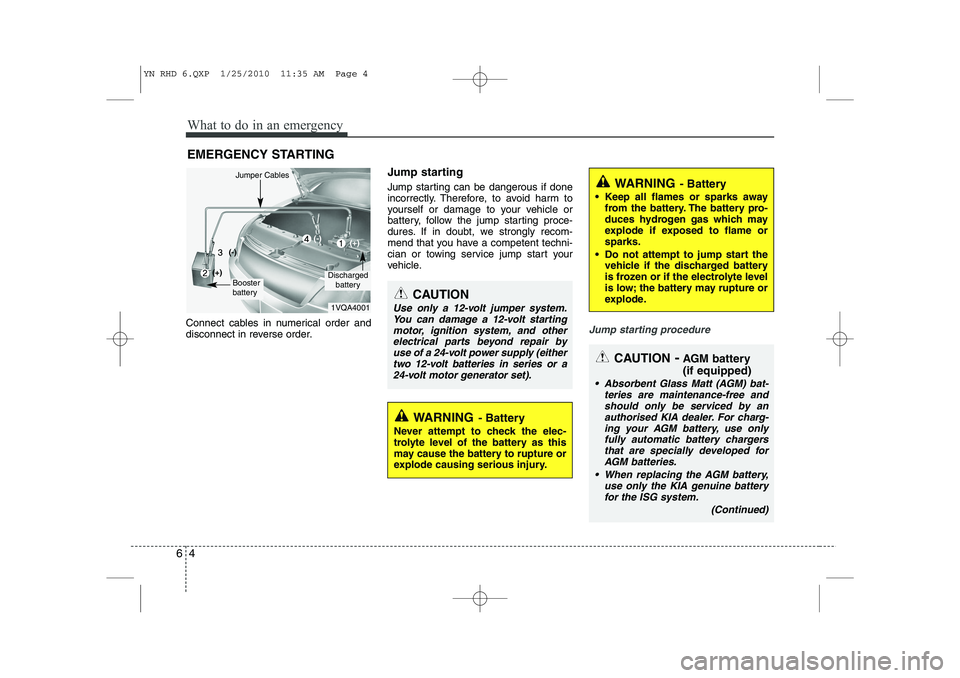
Connect cables in numerical order and
disconnect in reverse order. Jump starting
Jump starting can be dangerous if done
incorrectly. Therefore, to avoid harm to
yourself or damage to your vehicle or
battery, follow the jump starting proce-
dures. If in doubt, we strongly recom-
mend that you have a competent techni-
cian or towing service jump start your
vehicle.
Jump starting procedure
CAUTION
Use only a 12-volt jumper system.
You can damage a 12-volt starting
motor, ignition system, and otherelectrical parts beyond repair by use of a 24-volt power supply (eithertwo 12-volt batteries in series or a
24-volt motor generator set).
WARNING - Battery
• Keep all flames or sparks away from the battery. The battery pro-
duces hydrogen gas which may
explode if exposed to flame orsparks.
Do not attempt to jump start the vehicle if the discharged battery
is frozen or if the electrolyte level
is low; the battery may rupture or
explode.
WARNING - Battery
Never attempt to check the elec-
trolyte level of the battery as this
may cause the battery to rupture or
explode causing serious injury.
1VQA4001
Discharged battery
Jumper Cables
Booster
battery
(-)
(+)
(+)(-)
CAUTION -AGM battery (if equipped)
Absorbent Glass Matt (AGM) bat-
teries are maintenance-free and
should only be serviced by anauthorised KIA dealer. For charg-ing your AGM battery, use only fully automatic battery chargers
that are specially developed forAGM batteries.
When replacing the AGM battery, use only the KIA genuine batteryfor the ISG system.
(Continued)
YN RHD 6.QXP 1/25/2010 11:35 AM Page 4
Page 621 of 761
What to do in an emergency
10
6
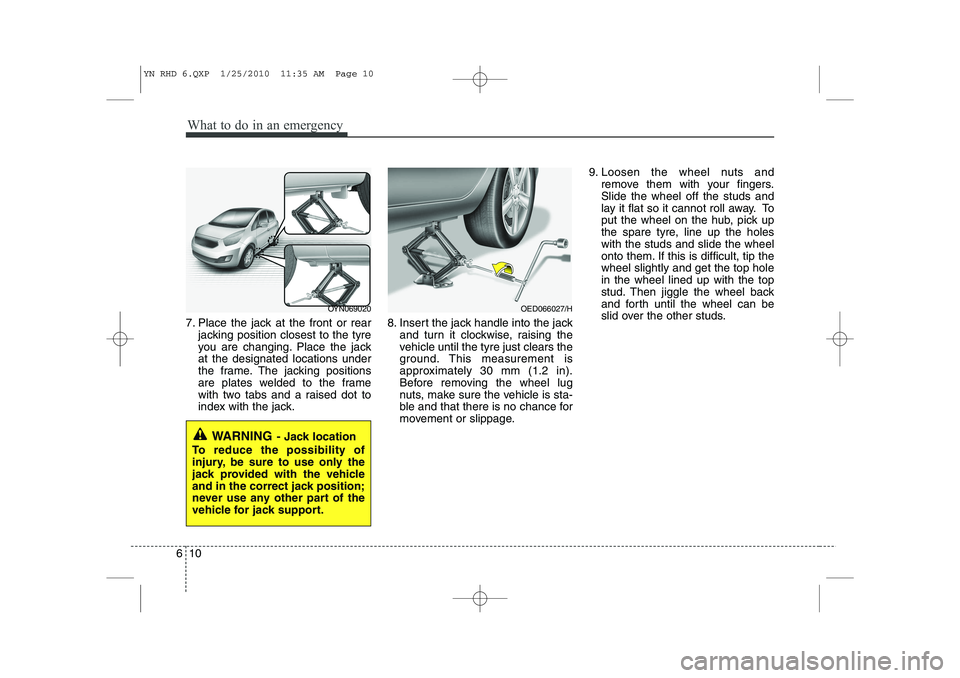
7. Place the jack at the front or rear
jacking position closest to the tyre
you are changing. Place the jackat the designated locations under
the frame. The jacking positions
are plates welded to the frame
with two tabs and a raised dot to
index with the jack. 8. Insert the jack handle into the jack
and turn it clockwise, raising the
vehicle until the tyre just clears the
ground. This measurement is
approximately 30 mm (1.2 in).
Before removing the wheel lug
nuts, make sure the vehicle is sta-
ble and that there is no chance for
movement or slippage. 9. Loosen the wheel nuts and
remove them with your fingers.Slide the wheel off the studs and
lay it flat so it cannot roll away. To
put the wheel on the hub, pick up
the spare tyre, line up the holeswith the studs and slide the wheel
onto them. If this is difficult, tip thewheel slightly and get the top holein the wheel lined up with the top
stud. Then jiggle the wheel back
and forth until the wheel can be
slid over the other studs.
WARNING - Jack location
To reduce the possibility of
injury, be sure to use only the
jack provided with the vehicle
and in the correct jack position;
never use any other part of the
vehicle for jack support.
OYN069020OED066027/H
YN RHD 6.QXP 1/25/2010 11:35 AM Page 10