ESP KIA VENGA 2011 Manual PDF
[x] Cancel search | Manufacturer: KIA, Model Year: 2011, Model line: VENGA, Model: KIA VENGA 2011Pages: 761, PDF Size: 34.65 MB
Page 478 of 761

457
Features of your vehicle
The rear parking assist system assists
the driver during backward movement of
the vehicle by chiming if any object issensed within a distance of 120 cm (47
in.) behind the vehicle. This system is asupplemental system and it is not intend-
ed to nor does it replace the need for
extreme care and attention of the driver.
The sensing range and objects
detectable by the back sensors are limit-
ed. Whenever backing-up, pay as much
attention to what is behind you as you
would in a vehicle without a rear parkingassist system.Operation of the rear parking assist system
Operating condition
This system will activate when the indi-
cator on the rear parking assist OFF
button is not illuminated. If you desire
to deactivate the rear parking assist
system, press the rear parking assist
OFF button again. (The indicator on
the button will illuminate.) To turn the
system on, press the button again.
(The indicator on the button will go off.)
This system will activate when backing up with the ignition switch ON.
If the vehicle is moving at a speed over
5 km/h (3 mph), the system may not be
activated correctly.
REAR PARKING ASSIST SYSTEM (IF EQUIPPED)
WARNING
The rear parking assist system is a
supplementary function only. Theoperation of the rear parking assist
system can be affected by several
factors (including environmental
conditions). It is the responsibility
of the driver to always check the
area behind the vehicle before and
whilst backing up.
OYN049046
SensorsOYN049128R
YN RHD 4(~98).QXP 10/20/2009 4:30 PM Page 57
Page 480 of 761

459
Features of your vehicle
Rear parking assist system pre- cautions
The rear parking assist system maynot sound sequentially depending on the speed and shapes of the objectsdetected.
The rear parking assist system may malfunction if the vehicle bumperheight or sensor installation has been
modified or damaged. Any non-factory
installed equipment or accessories
may also interfere with the sensor per-
formance.
The sensor may not recognize objects less than 40 cm (15 in.) from the sen-
sor, or it may sense an incorrect dis-
tance. Use caution.
When the sensor is frozen or stained with snow, dirt, or water, the sensor
may be inoperative until the stains are
removed using a soft cloth.
Do not push, scratch or strike the sen- sor. Sensor damage could occur.✽✽ NOTICE
This system can only sense objects with- in the range and location of the sensors;
It can not detect objects in other areas
where sensors are not installed. Also,
small or slim objects, such as poles orobjects located between sensors may notbe detected by the sensors.Always visually check behind the vehi-cle when backing up.
Be sure to inform any drivers of the
vehicle that may be unfamiliar with the
system regarding the systems capabili-ties and limitations.Self-diagnosis
If you don’t hear an audible warning
sound or if the buzzer sounds intermit-tently when shifting the gear to the R
(Reverse) position in operating condition,
this may indicate a malfunction in the rear
parking assist system. If this occurs, have
your vehicle checked by an authorised
KIA dealer as soon as possible.
WARNING
Pay close attention when the vehi-
cle is driven close to objects on the
road, particularly pedestrians, and
especially children. Be aware that
some objects may not be detected
by the sensors, due to the object’s
distance, size or material, all of
which can limit the effectiveness of
the sensor. Always perform a visu-al inspection to make sure the vehi-
cle is clear of all obstructions
before moving the vehicle in anydirection.
WARNING
Your new vehicle warranty does not
cover any accidents or damage to
the vehicle or injuries to its occu-pants due to a rear parking assist
system malfunction. Always drive
safely and cautiously.
YN RHD 4(~98).QXP 10/20/2009 4:30 PM Page 59
Page 481 of 761
Features of your vehicle
60
4
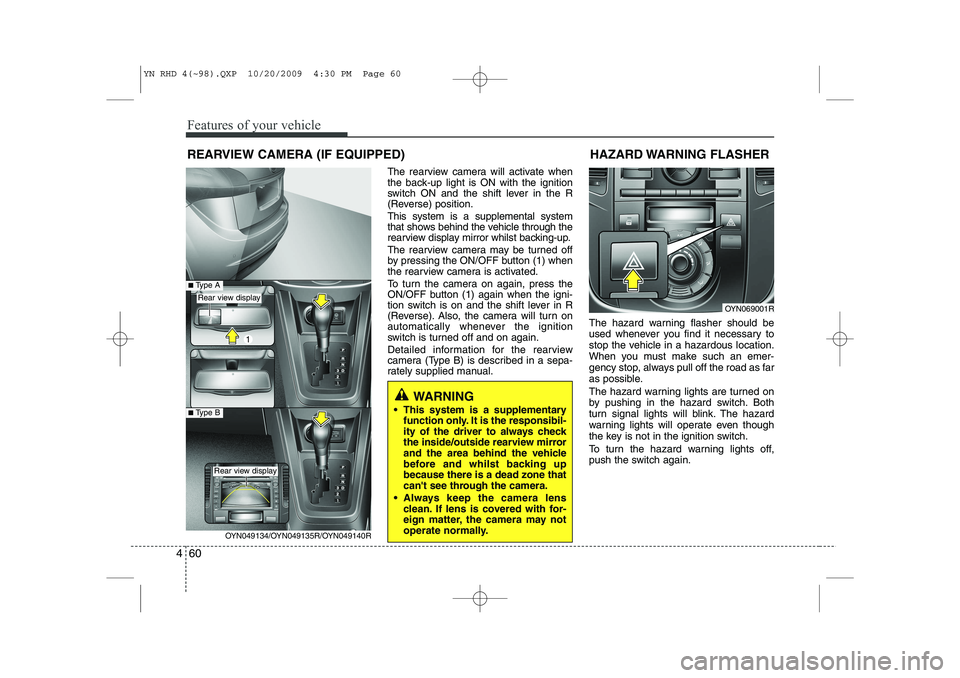
The rearview camera will activate when
the back-up light is ON with the ignition
switch ON and the shift lever in the R
(Reverse) position. This system is a supplemental system
that shows behind the vehicle through the
rearview display mirror whilst backing-up.
The rearview camera may be turned off
by pressing the ON/OFF button (1) when
the rearview camera is activated.
To turn the camera on again, press the
ON/OFF button (1) again when the igni-
tion switch is on and the shift lever in R
(Reverse). Also, the camera will turn on
automatically whenever the ignition
switch is turned off and on again.
Detailed information for the rearview
camera (Type B) is described in a sepa-
rately supplied manual. The hazard warning flasher should be
used whenever you find it necessary to
stop the vehicle in a hazardous location.
When you must make such an emer-
gency stop, always pull off the road as far
as possible.
The hazard warning lights are turned on
by pushing in the hazard switch. Both
turn signal lights will blink. The hazard
warning lights will operate even though
the key is not in the ignition switch.
To turn the hazard warning lights off,
push the switch again.HAZARD WARNING FLASHER
OYN069001R
WARNING
This system is a supplementary function only. It is the responsibil-
ity of the driver to always check
the inside/outside rearview mirror
and the area behind the vehicle
before and whilst backing upbecause there is a dead zone that
can't see through the camera.
Always keep the camera lens clean. If lens is covered with for-
eign matter, the camera may not
operate normally.
REARVIEW CAMERA (IF EQUIPPED)
OYN049134/OYN049135R/OYN049140R
Rear view display
Rear view display
■Type A
■Type B
YN RHD 4(~98).QXP 10/20/2009 4:30 PM Page 60
Page 486 of 761
465
Features of your vehicle
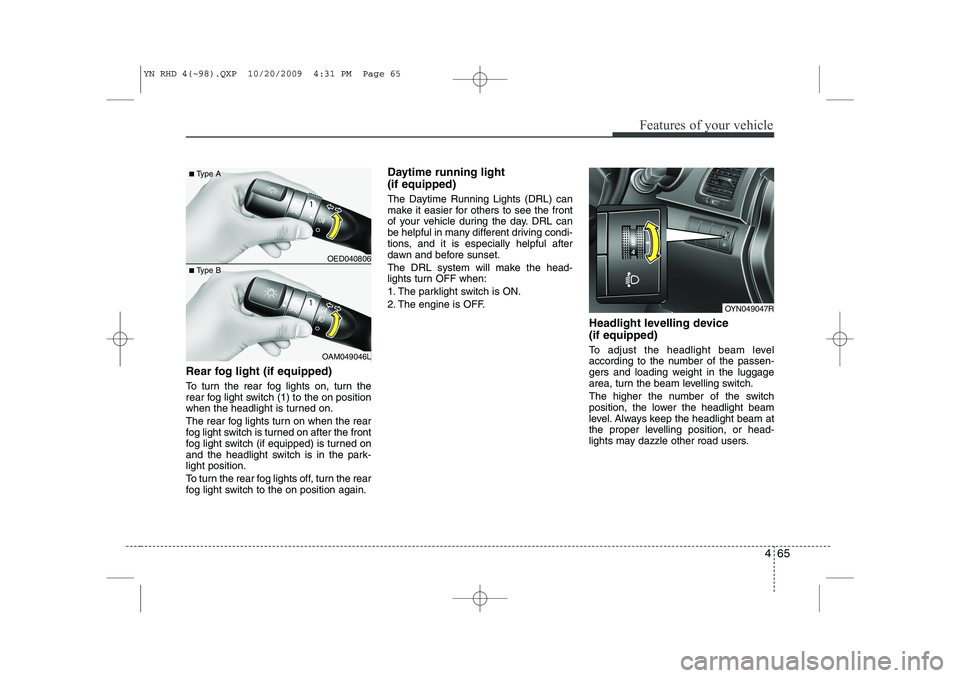
Rear fog light (if equipped)
To turn the rear fog lights on, turn the
rear fog light switch (1) to the on position
when the headlight is turned on.
The rear fog lights turn on when the rear
fog light switch is turned on after the front
fog light switch (if equipped) is turned on
and the headlight switch is in the park-light position.
To turn the rear fog lights off, turn the rear
fog light switch to the on position again.Daytime running light (if equipped)
The Daytime Running Lights (DRL) can
make it easier for others to see the front
of your vehicle during the day. DRL can
be helpful in many different driving condi-
tions, and it is especially helpful after
dawn and before sunset.
The DRL system will make the head-
lights turn OFF when:
1. The parklight switch is ON.
2. The engine is OFF.
Headlight levelling device (if equipped)
To adjust the headlight beam level
according to the number of the passen-
gers and loading weight in the luggage
area, turn the beam levelling switch.
The higher the number of the switch
position, the lower the headlight beam
level. Always keep the headlight beam at
the proper levelling position, or head-
lights may dazzle other road users.
OYN049047R
OED040806
OAM049046L
■
Type A
■ Type B
YN RHD 4(~98).QXP 10/20/2009 4:31 PM Page 65
Page 510 of 761
489
Features of your vehicle
For maximum defrosting, set the tem-perature control to the extreme
right/hot position and the fan speedcontrol to the highest speed.
If warm air to the floor is desired whilst defrosting or defogging, set the modeto the floor-defrost position.
Before driving, clear all snow and ice from the windscreen, rear window, out-
side rear view mirrors, and all side win-
dows.
Clear all snow and ice from the bonnet and air inlet in the cowl grill to improveheater and defroster efficiency and to
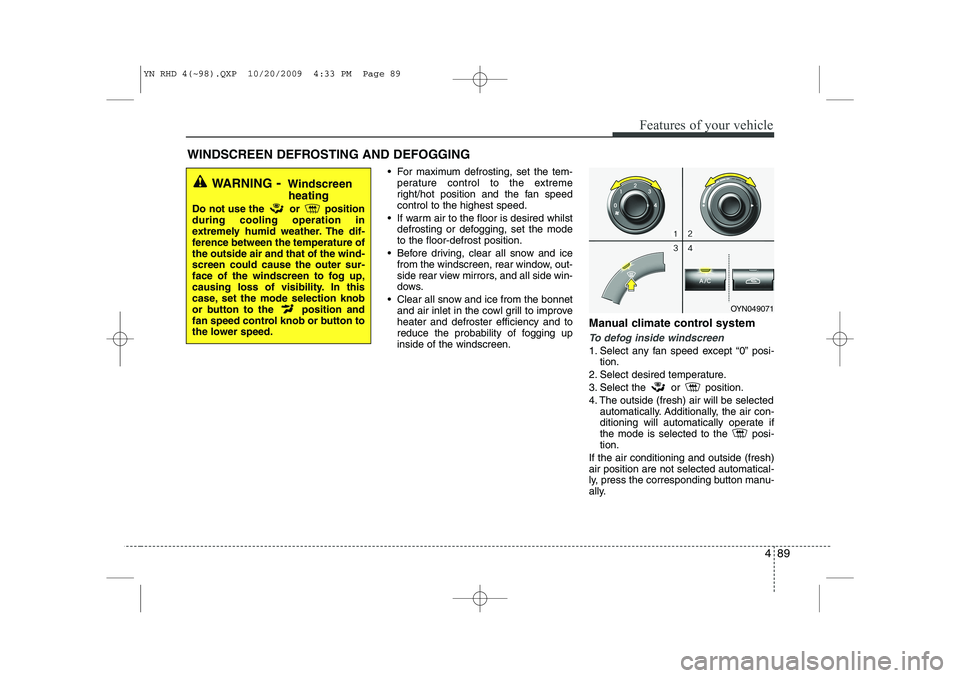
reduce the probability of fogging upinside of the windscreen. Manual climate control system
To defog inside windscreen
1. Select any fan speed except “0” posi-
tion.
2. Select desired temperature.
3. Select the or position.
4. The outside (fresh) air will be selected automatically. Additionally, the air con-
ditioning will automatically operate if
the mode is selected to the posi-tion.
If the air conditioning and outside (fresh)air position are not selected automatical-
ly, press the corresponding button manu-
ally.
WINDSCREEN DEFROSTING AND DEFOGGING
WARNING - Windscreen
heating
Do not use the or position during cooling operation in
extremely humid weather. The dif-
ference between the temperature ofthe outside air and that of the wind-screen could cause the outer sur-
face of the windscreen to fog up,
causing loss of visibility. In this
case, set the mode selection knob
or button to the position and
fan speed control knob or button to
the lower speed.
OYN049071
YN RHD 4(~98).QXP 10/20/2009 4:33 PM Page 89
Page 524 of 761
4 103
Features of your vehicle
Safety instructions Notes on USB stick (thumb drive) Notes on Bluetooth devicesNotes on Bluetooth® Technology*
‰Bluetooth is a short-range wireless
radio connectivity technology used
mainly for mobile phones, hand-held
PC’s and other devices.
‰ Bluetooth SIG Inc. owns the Bluetooth
word, marking and logo; and any use
of such marks is under license. Other
trademarks and trade names are
those of their respective owners.
‰ Bluetooth operates in 2.4 GHz fre-
quency range and transmits voiceand data at speeds of up to 1 mbps
within a range of up to 10 m.
‰ The Head Unit supports the Hands
free Profile (HFP), the Advanced
Audio Distribution Profile (A2DP) and
the Audio Video Remote Control
Profile (AVRCP).
WARNING
Make all inputs via the remote con-
trol only when the vehicle is sta-
tionary, or have the passenger
make them. Otherwise, you may
endanger the occupants and other
road users.WARNING
In rare cases it is possible that an
Bluetooth device is not recognized
by the unit or may cause a malfunc-
tion. Please only use Bluetooth
devices that comply with theBluetooth specifications.WARNING
We strongly recommend only using USB sticks (thumb drives)
of well-known manufacturers.
On no account must other USB devices such as hard discs or
other digital equipment or multiplug USB hub be connected to
the USB hub. Connecting other
devices can cause malfunction or
even destroy the audio equip-ment.
Avoid using the USB memory when it might hinder your safetydriving.
It is possible that noise is heard during playback when using the
AUX-IN together with the poweroutlet due to system-related not a
malfunction. If this happens, use
the power source of the AUX
device.
In rare cases it is possible that an USB stick (thumb drive) is not
recognized by the unit or may
cause a malfunction. Please only
use USB sticks that comply withthe USB thumb drive specifica-tions.
WARNING
Avoid inserting any foreign objects
into the slot of this player. Failure to
observe this may cause malfunc-
tion due to the precise mechanismof this unit.
WARNING
Keep the volume level low enough
to be aware of road and traffic con-ditions.
WARNING
Do not open covers and do not
repair yourself. Refer servicing to
qualified personnel.
YN RHD 4(99~AUDIO).QXP 6/1/2010 4:02 PM Page 103
Page 531 of 761
Features of your vehicle
110
4
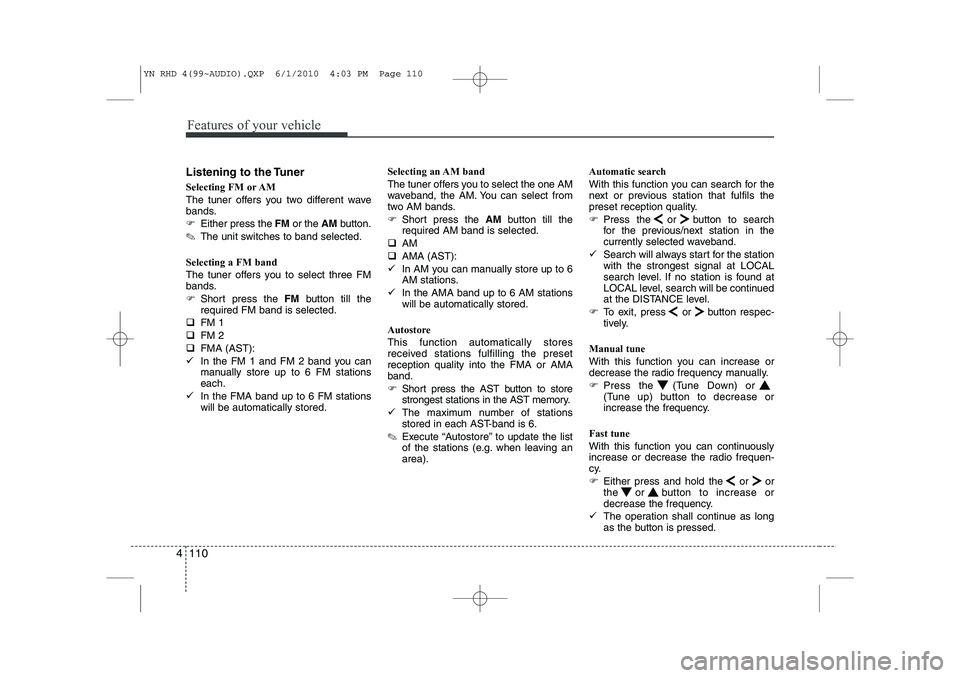
Listening to the Tuner
Selecting FM or AM
The tuner offers you two different wave
bands.
) Either press the FMor the AMbutton.
✎ The unit switches to band selected.
Selecting a FM band
The tuner offers you to select three FM
bands.
) Short press the FMbutton till the
required FM band is selected.
‰ FM 1
‰ FM 2
‰ FMA (AST):
9 In the FM 1 and FM 2 band you can
manually store up to 6 FM stationseach.
9 In the FMA band up to 6 FM stationswill be automatically stored. Selecting an AM band
The tuner offers you to select the one AM
waveband, the AM. You can select from
two AM bands.
)
Short press the AMbutton till the
required AM band is selected.
‰ AM
‰ AMA (AST):
9 In AM you can manually store up to 6
AM stations.
9 In the AMA band up to 6 AM stationswill be automatically stored.
Autostore This function automatically stores
received stations fulfilling the presetreception quality into the FMA or AMAband.
) Short press the AST button to store
strongest stations in the AST memory.
9 The maximum number of stations
stored in each AST-band is 6.
✎ Execute “Autostore” to update the list
of the stations (e.g. when leaving anarea). Automatic search
With this function you can search for the
next or previous station that fulfils the
preset reception quality.
)
Press the or button to search
for the previous/next station in the
currently selected waveband.
9 Search will always start for the stationwith the strongest signal at LOCAL
search level. If no station is found at
LOCAL level, search will be continued
at the DISTANCE level.
) To exit, press or button respec-
tively.
Manual tune
With this function you can increase or
decrease the radio frequency manually.
) Press the (Tune Down) or
(Tune up) button to decrease or
increase the frequency.
Fast tune
With this function you can continuously
increase or decrease the radio frequen-
cy.
) Either press and hold the or or
the or button to increase or
decrease the frequency.
9 The operation shall continue as long
as the button is pressed.
YN RHD 4(99~AUDIO).QXP 6/1/2010 4:03 PM Page 110
Page 535 of 761
Features of your vehicle
114
4
Viewing Information of Audio Files
) Short press the INFObutton.
9 Disk Title, Disk Artist, Track Title and
Track Artist can be displayed.
✎ If no information is available “NO
INFO” will be displayed, otherwise the
corresponding information will be dis-
played for 5 seconds.
) To abort this mode: press one of the
following buttons - / , Fast
/ , RPT, RDM, LIST.
List Function Audio Files ✎ With this mode you can browse all
supported tracks on the CD.
9 The main menu of the LIST functionconsists of:
) Short press LIST to enter track brows-ing.
) Short press or button to
browse through the list of the selected
category.
) Short press OK to playback of the
selected track.
) To abort this mode: press one of the
following buttons / , Fast
/ , RPT, RDM, INFO, SOUND,
SETUP and LIST. Notes on WMA files
The following WMA files are supported:‰
Bit rate: Up to 192 kbit/s
‰ Sampling frequency: Up to 44.1 kHz
‰ WMA file names must have the
“.wma” extension.
Notes on MP3 files
The following MP3 files are supported by
the CD player: ‰ Files conform with MPEG1/2 or 2.5-
Layer 3.
‰ The format of the CD must be ISO
9660 Level 1 or Level 2 or Joliet with
sector format in Mode 1 or Mode 2
Form 1. Other formats cannot be
played reliably.
‰ The maximum number of folders is99.
‰ The Maximum number of folders and
number of files is 490. Additional files
and folders will be ignored.
‰ Bit rate: Maximum of 320 kbit/s, con-
stant or variable.
‰ Sampling frequency: Maximum of 48kHz. ‰
Text display: ID3 tag V1 and ID3 tag
V2. MP3 tracks can contain addition
information such as artist, track and
album names (ID3 tags with maxi-
mum not more than 12 characters).
Characters other than upper
case/lower case letters (“Aa to Zz”)
and underscore (“_”) may not be dis-
played.
‰ Only files with .mp3 extension are
recognized as MP3 files.
‰ The unit may not play the first track in
the order that you wrote them to thedisc.
‰ The unit plays only the first session ifthe disc contains both CD audio
tracks and MP3 files.
‰ When playing a disc of 8 kbps or vari-
able bit rate (VBR), the elapsed play-
ing time in the display window maynot be correct.
‰ Make sure that a MP3 CD-R/CD-RW
is burned that is formatted as a data
disc and NOT as an audio disc.
‰ MP3 files are not compatible with
packet write data transfer.
YN RHD 4(99~AUDIO).QXP 6/1/2010 4:03 PM Page 114
Page 538 of 761
4 117
Features of your vehicle
List Function
9With this function you can navigate
through all tracks in the iPOD file sys-tem.
✎ The main menu of the LIST functionconsists of:
✎ PLAYLIST, ARTIST, ALBUM,GENRE, SONG and COMPOSER.
) Short press the OKbutton to enter the
selected category or the sub-category.
) Short press the button to go to the
previous category.
) Short press or button to navi-gate through the list of the selected
category.
‰ The songs in the selected play-list will
be displayed.
‰ Artist : a list of albums of the selected
artist will displayed, the user can then
select an album from this list to view
the songs in the album selected.
‰ Album : the songs in the selected
album will be displayed.
‰ Genre : the list of artists for the select-
ed Genre will be displayed. After the
selection of an artist, a list of albums
for this artist is displayed. The user
can now select an album in this list to
view the songs in the selected album.
‰ Song : all songs in the album will be
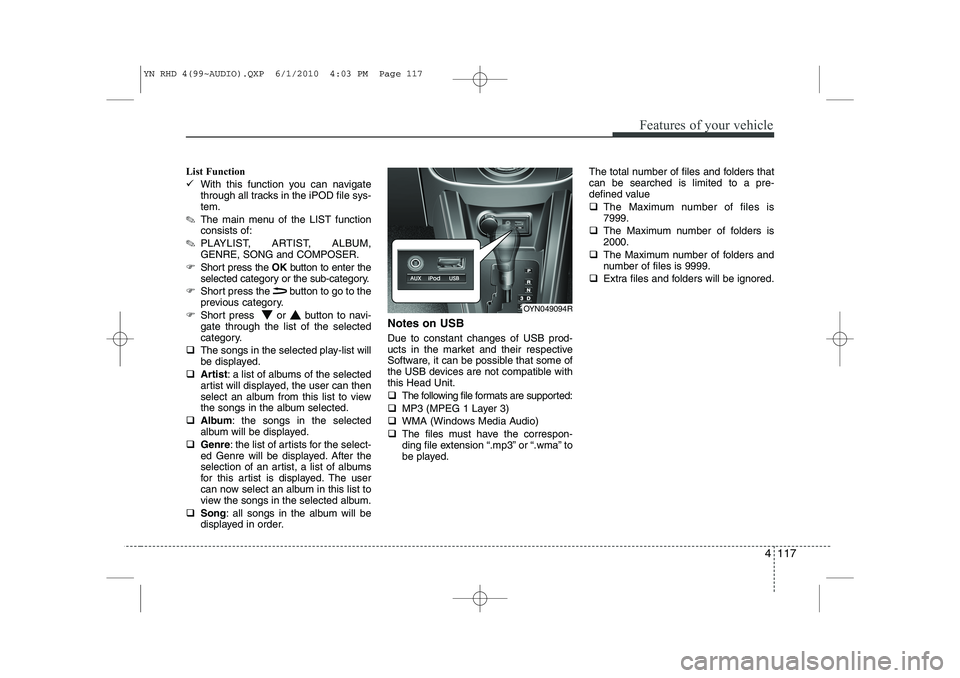
displayed in order. Notes on USB Due to constant changes of USB prod-
ucts in the market and their respective
Software, it can be possible that some of
the USB devices are not compatible withthis Head Unit. ‰
The following file formats are supported:
‰ MP3 (MPEG 1 Layer 3)
‰ WMA (Windows Media Audio)
‰ The files must have the correspon-
ding file extension “.mp3” or “.wma” to
be played. The total number of files and folders thatcan be searched is limited to a pre-
defined value ‰
The Maximum number of files is 7999.
‰ The Maximum number of folders is2000.
‰ The Maximum number of folders and
number of files is 9999.
‰ Extra files and folders will be ignored.
OYN049094R
YN RHD 4(99~AUDIO).QXP 6/1/2010 4:03 PM Page 117
Page 555 of 761
53
Driving your vehicle
Before entering vehicle
• Be sure that all windows, outside mir-ror(s), and outside lights are clean.
Check the condition of the tyres.
Check under the vehicle for any sign of leaks.
Be sure there are no obstacles behind you if you intend to back up.
Necessary inspections
Fluid levels, such as engine oil, engine
coolant, brake fluid, and washer fluid
should be checked on a regular basis,
with the exact interval depending on the
fluid. Further details are provided in sec-
tion 7, “Maintenance”.
Before starting
Close and lock all doors.
Position the seat so that all controls are easily reached.
Adjust the inside and outside rearview mirrors. Be sure that all lights work.
Check all gauges.
Check the operation of warning lights
when the ignition switch is turned to the ON position.
Release the parking brake and make sure the brake warning light goes out.
For safe operation, be sure you are famil-
iar with your vehicle and its equipment.
BEFORE DRIVING
WARNING
All passengers must be properly
belted whenever the vehicle is mov-
ing. Refer to “Seat belts” in section
3 for more information on their
proper use.
WARNING
Always check the surrounding
areas near your vehicle for people,
especially children, before putting a
car into D (Drive) or R (Reverse).
WARNING - Driving under
the influence of alcohol or drugs
Drinking and driving is dangerous.
Drunk driving is the number one
contributor to the highway death
toll each year. Even a small amount
of alcohol will affect your reflexes,
perceptions and judgment. Drivingwhilst under the influence of drugs
is as dangerous or more dangerousthan driving drunk.
You are much more likely to have a
serious accident if you drink or
take drugs and drive.
If you are drinking or taking drugs,
don’t drive. Do not ride with a driv-er who has been drinking or taking
drugs. Choose a designated driveror call a cab.
WARNING
When you intend to park or stop the
vehicle with the engine on, be care-ful not to depress the accelerator
pedal for a long period of time. It
may overheat the engine or exhaust
system and cause fire.
YN RHD 5.QXP 10/20/2009 4:38 PM Page 3