radio KIA VENGA 2013 User Guide
[x] Cancel search | Manufacturer: KIA, Model Year: 2013, Model line: VENGA, Model: KIA VENGA 2013Pages: 751, PDF Size: 27.49 MB
Page 202 of 751
Features of your vehicle
130
4
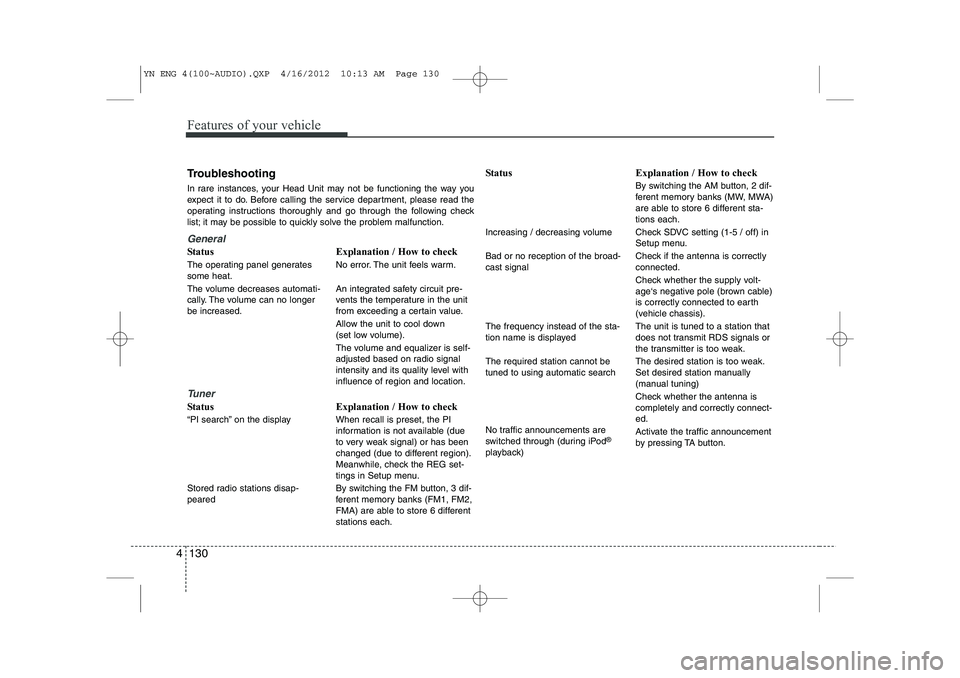
Troubleshooting
In rare instances, your Head Unit may not be functioning the way you
expect it to do. Before calling the service department, please read the
operating instructions thoroughly and go through the following check
list; it may be possible to quickly solve the problem malfunction.
General
Status
The operating panel generates some heat.
The volume decreases automati-
cally. The volume can no longerbe increased.
Tuner
Status
“PI search” on the display
Stored radio stations disap- peared Explanation / How to check
No error. The unit feels warm.
An integrated safety circuit pre-
vents the temperature in the unit
from exceeding a certain value.
Allow the unit to cool down
(set low volume).
The volume and equalizer is self-
adjusted based on radio signal
intensity and its quality level withinfluence of region and location. Explanation / How to check When recall is preset, the PI
information is not available (due
to very weak signal) or has been
changed (due to different region).
Meanwhile, check the REG set-
tings in Setup menu.
By switching the FM button, 3 dif-
ferent memory banks (FM1, FM2,
FMA) are able to store 6 differentstations each. Status
Increasing / decreasing volume Bad or no reception of the broad- cast signal The frequency instead of the sta-
tion name is displayed The required station cannot be tuned to using automatic search
No traffic announcements are
switched through (during iPod
®
playback) Explanation / How to check
By switching the AM button, 2 dif-
ferent memory banks (MW, MWA)
are able to store 6 different sta-tions each.
Check SDVC setting (1-5 / off) in
Setup menu.
Check if the antenna is correctly connected.
Check whether the supply volt-
age‘s negative pole (brown cable)
is correctly connected to earth
(vehicle chassis). The unit is tuned to a station that
does not transmit RDS signals or
the transmitter is too weak.
The desired station is too weak.
Set desired station manually
(manual tuning)
Check whether the antenna is completely and correctly connect-ed.
Activate the traffic announcement
by pressing TA button.
YN ENG 4(100~AUDIO).QXP 4/16/2012 10:13 AM Page 130
Page 203 of 751
4 131
Features of your vehicle
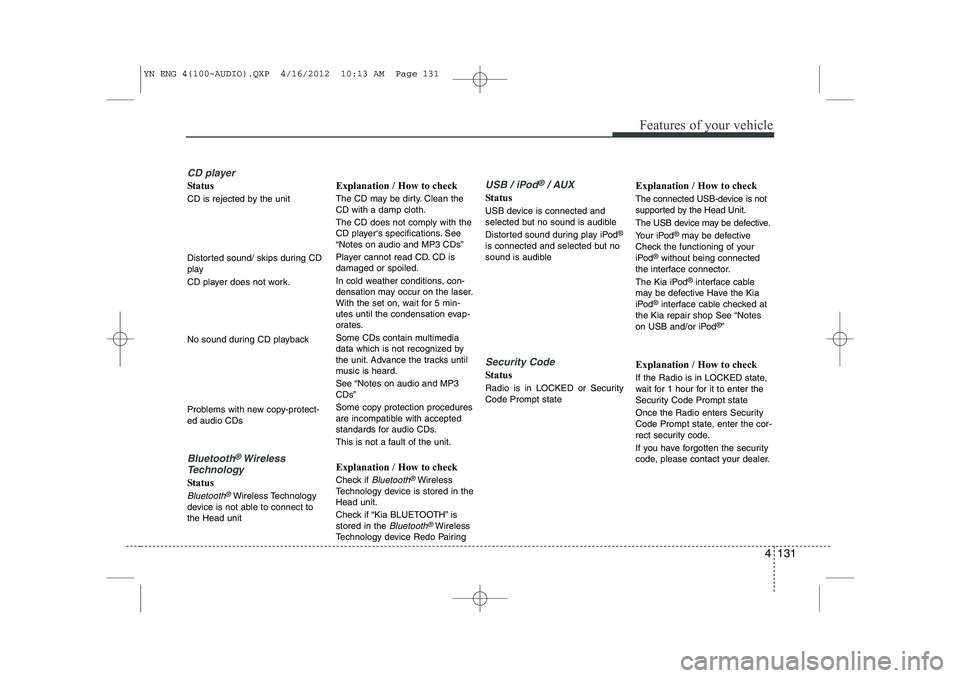
CD player
Status
CD is rejected by the unit
Distorted sound/ skips during CD
play
CD player does not work.
No sound during CD playback
Problems with new copy-protect- ed audio CDs
Bluetooth®Wireless
Technology
Status
Bluetooth®Wireless Technology
device is not able to connect to the Head unit Explanation / How to check
The CD may be dirty. Clean the CD with a damp cloth. The CD does not comply with the
CD player‘s specifications. See“Notes on audio and MP3 CDs”
Player cannot read CD. CD is damaged or spoiled.
In cold weather conditions, con-
densation may occur on the laser.
With the set on, wait for 5 min-
utes until the condensation evap-
orates.
Some CDs contain multimedia
data which is not recognized by
the unit. Advance the tracks until
music is heard.
See “Notes on audio and MP3 CDs”
Some copy protection procedures
are incompatible with accepted
standards for audio CDs.
This is not a fault of the unit. Explanation / How to check
Check if
Bluetooth®Wireless
Technology device is stored in the Head unit.
Check if “Kia BLUETOOTH” is stored in the
Bluetooth®Wireless
Technology device Redo Pairing
USB / iPod®/ AUX
Status
USB device is connected and
selected but no sound is audible
Distorted sound during play iPod ®
is connected and selected but no
sound is audible
Security Code
Status
Radio is in LOCKED or Security Code Prompt state Explanation / How to check
The connected USB-device is not
supported by the Head Unit.
The USB device may be defective.
Your iPod
®
may be defective
Check the functioning of your
iPod ®
without being connected
the interface connector.
The Kia iPod ®
interface cable
may be defective Have the Kia
iPod ®
interface cable checked at
the Kia repair shop See “Notes
on USB and/or iPod ®
”
Explanation / How to check
If the Radio is in LOCKED state,
wait for 1 hour for it to enter the
Security Code Prompt state
Once the Radio enters Security
Code Prompt state, enter the cor-
rect security code.
If you have forgotten the security
code, please contact your dealer.
YN ENG 4(100~AUDIO).QXP 4/16/2012 10:13 AM Page 131
Page 204 of 751
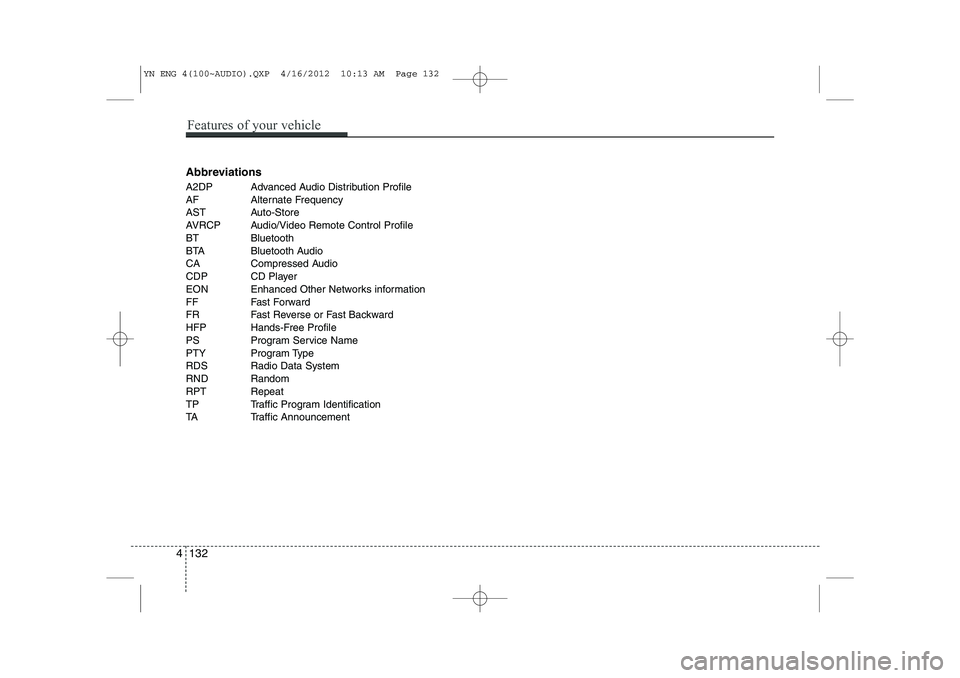
Abbreviations
A2DP Advanced Audio Distribution Profile
AF Alternate Frequency
AST Auto-Store
AVRCP Audio/Video Remote Control Profile
BT Bluetooth
BTA Bluetooth Audio
CA Compressed Audio
CDP CD Player
EON Enhanced Other Networks information
FF Fast Forward
FR Fast Reverse or Fast Backward
HFP Hands-Free Profile
PS Program Service Name
PTY Program Type
RDS Radio Data System
RND Random
RPT Repeat
TP Traffic Program Identification
TA Traffic Announcement
4 132
Features of your vehicle
YN ENG 4(100~AUDIO).QXP 4/16/2012 10:13 AM Page 132
Page 286 of 751

What to do in an emergency
22
6
TPMS (Tire Pressure Monitoring System)malfunction indicator
The low tire pressure telltale will illu-
minate after it blinks for approximate-
ly one minute when there is a prob-
lem with the Tire Pressure Monitoring
System. If the system is able to cor-
rectly detect an underinflation warn-
ing at the same time as system fail-ure then it will illuminate both the
TPMS malfunction and low tire pres-
sure position telltales e.g. if Front Left
sensor fails, the TPMS malfunction
indicator illuminates, but if the FrontRight, Rear Left, or Rear Right tire is
under-inflated, the low tire pressure
position telltales may illuminatetogether with the TPMS malfunction
indicator.
We recommend that the system be
checked by an authorized Kia dealer.
WARNING - Low pressure
damage
Significantly low tire pressure
makes the vehicle unstable and
can contribute to loss of vehicle
control and increased brakingdistances.
Continued driving on low pres- sure tires can cause the tires to
overheat and fail.CAUTION
The TPMS malfunction indica- tor may be illuminated if thevehicle is moving around elec- tric power supply cables orradios transmitter such as atpolice stations, government and public offices, broadcast-ing stations, military installa-tions, airports, or transmitting towers, etc. This can interferewith normal operation of theTire Pressure Monitoring System (TPMS).
The TPMS malfunction indica- tor may be illuminated if snowchains are used or some sep-arate electronic devices such as notebook computer, mobilecharger, remote starter or nav-igation etc., are used in the vehicle. This can interfere withnormal operation of the TirePressure Monitoring System(TPMS).
YN ENG 6.QXP 4/16/2012 10:06 AM Page 22
Page 557 of 751
493
Features of your vehicle
INTERIOR FEATURES
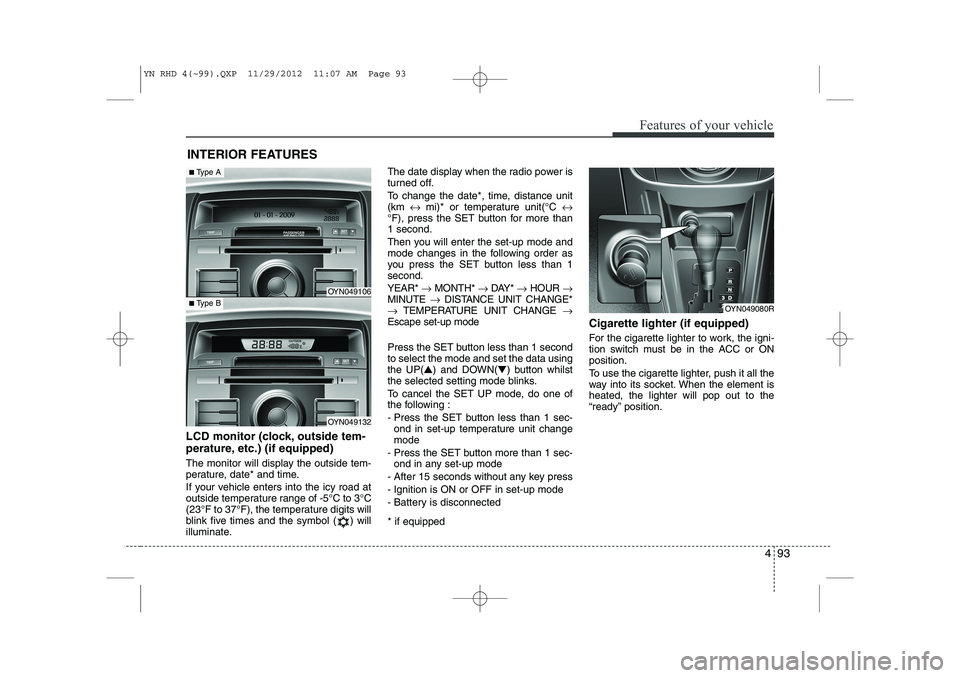
LCD monitor (clock, outside tem-
perature, etc.) (if equipped)
The monitor will display the outside tem-
perature, date* and time.
If your vehicle enters into the icy road at
outside temperature range of -5°C to 3°C
(23°F to 37°F), the temperature digits will
blink five times and the symbol ( ) will
illuminate. The date display when the radio power is
turned off.
To change the date*, time, distance unit (km
↔ mi)* or temperature unit(°C ↔
°F), press the SET button for more than1 second.
Then you will enter the set-up mode and
mode changes in the following order as
you press the SET button less than 1second. YEAR* →MONTH* →DAY* →HOUR →
MINUTE →DISTANCE UNIT CHANGE*
→ TEMPERATURE UNIT CHANGE →
Escape set-up mode
Press the SET button less than 1 second to select the mode and set the data usingthe UP( ▲) and DOWN( ▼) button whilst
the selected setting mode blinks.
To cancel the SET UP mode, do one of
the following :
- Press the SET button less than 1 sec- ond in set-up temperature unit change mode
- Press the SET button more than 1 sec- ond in any set-up mode
- After 15 seconds without any key press
- Ignition is ON or OFF in set-up mode
- Battery is disconnected * if equipped Cigarette lighter (if equipped)
For the cigarette lighter to work, the igni-
tion switch must be in the ACC or ONposition.
To use the cigarette lighter, push it all the
way into its socket. When the element isheated, the lighter will pop out to the
“ready” position.
OYN049080R
OYN049106
OYN049132
■
Type A
■Type B
YN RHD 4(~99).QXP 11/29/2012 11:07 AM Page 93
Page 645 of 751
What to do in an emergency
22
6
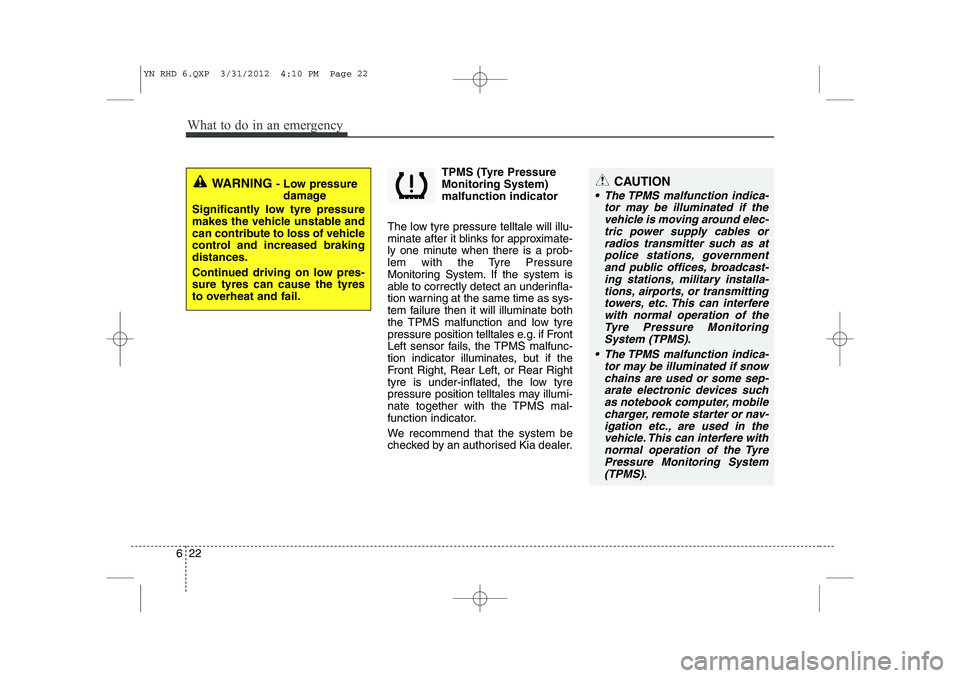
TPMS (Tyre Pressure Monitoring System)malfunction indicator
The low tyre pressure telltale will illu-
minate after it blinks for approximate-
ly one minute when there is a prob-
lem with the Tyre Pressure
Monitoring System. If the system is
able to correctly detect an underinfla-
tion warning at the same time as sys-
tem failure then it will illuminate both
the TPMS malfunction and low tyre
pressure position telltales e.g. if Front
Left sensor fails, the TPMS malfunc-
tion indicator illuminates, but if the
Front Right, Rear Left, or Rear Right
tyre is under-inflated, the low tyre
pressure position telltales may illumi-
nate together with the TPMS mal-
function indicator.
We recommend that the system be
checked by an authorised Kia dealer.
WARNING - Low pressure
damage
Significantly low tyre pressure
makes the vehicle unstable and
can contribute to loss of vehicle
control and increased brakingdistances.
Continued driving on low pres- sure tyres can cause the tyres
to overheat and fail.CAUTION
The TPMS malfunction indica- tor may be illuminated if thevehicle is moving around elec- tric power supply cables orradios transmitter such as atpolice stations, government and public offices, broadcast-ing stations, military installa-tions, airports, or transmitting towers, etc. This can interferewith normal operation of theTyre Pressure Monitoring System (TPMS).
The TPMS malfunction indica- tor may be illuminated if snowchains are used or some sep-arate electronic devices such as notebook computer, mobilecharger, remote starter or nav-igation etc., are used in the vehicle. This can interfere withnormal operation of the TyrePressure Monitoring System(TPMS).
YN RHD 6.QXP 3/31/2012 4:10 PM Page 22
Page 742 of 751
89
Specifications & Consumer information
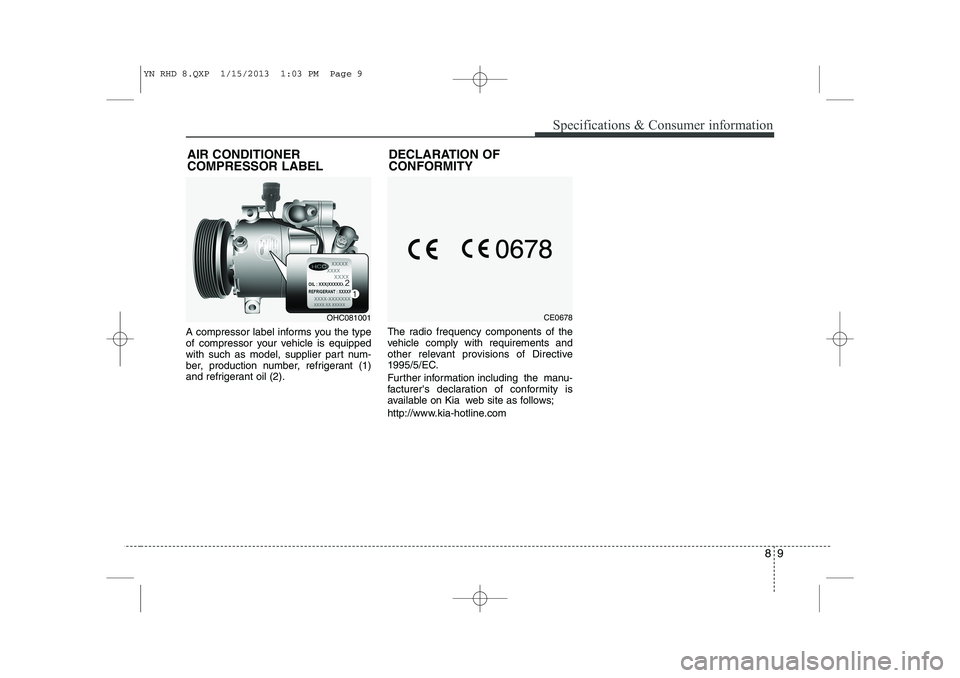
A compressor label informs you the type
of compressor your vehicle is equipped
with such as model, supplier part num-
ber, production number, refrigerant (1)
and refrigerant oil (2).The radio frequency components of the
vehicle comply with requirements and
other relevant provisions of Directive
1995/5/EC.
Further information including the manu-
facturer's declaration of conformity is
available on Kia web site as follows;
http://www.kia-hotline.com
AIR CONDITIONER COMPRESSOR LABEL
OHC081001DECLARATION OF CONFORMITYCE0678
YN RHD 8.QXP 1/15/2013 1:03 PM Page 9