steering wheel KIA VENGA 2013 User Guide
[x] Cancel search | Manufacturer: KIA, Model Year: 2013, Model line: VENGA, Model: KIA VENGA 2013Pages: 751, PDF Size: 27.49 MB
Page 73 of 751
4
Keys / 4-2 Remote keyless entry / 4-5Smart key / 4-8
Theft-alarm system / 4-11
Door locks / 4-13
Tailgate / 4-17
Windows / 4-19Hood / 4-24
Fuel filler lid / 4-26
Panorama sunroof / 4-29
Steering wheel / 4-33
Mirrors / 4-35
Instrument cluster / 4-40
Rear parking assist system / 4-57Rearview camera / 4-60
Hazard warning flasher / 4-60Lighting / 4-61
Wipers and washers / 4-67
Interior light / 4-70
Defroster / 4-71
Manual climate control system / 4-72
Automatic climate control system / 4-81
Windshield defrosting and defogging / 4-89
Storage compartment / 4-91
Interior features / 4-93Audio system / 4-100
Features of your vehicle
YN ENG 4(~99).QXP 4/16/2012 10:15 AM Page 1
Page 105 of 751
433
Features of your vehicle
Electric power steering
Power steering uses the motor to assist
you in steering the vehicle. If the engine
is off or if the power steering system
becomes inoperative, the vehicle may
still be steered, but it will require
increased steering effort.
The motor driven power steering is con-
trolled by the power steering control unit
which senses the steering wheel torque
and vehicle speed to command the
motor.
The steering effort becomes heavier as
the vehicle’s speed increases and
becomes lighter as the vehicle’s speed
decreases for better control of the steer-ing wheel.
Should you notice any change in the
effort required to steer during normal
vehicle operation, we recommend that
the system be checked by an authorized
Kia dealer.
✽✽NOTICE
The following symptoms may occur dur- ing normal vehicle operation:
Page 106 of 751
Features of your vehicle
34
4
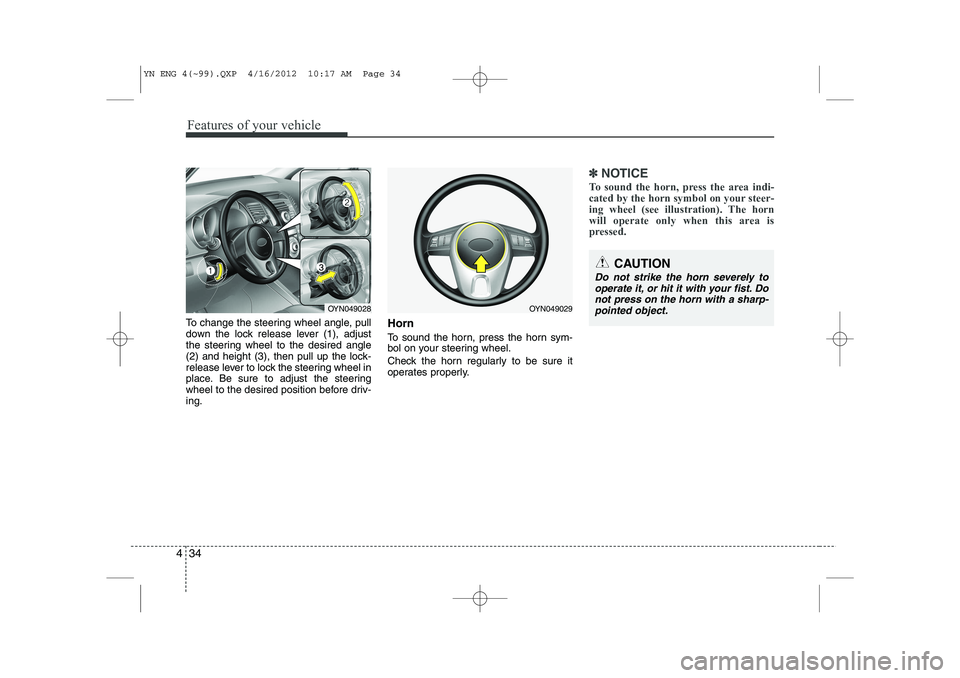
To change the steering wheel angle, pull
down the lock release lever (1), adjust
the steering wheel to the desired angle
(2) and height (3), then pull up the lock-
release lever to lock the steering wheel in
place. Be sure to adjust the steering
wheel to the desired position before driv-ing. Horn
To sound the horn, press the horn sym-
bol on your steering wheel.
Check the horn regularly to be sure it
operates properly.
✽✽
NOTICE
To sound the horn, press the area indi-
cated by the horn symbol on your steer-
ing wheel (see illustration). The horn
will operate only when this area is
pressed.
CAUTION
Do not strike the horn severely to operate it, or hit it with your fist. Do
not press on the horn with a sharp-pointed object.
OYN049029OYN049028
YN ENG 4(~99).QXP 4/16/2012 10:17 AM Page 34
Page 126 of 751
Features of your vehicle
54
4
ESP OFF indicator
(if equipped)
The ESP OFF indicator will illuminate
when the ignition switch is turned ON,
but should go off after approximately 3
seconds. To switch to ESP OFF mode,
press the ESP OFF button. The ESPOFF indicator will illuminate indicating
the ESP is deactivated.
✽✽ NOTICE
After reconnecting or recharging a dis-
charged battery, the ESP OFF indicatormay illuminate. In this case, turn the
steering wheel 360 degrees to the left
and 360 degrees to the right while theignition switch is in the ON position.
Then, restart the engine after the igni-
tion is off. If the ESP OFF indicator does
not turn off, we recommend that you
contact an authorized Kia dealer.
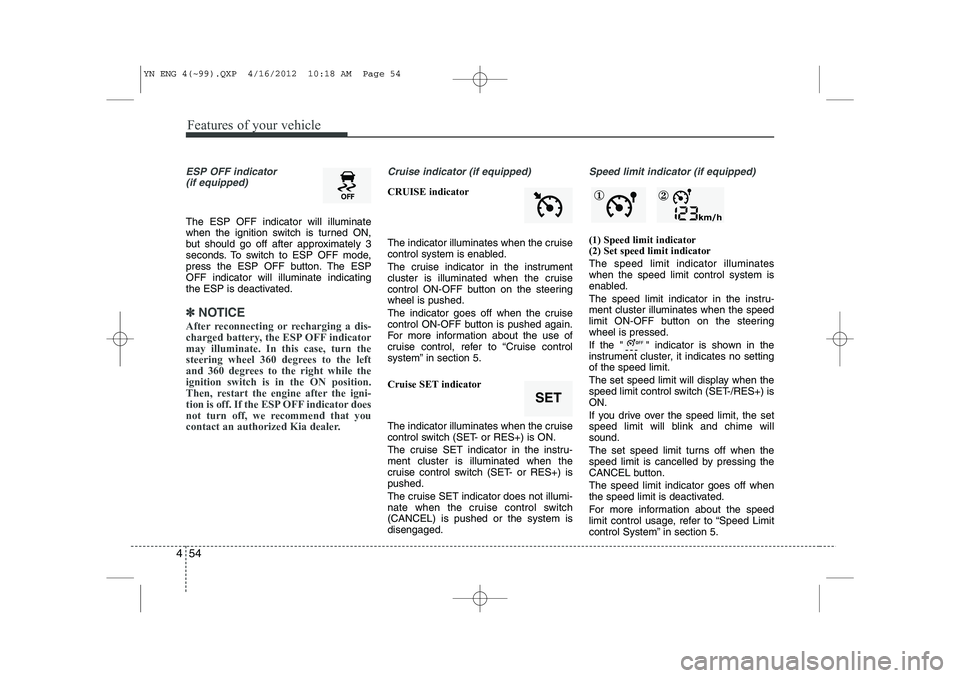
Cruise indicator (if equipped)
CRUISE indicator
The indicator illuminates when the cruise
control system is enabled.
The cruise indicator in the instrument
cluster is illuminated when the cruise
control ON-OFF button on the steeringwheel is pushed.
The indicator goes off when the cruise
control ON-OFF button is pushed again.
For more information about the use of
cruise control, refer to “Cruise control
system” in section 5.
Cruise SET indicator
The indicator illuminates when the cruise
control switch (SET- or RES+) is ON.
The cruise SET indicator in the instru- ment cluster is illuminated when the
cruise control switch (SET- or RES+) ispushed.
The cruise SET indicator does not illumi-
nate when the cruise control switch(CANCEL) is pushed or the system isdisengaged.
Speed limit indicator (if equipped)
(1) Speed limit indicator (2) Set speed limit indicator The speed limit indicator illuminates when the speed limit control system is
enabled.
The speed limit indicator in the instru- ment cluster illuminates when the speed
limit ON-OFF button on the steeringwheel is pressed.
If the " " indicator is shown in the
instrument cluster, it indicates no settingof the speed limit.
The set speed limit will display when the
speed limit control switch (SET-/RES+) isON.
If you drive over the speed limit, the set
speed limit will blink and chime willsound.
The set speed limit turns off when the
speed limit is cancelled by pressing the
CANCEL button. The speed limit indicator goes off when
the speed limit is deactivated.
For more information about the speed
limit control usage, refer to “Speed Limit
control System” in section 5.
SET
① ②
YN ENG 4(~99).QXP 4/16/2012 10:18 AM Page 54
Page 193 of 751
4 121
Features of your vehicle
Auxiliary In ‰Via the Auxiliary Input (3.5 mm plug)
you can connect your portable deviceto the Head Unit.
) Insert the 3.5 mm plug (connected to
your portable device) into the Auxinput.
✎ Audio output from the auxiliary source
is directly audible when the device isplugged in.
✎ The Auxiliary Source is aborted when
another source becomes active.
9 To re-select the Auxiliary Sourcewhen it is plugged in already:
) Short press the AUXbutton on the
Head Unit.
OR
) Short press the Modebutton on the
Steering Wheel Remote Control.
✎ If no Auxiliary Source is detected,
“NO MEDIA” will be displayed for 5
seconds and the Head Unit will return
to the previous selected source.✽✽
NOTICE
The AUX source is not available if an iPod
®is connected.
The volume setting of Auxiliary source
is independent of other sources. Any volume changes in Auxiliary source
is memorized and used whenever the
Auxiliary source is selected.
YN ENG 4(100~AUDIO).QXP 4/16/2012 10:13 AM Page 121
Page 195 of 751
4 123
Features of your vehicle
9When pairing is established, the ID of the Bluetooth®Wireless Technology
device and the service list info will bestored in the Head Unit
Bluetooth®
Wireless Technology Device List.
Device List
With this function you can browse through and select
Bluetooth®Wireless
Technology devices that are stored in theHead Unit
Bluetooth®Wireless
Technology Device List.
) Short press the SETUPbutton to enter
the Setup menu.
) Short press the or button to access the
Bluetooth®Wireless
Technology sub-menu.
) Press the button to browse the
Device List to select the required
device.
) Press the OKbutton to start pairing
between the selected device and theHead Unit.
✎ Note: Whenever there is at least one
connected device active, in the displaythe
Bluetooth®Wireless Technology
icon is visible. Delete Device
This function allows you to delete a
Bluetooth®Wireless Technology device
ID from the Head Unit Bluetooth®
Wireless Technology Device List.
) Short press the SETUPbutton to
enter the Setup menu.
) Short press the or button to access the
Bluetooth®Wireless
Technology sub-menu.
) Press the button to select Delete
Device.
) Press the OKbutton to delete the
selected device from the Head Unit
Bluetooth®Wireless Technology
Device List
Phone Volume
) Short press the SETUPbutton to
enter the Setup menu.
) Short press the or button to access the
Bluetooth®Wireless
Technology sub-menu.
) Select the option “Phone Volume”.
) Press the or button to decrease
or increase the phone volume setting.
‰ Default setting: 12
‰ Setting range: 0 ... 35
‰ During an ongoing call, user is
allowed to adjust the BT Phone vol-
ume. The adjusted volume is memo-
rized into Phone Volume setting. Answering a Call
)
Press the Callbutton on the Steering
Wheel Remote Control to accept an incoming call.
Terminate / Reject Call
) Press the End Callbutton on the
Steering Wheel Remote Control to
terminate or reject a call.
Last Call Re-dial
) Short press the Callbutton on the
Steering Wheel Remote Control to re-
dial last dialled number (one attempt).
) Long press the Callbutton on the
Steering Wheel Remote Control to re-
dial last dialled number (twoattempts).
Private Call
This function allows you to have a private
call even if the phone is connected to theHead Unit.
) Press the Callbutton on your phone
to start a private call.
OR
) Press the End Callbutton on your
phone to end a private call.
YN ENG 4(100~AUDIO).QXP 4/16/2012 10:13 AM Page 123
Page 196 of 751
Features of your vehicle
124
4
Transferring a Call
This function allows you to transfer a call
during an ongoing call. ‰ From the tuner to the phone
‰ From the phone to the tuner
) Long press the Callbutton on the
Steering Wheel Remote Control to
transfer the ongoing call back to the
phone or back to the tuner again.
Audio Streaming
Start Audio Streaming
This function allows the Head Unit to
start streaming music from phone.
9 The
Bluetooth®Wireless Technology
device must be connected with the Head Unit.
) Press the AUXbutton and select BT
AUDIO.
✎ The Head Unit starts streaming the
audio from the phone and will start
playing the audio files.
✎ The Head Unit has no control on the
sequence of track playback in phone. Next/Previous Track
This function allows you to select the
next/ previous track of phone‘s music
player by using the next/previous track
buttons on the Head Unit or SteeringWheel Remote Control.
)
Short press the or button on the
Head Unit or the Steering WheelRemote Control.
Suspend Audio Streaming
This function allows you to suspend
streaming music from the phone to theHead Unit.
) Short press the Mutebutton on the
Steering Wheel Remote Control.
) Press the AUXbutton and de-select
BT AUDIO.
YN ENG 4(100~AUDIO).QXP 4/16/2012 10:13 AM Page 124
Page 197 of 751
4 125
Features of your vehicle
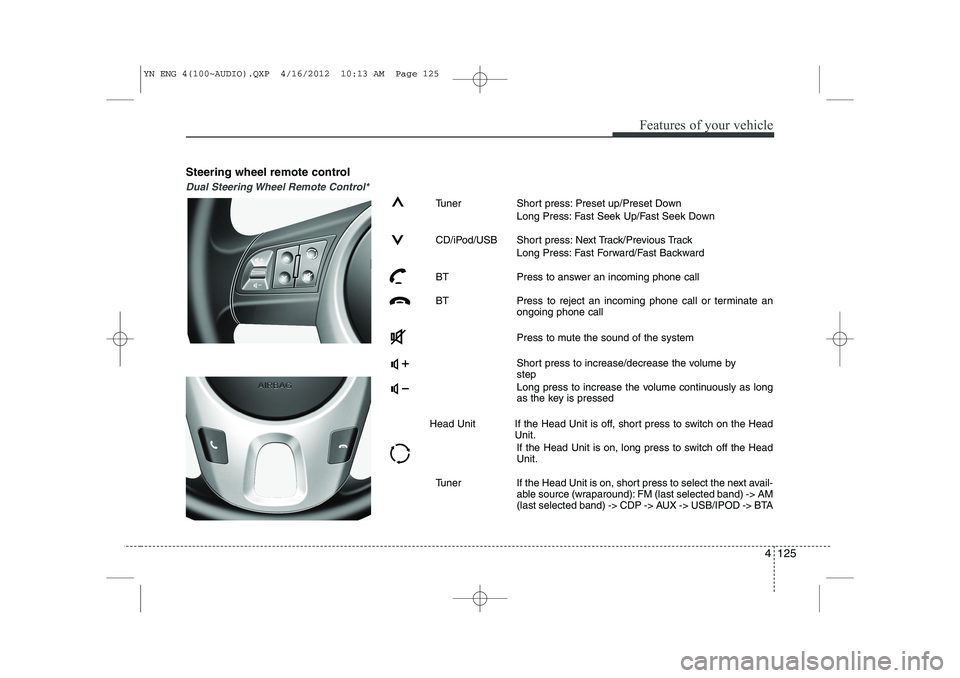
Steering wheel remote control
Dual Steering Wheel Remote Control*
Tuner Short press: Preset up/Preset DownLong Press: Fast Seek Up/Fast Seek Down
CD/iPod/USB Short press: Next Track/Previous Track Long Press: Fast Forward/Fast Backward
BT Press to answer an incoming phone call
BT Press to reject an incoming phone call or terminate an ongoing phone call
Press to mute the sound of the system
Short press to increase/decrease the volume by step
Long press to increase the volume continuously as long
as the key is pressed
Head Unit If the Head Unit is off, short press to switch on the Head Unit.
If the Head Unit is on, long press to switch off the HeadUnit.
Tuner If the Head Unit is on, short press to select the next avail- able source (wraparound): FM (last selected band) -> AM
(last selected band) -> CDP -> AUX -> USB/IPOD -> BTA
YN ENG 4(100~AUDIO).QXP 4/16/2012 10:13 AM Page 125
Page 198 of 751
Features of your vehicle
126
4
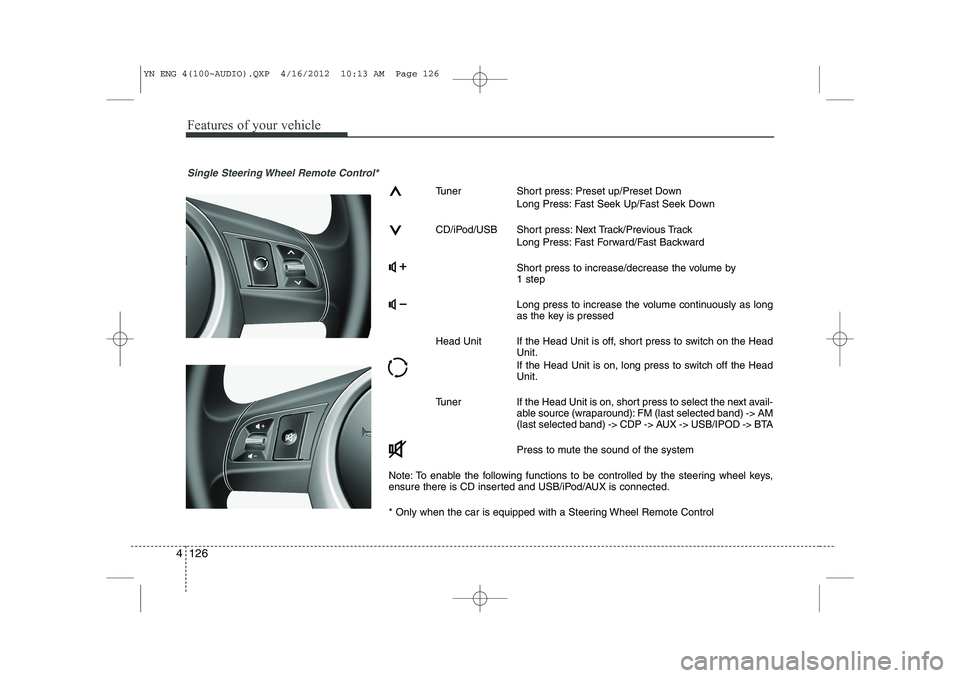
Single Steering Wheel Remote Control*
Tuner Short press: Preset up/Preset Down
Long Press: Fast Seek Up/Fast Seek Down
CD/iPod/USB Short press: Next Track/Previous Track Long Press: Fast Forward/Fast Backward
Short press to increase/decrease the volume by 1 step
Long press to increase the volume continuously as long
as the key is pressed
Head Unit If the Head Unit is off, short press to switch on the Head Unit.
If the Head Unit is on, long press to switch off the Head Unit.
Tuner If the Head Unit is on, short press to select the next avail- able source (wraparound): FM (last selected band) -> AM
(last selected band) -> CDP -> AUX -> USB/IPOD -> BTA
Press to mute the sound of the system
Note: To enable the following functions to be controlled by the steering wheel keys,
ensure there is CD inserted and USB/iPod/AUX is connected.
* Only when the car is equipped with a Steering Wheel Remote Control
YN ENG 4(100~AUDIO).QXP 4/16/2012 10:13 AM Page 126
Page 208 of 751
Driving your vehicle
4
5
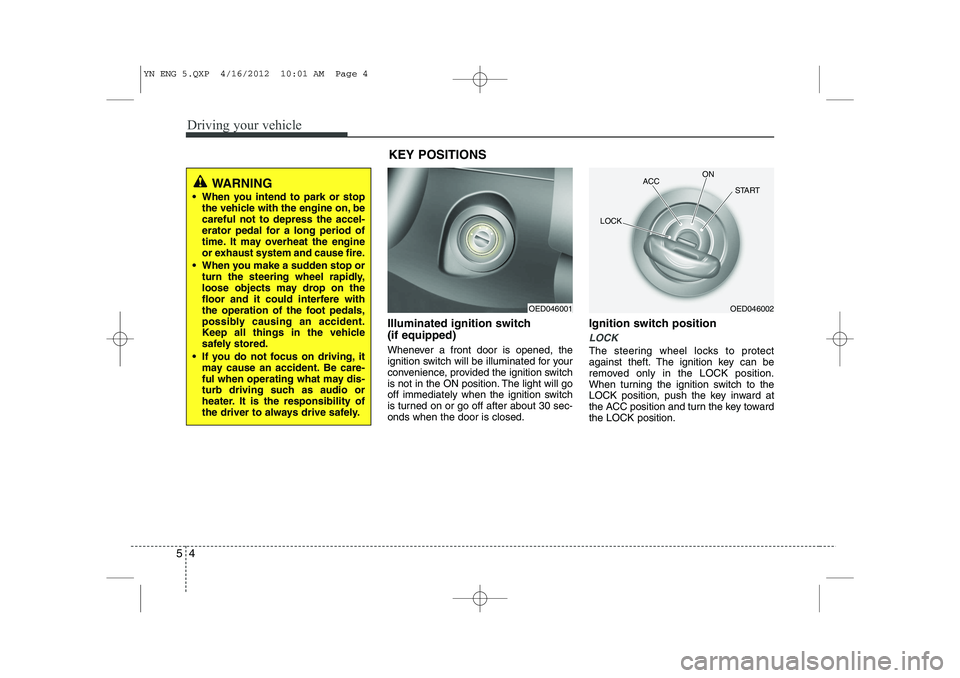
Illuminated ignition switch (if equipped)
Whenever a front door is opened, the
ignition switch will be illuminated for your
convenience, provided the ignition switch
is not in the ON position. The light will go
off immediately when the ignition switch
is turned on or go off after about 30 sec-onds when the door is closed. Ignition switch position
LOCK
The steering wheel locks to protect
against theft. The ignition key can be
removed only in the LOCK position.
When turning the ignition switch to the
LOCK position, push the key inward at
the ACC position and turn the key towardthe LOCK position.
OED046001OED046002
ACC
ON
START
LOCK
WARNING
When you intend to park or stop the vehicle with the engine on, be careful not to depress the accel-
erator pedal for a long period of
time. It may overheat the engine
or exhaust system and cause fire.
When you make a sudden stop or turn the steering wheel rapidly,
loose objects may drop on the
floor and it could interfere with
the operation of the foot pedals,
possibly causing an accident.
Keep all things in the vehicle
safely stored.
If you do not focus on driving, it may cause an accident. Be care-
ful when operating what may dis-
turb driving such as audio or
heater. It is the responsibility of
the driver to always drive safely.
KEY POSITIONS
YN ENG 5.QXP 4/16/2012 10:01 AM Page 4