transmission Lancia Flavia 2013 Owner handbook (in English)
[x] Cancel search | Manufacturer: LANCIA, Model Year: 2013, Model line: Flavia, Model: Lancia Flavia 2013Pages: 244, PDF Size: 2.87 MB
Page 10 of 244
INTRODUCTION
Congratulations on selecting your
new LANCIA vehicle. Be assured that
it represents precision workmanship,
distinctive styling, and high quality -
all essentials that are traditional to
our vehicles.
Before you start to drive this vehicle,
read this Owner's Manual and all the
supplements. Be sure you are familiar
with all vehicle controls, particularly
those used for braking, steering, and
transmission shifting. Learn how your
vehicle handles on different road sur-
faces. Your driving skills will improve
with experience, but as in driving any
vehicle, take it easy as you begin.
Always observe local laws wherever
you drive.
NOTE:
After reviewing the owner
information, it should be stored in
the vehicle for convenient referenc-
ing and remain with the vehicle
when sold.
Failure to operate this vehicle cor-
rectly may result in loss of control or a
collision. Operating this vehicle at excessive
speeds or while intoxicated may result
in loss of control, collision with other
vehicles or objects, going off the road,
or overturning; any of which may lead
to serious injury or death. Also, failure
to use seat belts subjects the driver
and passengers to a greater risk of
injury or death.
To keep your vehicle running at its
best, have your vehicle serviced at
recommended intervals by an autho-
rized dealer who has the qualified per-
sonnel, special tools, and equipment
to perform all service.
The manufacturer and its distributors
are vitally interested in your complete
satisfaction with this vehicle. If you
encounter a service or warranty prob-
lem, which is not resolved to your
satisfaction, discuss the matter with
your dealer's management.
Your authorized dealer will be happy
to assist you with any questions about
your vehicle.
IMPORTANT NOTICE
ALL MATERIAL CONTAINED IN
THIS PUBLICATION IS BASED ON
THE LATEST INFORMATION
AVAILABLE AT TIME OF PUBLI-
CATION APPROVAL. THE RIGHT
IS RESERVED TO PUBLISH REVI-
SIONS AT ANY TIME.
This Owner's Manual has been pre-
pared with the assistance of service and
engineering specialists to acquaint you
with the operation and maintenance of
your new vehicle. It is supplemented by
a Warranty Information Booklet and
various customer-oriented documents.
You are urged to read these publica-
tions carefully. Following the instruc-
tions and recommendations in this
Owner's Manual will help assure safe
and enjoyable operation of your ve-
hicle.After you have read the Owner’s
Manual, it should be stored in the
vehicle for convenient reference and
remain with the vehicle when sold.
4
Page 18 of 244
A WORD ABOUT YOUR
KEYSThe authorized dealer that sold you
your vehicle has the key code numbers
for your vehicle locks. These numbers
can be used to order duplicate keys
from your authorized dealer. Ask your
authorized dealer for these numbers
and keep them in a safe place.You can insert the double-sided keys
into the locks with either side up.
IGNITION KEY REMOVAL
Automatic Transaxle
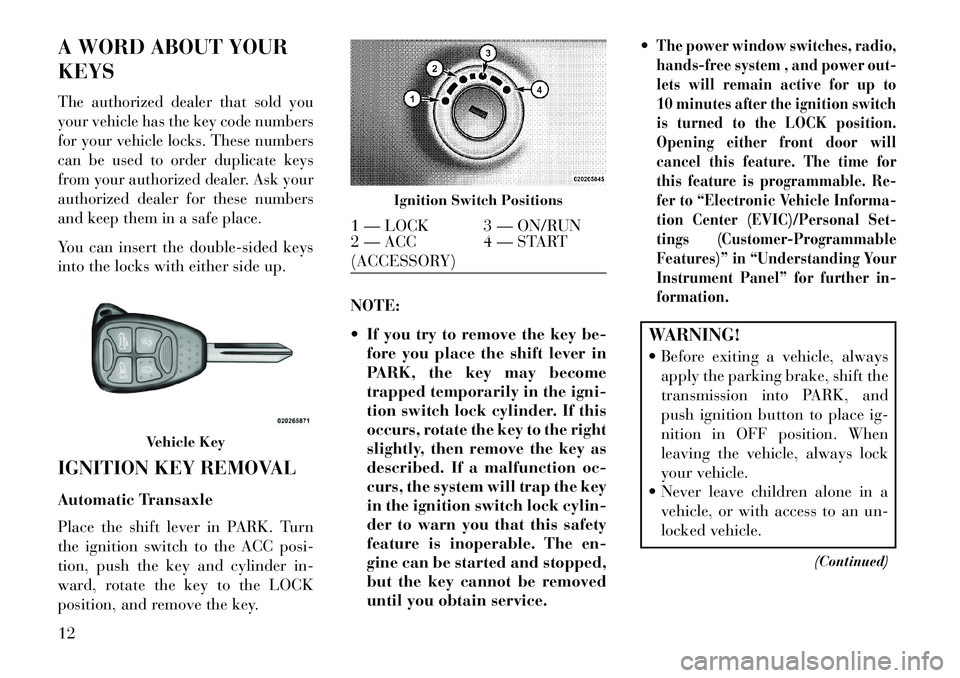
Place the shift lever in PARK. Turn
the ignition switch to the ACC posi-
tion, push the key and cylinder in-
ward, rotate the key to the LOCK
position, and remove the key.NOTE:
If you try to remove the key be-
fore you place the shift lever in
PARK, the key may become
trapped temporarily in the igni-
tion switch lock cylinder. If this
occurs, rotate the key to the right
slightly, then remove the key as
described. If a malfunction oc-
curs, the system will trap the key
in the ignition switch lock cylin-
der to warn you that this safety
feature is inoperable. The en-
gine can be started and stopped,
but the key cannot be removed
until you obtain service.
The power window switches, radio,
hands-free system , and power out-
lets will remain active for up to
10 minutes after the ignition switch
is turned to the LOCK position.
Opening either front door will
cancel this feature. The time for
this feature is programmable. Re-
fer to “Electronic Vehicle Informa-
tion Center (EVIC)/Personal Set-
tings (Customer-Programmable
Features)” in “Understanding Your
Instrument Panel” for further in-
formation.WARNING!
Before exiting a vehicle, always
apply the parking brake, shift the
transmission into PARK, and
push ignition button to place ig-
nition in OFF position. When
leaving the vehicle, always lock
your vehicle.
Never leave children alone in a vehicle, or with access to an un-
locked vehicle.
(Continued)
Vehicle Key
Ignition Switch Positions
1 — LOCK 3 — ON/RUN
2 — ACC
(ACCESSORY)4 — START
12
Page 22 of 244

The Vehicle Security Alarm is de-
signed to protect your vehicle; how-
ever, you can create conditions where
the Vehicle Security Alarm will give
you a false alarm. If one of the previ-
ously described arming sequences has
occurred, the Vehicle Security Alarm
will arm regardless of whether you are
in the vehicle or not. If you remain in
the vehicle and open a door, the alarm
will sound. If this occurs, disarm the
Vehicle Security Alarm.
If the Vehicle Security Alarm is armed
and the battery becomes discon-
nected, the Vehicle Security Alarm
will remain armed when the battery is
reconnected. The exterior lights will
flash, and the horn will sound. If this
occurs, disarm the Vehicle Security
Alarm.
SECURITY MANUAL
OVERRIDE
The Vehicle Security Alarm will not
arm if you lock the doors using the
manual door lock plunger.ILLUMINATED ENTRY
The courtesy lights will turn on when
you press the unlock button on the
Remote Keyless Entry (RKE) trans-
mitter or open any door.
The interior lights will fade to off after
approximately 30 seconds or they will
immediately fade to off once the igni-
tion switch is turned to ON/RUN from
the OFF position.
NOTE:
The front courtesy overhead
console and door courtesy lights
will turn on if the dimmer con-
trol is in the "Dome ON" position
(extreme top position).
The Illuminated Entry system
will not operate if the dimmer
control is in the “Dome defeat”
position (extreme bottom posi-
tion).
REMOTE KEYLESS
ENTRY (RKE)
This system allows you to lock or
unlock the doors, open the trunk and
open the convertible top from dis-
tances up to approximately 10 m
using a hand-held Remote Keyless
Entry (RKE) transmitter. The RKE
transmitter does not need to be
pointed at the vehicle to activate the
system.
NOTE: The line of transmission
must not be blocked with metal
objects.
Vehicle Key
16
Page 27 of 244
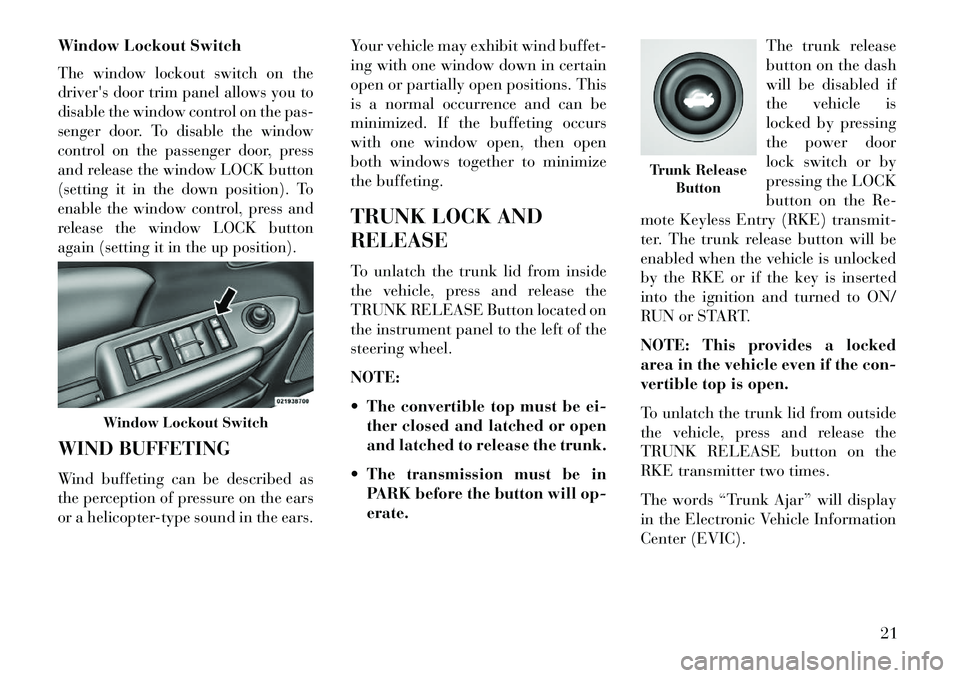
Window Lockout SwitchThe window lockout switch on the
driver's door trim panel allows you to
disable the window control on the pas-
senger door. To disable the window
control on the passenger door, press
and release the window LOCK button
(setting it in the down position). To
enable the window control, press and
release the window LOCK button
again (setting it in the up position).WIND BUFFETING
Wind buffeting can be described as
the perception of pressure on the ears
or a helicopter-type sound in the ears.Your vehicle may exhibit wind buffet-
ing with one window down in certain
open or partially open positions. This
is a normal occurrence and can be
minimized. If the buffeting occurs
with one window open, then open
both windows together to minimize
the buffeting.
TRUNK LOCK AND
RELEASE
To unlatch the trunk lid from inside
the vehicle, press and release the
TRUNK RELEASE Button located on
the instrument panel to the left of the
steering wheel.
NOTE:
The convertible top must be ei-
ther closed and latched or open
and latched to release the trunk.
The transmission must be in PARK before the button will op-
erate. The trunk release
button on the dash
will be disabled if
the vehicle is
locked by pressing
the power door
lock switch or by
pressing the LOCK
button on the Re-
mote Keyless Entry (RKE) transmit-
ter. The trunk release button will be
enabled when the vehicle is unlocked
by the RKE or if the key is inserted
into the ignition and turned to ON/
RUN or START.
NOTE: This provides a locked
area in the vehicle even if the con-
vertible top is open.
To unlatch the trunk lid from outside
the vehicle, press and release the
TRUNK RELEASE button on the
RKE transmitter two times.
The words “Trunk Ajar” will display
in the Electronic Vehicle Information
Center (EVIC).
Window Lockout Switch
Trunk Release Button
21
Page 107 of 244

NOTE: The vehicle should be
traveling at a steady speed and on
level ground before pressing the
SET button.
TO DEACTIVATE
A soft tap on the brake pedal, pushing
the CANCEL button, or normal brake
pressure while slowing the vehicle will
deactivate Electronic Speed Control
without erasing the set speed memory.
Pressing the ON/OFF button or turn-
ing the ignition switch OFF erases the
set speed memory.
TO RESUME SPEED
To resume a previously set speed,
push the RES (+) button and release.
Resume can be used at any speed
above 32 km/h.
TO VARY THE SPEED
SETTING
When the Electronic Speed Control is
set, you can increase speed by pushing
the RES (+) button. If the button is
continually pressed, the set speed willcontinue to increase until the button is
released, then the new set speed will
be established.
Pressing the RES (+) button once will
result in a 2 km/h increase in set speed.
Each subsequent tap of the button re-
sults in an increase of 2 km/h.To decrease speed while the Elec-
tronic Speed Control is set, push the
SET (-) button. If the button is con-
tinually held in the SET (-) position,
the set speed will continue to decrease
until the button is released. Release
the button when the desired speed is
reached, and the new set speed will be
established.
Pressing the SET (-) button once will
result in a 2 km/h decrease in set
speed. Each subsequent tap of the
button results in a decrease of 2 km/h.
TO ACCELERATE FOR
PASSING
Press the accelerator as you would
normally. When the pedal is released,
the vehicle will return to the set speed.Using Electronic Speed Control
On Hills
The transmission may downshift on
hills to maintain the vehicle set speed.
NOTE:
The Electronic Speed Con-
trol system maintains speed up and
down hills. A slight speed change on
moderate hills is normal.
On steep hills, a greater speed loss or
gain may occur so it may be prefer-
able to drive without Electronic Speed
Control.WARNING!
Electronic Speed Control can be
dangerous where the system cannot
maintain a constant speed. Your ve-
hicle could go too fast for the con-
ditions, and you could lose control
and have an accident. Do not use
Electronic Speed Control in heavy
traffic or on roads that are winding,
icy, snow-covered or slippery.
101
Page 118 of 244

7. Air Bag Warning LightThis light will turn on for
four to eight seconds as a
bulb check when the igni-
tion switch is first turned to
ON/RUN. If the light is either not on
during starting, stays on, or turns on
while driving, have the system in-
spected at an authorized dealer as
soon as possible. Refer to “Occupant
Restraints” in “Things To Know Be-
fore Starting Your Vehicle” for further
information.
8. Seat Belt Reminder Light
When the ignition switch is
first turned to ON/RUN, this
light will turn on for four to
eight seconds as a bulb check. During
the bulb check, if the driver's seat belt
is unbuckled, a chime will sound.
After the bulb check or when driving,
if the driver seat belt remains unbuck-
led, the Seat Belt Warning Light will
flash or remain on continuously. Refer
to “Occupant Restraints” in “Things
To Know Before Starting Your Ve-
hicle” for further information. 9. Oil Pressure Warning Light
This light indicates low engine
oil pressure. The light will
come on and remain on when the
ignition switch is turned from the
OFF to the ON/RUN position, and the
light will turn off after the engine is
started. If the bulb does not come on
during starting, have the system
checked by an authorized dealer.
If the light comes on and remains on
while driving, stop the vehicle and
shut off the engine. DO NOT OPER-
ATE THE VEHICLE UNTIL THE
CAUSE IS CORRECTED.
The light does not show the quantity
of oil in the engine. This can be deter-
mined using the procedure shown in
“Maintaining Your Vehicle”.
10. Engine Temperature Warning
Light
This light warns of an over-
heated engine condition. As
engine coolant temperature rise and
the gauge approaches H, the light will
illuminate and a single chime will
sound after reaching a set threshold. Further overheating will cause a con-
tinuous chime sound for 4 minutes or
until the engine is allowed to cool.
If the light turns on while driving, safely
pull over and stop the vehicle. If the A/C
system is on, turn it off. Also, shift the
transmission into NEUTRAL and idle
the vehicle. If the temperature reading
does not return to normal, turn the
engine off immediately and call for ser-
vice. Refer to “If Your Engine Over-
heats” in “What To Do In Emergencies”
for further information.11. Brake Warning Light
This light monitors various
brake functions, including
brake fluid level and parking brake ap-
plication. If the brake light turns on it
may indicate that the parking brake is
applied, that the brake fluid level is low,
or that there is a problem with the anti-
lock brake system.
The dual brake system provides a re-
serve braking capacity in the event of
a failure to a portion of the hydraulic
system. Failure of either half of the
dual brake system is indicated by the
Brake Warning Light which will turn
112
Page 119 of 244

on when the brake fluid level in the
master cylinder has dropped below a
specified level.
The light will remain on until the
cause is corrected.
NOTE: The light may flash mo-
mentarily during sharp cornering
maneuvers which change fluid
level conditions. The vehicle
should have service performed,
and the brake fluid level checked.
If brake failure is indicated, immedi-
ate repair is necessary.WARNING!
Driving a vehicle with the brake
light on is dangerous. Part of the
brake system may have failed. It
will take longer to stop the vehicle.
You could have a collision. Have the
vehicle checked immediately.
Vehicles equipped with Anti-Lock
brakes (ABS), are also equipped with
Electronic Brake Force Distribution
(EBD). In the event of an EBD failure,
the Brake Warning Light will turn on
along with the ABS Light. Immediate
repair to the ABS system is required. The operation of the Brake Warning
Light can be checked by turning the
ignition switch from the OFF position
to the ON/RUN position. The light
should illuminate for approximately
three seconds. The light should then
turn off unless the parking brake is
applied or a brake fault is detected.
If the light does not illuminate, have
the light inspected by an authorized
dealer.
The light also will turn on when the
parking brake is applied with the igni-
tion switch in the ON/RUN position.NOTE: This light shows only
that the parking brake is applied.
It does not show the degree of
brake application.
12. Tachometer
The silver area of the scale shows the
permissible engine revolutions-per-
minute (RPM x 1000) for each gear
range. Before reaching the red area,
ease up on the accelerator to prevent
engine damage.
13. Shift Lever Indicator
The Shift Lever Indicator is self-
contained within the instrument clus-
ter. It displays the gear position of the
automatic transmission.
NOTE: You must apply the
brakes before shifting from PARK.
14. Odometer Display/Trip Odom-
eter Display
The odometer display shows the total
distance the vehicle has been driven.
The two trip odometers show indi-
vidual trip mileage. To switch from
odometer to trip odometers, press and
release the Trip Odometer button. To
reset a trip odometer, display the de-
sired trip odometer to be reset then
push and hold the button until the
display resets (approximately 2 sec-
onds). Refer to “Trip Odometer But-
ton” for additional information.
113
Page 124 of 244

26. Malfunction Indicator Light
(MIL)The Malfunction Indicator
Light (MIL) is part of an on-
board diagnostic system
called OBD that monitors emissions,
engine, and automatic transmission
control systems. The light will illumi-
nate when the key is in the ON/RUN
position before engine start. If the
bulb does not come on when turning
the key from LOCK to ON/RUN, have
the condition checked promptly.
Certain conditions, such as a loose or
missing gas cap, poor fuel quality,
etc., may illuminate the light after
engine start. The vehicle should be
serviced if the light stays on through
several of your typical driving cycles.
In most situations, the vehicle will
drive normally and will not require
towing.
CAUTION!
Prolonged driving with the MIL on
could cause damage to the engine
control system. It also could affect
fuel economy and drivability. If the
MIL is flashing, severe catalytic
converter damage and power loss
will soon occur. Immediate service
is required.WARNING!
A malfunctioning catalytic con-
verter, as referenced above, can
reach higher temperatures than in
normal operating conditions. This
can cause a fire if you drive slowly
or park over flammable substances
such as dry plants, wood, card-
board, etc. This could result in
death or serious injury to the driver,
occupants or others. 27. Transmission Temperature
Warning Light
This light indicates that the
transmission fluid tempera-
ture is running hot. This
may occur with severe us-
age, such as trailer towing. If this light
turns on, safely pull over and stop the
vehicle. Then, shift the transmission
into NEUTRAL and run the engine at
idle or faster until the light turns off.
CAUTION!Continuous driving with the Trans-
mission Temperature Warning Light
illuminated will eventually cause se-
vere transmission damage or trans-
mission failure.WARNING!
If the Transmission Temperature
Warning Light is illuminated and
you continue operating the vehicle,
in some circumstances you could
cause the fluid to boil over, come in
contact with hot engine or exhaust
components and cause a fire.
118
Page 143 of 244
5
STARTING AND OPERATING
STARTING PROCEDURES . . . . . . . . . . . . . . . . . .140 AUTOMATIC TRANSMISSION . . . . . . . . . . . . .140
NORMAL STARTING . . . . . . . . . . . . . . . . . . . .140
IF ENGINE FAILS TO START . . . . . . . . . . . . . .140
AFTER STARTING . . . . . . . . . . . . . . . . . . . . . .141
AUTOMATIC TRANSMISSION . . . . . . . . . . . . . . .141
KEY IGNITION PARK INTERLOCK . . . . . . . . .142
BRAKE/TRANSMISSION SHIFTINTERLOCK SYSTEM . . . . . . . . . . . . . . . . . . .142
SIX-SPEED AUTOMATIC TRANSMISSION . . .142
GEAR RANGES . . . . . . . . . . . . . . . . . . . . . . . .143
AUTOSTICK® . . . . . . . . . . . . . . . . . . . . . . . . . . .147
OPERATION . . . . . . . . . . . . . . . . . . . . . . . . . . .147
DRIVING ON SLIPPERY SURFACES . . . . . . . . . .148
ACCELERATION. . . . . . . . . . . . . . . . . . . . . . . .148
TRACTION . . . . . . . . . . . . . . . . . . . . . . . . . . .148
DRIVING THROUGH WATER . . . . . . . . . . . . . . .148
FLOWING/RISING WATER. . . . . . . . . . . . . . . .148
SHALLOW STANDING WATER. . . . . . . . . . . . .149
PARKING BRAKE . . . . . . . . . . . . . . . . . . . . . . . .150
ANTI-LOCK BRAKE SYSTEM (ABS) . . . . . . . . . .151
137
Page 146 of 244
STARTING
PROCEDURES
Before starting your vehicle, adjust
your seat, adjust the inside and out-
side mirrors, fasten your seat belt, and
if present, instruct all other occupants
to buckle their seat belts.WARNING!
When leaving the vehicle, alwaysremove the key fob from the igni-
tion and lock your vehicle.
Never leave children alone in a vehicle, or with access to an un-
locked vehicle. Allowing children
to be in a vehicle unattended is
dangerous for a number of rea-
sons. A child or others could be
seriously or fatally injured. Chil-
dren should be warned not to
touch the parking brake, brake
pedal or the shift lever.
Do not leave the key fob in or near the vehicle, and do not leave the
ignition in the ACC or ON/RUN
position. A child could operate
power windows, other controls, or
move the vehicle. AUTOMATIC
TRANSMISSION
The shift lever must be in the PARK or
NEUTRAL position before you can
start the engine. Apply the brakes be-
fore shifting to any driving gear.
NOTE: The ignition switch must
be in the ON position, and you
must press the brake pedal before
shifting out of PARK.
NORMAL STARTING
NOTE: Normal starting of either a
cold or a warm engine is obtained
without pumping or pressing the
accelerator pedal.
Turn the ignition switch to the START
position and release it as soon as the
starter engages. The starter motor will
continue to run, and it will disengage
automatically when the engine is run-
ning. If the engine fails to start, the
starter will disengage automatically in
10 seconds. If this occurs, turn the
ignition switch to the LOCK position,
wait 10 to 15 seconds, then repeat the
“Normal Starting” procedure.
IF ENGINE FAILS TO
START
WARNING!
Never pour fuel or other flam-
mable liquids into the throttle
body air inlet opening in an at-
tempt to start the vehicle. This
could result in a flash fire causing
serious personal injury.
Do not attempt to push or tow your
vehicle to get it started. Unburned
fuel could enter the catalytic con-
verter and once the engine has
started, ignite and damage the
converter and vehicle. If the ve-
hicle has a discharged battery,
booster cables may be used to ob-
tain a start from a booster battery
or the battery in another vehicle.
This type of start can be dangerous
if done improperly. Refer to “Jump
Starting” in “In An Emergency”
for further information.
140