audio Lexus CT200h 2011 (in English) User Guide
[x] Cancel search | Manufacturer: LEXUS, Model Year: 2011, Model line: CT200h, Model: Lexus CT200h 2011Pages: 696
Page 197 of 696
197
2-1. Driving procedures
2
When driving
CT200h_EE (OM76041E)
Stopping the hybrid system
Stop the vehicle completely.
Set the parking brake. (P. 214)
Shift the shift position to P. (P. 2 0 7 )
Check that the shift position indicator shows P. (P. 204)
Press the “POWER” switch.
The hybrid system will stop, and the meter display will be
extinguished (the shift position indicator will be extinguished
a few seconds after the meter display).
Slowly release the brake pedal and check that the indica-
tor on the “POWER” switch is off.
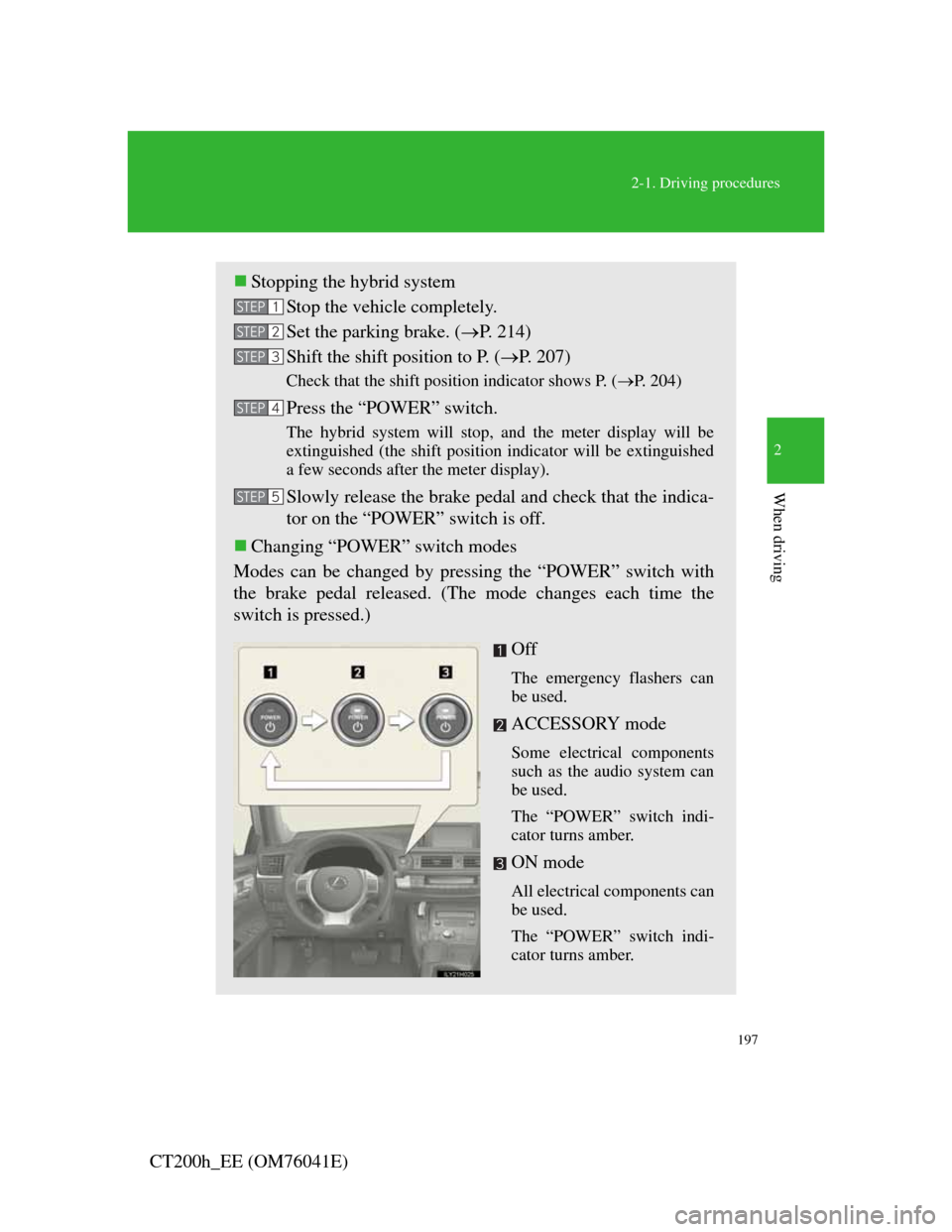
Changing “POWER” switch modes
Modes can be changed by pressing the “POWER” switch with
the brake pedal released. (The mode changes each time the
switch is pressed.)
Off
The emergency flashers can
be used.
ACCESSORY mode
Some electrical components
such as the audio system can
be used.
The “POWER” switch indi-
cator turns amber.
ON mode
All electrical components can
be used.
The “POWER” switch indi-
cator turns amber.
STEP1
STEP2
STEP3
STEP4
STEP5
Page 310 of 696

310
CT200h_EE (OM76041E)
3-1. Using the air conditioning sys-
tem and defogger
Automatic air conditioning
system ............................ 312
Rear window and outside
rear view mirror defogger
switch............................. 323
Windshield wiper de-icer . 324
3-2. Using the audio system
Audio system types.......... 325
Using the radio................. 329
Using the CD player ........ 335
Playing MP3 and WMA
discs ............................... 344
Operating an iPod ............ 353
Operating a USB
memory .......................... 364
Optimal use of the audio
system ............................ 373
Using the AUX port......... 376
Using the steering wheel
audio switches ............... 377
Page 311 of 696
3Interior features
311
CT200h_EE (OM76041E)
3-3. Using the Bluetooth® audio
system
Bluetooth
® audio system . 381
Using the Bluetooth®
audio system .................. 387
Operating a Bluetooth
®
enabled portable player .. 392
Setting up a Bluetooth
®
enabled portable player .. 396
Bluetooth
® audio system
setup ............................... 401
3-4. Using the hands-free phone
system (for cellular phones)
Hands-free system for
cellular phone................. 402
Using the hands-free system
(for cellular phone) ........ 411
Making a phone call ......... 417
Setting a cellular phone.... 422
Security and system setup 426
Using the phone book ...... 4313-5. Using the interior lights
Interior lights list ............. 438
• Personal/interior light
main switch.................... 439
• Front personal/interior
lights .............................. 439
• Rear interior light .......... 440
3-6. Using the storage features
List of storage features .... 441
• Glove box ...................... 442
• Console box ................... 443
• Cup holders.................... 444
• Bottle holders................. 445
• Auxiliary boxes ............. 446
3-7. Other interior features
Sun visors ........................ 448
Vanity mirrors .................. 449
Clock................................ 450
Power outlet ..................... 451
Heated steering wheel...... 453
Seat heaters ...................... 455
Floor mat.......................... 457
Luggage compartment
features .......................... 459
Page 325 of 696
325
3
Interior features
CT200h_EE (OM76041E)
3-2. Using the audio system
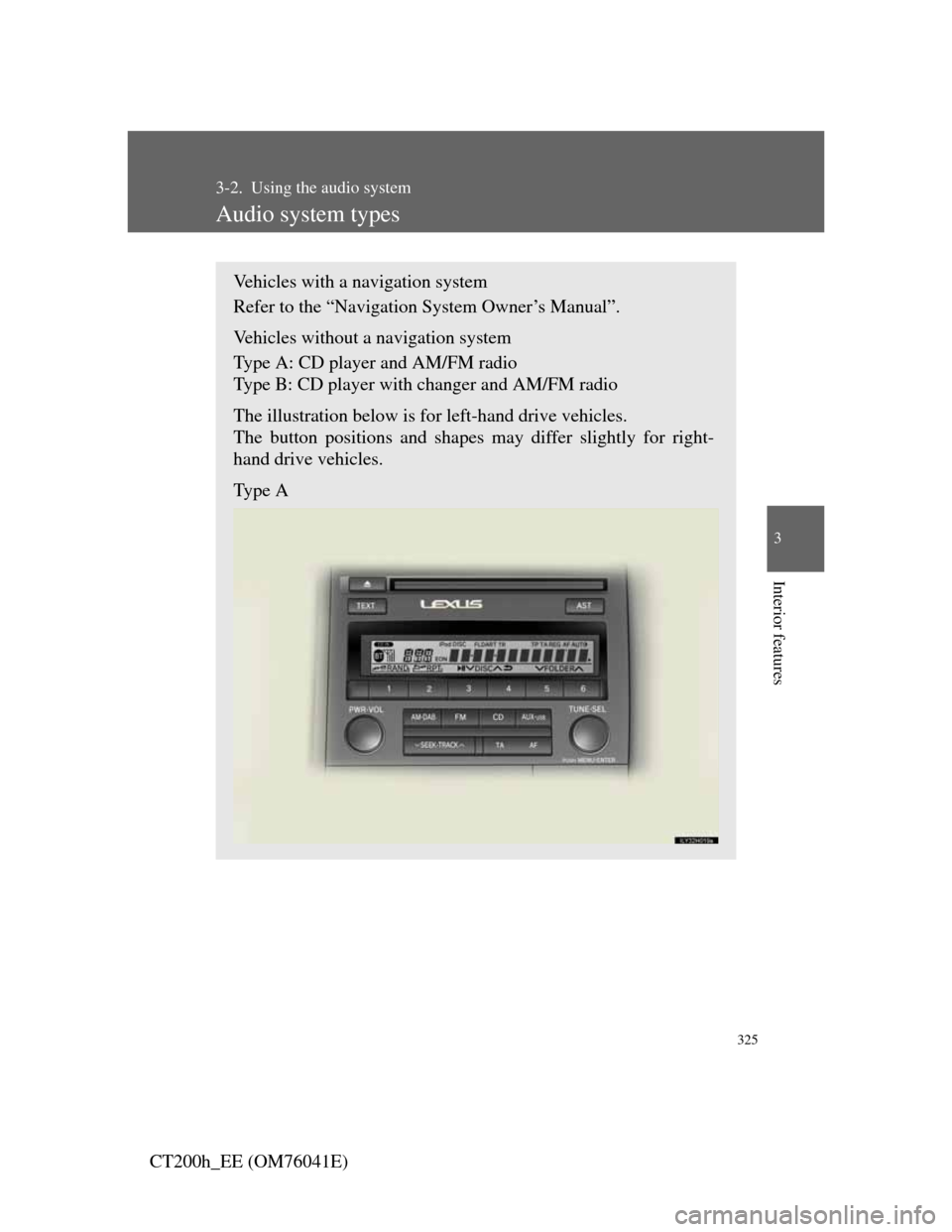
Audio system types
Vehicles with a navigation system
Refer to the “Navigation System Owner’s Manual”.
Vehicles without a navigation system
Type A: CD player and AM/FM radio
Type B: CD player with changer and AM/FM radio
The illustration below is for left-hand drive vehicles.
The button positions and shapes may differ slightly for right-
hand drive vehicles.
Type A
Page 326 of 696

326
3-2. Using the audio system
CT200h_EE (OM76041E)
Type B
TitlePage
Using the radioP. 3 2 9
Using the CD playerP. 3 3 5
Playing MP3 and WMA discsP. 3 4 4
Operating an iPodP. 3 5 3
Operating a USB memoryP. 3 6 4
Optimal use of the audio systemP. 3 7 3
Using the AUX portP. 3 7 6
Using the steering wheel audio switchesP. 3 7 7
Page 327 of 696
327
3-2. Using the audio system
3
Interior features
CT200h_EE (OM76041E)
Using cellular phones
Interference may be heard through the audio system’s speakers if a cellular
phone is being used inside or close to the vehicle while the audio system is
operating.
CAUTION
Certification for the radio (for Italy)
IL PRODUTTORE Panasonic Corporation Automotive Systems Company
4261, Ikonobe-cho, Tsuzuki-ku, Yokohama, Japan DI QUESTO
APPARECCHIO MODELLO 86120-76140 (Radio-CD) DICHIARA CHE
ESSO E’CONFORME AL D.M.28.08.1995 Nr.548, OTTEMPERANDO
ALLE PRESCRIZIONI DI CUI AL D.M.25.6.1985 (PARAGRAFO
3,ALL.A) ED AL D.M.27.8.1987 (PARAGRAFO 3,ALL.I).
IL PRODUTTORE PIONEER CORPORATION 1-1, Shin-ogura, Saiwai-
ku, Kawasaki-shi, Kanagawa, 212-0031, Japan DI QUESTO
APPARECCHIO MODELLO 86120-76250 (radio-CD changer)
DICHIARA CHE ESSO E’ CONFORME AL D.M.28.08.1995 No.548,
OTTEMPERANDO ALLE PRESCRIZIONI DI CUI AL D.M.25.6.1985
(PARAGRAFO 3,ALL.A) ED AL D.M.27.8.1987 (PARAGRAFO
3,ALL.I).
Certification for the disc player with a changer
This product is a class 1 laser product.
A laser beam leak may result in hazardous radiation exposure.
Do not open the cover of the player or attempt to repair the unit yourself.
Refer servicing to qualified personnel.
Laser power: No hazardous
Page 328 of 696
328
3-2. Using the audio system
CT200h_EE (OM76041E)
NOTICE
To prevent 12-volt battery discharge
Do not leave the audio system on longer than necessary with the hybrid sys-
tem is not operating.
To avoid damaging the audio system
Take care not to spill drinks or other fluids over the audio system.
Page 329 of 696

329
3-2. Using the audio system
3
Interior features
CT200h_EE (OM76041E)
Using the radio
Type A
Displaying text mes-Automatic presetting radio stations
Station selec-
Adjusting the fre-TA mode
button
Seeking the frequency AM•DAB/FM
mode buttons
Powe Volume
AF mode button
Page 330 of 696

330
3-2. Using the audio system
CT200h_EE (OM76041E)
Type B
Station selector
Displaying
text message
Adjusting the
frequency
Automatic presetting radio sta- Seeking the frequency AM•DAB/FM
mode buttonsPowe Volume
Program type button
AF mode
button
TA mode button
Page 331 of 696

331
3-2. Using the audio system
3
Interior features
CT200h_EE (OM76041E)
Setting station presets
Manually operation
Search for the desired stations by turning or press-
ing “”or “” on .
Press and hold the button (from
to ) the station
is to be set to until you hear a beep.
Automatically operation
Press and hold (type A) or (type B) until you hear a
beep.
Up to 6 stations are set in order of reception quality. When the
setting is complete, 2 beeps will be heard.
Type B:In the FM1 or FM2 mode, the stations automatically set
by the audio system will be set in the FM3 presets.
STEP1
STEP2