DUAL Lexus CT200h 2013 Owner's Manual (in English)
[x] Cancel search | Manufacturer: LEXUS, Model Year: 2013, Model line: CT200h, Model: Lexus CT200h 2013Pages: 688
Page 176 of 688

1763-4. Adjusting the steering wheels and mirrors
CT200h_OM_OM76102E_(EE)
Mirror angle can be adjusted when
The power switch is in ACCESSORY or ON mode.
Linked mirror function when reversing (type B only)
When the mirror select switch is in the “L” or “R” position, the outside rear view
mirrors will automatically angle downwards when the vehicle is reversing in
order to give a better view of the ground. To disable this function, move the mir-
ror select switch to the neutral position (between “L” and “R”).
Rain clearing mirrors (type B only)
The coating on the mirror has the rain clearing (hydrophilic) effect to make the
rear view clearer in raining. When water droplets collects on the mirror surface,
this effect causes the droplets to be spread out into a film.
The rain clearing effect will be reduced temporarily, when the dirt is adhered to
the mirror or after your vehicle is parked for a long time in underground or
indoor parking lots, etc., where there is no direct sunlight. However, the effect
will gradually recover after 1- or 2-day exposure to direct sunlight.
If you want to restore the rain clearing effect immediately, conduct the resto-
ration work (P. 481).
When the mirrors are fogged up
The outside rear view mirrors can be cleared using the mirror defoggers. Turn on
the rear window defogger to turn on the outside rear view mirror defoggers.
(P. 447, 454)
Automatic adjustment of the mirror angle (vehicles with driving position mem-
ory)
A desired mirror face angle can be entered to memory and recalled automatically
by the driving position memory. (P. 163)
Auto anti-glare function (type B only)
When the anti-glare inside rear view mirror is set to automatic mode, the outside
rear view mirrors will activate in conjunction with the anti-glare inside rear view
mirror to reduce reflected light. (P. 172)
Using automatic mode in cold weather (type B only)
When automatic mode is used in cold weather, the door mirror could freeze up
and automatic stowing and return may not be possible. In this event, remove any
ice and snow from the door mirror, then either operate the mirror using manual
mode or move the mirror by hand.
Customization
The automatic mirror folding and extending operation can be changed.
(Customizable features: P. 659)
Page 186 of 688
1864-1. Before driving
CT200h_OM_OM76102E_(EE)
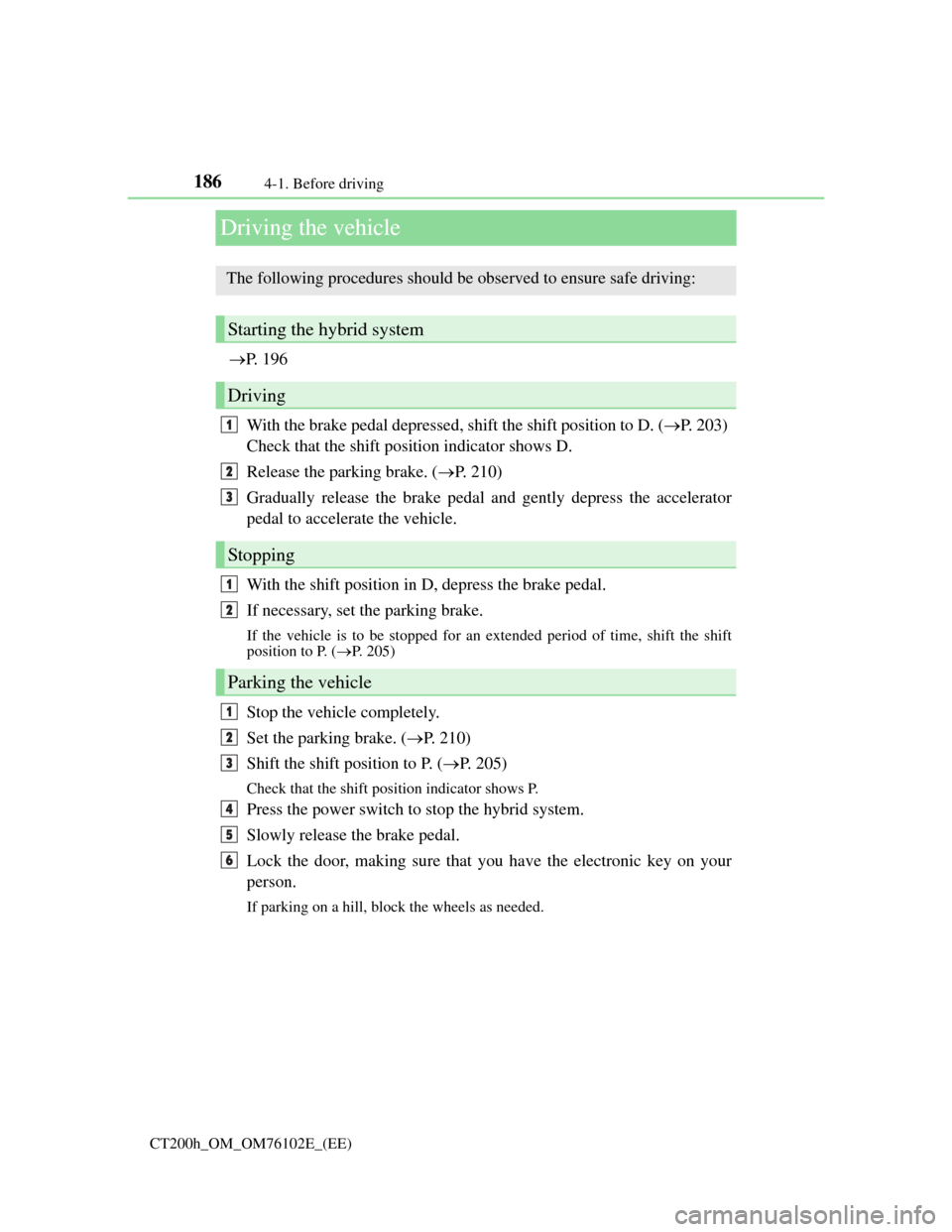
Driving the vehicle
P. 1 9 6
With the brake pedal depressed, shift the shift position to D. (P. 203)
Check that the shift position indicator shows D.
Release the parking brake. (P. 210)
Gradually release the brake pedal and gently depress the accelerator
pedal to accelerate the vehicle.
With the shift position in D, depress the brake pedal.
If necessary, set the parking brake.
If the vehicle is to be stopped for an extended period of time, shift the shift
position to P. (P. 205)
Stop the vehicle completely.
Set the parking brake. (P. 210)
Shift the shift position to P. (P. 205)
Check that the shift position indicator shows P.
Press the power switch to stop the hybrid system.
Slowly release the brake pedal.
Lock the door, making sure that you have the electronic key on your
person.
If parking on a hill, block the wheels as needed.
The following procedures should be observed to ensure safe driving:
Starting the hybrid system
Driving
Stopping
Parking the vehicle
1
2
3
1
2
1
2
3
4
5
6
Page 192 of 688

1924-1. Before driving
CT200h_OM_OM76102E_(EE)
WA R N I N G
Observe the following precautions.
Failure to do so may result in death or serious injury.
When taking a nap in the vehicle
Always turn the hybrid system off. Otherwise, if you accidentally move the
shift lever or depress the accelerator pedal, this could cause an accident or fire
due to hybrid system overheating. Additionally, if the vehicle is parked in a
poorly ventilated area, exhaust gases may collect and enter the vehicle, leading
to death or a serious health hazard.
When braking
When the brakes are wet, drive more cautiously.
Braking distance increases when the brakes are wet, and this may cause one
side of the vehicle to brake differently than the other side. Also, the parking
brake may not securely hold the vehicle.
If the electronically controlled assist function does not operate, do not follow
other vehicles closely and avoid downhill or sharp turns that require braking.
In this case, braking is still possible, but the brake pedal should be depressed
more firmly than usual. Also, the braking distance will increase. Have your
brakes fixed immediately.
The brake system consists of 2 or more individual hydraulic systems; if one of
the systems fails, the other(s) will still operate. In this case, the brake pedal
should be depressed more firmly than usual and the braking distance will
increase. Have your brakes fixed immediately.
Page 193 of 688

1934-1. Before driving
4
Driving
CT200h_OM_OM76102E_(EE)
NOTICE
When driving the vehicle
Do not depress the accelerator and brake pedals at the same time during driv-
ing, as this may restrain driving torque.
Do not use the accelerator pedal or depress the accelerator and brake pedals at
the same time to hold the vehicle on a hill.
When parking the vehicle
Always shift the shift position to P. Failure to do so may cause the vehicle to
move or the vehicle may accelerate suddenly if the accelerator pedal is acciden-
tally depressed.
Avoiding damage to vehicle parts
Do not turn the steering wheel fully in either direction and hold it there for an
extended period of time.
Doing so may damage the power steering motor.
When driving over bumps in the road, drive as slowly as possible to avoid
damaging the wheels, underside of the vehicle, etc.
If you get a flat tire while driving
A flat or damaged tire may cause the following situations. Hold the steering
wheel firmly and gradually depress the brake pedal to slow down the vehicle.
It may be difficult to control your vehicle.
The vehicle will make abnormal sounds or vibrations.
The vehicle will lean abnormally.
Information on what to do in case of a flat tire (P. 590, 604)
When encountering flooded roads
Do not drive on a road that has flooded after heavy rain etc. Doing so may
cause the following serious damage to the vehicle:
Engine stalling
Short in electrical components
Engine damage caused by water immersion
In the event that you drive on a flooded road and the vehicle is flooded, be sure
to have any authorized Lexus dealer or repairer, or another duly qualified and
equipped professional check the following:
Brake function
Changes in quantity and quality of oil and fluid used for the engine, transmis-
sion, etc.
Lubricant condition for the bearings and suspension joints (where possible),
and the function of all joints, bearings, etc.
If the P position control system is damaged by flooding, it may not be possible
to shift the shift position to P, or from P to other positions. When the shift posi-
tion cannot be changed from P to any other position, the front wheels will lock,
and you will be unable to tow the vehicle with the front wheels on the ground,
as the front wheels may be locked. In this case, transport the vehicle with both
front wheels or all four wheels lifted.
Page 219 of 688

2194-3. Operating the lights and wipers
4
Driving
CT200h_OM_OM76102E_(EE)
Washer/wiper dual operation
The wipers will automatically oper-
ate a couple of times after the washer
squirts.
Vehicles with headlight cleaners: If
the headlights are on, the headlight
cleaners will operate once.
Rain-sensing windshield wipers
Rain-sensing operation
Low speed operation
High speed operation
Temporary operation
When “AUTO” is selected, the wip-
ers will operate automatically when
the sensor detects falling rain. The
system automatically adjusts wiper
timing in accordance with rain vol-
ume and vehicle speed.
7
1
2
3
4
Page 220 of 688

2204-3. Operating the lights and wipers
CT200h_OM_OM76102E_(EE)
The sensor sensitivity can be adjusted when “AUTO” is selected.
Increases the sensitivity
Decreases the sensitivity
Washer/wiper dual operation
The wipers will automatically oper-
ate a couple of times after the washer
squirts.
Vehicles with headlight cleaners: If
the headlights are on, the headlight
cleaners will operate once.
The windshield wipers and washer can be operated when
The power switch is in ON mode.
Raindrop sensor (vehicles with rain-sensing windshield wipers)
If the wiper switch is turned to the “AUTO” position while the power switch is
in ON mode, the wipers will operate once to show that AUTO mode is acti-
vated.
If the temperature of the raindrop sensor is 90C (194F) or higher, or -15C
(5F) or lower, automatic operation may not occur. In this case, operate the wip-
ers in any mode other than “AUTO”.
If no windshield washer fluid sprays
Check that the washer nozzles are not blocked if there is washer fluid in the
washer fluid tank.
5
6
7
The raindrop sensor judges the amount of
raindrops.
An optical sensor is adopted. It may not
operate properly when sunlight from the
rising or setting of the sun intermittently
strikes the windshield, or if bugs etc. are
present on the windshield.
Page 222 of 688

2224-3. Operating the lights and wipers
CT200h_OM_OM76102E_(EE)
Rear window wiper and washer
Turning the end of the lever turns on the rear window wiper and washer.
Intermittent operation
Normal operation
Washer/wiper dual opera-
tion
Washer/wiper dual opera-
tion
The rear window wiper and washer can be operated when
The power switch is in ON mode.
: If equipped
Operating the wiper lever
1
2
3
4
NOTICE
When the rear window is dry
Do not use the wiper, as it may damage the rear window.
When the washer fluid tank is empty
Do not operate the switch continually as the washer fluid pump may overheat.
Page 283 of 688

281
4 4-6. Driving tips
Driving
CT200h_OM_OM76102E_(EE)
Hybrid vehicle driving tips
Using Eco drive mode
When using Eco drive mode, the torque corresponding to the accelera-
tor pedal depression amount can be generated more smoothly than it is
in normal conditions. In addition, the operation of the air conditioning
system (heating/cooling) will be minimized, improving the fuel econ-
omy. (P. 267)
Use of Hybrid System Indicator
The Eco-friendly driving is possible by keeping the indicator needle of
Hybrid System Indicator within Eco area. (P. 107)
Shift lever operation
Shift the shift position to D when stopped at a traffic light, or driving in
heavy traffic etc. Shift the shift position to P when parking. When
using the N position, there is no positive effect on fuel consumption. In
the N position, the gasoline engine operates but electricity cannot be
generated. Also, when using the air conditioning system, etc., the
hybrid battery (traction battery) power is consumed.
Accelerator pedal/brake pedal operation
Drive your vehicle smoothly. Avoid abrupt acceleration and deceler-
ation. Gradual acceleration and deceleration will make more effec-
tive use of the electric motor (traction motor) without having to use
gasoline engine power.
Avoid repeated acceleration. Repeated acceleration consumes
hybrid battery (traction battery) power, resulting in poor fuel con-
sumption. Battery power can be restored by driving with the acceler-
ator pedal slightly released.
When braking
Make sure to operate the brakes gently and in a timely manner. A
greater amount of electrical energy can be retained when slowing
down.
For economical and ecological driving, pay attention to the following
points:
Page 299 of 688
2965-2. Using the audio system
CT200h_OM_OM76102E_(EE)
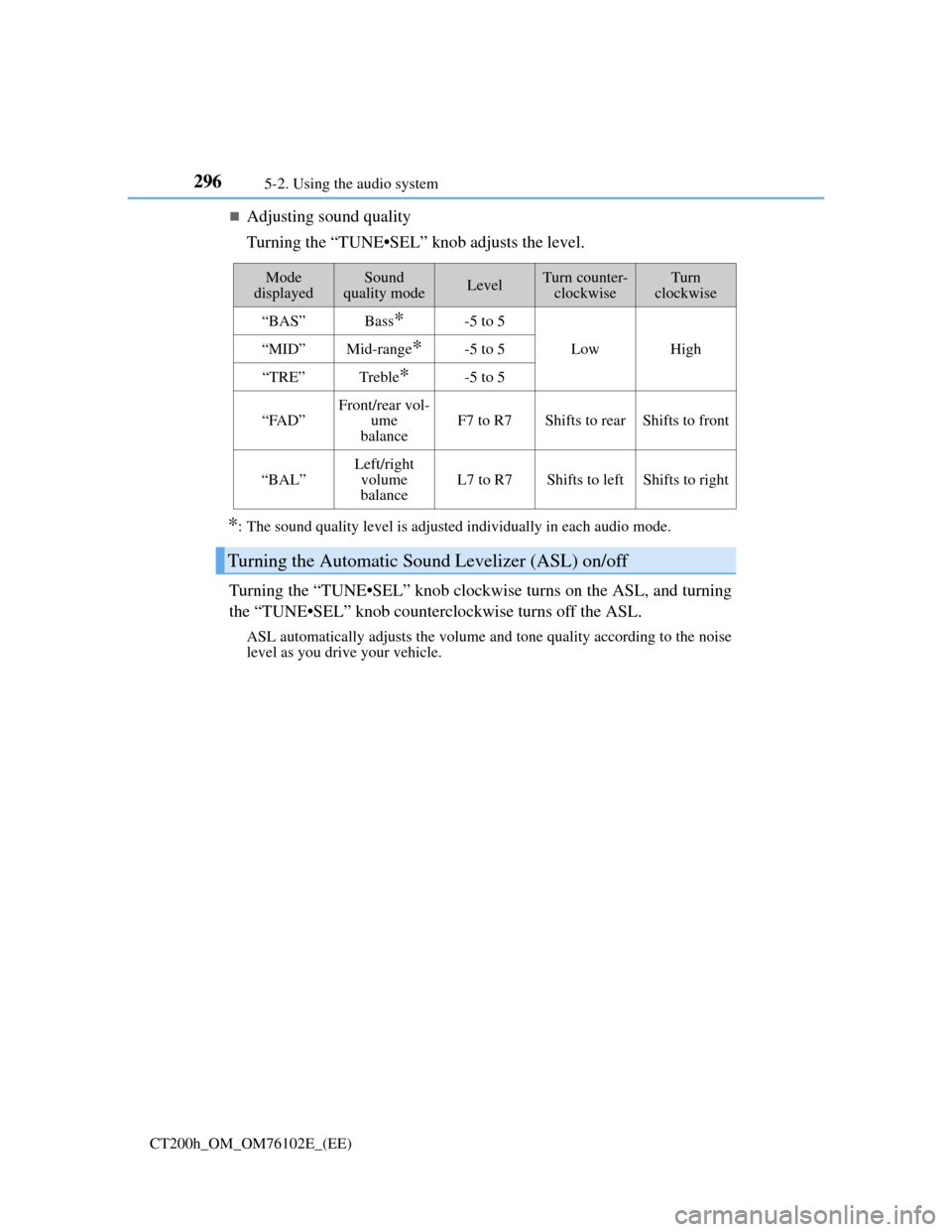
Adjusting sound quality
Turning the “TUNE•SEL” knob adjusts the level.
*: The sound quality level is adjusted individually in each audio mode.
Turning the “TUNE•SEL” knob clockwise turns on the ASL, and turning
the “TUNE•SEL” knob counterclockwise turns off the ASL.
ASL automatically adjusts the volume and tone quality according to the noise
level as you drive your vehicle.
Mode
displayedSound
quality modeLevelTurn counter-
clockwiseTurn
clockwise
“BAS”Bass*-5 to 5
LowHigh“MID”Mid-range*-5 to 5
“TRE”Treble*-5 to 5
“FAD”Front/rear vol-
ume
balanceF7 to R7Shifts to rearShifts to front
“BAL”
Left/right
volume
balance
L7 to R7Shifts to leftShifts to right
Turning the Automatic Sound Levelizer (ASL) on/off
Page 308 of 688

3055-4. Playing audio CDs and MP3/WMA discs
5
Audio system
CT200h_OM_OM76102E_(EE)
Lens cleaners
Do not use lens cleaners. Doing so may damage the CD player.
If discs are left inside the CD player or in the ejected position for extended peri-
ods of time
The discs may be damaged and may not play properly.
MP3 and WMA files
MP3 (MPEG Audio LAYER 3) is a standard audio compression format.
Files can be compressed to approximately 1/10 of their original size by using
MP3 compression.
WMA (Windows Media Audio) is a Microsoft audio compression format.
This format compresses audio data to a size smaller than that of the MP3 format.
There is a limit to the MP3 and WMA file standards that can be used and to the
media/formats on which the files are recorded.
MP3 file compatibility
• Compatible standards
MP3 (MPEG1 LAYER3, MPEG2 LSF LAYER3)
• Compatible sampling frequencies
MPEG1 LAYER3: 32, 44.1, 48 (kHz)
MPEG2 LSF LAYER3: 16, 22.05, 24 (kHz)
• Compatible bit rates (compatible with VBR)
MPEG1 LAYER3: 64, 80, 96, 112, 128, 160, 192, 224, 256, 320 (kbps)
MPEG2 LSF LAYER3: 64, 80, 96, 112, 128, 144, 160 (kbps)
• Compatible channel modes: stereo, joint stereo, dual channel and monaural
WMA file compatibility
• Compatible standards
WMA Ver. 7, 8, 9
• Compatible sampling frequencies
32, 44.1, 48 (kHz)
• Compatible bit rates (only compatible with 2-channel playback)
Ver. 7, 8: CBR 48, 64, 80, 96, 128, 160, 192 (kbps)
Ver. 9: CBR 48, 64, 80, 96, 128, 160, 192, 256, 320 (kbps)