audio Lexus CT200h 2016 Owner's Manual (in English)
[x] Cancel search | Manufacturer: LEXUS, Model Year: 2016, Model line: CT200h, Model: Lexus CT200h 2016Pages: 632, PDF Size: 8.5 MB
Page 412 of 632
4126-1. Using the air conditioning system and defogger
CT200h_OM_OM76197U_(U)
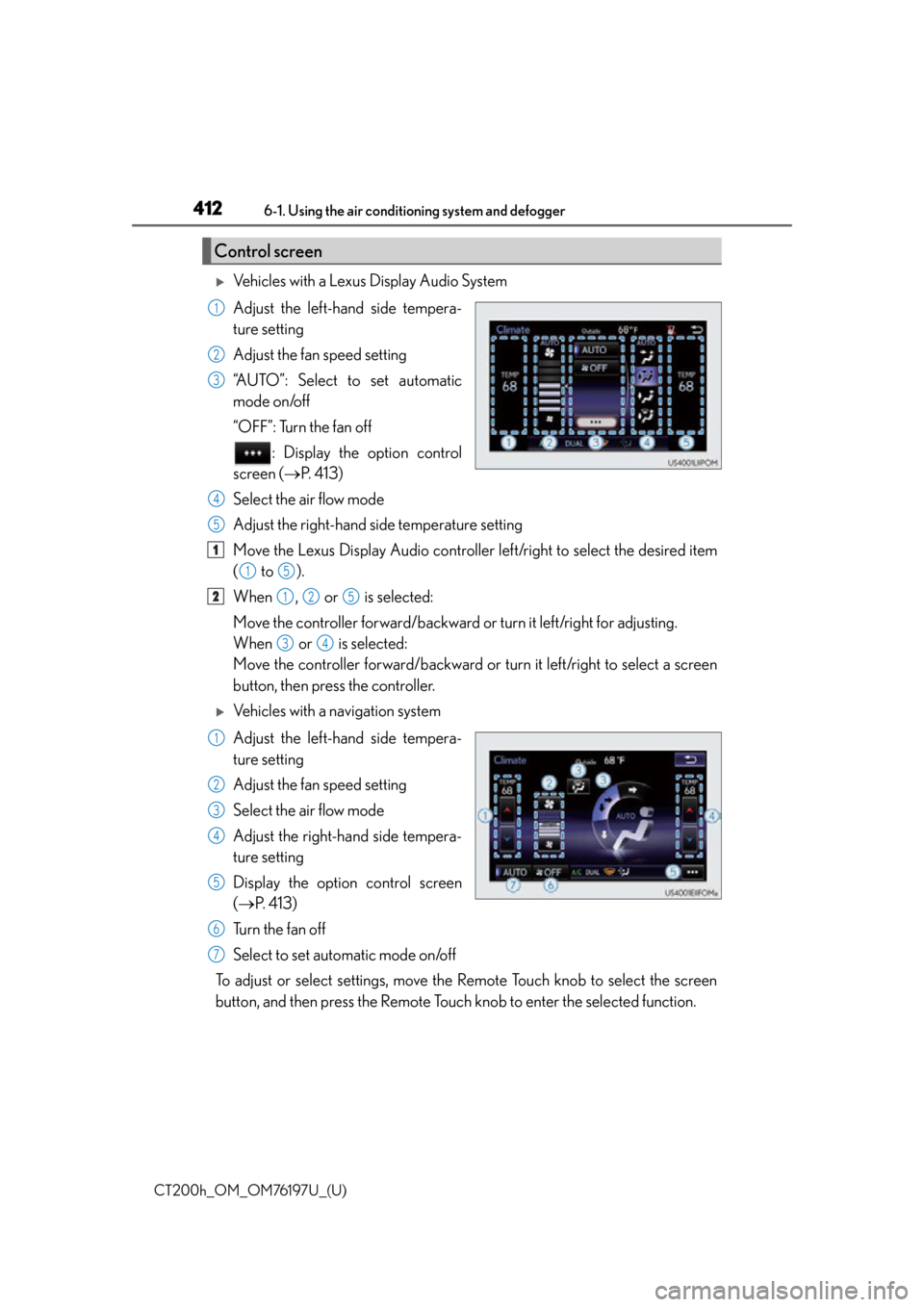
Vehicles with a Lexus Display Audio System
Adjust the left-hand side tempera-
ture setting
Adjust the fan speed setting
“AUTO”: Select to set automatic
mode on/off
“OFF”: Turn the fan off : Display the option control
screen ( P. 4 1 3 )
Select the air flow mode
Adjust the right-hand side temperature setting
Move the Lexus Display Audio controller left/right to select the desired item
( to ).
When , or is selected:
Move the controller forward/backward or turn it left/right for adjusting.
When or is selected:
Move the controller forward/backward or turn it left/right to select a screen
button, then press the controller.
Vehicles with a navigation system
Adjust the left-hand side tempera-
ture setting
Adjust the fan speed setting
Select the air flow mode
Adjust the right-hand side tempera-
ture setting
Display the option control screen
( P. 4 1 3 )
Tu r n t h e f a n o f f
Select to set automatic mode on/off
To adjust or select settings, move the Remote Touch knob to select the screen
button, and then press the Remote Touch knob to enter the selected function.
Control screen
1
2
3
4
5
1
15
2125
34
1
2
3
4
5
6
7
Page 413 of 632
CT200h_OM_OM76197U_(U)
4136-1. Using the air conditioning system and defogger
6
Interior features
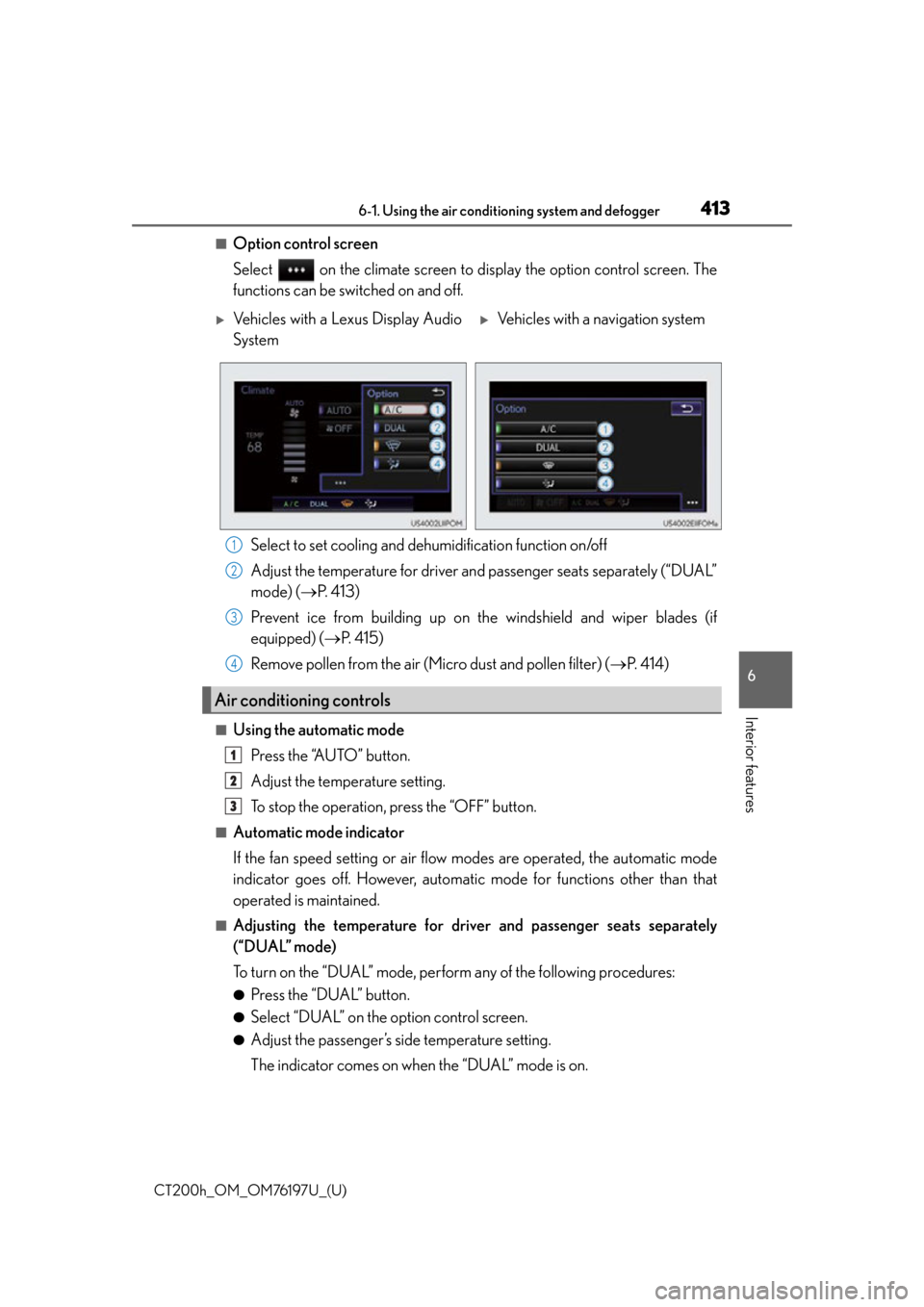
■Option control screen
Select on the climate screen to display the option control screen. The
functions can be switched on and off.
Select to set cooling and dehumidification function on/off
Adjust the temperature for driver and passenger seats separately (“DUAL”
mode) ( P. 4 1 3 )
Prevent ice from building up on th e windshield and wiper blades (if
equipped) ( P. 4 1 5 )
Remove pollen from the air (Micro dust and pollen filter) ( P. 4 1 4 )
■Using the automatic mode
Press the “AUTO” button.
Adjust the temperature setting.
To stop the operation, press the “OFF” button.
■Automatic mode indicator
If the fan speed setting or air flow modes are operated, the automatic mode
indicator goes off. However, automati c mode for functions other than that
operated is maintained.
■Adjusting the temperature for driver and passenger seats separately
(“DUAL” mode)
To turn on the “DUAL” mode, perform any of the following procedures:
●Press the “DUAL” button.
●Select “DUAL” on the option control screen.
●Adjust the passenger’s side temperature setting.
The indicator comes on when the “DUAL” mode is on.
Vehicles with a Lexus Display Audio
SystemVehicles with a navigation system
Air conditioning controls
1
2
3
4
1
2
3
Page 418 of 632

418
CT200h_OM_OM76197U_(U)6-1. Using the air conditioning system and defogger
Automatic air conditioning
system (Vehicles without a
navigation system or Le xus Display Audio System)
■Adjusting the temperature setting
Press to increase the temperature and to decrease the tem-
perature.
■Adjusting the fan speed setting
Press to increase the fan speed and to decrease the fan
speed.
Press the “OFF” button to turn the fan off.
Air outlets and fan speed are automatica lly adjusted according to the temper-
ature setting.
Control panel
Page 466 of 632

466
CT200h_OM_OM76197U_(U)7-1. Maintenance and care
WA R N I N G
■Wa t e r i n t h e v e h i c l e
●Do not splash or spill liquid in the vehicle,
such as on the floor, in the hybrid battery
(traction battery) air vents, and in the luggage compartment.
Doing so may cause the hybrid battery, electrical components, etc. to malfunction or
catch fire.
●Do not get any of the SRS components or wiring in the vehicle interior wet.
( P. 3 9 )
An electrical malfunction may cause the airbags to deploy or not function properly,
resulting in death or serious injury.
■Cleaning the interior (especially instrument panel)
Do not use polish wax or polish cleaner. The instrument panel may reflect off the wind-
shield, obstructing the driver’s view and leading to an accident, resulting in death or
serious injury.
NOTICE
■Cleaning detergents
●Do not use the following types of detergent, as they may discolor the vehicle interior
or cause streaks or damage to painted surfaces:
• Non-seat portions: Organic substances su ch as benzene or gasoline, alkaline or
acidic solutions, dye, and bleach
• Seats: Alkaline or acidic solutions, such as thinner, benzene, and alcohol
●Do not use polish wax or polish cleaner. The instrument panel’s or other interior part’s
painted surface may be damaged.
■Preventing damage to leather surfaces
Observe the following precautions to avoid damage to and deterioration of leather
surfaces:
●Remove any dust or dirt from leather surfaces immediately.
●Do not expose the vehicle to direct sunlight for extended periods of time. Park the
vehicle in the shade, especially during summer.
●Do not place items made of vinyl, plastic, or containing wax on the upholstery, as they
may stick to the leather su rface if the vehicle interior heats up significantly.
■Water on the floor
Do not wash the vehicle floor with water.
Vehicle systems such as the audio system may be damaged if water comes into contact
with electrical components such as the au dio system above or under the floor of the
vehicle. Water may also cause the body to rust.
■Cleaning the inside of the rear window
●Do not use glass cleaner to clean the rear window, as this may cause damage to the
rear window defogger heater wires or antenna. Use a cloth dampened with luke-
warm water to gently wipe the window cl ean. Wipe the window in strokes running
parallel to the heater wires or antenna.
●Be careful not to scratch or damage the heater wires or antenna.
Page 533 of 632
5338-2. Steps to take in an emergency
CT200h_OM_OM76197U_(U)
8
When trouble arises
■If the malfunction indicator lamp comes on while driving
First check the following:
●Is the fuel tank empty?
If it is, fill the fuel tank immediately.
●Is the fuel tank cap loose?
If it is, tighten it securely.
The malfunction indicator lamp will go off after several driving trips.
If the malfunction indicator lamp does not go off even after several trips, contact your
Lexus dealer as soon as possible.
■When the tire pressure warning light comes on
Check the tire inflation pressure and adjust to the appropriate level. Pushing the tire
pressure warning reset switch will not tu rn off the tire pressure warning light.
■The tire pressure warning light may come on due to natural causes
The tire pressure warning light may come on due to natural causes such as natural air
leaks and tire inflation pressure changes caused by temperature. In this case, adjusting
the tire inflation pressure will turn off the warning light (after a few minutes).
■When a tire is replaced with a spare tire
The compact spare tire is not equipped with a tire pressure warning valve and transmit-
ter. If a tire goes flat, the tire pressure warning light will not turn off even though the flat
tire has been replaced with the spare tire. Replace the spare tire with the repaired tire
and adjust the tire inflation pressure. The tire pressure warning light will go off after a few
minutes.
■If the tire pressure warning system is not functioning
P. 4 9 4
■If the tire pressure warning light frequently comes on after blinking for 1 minute
If the tire pressure warning light frequently comes on after blinking for 1 minute when the
power switch is turned to ON mode, ha ve it checked by your Lexus dealer.
■Warning buzzer
In some cases, the buzzer may not be heard due to being in a noisy location or audio
sound.
■Customization that can be configured at Lexus dealer
The vehicle speed linked seat belt reminder buzzer can be disabled.
(Customizable features: P. 5 9 1 )
However, Lexus recommends that the seat belt reminder buzzer be operational to alert
the driver and front passenger when seat belts are not fastened.
Page 564 of 632
5648-2. Steps to take in an emergency
CT200h_OM_OM76197U_(U)
■Starting the hybrid system when the 12-volt battery is discharged
The hybrid system cannot be started by push-starting.
■To prevent 12-volt battery discharge
●Turn off the headlights and the audio system while the hybrid system is off.
●Turn off any unnecessary electrical components when the vehicle is running at a low
speed for an extended period, such as in heavy traffic.
■When the 12-volt battery is removed or discharged
●The hybrid system may not start. ( P. 4 8 8 )
●If the 12-volt battery discharges while the shift position is in P, it may not be possible to
shift the shift position to othe r positions. In this case, the vehicle cannot be towed with-
out lifting both front wheels because the front wheels will be locked. (P. 5 2 4 )
●When the 12-volt battery is reconnected, start the hybrid system and confirm that the
shift position can be changed to each po sition using the shift position indicator.
■Charging the 12-volt battery
The electricity stored in the 12-volt battery will discharge gradually even when the vehicle
is not in use, due to natural discharge and the draining effects of certain electrical appli-
ances. If the vehicle is left for a long time, the 12-volt battery may discharge, and the
hybrid system may be unable to start. (The 12-volt battery recharges automatically while
the hybrid system is operating.)
WA R N I N G
■Avoiding 12-volt battery fires or explosions
Observe the following precautions to preven t accidentally igniting the flammable gas
that may be emitted from the 12-volt battery:
●Make sure each jumper cable is connected to the correct terminal and that it is not
unintentionally in contact with any other than the intended terminal.
●Do not allow the other end of the jumper cable connected to the “+” terminal to come
into contact with any other parts or metal surfaces in the area, such as brackets or
unpainted metal.
●Do not allow the + and - clamps of the jump er cables to come into contact with each
other.
●Do not smoke, use matches, cigarette lighters or allow open flame near the 12-volt
battery.
Page 591 of 632

591
CT200h_OM_OM76197U_(U)9-2. Customization
9
Vehicle specifications
Customizable features
Some function settings are changed simultaneously with other functions being
customized. Contact your Lexus dealer for further details.
When customizing vehicle features, ensure that the vehicle is parked in a safe
place with the shift position in P and the parking brake set.
■Changing using the Remote Touch
Press the “MENU” button on the Remote Touch.
Select “Setup” on the “Menu” screen and select “Vehicle”.
Various setting can be changed. Refer to the list of settings that can be
changed for details.
■Changing using the Lexus Display Audio controller Press the “MENU” button on the Lexus Display Audio controller.
Select “Setup” on the “Menu” screen and select “Vehicle”.
Various setting can be changed. Refer to the list of settings that can be
changed for details.
■Changing using the “DISP” switch Press the “DISP” switch to display the “SETTINGS” screen while the vehi-
cle is stopped, and then press and hold the “DISP” switch to display the cus-
tomize mode screen.
Press the “DISP” switch and select the item, and then press and hold the
“DISP” switch.
Press the “DISP” switch and select the desired setting, and then press and
hold the “DISP” switch.
To go back to the previous screen or exit the customize mode, press the
“DISP” switch to select the “EXIT”, and then press and hold the “DISP” switch.
Your vehicle includes a variety of electronic features that can be personalized
to suit your preferences. The settings of these features can be changed using
the “DISP” switch, the Remote Touch or Lexus Display Audio controller, or at
your Lexus dealer.
Customizing vehicle features
1
2
1
2
1
2
3
Page 592 of 632

592
CT200h_OM_OM76197U_(U)9-2. Customization
Vehicles with a navigation system or
Lexus Display Audio system: Settings
that can be changed using the screen of the Remote Touch or Lexus Display
Audio controller
Vehicles with a navigation system or Lexus Display Audio system: Settings
that can be changed using the “DISP” switch
Vehicles without a navigation system or Lexus Display Audio system: Settings
that can be changed using the “DISP” switch
Settings that can be changed by your Lexus dealer
Definition of symbols: O = Available, – =Not available
■Door lock ( P. 105, 560)
Customizable Features
1
2
3
4
FunctionDefault
settingCustomized setting
Unlocking on second key
turn
On
(Driver’s door
unlocked in first
step, all doors
unlocked in sec-
ond step)
Off
(All doors
unlocked in first
step)
–––O
Speed linked door locking
functionOffOnO–OO
Shift position linked door
locking functionOnOffO–OO
Shift position linked door
unlocking functionOnOffO–OO
Driver’s door linked door
unlocking functionOffOnO–OO
1234
Page 611 of 632

611
CT200h_OM_OM76197U_(U)
Index
What to do if... (Troubleshooting).................................. 612
Alphabetical index...................................616
For vehicles with a navigation system, refer to the “NAVIGATION
SYSTEM OWNER’S MANUAL” for information regarding the equip-
ment listed below.
• Navigation system
• Rear view monitor system
• Audio/visual system
Page 616 of 632

616Alphabetical index
CT200h_OM_OM76197U_(U)
Alphabetical index
A/C ................................................... 410, 418Air conditioning filter....................... 502
Automatic air conditioning system ........................................ 410, 418
Micro dust and pollen filter ............................................. 414, 420
ABS (Anti-lock Brake System)....... 235 Function ..................................................235
Warning light ...................................... 530
Air conditioning filter .......................... 502
Air conditioning system ............ 410, 418 Air conditioning filter....................... 502
Automatic air conditioning system ........................................ 410, 418
Micro dust and pollen filter ............................................. 414, 420
Airbags ........................................................ 38 Airbag operating conditions ........... 43
Airbag precautions for your child ..........................................................40
Airbag warning light ........................ 530
Correct driving posture ....................30
Curtain shield airbag operating conditions........................ 44
Curtain shield airbag precautions .............................................41
Front passenger occupant classification system ......................... 47
General airbag precautions............40 Locations of airbags............................ 38
Modification and disposal of
airbags .................................................... 43
Side airbag operating conditions ............................................. 44
Side airbag precautions ...................... 41
Side and curtain shield airbags operating conditions ....................... 44
Side and curtain shield airbags precautions ............................................ 41
SRS airbag instructions for Canadian owners ..........................604
SRS airbags ............................................. 38
Alarm ............................................................ 76 Alarm ...........................................................76
Warning buzzer................................. 529
Anchor brackets.......................................56
Antenna Radio ................................ 262, 344, 462
Smart access system with push-button start......................114
Anti-lock brake system (ABS)........ 235 Function .................................................. 235
Warning light .......................................530
Approach warning ................................ 193
Assist grips ...............................................442
Audio system (with navigation system)
*
A