door lock Lexus CT200h 2016 (in English) Owner's Guide
[x] Cancel search | Manufacturer: LEXUS, Model Year: 2016, Model line: CT200h, Model: Lexus CT200h 2016Pages: 632, PDF Size: 8.5 MB
Page 114 of 632
114
CT200h_OM_OM76197U_(U)3-2. Opening, closing and locking the doors
Smart access system with push-button start
●Locks and unlocks the doors (
P. 1 0 5 )
●Locks and unlocks the back door ( P. 1 1 0 )
●Starts and stops the hybrid system (P. 1 5 6 )
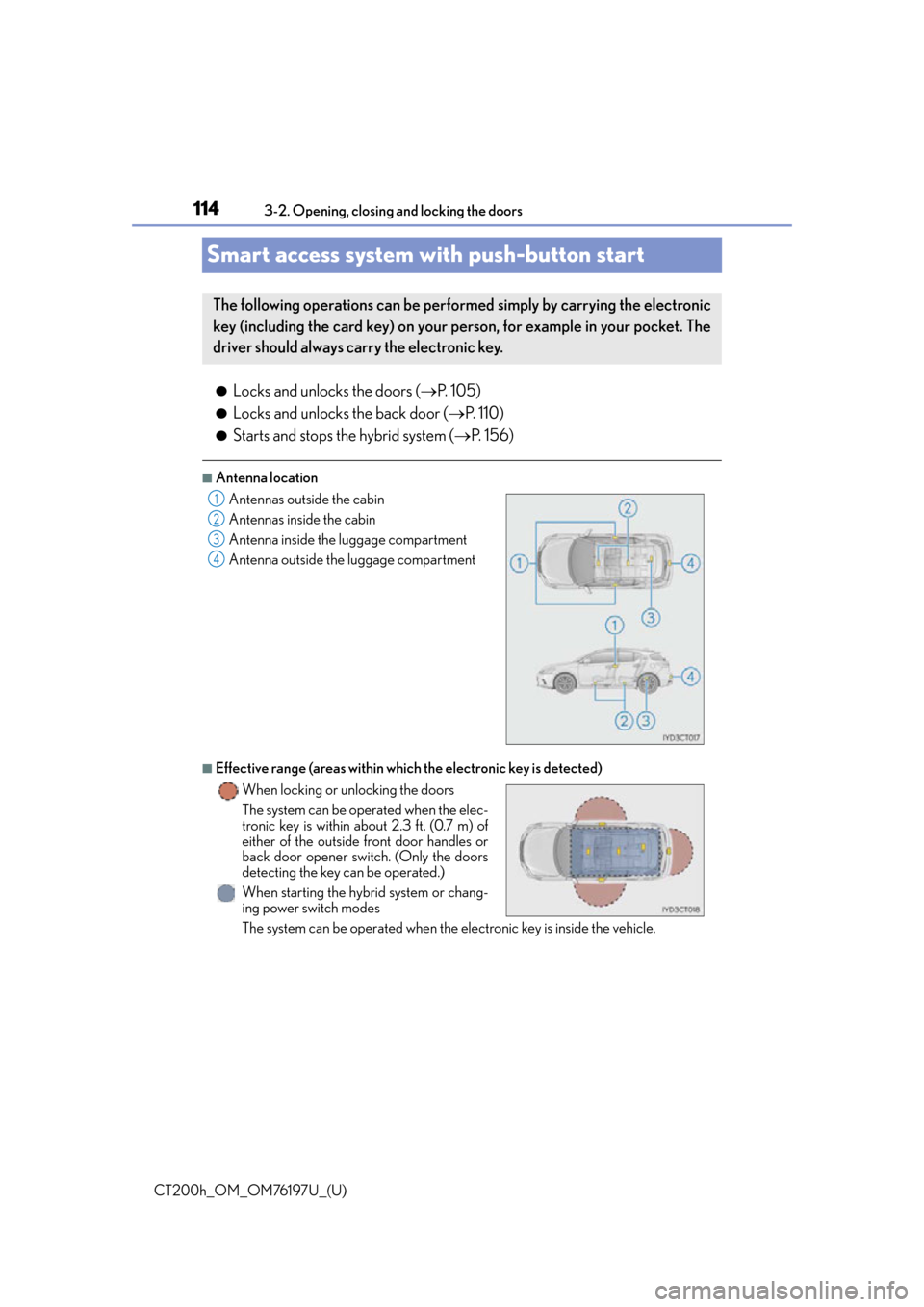
■Antenna location
■Effective range (areas within whic h the electronic key is detected)
The system can be operated when the electronic key is inside the vehicle.
The following operations can be performed simply by carrying the electronic
key (including the card key) on your person, for example in your pocket. The
driver should always carry the electronic key.
Antennas outside the cabin
Antennas inside the cabin
Antenna inside the luggage compartment
Antenna outside the luggage compartment
When locking or unlocking the doors
The system can be operated when the elec-
tronic key is within about 2.3 ft. (0.7 m) of
either of the outside front door handles or
back door opener sw itch. (Only the doors
detecting the key can be operated.)
When starting the hybrid system or chang-
ing power switch modes1
2
3
4
Page 115 of 632
CT200h_OM_OM76197U_(U)
1153-2. Opening, closing and locking the doors
3
Operation of each component
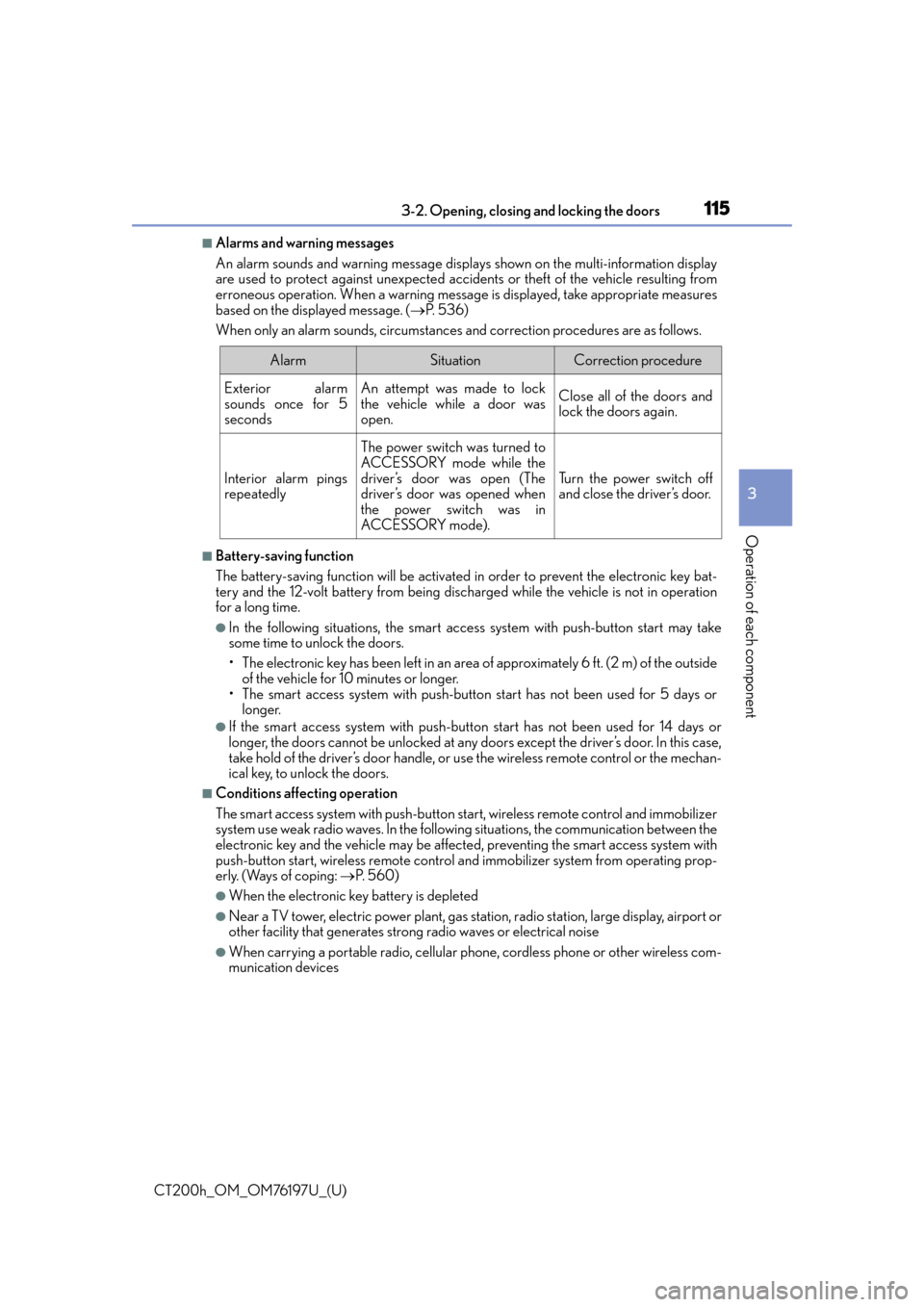
■Alarms and warning messages
An alarm sounds and warning message displa ys shown on the multi-information display
are used to protect against unexpected acci dents or theft of the vehicle resulting from
erroneous operation. When a warning messag e is displayed, take appropriate measures
based on the displayed message. ( P. 5 3 6 )
When only an alarm sounds, circumstances and correction procedures are as follows.
■Battery-saving function
The battery-saving function will be activated in order to prevent the electronic key bat-
tery and the 12-volt battery from being discha rged while the vehicle is not in operation
for a long time.
●In the following situations, the smart access system with push-button start may take
some time to unlock the doors.
• The electronic key has been left in an area of approximately 6 ft. (2 m) of the outside
of the vehicle for 10 minutes or longer.
• The smart access system with push-butto n start has not been used for 5 days or
longer.
●If the smart access system with push-butto n start has not been used for 14 days or
longer, the doors cannot be unlocked at any doors except the driver’s door. In this case,
take hold of the driver’s door handle, or us e the wireless remote control or the mechan-
ical key, to unlock the doors.
■Conditions affe cting operation
The smart access system with push-button star t, wireless remote control and immobilizer
system use weak radio waves. In the followi ng situations, the communication between the
electronic key and the vehicle may be affected, preventing the smart access system with
push-button start, wireless remote control and immobilizer system from operating prop-
erly. (Ways of coping: P. 5 6 0 )
●When the electronic key battery is depleted
●Near a TV tower, electric powe r plant, gas station, radio station, large display, airport or
other facility that generates strong radio waves or electrical noise
●When carrying a portable radio, cellular ph one, cordless phone or other wireless com-
munication devices
AlarmSituationCorrection procedure
Exterior alarm
sounds once for 5
secondsAn attempt was made to lock
the vehicle while a door was
open.Close all of the doors and
lock the doors again.
Interior alarm pings
repeatedly
The power switch was turned to
ACCESSORY mode while the
driver’s door was open (The
driver’s door was opened when
the power switch was in
ACCESSORY mode).
Tu r n t h e p o w e r s w i t c h o f f
and close the driver’s door.
Page 116 of 632

116
CT200h_OM_OM76197U_(U)3-2. Opening, closing and locking the doors
●When the electronic key is in contact wi
th, or is covered by the following metallic
objects
• Cards to which aluminum foil is attached
• Cigarette boxes that have aluminum foil inside
• Metallic wallets or bags
•Coins
•Hand warmers made of metal
• Media such as CDs and DVDs
●When other wireless key (that emit radio waves) is being used nearby
●When carrying the electronic key together with the following devices that emit radio
waves
• Another vehicle’s electronic key or a wireless key that emits radio waves
• Personal computers or personal digital assistants (PDAs)
• Digital audio players
• Portable game systems
●If window tint with a metallic content or me tallic objects are attached to the rear win-
dow
■Note for the entry function
●Even when the electronic key is within the effective range (detection areas), the system
may not operate properly in the following cases:
• The electronic key is too close to the window or outside door handle, near the
ground, or in a high place when the doors are locked or unlocked.
• The electronic key is near the ground or in a high place, or too close to the rear
bumper center when the back door is opened.
• The electronic key is on the instrument panel, luggage room, floor, or in the door
pockets or glove box when the hybrid system is started or power switch modes are
changed.
●Do not leave the electronic key on top of th e instrument panel or near the door pockets
when exiting the vehicle. Depending on the radio wave reception conditions, it may be
detected by the antenna outs ide the cabin and the door will become lockable from the
outside, possibly trapping the el ectronic key inside the vehicle.
●As long as the electronic key is within the effective range, the doors may be locked or
unlocked by anyone.
●Even if the electronic key is not inside the ve hicle, it may be possible to start the hybrid
system if the electronic key is near the window.
●The doors may unlock if a large amount of wa ter splashes on the door handle, such as in
the rain or in a car wash when the electronic key is within the effective range. (The door
will automatically be locked after approximately 60 seconds if the doors are not
opened and closed.)
●If the wireless remote control is used to lo ck the doors when the electronic key is near
the vehicle, there is a possibility that the door may not be unlocked by the entry func-
tion. (Use the wireless remote control to unlock the doors.)
●Touching the door lock sensor while wearin g gloves may delay or prevent lock opera-
tion. Remove the gloves and touch the lock sensor again.
●When the lock operation is performed using the lock sensor, recognition signals will be
shown up to two consecutive times. After th is, no recognition signals will be given.
●If the door handle becomes wet while the el ectronic key is within the effective range,
the door may lock and unlock repeatedly. Place the key in a position 6 ft. (2 m) or more
separate from the vehicle while the vehicle is being washed. (Take care to ensure that
the key is not stolen.)
Page 117 of 632

CT200h_OM_OM76197U_(U)
1173-2. Opening, closing and locking the doors
3
Operation of each component
●If the electronic key is insi de the vehicle and a door handle becomes wet during a car
wash, a message may be shown on the mult i-information display and a buzzer will
sound outside the vehicle. To turn off the alarm, lock all the doors.
●The lock sensor may not work properly if it comes into contact with ice, snow, mud, etc.
Clean the lock sensor and attempt to operate it again, or use the lock sensor on the
lower part of the door handle.
●A sudden approach to the effective range or door handle may prevent the doors from
being unlocked. In this case, return the door handle to the original position and check
that the doors unlock before pulling the door handle again.
●If there is another electronic key in the detection area, it may take slightly longer to
unlock the doors after the door handle is gripped.
●Fingernails may scrape against the door duri ng operation of the door handle. Be care-
ful not to injure fingernails or damage the surface of the door.
■When the vehicle is not driven for extended periods
●To prevent theft of the vehicle, do not leave the electronic key within 6 ft. (2 m) of the
vehicle.
●The smart access system with push-button start can be deactivated in advance.
( P. 5 9 1 )
■To operate the system properly
Make sure to carry the electronic key when operating the system. Do not get the elec-
tronic key too close to the vehicle when op erating the system from the outside of the
vehicle.
Depending on the position and holding condition of the electronic key, the key may not
be detected correctly and the system may not operate properly. (The alarm may go off
accidentally, or the door lock prevention may not operate.)
■If the smart access system with push-button start does not operate properly
●Locking and unlocking the doors: Use the mechanical key. (P. 5 6 0 )
●Starting the hybrid system: P. 5 6 1
■Customization
Settings (e.g. smart access system with push-button start) can be changed.
(Customizable features: P. 5 9 1 )
■If the smart access system with push-butto n start has been deactivated in a customized
setting
●Locking and unlocking the doors:
Use the wireless remote control or mechanical key. ( P. 105, 560)
●Starting the hybrid system and changing power switch modes: P. 5 6 1
●Stopping the hybrid system: P. 1 5 7
Page 118 of 632

118
CT200h_OM_OM76197U_(U)3-2. Opening, closing and locking the doors
■Certification for the smart access system with push-button start
For vehicles sold in the U.S.A., Hawaii
, Guam, Puerto Rico and NATO Germany
*: For U.S. mainland and NATO Germany only
For vehicles sold in Canada
FCC ID: HYQ13CZD FCC ID: HYQ13CZE*FCC ID: HYQ14ACX FCC ID: HYQ14ADF*
FCC ID: HYQ14AEB FCC ID: HYQ14AEF*
Page 119 of 632

CT200h_OM_OM76197U_(U)
1193-2. Opening, closing and locking the doors
3
Operation of each component
WA R N I N G
■Caution regarding interference with electronic devices
●People with implantable cardiac pacemakers, cardiac resynchronization therapy-
pacemakers or implantable cardioverter de fibrillators should keep away from the
smart access system antennas. ( P. 114)
The radio waves may affect the operation of such devices. If necessary, the entry
function can be disabled. Ask your Lexus dealer for details, such as the frequency of
radio waves and timing of the emitted radio waves. Then, consult your doctor to see if
you should disable the entry function.
●Users of any electrical medical device other than implantable cardiac pacemakers,
cardiac resynchronization therapy-pacemakers or implantable cardioverter defibril-
lators should consult the ma nufacturer of the device for information about its opera-
tion under the influence of radio waves.
Radio waves could have unexpected effe cts on the operation of such medical
devices.
Ask your Lexus dealer for details on disabling the entry function.
Page 125 of 632
CT200h_OM_OM76197U_(U)
1253-3. Adjusting the seats
3
Operation of each component
■To stop the position recall operation part-way through
Perform any of the following:
●Press the “SET” button.
●Press button “1”, “2” or “3”.
●Operate any of the seat adjustment switches (only cancels seat position recall).
■Seat positions that can be memorized (P. 120)
The adjusted positions other than the position adjusted by lumbar support switch can be
recorded.
■Operating the driving position memory after turning the power switch off
Recorded seat positions can be activated up to 180 seconds after the driver’s door is
opened and another 60 seconds after it is closed again.
■In order to correctly use the dr iving position memory function
If a seat position is already in the furthest po ssible position and the seat is operated in the
same direction, the recorded position may be slightly different when it is recalled.
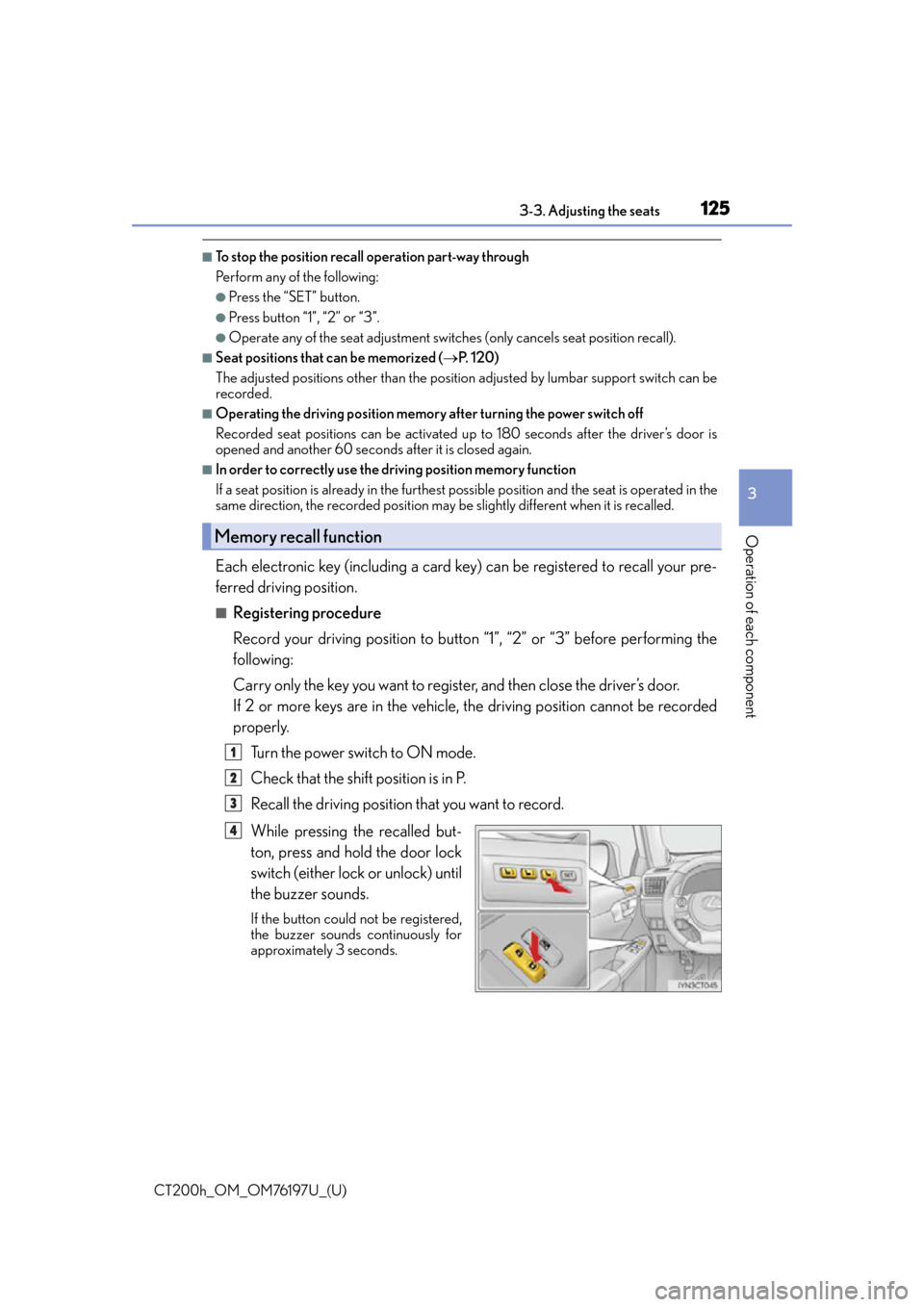
Each electronic key (including a card key) can be registered to recall your pre-
ferred driving position.
■Registering procedure
Record your driving position to button “1”, “2” or “3” before performing the
following:
Carry only the key you want to regist er, and then close the driver’s door.
If 2 or more keys are in the vehicle, the driving position cannot be recorded
properly.
Turn the power switch to ON mode.
Check that the shift position is in P.
Recall the driving position that you want to record.
While pressing the recalled but-
ton, press and hold the door lock
switch (either lock or unlock) until
the buzzer sounds.
If the button could not be registered,
the buzzer sounds continuously for
approximately 3 seconds.
Memory recall function
1
2
3
4
Page 126 of 632

126
CT200h_OM_OM76197U_(U)3-3. Adjusting the seats
■Recall procedure
Carry the electronic key that has been
registered to the driving position, and
then unlock and open the driver’s door using the smart access system with
push-button start or wireless remote control.
The driving position will move to the recorded position.
If the driving position is in a position that has already been recorded, the seat and out-
side rear view mirrors will not move.
■Cancelation procedure
Carry only the key you want to cancel and then close the driver’s door.
If 2 or more keys are in the vehicle, the driving position cannot be canceled
properly.
Turn the power switch to ON mode.
While pressing the “SET” button, press and hold the door lock switch
(either lock or unlock) unt il the buzzer sounds twice.
If the button could not be canceled, the buzzer sounds continuously for approxi-
mately 3 seconds.
■Recalling the driving position using the memory recall function
●Different driving positions can be registered for each electronic key. Therefore, the
driving position that is recalled may be different depending on the key being carried.
●If a door other than the driver’s door is unlocked with the smart access system with
push-button start, the driving position cannot be recalled. In this case, press the driving
position button which has been set.
WA R N I N G
■Seat adjustment caution
Take care during seat adjustment so that th e seat does not strike the rear passenger or
squeeze your body against the steering wheel.
1
2
Page 138 of 632

138
CT200h_OM_OM76197U_(U)3-5. Opening, closing the windows and moon roof
■The power windows can be operated when
The power switch is in ON mode.
■Operating the power windows after turning the hybrid system off
The power windows can be operated for approximately 45 seconds even after the
power switch is turned to ACCESSORY mode or turned off. They cannot, however, be
operated once either
front door is opened.
■Up jam protection function
If an object becomes caught between the window and the window frame, window travel
is stopped and the window is opened slightly.
■Down jam protection function
When the side window is opening, if a foreign object malfunction within the door causes
it to be clamped, the operation stops.
■When opening and closing the window cannot be done
When the up or down jam protection function operates unusually or the door window
can not be fully opened and closed, perfor m the following operations with the power
window switch of that door.
●Stop the vehicle, with the power switch in ON mode, continually operate the power
window switch in the one-touch closing position within 4 seconds after the up jam or
down jam protection function was activated. Otherwise, by continually operating the
power window switch in the one-touch opening position, the door window can be
opened and closed.
●If the door window cannot be opened and closed even when performing the above
operations, implement the following pr ocedure for function initialization.
Turn the power switch to ON mode.
Pull and hold the power window switch in the one-touch closing position and com-
pletely close the door window.
Release the power window switch for a mo ment and then resume pulling and holding
the switch in the one-touch closing position for approximately 4 seconds.
Press and hold the power window switch in the one-touch opening position and after
the door window is completely opened, cont inue holding the switch for a further 1 sec-
ond or more.
Pull and hold the power window switch in the one-touch closing position, once more,
and after the door window is completely cl osed, continue holding the switch for a fur-
ther 1 second or more.
If you release the switch while the window is moving, start again from the beginning.
If the window reverses and can not be closed or completely open, have the vehicle
inspected by your Lexus dealer.
■Door lock linked window operation
●The power windows can be opened an d closed using the mechanical key.* ( P. 5 6 0 )
●The power windows can be opened us ing the wireless remote control.* (P. 1 0 5 )
*: These settings must be customized at your Lexus dealer.
■Customization
Setting (e.g. linked door lock operation) can be changed.
(Customizable features:
P. 5 9 1 )
1
2
3
4
5
Page 144 of 632
144
CT200h_OM_OM76197U_(U)4-1. Before driving
Driving the vehicle
P. 1 5 6
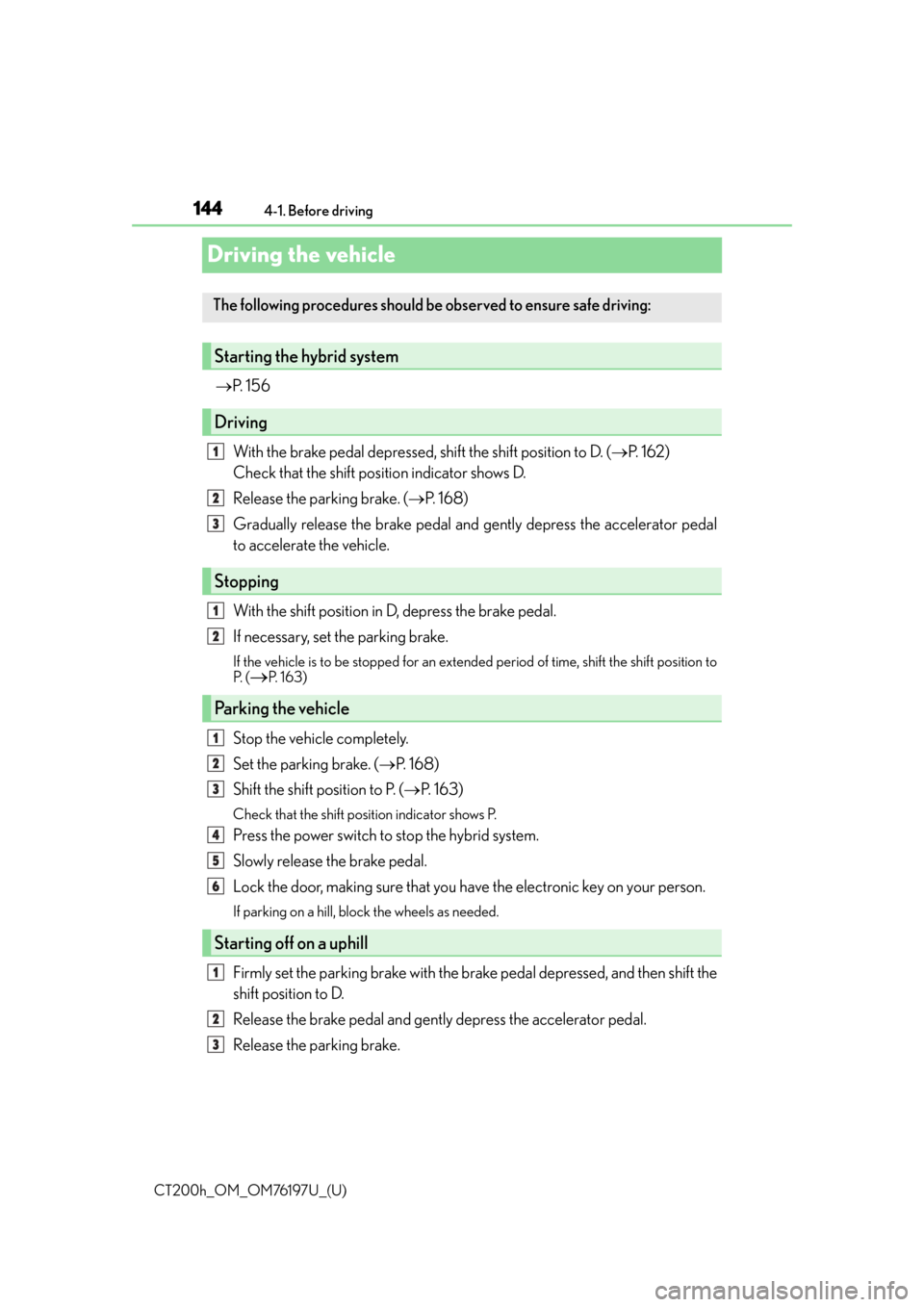
With the brake pedal depressed, shift the shift position to D. ( P. 1 6 2 )
Check that the shift position indicator shows D.
Release the parking brake. ( P. 1 6 8 )
Gradually release the brake pedal and gently depress the accelerator pedal
to accelerate the vehicle.
With the shift position in D, depress the brake pedal.
If necessary, set the parking brake.
If the vehicle is to be stopped for an extended period of time, shift the shift position to
P. (P. 1 6 3 )
Stop the vehicle completely.
Set the parking brake. ( P. 1 6 8 )
Shift the shift position to P. ( P. 1 6 3 )
Check that the shift position indicator shows P.
Press the power switch to stop the hybrid system.
Slowly release the brake pedal.
Lock the door, making sure that you have the electronic key on your person.
If parking on a hill, bloc k the wheels as needed.
Firmly set the parking brake with the brake pedal depressed, and then shift the
shift position to D.
Release the brake pedal and gently depress the accelerator pedal.
Release the parking brake.
The following procedures should be observed to ensure safe driving:
Starting the hybrid system
Driving
Stopping
Parking the vehicle
Starting off on a uphill
1
2
3
1
2
1
2
3
4
5
6
1
2
3